Posts in Featured

Sparrow 1.1 for iPhone Available, Push Coming “With or Without Apple”

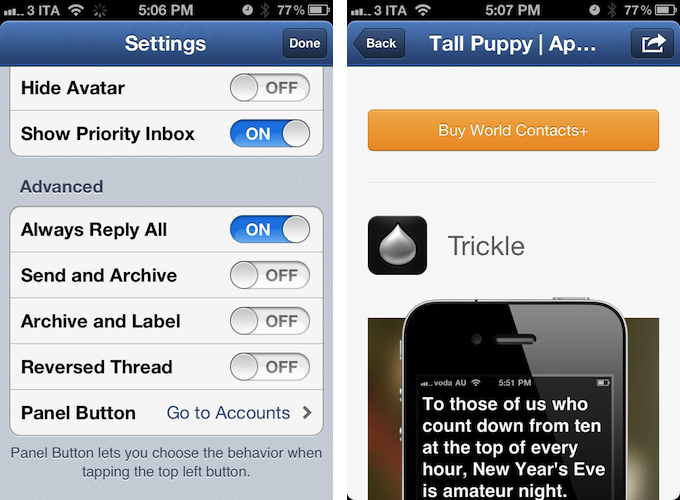
Sparrow for iPhone, the alternative email client for iPhone I reviewed three weeks ago, has an update on the App Store today, adding a number of functionalities that didn’t make it into version 1.0 of the software. Sparrow 1.1 allows you to show or hide the dock badge per account, open links through a built-in web browser (which includes options to open in Safari, and mail a link), and selectively choose which folders or labels to show in the app. There are new actions to empty trash or spam, and you can now activate a Send & Archive option in the Settings to instantly archive a message or conversation as you send a new email.

About push, which had to be removed from the final version of Sparrow 1.0 – the developers tested push notifications while the app was in beta, and they worked well, but Apple didn’t approve the implementation – the developers are confident Apple will revise its position. They will submit version 1.2 of the app soon, re-including support for push notifications. And if Apple won’t approve Sparrow with push for the second time, the developers say they are working out a solution to include push in other ways “with or without Apple”. It will be interesting to see whether Sparrow will consider adding push notifications through external services such as Boxcar, which recently raised new funding to build a push notification service for mobile developers. Update: the beta version of Sparrow I tested included push through a method that let the app run in the background leveraging the VoIP API. It’s not clear whether Apple will ever revise its position on letting a non-VoIP app use the VoIP API.

Thanks to your amazing support, we feel confident that Apple might revise its position on the Push API. We’ll submit a first version of Sparrow 1.2 including it. This might delay Sparrow 1.2 validation but we’re already working with some partners to include Push in future versions of Sparrow without needing Apple clearance.

Sparrow 1.2 for iPhone will also include landscape support, 9 more languages, and a gesture to swipe up or down between messages. The team is also working on Sparrow 1.6 for Mac, which will bring fixes and POP support.

Sparrow is a fantastic email client for iPhone, as I’ve already detailed in my review, and this 1.1 release adds some nice features that didn’t make the cut in the original 1.0. You can find Sparrow 1.1 on the App Store today.

Access Extra Content and Perks

Founded in 2015, Club MacStories has delivered exclusive content every week for nearly a decade.

What started with weekly and monthly email newsletters has blossomed into a family of memberships designed for every MacStories fan.

Learn more here and from our Club FAQs.

Club MacStories: Weekly and monthly newsletters via email and the web that are brimming with apps, tips, automation workflows, longform writing, early access to the MacStories Unwind podcast, periodic giveaways, and more;

Club MacStories+: Everything that Club MacStories offers, plus an active Discord community, advanced search and custom RSS features for exploring the Club’s entire back catalog, bonus columns, and dozens of app discounts;

Club Premier: All of the above and AppStories+, an extended version of our flagship podcast that’s delivered early, ad-free, and in high-bitrate audio.

Learn more here and from our Club FAQs.


Instagram’s Rise To 30 Million Users Visualized

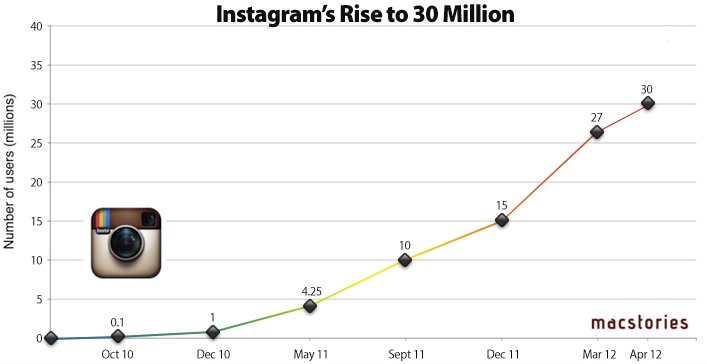
(Instagram’s growth. Click for full size.)

With the launch of the official Android app today, Instagram has released updated stats that show the stunning growth of the service over the past 18 months. It was only back in December 2011 that we reported 15 million users had signed up to Instagram; the growth rate of the service is accelerating, as the company announced 27 million users in mid-March, and 30 million users today. The Instagram Press Center reports additional numbers, including 1 billion photos uploaded so far, with 5 million photos each day and 575 likes per second on average.

In the past year, Instagram has added new designers to its relatively small team based in San Francisco, who helped revamping the iPhone app and worked on the launch of the Android client. More recently, Instagram started opening up its API to allow developers of other mobile applications to directly upload photos to Instagram – that was the case with Hipstamatic, and the company is keeping an eye on this API experiment to see if wider adoption among developers could lead to an even faster growth pace. The launch of Instagram for Android will surely help, as more than 430,000 users were already on the waiting list for the app.

Instagram Stats (April 2012)

  • 430K+ on Android Waiting List
  • 30 million+ Registered Users
  • 1 billion+ Photos Uploaded
  • 5 million+ Photos Per Day
  • 575 Likes Per Second
  • 81 Comments Per Second

Looking back at Instagram’s success over the past two years, it’s clear Instagram has become one of the fastest growing social networks that launched exclusively on iPhone. While many are wondering when the company will decide to monetize the service with advertising, more partnerships, or other plans, Instagram says they are actively considering more devices and platforms for the future.

Access Extra Content and Perks

Founded in 2015, Club MacStories has delivered exclusive content every week for nearly a decade.

What started with weekly and monthly email newsletters has blossomed into a family of memberships designed for every MacStories fan.

Learn more here and from our Club FAQs.

Club MacStories: Weekly and monthly newsletters via email and the web that are brimming with apps, tips, automation workflows, longform writing, early access to the MacStories Unwind podcast, periodic giveaways, and more;

Club MacStories+: Everything that Club MacStories offers, plus an active Discord community, advanced search and custom RSS features for exploring the Club’s entire back catalog, bonus columns, and dozens of app discounts;

Club Premier: All of the above and AppStories+, an extended version of our flagship podcast that’s delivered early, ad-free, and in high-bitrate audio.

Learn more here and from our Club FAQs.


Air Display Gets HiDPI Mode Support on iPad Retina Display

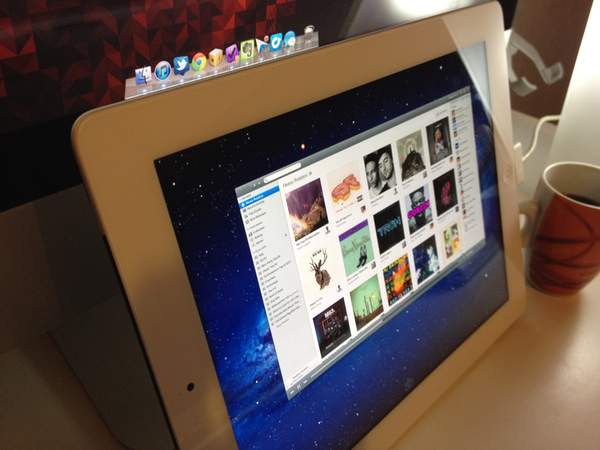
Announced last week, Avatron’s popular utility Air Display, a $9.99 app that can turn any iOS device into an external display for a Mac or PC, has been updated today to include support for two major new features and technical achievements: HiDPI mode and Retina graphics. Meant to be enjoyed on the new iPad’s Retina display, Air Display 1.6 requires the installation of a desktop application that will handle the wireless connection between Lion and the iOS app.

Once installed, Air Display Connect on the Mac will allow you to easily select the device you want to turn into an external monitor. For the new iPad’s display (and Retina iOS devices in general, but of course the app gives its best results on the iPad), Avatron has enabled support for high resolutions, although an option is present to render items at non-Retina resolutions as well. The Retina display’s tightly packed pixels have also allowed Avatron to use HiDPI mode – a hidden feature of Lion which draws element on screen at double the size – in a meaningful and gorgeous-looking way. Read more

Access Extra Content and Perks

Founded in 2015, Club MacStories has delivered exclusive content every week for nearly a decade.

What started with weekly and monthly email newsletters has blossomed into a family of memberships designed for every MacStories fan.

Learn more here and from our Club FAQs.

Club MacStories: Weekly and monthly newsletters via email and the web that are brimming with apps, tips, automation workflows, longform writing, early access to the MacStories Unwind podcast, periodic giveaways, and more;

Club MacStories+: Everything that Club MacStories offers, plus an active Discord community, advanced search and custom RSS features for exploring the Club’s entire back catalog, bonus columns, and dozens of app discounts;

Club Premier: All of the above and AppStories+, an extended version of our flagship podcast that’s delivered early, ad-free, and in high-bitrate audio.

Learn more here and from our Club FAQs.


March 2012 In Review

March was the month of the new iPad, an updated Apple TV and the announcement of a dividend and share repurchase program. It was most certainly a ‘big’ month. If a new iPad wasn’t enough, we also got a lot of new apps (alongside all those being updated for the Retina Display) and big app updates - everything from Angry Birds Space (world productivity took a dive that week) to both iA Writer and Byword iPhone apps launching to Camera+ 3.0 and our eyes were in heaven after Instapaper was updated to support the Retina Display with some truly beautiful new fonts. On the story front, Federico tackled the issue of what was the best aspects of our favourite iOS text editors, talked about the ‘Apple Community’, Cody reviewed the new iPad and I expressed sadness and frustration with lies of Mike Daisey.

Jump the break to get a full recap of March 2012. You can also jump back to see what happened in January and February of this year.

The New iPad

On March 7th, Apple held its iPad keynote - announcing the third generation iPad, simply calling it the ‘new iPad’. It featured a Retina Display, improved rear camera, quad-core GPU with the new A5X processor and support for 4G networks. We posted a review roundup, featuring the highlights from various reviews on the internet, as well as our own review by Cody. Apple announced that in its opening weekend it sold 3 million of the new iPads.

The (updated) Apple TV, iOS 5.1,  iPhoto for iOS and more from Apple’s iPad event

Alongside the new iPad, Apple also released an updated Apple TV with support for 1080p content as well as new UI that was also released for the existing Apple TV. Co-inciding with the release of the new iPad was the release of iOS 5.1 which included some bugfixes and new features such as an improved activation method to use the lockscreen camera. Apple also announced the iOS version of iPhoto which was made available for $4.99 a short time later.

More minor announcements included the availability for AppleCare+ for the new iPad, iTunes 10.6 and the release of the “Apple Configurator” app after the event. Apple also bumped the over-the-air download limit from 20 MB to 50 MB to reflect larger app sizes due to Universal apps that included graphics for the Retina iPad and iPhone - as well as larger download caps that exist today. Finally, you saw Apple update a whole bunch of their own apps for the new iPad and Retina Display.

We also posted a complete round-up of the event and a bunch of minor details about the event that you may have missed. You can also watch the recording of the event here.

25 billion apps downloaded

On March 3rd, Apple announced that 25 billion apps had been downloaded from the App Store. To mark the milestone it revealed a new “All-Time Top Apps” section on the App Store. A few days later, Apple revealed that the 25 billionth app downloaded was ‘Where’s My Water? Free’ by Chunli Fu who is from  Qingdao, China - she won a $10,000 iTunes gift card.

Apple announces dividend and share repurchase program

Somewhat out of the blue, Apple announced on a Sunday afternoon that it would be holding a conference call early the next day (Monday) to announce the result of discussions by Apple’s board on what it would do with Apple’s cash balance. As was widely expected, Apple announced it would begin issuing quarterly dividends of $2.65 per share. It also announced a $10 billion share repurchase program to begin in FY2013.

Fair Labor Association releases preliminary report on Foxconn conditions

The Fair Labor Association released a preliminary report on its findings from inspections at Foxconn that were conducted earlier this year. In what now seems like planned positive PR ahead of the report’s release, Tim Cook visited Foxconn a few days before the report was published and photographs were distributed to media of the visit.

Angry Birds Space

Rovio this month released Angry Birds Space, the fourth in the series (after the original, Rio and Seasons). Unsurprisingly, the game did incredibly well and managed to receive over 10 million downloads in less than 3 days. Particularly awesome was this analysis of the physics used by the game, a great follow-up to the original investigation into Angry Birds physics.

Everything Else


The Really Big Reviews

Everything Else

March Quick Reviews

Retina & Universal

iPhoto for iOS Review

The Essence of a Name

On Reviewing Apps

Getting Your iPad App Ready for the new iPad

Comparing My Favorite iOS Text Editors

Daisey’s Lies Take Us Two Steps Backwards

iPad (3) Review: You Won’t Believe It Until You See It

The Apple Community, Part II

Regarding Apple’s Edge and the new Apple TV Interface

A Series of Clicks

The (Semi)Skeuomorphism

MacStories Reading Lists

MacStories Reading List: February 26 – March 4

MacStories Reading List: New iPad Special Edition

Access Extra Content and Perks

Founded in 2015, Club MacStories has delivered exclusive content every week for nearly a decade.

What started with weekly and monthly email newsletters has blossomed into a family of memberships designed for every MacStories fan.

Learn more here and from our Club FAQs.

Club MacStories: Weekly and monthly newsletters via email and the web that are brimming with apps, tips, automation workflows, longform writing, early access to the MacStories Unwind podcast, periodic giveaways, and more;

Club MacStories+: Everything that Club MacStories offers, plus an active Discord community, advanced search and custom RSS features for exploring the Club’s entire back catalog, bonus columns, and dozens of app discounts;

Club Premier: All of the above and AppStories+, an extended version of our flagship podcast that’s delivered early, ad-free, and in high-bitrate audio.

Learn more here and from our Club FAQs.


The (Semi)Skeuomorphism

Last night’s release of Paper, a new drawing and sketching app for iPad (The Verge has a good review and interview with its developers), got me thinking about a trend I’m seeing lately in several high-profile iOS apps from third-party developers and, to an extent, Apple itself. That is, drifting away from the forced skeuomorphism of user interfaces to embrace a more balanced approach between imitating real-life objects to achieve familiarity, and investing on all-digital designs and interfaces to benefit from the natural and intuitive interactions that iOS devices have made possible.

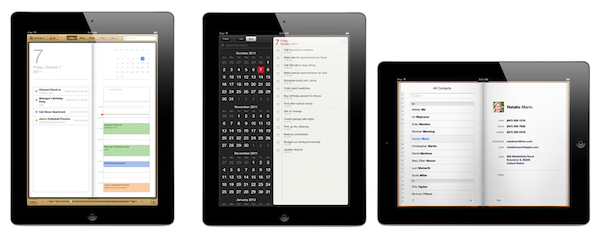
John Gruber says that the tension “between simplicity and obviousness” can be seen in developers getting rid of UI chrome (buttons, toolbars) to make simpler apps, and Apple, which has adopted UI chrome – often, in the form of skeuomorphic elements – to bring obviousness and familiarity to its applications. iCal’s bits of torn paper and Address Book’s pages are obvious, but are they simple?

The subject is complex, and the scope of the discussion is too broad to not consider both ends of the spectrum, and what lies in between. Ultimately, simplicity vs. obviousness brings us to another issue with user interfaces: discovery vs. frustration.

Apple’s (and many others’, with Apple being the prominent example) approach is clearly visible: familiar interfaces are obvious. Everybody knows how a calendar looks. Or how to flip pages in a book. People are accustomed to the physical objects Apple is trying to imitate in the digital world. But are they aware of the limitations these objects carry over when they are translated to pixels? As we’ve seen, this can lead to frustration: why can’t I rip those bits of torn paper apart? Why can’t I grab multiple pages at once, as I would do with a physical book? And so forth. Interfaces that resemble real-life objects should be familiar; it is because of that very familiarity, however, that constraints become utterly visible when pixels can’t uphold the metaphor.

On the other hand, a number of applications are trying to dismantle the paradigm of “skeuomorphism mixed with buttons” by leveraging the inner strength of the iOS platform, and in particular the iPad: the device’s screen. Impending’s Clear, for instance, famously avoided buttons and toolbars to focus its interaction exclusively on gestures. Paper, for as much as its name implies a real-life feeling of actual paper, is the least real-life-looking (and behaving) sketching app of all: sure it’s got paper and a tool palette, but there are no buttons and navigation elements when you are drawing. In Paper, you pinch to go back one level (like Clear); you rotate two fingers on screen to undo and redo your actions. I assume the developers had to use standard sharing and “+” buttons only because they couldn’t come up with a significant breakthrough in associating these commands with equally intuitive gestures.

Which brings me to the downside of simplicity: discovery. Pinch to close and rotate to undo make for a pretty demo and elegant implementations for the iOS nerds like us, but are they discoverable enough by “normal people”? Would my dad know he can pinch open pages and rotate an undo dial? Are these gestures obvious enough to avoid confusion and another form of frustration? Intuitive software shouldn’t need a manual.

There are several ways to look at this debate. For one, we could argue that Apple was “forced” to use skeuomorphic elements to get us “comfortable” with these new devices, easing the transition from computers by imitating other objects and interfaces we already knew how to use. With time, they have realized people are now familiar with the previously unfamiliar, and they are now slowly introducing elements that subtly drift away from real-life interactions. Like the full-screen mode in iBooks, or the sidebar in Mountain Lion’s Contacts app. But there are still some graphical elements decorating Apple’s interfaces that don’t have a clear functional purpose: the leather in Find My Friends, the green table in Game Center, the iPad’s Music app. I think there is also a tension between functionality and appearance, and I believe Apple sees some skeuomorphic UI designs as simply “cool”, rather than necessary means to convey interaction: it’s branding.

The “simple and elegant” interfaces, though, reside in a much wider gray area that’s still largely unexplored. Clear and Instapaper, by foregoing real-life resemblances of any sort, have dodged the bullet of frustration by creating their own standards. You can be mad at Clear’s use of gestures, but you can’t be frustrated because its paper doesn’t act like paper. There is no faux paper in there. The “frustration” this new breed of iOS apps generates can be traced back to the novelty of their interfaces and interactions, not to their legacy. But then there’s a certain selection of apps, like the aforementioned Paper, that are still somewhat bounded to their real-life counterparts and, partly because of technological limitations and established UI patterns, aren’t completely distancing themselves from the familiarity of real objects.

We’re at a point in software history where balance is key. Balance between simplicity and obviousness, discovery and frustration, innovation and familiarity. We’re using software that wants to remember where it came from, but that also strives to touch the emotional cords of a natural extension it didn’t know was reachable: us.

As iOS devices and the ecosystem of apps and developers around them mature and evolve, these dichotomies will increasingly define the interactions of today, and the software of tomorrow.

Access Extra Content and Perks

Founded in 2015, Club MacStories has delivered exclusive content every week for nearly a decade.

What started with weekly and monthly email newsletters has blossomed into a family of memberships designed for every MacStories fan.

Learn more here and from our Club FAQs.

Club MacStories: Weekly and monthly newsletters via email and the web that are brimming with apps, tips, automation workflows, longform writing, early access to the MacStories Unwind podcast, periodic giveaways, and more;

Club MacStories+: Everything that Club MacStories offers, plus an active Discord community, advanced search and custom RSS features for exploring the Club’s entire back catalog, bonus columns, and dozens of app discounts;

Club Premier: All of the above and AppStories+, an extended version of our flagship podcast that’s delivered early, ad-free, and in high-bitrate audio.

Learn more here and from our Club FAQs.


The Apple Community, Part II

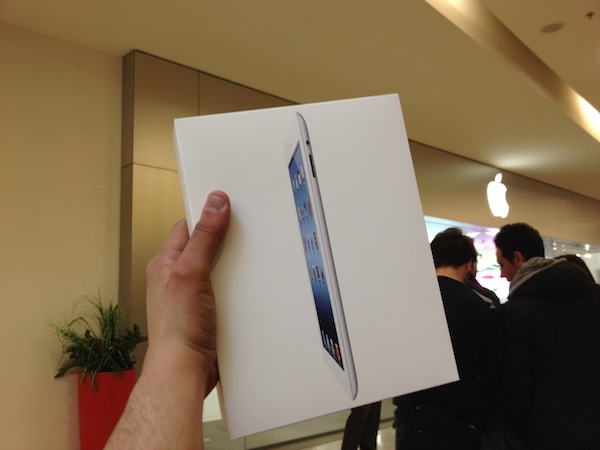
A few hours ago, I came back from the Apple Store at Roma Est driving all the way back home after a 19-hour wait for the new iPad. Tired – exhausted, my head exploding for the absurd coffee intake I forced my body into, but happy, smiling because I knew that what I had imagined all along didn’t turn to be true – it was better.

Until yesterday, I had never waited in line for an Apple product before. I always preferred driving to the store myself after a few days, or simply asking one of my US friends to ship me an iPhone or iPad without waiting for the Italian launch. A lot of people told me “I was missing out” – that for an Apple fan, getting in line to wait for a new product isn’t just about waiting, which is boring per se, it’s about knowing the people that share your same passion, not giving a damn about spending 20 hours of their lives to get “a device”. Today I can say buying an iPad was just the tip of the iceberg for what has been an incredible experience – something that I look forward to for the next big Apple launch.

I know I am late to the party. I’m fairly certain you all know what a “Day One” looks and feels like. Long lines, security staff, Apple employees, the cheering and the clapping before and during the launch. All that felt new to me. Unexpected and familiar at the same time, as if I was getting to know for the first time a family that, however, I had always known somehow.

It’s no exaggeration to call the people I got to meet in real life last night an extended family. I wrote about the Apple Community before, but actually meeting the people I mention so often is different. I shook hands and made bad jokes 5 minutes after arriving at the line. I talked to folks I only “knew” through Twitter and Facebook, and got a chance to really know them from a much more rewarding perspective. I talked to the founder of another blog and spent two hours discussing the future, where we see things going for our sites, and the state of Italian Apple reporting in general. I introduced myself to Apple PR, finally giving a face and a smile to the people that keep in the loop about news and announcements. I shared meals, coffee – and lots of it – and exchanged phone numbers and Twitter handles. Because whilst I may have known some of those folks already, clicking on usernames and friend request buttons after knowing them felt more real. Necessary. Natural. An obvious consequence.

It was surreal. I mean, we’re talking about a bunch of people – from any kind of social extraction – waiting in line and sitting on the ground to buy a gadget. We are talking about employees of a big corporation, all dressed up in blue and clapping and shaking your hands because you are giving them money. Because you are the customer. And it was surreal, because it felt like you were there as a friend. As my girlfriend put it - “they make paying more pleasant, as if you are glad you are giving them money”. I don’t know if I’m “glad” I spent 700 Euros today. But I sure am happy to have paid for this product in that way.

On the other hand, it felt real. Surprisingly so. You are meeting up with these people you only know from profile pictures and wall posts, and you realize these are real people that have their history, their flaws, their bad jokes about food and sports, and all those traits that turn flaws into the thing we love the most about human beings: that we’re different. That we all have problems and may argue about politics and Android. But that, in the end, if 20 hours spent in line to get an iPad can make us laugh, we should celebrate those 20 hours. Appreciate them. Treasure them.

The more cynical of you might dismiss my words as the usual excitement of a nerd who is happy about paying for Apple products because it is this company’s big, evil plan to make us think we have a choice. You are free to think whatever you want. Maybe it is Apple’s grand scheme to get rich by providing a friendly customer experience. But we do have a choice, and we have chosen to make the most out of it. Those people, those stories – heck, those 13 espressos were real. There is no corporate strategy that will take that away from us. There is no exclusive or breaking news that can beat the fact that some of my readers can also be my friends.

In our review of the new iPad, Cody wrote “you won’t believe it until you see it”. I agree. The device is fantastic. But I ’ll add this: the greatest thing about Apple isn’t the product line itself. It’s the community. It’s the users and the developers and the journalists. It is you, reading this on an Apple device. It’s the Apple community using Apple products. And you won’t believe it until you experience it.

Access Extra Content and Perks

Founded in 2015, Club MacStories has delivered exclusive content every week for nearly a decade.

What started with weekly and monthly email newsletters has blossomed into a family of memberships designed for every MacStories fan.

Learn more here and from our Club FAQs.

Club MacStories: Weekly and monthly newsletters via email and the web that are brimming with apps, tips, automation workflows, longform writing, early access to the MacStories Unwind podcast, periodic giveaways, and more;

Club MacStories+: Everything that Club MacStories offers, plus an active Discord community, advanced search and custom RSS features for exploring the Club’s entire back catalog, bonus columns, and dozens of app discounts;

Club Premier: All of the above and AppStories+, an extended version of our flagship podcast that’s delivered early, ad-free, and in high-bitrate audio.

Learn more here and from our Club FAQs.


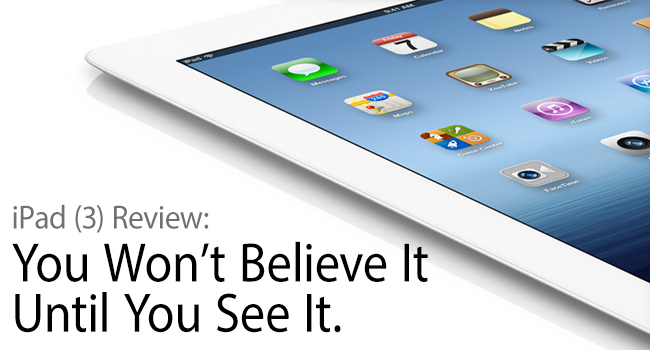
iPad (3) Review: You Won’t Believe It Until You See It

You Won't Believe It Until You See It

You Won’t Believe It Until You See It

Apple’s iPad is iconic in design. Competitors try to emulate Apple’s success, but nobody can mistake the aluminum frame and its companion piano black or pearl white bezel for any other product. While it’s a product known for its distinct shape and size, the iPad’s character is only truly revealed when you power on its display and begin to explore the contained interface. With the Retina display, the new iPad is unlike anything you’ve seen before.

Read more

Access Extra Content and Perks

Founded in 2015, Club MacStories has delivered exclusive content every week for nearly a decade.

What started with weekly and monthly email newsletters has blossomed into a family of memberships designed for every MacStories fan.

Learn more here and from our Club FAQs.

Club MacStories: Weekly and monthly newsletters via email and the web that are brimming with apps, tips, automation workflows, longform writing, early access to the MacStories Unwind podcast, periodic giveaways, and more;

Club MacStories+: Everything that Club MacStories offers, plus an active Discord community, advanced search and custom RSS features for exploring the Club’s entire back catalog, bonus columns, and dozens of app discounts;

Club Premier: All of the above and AppStories+, an extended version of our flagship podcast that’s delivered early, ad-free, and in high-bitrate audio.

Learn more here and from our Club FAQs.


Angry Birds Space Now Available

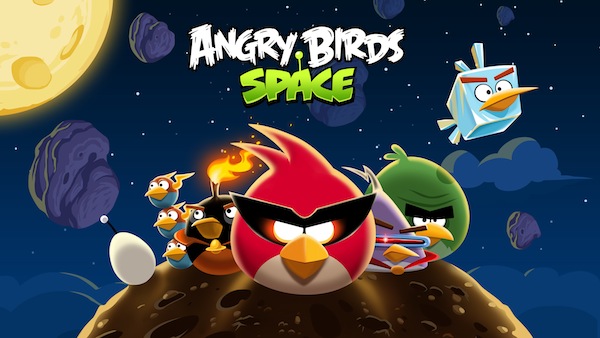
Angry Birds Space, the first new game from Rovio in over a year, is now available on the App Store. Officially announced back in February, Angry Birds Space takes a radically new approach to the series by setting the war against the pigs in outer space, thus bringing completely re-imagined dynamics and physics to the franchise.

From our previous coverage:

Based in a weightless environment, the basic gist of the game seems to be that in such conditions, trajectories are affected by gravity, and objects end up following curves, rather than straight lines. Using a “galactic slingshot” in footage shot on-location at the International Space Station, NASA’s Don Pettit explains how astronauts and scientists have to consider these changes in physics and gravity when they are in outer space; apparently, this mechanic will be brought to Angry Birds Space in a fairly accurate representation.

Angry Birds Space, unlike the Rio and Seasons spin-offs, brings a new gameplay that has allowed Rovio to design a whole set of different birds, levels, and in-app purchases. Angry Birds Space comes with 60 levels, new superpowers, hidden bonus levels, and a zero-gravity mechanic that, for those who have played with the Nintendo Wii in the past, somewhat resembles Mario Galaxy’s unique approach to planets and interstellar jumps.

Early coverage of the new game positively remarked how Angry Birds Space will feel familiar to the franchise’s veterans, while still adding a new way of thinking and constructing trajectories on screen. Angry Birds Space is now available on the App Store, both in iPhone and iPad editions. You can check out the game’s trailers and first hands-on videos after the break.

Access Extra Content and Perks

Founded in 2015, Club MacStories has delivered exclusive content every week for nearly a decade.

What started with weekly and monthly email newsletters has blossomed into a family of memberships designed for every MacStories fan.

Learn more here and from our Club FAQs.

Club MacStories: Weekly and monthly newsletters via email and the web that are brimming with apps, tips, automation workflows, longform writing, early access to the MacStories Unwind podcast, periodic giveaways, and more;

Club MacStories+: Everything that Club MacStories offers, plus an active Discord community, advanced search and custom RSS features for exploring the Club’s entire back catalog, bonus columns, and dozens of app discounts;

Club Premier: All of the above and AppStories+, an extended version of our flagship podcast that’s delivered early, ad-free, and in high-bitrate audio.

Learn more here and from our Club FAQs.


Adobe Releases Photoshop CS6 Beta

Adobe has tonight released the beta of Photoshop CS6, giving users a “sneak preview” of the new tools and performance enhancements that Adobe has been working on for CS6. The standout new features include an even better Content-Aware Patch tool that allows you to literally move objects around an image like they were always there, a ‘modern’ UI with much improved performance and re-engineered tools.

The Verge has a detailed look at the beta and amongst the new features, they highlight a few features such as background save, easy iris blur and tilt shift tools and even a simple video editing tool that lets you use many Photoshop tools and shortcuts. Meanwhile, Marc Edwards of bjango runs through a list of improvements and changes that matter most to him as an interface designer - highlighting some of the more minute details, such as layer searching and group clipping masks, that have a big impact on how things can be accomplished.

You can download the beta of Photoshop CS6 for free. A final release will be made available sometime in the first half of this year for $699 new or $199 if you’re upgrading (those prices are $999 and $399 if you want CS6 Extended). Jump the break for a video from Adobe that highlights some of the notable improvements and new features in CS6.

Read more

Access Extra Content and Perks

Founded in 2015, Club MacStories has delivered exclusive content every week for nearly a decade.

What started with weekly and monthly email newsletters has blossomed into a family of memberships designed for every MacStories fan.

Learn more here and from our Club FAQs.

Club MacStories: Weekly and monthly newsletters via email and the web that are brimming with apps, tips, automation workflows, longform writing, early access to the MacStories Unwind podcast, periodic giveaways, and more;

Club MacStories+: Everything that Club MacStories offers, plus an active Discord community, advanced search and custom RSS features for exploring the Club’s entire back catalog, bonus columns, and dozens of app discounts;

Club Premier: All of the above and AppStories+, an extended version of our flagship podcast that’s delivered early, ad-free, and in high-bitrate audio.

Learn more here and from our Club FAQs.