Federico Viticci

10766 posts on MacStories since April 2009

Federico is the founder and Editor-in-Chief of MacStories, where he writes about Apple with a focus on apps, developers, iPad, and iOS productivity. He founded MacStories in April 2009 and has been writing about Apple since. Federico is also the co-host of AppStories, a weekly podcast exploring the world of apps, Unwind, a fun exploration of media and more, and NPC: Next Portable Console, a show about portable gaming and the handheld revolution.

Times and Titles

[image via]

We all knew today’s news of Steve Jobs resigning as CEO of Apple was coming. Sooner or later, we – geeks, Apple watchers, fans, journalists, the Apple community as a whole – knew that Apple would announce a change of roles that would see Jobs go, initiating the execution plan that has been carefully planned internally for a long time. And that day has come. But it shouldn’t be seen for what it’s not: a change within the company. It is a change, technically, with Steve Jobs becoming Chairman of the Board, director, and Apple employee, and Tim Cook elected as new CEO. But it’s not a change in perspective – the spirit that has driven Apple’s innovation, attention to detail and need for great products won’t disappear as Tim Cook takes the reins.

There’s no denying reading the initial Reuters Twitter headline about Jobs resigning brought my heart to a full stop. But as I quickly rationalized and processed the news, later confirmed by a series of press releases, I realized that was the turning point I was expecting all along. The change that we, the community, feared and filed away in the imaginary drawer of things that are too far away to even consider as a fact. Yet, in spite of many people’s best hopes, it is a fact. And I’ll say this again – it is sad to see a man slowly taking steps back from the company he built because he’s no longer capable of meeting others’ expectations.

So let’s look at history in the eyes. Steve Jobs won’t be replaced iconically, he will be replaced as a company executive. Steve Jobs’ vision, charisma, stubbornness, willingness to build products people love and engage with on a personal level – these things will live on within Apple no matter the title the Board gives him. Steve is not Apple, but Apple stems from Steve’s ideals. And ideals, history has taught us, don’t die. No matter the bureaucracy, the speculation, the market strategies, the corporate espionage – no matter from what angle you look at it, true ideals live on. They are symbols of evolution, but they survive change.

This is what we believe. Technology alone is not enough. And from my personal angle, this is the mantra that CEO Steve Jobs has best implanted since 1997 in Apple as a company, a team of executives and designers and engineers and employees – Apple as a vision and a statement. A hundred years from now, people will look back at Jobs’ career as CEO of Apple, and wonder how he did. In this very moment of time, we do know how he did. And we applaud Steve Jobs for his achievements in the past decade.

But at the same time, we also applaud his team and we look forward to more great products born under and developed with Steve Jobs’ taste as a Chairman, and Apple employee. Once again, let’s look at the facts – Jobs is still there, only taking a different role and executing the “succession plan” any respectable company that operates at Apple’s levels has. Those who predict the premature demise of Apple and speculate on the failures of future products due to Jobs’ change of title clearly don’t understand how Apple works. I don’t either, but at least I’m not looking into a crystal ball. It will be interesting to keep an eye on Apple’s operations in the next two years for sure, but saying the company without Jobs the CEO is now doomed is a long stretch.

A change of titles – a new Chairman here, a CEO there – won’t transform the way today’s Apple works and makes money. Yet we, the community, are inclined to taking this on a personal level, because let’s face it – a little part of the Apple fan in us died today. Not because of the sadness, the desperation, or the aforementioned predictions of Apple’s upcoming “problems”. Not even strictly because Steve Jobs is a geek’s favorite hero and it’s sad to see him “go”. It’s a much more subtle feeling running through the veins of the Apple community. It’s that feeling of times changing, of you and your friends growing older and perhaps with a better understanding of things – it’s watching what you took for granted be upgraded to something new you think will be fine eventually, but you’re still not completely used to.

Steve Jobs’ greatest accomplishment is not the iPad, the App Store, the iPhone 4 and the device coming out next year. It’s not even the company taken as a bunch of executives and employees around the world, for as much as that’s an impressive work of management and planning. Rather, Steve Jobs the CEO should be proud of the philosophy he’s instilled in Apple’s vision of a product maker for all kinds of people. Because, really, that’s what Steve Jobs the CEO set as a goal for Apple: making people happy using their products.

In these past 14 years, Apple’s former CEO turned around an industry, changed its face, and taught us that technology alone is not enough.

And we thank you for that, Steve.


Steve Jobs Resigns, Tim Cook Named New CEO of Apple

With a press release that just went out, Steve Jobs has announced he’s stepping down as CEO of Apple. Former COO Tim Cook will take the role of new CEO. Steve Jobs will stay involved as Chairman of the Board, and Tim Cook will obviously join the Board, too, effective immediately. In a letter to the Board and the Apple community, Steve Jobs explains he’s no longer capable of meeting his duties and expectations as Apple CEO, strongly recommending the Board to name Tim Cook as new CEO. Jobs also states “Apple’s brightest and most innovative days are ahead of it”.

On January 17, Apple’s Board granted Steve Jobs a medical leave of absence, and the former CEO said he would remain involved with major strategic decisions, with Tim Cook filling in for day-to-day operations at Apple. Since then, Steve Jobs made two appearances at a media event in March and the WWDC ‘11 keynote to announce the iPad 2, iOS 5 and new iCloud features. Speculation has surrounded Steve Jobs’ health conditions since January, although the company preferred to keep such conditions private and out of the community and press daily rumors.

Steve Jobs co-founded Apple in 1976 with Steve Wozniak and Ronald Wayne. He left the company in 1985, only to return from NeXT (another company he started) to Apple in 1997 and ignite the digital revolution by laying the groundwork of modern Mac OS X, iTunes and the iLife suite, and later the iPhone in 2007, and the iPad in 2010. From Apple’s official bio of the Steve Jobs (which hasn’t been updated to reflect the new Chairman role yet):

Steve Jobs is the CEO of Apple, which he co-founded in 1976. Apple is leading the consumer technology world with its revolutionary iPhone and App Store, its family of iPod media players and iTunes media store, and its Mac computers and iLife and iWork application suites. Apple recently introduced the iPad, a breakthrough Internet and digital media device, plus the iBookstore, alongside iTunes and the App Store.

Steve also co-founded and was the CEO of Pixar Animation Studios, which created some of the most successful and beloved animated films of all time including Toy Story, A Bug’s Life, Monsters, Inc., Finding Nemo, The Incredibles, Cars and Ratatouille. Pixar merged with The Walt Disney Company in 2006 and Steve now serves on Disney’s board of directors.

Steve grew up in the apricot orchards which later became known as Silicon Valley, and still lives there with his family.

Tim Cook, former COO of Apple, was responsible for the company’s worldwide sales and operations, reporting directly to Steve Jobs and managing Apple’s supply chain overseas. He’s regarded as the man who made possible building and shipping millions of iOS devices in four years thanks to exclusive supplier agreements and deals, including pre-payments to get stable access to important components such as the LCD displays used in Apple’s iPhone, iPad, and iPod touch.

Before joining Apple, Cook was vice president of Corporate Materials for Compaq and was responsible for procuring and managing all of Compaq’s product inventory. Previous to his work at Compaq, Cook was the chief operating officer of the Reseller Division at Intelligent Electronics.

Wikipedia provides a brief timeline of Cook’s roles at Apple:

  • He initially served as Senior Vice President for Worldwide Operations
  • In January 2007, Cook was promoted to COO.
  • Cook served as Apple CEO for two months in 2004, when Steve Jobs was recovering from pancreatic cancer surgery. Cook also serves on the Board of directors of Nike.
  • In 2009 Cook again served as Apple CEO for several months while Steve Jobs took a leave of absence for a liver transplant.
  • In January 2011, Apple’s Board of Directors approved a third medical leave of absence, requested by Steve Jobs. During that time, Tim Cook was responsible for most of Apple’s day-to-day operations while CEO Steve Jobs made most major decisions.

Steve Jobs is widely regarded as the “visionary genius” behind many of Apple’s best inventions and innovations such as the refined graphical user interface, the Mac’s attention to detail and beautiful typography, and iOS’ focus on multitouch and natural user experience. To get an idea of the man behind the company, check out this collection of Steve Jobs quotes we collected two years ago.

Below, you’ll find the press releases from Apple, Steve Jobs’ commencement address at Stanford University in 2005, and the video of the official “iCEO” announcement in 2000. As for our thoughts on Apple without Steve Jobs, we’ll take our time to elaborate on today’s (huge) news for the company, but overall, this article from January 2011 still holds true: During Steve’s Absence, Apple Will Be Just Fine. Read more


Sleipnir Beta Comes To OS X with Group Tab Management and Sync

In the past months, I’ve reviewed several alternative browsers for iOS, and eventually settled with Grazing 2.0 because of its great multitouch support and push features that allow me to effortlessly and reliably share webpages across the Mac, iPhone and iPad through push notifications. However, amidst the plethora of shameless Safari copycats and relatively clever iPad browsers, there was Sleipnir, an iPhone app developed by Japanese studio Fenrir that impressed me with an innovative interface, and group tab management aimed at enhancing the iPhone’s browsing experience with the possibility of grouping tabs/websites by context through large thumbnail previews. Months later, Sleipnir came to the iPad, bringing an overhauled interface with bigger previews, and a new navigation system specifically built for the tablet. And now a beta of Sleipnir is available on the Mac, porting many of the functionalities seen on iOS to the desktop.

Sleipnir for Mac is in beta, and much is expected to change before the final release. The app is already compatible with OS X Lion, though it doesn’t support native full-screen mode in this first beta version, and some features like bookmark import are not working on my machine. In spite of the app being a little rough around the edges, Sleipnir for Mac is already pretty solid, and with free bookmark sync through the Fenrir Pass service it provides and interesting solution to use a non-default browser (like Safari) or more popular browsers like Google Chrome on iOS or the Mac.

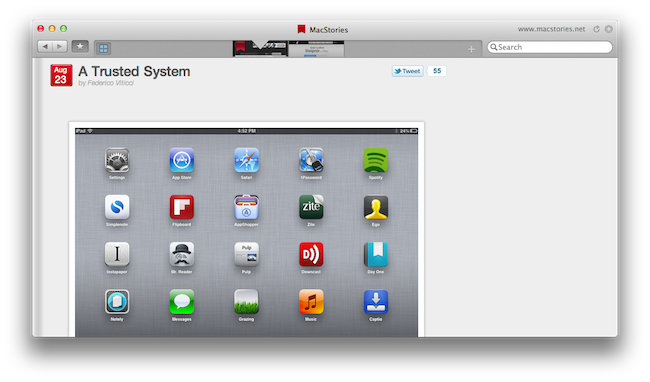
On the Mac, Sleipnir displays tabs as mini-thumbnails in an address bar-free toolbar, which also contains a search field, a new tab button, and, optionally, your bookmarks. In spite of the lack of an address bar by default, Sleipnir lets you manually type in an address with the standard CMD+L shortcut (it will slide in the address bar), and it enables you to keep an eye on the currently opened webpage by visualizing its domain in the upper right corner (something that Mozilla has also been experimenting with in Firefox). The selected tab is constantly marked by an indicator that runs through the toolbar as you switch between pages, whilst tabs can be closed by clicking on the “x” button, or by using the CMD+W shortcut.

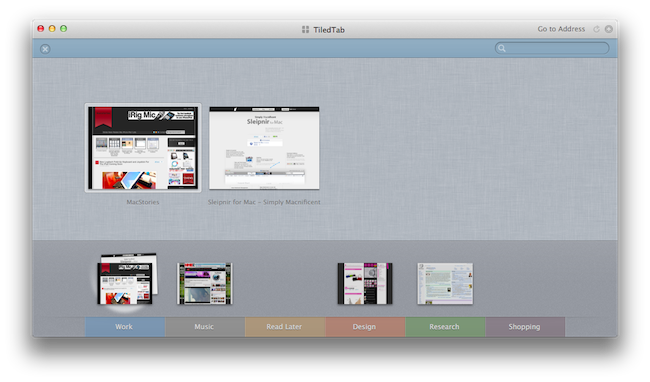
The biggest feature of Sleipnir is always been tab management through groups, and this has been ported to the Mac as well. Groups on the Mac are accessible from a window called “TiledTab”,  which displays large previews on a linen background, with groups in the bottom section of the page. You can move thumbnails between groups, search for tabs and rename groups, though I couldn’t find an option to delete existing groups or create new ones in this beta. Tab groups are useful if you usually keep a lot of tabs open and have been looking for ways to link related webpages together – furthermore, you can move between groups from the TiledTab UI with a two-finger swipe.

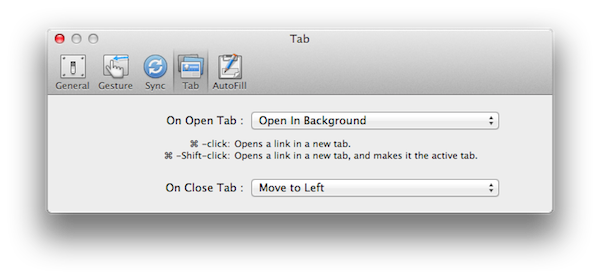
In the Preferences, Sleipnir lets you setup free bookmark sync using Fenrir Pass, and as we’ve seen before on the iPhone and iPad, Sleipnir’s implementation of bookmarks include things like an archive button, ribbons, and labels for deeper organization of saved webpages.

Sleipnir for Mac won’t replace the Safaris and Chromes of this world, but it’s got the feature set and ideas to become an alternative browser that you might want to use outside of your main browsing environment – say for research purposes (groups are great for that) or just to keep a different set of bookmarks always in sync between OS X and iOS.

You can download Sleipnir for Mac beta here, and get the universal iOS app for free on the App Store.


WSJ: iPhone 5 in mid-October On Verizon, AT&T, And Sprint

According to a new report from the Wall Street Journal, initially quoted by Business Insider, U.S. carrier Sprint will sell the iPhone 5 once the device becomes available in October.

Sprint Nextel Corp. will begin selling the iPhone 5 in mid-October, people familiar with the matter said, closing a huge hole in the No. 3 U.S. carrier’s lineup and giving Apple Inc. another channel for selling its popular phone.

The timing, however, indicates Apple’s new iPhone will hit the market later than expected and too late to contribute to sales in the company’s fiscal fourth quarter, which ends in September. Most observers had expected the device to arrive next month.

Much speculation has surrounded the release of the next-generation iPhone, which was expected to debut during the summer as every previous iPhone, though the launch didn’t materialize and Apple decided to focus the WWDC (the iPhone’s typical announcement stage) on software instead. Since then, rumors have failed to pinpoint an exact release date for the iPhone, with different sources claiming a September or October launch. It is not clear whether Apple would use its typical media event in September only to launch the device in October – what seems fairly certain is that the iPhone 5 will come equipped with a new version of iOS, which is currently being tested by registered developers. Last, according to other rumors, Apple may be gearing up to release two different versions of the iPhone this fall, one aimed at pre-paid markets with a cheaper iPhone 4-like construction, and a brand new one that should indeed be the long-awaited “iPhone 5”. Confusion around alleged prototypes running a new A5 chip (the same of the iPad 2) on older iPhone 4 bodies has also contributed to making it difficult to predict the next iPhone’s form factor, leading to contradicting reports about a faster “iPhone 4S”, a completely redesigned iPhone 5, or a mix of both. Most recent rumors and case leaks from manufacturers seem to indicate the new device will feature a thinner design with tapered edges.

Amidst speculation, a few interesting reports in the past months detailed how the next-generation iPhone could end up being sold on more than two carriers in the US. Currently, the iPhone 4 is sold in two colors on two carriers, AT&T and Verizon. The CDMA iPhone, built specifically for Verizon, was also rumored to be set for an expansion to other CDMA markets, such as Asia. Back in April, BGR showed what they claimed to be a prototype iPhone running on T-Mobile’s network – AT&T later announced its plans to acquire T-Mobile and it’s unclear now whether Apple could really release a T-Mobile iPhone in late 2011 with the acquisition expected to be approved and take full action by 2012.

Rumors of a Sprint iPhone arose in mid-2010 and were reinforced earlier this year by analysts’ claims of an iPhone for Sprint during the holidays, and a job posting appeared on Apple’s website. Sprint currently has 52 million subscribers and it’s the third largest mobile operator in the United States. The WSJ also briefly mentions some hardware details of the iPhone 5:

The new iPhone is expected to be similar to the current iPhone 4, but thinner and lighter with an improved digital camera and a new more sophisticated operating system.

According to the WSJ, AT&T and Verizon will begin selling the iPhone 5 in mid-October, too. TiPB was first to report the news of a likely October 7 launch date for the iPhone 5 two weeks ago, a rumor that was also corroborated by other blogs. The iPhone 5 is said to be a “world phone” as well, with an integrated system to work both on GSM and CDMA radio channels.


Apple Updates Lion To 10.7.1 On The Mac App Store

The first update to OS X Lion, version 10.7.1, was released exactly one week ago, yet unlike the operating system’s public release in July, Apple didn’t decide to make the update immediately available through the Mac App Store. Rather, Apple published 10.7.1, a minor delta update, using Software Update, a standalone desktop control panel that has historically taken care of updating Apple’s system apps. The fact that an update for Lion wasn’t showing up on the Mac App Store left some wondering whether that was the best way to approach new customers already getting used to Apple’s new purchase and update mechanism for apps. As usual, the company also made the update available on its website as direct download.

Earlier today, Apple has updated the Lion installer from the Mac App Store – that is, where you buy the “app” at $29.99 – to version 10.7.1, allowing customers to download a version of Lion already up-to-date with what’s being pushed to customers of OS X Lion via Software Update. Lion now reports “Updated on August 23, 2011” on the Mac App Store, though we can’t confirm at this point whether the Mac App Store directly updates the OS (thus eliminating the need for Software Update), or it’s simply a way for new downloaders to get the latest version of Lion.

Apple has also recently released an OS X Lion USB Thumb Drive, and seeded OS X 10.7.2 to developers for testing purposes.

Update: according to several reports we’ve received, 10.7.1 shows up as a new version in Software Update, but not on the Mac App Store. Therefore, it appears Apple is keeping the Store as a way to buy the latest version, and Software Update as the preferred way to download & install new updates.

Update #2: Dan Frakes reports 10.7.1 is now showing up in the Updates tab of the Mac App Store.


Samsung Uses “2001: A Space Odyssey” Movie As Evidence Against Apple’s iPad Design

Samsung Uses “2001: A Space Odyssey” Movie As Evidence Against Apple’s iPad Design

Florian Mueller at FOSS Patents reports on Samsung’s latest documents filed against Apple’s motion for preliminary injunction in the United States:

Ever since Apple started to assert the design of the iPad against other manufacturers, many people have been wondering whether there’s actually prior art for the general design of the iPad in some futuristic devices shown in sci-fi movies and TV series. And indeed, Samsung’s lawyers make this claim now in their defense against Apple’s motion for a preliminary injunction.

These newly provided documents include a screen grab of Stanley Kubrick’s 1968 movie “2001: A Space Odyssey”, which shows two “tablet devices” on a table. Samsung’s lawyers write:

As with the design claimed by the D’889 Patent, the tablet disclosed in the clip has an overall rectangular shape with a dominant display screen, narrow borders, a predominately flat front surface, a flat back surface (which is evident because the tablets are lying flat on the table’s surface), and a thin form factor.

The ongoing series of lawsuits between Apple and Samsung is getting really complex and difficult to follow, and this is the first example of something interesting Samsung will likely pursue in the coming weeks: providing prior art as evidence that Apple didn’t really invent anything new with the iPad’s design. I wonder if Samsung will use Pixar’s “The Incredibles” too?

Permalink

A Trusted System

Over the past few months, I’ve noticed a trend emerging in my daily app consumption and workflow: as the App Store gets populated by thousands of new applications every day and developers struggle to get noticed in the sea of iPhone and iPad releases and “promotions”, I increasingly tend to rely on “a trusted system”, rather than constantly tweaking my home screen or dock to accommodate new apps from “indie devs” to try out, and perhaps replace with something else entirely the week after.

More than a trend, people who know me well might argue that I have a problem: I switch between apps less, and thus I am becoming that kind of guy that doesn’t care about what’s new in spite of my professed interest for innovation and good software.

But that’s my point exactly, and there’s an important difference between caring about new apps and trusting only a few selected ones for my work that I’d like to point out in this article.

Why should I buy the latest to-do app for iPhone or the next RSS reader for the iPad? Why should I constantly tweak and fiddle when the trusted system I’ve built is serving me so well? Some people, including me, are big advocates of App Store discovery and innovation: you never know what hidden gem the Productivity category might hide beneath hundreds of “wallpaper customizers”, and therefore it is an app lover’s job to navigate the App Store with the sole purpose of discovery in mind. With half a million apps to choose from, those who set out to explore the intricate App Store maze are the Magellans of the digital distribution era. Yet, I believe app discovery should be the reason behind good information and curiosity, not the ultimate goal towards getting things done or simply enjoying iOS devices.

We, as geeks, want to be – or at least “feel” – productive with our iPhones and iPads. Whereas we look at “the average user” and justify our expenses saying that unlike those people, we actually do stuff with Apple devices, the other end of the spectrum is equally true in my opinion, but we often don’t see it: all kinds of people (“the users”) are now serious about iOS, and whilst for some buying an iPhone will always be related to the status symbol, more customers than we, as geeks, usually think of are starting to look at iPhones and iPads as productivity platforms. It’s not just for the nerds or the fashion victims anymore. And as people get serious about iOS, they develop the “trusted system awareness” in that they start looking for apps to rely on without hesitation on a daily basis.

For me, the trusted system has become a synonym of great software developed by people that are serious about the bits and Xcodes they work with. Software from people that have something to lose if things go south. Apps from developers that are deeply invested in the platform – apps from people that often do this for a living but that are also users of their own creations. And this synonym has led me to trust the smaller, indie devs less, because I always fear the app I’m showing interest in will be discontinued tomorrow and never come back to support my needs.

It’s not like this hasn’t happened before. Too many times I’ve decided to fit an app in my workflow, only to find out months later the developer had no willingness whatsoever to maintain it or at least come clean and say “look, it was just an experiment”. And I can understand that point of view, really. I’m not saying garage developers and seven year-olds shouldn’t take their first steps in iOS development and see what’s like to gain popularity in the App Store. Not at all. I’m looking at us, the users who are serious about iOS, and deconstructing the difference between being curious, which is legitimate, and not getting anything done because of the constant tweaking, which is poisonous.

We need to separate work from leisure and app discovery. If we’re really committed to proving that iOS devices can be fantastic replacements for trucks, we need to get serious and understand that switching between apps and feverishly mining for the latest productivity goldmine won’t make you smarter or “more productive”. On the other hand, developers need to understand that just because they’ve released a new Google Reader client or GTD app, they shouldn’t expect thousands of users to jump on board and hit Buy.

iOS users have come to the point where the trusted system is more important. They know what developers and “names” to follow in the long term, and they’re happier when said developers provide an ecosystem for their apps that will make spending money on three different platforms less painful.

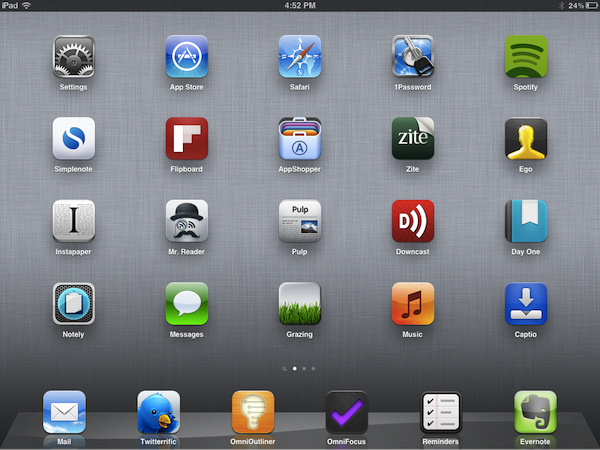
From personal experience, I see myself “trusting” people like The Omni Group, Evernote, The Iconfactory, Agile Bits, Edovia, Smile, Acrylic Apps or Tapbots more and more every day. I know I can get actual work done by using their apps, I know I can look forward to great customer support and shoot them a tweet when I’ve got a question – I can spend $50 bucks knowing that the work and enjoyment I’ll get in return will be greater.

But that’s not to say I’ve stopped giving the benefit of the doubt to “new kids on the block”, or that I’ve given up on trying to find the hidden gems in the App Store caves. Those who read this site know that I’ve started using Mr. Reader and Grazing Browser on my iPad and iPhone – apps from two relatively less-known developers that, however, have showed outstanding support, commitment to their software and a steady flow of software updates in the past weeks. To me, these seem like people who are serious about what they do. And I’m willing to trust them even if they haven’t been around for 10 years like others in this industry. More apps like Prowl, Notesy and Notely also come to mind.

iOS devices are now playing an important role in our lives, and we shouldn’t stop exploring all the ways to make them better with new apps, and different workflows. But I believe no one can blame us for choosing the trusted system when it’s time to work, and stop tinkering.


Evernote 3.0 for Mac Released: New Lion-only Features and Redesigned Interface

Following the release of a new Evernote app for iOS earlier today that brought a completely redesigned iPad interface, rich text editing and support for viewing shared notebooks, the Evernote team has followed up with the release of Evernote 3.0 for Mac, a major update to the desktop app that aims at enhancing the experience for new OS X Lion users, as well as introducing several fixes and improvements under the hood for both 10.7 and older OS X versions.

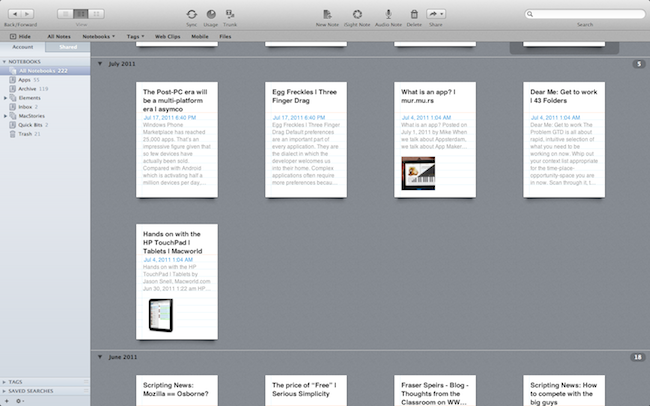
Like Evernote 4.1 for iPad, Evernote 3.0 for Mac brings a new design for the “all notes” view, which, however, unlike the tablet version is not really enabled “by default” and requires users an extra click to be accessed. The Evernote developers, in fact, have decided to unify the Mac and iOS experience by bringing the iPad’s interface back to the Mac only in full-screen mode, which is fully supported on Lion. As I previously teased in my MacBook Air review, the new Evernote for Mac doesn’t simply scale up content when entering full-screen mode (which can be activated from the upper right corner of the application’s window): rather, Evernote changes the standard List, Snippet or Thumbnail views to a new “full-screen Snippet” one that looks exactly like its iPad counterpart. Bigger snippets offer a broader view of text and images within notes, and they also provide a way to check out a note’s creation date and time. Full-screen mode in Evernote also features the same month headers seen on the iPad, it allows you to close them at any time, and it displays a note counter next to each month. Read more


Apple Releases iTunes 10.4.1 with Keyboard, Album Artwork Fixes

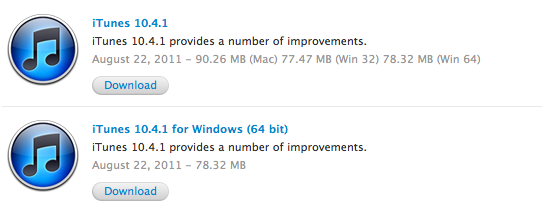
Apple released an update for iTunes a few minutes ago, bringing the app’s version number to 10.4.1 and including in a small delta update – available on Macs through the Software Update control panel – various fixes for the keyboard’s media keys, album artwork, and VoiceOver. From the changelog:

  • Fixes a problem where the media keys on some third-party keyboards work inconsistently with iTunes
  • Addresses issues with adding artwork to songs and videos
  • Resolves an issue which may cause iTunes to become unresponsive when purchasing an HD movie
  • Fixes a problem where iTunes may take longer than expected to open after waking your Mac from sleep
  • Addresses issues with VoiceOver support

iTunes 10.4.1 is available from Apple’s iTunes website and Downloads page, as well as Software Update. The update is available for Macs, Windows 32-bit and 64-bit machines. The app was recently updated to feature full Lion support and a completely rewritten Cocoa codebase, though a newer version of iTunes (10.5) has already been seeded to developers for iOS 5 testing.