Federico Viticci

10763 posts on MacStories since April 2009

Federico is the founder and Editor-in-Chief of MacStories, where he writes about Apple with a focus on apps, developers, iPad, and iOS productivity. He founded MacStories in April 2009 and has been writing about Apple since. Federico is also the co-host of AppStories, a weekly podcast exploring the world of apps, Unwind, a fun exploration of media and more, and NPC: Next Portable Console, a show about portable gaming and the handheld revolution.

Google Officially Launches Google Drive

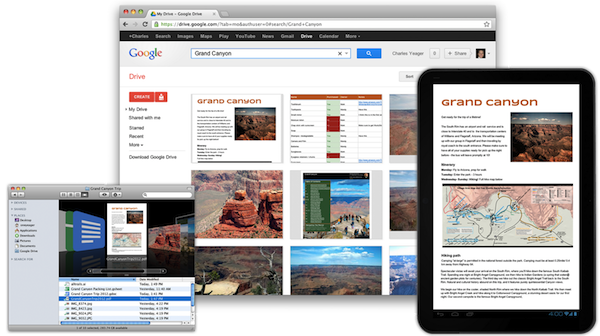
Rumored for years, Google has today officially taken the wraps off Google Drive, the company’s new solution to store, share, and collaborate on documents and files in the cloud. Available at drive.google.com, Google Drive allows users to open more than 30 file types (including video, Adobe Illustrator and Photoshop) directly in the browser even without desktop apps installed; Drive is connected to Google Docs for document editing and collaborative features, albeit Docs storage doesn’t count against Drive’s storage limits.

Today, we’re introducing Google Drive—a place where you can create, share, collaborate, and keep all of your stuff. Whether you’re working with a friend on a joint research project, planning a wedding with your fiancé or tracking a budget with roommates, you can do it in Drive. You can upload and access all of your files, including videos, photos, Google Docs, PDFs and beyond.

With a promised 99.9% uptime guarantee from Google, Drive starts for free at 5 GB of storage:

You can get started with 5GB of storage for free—that’s enough to store the high-res photos of your trip to the Mt. Everest, scanned copies of your grandparents’ love letters or a career’s worth of business proposals, and still have space for the novel you’re working on. You can choose to upgrade to 25GB for $2.49/month, 100GB for $4.99/month or even 1TB for $49.99/month. When you upgrade to a paid account, your Gmail account storage will also expand to 25GB.

Among the Drive features touted by Google, the company announced the service will support OCR (optical character recognition) for scanned documents, image recognition for uploaded pictures (for instance, you’ll be able to search for “Eiffel Tower” and have Drive find a picture of it in your files), and search. As with most Google products, great focus has been put on the search functionality, which will allow users to look for file names, content, activity, and owner information in the Drive accounts. Furthermore, Google says they have worked with a number of third-party developers to enable Drive integration with various online service starting today; similarly, Google Drive will work with other Google apps and services such as Google+ and Gmail to easily share files or attach documents to email messages.

The official Google Drive app for Android has gone live on Google Play, and the company says they are also “working hard” on a Drive app for iOS devices. ReadWriteWeb was provided with screenshots of the Drive iOS app directly from Google.

Check our more links, details, videos, and our first impressions with Google Drive after the break. Read more


Promoting Software

In the pre-PC era, we built dedicated tools to fit different purposes. In the PC era, we learnt how to shift some tasks over to a single, centralized tool called the “personal computer”; we started exploring the concept of “ecosystem” through “digital hubs”, although we didn’t see the PC – whether “desktop” or “portable” – as a meaningful replacement for objects we depended upon in our daily lives. With mobile devices from the Post-PC era, we’re seeing tremedous growth in one particular aspect: that software can do (almost) anything. We’re in the process of learning how to use a single tool to fit multiple purposes at once.

This is especially true with the iPad. Following yesterday’s news of Cargo-Bot, an iPad game made on the iPad using Codea, I had yet another example of how software is changing the way we think of the distinction between tools for “work” and “entertainment” – and how it’s blurring the difference between computers for “production” and devices for “consumption”. John Gruber calls it “a glimpse of the future”. He’s right: here we have a device that is now capable of programming a game for its own platform, and it seems totally obvious in retrospect.

I never quite got the argument that devices like the iPhone and iPad were made for “consumption”. In the past five years, we have seen people making music on tablets, writing novels on them, and film-makers using iPhones as solid alternatives to their mobile capturing needs. The portability of the camera reinvented citizen journalism and revolutionized mobile photo sharing. I have seen doctors pulling out iPhones to do quick calculations and compare MRI images. I have been increasingly using my iPad as an “anything device”; on the other hand, I may have played no more than 4 games on my iMac since 2008.

It’s not just about “niches” or “bloggers” who want to find a way to do more on tablets than “normal people” would think is feasible. While the App Store has certainly seen a surge in popularity of text editors, Twitter clients, note-taking apps, and other kinds of apps writers and bloggers use on a daily basis, we shouldn’t forget about Final Draft, Procreate, Paper, the Business category, Apple’s Cards app, travel guides, books…just to name a few.

Software can do anything, but sometimes it is the combination of hardware and software that yields new, unexpected results that take advantage of the interplay of bits and guts. Apple based its mobile business on this. And third-party developers, too, understand that, in some areas, Post-PC hardware needs to be “extended” to address more specific needs. The Jawbone JAMBOX is a fantastic portable speaker that can augment your music listening or gaming sessions. The Nest thermostat is proving to be a hit among early adopters. Ten One Design is working on a Bluetooth-enabled pressure-sensitive stylus with an SDK for developers. Note how, even when extra hardware is needed, Post-PC devices leverage one thing to make these additions more natural, powerful, and connected: software.

It’s not just Apple. Other companies are making smartphones and tablets (and glasses), and some of them also recognize the importance of an ecosystem that fosters innovation and a stable business model for all the parties involved. It appears to me – and the numbers speak clearly for themselves – that only Apple, though, has so far acknowledged that a third-party software ecosystem needs to be nurtured, carefully encouraged, and educated about the latest technologies available to consumers and developers. And then again, Apple can do better.

The Times They Are a-Changin’. The multi-purpose, constantly evolving nature of software has changed us: most people don’t want to upgrade their devices every six months anymore, but they are always looking for new ways to unify the “things they have to do or want to do” into a single, intuitive, affordable experience capable of changing context and functionality with just a few taps.

In the Post-PC era, we are promoting software.


Happy 3rd Birthday, MacStories!

Three years ago, I started MacStories because I didn’t have a job. Along the way, the “hobby” became a new job in itself, and it now allows me to run a site read by millions of people every month. More importantly, the site has allowed me to get to know some amazing people: my co-workers, developers and designers, and you, our readers.

Three years is not an incredible milestone. Yet, because April 20, 2009, feels so distant to us, I thought it would be appropriate to quickly look back at things we’ve done, and lay out a foundation for the plans we’re excited to execute in the future.

We’re not perfect. We have been guilty of focusing too much on “quick” news reporting and speculation about Apple in the past years, and, in retrospect, I think we could have handled some things differently. But I also like to look at this differently: along the way, we’ve found our style. It’s not perfect, but at least it’s what we love to do. It’s the very notion of “getting better” that implies starting from somewhere. And if not everyone will agree that the articles we publish today are better than the ones from 2009, we are surely happier with the words we post in 2012.

On a personal note, I want to thank the MacStories team for allowing me to turn a passion into my dream job. Cody, Chris, Graham, Don, and the most recent additions to the crew, Gabe and Lukas, are amazing colleagues and, more importantly, friends that, like me, share a common goal: to write about the devices and software we love, and the ecosystem of stories and people around them.

As a team, we’d like to thank you, our readers, for showing up every day and allowing us, with your opinions and support, to run MacStories exactly the way we want to: with passion and a shared sentiment that, ultimately, people are always interested in a good story.

We want to keep bringing you the news, reviews, stories and everything in between that you’re now used to seeing on MacStories. In three years, we hope to be able to look back at this article, and say that we’ve gotten “better”.

We hope to have as much fun along the way as we have had in the past three years. That’s why we created a small list of the stuff we’re proud of (you can find it below): to remember we had fun, but that we can also do better.

It’s our goal to make MacStories a better site in every aspect: more readable, with more quality content, more stories, and new options for our readers to enjoy our articles on any device. We’ll be making some changes to the site soon, and we hope you’ll enjoy them.

Thanks for reading MacStories. Here’s to the next three years, starting today.

- Federico


Our first post, and original logo from 2009:

And our version 2.0 design for 2009-2010:


Reviews

Hardware Reviews

Editorials & Analysis

Miscellaneous

Sections


Iris: A Beautiful and Simple Instagram App for iPad

Instagram may have been acquired by Facebook, but this isn’t stopping third-party developers from coming up with clever solutions to use the Instagram API. If anything, if Facebook will live up to its promise of keeping Instagram alive while growing and improving its network, everyone’s favorite photo sharing service may see even bigger numbers and user adoption. And there’s no better way to use official APIs than building software the developers of the original app are ignoring, at least for now.

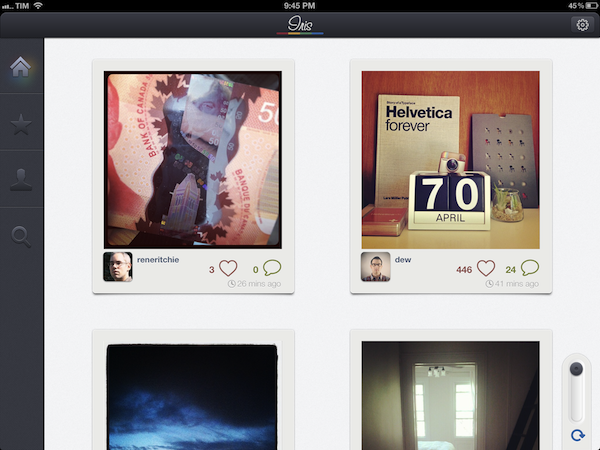
For the past few weeks, I have been trying a new Instagram app for the iPad called Iris. It’s available now on the App Store and it’s optimized for the Retina display. While Instagram has started experimenting with a new API to allow other developers to upload pictures to the service, Iris doesn’t let you upload photos using the iPad’s camera and the app’s custom interface. Instead, Iris is another app focused on providing a beautiful experience for browsing and liking Instagram photos, and, in my opinion, it is the most attractive solution that’s been brought to the market to date.

Iris puts great focus on large thumbnails for photos, a light background to make Instagram’s filters really pop, and a dark sidebar to switch between your feed, popular items, profile, and search. Iris allows you to browse either via large thumbnail previews or smaller ones; the layout change can be activated with a switch in the lower left corner. In the lower right corner, the developers have implemented a “pull to refresh” command, which literally requires you to pull a slider to refresh the main view. You can also hit the associated refresh button if you feel uncomfortable with pulling, but I found the gesture quite clever and fun. Unlike other apps, Iris doesn’t have standard pull to refresh at the top of the view.

To navigate, Iris uses a mix of tabs, “load more” buttons, and panels. For instance, the main feed gives you a vertical list of photos from people you follow, and once you reach the end of the list you can hit a “load more” button to fetch more items. I found the refresh times acceptable, and I like the custom popup dialog that shows up when you load sections or refresh pages. You can tap on a photo to bring it up at its original size; you can like with a double tap (like the original Instagram), or by hitting the heart icon below a photo. In the same area, you can find buttons to comment, and view a photo’s location. Comments are displayed in a panel that loads at the side of the screen and is reminiscent of Loren Brichter’s Twitter for iPad. If you tap on a user’s avatar while viewing a photo, the user’s profile will slide up from the bottom of the screen, and, if I had to point out a minor UI annoyance I noticed, you’ll have to hit a “back” button to make the profile view slide down again. I find the action confusing as back buttons are typically associated with the content area moving to the right.

The Popular section is pretty self-explanatory; I did find some nice touches in the profile view. You can view the people you follow and your followers in dedicated panels; you can follow/unfollow in-app, and of course check out another user’s complete set of photos. In your Profile, you can also hit a globe icon to have a history of your Instagram shots displayed as Iris pins on a Google map – it’s a neat summarization of the places you “visited” with Instagram.

The search function of the app is very basic as well: you can search for people and “tags”. While people results will open in the aforementioned side panel, tags will simply return associated photo results in a regular grid view.

If Instagram were to release an official iPad app, I think it’d be extremely similar to Iris’ approach. A minimal, beautiful interface for the Instagram community that takes advantage of the iPad’s display to lay out large thumbnails and photos. Instagram would obviously want to implement a camera in a (possible) official app – right now, Iris doesn’t let you upload anything, and has to display photos at low resolution on the iPad’s Retina display. The effect, however, is nice (especially thanks to filters, which help hiding some pixellation here and there), and I bet it gets a lot better on older iPad models.

Iris offers a simple, good-looking and enjoyable Instagram experience on the iPad, so if you’ve been looking for a great iPad app to browse your favorite photos, $1.99 should be a no-brainer.


Interview: Justin Williams

In our ongoing series of interviews with developers and creators in the Apple community, I recently had the chance to talk with Justin Williams, the founder of Second Gear and developer of Today, Elements, and MarkdownMail. When he’s not busy developing new features for his apps or sketching out ideas, Justin also writes his personal weblog at carpeaqua. You can follow him on Twitter as @justin. The interview below was conducted between January 18 and April 19.

MacStories: Hey Justin! Could you introduce yourself to the readers who haven’t heard about you or haven’t tried any of your apps before?

Justin Williams: I’m Justin Williams. I’m the Crew Chief and lead developer at Second Gear. You may or may not have heard of our products:

  1. Elements — the original Dropbox syncing Markdown text editor for iOS.
  2. MarkdownMail — A quick and easy way to send HTML emails on your iOS device written in Markdown syntax.
  3. Today — A daily calendar app for Mac OS X.

I also write about technology and user experience at carpeaqua.com and post bad jokes on Twitter at @justin. Read more


Shazam Player Now Available for iPad

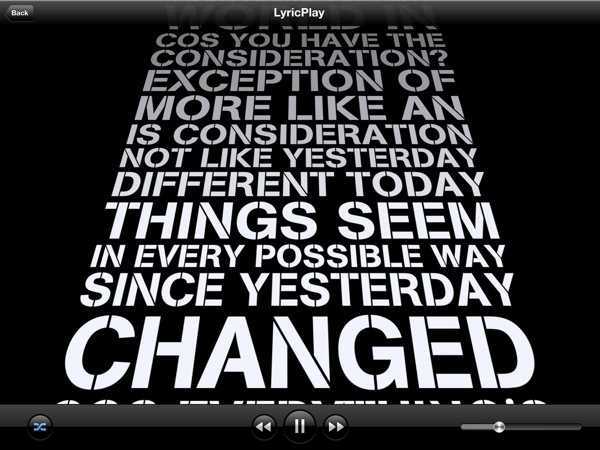
Shazam Player, the app from the creators of popular music recognition utility Shazam, has today reached version 1.5, adding support for the iPad, Retina graphics, and better display of lyrics on screen. Shazam Player, as I outlined in my original review of the iPhone version, provides an alternative view to Apple’s Music app, enhancing your music library with a plethora of sharing and discovery functionalities for artists and albums.

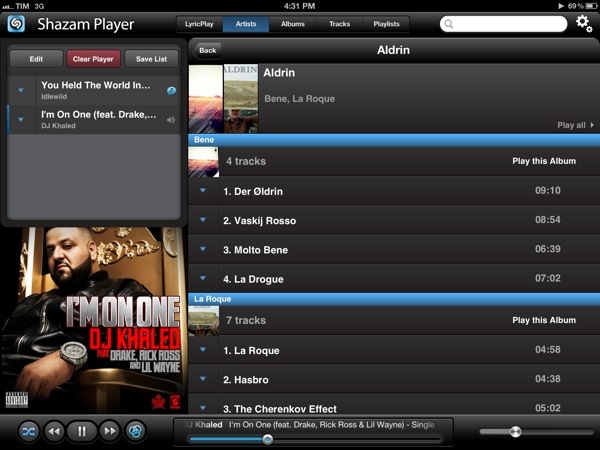
Like its iPhone counterpart, Shazam Player for iPad offers users the ability to create separate playlists from Apple’s Music app and organize songs in “good” and “bad” lists for easy retrieval later. The whole interface has been revised to take advantage of the iPad’s real screen estate, adding a “Player” box on the left side to visualize the songs playing in your queue. These songs can be rearranged for a particular order, and lists can be saved for later or cleared with one tap. You can send single songs or entire albums to the player with a tap or swipe. Tapping on the triangle button next to a song gives you access to a separate popover window containing the same sharing options of the iPhone app: you can share on Facebook and Twitter, check out related YouTube videos, artist information, and activate LyricPlay.

Shazam Player’s standout feature, in fact, is its support for song lyrics visualized on screen through a system Shazam calls LyricPlay. This functionality is only available for tracks that have been “scanned” and matched with Shazam’s servers, and unfortunately I found this new 1.5 version to be mostly hit or miss when it came to, say, matching popular songs from Drake, Oasis, or even The Eagles – all of them available on iTunes and well-known to Shazam (the standard app can fetch song info through the device’s mic). On the iPad, when the feature works, lyrics have been updated for the Retina display and they follow a song’s progression with an animation on screen. Lyrics can now be sent to the Apple TV via AirPlay, and songs that aren’t matched for LyricsPlay usage have also received a new UI for full-screen cover art and music visualizer.

Overall, I still find Shazam Player a solid alternative to the iOS Music app if you’re looking for on-device playlist creation, sharing and queue options, and online lyrics support all in the same package. Keeping in mind that LyricsPlay won’t probably find all your lyrics, you can check out the app for free on the App Store.


Ken Segall Remembers Noah Wyle and Steve Jobs’ “Moment Of Truth”

Ken Segall Remembers Noah Wyle and Steve Jobs’ “Moment Of Truth”

Ken Segall has posted a fun anecdote about Steve Jobs and actor Noah Wyle from 1999, when the two orchestrated a fake keynote opening address at Macworld.

Steve’s response surprised me. “No, that’s just it. I never said anything. This never happened — it’s all made up.”

So there you have it. It was all a lie. Granted, Steve wasn’t exactly under oath when he offered this testimony, but he did deny it emphatically. Maybe one day we’ll get a rebuttal from an eyewitness to the event.

Make sure to check out his post for the full story. Here’s a video of the “performance” on stage at Macworld 1999.

Ken Segall is also working on “Insanely Apple”, a book about Steve Jobs and the importance of Simplicity in his career, and inside Apple as a company. Segall worked alongside Steve Jobs and the Chiat\Day agency for a number of ad campaigns, including the original iMac’s one. We’ll have a review of Insanely Simple when it becomes available on April 26th. [image via]

Permalink

DragonDrop Simplifies OS X Drag & Drop

Ever since Lion’s release last year, I have been looking for ways to improve the system’s support for drag & drop. Lion is so focused on gestures, yet incredibly similar to older versions of OS X when it comes to file management, that I am still surprised the Finder didn’t get new functionalities aimed at increasing our efficiency with working with files on trackpads. A number of utilities have sprung from many users’ need to have a simpler drag & drop, such as Yoink.

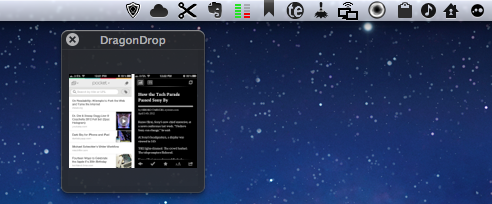
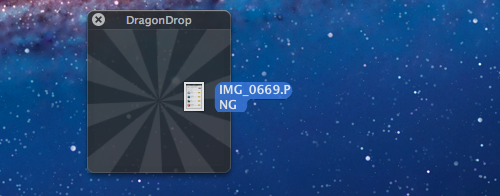
DragonDrop, another take on simplified drag & drop for the OS X Finder, offers a solution that’s somewhat in between the aforementioned Yoink and Quick Look previews. DragonDrop lets you “pause” the drag & drop action by temporarily placing a file – being it an image, text document, webclip, or just about anything OS X can drag & drop (even colors) – in a floating shelf. When you’re ready to “resume”, you can pick up the file and drop it on your destination as it came from the original source.

While this concept is nothing new, DragonDrop provides a unique implementation – a feature that caused the app to take some time to be approved by Apple for sale on the App Store. DragonDrop can be activated by dropping files onto its menubar icon, or by performing a “shake” gesture with your finger while dragging. Apple didn’t like this feature – which is optional in the app’s Preferences – but eventually decided to approve DragonDrop as other Mac App Store apps already modify system functionalities.

Not everyone’s going to like the possibility of bringing up DragonDrop’s shelf with a shake gesture, but I’ve been using it extensively over the past weeks to quickly copy text from webpages and emails (without having to perform a long, precise drag & drop) and folders from the Finder. I like how the shake gesture makes the floating shelf appear next to the mouse cursor, rather than up in the menubar.

At $4.99, DragonDrop is a very focused utility (it also supports cut/copy/paste in the menubar) aimed at enhancing one core functionality of OS X. I recommend it, but if you’re not sure you might need it, there’s a free trial available on the developers’ website.


Interview: Nate Weiner Talks Pocket Launch, Read It Later Evolution

I recently had the chance to talk with Nate Weiner, the creator of Read It Later, to discuss today’s launch of Pocket (here’s my review), the state of “read later” apps and reading on the web, and the direction Pocket is taking in enabling users to save their favorite content. Nate Weiner had the idea for Read It Later in 2007, when he found out he was constantly emailing links to himself for articles he wanted to read later. After five years, Read It Later is reborn today as Pocket.

MacStories: Looking back at my Purchased history on the App Store, I see the original Read It Later is the third app I installed on my iPhone. How has Read It Later changed in the past three years, leading to Pocket, launching today?

Nate Weiner: Was it really? That is awesome.

A lot has changed since then. When I launched the first iPhone app for Read It Later, I was just a solo developer working out of my bedroom in Minnesota. Today, I’m sitting in Read It Later’s office in downtown San Francisco alongside 7 other incredibly talented people.

What hasn’t changed is our focus. Read It Later was a simple tool that focused on doing just one thing: saving things for later. Pocket is about taking all of the core parts of what people did with Read It Later and making them better, easier, and quite honestly, just a lot more fun to use. Read more