Federico Viticci

10768 posts on MacStories since April 2009

Federico is the founder and Editor-in-Chief of MacStories, where he writes about Apple with a focus on apps, developers, iPad, and iOS productivity. He founded MacStories in April 2009 and has been writing about Apple since. Federico is also the co-host of AppStories, a weekly podcast exploring the world of apps, Unwind, a fun exploration of media and more, and NPC: Next Portable Console, a show about portable gaming and the handheld revolution.

Musicon Lets You Add Albums To Your Home Screen

In the weeks leading to Apple’s WWDC announcements, there was one possible feature of iOS 5 that was making the rounds of the Internet, meeting many people’s expectations for the new OS: the possibility to create shortcuts for anything on a device’s Home screen would have been an interesting option to, say, let users create a WiFi icon to quickly access Network settings without opening the dedicated app. Playing around with the concept of aliases and app-specific shortcuts, the theories surrounding iOS 5 pointed at Apple building such a functionality to reduce the time spent tapping and scrolling around. That, of course, didn’t happen, but it hasn’t stopped third-party developers from releasing their own solutions that take on this idea of “creating Home screen shortcuts”.

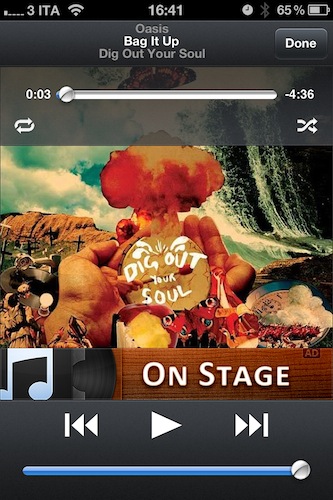
Musicon, a new iPhone app by developer Fabian Kreiser, enables you to create Home screen icons for music albums you have synced on your device or, if you’re rocking the latest iCloud features, bought on your computer and automatically pushed to your iPhone. Musicon works like this: it scans your music library (the one from iPod.app, or Music.app if you’re already on iOS 5) and fetches albums and album artworks. If music is playing from the native iOS app, a “Now Playing” button lets you control it – this app isn’t meant to be a music controller on its own, unlike Kreiser’s other iPhone app On Stage. In fact, if you have On Stage (which we reviewed here) installed on your device the app won’t show any advertisement.
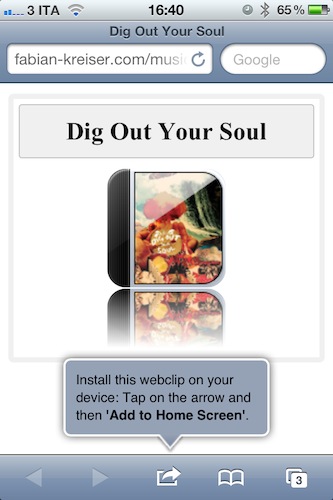
Once you’ve found an album you like, select it, and hit the big “Install Webclip” button. The app will already display a preview of the icon that you’ll end up with in the Home screen in the upper section of the screen. As you hit the button, Musicon does its thing to create a shortcut: it takes you to the developer’s website to install a webclip on your device. That’s right, these shortcuts are nothing but links to a webpage that somehow takes you to Musicon after you tap on the icon. Music will start playing in the native iPod app, and Musicon will come in foreground with the playback control UI. Not the most elegant solution if you ask me, but it works and the Home screen icons shine on the Retina Display.

Musicon is free, but I wish I could pay to remove advertising without having to keep On Stage installed. The idea is pretty nice and I can see why some people would want to save a couple of albums for quick access on a daily basis – if you’re one of them, get Musicon here and start creating your own shortcuts.
Mr. Reader Gets A Great Update with Evernote, Send2Mac, Terminology Support

There’s no doubt Mr. Reader is becoming one of the most powerful and integrated RSS apps for the iPad. Ever since I reviewed version 1.0 back in April, the developer went back to work to implement several features that are making Mr. Reader a Google Reader client that’s not limited at fetching and marking items as read from a native interface. Rather, Mr. Reader shipped with a good selection of external services to send your favorite articles to, but version 1.1 added support to create tasks in OmniFocus and integration with third-party iOS browsers like iCab. Whereas most feed readers want to provide a good reading experience but don’t focus on letting you get those feeds out of the closed Google Reader experience, Mr. Reader aims at filling the gap between online services / apps and RSS.

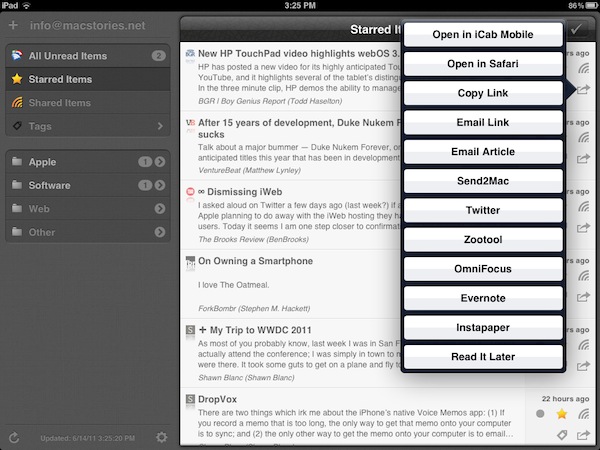
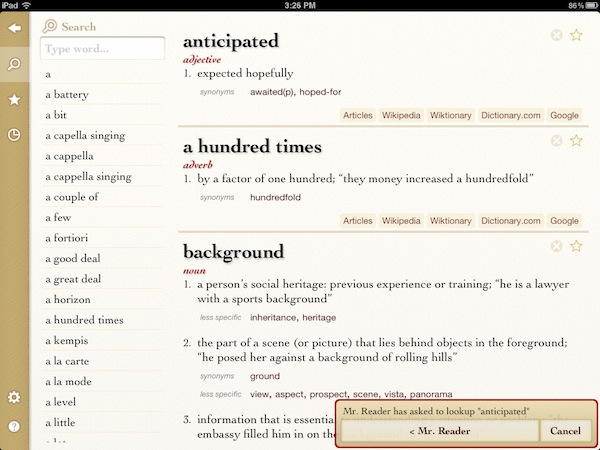
Version 1.2, released yesterday and available now at $3.99 in the App Store, takes the whole concept of getting articles out of the app a step further. With Evernote, Send2Mac and Terminology support, you’ll be able to save articles as notes in your Evernote account, send webpages to your desktop browser in the background thanks to the great Send2Mac service (which already works on Lion), or get definitions of words you don’t know if Agile Tortoise’s app is installed on your iPad. Unlike Instapaper, definitions are not provided in a popover inside the application (at least on iOS 5): when you select a word and hit the Terminology button, you’ll be brought directly to Terminology with the selected word at the top of the list and a popup at the bottom saying that you opened that word from Mr. Reader.

Evernote support is really simple, and I like it: the app will create a blank note with just the title and URL section saved from Mr. Reader. As for Send2Mac, it works perfectly but it only allows you to configure one computer – I’d love to add both my MacBook Pro and iMac to Mr. Reader.

There’s a lot more in Mr. Reader 1.2 though. Tapping on an article will let you open all feeds from the original source; you can send articles to Readability, if you’re a fan of the service; a new theme, Sydney, has been added and others have been refined; the annoying modal sync window has been changed to an unobtrusive spinning indicator that doesn’t overlay the feed list. Alongside dozens of other bug fixes and improvements, Mr. Reader now remembers your preferred view for each feed automatically.

At $3.99 and with updates coming out every few weeks to make the app more stable and integrated, I’m excited to see Mr. Reader taking on Reeder as the most powerful (yet elegant) iPad RSS reader. While looking forward to iOS 5 and (perhaps) iCloud integration, you can get the app here.


Report: New MacBook Air In Late June

Rumored to be getting an update this week as part numbers surfaced online suggested Apple was planning to release new products on Wednesday, the much anticipated new MacBook Air models were replaced by unlocked iPhones today, but sources believe they’re still on track for a late June release with 380,000 - 400,000 initial shipments. As reported by Reuters quoting the Economic Daily newspaper, Apple is expected to sell new MacBook Air units in late June, with shipments of the old line and new models reaching 460,000 units this month.

As supplies dwindle worldwide and the new Airs are increasingly rumored to be refreshed in June or July, little is known about the actual specifications of the new machines. It seems fairly obvious that Apple would implement Sandy Bridge processors and Thunderbolt technology as seen in the latest MacBook Pro and iMac updates, but there are no details on the CPUs Apple would go for in the Airs. A report from May indicated Intel was working on new ULV (ultra-low voltage) processors that would be a perfect fit for the Air, but sources haven’t corroborated the rumor since then.

It is believed, however, that the MacBook Air is becoming Apple’s crown jewel when it comes to promoting the Mac, and so the new Air would require a significant spec bump to be able to run OS X Lion smoothly.


A Roundup Of Custom Notification Center Widgets, Themes and Mockups

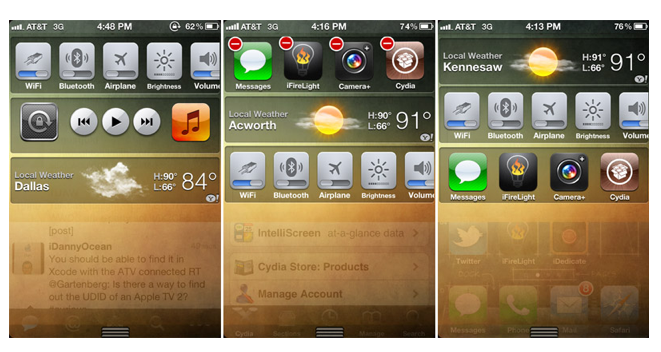
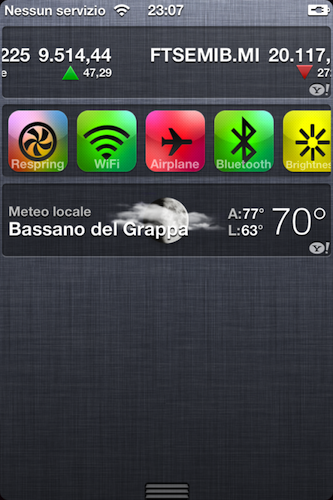
With the release of redsn0w and the first unofficial widget for iOS 5 over the weekend, we noted how developing widgets for the new Notification Center could open a big new opportunity for developers willing to invest on features not implemented by Apple – e.g. widgets in iOS 5 are limited to the iPhone and the Stocks and Weather applications. We first detailed UISettings on Saturday, a widget that, similarly to toggles for popular iOS 4 tweak SBSettings, allows users to quickly activate iPhone hardware functionalities like WiFi, Bluetooth and Brightness.

Since the release of UISettings, several developers have started playing around with the concept of widgets in Notification Center. Besides some obvious updates to UISettings that brought an improved design and stability, others have released new tweaks to enable new functions in the area otherwise reserved to notifications. Spring Prefs, for example, is an upcoming widget by @GreySyntax that will put system information in the Notification Center. Available RAM, firmware version, IP and uptime – they all can be viewed right under the status bar of iOS 5 with a pulldown gesture. In the same sneak peek, you can also see a custom Notification Center theme that gets rid of Apple’s much criticized linen background for a more elegant transparent effect and minimal layout. Read more


iPhone 5 Reaches Final Testing Stage, Launching In September

Several rumors in the past months indicated that Apple wasn’t ready to launch a new iPhone model this summer, and the WWDC confirmed speculation of Apple focusing on software (with iOS 5, Lion, and iCloud) to save the next-generation iPhone for a Fall launch. We’ve already discussed why this would make sense for a number of reasons. 9to5mac is now reporting the new iPhone has reached the final “AP” testing stage, and is being carried around by high-level Apple executives. Apple is apparently also working on a deal with Verizon to launch FaceTime over 3G, something that was spotted in the first beta of iOS 5 and suggested the company was playing around with settings to enable video chat on mobile operators by the end of the year.

Although this has been assumed since the no-iPhone-at-WWDC-rumors broke, the current plan is for a September launch for the next-generation iPhone.

Apple and Verizon have yet to strike a deal regarding FaceTime over 3G for the Verizon network. Keep in mind that 3G and 4G aren’t the same thing. < Don’t read into that too much. Or maybe do.

The website has also done a little digging into the iOS 5 SDK and discovered codenames for two unreleased iPhone devices, N93 and N94. The current-gen iPhone was codenamed N90 and N92 for the GSM and CDMA variations, respectively. Considering rumors of worldphone capabilities that are floating, it’s not clear why would Apple have two different iPhone models in the works, unless one of them is destined to another US carrier like T-Mobile or Sprint, as recent speculation claimed. However, it seems very clear at this point that the device will feature minor hardware changes and the same industrial design of the iPhone 4, with 9to5mac also claiming that the iPhone 5 could have the same 5 MP camera of the current generation as code strings in the SDK point out. The iPhone 5 was rumored to be set for an 8 MP upgrade from either OmniVision or Sony, though a report from last week also said Largan Precision had been contacted to provide 8 MP sensors for the next-generation iPhone.


Steve Jobs Email Confirms iWeb Will Be Discontinued

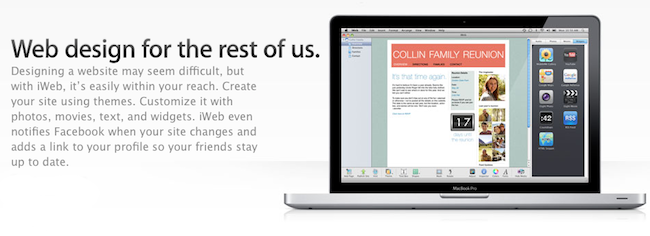
MacRumors has posted what they believe to be a legitimate email from Steve Jobs to a customer, in which Apple CEO sort of confirms that iWeb, the website creation tool bundled in the iLife suite and connected to MobileMe’s hosting service, will be discontinued come the official end of MobileMe services next year. Following the announcements at WWDC that saw the introduction of iCloud and the support document that detailed how existing MobileMe subscribers will be given instructions to migrate to iCloud this Fall, many wondered what would happen to old offerings like the aforementioned iWeb and the me.com web apps, which didn’t see any announcement or confirmation at the developers event. iWeb allowed users to design and update websites on a Mac, then host them through MobileMe. Steve Jobs suggests users will have to find an alternative design tool and provider to host the websites.

The email:

Q: Dear Mr. Jobs,

Will I need to find an alternative website builder and someone to host my sites?

I have invested a lot of time and effort and the thought of re-training sucks more than mobileme ever did.

A: Yep.

Sent from my iPhone

MobileMe subscriptions were automatically renewed to June 30, 2012, free of charge for all existing free (trial) and paid customers. It’s not clear at this point which other MobileMe services won’t make the transition to iCloud as Apple hasn’t confirmed anything but the information from the support document so far, but several tech pundits started believing that iWeb was headed towards discontinuation when it didn’t receive a substantial update with the iLife ‘11 suite last year.


New MacBook Airs Coming On Wednesday? [Updated]

Following the screenshots detailing Nuance integration in iOS 5 through Apple internal settings, Chronic Wire reports new MacBook Airs may be coming out on Wednesday. Chronic had a good track record in the past pinpointing various Apple rumors and he seems certain the new line will launch this week, on June 15th. However, he didn’t post any tech specs of the new machines – though it looks fairly obvious that Apple will implement Sandy Bridge processors and Thunderbolt technology like in the iMac and MacBook Pro 2011 refreshes. Several reports in the past months pointed at Apple aiming at a June-July release for the popular ultra-thin laptops.

Meanwhile, 9to5mac also claims Apple will we holding retail store overnights on Tuesday for a Wednesday product launch, but they couldn’t confirm what the product could be. They don’t believe it’s the new MacBook Air family like Chronic Wire does, but it could be considering recent speculation.

We have since heard from a source that there are still some current generation MacBook Airs shipping to retail stores across the world into the next couple of weeks. Because of our own independent information, we doubt a new MacBook Air launch for Wednesday. It does make sense though based on the scheduled retail overnight.

Other products recently rumored for an update would be the Mac Pro Server, Mac mini server and Time Capsule/AirPort Extreme stations, which several bloggers believed would be unveiled by Apple at WWDC.

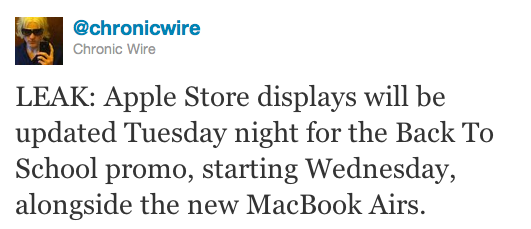
Update: Chronic Wire now reports Back to School promo material will be put in place during the retail overnights on Tuesday, with a launch on Wednesday alongside the new Airs. The Back to School 2011 promo was initially believed to be set for a WWDC announcement with possibility for students to get the usual iPod touch with the purchase of a new Mac, or a discount off a new iPad 2.

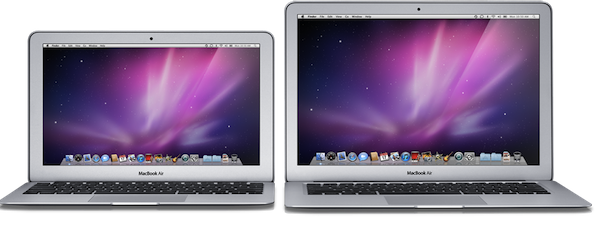
Update #2: MacRumors initially posted part numbers of what they claimed to be the four models supposed to become available this week. In a tweet, they later confirmed the numbers were for unlocked iPhones. Currently, Apple offers four MacBook Air models with 64 GB and 128 GB SSD options for the 11-inch, 128 GB and 256 GB for the 13-inch.


iOS 5 Internal Settings Show Possible Nuance Integration

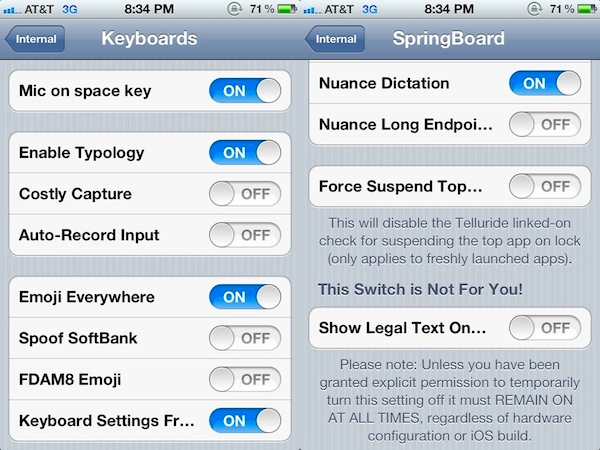
The Chronic Wire got its hands on a build of iOS 5 running Apple internal settings and posted a series interesting screenshots throughout the day detailing some of the features that are enabled for Apple employees and developers for testing and troubleshooting, but aren’t visible in the beta build of iOS 5 seeded to developers on Monday. Among those screenshots, new ones posted a few minutes ago show what looks like Nuance voice recognition baked into the OS – in the weeks leading up to WWDC 2011, Nuance was in the middle of Internet speculation for a possible deal with Apple that would allow the company to tightly integrate Nuance’ voices and functionalities into iOS for text-to-speech, voice recognition, and more.

The screenshots show some options like “mic on space key”, “auto-record input” and “Nuance dictation”, which seem to suggest Apple has been testing ways to integrate additional buttons in the default iPhone keyboard to let users speak and have text transcribed on screen. Nuance indeed has an application for the iPhone called Dragon Dictation (our review here) that enables users to do just that in seconds. Nuance voices are also built-in in Mac OS X Lion as reported a few weeks ago.

The Chronic Wire is promising more screenshots from these internal settings and we’re certainly looking forward to more tidbits hidden inside iOS 5. No Nuance announcement or partnership was unveiled at WWDC, with new rumors now suggesting that everything could be unveiled in the Fall before the release of iOS and perhaps during the iPhone 5 keynote.


First Third-Party iOS 5 Widget Released In Cydia

A few hours after the release of redsn0w for iOS 5 beta 1, some developers found out it was technically possible to develop widgets for iOS 5. In the new OS, in fact, Apple is restricting the use of “widgets” (they don’t even call them this way) to the Stocks and Weather applications, which, through the Settings, can have a “widget” or “ticker” in the new Notification Center. Currently, the widget section of Notification Center can only be used on the iPhone, as the iPad didn’t get the functionality for some reason.

iSpazio reports [Google Translation] the first third-party, fully functional iOS 5 widget has been released in Cydia, and it’s called UISettings. Available for quite some time in Cydia as an extension of the multitasking bar, the app has been completely rewritten to work as a widget under iOS 5, providing shortcuts for a system respring, a WiFi and Bluetooth switch, as well as AirPlane mode and Brightness controls. The concept’s similar to the popular SBSettings tweak, though UISettings is limited to a handful of shortcuts and controls.

The widget can be downloaded from the developers’ beta repo (http://qwertyoruiop.com/beta), and a new version is already in the works. The possibility of developing and releasing custom widgets in Cydia may offer an interesting alternative to Apple’s restrictions if the company decides to prevent developers from building third-party widgets in iOS 5, although everything can change come the final release of the OS this summer. Apple may even announce new Store sections for widgets (or Safari extensions) and surprise developers a few weeks ahead of iOS 5’s release. This is just speculation on our side however, so in the meantime you can download UISettings and check out how a custom widget integrates with Apple’s Notification Center.