Apple Releases OS X 10.7.3 [Direct Links]


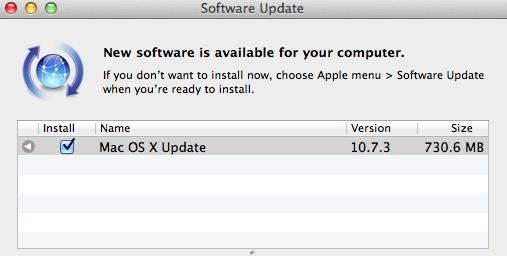
A few minutes ago Apple released an update to OS X Lion, which reaches version 10.7.3 and brings a number of bug fixes and improvements. This new version of Lion includes “general operating system fixes” and support for more languages; 10.7.3 also addresses compatibility issues with Windows file sharing and directory services.

The 10.7.3 update is recommended for all OS X Lion users and includes general operating system fixes that improve the stability, compatibility, and security of your Mac including fixes that:

Add Catalan, Croatian, Greek, Hebrew, Romanian, Slovak, Thai, and Ukrainian language support

Address issues when using smart cards to log into OS X

Resolve issues authenticating with directory services

Address compatibility issues with Windows file sharing

Extended release notes from Apple’s website note that Safari 5.1.3 is included with the update and mention more fixes in detail:

  • Add Catalan, Croatian, Greek, Hebrew, Romanian, Slovak, Thai, and Ukrainian language support
  • Address issues when using smart cards to log into OS X
  • Address compatibility issues with Microsoft Windows file sharing
  • Address an issue printing Microsoft Word documents that use markup
  • Address a graphics performance issue after sleep on some earlier iMacs that use ATI graphics
  • Resolve a Wi-Fi connection issue when waking from sleep
  • Address an issue that may prevent Safari from opening before joining a wireless network
  • Fix a potential issue authenticating to an SMB DFS share
  • Include RAW image compatibility for additional digital cameras
  • Improve binding to read-only Active Directory Domain Controllers
  • Improve binding and login speed for Active Directory users in a domain whose name ends in “.local”
  • Improve reliability of Dynamic DNS (DDNS) updates by Active Directory clients
  • Allow login with an Active Directory username that contains a space
  • Improve compatibility with Active Directory schemas that have been extended with the “apple-user-homeDirectory” and “apple-user-homeurl” attributes
  • Fix home directory Dock item for Active Directory users with mobile accounts
  • Allow NIS users with MD5-hashed passwords to log in

Direct links to the 10.7.3 update below:

Other software updates released today:

Launch Center 1.2 Gets All-New App Detection

One of my favorite apps in a long time, App Cubby’s Launch Center (our previous coverage here and here), just got a lot better thanks to an update released on the App Store a few minutes ago, version 1.2. Whilst one wouldn’t normally expect an app to get significant improvements in a 1.2 update, Launch Center’s latest version is, I believe, quite possibly the greatest addition to the app since its release, making it extremely easier to discover new third-party apps that can be integrated with no further configuration in Launch Center.

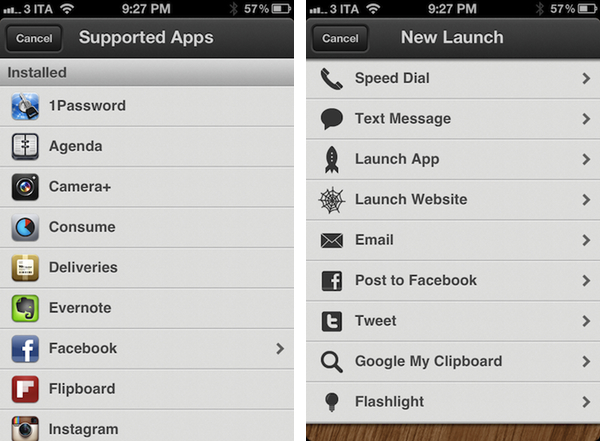
For those who are not familiar with Launch Center already, as we detailed in our previous reviews this utility allows you to set up custom shortcuts on your iPhone to launch common actions or often-used applications with a single tap. Upon firing up Launch Center, you’ll be able to create and manage shortcuts for, say, calling your wife or texting a coworker; you can create a quick action to activate the iPhone’s flashlight, launch a website in Safari, tweet, email someone, or Google your clipboard. As I’ve written before, Launch Center has replaced a bunch of existing apps in my dock thanks to its super-simple approach to aggregating default apps and functionalities that can be triggered through the popular URL schemes you can find documented on websites such as HandleOpenURL. And it’s from this idea of hidden URLs that only a few people know about that App Cubby decided to make Launch Center 1.2 all about app detection and integration.

Launch Center 1.2 leverages your apps’ internal URL schemes to simplify the process of discovering new shortcuts and speeding up your workflow. Launch Center comes with a new section called “Supported Apps” inside the Launch App menu, which lists third-party apps that can work with Launch Center through a URL. Launch Center organizes this list in Installed Apps (the ones you already have on your device) and Featured Apps (which you don’t have installed, and you can get from the App Store). This list of support apps, it turns out, has been built directly by App Cubby and it is hosted on the developers’ servers alongside links to the icons that, as you can see from the screenshots, are served directly to the iPhone and look great on the Retina Display. The reason behind App Cubby’s decision to keep the list of supported apps on their servers is to encourage more developers to get in touch and ask for integration in Launch Center which, ultimately, has a chance of becoming the de-facto solution for quickly accessing apps’ settings/sections/menus using a technology Apple is (seemingly) okay with.

App Cubby writes:

We’d also appreciate help in spreading the word about URL schemes. It’s surprising how few apps support them, and those that do don’t always go very deep with supported actions. If you have an idea for an app and/or action that would make sense in Launch Center, please contact the developer of that app directly and point them to this page.

Launching an app is great, but the true power of Launch Center is in the ability to trigger specific actions deep within an app. For example, while using Tweetbot, you may leave the app buried deep within a search. To launch the app and tweet might take quite a few taps as you have to back out of the search, tap the compose button, select an account, paste text, etc. Launch Center can make that a reliable 2 taps. 1 to open Launch Center and 1 to trigger the action.

In my Launch Center, I was pleased to see many of my most-used apps were already supported. I have set up shortcuts for 1Password, Instagram’s camera and Facebook; I tweaked Tweetbot’s shortcut to jump directly to my Favorites, and created an OmniFocus launch to create a new task “using clipboard for note”. Other apps I see as supported (and installed on my device) include Agenda, Evernote, Consume, Flipboard, Delivery Status Touch, Camera+, Instapaper, Skype, and Reeder. Hopefully a lot more will be coming soon thanks to App Cubby’s decision to make their iOS App URLs page public.

As I said above, Launch Center has become one of my favorite new apps for iPhone. It speeds up my workflow and looks neat, and I look forward to seeing how many developers will get in touch with App Cubby to formally introduce support for Launch Center in their apps (I also would like to see App Cubby figure out a way to fetch icons for any app).

You can find Launch Center 1.2 in the App Store.


Localized Flipboard Content Guides Come To UK & Ireland, Australia and Canada

Flipboard has today launched three new localized ‘Content Guides’ in Australia, Canada and the UK and Ireland. Users in these countries will now be shown recommendations that match their location. For example, Australian Flipboard users will now see The Australian, ABC News and the SMH prominently displayed in the News section of the content guide and UK users will be recommended the BBC, The Guardian and The Telegraph amongst others.

The localised recommendations aren’t just for the News section but the other categories such as Business and Tech & Science too. Similarly, it doesn’t mean that no international publications are recommended anymore, it just means that local publications are now recommended more prominently. Flipboard now has six Content Guides for countries outside the US with France, Taiwan and Hong Kong previously receiving localised Content Guides. Flipboard also has a dedicated app for the Chinese market which also has its own Content Guide.

Users in these countries needn’t do anything to receive the new content guides - they are automatically loaded based on the Region Format of the iPad (you can change yours in Settings > General). The Flipboard team does note that they are working on a way to easily change regions from within the app so you can look at recommendations for other regions.

[Flipboard Blog via The Next Web]


Quick Review: RankIt Checks On iOS & Mac App Store Charts

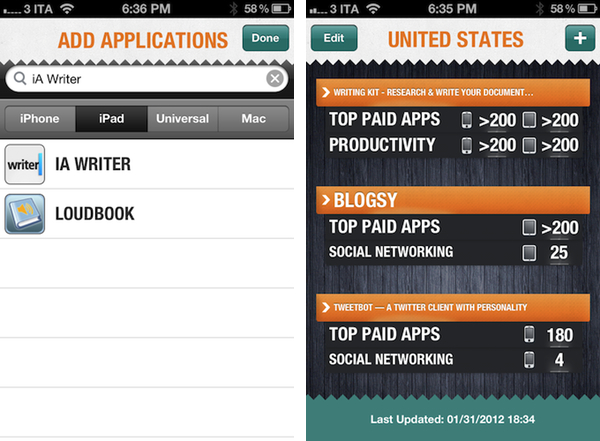
Developed by Steve Reynolds (Analytix, Clicky Touch), RankIt is a new iPhone app that allows you to check on iOS and Mac App Store charts for any app that’s currently available for sale. Whilst some iPhone apps have tried to bring the complexity of web-based App Store analytic tools to iOS in the past, RankIt focuses on simplicity in that it allows you to quickly enter as many apps to “monitor” as you want, and refresh at any time to see real-time rankings.

As you fire up RankIt for the first time, you’re asked to add an app from the App Store you’d like to check rankings for. You can choose between iPhone, iPad, Universal and Mac apps, and change from United States to 9 other markets with available charts. In Settings.app, you can further tweak RankIt to adjust the number of maximum ranks returned (from 50 up to 400), set a default country, and refresh on launch. Once you’ve entered an app to monitor, RankIt will quickly refresh its ranking to check on freshly updated charts. RankIt will display an app’s position in the Top Paid/Free charts, as well as its ranking in the category’s charts. Universal apps will show iPhone and iPad icons next to them; with one tap, you can open a single app view that displays rankings in multiple countries. You can refresh at any time, with RankIt taking only a few seconds to get updated charts from the App Store.

In spite of its simplicity, I believe RankIt can be a worthy addition to any iOS or Mac developer’s workflow. In fact, the app’s focus on “quick stats” might just be its biggest selling point when compared to more in-depth tools that can’t just be refreshed every 10 minutes, whereas RankIt seems to be meant exactly for this – quickly checking on the App Store’s charts. I’ll make sure to test RankIt again during one of the big app launches next week, and see how it handles updates in real-life usage scenarios.

RankIt is $1.99 on the App Store.


January 2012 In Review

Starting this month we’re launching a new, month-in-review feature that will summarize the past month’s big news stories, apps and editorials that we have published on MacStories. Each month we’ll give links to all those big stories and give a summation of the big events: for example, this month we detail Apple’s Education Event and include links to all the important articles related to it. We’ll also include links to new apps, app updates and app reviews that we think are worthy of your attention. Finally, we’ll be including links to our standout editorial stories from the past month - the stories we are most proud of.

We hope you enjoy this new feature and find it useful. Our hope is that it gives some perspective on the events of the past month, particularly when news flows so fast these days.

Apple’s Education Event

The big news of January was probably Apple’s Education Event that was held on January 19th in New York. The education-themed event saw the release of iBooks 2.0 which featured the ability to read new multi-touch books and, specifically, textbooks. In order to promote the creation of these new multi-touch books, Apple also released the free iBooks Author application for OS X, allowing virtually anyone to create a beautiful and interactive book for the iBookstore. The event also saw the release of an iTunes U app for the iPhone and iPad to give students and teachers more control over their courses.

Apple’s Q1 2012 Earnings Call

The other significant piece of news from January was Apple’s Q1 2012 earnings call in which Apple revealed it had just had the best quarter in its history, posting $46.33 billion in revenue, selling 37.04 million iPhones and 15.43 million iPads during the blowout quarter. The Next Web pointed out an interesting statistic that by selling 37.04 million iPhones during the 14 week quarter, Apple had actually sold more iPhones than babies had been born during the same time period. We also posted some of the more interesting details and statistics from the earnings call in a follow-up post which is well worth the read. A final article related to the earnings call is the one about how the iPhone ASP rose in Q1 2012, despite the addition of the “free” iPhone 3GS.

Apple Continued To Rollout Products Internationally

January saw the next big wave of iPhone 4S launches in China and 21 other countries on January 13th, making the 4S available in over 90 countries. Apple’s recently launched iTunes Match also became available in 19 additional countries around Europe and South America - taking the total number of countries with iTunes Match to 37 - making it another quick international rollout.

Supplier Responsibility

This month the issue of working conditions at Apple’s suppliers again came under close inspection. It started with the NPR program ‘This American Life’ investigating the issue in one of its episodes. Apple then released its annual Supplier Responsibility report (earlier than last year) and revealed its list of suppliers for the first time. Towards the end of the month, The New York Times featured an editorial on the issue - focusing on Apple. We also linked to a paidContent article that put the NYT article into perspective and rationally laid out the reality that Apple can’t solely change manufacturing overnight.

Jailbreak

January saw the untethered A5 jailbreak finally being released, to the joy of many iPhone 4S and iPad 2 owners who had been holding out for a jailbreak for quite some months. In fact the demand for the jailbreak saw nearly 1 million downloads of the tool in just the first 24 hours. Jailbreak certainly hasn’t become irrelevant just yet.

New SVP of Retail

On January 31, Apple announced John Browett has been hired as new Senior Vice President of Retail, a position left open since Ron Johnson left Apple to become the new CEO of J.C. Penney. Browett has been the CEO of European technology retailer Dixons and previously held various executive positions at Tesco, including CEO.

Everything Else

New apps, updates to apps and reviews that we published in January 2012.

January Quick Reviews

A selection of the best editorial pieces that we published on MacStories in January 2012.

January MacStories Reading Lists


Witness Home Alarm System Gets AppleScript Support, Sneak Peek, Face Detection

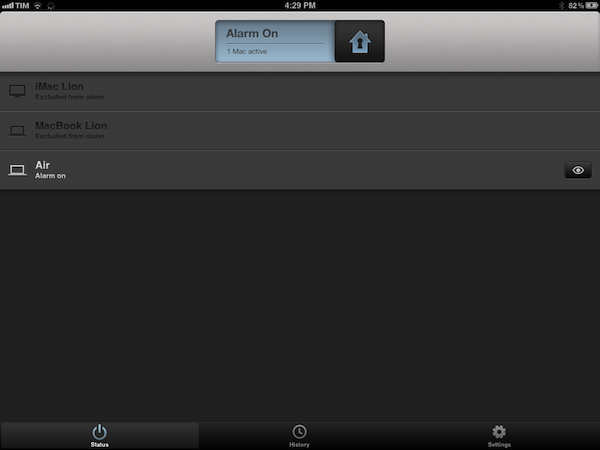
I’ve been a loyal and satisfied Witness customer since the app’s original release last year. Witness, developed by Orbicule (makers of Undercover and Macnification), is a Mac-based home surveillance system that uses your Mac’s built-in FaceTime/iSight camera to snap photos of whoever’s using your computer when you’re not there. This utility, in fact, securely communicates with a web service that’s connected to iOS apps (iPhone and iPad) that enables you to remotely lock your machine as you walk away from your house, and receive push notifications when the camera detects motion in front of your Mac’s screen. Witness sends push notifications, snaps photos and videos that are sent in real-time to your iOS devices (so you know instantly what’s going on), and can lock your computer using Lion’s standard login screen, or the app’s own lock dialog. You can read more about Witness in my review.

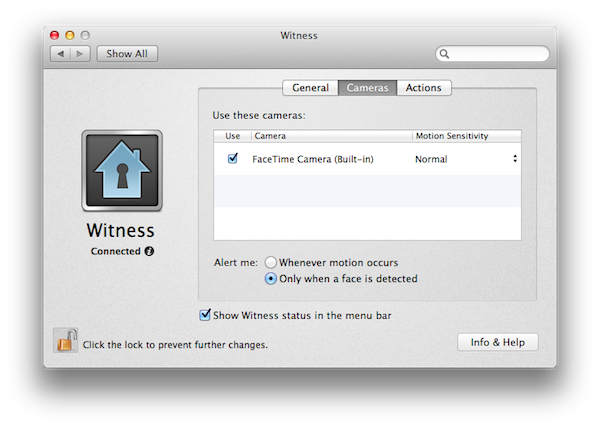
With Witness 2.0, released today, Orbicule has supercharged its home alarm system technology adding a series of functionalities that give more control to users away from their computers, and more issues to (possible) burglars looking to steal your Mac without being seen (or really, just people who want to mess around with your Mac without telling you). Aside from motion detection, which has been improved, Witness 2.0 comes with face detection, allowing you to be notified only when an actual person is sitting in front of your computer’s camera. There are settings to adjust motion sensitivity, and, overall, this feature can really come in handy if you have pets running around the house when you’re not there. I have tried this with my two dogs, and it worked remarkably well with motion sensitivity set to “Normal”: Witness didn’t detect anything with my dogs normally walking around, and I was only sent a notification when I held my dog right in front of the FaceTime camera. Similarly, Witness’ alarm didn’t fire off when I asked my girlfriend to simply walk around the living room, but I did get a notification as she approached my computer.

Next up: multiple cameras and sneak peek. Whereas Witness 1.0 allowed you to set up one camera (the built-in one) and watch images and videos sent after a successfully triggered alarm, Witness 2.0 lets you connect up to 3 cameras (USB or FireWire) and check upon your room from multiple angles. Combined with a new feature called Sneak Peek that lets you load an image from your camera at any time, Witness 2.0 offers a good combination of real-time capturing and multiple angles – I imagine this can be particularly useful for large rooms and office areas.

Last, Witness 2.0 has AppleScript support and auto-activation. You can ask Witness 2.0 to run an AppleScript when an alarm is activated, deactivated, or motion is detected, thus creating a whole new range of possibilities for remote automation. Someone’s using your Mac? Why don’t you tell iTunes to start playing this at the highest volume? Or perhaps open a totally creepy video in the default browser? With AppleScript support, you have endless possibilities for customization and it’s really up to you to find something that might be useful when executed automatically by the system. Even better, with Witness 2.0 you’re given the option to forget about activating your alarm as the iOS app now uses geo-location to see when you’re not near your Mac anymore, and activate the alarm for you. Obviously I still recommend manually activating alarms (especially if you’re working with multiple Macs in different locations) as geo-location can’t always be 100% reliable, but in my tests Witness managed to activate an alarm roughly 2 minutes after I left my house, so I’d say it worked fairly well.

With these new features and optimizations, I highly recommend existing Witness users to upgrade to version 2.o and check it out by themselves today. If you haven’t tried Witness yet, a single user license is available through Orbicule’s website at $39 with a student discount available.

Exclusive offer for MacStories readers: Using this link, you can purchase Witness 2 (single user license) with a 20% discount. The coupon code is directly applied, and it will be valid until February 6.


Apple Updates FCP X With Multicam Editing, Enhanced XML

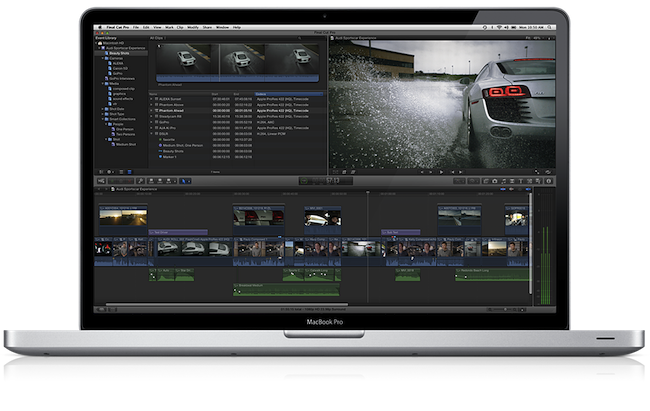
With a press release, Apple today announced a major update to its professional video editing tool Final Cut Pro X. The new version, 10.0.3, available as a free update on the Mac App Store, introduces several highly requested features and fixes, including multicam editing, enhanced XML 1.1 support, and advanced chroma keying. A free trial of Final Cut Pro X is available on Apple’s website.

Following a controversial launch in June (when the company even made an exception with refunds), Apple responded to negative FCP X feedback promising that more functionalities and improvements would be released in the following months. Today’s update brings multicam editing from up to 64 different angles of videos and photos, and XML for advanced interchange with different plugins and applications that support the Final Cut Pro X ecosystem, such as DaVinci Resolve, CatDV (color correction and media management), and the 7toX app from Intelligent Assistance which “uses XML to import Final Cut Pro 7 projects into Final Cut Pro X”.

Final Cut Pro X v10.0.3 includes a collection of groundbreaking new tools for editing multicam projects. Final Cut Pro X automatically syncs clips from your shoot using audio waveforms, time and date, or timecode to create a Multicam Clip with up to 64 angles of video, which can include mixed formats, frame sizes and frame rates. The powerful Angle Editor allows you to dive into your Multicam Clip to make precise adjustments, and the Angle Viewer lets you play back multiple angles at the same time and seamlessly cut between them.

Final Cut Pro X builds upon its robust, one-step chroma key with the addition of advanced controls including color sampling, edge adjustment and light wrap. You can tackle complex keying challenges right in Final Cut Pro X, without having to export to a motion graphics application, and view your results instantly with realtime playback.

The Loop has more details on Apple’s implementation of multicam editing using audio waveforms:

What’s really different in Apple’s implementation of multicam is how the company does its automatic syncing. Of course, you can sync camera angles by using the timecode or the less accurate method of using the time of day, but Apple has a new way of syncing camera angles — audio waveforms.

Townhill explained that with Final Cut Pro X, you can now sync scenes using the audio waveform captured with the camera. This doesn’t have to be the final audio used in the scene, but it can be used for syncing purposes. Of course, manually syncing cameras is still available at any time.

Furthermore, Apple states in the press release that ”broadcast monitoring in Final Cut Pro X is currently in beta and allows you to connect to waveform displays, vectorscopes, and calibrated, high-quality monitors to ensure that your project meets broadcast specifications. Final Cut Pro X supports monitoring of video and audio through Thunderbolt I/O devices, as well as through third party PCIe cards.” This update also allows users to import and edit layered Photoshop graphics, and import/export effect parameters through XML 1.1.

At the moment of writing this, the Mac App Store still reports 10.0.2 as the latest FCP X version available. The update should go live later today at this link.


Obama, Romney Election Campaigns To Use Square In Fundraising Efforts

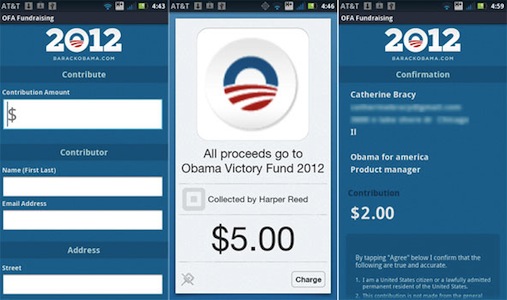
Square looks set to play a big part in the 2012 US Presidential race, with both the Obama and Romney camps announcing this week that they will be adopting the tool to give their grassroots fundraising efforts a boost. The mobile payments company uses a small accessory that plugs into the headphone jack of an iPhone, iPad or Android phone and works with a companion app to accept payments from credit cards.

The Obama re-election campaign will begin using Square straight away, initially with campaign staffers and “some approved volunteers”. But the ultimate goal is to develop their own Obama Square app that they can distribute on the App Store - allowing anyone to get the app and Square attachment and go around collecting donations. To comply with the Federal Election Commission’s (F.E.C.) rules, the app will need to collect the name, address, city, state, ZIP code, occupation and employer of the contributor, along with contribution size and collection date.

If the Square rollout is successful, and others follow, campaigns could send out armies of volunteers brandishing the Square credit card reader and collecting millions of dollars in micro-payments from political supporters.

The Romney campaign similarly announced today that they will also be trialling Square and likely developing their own, Romney-themed Square app. They will conduct a “beta-test” of the Square app and accessory on Tuesday night’s Florida primary election.

Daniel Rubin, strategic partnerships manager at Square, who works with political campaigns and major nonprofit organizations, said Square was partnering with a number of campaigns to make 2012 the year mobile payments change the way donations are collected on the ground. “It’s now easier than ever to give to campaigns of any political stripe,” Mr. Rubin said. “At a campaign, or any political event, donors will be able to give on the spot. They won’t have to run home and get a check or fill out long paper forms.”

[via The New York Times]