This Week's Sponsor:

Copilot Money

Copilot Money, The Best Money Tracker, Launches on the Web – Limited-Time: Get 26% Off + 2 Months Free


Posts in news

Evernote for Mac Gets Direct Skitch Integration

Evernote and Skitch

Evernote and Skitch

With a new version released today, Evernote has updated its Mac app to include a brand new communication layer with Skitch, the company’s image/document annotation and sharing tool.

When Evernote acquired Skitch in the summer of 2011, I wondered how they would manage to deeply integrate the two apps in a way that would make storing a note and annotating it a seamless experience. In the past two years, Evernote focused on revamping its desktop and iOS clients and on launching a new version of Skitch with Evernote integration – meaning that Skitch could sync notes to Evernote, and those notes would show up inside an Evernote notebook with inline previews and changes, but Evernote couldn’t direct plug into Skitch for further editing. Here’s what I wrote in 2011:

According to Evernote, the engineers at the two companies will be working closely in the coming months to deeply integrate Skitch and Evernote with each other, as right now the only way to let the apps communicate on a Mac is by annotating an image in Skitch, and manually drag it into Evernote. It wouldn’t be a surprise if the app gained a feature to push annotations to Evernote’s cloud to avoid drag & drop — considering the app is coming to mobile devices, this has been certainly considered by the Evernote team.

Users could drag and drop images between Evernote and Skitch, but that would result in duplicate files and wasted storage space – an issue that was exacerbated by iOS’ inferior sharing capabilities and limited “Open In” menu. In short, it always struck me as unusual that Evernote couldn’t figure out a way to let its apps “talk” to each other, avoiding manual interaction in favor of simple, intuitive inter-app communication that treated Evernote as a storage space and browser, and Skitch as an editor.

Today’s Evernote 5.2 for Mac does exactly this, and quite admirably as well. I have been testing the new version, which has gained a new Skitch button in the note editor that allows you to send any note – either as text, image, or combination of both – directly to Skitch for editing. When you’re done annotating in Skitch, you can send a file back to Evernote – and not just back to Evernote’s cloud, but back to the Evernote app itself, which will automatically come in the foreground again, showing the new version of an image/document already inside a note. Read more


Some Thoughts on an Entry Level iPhone

This could have been a footnote in my comments on OS X adoption, but I wanted to return to iOS adoption and elaborate on one comment I made about being able to upgrade easily since people likely have a recent iPhone. Apple is seeing some interesting things happening with their most affordable iPhone.

Tim Cook noted that the iPhone 4 was in constraint for the entire quarter during Apple’s first fiscal conference call for 2013. Again, during the second conference call, Tim Cook talked about the popularity of the iPhone 4 in China, Apple’s biggest emerging market with the most potential for revenue.

China has an unusually high number of first time smartphone buyers. We’ve seen significant interest in iPhone 4 there and recently made it even more affordable to make it more attractive to those first time buyers.

It turns out that the free iPhone 4 is still popular. Not only as a free phone on contract, but also as a first phone for customers in emerging markets. In developed markets, it seems that early adopters and people who love their iPhones tend to get the latest new thing, while people who just want a nice phone or can’t justify the upfront expense end up getting an iPhone that’s more affordable, but otherwise still workable and current as it supports the latest version of iOS. How many other phone makers have a free phone that has luxury materials like steel and glass, has the latest operating system, and has a great quality camera? You’re guaranteed a quality product that just works, for free, even though the phone is a few years old. That’s remarkable.

Every year, Apple reduces the price of last year’s entry iPhones by a hundred dollars, meaning that this year’s free iPhone would end up as the iPhone 4S if Apple follows the same pattern. It’s a great phone with a great camera and good all around battery life, and iOS 7 will be available for it. But I wouldn’t be surprised if that wasn’t the case this year.

I don’t know anything about what Apple has in store for their next iPhone announcement, but there’s currently a lot of speculation surrounding a cheap plastic iPhone. I think it’s certainly plausible that Apple would not only release a new flagship iPhone, but a new entry level iPhone as well. But why?

I wouldn’t correlate Apple’s entry level iPhone as cheap, but rather as more affordable, as I imagine it costs significantly less to produce a high quality build not dissimilar from the iPhone 3GS than a phone made of glass. In emerging markets, and even here in the United States, I can’t imagine that the iPhone 4 is a cost effect phone to produce at the prices Apple wants to sell it for. The press talks about there being demand for phones with bigger screens, but there’s clear and evident demand for a free iPhone and Apple wants to capture the attention of the markets that are asking for it. A CIRP survey notes that about half of total worldwide iPhone sales consisted of the iPhone 4 and iPhone 4S as of March, thanks in part to the success of the iPhone 4 in China and possibly related to Apple’s 25% price reduction in markets like Brazil.

The iPhone 3GS was a phone that kept receiving the latest iOS updates for a long time, but didn’t always have all of the features. The iPhone 4 and 4S are going to end up in the same boat, where they’ll run iOS 7, but will lack some of its more commendable features since the phones aren’t powerful enough. Part of me thinks that an entry level iPhone will be very much like an iPod touch with an antenna, with hardware that’s capable enough to run all of iOS 7’s features, is better than the any last generation iPhone, but won’t compare to what’s inside Apple’s flagship offering. This is a good thing — it means more and more people will have access to Apple’s latest software and the latest apps from the App Store.

Talking about iPods, it’s a market that’s still there but isn’t as prevalent as it used to be. The iPod isn’t as relevant since more and more people are listening to music on their iPhones and on demand, and I think young people in particular aren’t finding them as attractive or necessary. iPods will stick around, but Apple can better tailor an entry level iPhone to come in fun colors with fun marketing for people who are looking to have the coolest and latest thing that might not be a flagship, but is free[1] compared to an iPod touch and would fit well within a family plan.

Apple is also currently in the process of making three big transitions. The first is the move to the 4-inch Retina display, which started with the iPhone 5. The second is the move to the Lightning port which also started with the iPhone 5, the Lightning cable being skinnier and much easier to use than the previous 30-pin connector found on today’s iPad 2, iPhone 4, and iPhone 4S. The third is the transition to LTE. If Apple is looking to phase in their latest technologies, the best way to do it would be to phase out the glass iPhones by introducing a new entry level model that would give the low end phone the same advantages of the flagship phone. Having a new screen size phased in means good things for developers, and phasing in the Lightning connector at a faster pace means good things for Apple since they only have to produce one cable, and it’s also good for accessory makers targeting the latest iPhone owners. As of right now, the only phone that supports LTE is the iPhone 5. A new flagship phone would have it, but that would leave the iPhone 4S stuck on 3G and HSPDA unless Apple does a quiet internal update.

The press will try to spin the launch of an entry level iPhone as Apple’s way of fighting back against cheaper Android phones, as a way to gain ground over a competitor that’s supposedly winning the smartphone market. I think Apple isn’t interested in this, but rather in making an affordable phone that meets people’s expectations of quality in an Apple product. And if Apple can give you something that’s even better than an iPhone 4 or 4S at the same price, in addition to becoming possibly even more affordable in emerging markets, then that only means good things for consumers.


  1. I would expect the phone to be free, but I also wouldn’t be surprised if you could buy it unsubsidized. The United States is a huge market for Apple, though I don’t know how it’d be an attractive option over a subsidized flagship phone if you were on a carrier that wasn’t T-Mobile. It could be a much more popular option in European markets where it’s more common to buy the phone outright. ↩︎

Apple Celebrates 5 Years of App Store With Free App Promotion, Timeline

Ahead of the App Store’s fifth anniversary on Wednesday, July 10, Apple has launched a new promotion that includes five “groundbreaking” iOS apps and five “landmark” iOS games; these apps will be available for free for a limited time to celebrate the first five years of App Store. Apple has posted an official page with links to download the apps and games on iTunes.

From the 500 apps available at launch in 2008 to the more than 900,000 at your fingertips today, it’s been a remarkably prolific five years for the App Store. To celebrate, we’re giving everyone five landmark games and five groundbreaking apps for a limited time. Plus, look back at the key moments that have made the App Store the world’s most innovative destination for apps.

The apps and games picked by Apple include Day One (a journaling application with an OS X counterpart that was named “Mac App of the Year” in 2012), award-winning game Badland, Infinity Blade II, Superbrothers: Sword and Sworcery EP, Over, and Traktor DJ. Read more


Kickstarter: Snuglet Keeps the Latest MagSafe in Place

Apple’s MagSafe 2 connectors and are probably the best thing we have going for laptops right now. Your dog can trip over the cable, get run over by the vaccum, or yanked out by kids running around the house, and the cord just magically detaches itself from the MacBook without sending the machine to the floor. Which is great — that’s exactly what we want.

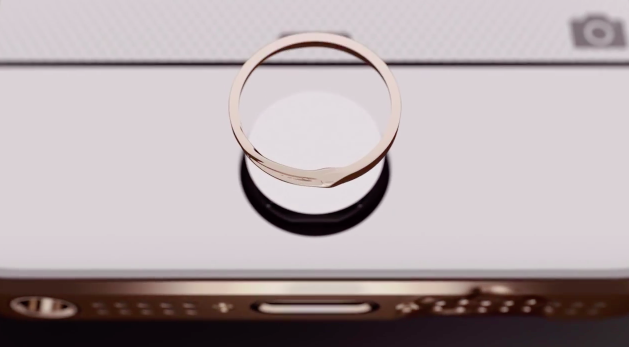
Unlike their first generation counterparts, the redesigned MagSafe connectors are not very forgiving when charging a laptop in your lap, on the bed, or on the sofa. In attempt to better balance the strength of the MagSafe connector, Tetrio has developed the Snuglet, a small ring that tightens the MagSafe connector just enough so that it stays in place when we’re using it, but is still supposed to come out of the laptop when it accidentally gets pulled. It pops into the charging port on your MacBook and is later removed with a removal tool (it looks kinda like a SIM tray ejector tool).

I won’t lie. I’m admittedly super skeptical of this particular KickStater because if it fails to prevent a falling MacBook then it’s really not that useful. I would love to see a proper demo video showing that the MagSafe 2 still works to save your MacBook’s skin when the cord is tripped on, especially with a laptop as light as the MacBook Air.

Tetrio are asking for $9,000 for their campaign, raising $2,977 so far. The first 250 backers can pre-order a pair of Snuglets for $12, while the second batch of 250 can pre-order it for $15. Everyone else can pledge $19 for their very own pair of Snuglets. Learn more about this Kickstarter and back the Snuglet here.


Apple’s 2013 ‘Back to School’ Promotion

Apple’s ‘Back to School’ promotion is live in the United States for the 2013 school year, offering incentives in the form of App Store gift cards to students who purchase a Mac, iPad, or iPhone. In addition to an education discout for qualifying Macs, students who purchase a Mac will receive a $100 gift card, and students who purchase an iPad, iPad mini, or iPhone will receive a $50 gift card. You can use these gift cards for iTunes purchases, to buy things like text books in the iBookstore, or to purchase apps from the App Store.

The promotion is open to any student, parent or staff member or a K-12 or higher education school with any purchase made between July 2nd and September 6th, 2013. If you order online, Apple is offering free shipping on orders over $50. Apple is also suggesting various back to school accessories like backpacks and cases on the ‘Back to School’ promotional page.


Sponsor: ReadKit

Our thanks goes out to Webin for sponsoring MacStories this week with ReadKit.

If you want to read articles from Instapaper, Pinboard, and your favorite site feeds all in one place, look no further than ReadKit on the Mac. ReadKit supports read later apps like Pocket and Readability, and connects with feed readers like NewsBlur, Newsbin, Fever, and Feed Wrangler. Plus ReadKit has its own feed engine for reading your favorite sites locally. Not only is it versatile, but it’s beautiful as well. ReadKit looks like it was built just for the Mac, and lets you read articles without page elements like spammy links with Focus mode. One of our favorite features is smart folders, which let you group together related articles from your feeds based on a custom set of rules. You can even tag articles and bookmarks to find related things later.

ReadKit manages to bring together the web’s best services for saving and sharing the articles, images, and videos you save online under one roof. Download ReadKit from the Mac App Store for $4.99, or learn more here.


Reeder 3.2 Brings Feedly, Feed Wrangler Sync

As announced last month, an update to RSS client Reeder for iPhone has been released today on the App Store, adding support for Feedly and Feed Wrangler. Arriving just in time for Google’s shutdown of Reader, the latest Reeder update for iPhone brings the app’s supported sync services to four (previously added Feedbin, Feedly, Feed Wrangler, and Fever) and removes Google Reader from the “Add Account” screen (existing accounts won’t be deleted from the app).

Feedly and Feed Wrangler integration in Reeder is solid, but it lacks some features. While I have been generally happy with Reeder’s speed in syncing with Feedly and Feed Wrangler, the app lacks support for Smart Streams – a key functionality of Feed Wrangler that’s already supported by clients like ReadKit and Mr. Reader. To access Smart Streams on the iPhone, my recommendation still goes to Feed Wrangler’s official app, which may not be as polished as Reeder, but that works perfectly with the service’s Smart Streams.

Reeder, a longtime MacStories favorite, is moving into the post-Reader era with an iPhone update that should work for most people and major iPad and OS X updates on the horizon. Developer Silvio Rizzi hasn’t provided a release date yet, but he announced the iPad version will be a completely redesigned app. Due to the lack of compatibility updates, both Reeder for iPad and Reeder for Mac have been removed from the App Store.


Apple Announces Q3 2013 Conference Call for July 23

Apple’s third quarter earnings report and conference call will take place on July 23rd, 2013, according to an Investor Relations update on Apple’s website first noted by 9to5mac. Apple will provide a live audio webcast of the event.

Apple plans to conduct a conference call to discuss financial results of its third fiscal quarter on Tuesday, July 23, 2013 at 2:00 p.m. PT / 5:00 p.m. ET.

In the second quarter (which ended on March 30, 2013), Apple posted revenue of $43.6 billion. The company sold 19.5 million iPads, 37.4 million iPhones, and  ”just under” 4 million Macs, earning a quarterly net profit of $9.5 billion. The company ended the quarter with a cash balance of $145 billion.

In April, Apple posted its guidance for the third quarter, with revenue set between $33.5 billion and $35.5 billion and operating expenses between $3.85 billion and $3.95 billion. During the quarter, Apple hit the milestone of 50 billion apps downloaded from the App Store, introduced a new low-end iPod touch, and held its annual Developers Conference in San Franisco, where it released an updated line of MacBook Airs and announced new versions of iOS and OS X coming this Fall. Apple also previewed the new Mac Pro, a completely redesigned new machine coming later this year.

In the year-ago quarter, Apple posted revenue of $35 billion, with 17 million iPads, 26 million iPhones and 4 million Macs sold. Last year, Apple held its Q3 2012 earnings call on July 24, and released OS X Mountain Lion on July 25. Apple’s Q3 2013 call will provide insight into sales of the iPhone and iPad over the past months, which lacked updates to both lines. On July 23, the iPhone 5 will reach the 305th day of its cycle, and the iPad mini its 263rd.

We will provide live updates from the conference call on our site’s homepage on July 23rd starting at 2 PM PT.


Feedly and Digg Reader For Most People

If I had to choose two alternatives to Google Reader, I’d pick Feedly or Digg Reader for most people. Moving to either service takes seconds since you sign into these services with your existing Google account credentials, after which they import your existing feeds with little fuss. Neither Feedly or Digg Reader require you to pay a subscription fee, making them good choices for casual readers and those who won’t get the value out of an alternative with pro features.

Google Reader will no longer be active after July 1st, and you’ll have until July 15th to export your existing feeds. I recommend following this guide by Katie Floyd if you want to back up your current subscriptions.

Why Feedly

Feedly is my reader of choice. Feedly has a solid web app that works in all major browsers from Google Chrome to Opera, plus they have great Android and iOS apps, making it one of the few alternatives that’s already available on most devices. It’s integrated with IFTTT, and there’s an open API so you can still use your favorite apps like Reeder. There will be a subscription for people who want more features down the road.

Feedly’s mobile apps are put together like a magazine, but they’re not as deliberate as an app like Flipboard. Folders are eschewed for colorful headers, and the endless feed of articles is replaced by covers and article groupings that can be flicked away like turning a page. It’s an app made for skimming, for picking and choosing, and the result is something that feels fresh and not boring.

You can share articles to Pocket or Instapaper, to Twitter or Facebook or Google+, to Buffer or your device’s clipboard so you can paste a link into a chat app like I sometimes do. There’s a section that only shows you the most popular stuff from your feeds for the day, and then there’s a section for browsing everything all at once. You can search for sites you like and subscribe to them, or browse general categories for things like technology and games to discover something new. There’s lots of swooshing and swiping gestures throughout the app; when browsing articles, swiping left and right advances to the next or previous article, and pulling up closes them so you can continue perusing. If you’re reading in the dark, you can change the theme from white to black.

My favorite feature is the giant button at the end of each section that lets you mark everything as read. It’s super clever.

You can download Feedly for iOS here.

Why Digg Reader

Digg Reader is a new feed reader that closely resembles Google Reader. There’s no Android app right now, but there is an iOS app. You won’t be able to plug Digg Reader into your favorite apps just yet, but an API is planned.

Betaworks, the company behind Digg Reader, has a history of working with products that track things on the web or help you discover the most popular stories. Bit.ly is a company of betaworks, as is recently acquired Instapaper. Betaworks created News.me, an iOS app that highlighted the best articles and videos your friends shared on Twitter. Today, News.me has stuck around as a service that delivers the day’s best stuff to your inbox. Betaworks also revived Digg, turning it into a handcrafted site that presents the web’s top stories.

Digg Reader is a modern take on Google Reader, integrating betaworks’ intimate knowledge of what’s popular from Digg into its core. Thus, the best feature is the popular view, which presents a list of the most popular unread articles from your feeds. The layout is very clean and simple, the reading experience being a prime focus for both the web and mobile apps. Digg Reader is much friendlier to look at and use on a daily basis than other alternatives.

The web app is currently the most robust and is very friendly to those who are accustomed to Google Reader’s keyboard shortcuts. You can share articles to Facebook or Twitter, and choose to save articles to apps like Instapaper, Pocket, and Readability. The things you Digg can also be publicly shared through a user specific URL. Like Feedly, Digg Reader lets you search for sites and discover something new in a variety of categories. The iOS app currently lacks the popular view, but it does have a darker theme for evening reading.

I recommend Digg Reader over Feedly if you read on your computer more often than your tablet or phone.

Digg on iOS has Digg Reader built-in. Download it here.