


Apple has today aired a new iPad Air commercial called “Your Verse Anthem” focused on the capabilities of the iPad as a device to express the creativity of the human race. The ad features voiceover by Robin Williams taken from the movie Dead Poets Society; in the clip that Apple chose, John Keating (Robin Williams) describes why people read and write poetry and how everyone can contribute a verse to the world. Interestingly, as noted by Linus Edwards, this isn’t the first time Apple has been inspired by Dead Poets Society. Read more
Posts in news
Apple Airs New “Your Verse” iPad Air Commercial
Interesting Announcements From CES 2014
This Week 1.2 Adds iPad Support
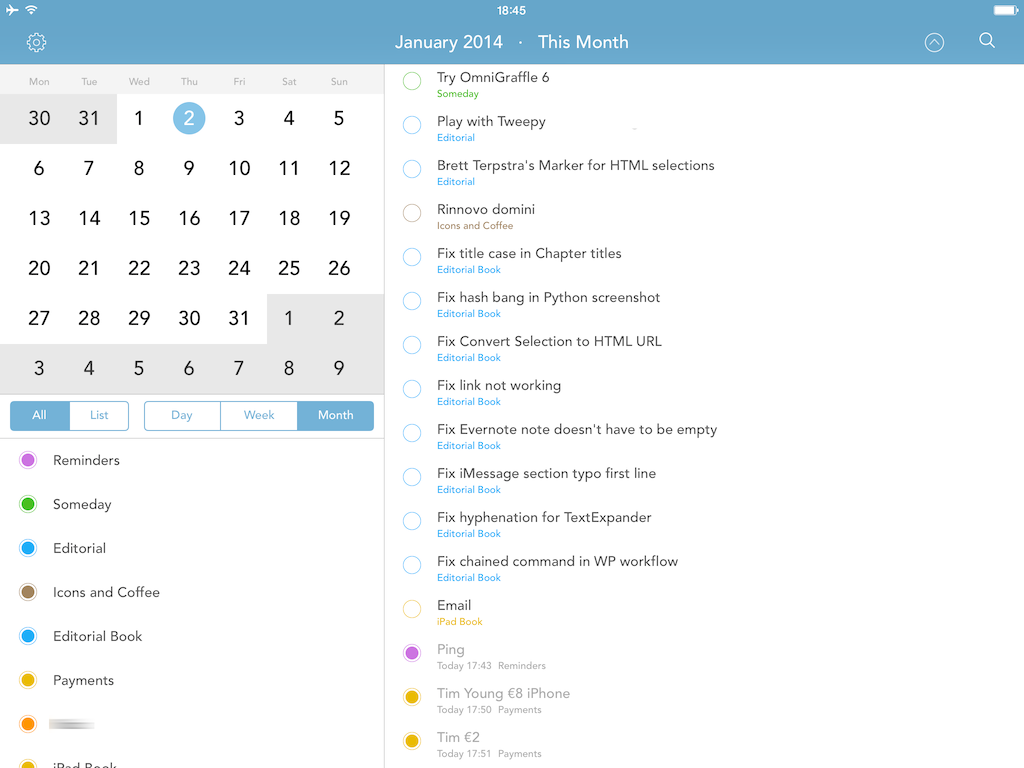
In December, I covered This Week, a lightweight Reminders client for iPhone that displayed todos on a weekly basis, providing a simpler and more intuitive interface than Apple’s Reminders app. Since my post, the developers added three additional views to the app (List, Day, and Month) and, last week, released version 1.2 with iPad support, making This Week Universal.
On the iPad, This Week is a nice alternative to the stock Reminders app: on the left side of the screen, you’ll get a small calendar widget at the top and view filters at the bottom. Depending on the view you choose, time blocks in the calendar will be highlighted with a white selection; by default, All > Month gives you a complete summary of all your due and overdue reminders from all your lists. Tap one of the lists, however, and the app will filter results on the right, dimming unselected lists in the sidebar. You can tap reminders to view details in a popover, or tap & hold them to open the popover in “Information” mode, where you can’t edit and you’re limited to viewing details.
This Week 1.2 is a nice update but the app still has a long way to go to become a full-featured Reminders client. URLs in notes aren’t tappable and there are no settings to control font size; there’s no URL scheme for power users, and the app could use more filter and navigation tools to, say, only show repeating reminders or those with a location attached. Considering the scarcity of Reminders clients for iPad, though, This Week 1.2 is a welcome addition, and $4.99 on the App Store.
Ecoute 2.1 Adds Up Next, Queue Management
In my review of Ecoute 2 for iPhone, I noted how the app lacked a proper queue management system to replicate the Up Next feature of iTunes for Mac:
Ecoute has a “Play next” feature, but, alas, there’s no Up Next-like queue management: adding a song to the queue will put it at the top of the queue, not at the bottom after songs you’ve already queued up. On iTunes for Mac, you can either play a song next or add it to Up Next, but Ecoute can only “play next”. Furthermore, the Play Next button is based on another workaround that’s a byproduct of playback managed by the Music app: Ecoute can’t create a real queue in Music, and therefore every time you’ll add a song to the queue you’ll hear a brief interruption as the currently playing song stops and resumes itself. This is a hack, and it works, but it’s not elegant and the app doesn’t have all the queue-related features of iTunes 11, which is unfortunate.
In an otherwise excellent update that made Ecoute 2 my favorite alternative to Apple’s Music app, the lack of Up Next stood out. Fortunately, developers Louka Desroziers and Julien Sagot were already working on improvements to the queue functionality, which are available today in version 2.1 of Ecoute, released on the App Store.
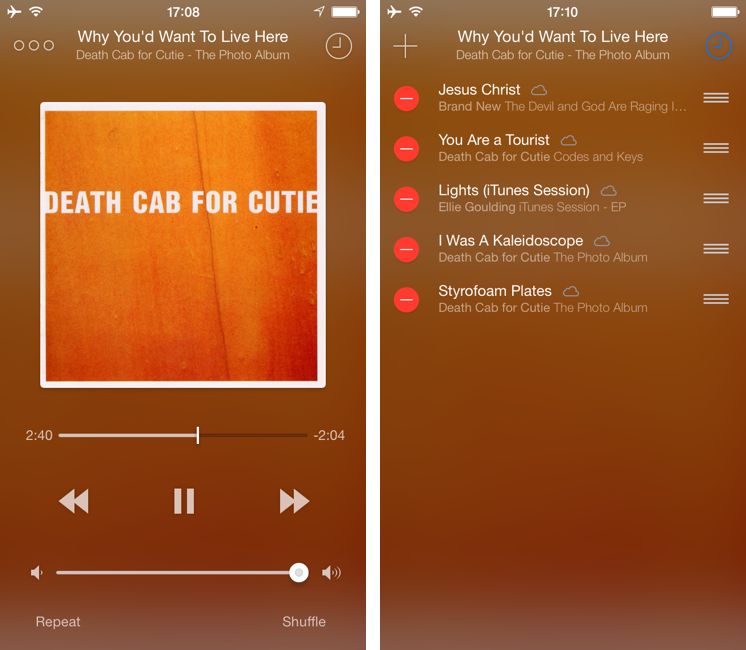
When playing music in Ecoute, you can now choose between “Play Next” and “Add Up Next” from the tap & hold menu; this works for individual songs as well as entire albums or playlists. The way Ecoute’s queue works mirrors iTunes 11: you can play a song immediately after the currently playing one, or you can stack songs at the bottom of the queue.
Up Next can be accessed by tapping the clock icon in the Now Playing screen (which has been redesigned to show blurred album art in the background, like Apple’s Remote app). Songs can be removed and rearranged in the queue, and you can add more through the “+” button in the top left corner. Right now, Ecoute uses the default Music picker to add songs manually to the queue, but the developers confirmed they are working on their own solution.
There are still some bugs and hacks that Ecoute has to employ to work around Apple’s limitations for iTunes Match and queue management on iOS. Overall, though, Up Next is a solid addition to an app that I already considered superior to Music for navigation and responsiveness of the interface. Ecoute is $2.99 on the App Store.
App Santa: Tweetbot, 1Password, Vesper, and 12 Other Great iOS Apps On Sale For Christmas

Back in 2006 and 2007, there was an initiative called MacSanta that, through a holiday sale, allowed users to buy great Mac apps at discounted prices. Today, App Santa has launched, and while the project isn’t affiliated to the old MacSanta, the core idea is the same: great, award-winning apps on sale for Christmas.
The apps included in App Santa are all for iOS devices and have been discounted up to 60% off the original price; the project is the collaboration of indie developers Tapbots, Q Branch, Contrast, Readdle, TLA Systems, Junecloud, Edovia, Realmac, and Bloom Built. These are all great apps that we’ve reviewed or mentioned in the past on MacStories, so check out the links below for the full discounts available on the App Store.
Note: If you don’t see the discounted price on the App Store yet, keep refreshing – price changes are propagating in iTunes.
- Tweetbot 3: $4.99 > $1.99
- 1Password 4: $17.99 > $9.99
- Day One: $4.99 > $2.99
- Vesper: $4.99 > $2.99
- PCalc: $9.99 > $6.99
- Delivery Status: $4.99 > $2.99
- Printer Pro: $6.99 > $2.99
- Mileage Log+: $9.99 > $4.99
- Perfect Weather: $2.99 > $1.99
- Launch Center Pro: $4.99 > $2.99
- Clear+: $4.99 > $1.99
- Screens VNC: $19.99 > $14.99
- PDF Converter: $6.99 > $2.99
- Calendars 5: $6.99 > $2.99
- Scanner Pro: $6.99 > $2.99
Rdio for iOS Gets New Profile Views, Sleep Timer
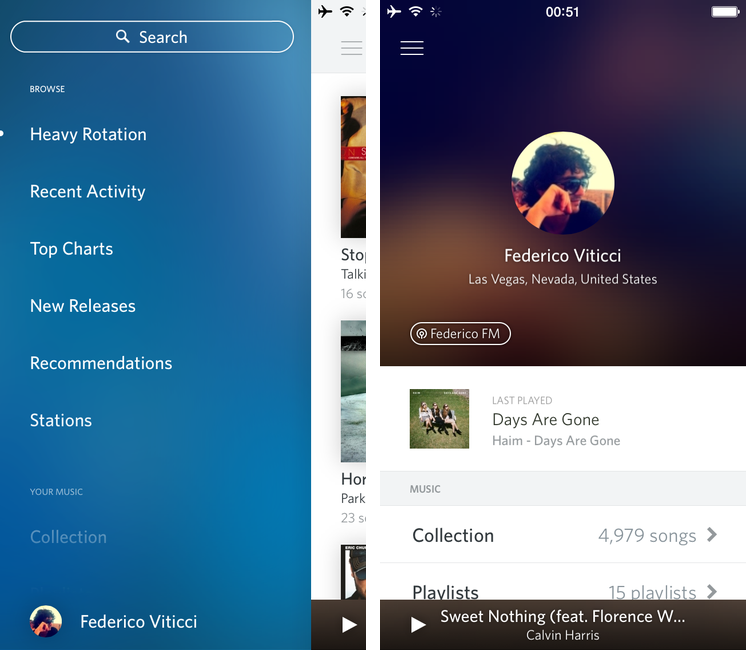
Music streaming service Rdio has today released an update to their iOS app that brings a new design for Profile views, a sleep timer, and various UI improvements for iOS 7.
The Rdio app has been regarded as one of the iOS 6 apps that, in hindsight, got the design of iOS 7 right before Apple even unveiled iOS 7, but, after the release of the OS in September, Rdio hasn’t done much to turn what was a forward-looking iOS 6 app into a real iOS 7 app. Today, version 2.5.4 shows an iOS 7 keyboard for search and it brings subtle changes to backgrounds, but otherwise Rdio hasn’t received a major redesign for iOS 7 yet.
Profiles views have been updated, showing avatars in the middle of the screen on a blurred background of the profile picture itself. The new design is available for both your personal profile and other people’s profile views, and it gives you easier access to a person’s “FM” station as well as the song they last played on Rdio.
In this update, Rdio also included a sleep timer feature: from the Settings, you can choose to automatically stop music playback after 15 to 120 minutes, which is a handy addition for people who like to put on some music before bedtime. You can get Rdio 2.5.4 on the App Store.
Camera+ 5 Brings “The Lab” Editing Features, New Icon
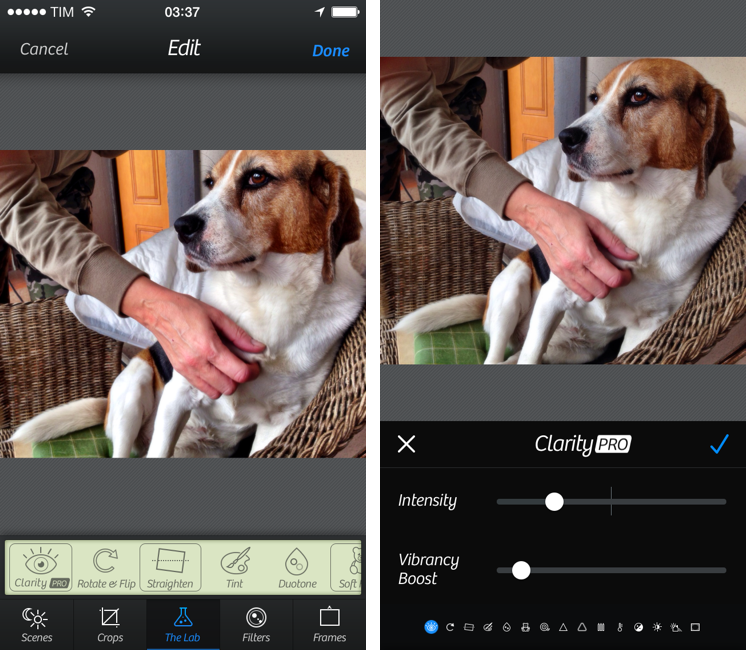
Released today as a free update for existing customers, Camera+ 5.0 for iPhone brings new editing features in a section called “The Lab”, redesigned icons, and interface updates to captions and filter layering. Read more
Apple Posts “Best of 2013” iTunes Lists
Last night, Apple published its annual “Best of iTunes” list, which includes editorial picks for the best releases in music, movies, TV shows, apps, books, and podcasts of 2013. The special page, featured across the entire iTunes Store, can be viewed here.
For apps, as in previous years Apple has picked apps and games of the year, runner-ups, and other notable app releases of the year. The App Store category is organized in iPhone, iPad, and Mac apps; this year, Apple has included sub-sections as “Trends”, listing apps belonging to popular categories such as photo editing, productivity, and multiplayer games.
On iOS, Apple has picked Duolingo and Ridiculous Fishing as app and game of the year for iPhone, and Disney Animated and BADLAND on the iPad. For the Mac, Apple has chosen Wunderlist and XCOM: Enemy Unknown as app and game of the year; on the Mac App Store, Apple hasn’t included Trends, opting for a simpler “best apps” and “best games” organization.
Last year, Apple picked Day One and Deus Ex: Human Revolution as winners for the Mac; Paper and The Room for the iPad; and Action Movie FX and Rayman Jungle Run for the iPhone.
We have compiled the full list of apps below.
Apple Airs iPhone 5s Holiday Commercial Featuring AirPlay

Just in time for the holidays, Apple today aired and published a new iPhone 5s commercial focused on AirPlay and the impact that capturing memories can have on real life scenarios. The commercial, called “Misunderstood”, was first spotted by 9to5mac and subsequently posted by Apple on their official website and YouTube channel.
The commercial is interesting for a variety of reasons. The underlying theme is fairly straightforward: there’s a family gathering for Christmas, with parents, grandparents, kids, and other relatives getting together to celebrate the holiday. It’s snowing and kids are playing outside, running, building a snowman, and taking walks with their parents. Inside, adults are making preparations, cooking, talking by the Christmas tree – perhaps they’re seeing each other after months of work and normal life routine that prevents them from being always together, all the time. It’s a typical Christmas family reunion.
There’s a teenager with a 5s who in the first half of the commercial is shown constantly checking his iPhone: he’s holding the iPhone as he greets his relatives, he’s absorbed in the display and apps while everybody else is seemingly having a good time, and, again, he goes back to his iPhone while others are looking at the festive tree inside the house. At one point, his grandfather throws a hat towards his iPhone’s camera to grab his attention – “Put that thing down and come join us!”, the commercial seems to say. We’ve all seen (or been) this kid in our lives, full of electronic devices.
And then the commercial changes: as the entire family is gathered in the living room, the boy walks in, his iPhone in hand, and turns on an Apple TV connected to the television. He connects the iPhone to the Apple TV wirelessly with AirPlay, and he starts streaming a video. This is where Apple reveals the story behind the ad: the kid wasn’t just isolating himself from his family because he was bored and he needed his apps – he was making a home video for his family. The perspective changes: what, from the outside, looked like a teenager ignoring family members reveals photos and videos taken with the iPhone’s camera and (likely) edited with iMovie. There are touching clips of kids playing, people hugging, laughing, kissing, and just having the good time that everybody wants to have for Christmas – when life routine is far away in the city and you get to wake up late and take a walk with your kid in the snow. Heads turn in the living room – “How did you make this?”, you can almost hear people ask.
The iPhone shown in the first half of the commercial wasn’t being used as an escape device to kill boredom – it’s advertised as a creation device used to create memories, edit videos, and share a touching moment with family members that you don’t see much often anymore. From the iPhone’s camera point of view, now mirrored via AirPlay onto the big screen for others to see, everything makes more sense: seeing relatives and watching them talk, play, and share personal moments. The iPhone was used to record life rather than escape from it. The home video ends, notably, with a selfie; people are happy, the kid is happy. Cut to family house seen from outside. Happy holidays from Apple.
Apple’s new commercial may be deemed as unrealistic by some (an Apple TV at your grandparents’ house? Teens not using Snapchat?), but it’s good. It’s relatable, human, and it highlights the iPhone’s best features (the 5s’ camera, SloMo, powerful video editing, streaming, music) with the personal touch that Apple has been employing in the past years for commercials such as Photos, Music, and FaceTime Every Day. It’s a clever commercial in that it sells a product while telling a story that people know – but from the angle of technology empowering us in new ways.
The inclusion of the Apple TV and AirPlay is interesting. AirPlay, in its various forms, has long been considered one of Apple’s most undervalued features, and the company is trying to position it as an easy to use and useful companion to the main iPhone experience. There are no screens showing how AirPlay is activated or the Apple TV interface, but the message is there: there’s a way to show iPhone videos on the television. It’ll be interesting to see if Apple will follow-up to this in future commercials.
As Christmas approaches, Apple is once again advertising the iPhone as an experience more than a gadget. It’s not about the camera sensor, the faster processor, the apps, or wireless streaming taken individually – it’s about how all these elements, together, make technology (in this case, Apple’s technology) fit into our lives, empowering us.
You can watch the commercial below.