With our annual OS reviews out of the way, Federico and I will be covering our favorite indie apps that take advantage of Apple’s latest OS features. We have hundreds to draw from and instead of one big sweeping roundup, we’re going to do a bunch of smaller ones as we work our way through our lists.
To start with, we have six excellent apps that make use of Siri AI, Apple Intelligence, extra-large widgets, and more. There’s a lot of innovation packed into this group, so let’s dive into the details, and check back soon for more roundups.
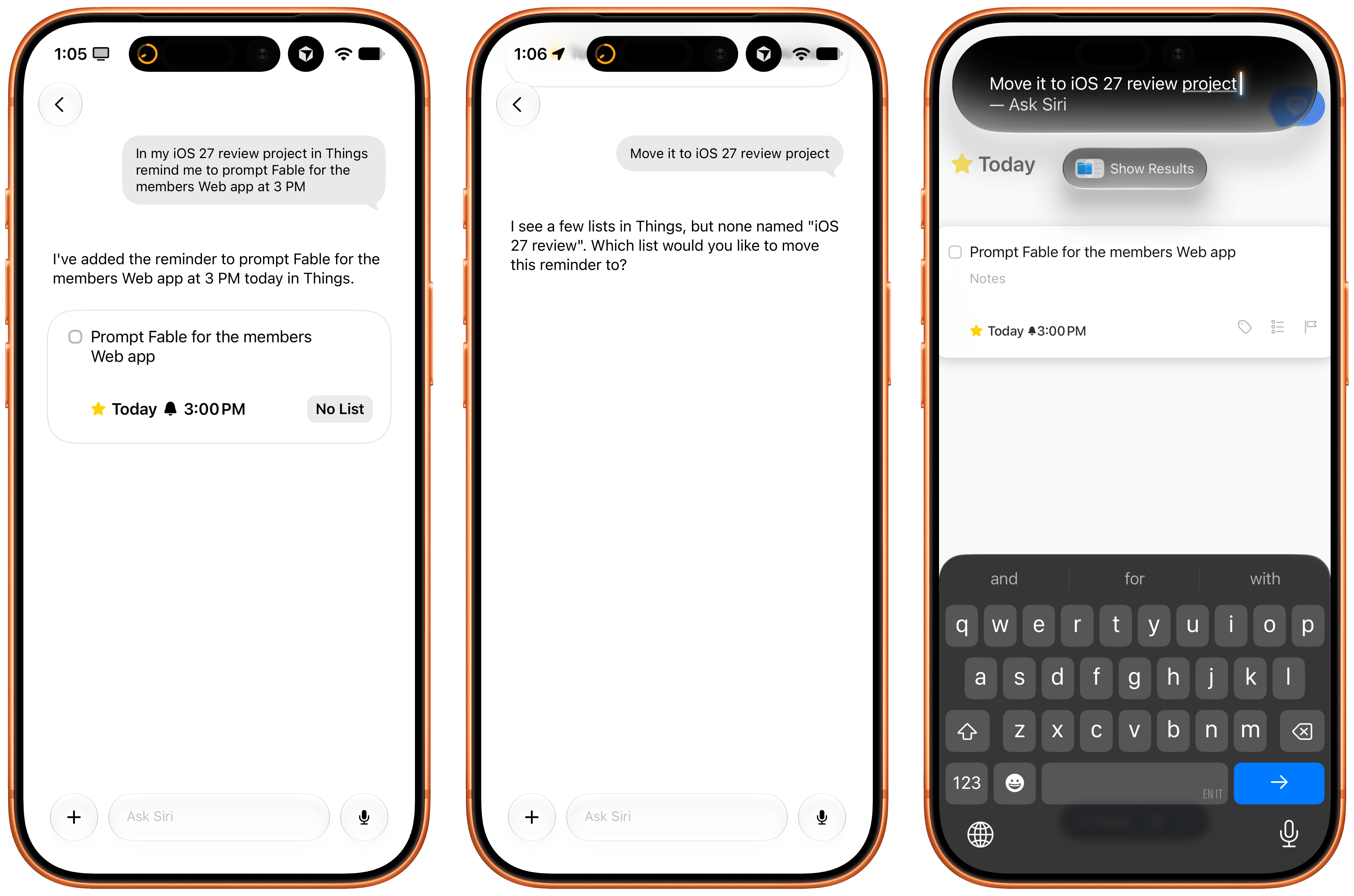
Cultured Code’s beautiful task manager is no stranger to supporting major Apple OS releases: while the company is keeping quiet on their plans for a possible Things 4 (Things 3 was released in May 2017), for the past nine years Things has regularly received support for new versions of iOS, iPadOS, and macOS on day one. The app’s iOS 27 update is no exception, and it makes for a great demo of some of the new features of Siri AI as well as XL widgets for iPhone. It also serves as an example of the limitations of Siri AI – and not because of Cultured Code.
The updated Things app integrates with Siri AI and Spotlight, allowing you to retrieve and open tasks from anywhere on iOS and iPadOS, as well as manage tasks with the assistant using its several input methods. In my tests, Cultured Code’s integration worked well, but Apple’s slow on-device indexing was the problem. Soon after installing the app, I was able to ask Siri to create a reminder, and it prompted me to pick a destination app again because I’d installed a few more task managers since I last confirmed my previous choice. After picking Things, I was able to create a task, which landed in the inbox, and then follow-up with Siri AI by saying “make it due at 3 PM”, and it worked.
The issues I ran into, which are outside of Cultured Code’s control, are due to how long it takes iOS 27 and Siri AI to build an index of the app’s capabilities and data structure. For instance, I created an ‘iOS 27 Review’ list in Things, but, after three hours, Siri AI still can’t find it. As I noted in my review, I believe this is going to be a major challenge for most third-party apps in the short term as users download them, expect them to work with Siri, but the indexing isn’t going quickly enough.
Regardless of Apple’s technical problems, Things’ integration with Siri AI shows the path forward for third-party task managers on iOS. I also recommend reading the developers’ guide on how to prompt Siri AI for the app.
I covered the differences between Apple’s two flavors of local Foundation models (AFM 3 Core and 3 Core Advanced) in yesterday’s review, but there’s no better way to actually take the model for a spin than Locally AI.
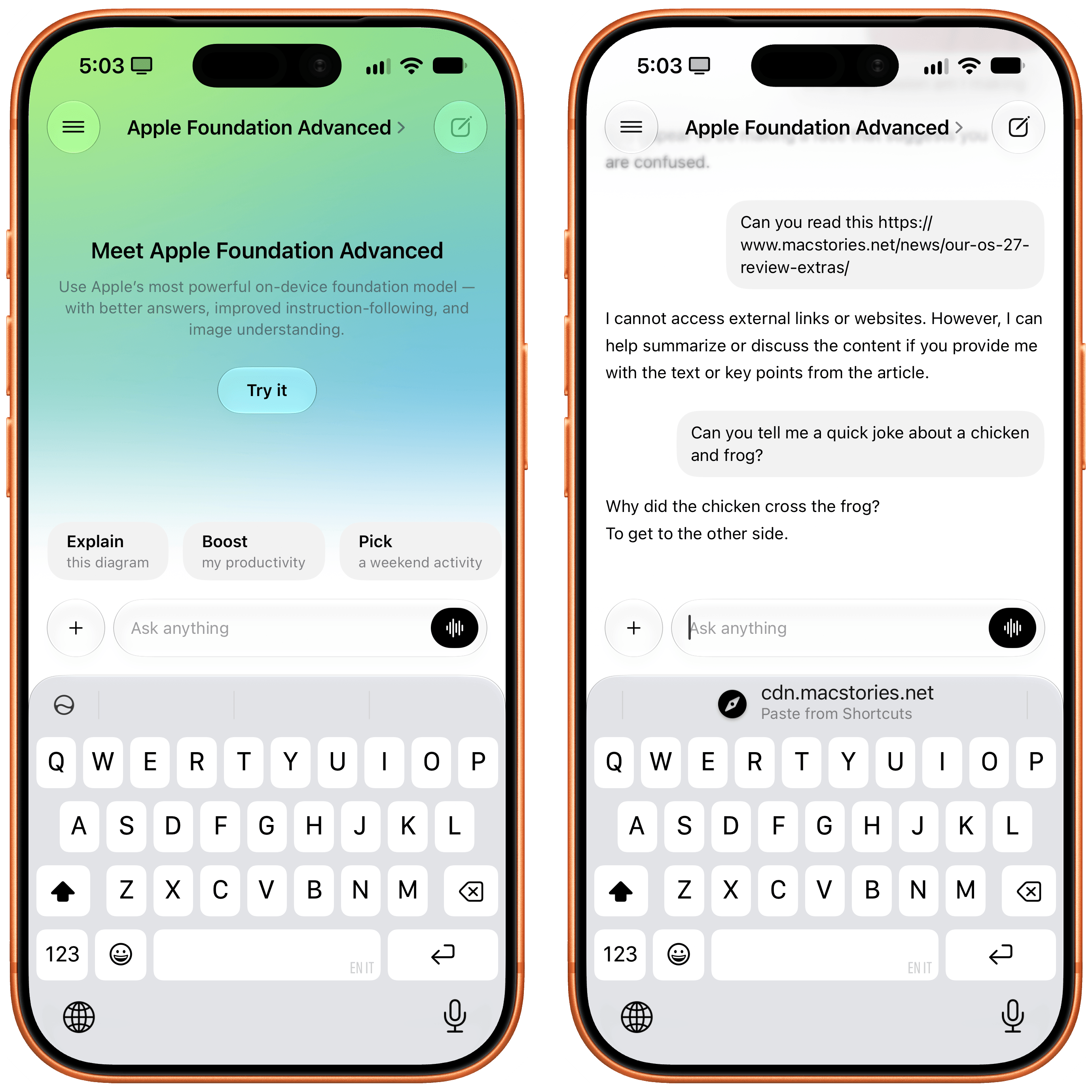
The app, which is now part of the LM Studio family of products and can connect to a remote Mac using LM Link, now offers an ‘Apple Foundation Advanced’ model that, assuming you have a compatible device, lets you prompt Apple’s new on-device model.
A good way to prompt this model is to give it an image: for the first time, a local Foundation model comes with vision capabilities, and I’ve found Core Advanced to be surprisingly strong at describing things like iPhone screenshots, selfies with different facial expressions, and more. Obviously, it comes with limits: Locally AI’s harness doesn’t expose tools to the model, which means it can’t fetch web content and, say, summarize articles for you in the app. Its knowledge and creativity are also quite limited, as you can see from the non-joke it created in the screenshot above.
Still, despite the limitations of the model itself, Locally AI is an excellent utility for running local models on iPhone and iPad, and if you’re curious to see what Apple’s bigger models feels like outside of Siri AI with your own prompts, I recommend checking it out.
Charlie Chapman’s Dark Noise has long been my favorite utility to play white noise and other sound effects to relax or focus, and the app has received a substantial update for iOS 27 worth checking out.
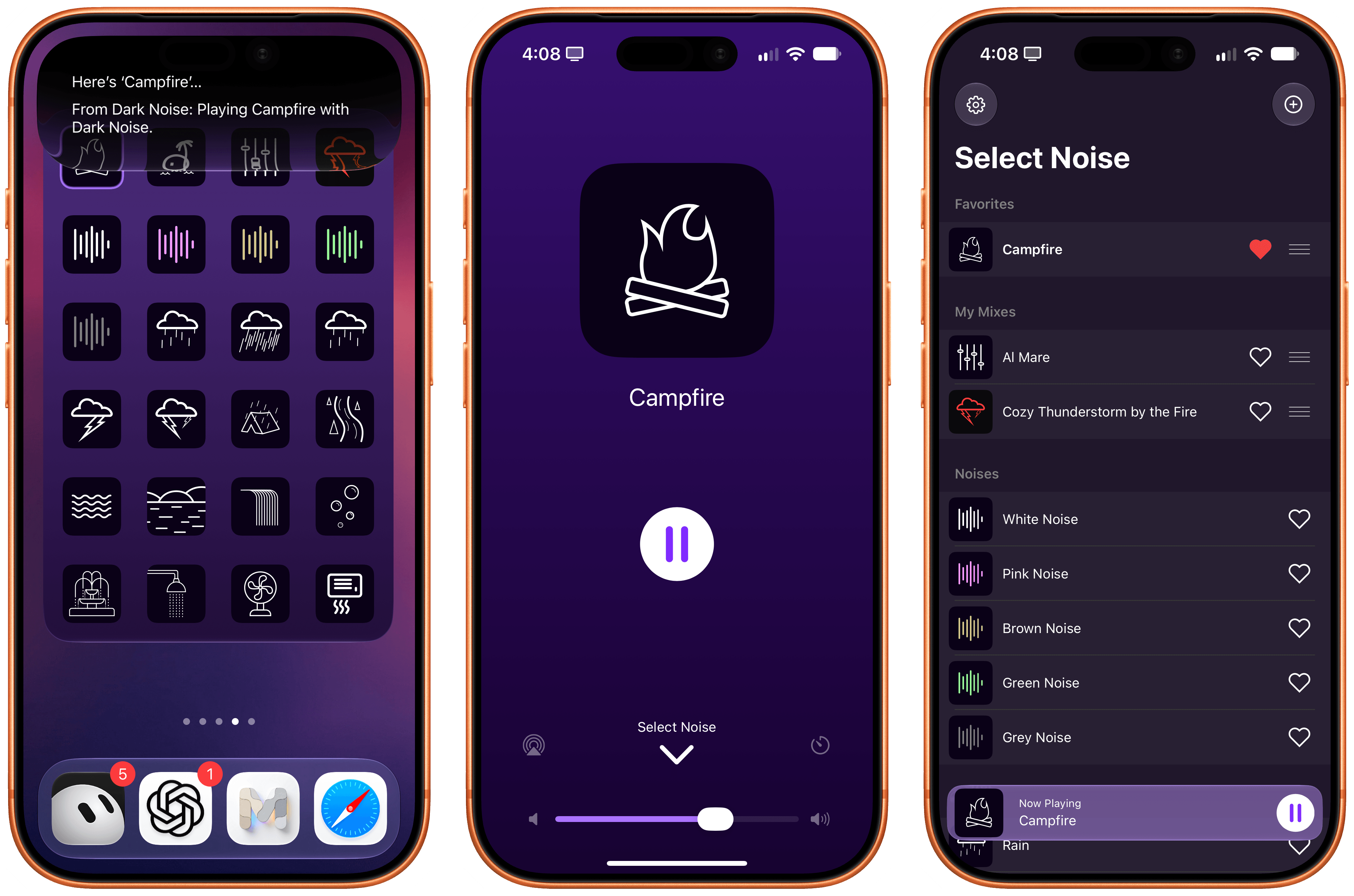
First, there’s a good-looking new Liquid Glass player that fluidly morphs on-screen from a mini-player docked at the bottom of the app into a full-screen view that lets you control playback, volume, and set a sleep timer. On the Home Screen, there’s a (customizable) XL portrait widget for iPhone that lets you configure any combination of up to 24 distinct sounds and mixes that you can play with a single tap without opening the app.
As you can imagine, the app also integrates with Siri AI now. Using Apple’s assistant, you can ask to play specific sounds from the app (make sure to add “…from Dark Noise” to your request) and you can also leverage on-screen awareness inside the app itself. While looking at your list of favorites and mixes, for instance, you can say something like “play the second mix”, and since Chapman has properly annotated the app’s views, Siri AI and Dark Noise will know what you mean.
If you, like me, struggle to get work done with music in the background but also do not appreciate complete silence, I recommend installing Dark Noise and creating a few mixes of your own.
I first covered Francisco Cantu’s AskPlay when it debuted on the Mac earlier this year in the App Radar for Club members, where I wrote:
Created by indie developer Francisco Cantu (a name that should be familiar to longtime MacStories readers!), AskPlay is one of the best new Mac apps I’ve tried in a long time, and we will properly review it on MacStories in the near future. The idea is simple: AskPlay gives you natural language control over Apple Music to play or queue songs. The app, which lives in the menu bar but can also be invoked with a system-wide hotkey, brings up a Spotlight-like floating search box where you can type or say things like, “Queue some ‘90s hip-hop,” or, “Play something like Oasis,” and have an AI carry out the request.
The app can build mixes for a mood or era, start stations, manage the queue (you can ask to move songs up or down), control playback, and add songs to your library or playlists, and it also answers questions such as, “Who sings this?” You can either type your requests or set a voice hotkey that summons the app already listening, pausing your music while you speak. AskPlay is a bring-your-own-key app, so you’ll need an API key from OpenAI, Anthropic, or OpenRouter in addition to an Apple Music subscription (and a subscription to the app itself).
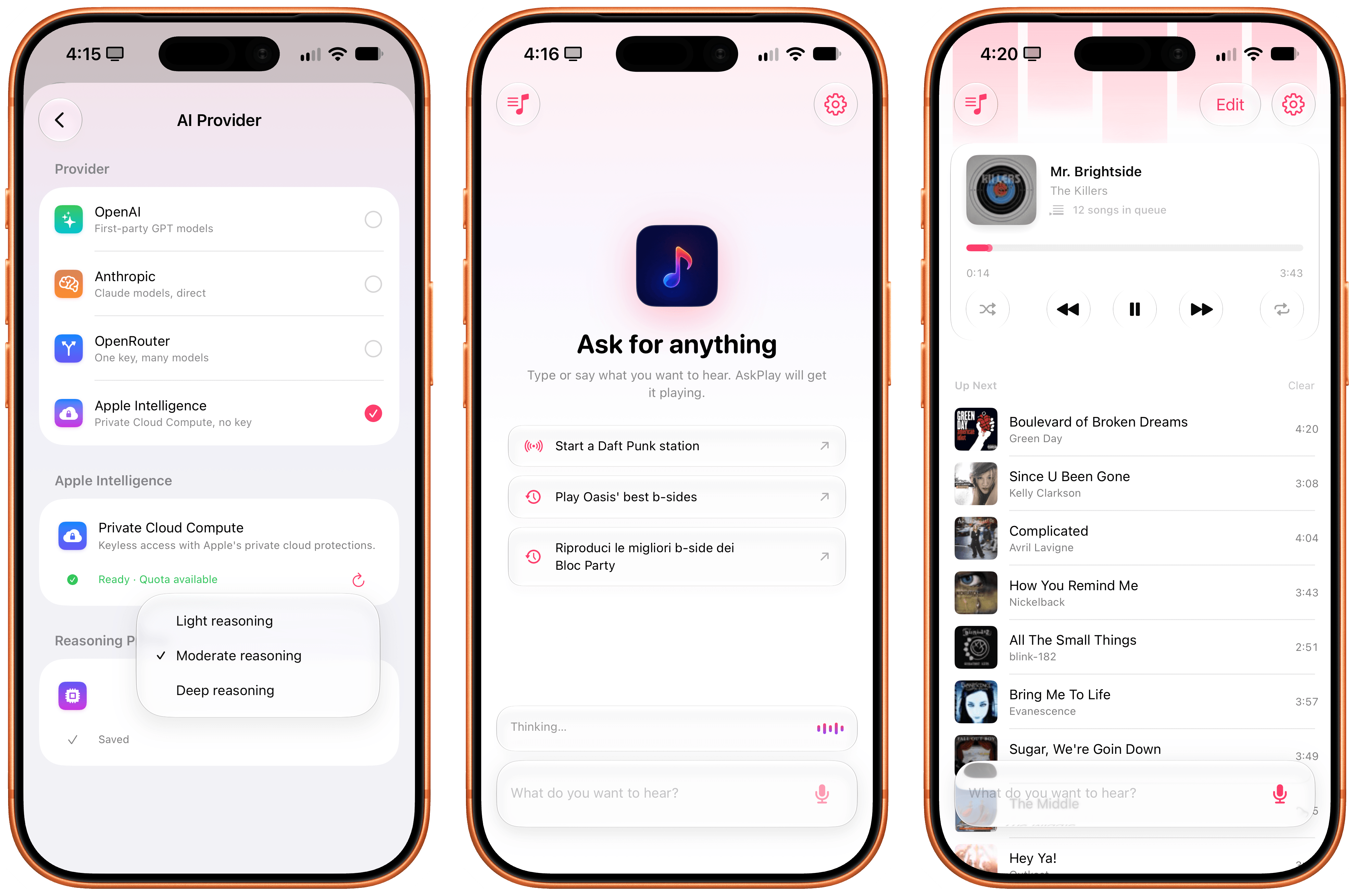
AskPlay is now on iPhone too, and thanks to iOS 27, it’s become one of my favorite showcases of Apple’s Cloud Pro Foundation model running in Private Cloud Compute. Unlike the original version, AskPlay now lets you hand off prompt processing to a reasoning model in the cloud at no cost thanks to Apple’s PCC framework for third-party developers. And not only that, but AskPlay is also the first app I’ve seen that lets you choose between the three reasoning modes supported on PCC: light, moderate, and deep.
In my experience, I’ve had the best results with the PCC model set to “moderate” reasoning. What this means in practice is that with AskPlay for iOS 27, we now have a way to generate Apple Music-based mixes using natural language with a quality that I find superior to Apple Music’s own playlist generation feature.
AskPlay remains one of the best app debuts of the year, and if you want to demo the capabilities of Private Cloud Compute for third-party apps, you should start here.
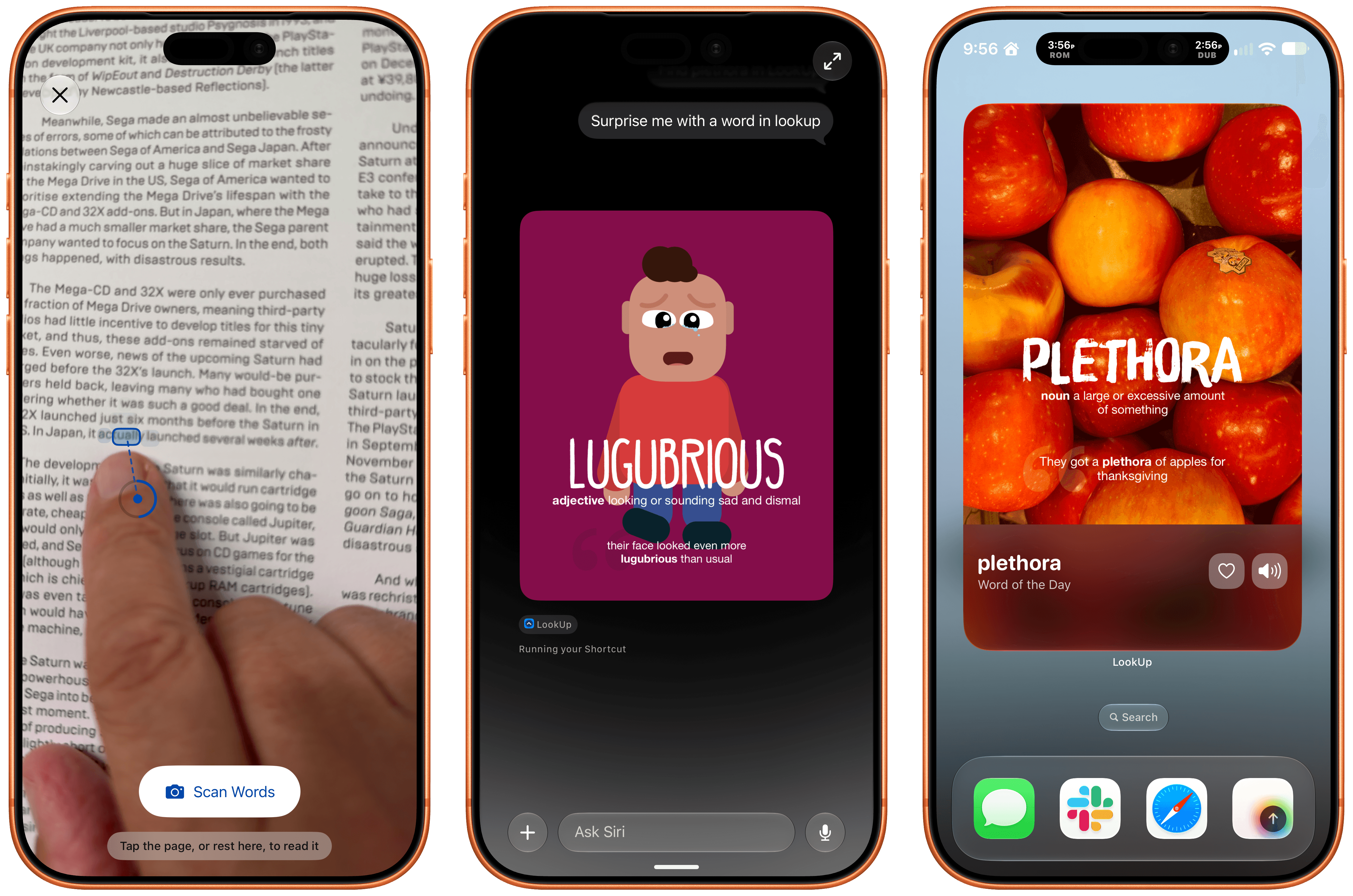
LookUp 13 from Vidit Bhargava has been released with a wide variety of features that make use of iOS and iPadOS 27. The app, which is available on the iPhone, iPad, Mac, Apple Watch, and Vision Pro, makes great use of Siri AI, allowing you to quickly ask Siri things like “Search the word plethora in LookUp,” which opens the app right to that word. Siri can also be used to find LookUp’s word of the day or a random word.
Beyond Siri, Vidit has added support for Apple Intelligence in the notes that can be tied to a word and combined Apple’s Foundation Models with the Vision framework and hand-pose tracking to let you scan a printed page for a word. Point at a word and the app’s scan mode uses your device’s camera to see which word you’re pointing at. It took a little practice to figure out the right distance from the camera to the page, but once I got that down, it felt like magic. The same feature can pick out other nearby words that might be difficult for the reader, too.
LookUp 13 also offers a Reading Mode that looks up words you speak as you read. The feature uses a Live Activity that listens to you speak, and returns a definition. Initially I ran into some trouble with Reading Mode, but when I tried again later, it worked every time. Also included in the latest release are interactive flash cards that ask for word definitions that are graded by Private Cloud Compute and new extra-large widgets for the word of the day and a shuffled word of the day.
LookUp is an excellent app. I love how Vidit continues to push the boundaries of Apple’s technologies every year, and while I hit a few rough spots in testing, which struck me as issues with Siri AI, not LookUp, I’m impressed by how much depth LookUp’s new Apple Intelligence features add to the app.
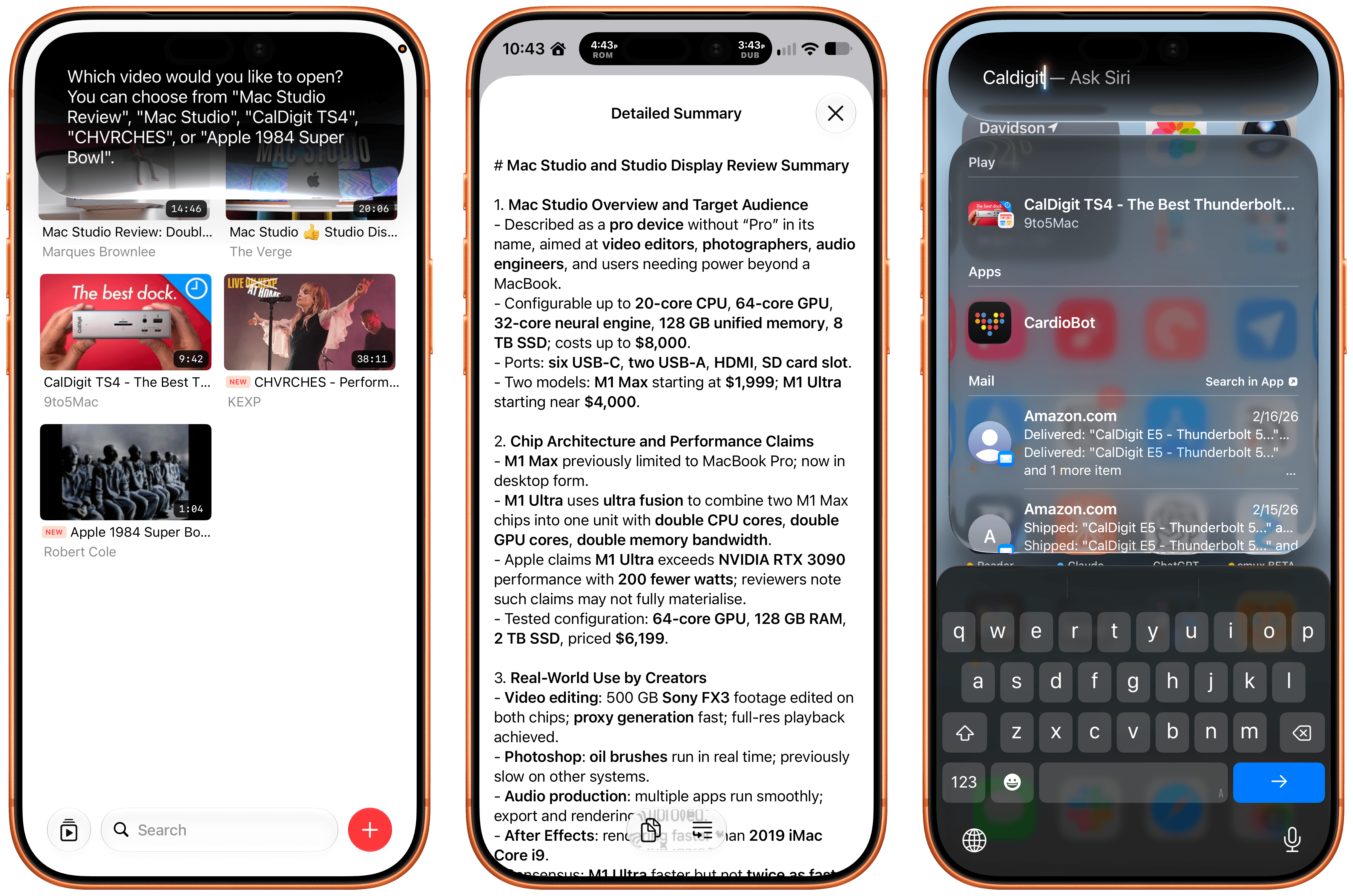
The latest update to Play, the watch-it-later app from Marcos Tanaka that works on the iPhone, iPad, Mac, Vision Pro, and Apple TV, includes a bunch of great touches. There’s a new Channels Inbox for navigating saved videos by source. Play has also added Siri AI support allowing you to search for and open videos. Onscreen content is made available to Siri, so you can do things like ask it to remind you to finish a video later, and it knows what you mean. In my testing, all three features work well.
Also, on an individual video’s detail view, you can use Apple Intelligence to create a summary of a video. There are options ranging from a concise summary to a simple explanation. I ran into a roadblock when I tried to create a summary of a fifteen-year-old YouTube video, but more recent videos all worked well. Apple Intelligence can also suggest tags and icons for videos and lets you ask questions, with the answers drawn from the video’s transcript.
Beyond Siri AI and Apple Intelligence, Play adds an extra large widget, a refreshed Liquid Glass design that I love, and Spotlight search. It’s a fantastic update to my favorite way to save videos for later.


 Federico
 John
John