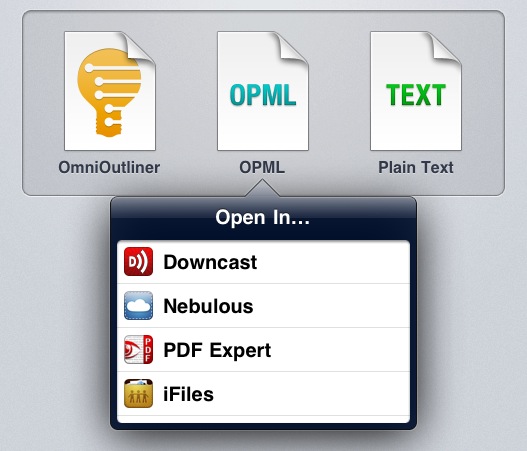
PDF Expert 3.0: Redesigned UI, Page Manager

PDF Expert by Readdle is my favorite app to collect, read, and annotate PDF documents on the iPad, and thanks to a series of updates in the past months it’s also become a solid alternative to iBooks on the iPhone, not to mention support for signatures and text notes. With the major 3.0 update released today, free for existing iPad customers, Readdle has completely revamped the user interface of PDF Expert, adding a new toolbar for annotations, notes, drawing shapes on screen and highlighters, as well as a “page manager” to act on single pages within a document, copy them, export them, and move them with drag & drop.

The new toolbar in PDF Expert for iPad is easily dismissible with a tap on the “x” button, so you won’t have to look at it all the time while you’re reading a document. Similarly, a single tap on the edit icon in the upper toolbar (the one that contains navigation buttons, the new Recents menu, search, bookmarks, and sharing options) will display the annotation toolbar again. You can manually highlight text or use the automated tools for highlights, underlines and strikethroughs; you can add shapes, notes, your signatures, and choose from a variety of free-hand highlighters with different colors. Changes can be reverted at any time, and I haven’t noticed any visible slowdown when navigating annotated documents with hundreds of pages.

The new toolbar is clean and unobtrusive, but it gets better with the new Page Manager. With a tap on the pages button, you can switch to a bird’s eye view of all your document’s pages with live previews (that is, thumbnails include annotations and highlights). You can add a blank page between existing pages, select one and move it around – even select multiple ones, rearrange them, rotate them, email them, and extract them as a new document in PDF Expert’s main section. Live previews update fast on the iPad 2, and the “extract” function is undoubtedly useful if you need to focus on specific pages of a document.

PDF Expert 3.0 is a great update that improves both design and usability, whilst adding some other “little gems” you can check out in the app’s built-in update guide. PDF Expert for iPad is available at $9.99 on the App Store. Read more


The “Apple TV Set”


Jean-Louis Gassée notes how the “Apple television” that’s been long rumored among Apple fans and the tech press will have to face two problems: architecture and implementation.

As many imagined, the device would look something like this:

Imagine a true plug-and-play experience. One set with only two wires: power and the cable TV coax. Turn it on, assert your Apple ID credentials and you’re in business.

But then it would come down to getting cable channels into the set:

Large carriers, such as Comcast, are known as Multiple System Operators, MSOs, with an emphasis on the “M”. They’re a patchwork of acquired systems that have never needed to be compatible. This would either restrict the TV set to a small number of carriers, or make the product more complicated and prone to more bugs — and more field tech visits.

And on top of that, Apple would have to solve the problem of easily troubleshooting a 50-inch screen, or simply figure out a way to get people to upgrade to newer models of “Apple TV set” every couple of years:

We’re willing to upgrade our laptops, smartphones, and tablets every year or two because Moore’s Law keeps improving the CPU and other electronics at the rapid rate that made the computer industry’s fortunes. An integrated Apple TV set wouldn’t benefit from better electronics as naturally as an iPhone does…unless, of course, the tiny iOS computer is implemented as an easily accessible plug-in module.

I’d argue that the television market is so variegate, and potentially lucrative, that there’s more to figure out and correctly implement than U.S. cable providers and MSOs. Looking at Apple now, it’s hard to see a company willing to disrupt a market with a brand new, premium device…available exclusively in the United States. Even the Apple TV, “not part of the stool” and still considered a hobby, was released in the United States and Europe last year. Then look at the iPhone. It took almost four years to get there, but as it turns out the majority of profits now come from regions outside Americas (and iPhone is “key driver” of Apple’s revenue in Greater China – more context here and here).

The problem with the Apple TV set isn’t an “American cable company” (you name it) – it’s the television market as a whole. If we take in account the segments and population that can afford an HDTV nowadays – assuming it falls somewhere in between the $500 - $3000 range – it’s easy to see how Apple will have to make a product that ultimately just works with any television content provider in the United States, Europe, and Asia. Why would they ignore those markets?

There are greater issues to solve and differences to consider in the international TV market. Just a few examples: Italy still switching from analog to digital TV, satellite’s popularity in many areas of Europe, or some ISPs’ offerings with Internet/ TV packages. Supposedly, Apple will have to come up with a solution to work around these, in several countries. Italy may not be Apple’s finest source of revenue, but Europe/Japan/Asia-Pacific combined made for $14.94 billions of revenue in Q3 2011. I’m just assuming some of these Apple customers would also be interested in a TV set from Apple.

We don’t know what Apple has in mind, we can speculate on the company’s margins for such a device – we can only imagine that there is a market to disrupt because the current television sets are too difficult to configure and troubleshoot, with different user experiences and fragmented interfaces, store fronts, or even remotes.

I believe the question isn’t what will the TV set from Apple look like, as we can make a pretty accurate guess about that. Rather, I’d speculate on how many markets Apple is willing to enter at once, and its timing.


Makayama Movie Mount for iPad 2

The iPhone’s built in camera is one of the most popular cameras in the world – ask Flickr. Many people were asking for a camera on the iPad 2, but it seems a very few use it because of its lackluster quality and awkwardness. Makayama, makers of mobile apps and software, has released the Movie Mount, an iPad 2 accessory that improves the way you can record video/pictures with the iPad 2.

The Movie Mount is a unique piece of hardware which allows the user to greatly improve video capture with Apple’s iPad 2. It has an arrangement of optional accessories that all snap onto the Movie Mount such as a tripod, tele and wide angle lenses, an optical viewfinder, a microphone and lights too. When outfitted with all Makayama’s accessories, it almost passes as a semi-pro setup. The Movie Mount also has a free iTunes app that will allow the iPad 2 to manually control video recording. You can check out the app right now, but it’s not necessary to use the Movie Mount and its accessories. Video demo after the break.

Read more


Police Confirms They “Assisted” Apple In Lost iPhone 5 Search

According to a new update from SF Weekly, San Francisco Police Department spokesman Lt. Troy Dangerfield has confirmed that four SFPD officers “assisted” two Apple investigators in searching the house and car of Sergio Calderòn for an allegedly lost iPhone 5 prototype.

Dangerfield says that, after conferring with Apple and the captain of the Ingleside police station, he has learned that plainclothes SFPD officers went with private Apple detectives to the home of Sergio Calderón, a 22-year-old resident of Bernal Heights. According to Dangerfield, the officers “did not go inside the house,” but stood outside while the Apple employees scoured Calderón’s home, car, and computer files for any trace of the lost iPhone 5. The phone was not found, and Calderón denies that he ever possessed it.

In a contradicting report posted earlier today, SF Weekly claimed that Apple personnel may have posed as police officers in an effort of searching the man’s house for a phone located through GPS signal, but never restored. Calderòn told SF Weekly in an exclusive interview that six badge-wearing individuals came to his place at around 6 PM, but didn’t identified as being employed by Apple. One man, who identified himself as “Tony”, gave Calderòn his phone number. The number was later associated to Anthony Colon, an investigator employed by Apple whose LinkedIn profile was subsequently deleted from the social networking website.

The visitors also allegedly threatened him and his family, asking questions about their immigration status. “One of the officers is like, ‘Is everyone in this house an American citizen?’ They said we were all going to get into trouble,” Calderón said.

Calderòn says he was under the impression that they were all police officers, as the two people who searched his place were part of a group who stood outside and identified themselves as SFPD officials. Whereas a first report indicated SFPD had no records of such investigation, the fact that SFPD sent “plainclothes” officers with badges may check out with today’s update.

Yesterday:

There’s just one problem: SFPD spokesman Officer Albie Esparza says no records exist of any such activity by SFPD inspectors.

“I talked to CNET” reporter Declan McCullagh, Esparza tells SF Weekly. “I don’t know who his source is, but we don’t have any record of any such an investigation going on at this point.

Today:

Contradicting past statements that no records exist of police involvement in the search for the lost prototype, San Francisco Police Department spokesman Lt. Troy Dangerfield now tells SF Weekly that “three or four” SFPD officers accompanied two Apple security officials in an unusual search of a Bernal Heights man’s home.

Dangerfield said he plans to contact Calderòn for further questions about the incident. As it’s unclear who knocked on Calderòn’s door, and how the six individuals identified themselves prior to entering the man’s house, SFPD needs to investigate the situation – as pointed out by SF Weekly, impersonation of a police officer is a misdemeanor in California with up to a year of a jail time.

CNET was first to report on a second iPhone prototype lost in a bar, after last year’s leak of an iPhone 4 unit to Gawker Media’s technology blog Gizmodo months ahead of the device’s release. So far, Apple hasn’t commented on the story.


Acquire Connects Your iOS Camera Directly to Photoshop

Acquire, by FlyingCarLTD, is an iOS app that lets you shoot images from your iOS camera directly into Photoshop CS5.

Acquire is simple and instantly sends images from your iOS device’s camera into Adobe Photoshop CS5 over a WiFi network. With Adobe’s Remote Connect feature, an image taken with an iPhone, iPad or iPod touch is instantly and wirelessly transmitted into Photoshop so you can work with it automatically, no importing needed.

There are many iOS photo apps that let you edit or add effects to an image in the phone but many times edits are permanent and the original image is lost. If you like a more professional and do-it-yourself approach with your iOS camera images, all the tools and effects you’ll ever need are right there with your mouse or trackpad.

“Whether you are a photographer who wants to immediately evaluate the quality of an iPhone photo, an artist who needs a quick image for reference, a manager who needs to add a digital signature to a receipt for email, or a developer who needs to instantly ingest screen shots from your iOS device, Acquire is the perfect tool for you.”

Acquire is only $1.99 in the iTunes store and is available now. An app that works with an Adobe product and it’s only $2? Color me sold. [via John Nack]


Did An Apple Investigator Pose as a Police Officer to Search for Missing iPhone Prototype?

On Wednesday, we reported a repeat of last year’s iPhone disaster - an iPhone prototype lost in a bar. According to the website, Apple never filed a police report based on such loss, likely from an employee field-testing the unit, although it “sparked a scramble by Apple security” in an effort to recover it quickly. The story just got one hundred times more interesting: the SF Weekly has followed up with a new report claiming that Apple security personnel may have posed as the police during the search of Sergio Calderón’s home. Impersonating a police officer is a criminal offense, even if you are a security guard. On the flip side, the police could’ve improperly assisted in the investigation without documenting their work corectly.

[Sergio] Calderón said that at about 6 p.m. six people – four men and two women – wearing badges of some kind showed up at his door. “They said, ‘Hey, Sergio, we’re from the San Francisco Police Department.’” He said they asked him whether he had been at Cava 22 over the weekend (he had) and told him that they had traced a lost iPhone to his home using GPS.

At no point, he said, did any of the visitors say they were working on behalf of Apple or say they were looking for an iPhone 5 prototype.

Calderón is claming that he allowed the team of investigators to search his home and automobile and even check his computer to see if a missing iPhone prototype had been synced with it. The investigators walked away empty handed but told Calderón they would give him $300 to return the phone or could offer information on the device’s whereabouts.

As the visitors left, one of them – a man named “Tony” – gave Calderón his phone number and asked him to call if he had further information about the lost phone. Calderón shared the man’s phone number with SF Weekly.

The phone was answered by Anthony Colon, who confirmed to us he is an employee of Apple but declined to comment further. According to a public profile on the website LinkedIn, Colon, a former San Jose Police sergeant, is employed as a “senior investigator” at Apple.

A spokesman for the SFPD is concerned about the supposed series of events and they will be investigating the incident. This story keeps getting more crazy by the day! What’s next, a movie deal? But in all seriousness, Apple is taking this very seriously.

UPDATE: Anthony Colon’s LinkedIn profile has been deleted but MacRumors saved a screenshot of it and we also have a link to the cached version of his LinkedIn profile page.

[via MacRumors]

Image via Taste Tequila


Report: Apple Considering USB 3.0 For Macs

According to VR-Zone Apple has been investigating third party USB 3.0 host controller chips and may be considering to add support for the latest USB standard in upcoming Macs. Many had presumed that with Thunderbolt Apple may not opt to support USB 3.0, but given that USB 3.0 chips have negligible cost (below $3) it may be seen that Apple embraces the standard as a complement to their Thunderbolt ports.

Intel has yet to add support for USB 3.0 on their chipsets and support is not expected until next Spring, which may explain why Apple is reportedly talking to other manufacturers. Compared to USB 3.0, Thunderbolt controllers are much more expensive at $10 to $15 per chip with corresponding chips on the device also required. This cost associated with Thunderbolt is an inherent limitation in the technology that could be compensated by supporting USB 3.0. As Electronista explains “USB 3.0 would, as a result, still be useful as a catch-all for faster devices that don’t need Thunderbolt in addition to the USB 2.0 devices it would inherently recognize.”

Apple may be aware of Thunderbolt’s current obstacles, the sources added. Apple is supposedly talking directly with some of its hardware partners, most likely early Thunderbolt supporters, to have them develop external drives more suited to the home or to small companies. [Electronista]

[VR-Zone via Electronista]


Apple Revamps ‘Student Jobs’ Page, Highlights Range Of Opportunities At Apple

Apple yesterday revamped their Student Jobs website that gives information about internships, retail positions and other career options at Apple that are open to current students and recent graduates. Current students have the opportunity to be an Apple Campus Representative, get an Internship or work in an Apple Retail Store. Whilst recent graduates similarly have the opportunity to work in an Apple Retail Store but could also participate in the Apple Leader Program or get a job in the Corporate section of Apple.

On the website Apple describes the Internships by saying:

At Apple, interns are an important part of the team. Whether you sign on for a summer internship or a co-op during the academic year, you’ll be working on critical projects. Better yet, you’ll be that much closer to landing a full-time job at Apple after graduation.

You might help engineer the next iPad, develop the next generation of Mac OS X, create the marketing materials for a top-secret product launch, manufacture the next new product, or travel internationally to help open a new store. We rely on interns in various corporate locations outside the United States too.

You can have a look for potential job opportunities yourself at Apple by visiting the new Student Jobs page here.

[Via The Next Web]