This Week's Sponsor:

Hello Weather

Half Off for WWDC Week, Just in Time for Summer.


Apple’s First CEO: Jobs’ Attention To Detail Is Also His Weakness

Apple’s First CEO: Jobs’ Attention To Detail Is Also His Weakness

Jay Yarow at Business Insider has posted a lengthy interview with Apple’s first CEO Michael Scott, who ran the company from February 1977 to March 1981. The interview is full of interesting details and tidbits that are worth saving in your Instapaper queue, but here’s one we particularly liked about how Scott – who was hired by Mike Markkula to be the CEO as both Jobs and Wozniak were seen as too young and unexperienced – viewed Steve Jobs’ proverbial attention to detail at the time:

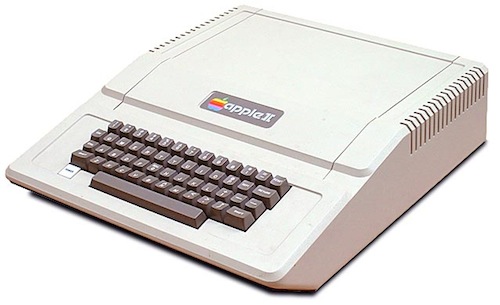
I stayed out of it but for weeks, maybe almost six weeks, the original Apple II case, Jobs wanted a rounded edge on it so it didn’t have a hard feel. They spent weeks and weeks arguing exactly how rounded it would be. So that attention to detail is what Steve is known for, but it also is his weakness because he pays attention to the detail of the product, but not to the people.

To me, the biggest thing in growing a company is you need to grow the people, so it’s like being a farmer, you need to grow your staff and everybody else too as much as you can to enable the company to grow, just as much as you need to sell the product.

Check out the full interview by hitting the source link below.

Permalink

Another iOS 5 Concept: Lion-like Dashboard

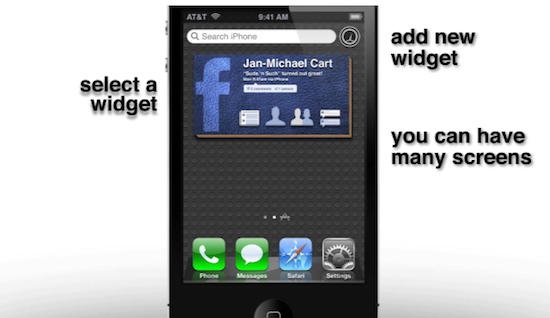
With speculation running wild about Apple’s upcoming software announcements at the WWDC ‘11 – where the company is expected to showcase the next versions of iOS and Mac OS X – it doesn’t come as a surprise that the Internet is exploding with concepts and mockups of what iOS 5 will look like on the iPhone and iPad, let alone the fan-made renderings that aim at giving us a possible glimpse of the iPhone 5. Jan-Michael Cart, the same guy behind the iOS 5 voice recognition concept we posted two weeks ago, has come up with a new interface idea for the Dashboard, available on YouTube alongside his collection of iOS concept videos.

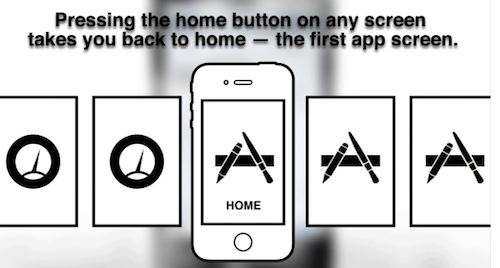
Of all the videos created by Cart in the past weeks, we think this might be the nicest and most interesting one. By taking inspiration from the Lion Dashboard, which retains the same look of the Snow Leopard one but can be launched with a single swipe to the right from the desktop, Cart imagines an iOS Dashboard that resides on the current Spotlight page on the left of the Home screen, and can be activated with an horizontal swipe. Rather than replacing the Spotlight search with the Dashboard, Cart has conceptualized a way to add widgets to this screen and start a new search by simply hitting the box at the top, like you normally would on iOS. When performing a search the Dashboard screen blurs in the background; Cart has also imagined a variety of widgets that can be placed on multiple pages on the left, such as a Facebook box and a Twitter ticker to stay on top of the latest messages from users you follow. In another video posted on his YouTube channel, Cart also describes how widgets could be created from the dedicated Dashboard page, but also dragged to the Home screen. As to how users would be able to swipe between the Dashboards and Springboard pages, Cart believes the Home button would play a key role in both cases, as seen in the screenshots below.

We have embedded the video after the break. Whilst recent rumors have claimed Apple is focusing on features like location and smart voice recognition for iOS 5, it’s likely that ahead of the public launch of OS X Lion Apple will consider porting over some functionalities from the desktop to mobile devices. The video below is a good example of that.
Read more


MacHeist Releases Official iPhone Game “The Heist”

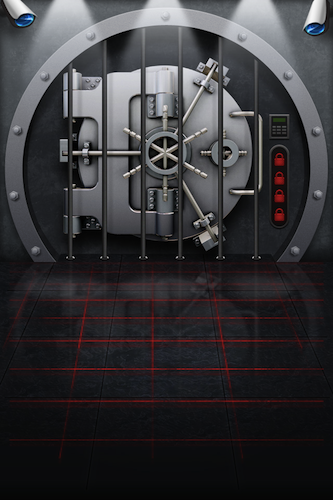
MacHeist, the website that’s become popular among Mac users thanks to its app bundles, marketing tactics and online “missions” to complete to get access to free software and other gifts, has released today its first official iPhone game, called The Heist. Whilst there’s no official mention of a new MacHeist bundle in the app (but according to the rumors it will come soon, especially considering the latest refresh to the website’s homepage and multiple hints), the app features a “secret vault” you have to crack to earn a “valuable prize” that awaits you at the end – and we’re not saying what it is just yet to spoil all the fun.

To crack the vault and beat the game, in fact, you’ll have to solve 60 different puzzles organized in 4 types which, in pure MacHeist style, are intricate and complicated enough to keep you engaged for a good couple of hours. The game features Game Center integration with 19 achievements to earn, as well as lots of hints and easter eggs that remind us of a new MacHeist coming out sometime in the future. For instance, the tap tap tap developers managed to include a fake phone call from “Sophia” that totally mimics the Phone.app interface, letting you think that you’re getting an actual phone call from MacHeist. It’s all in the details.

You can download The Heist at $0.99 from the App Store. Check out more screenshots below. Read more


Samsung Will Hand Over Prototypes of Phones and Tablets to Apple

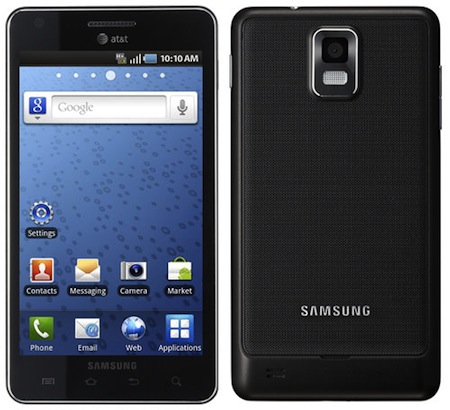
As noted by Cnet UK, the legal battle between Apple and Samsung – sued for allegedly copying the “look and feel” of the iPhone and iOS with its Galaxy devices – it’s far from over, with the Cupertino company now asking Samsung to hand over prototypes of unreleased phones and tablets for legal scrutiny. With the federal court ruling that Samsung will have to send these units to Apple’s legal team (and no one else within Apple will be able to see them, not even Apple’s own lawyers or hardware engineers), Samsung is being forced to send the unreleased Droid Charge, Galaxy Tab 8.9 and Galaxy Tab 10.1 to Apple, though the other two devices mentioned, the Infuse 4G and Galaxy S 2, have already been released publicly in the United Kingdom and United States, respectively.

Apple’s legal battle with Samsung has taken a new twist. The California outfit is suing the Korean corporation over alleged copying of Apple products in Samsung’s Android range, and a federal court is forcing Samsung to hand over samples of new phones for Apple to pore over.

Normally, there’d be three months before Samsung had to hand over samples, but San Jose Judge Lucy Koh has decided that Samsung has already been shooting its mouth off about the unreleased phones and can’t claim they’re secret models, Courthouse News reports. Apple points out that Samsung even gave away a Galaxy Tab 10.1 tablet to all 5,000 people at the recent Google I/O developer conference.

Courthouse News further reports:

The judge was careful not to endorse Apple’s claims of infringement.

“Although the Court expresses no opinion on the merits of Apple’s claims, the Court notes that Apple has produced images of Samsung products and other evidence that provide a reasonable basis for Apple’s belief that Samsung’s new products are designed to mimic Apple’s products.”

The judge notes as a basis for her ruling that the design of Samsung’s cell phones is directly relevant to the infringement claims by Apple.

None of the devices are secret models or previously unseen units, actually: unlike Apple, Samsung has a different stance on “secrecy”, often showcasing upcoming smartphones and tablets months ahead of their launch, whilst Apple always prefers to keep new devices under wraps until they’re released or unveiled at special media events. Apple initially sued Samsung’s mobile division in April, claiming that with the Galaxy line of phones and tablets the company clearly copied the iPhone and iPad hardware, as well as user interface elements and packaging, causing confusion among consumers. Samsung fired back at Apple in the past weeks by countersuing in Europe and Asia first, then in the United States.


Watchlater Update Brings A Better Bookmarklet and More Video Options

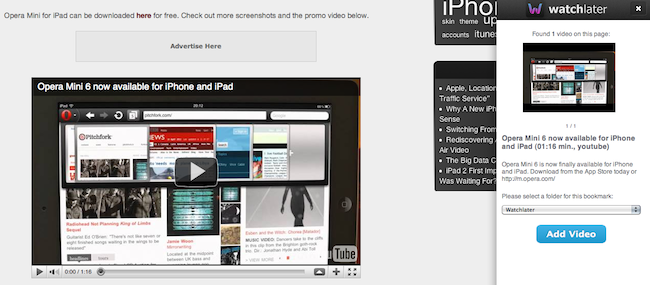
Watchlater is an iPad app I reviewed back in March that, similarly to how Instapaper enables you to save articles from the web for later, allows you to organize videos you don’t have time to watch right away into a convenient interface that groups videos in folders and also lets you cache them for offline watching. With the installation of a browser bookmarklet, Watchlater could grab any video from sources like Vimeo and Youtube, send it off to the iPad client, and allow you to watch content later without re-opening the web browser. Again, the concept is very similar to Instapaper, only it works with videos instead of text.

The first version of Watchlater, however, had some issues the developers needed to iron out: for instance, YouTube videos couldn’t be cached and the app was forced to play them back in a browser window through an embedded web view; on the other hand, the bookmarklet didn’t play nice with embedded videos in web pages, forcing you to save them by visiting the original Vimeo or YouTube page. Formally introduced today after months of App Store availability, the new version of Watchlater tries to fix the issues reported in the first version and adds a more powerful bookmarklet to make saving videos from the web easier and faster. The app still can’t cache YouTube videos, but the bookmarklet has been rewritten to be more reliable and capable of catching any video – whether it’s embedded in an article or available in its direct URL, the bookmarklet can grab it and display a sidebar to add it to one of your folders. A new “express” option in the sidebar also brings an option to quickly save videos without confirmation – this is very nice in the way it displays an unobtrusive notification à la Instapaper for saved videos, and it’s something we’ve been asking since the first version of Watchlater we tested. In the iPad app, the developers added a redesigned cache button, a download queue, as well as the possibility to delete videos within the app without opening the Watchlater website. Videos now launch by default in a more elegant view that strips all the unnecessary clutter around them and gets rid of the original web page (try it with a YouTube video). More importantly, users can now add videos thanks to smart URL recognition from the system clipboard – meaning you won’t have to necessarily use the bookmarklet on the iPad as long as you’re launching the app with a link copied from YouTube, Vimeo, or other video providers.

All in all, Watchlater is a great way to manage videos found on the web, and it keeps getting better on each release with updates to the website, bookmarklet and iPad app. You can download Watchlater at $2.99 from the App Store.


Steve Jobs To Be On Stage at WWDC ‘11? [Updated]

[Update]: It looks like GigaOM got the date wrong – reading Apple’s PR from last year where the company confirmed Jobs would be on stage.

We apologize for the error and for not looking into the PR from 2010 ourselves earlier – here’s to hoping Steve Jobs will still be on stage this year as well. [End of update]

GigaOM reports Apple has issued an official statement, confirming that Steve Jobs will be the keynote speaker at WWDC at 10 AM PDT.

Consider the hype machine up and running for WWDC 2011, thanks to an official announcement highlighting Steve Jobs as the keynote speaker on June 7 at 10:00 AM PDT. WWDC 2011 will cover five key technology tracks: Application Frameworks, Internet & Web, Graphics & Media, Developer Tools, and Core OS. However, it’s Steve’s appearance that is the real news.

There have been some concerns lately as to whether Steve Jobs would be able to announce iOS 5 and OS X Lion on stage due to his last medical leave of absence, and the fact that Jobs is presenting on stage is certainly good news for Apple fans. Steve Jobs had skipped the WWDC keynote stage in the past, leaving the presentation to VPs like Schiller and Forstall (example: iPhone 3GS announcement in 2009), thus leading to speculation in the past weeks that, after the iPad 2 event in March where Jobs unveiled the product, the CEO would not attend WWDC to focus on his health. However, it appears Jobs will be there on June 6 to formally introduce the next version of iOS and Mac OS X Lion – though GigaOM is referring to an official statement we can’t find on Apple’s PR or other websites just yet.


Stream Media From iOS To Windows Media Center

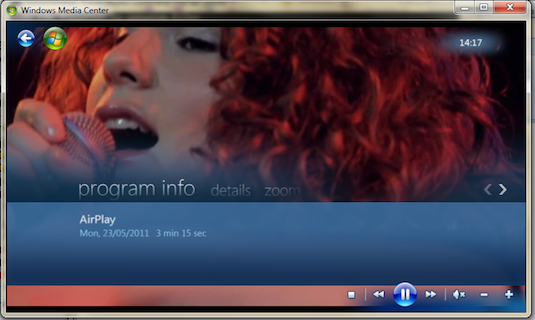
We’ve seen a multitude of hacks that have enabled AirPlay streaming to a variety of platforms that aren’t officially supported by Apple. The latest hack, by Thomas Pleasance, lets you AirPlay straight to Windows Media Center.

To get this working all you’ll need is Apple’s Bonjour service installed (most of you will have already done this) and Pleasance’s Media Center add-in. Then just jump on your iPhone or iPad and stream video or pictures over to it – music support isn’t yet included.

If you’re new to AirPlay hacks, you might want to check out some of the following hacks that we have previously covered: AirServer or BananaTV for iOS to OS X, AirTuner for iOS to iOS, BananaTunes for AirPlay Music streaming or AirPlay support in XBMC.

You can download Thomas Pleasance’s AirPlay for Media Center add-in here.

[Via Engadget]


Rumor: iPhone 3GS Won’t Get iOS 5

With Apple wrapping up its software announcements for the WWDC set to kick off in San Francisco on June 6, a new rumor suggests the two-year old iPhone 3GS won’t get the iOS 5 upgrade when Apple releases the first betas this summer and the final version of the OS likely this Fall. According to Russian analyst and Mobile Review editor Eldar Murtazin, the 2009 iPhone 3GS will stay on iOS 4, thus leaving the iPhone 4 and next-generation device Apple is scheduled to announce later this year as the only iPhone models capable of running iOS 5. Murtazin wrote in a tweet posted earlier today:

Just one comment. Apple iPhone 3Gs wont be upgradable to iOS 5.x. iPhone 4 will.

No additional details are provided by Murtazin in his Twitter timeline, leaving room for much speculation in regards to reliability of the rumor. When Apple released iOS 4 in summer 2010, for example, the company made sure it could run on the iPhone 3G, 3GS and iPhone 4. It was only with the first beta of iOS 4.3 (seeded in January) that Apple dropped support for the iPhone 3G and iPod touch 2nd gen – older devices the software team at Cupertino thought wouldn’t be capable of running the latest versions of iOS anymore. And again, Apple “unofficially” confirmed they were dropping support for the original 2007 iPhone in 2010, when Steve Jobs replied to a customer email and said Apple wouldn’t update the original iPhone in the future. Indeed, the 2007 iPhone can’t run iOS 4.

At this point, it’s unclear whether or not the iPhone 3GS will receive an upgrade to iOS 5, though Apple’s history seems to indicate that an iPhone lifespan varies from two to two years and a half. A report posted by 9to5mac earlier this month claimed that Apple was internally testing iOS 5 on the iPhone 3GS, although the website suggested that it wasn’t “immediately clear” whether the 3GS would eventually get the public version of iOS 5.

The iPhone 3GS was introduced on June 8, 2009, at the WWDC in San Francisco. It was released on June 19 in the United States, Canada and six more European countries, featuring faster performances with 256 MB of RAM, better camera with video capabilities, voice control and digital compass. The device is still available on Apple’s website at a discounted price of $49 for the 8 GB version. The iPhone 3GS runs the latest iOS 4.3.3, though the difference in performances is notable when compared to A4 and A5-enabled devices like the iPhone 4 and iPad 2.

[Thanks, Kevin]


Apple Faces Licensing Challenges With Music Publishers

In just a matter of weeks, Apple is expected to reveal their cloud-music service at WWDC. With rumors suggesting Apple is actively co-operating with the music publishers, CNet today published an interesting article that highlighted the potential stumbling blocks that Apple faces in tying up a deal. There are four major record companies and it is widely believed Apple has finalised agreements with three of them: EMI Music, Warner Music and Sony Music, furthermore, Universal, the current holdout may reach an agreement with Apple this week. Yet this is only half the battle, as CNet points out, because Apple still needs publishing rights the big labels only own the recording rights, not the publishing rights.

For the publishing rights, Apple must negotiate with the large music publishers individually. With only two weeks till WWDC it really doesn’t leave Apple with much time at all to sort this out. But what are publishing rights? As CNet explains, when Apple sells a song, such as the Beatles “Twist and Shout”, it must pay both EMI and Apple Records (representing the Beatles) for the sound recording. However it then has to pay the publishing company that represents the writers of the song and words (in this example it is the company representing Phil Medley and Bert Russel). However if Apple then wants to sell a cover version of the song, such as The Isley Brothers version, it again has to pay Medley and Russell again.

The complication with this is that whilst there is a set rate for those licenses in terms of CDs and digital downloads – there is no precedent or guidance for a cloud-based music service that Apple is reportedly developing. As CNet suggests, there is very little money that separates Apple and the publishers on this issue, but it will nonetheless be the sticky point of negotiations. What muddies the water even more is that because Apple has inked deals with 3 the labels already, they “have soaked up most of the money that Apple is prepared to pay” – leaving little for deals with the publishers.

A source from the recorded-music side said that the labels who have licensed Apple have negotiated only what their songs are worth and if Apple is unwilling to pay the publishers’ price, the publishers don’t have to provide licensing. The source suggested that this is a negotiating ploy and that Apple is trying to pit the labels and publishers against each other.

[Via CNet]