This Week's Sponsor:

Mindspace

A Private All-in-One Journal App Made for iPad, Offering 50% Off Your First Year.


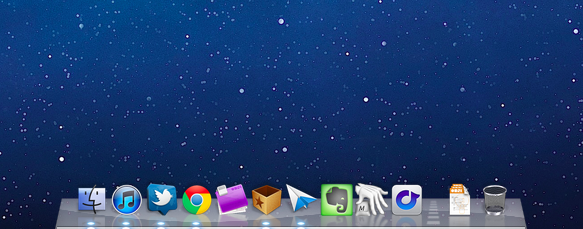
My Must-Have Mac Apps, 2011 Edition

One year after my “Must Have 25 Mac Apps” article, I believe it’s time to revisit that list of software I said I would install every time on a new Mac.

A lot of things have changed since September 2010. For one, Mac apps can now be distributed through the Mac App Store, which has proven to be a feasible and reliable platform for developers to showcase their apps to OS X users. The Mac App Store comes built into Snow Leopard since version 10.6.6, and over the past months we’ve taken a look at different numbers and stats showing how Apple’s youngest storefront is set to fundamentally revolutionize app distribution on desktop computers. But the Mac App Store’s release leads to another change happened in the last 12 months, and that’s Lion.

Originally previewed at the “Back to the Mac” event in October 2010, Lion was publicly released in late July after a round of betas that started becoming available to Mac developers since February. Lion has enabled Apple to bring new features to the Mac App Store such as delta updates for apps and in-app purchases, not to mention the fact that all new Macs sold since July 20 have Lion pre-installed, and thus the Mac App Store. At a developer level, Lion is allowing Objective-C coders and OS X designers to come up with new solutions that take advantage of Apple’s latest technologies such as natural scrolling, push notifications, popover controls, full-screen mode, and Versions. Lion has spawned a new breed of Mac software that it’s just starting to leave a sign in the average consumers’ minds, who are increasingly demanding and looking forward to applications that have been properly enhanced for Lion.

And last, there are new Macs in Apple’s line-up. Since September 2010, Apple has updated all its Mac models (except the Mac Pro) and discontinued the white MacBook, the most obvious victim of Apple’s new crown jewel – the MacBook Air. New Macs come with trackpads specifically geared towards Lion’ multi-touch support, and the new Sandy Bridge CPUs by Intel make the process of booting a Mac, and even switching between applications faster than ever.

In a way, the “September 2011” Apple is both identical and different from the company we were covering last year. But title changes and cloud strategies aside – how does the new Mac ecosystem affect the apps I listed on this site a year ago? Read more


Agenda 2.0 Gets Native, Elegant iPad Version

Back in June I reviewed App Savvy’s Agenda, an elegant and intuitive calendar app for the iPhone that was “powered by gestures”. Unlike Apple’s recent experimentations in UI design with interfaces resembling their real-life counterparts (Address Book, Lion’s iCal, the iPad’s Calendar), Agenda wanted to be an app that looked like your old “paper calendar”, in a way that wouldn’t feel awkward or “over-designed” on the iPhone’s screen. That made Agenda an easy-to-use application with the focus on beautiful typography, navigation, and “one hand usage”. Agenda can be used with single swipes to the left or right to switch between monthly, weekly, and daily views.

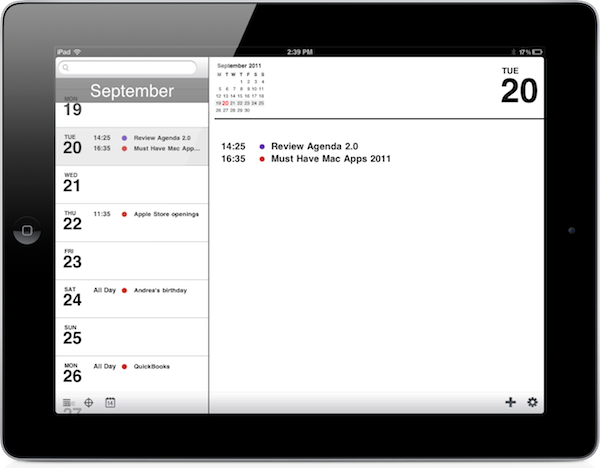
With a free 2.0 update released today, Agenda becomes a Universal app that runs natively on the iPad. I’ve been able to beta test it in the past weeks, and I’m impressed by how Agenda made the leap from the iPhone to the bigger screen of the iPad. Everything in Agenda 2.0 – navigation, views, event creation – benefits from the added pixels and updated interface, which takes advantage of the iPad’s landscape orientation to beautifully lay out year, month, week and day views with the same attention to simplicity and typography seen in version 1.0. On the iPad, you start in a day view with a sidebar, and scheduled events on the right. The bottom toolbar contains buttons to snap back to “today” in the sidebar’s scrollable list, jump to a specific day, or change the view to day/week/month/year. The day view’s sidebar automatically updates the translucent top header as you scroll back to previous months, and a search bar along the top lets you look up single events in your calendar. Agenda supports all calendar protocols integrated with iOS, and calendars are automatically imported from Apple’s Calendar app (you can choose which ones to enable, and the app works with no issues with iCloud).

Tapping on events in the day view will reveal a popover with additional details, whilst swiping vertically in this section will navigate between days. Similarly, tapping on days in the sidebar will scroll the right panel automatically. At the top of day view, Agenda displays a mini-calendar for the current month; tapping on it will bring you to the month view, which is fairly standard but gets the job done. Events can be given colored dots for the calendar they’ve been assigned to, and today is highlighted in red. Again, scrolling vertically in this view will automatically advance to the next months, and update the header at the top.

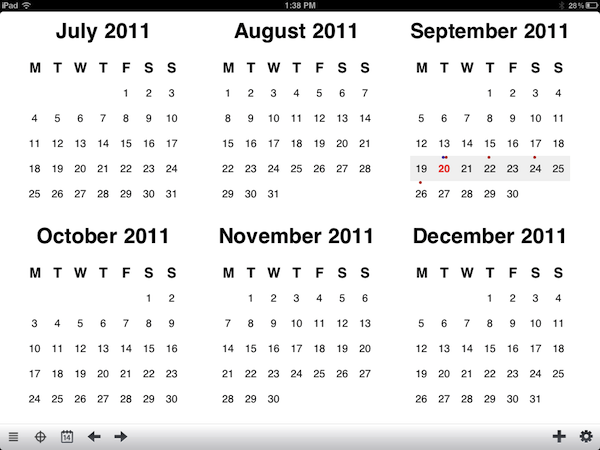
Agenda for iPad also offers a year view, which has to be scrolled horizontally, and provides some basic “heat map” functionality in that thanks to colored dots you can see at a glance which months are the busiest. Year view displays six months at a time – a clever choice that allows each panel to have bigger fonts for months and days. Tapping on a day in year view will jump back to day view.

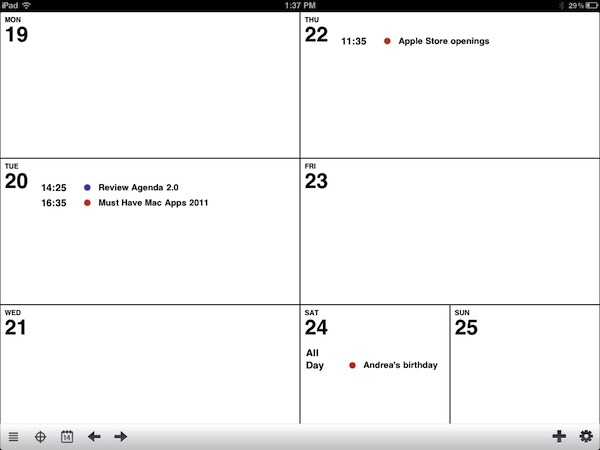
My favorite feature of Agenda 2.0, however, is the week view on the iPad. See, when I use a calendar application, I like to know what’s going on this week. Week view allows me to instantly see my schedule for the week, and I love how Saturdays and Sundays (my non-work days) are smaller than regular week days.

I spoke to App Savvy’s Ken Yarmosh about Agenda 2.0, and he told me that, in a small way, the Mac influenced the design of Agenda for iPad. As I mentioned above, the iPad’s bigger screen makes for a more comfortable calendar experience and, personally, I think Agenda would be great as an alternative to iCal on my desktop. Agenda works with Apple’s standard EventKit framework for event creation, and the app is already running smoothly on iOS 5. I also asked Ken about the design decisions behind Agenda for iPad: unlike several calendar apps on the App Store, Agenda only works in landscape mode. Ken explained that, while designing the app for a different form factor, they had to look at how a regular calendar is used in real life, and found out that most “sizes” of a paper calendar are closer to the iPad’s landscape mode. I agree with Ken when he says that portrait views in calendar apps for the iPad are usually difficult to use and navigate. More importantly though, he confirmed my general feeling of “less swiping, more tapping” on the iPad version of Agenda – in designing a native experience for the iPad (and not a simple “port” of the iPhone experience) Ken and his team correctly assumed that the iPad implies different usage scenarios than the iPhone, and being forced to constantly swipe on the tablet’s large screen can be tiresome.

The new Agenda comes with a few more fixes and minor changes for the iPhone version, too. Agenda 2.0 is a delightful way to manage your calendars on the iPad – and app that focuses on content and an elegant presentation of events, weeks, and months. Agenda is currently on sale at $0.99, and you shouldn’t miss it.


Epic Games Brings Unreal Engine 3 To The Mac

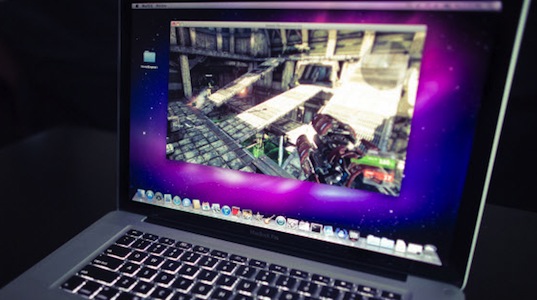
Epic Games yesterday announced that the Unreal Engine 3 can now run on Macs with the arrival of the free Unreal Development Kit to OS X. Joystiq does note, however, that it arrives four years after Epic announced Gears of War and Unreal Tournament for OS X, but failed to deliver.

Every UDK game’s potential user base has increased dramatically yet again.

Unreal Engine 3 now supporting Macs comes after Epic introduced the Unreal Development Kit for iOS last year. Since then a number of iOS games build on the UDK have been released, including Epic Citadel (the beautiful tech demo of the UDK), Infinity Blade and Rage HD. LucasArts and Gameloft have also signed multi-year deals with Epic to produce games using the UDK.

[Epic Games via Joystiq]


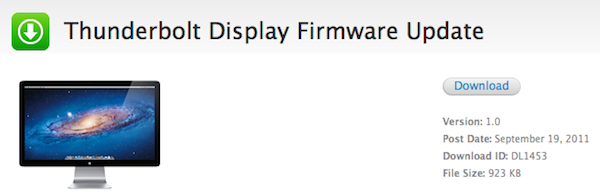
Apple Releases Thunderbolt Display Firmware Update

Apple’s Thunderbolt Display started arriving to customers last week, and earlier today Apple changed the display’s shipping times to 3-5 days, signaling a clear change in retail and online availability. Apple has now released a firmware update for the Thunderbolt Display. The update requires OS X  10.6.8, or “10.7.1 or later”.

This update improves the stability of the Apple Thunderbolt Display.

The updater application will be installed in the Utilities folder inside the Application folder and will be launched automatically when you close this installer. Please follow the instructions in the updater application to complete the update process.

The Thunderbolt Display Firmware Update is available from Apple’s Downloads website now.


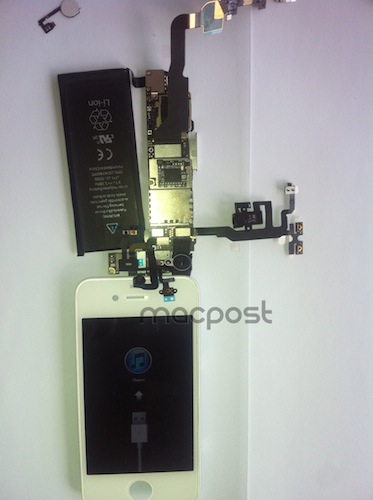
Leaked Photos Show “iPhone 4S” Device with A5 Chip, iPhone 4 Design

A photo discovered earlier today by PhoneArena on Chinese microblogging service Weibo seemed to “confirm” that the next-generation iPhone would indeed run a modified version of the A5 CPU first introduced by Apple in the iPad 2 last March. As usual with photo leaks, the image was blurry and the A5 logo on the integrated chip in the mainboard could have been easily faked with Photoshop. Several outlets, however, suggested that the photo could be real, albeit belonging to the rumored “iPhone 4S” device in the works, rather than the real, “all-new” next-generation iPhone 5. Comparisons of this morning’s photo with previously posted iPhone 4S/5 parts seemed to confirm the theory that the newly captured part was legit.

There’s been much controversy and speculation in recent months as to whether Apple will introduce a single iPhone 4-like update in the next weeks, a major redesign called “iPhone 5”, or both. Most recent rumors are claiming Apple will release two new iPhone models this Fall to target different market segments – namely, there’s a great opportunity for Apple in China and other pre-paid markets, where a cheaper, off-contract “iPhone 4S” could possibly sell very well and still appeal to consumers as a premium device. Apple executives have hinted at the pre-paid market before.

A new photo which seems to corroborate this morning’s alleged leaked has been published by MacPost, which claims it depicts the new “iPhone 4S” with an A5 chip and slightly updated battery. As many noted this morning, the battery unit in the allegedly leaked photos reports “1430 mAh”, instead of the iPhone 4’s 1420 mAh. MacPost’s follow-up picture shows a partially-assembled device displaying iTunes’ activation screen, as well as an iPhone 4-like white front panel. According to the website, this should confirm the “4S” nature of the device (that is, the “minor” upgrade – identified by many as N94 – and not the “real” iPhone 5), also because of the several components that are shown in the photo, and “leaked” on the Internet over the past months. Those components they mention were deemed as “iPhone 5 parts” at the time. Furthermore, the front panel’s speaker grille is heavily resembling of white iPhone 4 prototypes prior to the white iPhone 4’s public debut.

There’s still much confusion floating around Apple’s plans for the next iPhone(s), and it is worth noting the same A5-enabled, white, iPhone 4-like device was spotted back in April running on T-Mobile network. 9to5mac shares my personal theory in that if these photos are legit, they’re most likely to portray an early iPhone 4-like prototype for a next-generation iPhone, rather than a recent “final design” unit.

According to an article from The New York Times published last week, a “fairly different” iPhone 5 with better specs (A5 CPU, 8 MP camera) is just “weeks away”.


Fusion and Carbon Productivity Bundle: 10 Lovely Apps for $29.99

‘Tis the season for Mac app bundles. Some are good, others are great and few are good enough to “fall in love with.” Fusion and Carbon have put together a productivity bundle appropriately described as 10 Reasons to Fall in Love and Get Things Done.” The bundle includes some of MacStories’ favorite Mac apps including EvernoteSparrow Mail. If you tried purchasing the included apps individually you’d be paying nearly $360, so if you’re looking to add to your collection of Mac apps this is a terrific deal at just $29.99. The deal is only good for 6 more days, so share the love!

The Productivity Bundle includes:

  • Evernote Pro - Capture anything from pictures, notes, audio; access it anywhere you have access to a computer or mobile device; find everything fast with advanced tagging. The bundle deal includes 3 months of their Pro subscription (standard subscription is free). (our review)
  • Strongspace - A great backup solution to the cloud. Your precious data is always backed up, turn it on and you’re done. It even lets you share your files or a folder with one click. Like Time Machine, it also captures full snapshots of your data and if you need something you deleted, simply roll back.
  • Sparrow Mail - A minimal and fantastic alternative to Apple’s Mail.app. Sparrow has multiple account support and a unified inbox plus full IMAP support, notifications and more. (our review)
  • Carousel - Okay, maybe not every app in this bundle is for being productive but one needs a break, right? Browse your Instagram Feed, Popular and Profile photos with a choice of great app themes. Follow and explore users, like, comment, moderate comments, and more. Keyboard shortcuts to quickly traverse your feed, like, comment, and more. Drag & drop to save full-size photos to your Mac, or iPhoto. (our review)
  • Alarms - A super minimal alarm app that’s simple to use and fun. It notifies you of birthdays, sync tasks with iCal, supports Growl and has customizable keyboard shortcuts. (our review)
  • Flow - A web-based task management app that works in your browser, iPhone or email. There’s no syncing required and you can collaborate with anyone such as family, friends, and coworkers, all in one place. The bundle gives a 1 year subscription to new Flow users.
  • Koku - Easily manage all your personal finances by keeping track using the Direct Connect to safely download your transactions as they occur. You can also have your purchases tagged automatically.
  • Grasshopper - A virtual phone system designed for entrepreneurs that includes a toll free and local number with unlimited extensions. Call forwarding and voicemail is also included. Manage your account online or by phone with no hardware to purchase. The bundle gives your $100 credit towards their $9.95 and higher monthly plans.
  • Nottingham - Need an elegant notepad for your Mac? This app is designed to be lightweight and easy to use and it keeps all your data safe by syncing to your iPhone and the web via Simplenote.
  • Inbox Assistant - Extract meetings, tasks and other important events out of your emails while it automatically adds them to your calendar. Use Natural Language Processing for entry as well.


Apple Introduces Their Online Store For Hungary, Poland, Czech Republic and UAE

Apple customers in the Czech Republic, Hungary, Poland, and the United Arab Emirates can today finally purchase Apple products and accessories directly from the online Apple store. The introduction of the online stores in these respective countries is the first avenue in which Apple can directly sell products to consumers located in those countries. Apple has no physical Apple retail stores in these countries and did not previously operate an online store. Consequently, until today the only way to purchase an Apple product from within these countries has been from authorised Apple resellers or importing.

The introduction of the new Apple Stores is displayed prominently on the front of the respective Apple websites in the four countries. The United Arab Emirates banner is shown above, it features a welcome slogan and confetti streaming down in the nations colours. You can see the Poland, Czech Republic and Hungary versions below the break.

[Via MacRumors]

Read more


Keep it Memorable, Stupid!

Image credit: Done by Emily Carlin on Flickr

KIMS, unlike KISS (Keep it simple, Stupid!), is removing the notion that we have to toss out our complicated, but memorable systems in favor of simple workflows. I think throwing away what works is the wrong way to go about changing your workflow or lifestyle for the better.

In looking for a simpler way to do something you’ll be presented with tools, pitched ideas, and told that your quality of life will be better if you take this system you have now and simplify it. I think the big problem is that people tend to confuse the words simple and minimalism. To say I should simplify my workflow is to say I should throw out my system because it’s inefficient. That might be true if I was to compare how productive I am to how productive you are. However, our jobs are likely different and even if they were the same, it’s like comparing how well I run to a guy who’s been running in marathons for the last twenty years. You can only accurately measure and reference yourself!

Where I make my case is that you shouldn’t toss a memorable system for the sake of minimalism. Text files for example are extremely minimal, but not many people want to go commando and start setting up areas of focus in Dropbox, when tags and journals in Evernote are much easier to manage for lots of people. You’re told you should do this thing because you’ll ultimately be more productive or you’ll remove a point of stress and clutter in your life, but I have a feeling that the transition and “attempt” (because you’ll never really stick with this minimal system) is going to be a point of stress itself.

Read more