Posts in news

Firefox 9 Beta Released with “New Look” To Match OS X Lion

Two days after the release of Firefox 8, Mozilla has made available a first public beta of the next major Firefox update, Firefox 9. As expected due to the company’s fast release cycle, Firefox 9 will follow Firefox 8 in a few weeks, with Firefox 10 likely entering initial alpha testing soon.

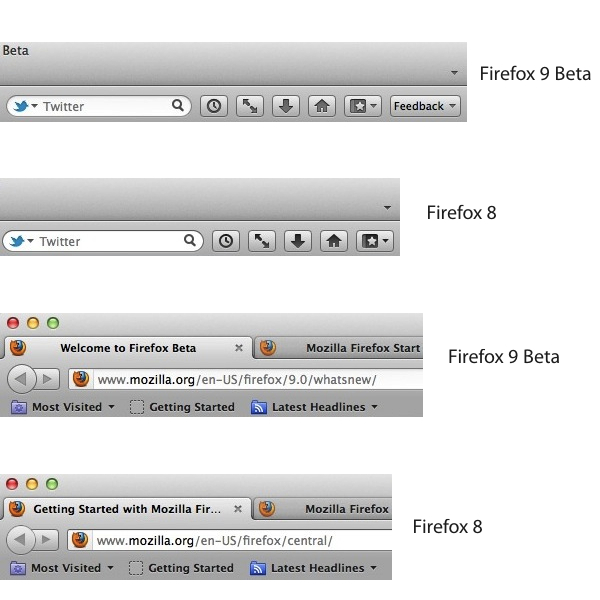
For the first time since the release of OS X Lion in July, Mozilla says they have included ”a new look that matches the Mac OS X Lion application toolbar and icon styles”. In the release notes, Mozilla refers to these changes as “improved theme integration for Mac OS X Lion”. For comparison, we have grabbed a series of screenshots to show the differences the “new look” brings between Firefox 8 and Firefox 9 beta. It is, however, possible that haven’t spotted all the differences between the two versions yet – MacStories readers are welcome to leave us a comment if they find more visual cues to the “new look” in Firefox 9 for Lion.

Mozilla mocked up some big Lion changes a few months back, and notably Firefox still hasn’t implemented several native Lion functionalities, like natural scrolling and full-screen mode.

Firefox 9 comes with other improvements for developers:

  • Type Inference: Firefox Beta adds Type Inference to make JavaScript significantly faster. To learn more about how rich websites and Web apps with lots of pictures, videos and 3D graphics will load faster in Firefox, check out this blog post.
  • Do Not Track JavaScript Detection: Firefox Beta enables JavaScript to show developers when users choose to opt-out of behavioral tracking with the Do Not Track privacy feature.
  • Chunked XHR Support: Firefox Beta supports chunking for XHR requests so websites can receive data that’s part of a large XHR download in progress. This helps developers make websites and Web apps faster, especially those that download large sets of data or via AJAX.

You can download Firefox 9 beta over at Mozilla’s website.


Digital Camera RAW Compatibility Update 3.9 Released

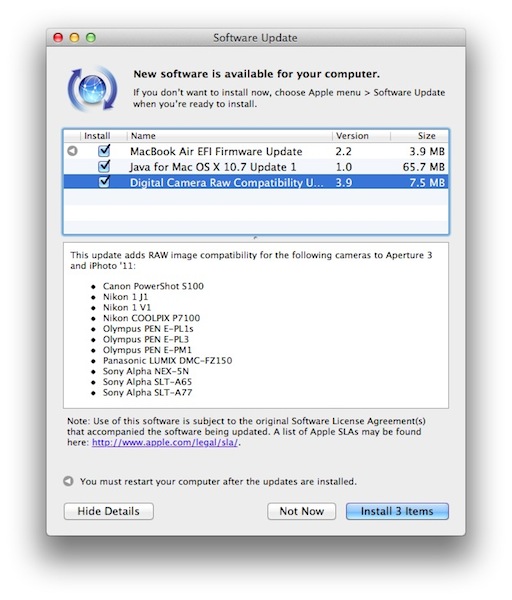
Apple today released a new Digital Camera RAW Compatibility Update, which reaches version 3.9 and adds support for the following cameras to Aperture 3 and iPhoto ‘11:

  • Canon PowerShot S100
  • Nikon 1 J1
  • Nikon 1 V1
  • Nikon COOLPIX P7100
  • Olympus PEN E-PL1s
  • Olympus PEN E-PL3
  • Olympus PEN E-PM1
  • Panasonic LUMIX DMC-FZ150
  • Sony Alpha NEX-5N
  • Sony Alpha SLT-A65
  • Sony Alpha SLT-A77

OS X Lion introduced support for more RAW formats, as did the 10.7.2 update, and Apple maintains a list of supported RAW formats in this support document. Digital Camera RAW Compatibility Update 3.9 is available now on Software Update and should be uploaded shortly to Apple’s Support Downloads website. Both iPhoto and Aperture were updated with Photo Stream functionality and other fixes in October.


Apple Releases iOS 5.0.1 [Direct Links]

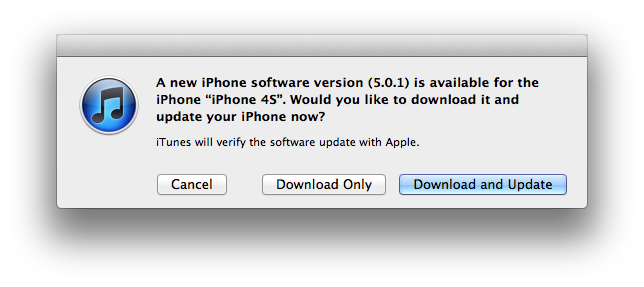
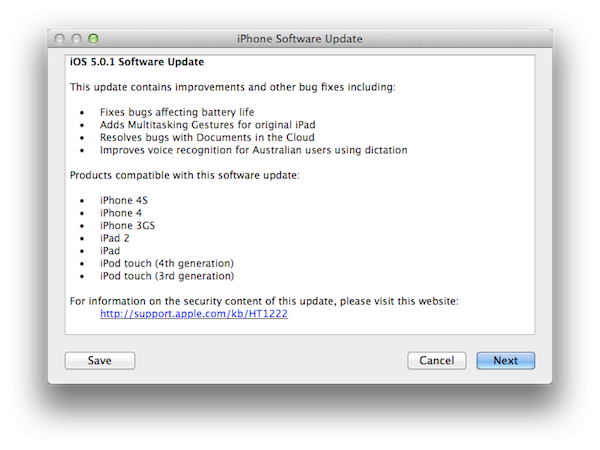
Apple has just released iOS 5.0.1. The update is available now on Apple’s iTunes, although at the moment of writing this the new software version still has to show up on iOS 5’s built-in Software Update preference panel. iOS 5.0.1 is, however, appearing as an update on iTunes. iOS 5.0.1, as previously announced by Apple, brings battery life fixes for all devices running iOS 5, as well as security improvements and multitasking gestures on the original iPad. Battery life issues were especially reported in the past weeks by iPhone 4S users, and a number of unofficial “tutorials” have surfaced on how to improve battery life for the device. With iOS 5.0.1, Apple is saying battery life issues weren’t specific to the iPhone 4S, but to iOS 5.

Update: iOS 5.0.1 is now appearing as over-the-air update for several users.

Update #2: Apple has posted the security contents of this update, and among the fixes it appears to be one for the bug discovered by Charlie Miller, which allowed execution of unsigned code in App Store apps.

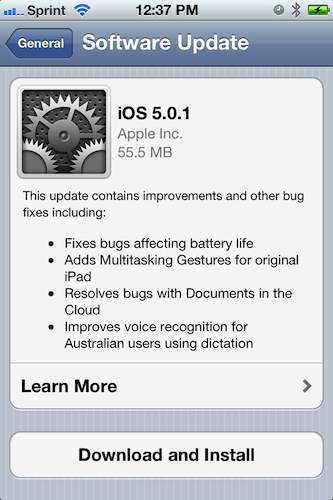
A screenshot of the official changelog below:

iOS 5.0.1 direct download links below (build number 9A405).


Nuance Releases “Dragon Express” On Mac App Store

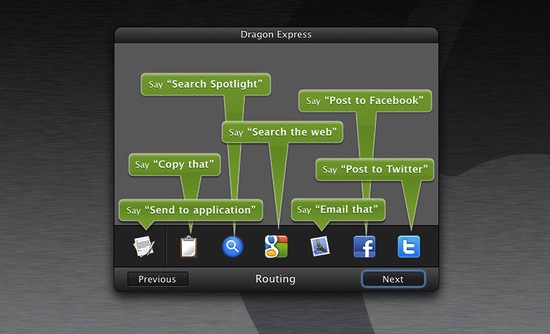
Nuance today released a new product of the “Dragon” dictation family for OS X, called Dragon Express and available at $49.99 on the Mac App Store. Dragon Express lives in the OS X menubar and can be activated with a single click or keyboard shortcut, allowing users to open the utility and start talking into a Mac’s built-in or external USB microphone. Using Nuance’s speech recognition technology, Dragon Express will transcribe the spoken text into the app’s window, with options to forward the text to other apps, search it with Spotlight or Google, email it, copy it to the clipboard, or share it on Facebook and Twitter.

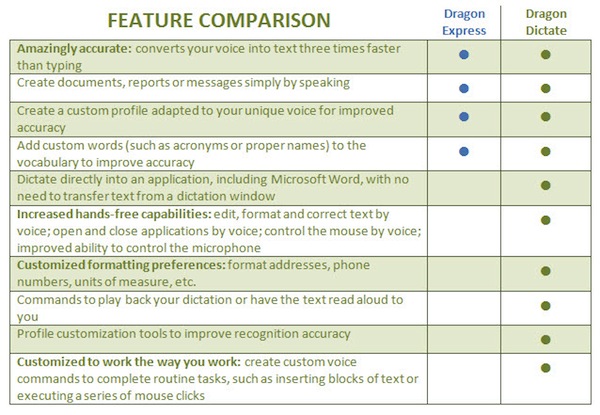
Nuance is positioning Dragon Express as a lightweight version of the popular Dragon Dictate, which has more features and comes at a higher price. Dragon Express should be an “introduction” to speech recognition for OS X customers, and the company has even posted a handy comparison chart to see the functionalities available in Express and Dictate.

Dragon Express works locally (it doesn’t require network connectivity) and according to Nuance it’s “easier to use” than the full-featured Dragon Dictate. From the press release:

Dragon Express is a great app for those who are new to speech recognition or who are looking for an easy-to-use dictation tool that allows them to use their voice instead of typing,” said Peter Mahoney, senior vice president and general manager, Dragon, Nuance. “For those looking for a more full-featured speech recognition program, we recommend Dragon Dictate, which provides the full capabilities of advanced speech recognition technology.

Those looking to try Nuance’s speech recognition technology and services for the first time might want to try Dragon Express, available at $49.99 on the Mac App Store. Nuance is also offering Dragon Express customers the opportunity to upgrade to Dragon Dictate for $99. Nuance isn’t new to Apple customers, offering a variety of iOS and OS X apps and also powering OS X Lion’s built-in voices.


Hack Brings Auto-Correct Bar To Default iOS 5 Keyboard

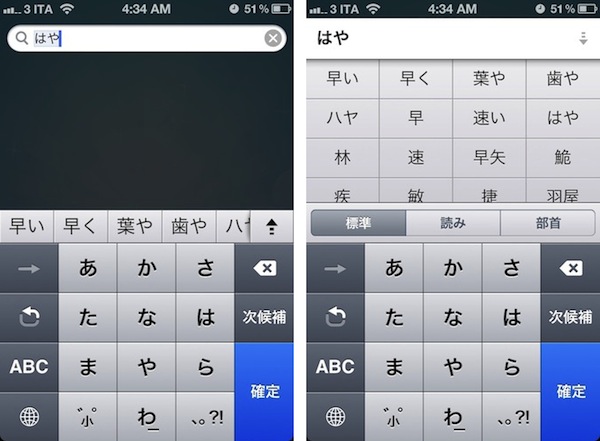
As reported by 9to5mac, it appears Apple’s iOS 5 comes with a software functionality to enable an Android-like extra keyboard row for auto-corrections and common suggestions systemwide.

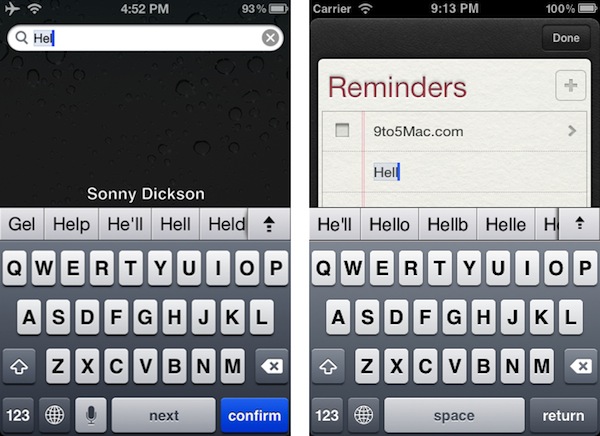
Screenshots of the feature, first posted by Australian developer Sonny Dickson, seems to suggest the feature had been present in iOS 5 since the first beta seeded to developers, but have only been recently re-discovered. The images posted by Dickson show an additional row on top of the standard system keyboard on the iPhone and iPad, which in the provided examples includes suggestions to auto-complete “Hel” with common options like “He’ll”, “Help” or “Gel”. It appears that once enabled, the keyboard bar replaces iOS’ standard auto-correction popup. 9to5mac shares a method on how to enable the feature without a jailbreak.

The extra keyboard row, however, isn’t completely new to iOS 5. The OS already uses a similar (if not the same) system for the Japanese Kana keyboard, with text suggestions displayed in a bar that you can scroll, and expand with the arrow icon also seen in Dickson’s screenshots. For this reason, we believe the hack simply extends the Japanese keyboard’s functionalities to other iOS 5 keyboards.

As usual with unofficial iOS 5 features discovered by developers hacking around the system, don’t expect complete and reliable functionality from the keyboard bar. As Panorama Mode has shown earlier this week, there’s a reason Apple has decided not to include a certain feature in the final version of iOS 5, and early reports from users who have activated this tweak indicate the keyboard bar may crash the iOS Springboard. Still, this is an interesting discovery that we’d be curious to try out with the new iPad split keyboard, also a new feature in iOS 5.


Steve Jobs Nominated for Time “Person of the Year”

NBC Nightly News anchor Brian Williams nominated Apple’s late co-founder and CEO Steve Jobs to be Time’s “Person of the Year” 2011, CNET reports. Other nominees in this year’s selection include U.S. Senate candidate Elizabeth Warren, Mohamed Bouazizi (a Tunisian fruit vendor who kicked off the Arab Spring) and the “angry people”. Alongside Williams, ”Saturday Night Live” writer Seth Meyers and actor Jesse Eisenberg presented the nominations this year.

One guy, who changed our world, and I said to Seth Meyers as we walked across Sixth Avenue, ‘Just look with me on this one block walk at how he changed the world around us. Look at how he changed the world.’ Not only did he change the world, but he gave us that spirit again that something was possible that you could look at a piece of plastic or glass and move your finger– that’s outlandish. You could make things bigger or smaller like that. ‘Oh the places you’ll go’ and oh the way you will change forever the music and television industries. So may he rest in peace, Steve Jobs, and the spirit he represents, are my nominee for Person of the Year,” said Williams during his nomination speech.

Steve Jobs would be the first person to receive the award posthumously. Time’s Person of the Year will be revealed next month, and previous winners include Facebook’s Mark Zuckerberg (2010), Barack Obama (2008) and Amazon’s Jeff Bezos (1999). As Wikipedia describes the award, Person of the Year “features and profiles a person, couple, group, idea, place, or machine that for better or for worse, …has done the most to influence the events of the year.”

[Photo: Jon Snyder/Wired.com]


Chitika: 38% Of iPhone Users Have Updated To iOS 5

According to a new study by advertising firm and data analytics company Chitika, in the week of October 22-28 iOS 5 adoption rate has jumped to 38% between iPhone users, 30% on the iPad, and 12% on the iPod touch. Chitika, which monitors a subset of web traffic from iOS devices, claims that in two weeks iOS 5 adoption has grown from 20% on the iPhone to 38%, whilst iPod touch users have shown less interest in upgrading to Apple’s latest software update. Furthermore, Chitika data seems to show that iOS 4, which was released last year, is still installed on nearly 80% of the monitored iPod touch user base (63% on the iPad, 58% on the iPhone) with smaller numbers for iOS 3.

To put Chitika’s numbers in perspective, it’s important to understand that the company can’t monitor every single iOS device out there (over 250 million), as its stats are largely based on devices that appear in Chitika’s web logs. However, the percentages reported by the company may still provide a good insight into the upgrade pattern of iOS users after the release of iOS 5. iOS 5 was first seeded to developers in June, and it’s likely that a portion of Chitika’s initial data was made of developers running the latest betas of iOS 5 prior to the public release. On October 12th, Apple released iOS 5 for the iPhone 3GS, iPhone 4, iPad, iPad 2 and iPod touch 3rd & 4th gen, alongside iCloud and a software update for OS X. On October 17th, five days after the initial iOS 5 rollout, Apple announced 25 million customers were already “using” iOS 5, with more than 20 million customers signed up for iCloud.

As Chitika and Apple don’t break down their numbers by device model, here’s two more pieces of information worth considering: older iPod touch models given away with previous Back to School promotions won’t be able to upgrade to iOS 5, and the iPhone 4S was released in seven countries on October 14th, running iOS 5 out of the box. In the first weekend, the iPhone 4S topped 4 million sales, more than doubling last year’s iPhone 4 numbers. It’s likely that the success of the iPhone 4S has affected both Chitika’s study (performed between October 22 and October 28) and Apple’s own iOS 5 usage numbers, released on October 17th. In this regard, there may be some truth to Chitika’s report that more iPhone owners have upgraded to iOS 5, especially considering the wide compatibility of the OS with phones released in 2009 and still capable of running the latest version of iOS (the iPhone 3GS).

The numbers posted by Chitika may also be affected by how iPod touch owners use their devices. Back in April, Apple said over 60 million iPod touches had been sold since 2007, and it’s widely believed a large percentage of these units were sold to teenagers and kids too young to own an iPhone or iPad, but still interested in Apple’s iOS platform, especially for games and social apps. Apple itself positioned the iPod touch as a gaming device selling more copies than Sony’s PSP or the Nintendo DS. If the iPod touch demographics are really made mostly by teenagers, a possible interpretation of slower iOS 5 adoption rates is that these users aren’t interested in upgrading to the latest version as soon as possible as other “tech savvy” owners of iPhones and iPads and early adopters. It’s likely that most owners of compatible devices will eventually upgrade to iOS 5, but they haven’t in the weeks following the iOS 5 release.

Last, two other possible factors that may have influenced the upgrade process of some users could be iOS 5’s battery life issues and the lack of a proper jailbreak for iOS 5. As for battery life, Apple has already promised a software fix and iOS 5.0.1 is being tested by developers and select end users. A subset of users may also be waiting for an “untethered jailbreak” for iOS 5 before they decide to upgrade: in April, it was reported Cydia – an unofficial marketplace for all sorts of jailbreak apps and modifications – had been installed on roughly 10-15 million iOS devices, with over 1.5 million users logging into Cydia daily. JailbreakMe, a web-based tool that allowed users to jailbreak iOS 4.3 devices including the iPad 2, was used over 2 million times shortly after its release.

You can check out Chitika’s numbers and full study here. As iOS 5 adoption grows in the next months, so will the number of App Store apps that require the latest version of iOS to be installed, and it will be interesting to see which devices Apple will support with the next major version of iOS – especially the iPhone 3GS, which came out in 2009 and is still available for sale.



Apple Releases iAd Producer 2.0

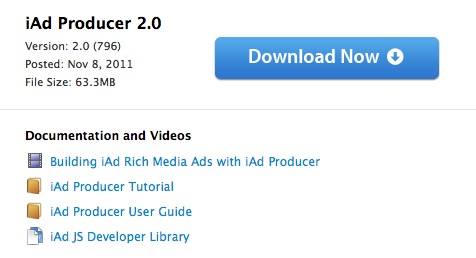
Apple today released an update for iAd Producer, its developer-oriented design tool that enables easy creation of high-quality, interactive content for Apple’s iAd platform. First released in December of last year, iAd Producer is an HTML and CSS layout application that automatically manages the technologies behind iAd (CSS 3, JavaScript, HTML5) to offer a visual aid in the designing process of rich and animated ads with an easy-to-use interface. iAd Producer allows developers to create and re-use their own page templates and components, manage the structure and flow of iAds for specific iOS devices in a single window UI, and test the results with a built-in simulator.

Today’s update, available here, brings changes in the animation section, an improved editor, project validation and a new Object List. The new Project Validation ”automatically checks the size and type of image assets, and that pages and components are configured correctly” and makes sure an iAd has been built correctly before submitting it to Apple; it even checks for possible performance issues and other common errors. The Object List is another handy addition for developers, providing one-click access to all the objects or elements in a single page. Among changes to the JavaScript editor and other performance improvements, iAd Producer’s animation tools let you pick from a library of effects and animations that include wipes, fades, spinning effects, cube transitions and more.

iAd Producer is available for download on Apple’s website. A list of features is available on the app’s product page.


Firefox 8 Officially Released

In late September Mozilla released version 7 of its Firefox browser, and as part of the company’s new fast release cycle we noted a few days after the release that a beta of Firefox 8 had already been seeded to developers. In the article, we noted Mozilla promised Firefox 8 would deliver better tab management, deeper Twitter integration, and new features for web developers.

Uploaded to the company’s FTP servers a few days ago, Firefox 8 has been officially released today, with a blog post from Mozilla outlining the differences from the previous version. As with the Firefox 8 beta, Firefox 8 final comes with an option in the Preferences to load existing tabs (the pages you left open the last time you quit the browser) only when they’re selected. This should improve the browser’s startup times, as it’s no longer forced to reload all tabs upon launch.

Another minor new feature is the addition of a Twitter icon in the app’s search box. Mozilla says “Twitter search is currently available in English, Portuguese, Slovenian and Japanese versions of Firefox”, and the new options basically just loads a new Twitter search page for anything you type in the search field – don’t expect Firefox to smartly recognize @usernames or #hashtags, and open Twitter profiles or hashtag pages instead of plain search.

Alongside better handling of third-party add-ons, security and stability fixes, Firefox 8 introduces a series of improvements for web developers:

Improved performance and memory handling when using <audio> and <video> elements

  • Added CORS support for cross-domain textures in WebGL
  • Added support for HTML5 context menus
  • Added support for insertAdjacentHTML
  • Improved CSS hyphen support for many languages
  • Improved WebSocket support

As far as Lion support goes, whereas Google updated Chrome to take advantage of the OS’ new native scrolling and full-screen mode, Mozilla’s browser still lacks any sort of Lion integration and support for new functionalities.

To read more about Firefox 8’s new features, head over Mozilla’s blog post on the update. Expect a beta of Firefox 9 to become publicly available soon; you can download Firefox 8 from Mozilla’s website here.