Posts in news

Apple to Approve Streaming iPad Games for a Monthly Charge

Bloomberg is reporting that for the first time Apple has agreed to let a game development studio break away from the pay once per-game business model. The company, Big Fish Games, will attempt to peddle their iPad games through a monthly subscription.

The company’s founder, Paul Thelen, says that the service will be similar to that of Netflix. Consumers will pay a monthly fee to play iPad games streamed directly to their device over a wifi connection without having to download each game from the iTunes App Store. Big Fish Games currently have 99 iPad games available for download and it sounds like there may be even more to choose from by the time this new service launches early next year. It appears that the launch will include a single app available for download that users will be able to browse available iPad games – similar to Big Fish Games “Game Finder” app.

Thelen reports that there will be several options for gaming subscriptions starting at $4.99 a month. There will also be an ad-supported and time limited free version.

Big Fish also will offer a free version of its game service that limits play to 30 minutes a day and includes advertising. The subscription will initially cost $4.99 and will increase early next year to $6.99 after more titles are added, Thelen said. Apple collects a 30 percent commission.

It will be interesting to see if there is actually a demand for a streaming game service on the iOS platform. Apple reportedly seemed hesitant to agree to the let the game development studio use the business model that has been previously reserved for digital periodicals. If this trial run is a success, we will likely see a flood of new apps utilizing this model. Hopefully it doesn’t have an effect on the quality of iOS games we have seen to date.
 

[Bloomberg via MacRumors]


Apple Looking To Recruit Senior-Level Executives For iCloud Services

According to a report in The Wall Street Journal today, Apple has been looking to recruit senior-level executives “with backgrounds in Web-based software” to bolster the talent pool at Apple for iCloud and their other cloud and web based services. Curiously, the report also notes that Apple is also considering new iCloud apps that will “reduce the need for people to carry around numerous devices at once”.

The company doesn’t have specific Web-centric positions in mind, and it is looking broadly for talent to fill director-level positions and above, including senior executives if they find a candidate that is a good fit, this person said.

As the article notes, Apple has been hiring a number of lower-level staff for their web and cloud offerings since 2010 - including poaching web engineers from companies such as Quantcast and Yahoo. This move also follows on from Eddy Cue’s recent promotion to the role of Senior Vice President Internet Software and Services after leading Apple’s iTunes, App Store, iBookstore and iCloud offerings.

[The Wall Street Journal via MacRumors]


Analyst: The iPad 3’s Retina Display is now in Production

According to DisplaySearch analyst Richard Shim in an interview with CNET, the iPad 3’s 2048 x 1536 QXGA display is currently in production, with names like Samsung, Sharp, and LGD now laid on the table. The iPad’s possible Retina Display, which would double the pixels from the current 1024 x 768 display found in the iPad and the iPad 2, is rumored to find its way into the next generation iPad by 2012. Excited yet?

Shim says that finished iPad 3s with their aluminum shells and upgraded 4:3 displays could be finished in December following the few weeks it takes it takes to assemble Apple’s latest tablet. 9to5 Mac has already found hints of Apple’s next iPad, codenamed J2 (supposedly the 3G model with J1 being Wi-Fi only) in the iOS 5 source code, following a DigiTimes report that 2 million iPad 3s would be produced by the years end.

Keep in mind that an iPad 3’s Retina Display would have more vertical pixels than the 27” Apple Thunderbolt Display currently on the market, with a resolution of 2560 x 1440 pixels. Provided Apple could even sell such a pixel precise display, what would it mean for developers and designers creating new and unique interfaces for the iPad? And remember the transition period from the iPhone 3GS to the iPhone 4? Yikes. Leave your thoughts in the comments below!

[CNET via 9to5 Mac]


Charity: The Humble Introversion Bundle!

In the giving mood? Why not head down and meet up with the other fine gamers hanging out at the Humble Bundle, who’re offering a bunch of cross-platform games (DRM free) to raise money for Child’s Play and the Electronic Frontier Foundation. Donate for a couple of great causes and get a bundle of excellent games in return. If you donate more than the average, you can acquire some bonus titles not otherwise available with the initial line up of games and tech demos. The $70 bundle can be yours at any price, but we recommend at least slapping down a Jackson if you can. Contributers also have the option of bragging rights and posting their handle on the Humble Bundle wall of fame.

The Humble Introversion Bundle includes lots of great titles such as Aquaria, Multiwinia, and DEFCON, giving you plenty of adventure, multiplayer, and virtual gaming environments to romp through over the holidays. Given the choice of exploring underwater caverns and blowing up computer viruses, there’s something here for players of all ages. You can find links to all the great games below.

There’s fourteen days left to donate, so you have plenty of time to cash in your paycheck and donate to a worthy cause. Be sure to check out The Humble Introversion Bundle official launch video after the break and get amped up!

Read more


Apple Posts New iPad 2 Advert: “Love”

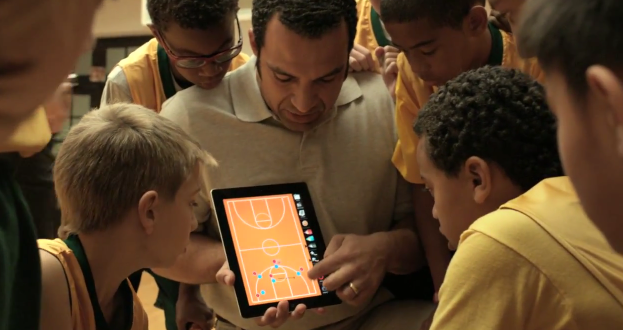
Apple has tonight uploaded a new iPad advert to their YouTube channel. This latest advert, “Love”, follows the general style of their previous iPad 2 adverts — with a strong narrator intertwined with people using the iPad, highlighting an emotional connection. This advert highlights the emotional connection between people using the iPad for things that they love doing. There are shots of a basketball coach using an iPad to show his team a strategy, a group of friends in a band using the iPad to control levels, a person painting a landscape with an iPad, a person creating a home movie with iMovie on the iPad and a young child learning about dinosaurs on an iPad.

For some, it’s a life long passion. For others, its something discovered yesterday. We all have things that speak to us, they drive us to get up early, and stay up late. Getting lost in the things we love has never felt quite like this.

Jump the break to see the advert for yourself and jump over to Apple’s website or YouTube channel to see more of their iPad adverts.

Read more


Apple Announces Holiday Sale For This Friday, Across The World

Update: Apple has now confirmed the “One-Day Shopping Event” is also occurring in the US this Friday - but it makes no mention of the sale also taking place in its retail stores, suggesting this is an online-only affair.

Apple has begun placing banners on its online Apple Stores across the world, indicating that it will be holding a sale this Friday - on the yearly “Black Friday” as it is known in the US. The banners, found on the store page, inform us that this “special one-day Apple shopping event” is this Friday, November 25.

Mark your calendar now, and come back to the Apple Online Store for the special one-day event. You’ll discover amazing iPad, iPod and Mac gifts for everyone on your list.

The banner has gone up on the Australian, Italian, UK and a number of other international stores. No mention has yet been made on the US store, but it is expected to also receive the banner in a number of hours. In the US the Black Friday sale is expected to also take place inside Apple’s retail stores - no mention of the sale in retail stores is made on the Australian or Italian notices.


Hacker Builds Custom Siri Proxy Server

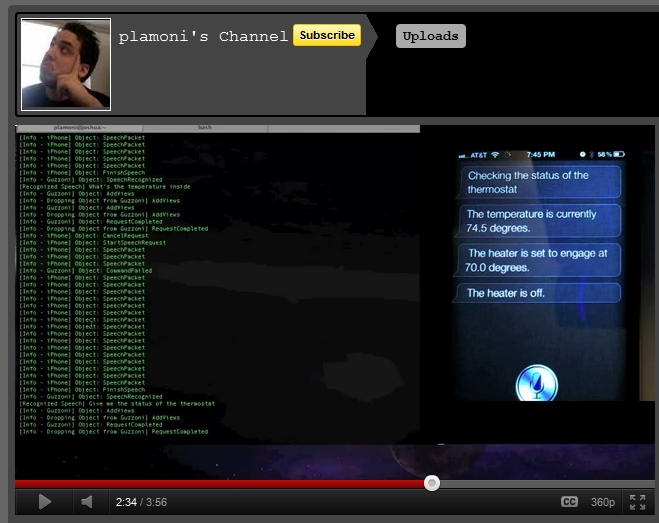
A hacker known as plamoni created a Siri proxy server that could allow anyone to use it and make Siri work with a wide range of non-Apple devices. Applidium, a development firm, hacked the Siri security protocol and has explained the process so anyone can use it.

One implementation of Siri + the proxy server is sending commands to any standard thermostat with Wi-Fi capabilities. plamoni taught Siri (no jailbreak required) to send commands over the network and if you’re interested, the source code is available for free online. Anyone with an iPhone 4S unique identifier and knowledge of networking can get it working. In order to set up Siri to control your home’s temperature involves a DNS server that uses a proxy to send requests to Siri’s servers.

Video after the break. Read more


Google Search for iPad Gets New Features and Redesigned UI

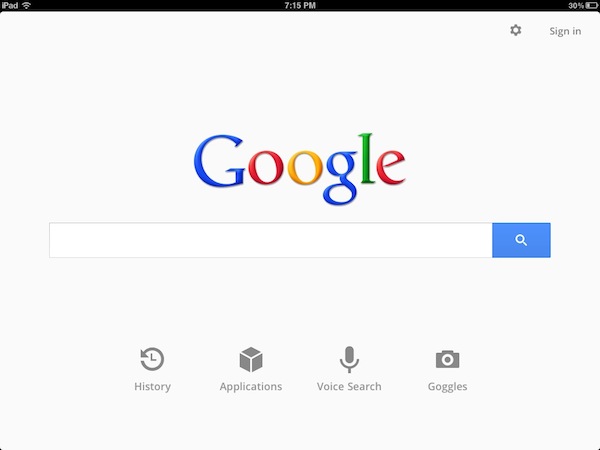
A few minutes ago Google released a new version of its official Google Search app for iOS that, alongside bug fixes and full-screen mode for search results and images on the iPhone, brings a completely overhauled interface, as well as new functionalities, on the iPad. Google Search, available as a universal app, has in fact introduced a redesigned UI that falls in line with Google’s recent updates to its online services like Gmail, Google Reader, Google Calendar and Google+. Google Search on the iPad now sports a series of gray icons in the main page to quickly jump to History, other Google apps, voice search and Goggles, a feature that Google introduced on iOS months ago to search for products just by taking a picture of them. The History page got a visual overhaul, displaying search results as stacks of pages you can swipe through to get your previous search.

Often you may be looking to find something you have seen before again or are continuing research on a topic. But on a tablet, typing can be a challenge. That is why we have created a visual way to explore your search history. Swipe right to view snapshots of pages you’ve visited, stacked and organized by search term. You can also manage your search history from this new view.

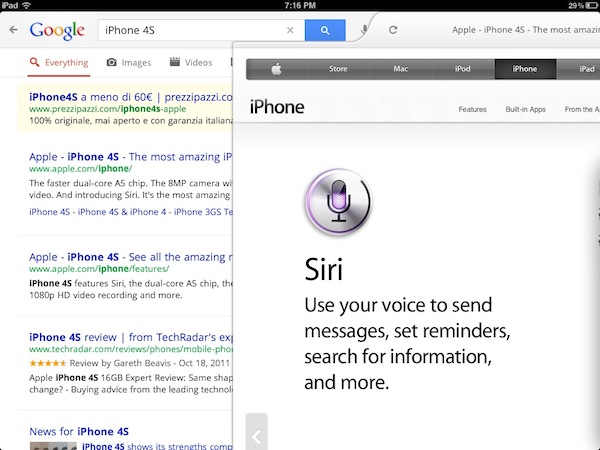
Search results are now loaded with Google Instant and Instant Previews, meaning the engine will be able to predict your queries and, at the same time, offer a visual aid to display pages as thumbnails, rather than just text results. The typical search interface is still there, visualized with Google’s recently launched tablet view. The native app has allowed the developers to embed a toolbar at the top, which contains buttons to open voice search, apps, settings, and sign in with your Google account.

Another big change on the iPad is how results are displayed side-by-side with webpages. As you tap on a link from the search results, Google Search will “slide in” a webpage with a quick animation that enables you to go back at any time with a single swipe gesture. You can adjust the size of the panel and visualize a webpage alongside other search results. Furthermore, the webpage view features another toolbar with buttons to +1 on Google+ and search for a specific word inside the page. With the iPad in landscape mode Google has effectively built a sort of split-browser with search results automatically loading in the resizable panel on the right.

Once you pick a web page to visit, you’ll see the page load on a new, slide-in pane that will layer over the search results. You can slide the pane to the right to get back to your search results, and even keep scrolling through the results as your web page is loading. This allows you to go back and forth from results to web pages quickly to get the information you are looking for.

Especially on the iPad and in landscape mode, the latest Google Search update seems like a step in the right direction to enable users to search faster, switch between results quicker, and have access to search history in a more user-friendly interface. You can get Google Search for free from the App Store.

More screenshots and promo video below.

Read more


OmniFocus for iPhone Adds “iCloud Capture” To Import iOS Reminders

With the latest update to OmniFocus for iPhone, The Omni Group has figured out a way to let the app interact with iOS reminders and iCloud, and automatically fetch reminders created through the iPhone 4S’ Siri or Reminders app. Whilst you still can’t ask Siri to create new tasks directly into OmniFocus, the solution implemented by The Omni Group is very clever, and it gives you the illusion of native integration with the assistant, using iCloud and your Apple ID as a bridge between Siri’s reminder functionality, and OmniFocus.

The Omni Group has implemented a new feature called iCloud Capture that is capable of taking Reminders from your iCloud account, and move them into OmniFocus’ inbox. iCloud Capture, as explained in the Help section, literally takes input that would otherwise stay into Reminders, and moves “as much data as it can” away from Reminders and into OmniFocus. This is done in two ways: first, you have to create reminders that go into a “Reminders” or “OmniFocus” list. Second, you’ll have to log in with your iCloud account in OmniFocus’ settings, and enable iCloud Capture. Once enabled, OmniFocus will check for new reminders every time upon launch and move them into the inbox. The “upon launch” part is important, as OmniFocus can’t process iCloud data in the background – you won’t be able to add reminders via Siri, and expect OmniFocus to import & sync in the background. You’ll have to open OmniFocus for iCloud Capture to work, but it’s a minimal effort compared to the added convenience of being able to let OmniFocus seamlessly process and import reminders.

Please note that reminders will be deleted from Reminders.app as they’re moved to OmniFocus; title and dates will be preserved in the transition, but The Omni Group says that location reminders – which both Siri and Apple’s Reminders can use out of the box – will be “most effective” when they match Reminders’ contact locations and OmniFocus’ own implementation, which is quite different from Apple as it’s got more options. From my understanding of this limitation, it appears getting location reminders into OmniFocus from iCloud might work best if OmniFocus is using the same contact information rather than its “current location” or “exact location”, and I’ll need to investigate this further. For now, I can say that one location-based reminder did go through iCloud Capture, but another did not, and stayed inside Reminders.

The Omni Group didn’t add direct Siri integration, but they came up with one of the most clever ways I’ve seen to use Siri and iCloud to create reminders and have them automatically moved to OmniFocus every time you open the app. The system isn’t perfect, but has worked very well for me with simple reminders. Another good point of iCloud Capture is that Windows users will be able to move Outlook tasks to OmniFocus when they launch the app, as iCloud Capture checks for all reminders in your iCloud account, not just those created via Siri. Overall, I’d recommend giving iCloud Capture a try, and see if reminders might work better for you inside OmniFocus rather than Apple’s Reminders.

Update: The Omni Group has posted a series of videos showing how iCloud Capture works. Check them out after the break.

Read more