Posts in Featured

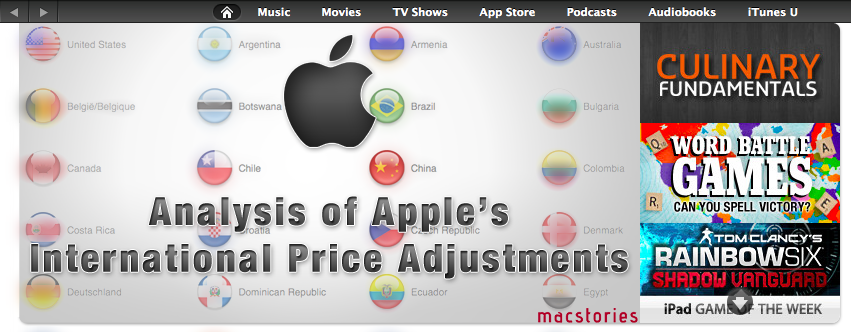
An Analysis Of Apple’s Adjustment Of International App Store Prices

UPDATED: Included a discussion on various sales taxes to clarify some of sections of the analysis, also corrected a mistake regarding Denmark prices.

For those of you who aren’t located in the United States, Wednesday’s news of Apple re-adjusting their prices in the App Store for international stores might have been pretty big news. For many the headline was welcome news, indeed when I woke up Thursday morning and saw they had finally re-calibrated the iTunes ‘exchange-rate’ I was pretty happy about it. We first discussed the great disparity in global iTunes prices back in January and I was pleased to see Apple eventually act and restore some fairness for international consumers.

Unfortunately I soon figured out it wasn’t all good news; Apple had only adjusted the iTunes ‘exchange-rate’ for apps. For their other stores such as for music, movies, TV shows and books the prices remained unchanged. Nonetheless I have revisited my January analysis, updating that data and doing some further analysis of what the price changes actually bring, what it means for individual countries and who is better or worse off.

Read more

Access Extra Content and Perks

Founded in 2015, Club MacStories has delivered exclusive content every week for nearly a decade.

What started with weekly and monthly email newsletters has blossomed into a family of memberships designed for every MacStories fan.

Learn more here and from our Club FAQs.

Club MacStories: Weekly and monthly newsletters via email and the web that are brimming with apps, tips, automation workflows, longform writing, early access to the MacStories Unwind podcast, periodic giveaways, and more;

Club MacStories+: Everything that Club MacStories offers, plus an active Discord community, advanced search and custom RSS features for exploring the Club’s entire back catalog, bonus columns, and dozens of app discounts;

Club Premier: All of the above and AppStories+, an extended version of our flagship podcast that’s delivered early, ad-free, and in high-bitrate audio.

Learn more here and from our Club FAQs.


Tweetbot Gets Initial Push Notification Support

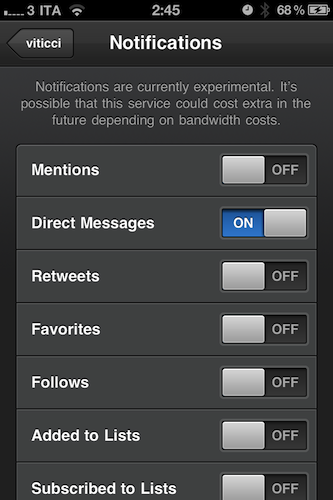
Tweetbot, the Twitter client “with personality” we reviewed a while ago and followed as the developers introduced new features and fixes, has received a major update to version 1.4 that adds a new important functionality, highly requested by the app’s userbase: push notifications. Alongside various bug fixes, selected tabs now remembered when switching accounts, and lists from Twitter users viewable as tweets, Tweetbot 1.4 comes with a new Push Notifications service in the Settings that allows you to be notified about incoming DMs, replies, follows and unfollows, and so forth. The supported Twitter services are many, however the developers have decided to limit the rollout of push notifications for now, mentioning scaling issues and API limitations from Twitter. As Tapbots wants to ensure an optimal experience for everyone, make sure their push notification servers hold up to the new traffic (enabling push notifications for an app – especially a Twitter client – isn’t as easy as most people think) and avoid delays in notification delivery, the initial rollout of Tweetbot push notifications will allow 1,000 users to sign up on a first come, first serve basis. In the following weeks, the limit will be raised to 10,000 users. Please keep in mind that right now – the app has just started propagating in the iTunes Store – notifications might take a while to become active as Tapbots set up the new service. Read more

Access Extra Content and Perks

Founded in 2015, Club MacStories has delivered exclusive content every week for nearly a decade.

What started with weekly and monthly email newsletters has blossomed into a family of memberships designed for every MacStories fan.

Learn more here and from our Club FAQs.

Club MacStories: Weekly and monthly newsletters via email and the web that are brimming with apps, tips, automation workflows, longform writing, early access to the MacStories Unwind podcast, periodic giveaways, and more;

Club MacStories+: Everything that Club MacStories offers, plus an active Discord community, advanced search and custom RSS features for exploring the Club’s entire back catalog, bonus columns, and dozens of app discounts;

Club Premier: All of the above and AppStories+, an extended version of our flagship podcast that’s delivered early, ad-free, and in high-bitrate audio.

Learn more here and from our Club FAQs.


Apple Approving Apps Updated for Lion

Earlier this week, Apple informed registered Mac developers that they could start submitting apps targeting the new features of OS X Lion – coming this month – such as full-screen mode, sandboxing, push notifications and new Aqua interface controls. In the email sent to developers, Apple wrote: ”OS X Lion, the eighth major release of the world’s most advanced operating system, will soon be available to millions of Mac users around the world. Submit your Lion apps for review now so they can be on the Mac App Store when Lion ships this month.” Whilst several rumors in the past had claimed Lion would be released today, July 14th, alongside new Mac hardware, such claims have failed to come true as the OS isn’t available to the general public yet. According to most recent speculation, minor issues with app resumes and restarts in Lion have forced Apple to “delay” the release – though it’s not clear how the company could delay something that was set for July, but wasn’t given a precise release date.

In the meantime, as first noted by OS X Daily, Apple has started approving apps updated for Lion. OS X Daily points out that Mac game WordCrasher was updated to support Lion’s full-screen mode and Resume; we’ve also found more Lion-ready app updates approved by Apple today. These updates either bring new features (as in the case of BusyCal) or minor bug fixes to ensure Lion compatibility.

WordCrasher

  • Full-screen. Use the full-screen button or press CONTROL + COMMAND + F to toggle fullscreen mode under OS X Lion.
  • Resume. Close WordCrasher at any time and resume your game right where you left it. Restart your Mac, and WordCrasher will resume straight away.

Harmony Worship

  • [Bugfix] Fix datamodel for OS X Lion
  • Include missing image in Mac App Store build

Shortcuts

  • System actions with CMD and ALT now work on Lion
  • User interface fixes

BusyCal

  • Lion compatibility.
  • Supports full screen mode on Lion.
  • Supports trackpad gestures on Lion.
  • Supports new scrollbars on Lion.
  • Supports Address Book yearless birthdays on Lion.

The four apps above were existing Mac App Store apps that have been updated to receive Lion fixes and support. The fact that all these updates were approved today leaves us wondering whether Apple wants to quickly get the Store ready for a Lion launch next week by approving apps that take advantage of the new OS – Lion will be exclusively distributed on the Mac App Store and, after it launches, new users may want to spend some extra money to get apps that work nicely with it. Since Apple began accepting Lion submissions this week many wondered whether the new OS could really come out today – if history is of any indication, it usually takes a week for Apple to begin accepting app updates and actually releasing a new major OS. According to a series of fresh claims, Lion is on schedule for a launch next week.

Access Extra Content and Perks

Founded in 2015, Club MacStories has delivered exclusive content every week for nearly a decade.

What started with weekly and monthly email newsletters has blossomed into a family of memberships designed for every MacStories fan.

Learn more here and from our Club FAQs.

Club MacStories: Weekly and monthly newsletters via email and the web that are brimming with apps, tips, automation workflows, longform writing, early access to the MacStories Unwind podcast, periodic giveaways, and more;

Club MacStories+: Everything that Club MacStories offers, plus an active Discord community, advanced search and custom RSS features for exploring the Club’s entire back catalog, bonus columns, and dozens of app discounts;

Club Premier: All of the above and AppStories+, an extended version of our flagship podcast that’s delivered early, ad-free, and in high-bitrate audio.

Learn more here and from our Club FAQs.


Apple Shuts Down OS X Downloads Page

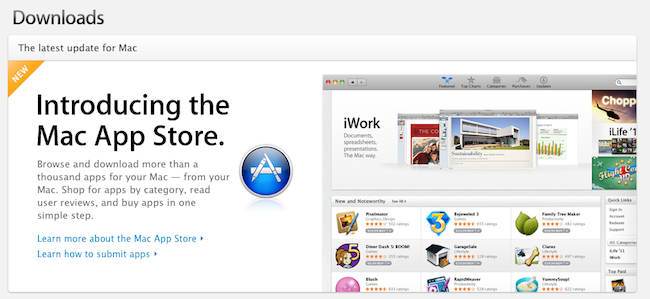
As announced back in December 2010, Apple has shut down [thanks, Daylen] the OS X Downloads page that used to list applications, widgets and utilities users could download for their Macs. Instead, Apple is now featuring the Mac App Store at the same URL, which you can find here (the old apple.com/downloads/macosx URL also redirects to the new page). It’s unclear when Apple made the change to the webpage, but the last time we checked a couple of weeks ago the Downloads website was still active and listing apps for OS X. With OS X Lion approaching its public release, the fact that Apple has replaced the Downloads website with a Mac App Store banner doesn’t come as a total surprise – after all, Lion is going to be distributed exclusively on the Mac App Store, and Apple wants it to become the most popular way to discover and install new software for OS X.

Back in December, an email from Apple to developers said:

Because we believe the Mac App Store will be the best destination for users to discover, purchase, and download your apps, we will no longer offer apps on the Mac OS X Downloads site. Instead, beginning January 6, we will be directing users to explore the range of apps available on the Mac App Store.

We appreciate your support of the Mac platform and hope you’ll take advantage of this new opportunity to showcase your apps to even more users.

The Downloads page used to be a good source of traffic and page views for developers willing to showcase their apps on Apple’s website, for free. Now, they’ll need to submit their apps to the Mac App Store, which is organized in categories and has a front page with featured software and staff picks, but can’t be accessed from a web browser.

As a side note, the Widgets site can still be accessed here. On the Downloads page, Apple is also featuring links to iOS Software Updates, Safari Extensions, Mac Software Updates, Safari 5 and iTunes 10.

Access Extra Content and Perks

Founded in 2015, Club MacStories has delivered exclusive content every week for nearly a decade.

What started with weekly and monthly email newsletters has blossomed into a family of memberships designed for every MacStories fan.

Learn more here and from our Club FAQs.

Club MacStories: Weekly and monthly newsletters via email and the web that are brimming with apps, tips, automation workflows, longform writing, early access to the MacStories Unwind podcast, periodic giveaways, and more;

Club MacStories+: Everything that Club MacStories offers, plus an active Discord community, advanced search and custom RSS features for exploring the Club’s entire back catalog, bonus columns, and dozens of app discounts;

Club Premier: All of the above and AppStories+, an extended version of our flagship podcast that’s delivered early, ad-free, and in high-bitrate audio.

Learn more here and from our Club FAQs.


Spotify Launching Today In The US, iPhone App Available In US App Store

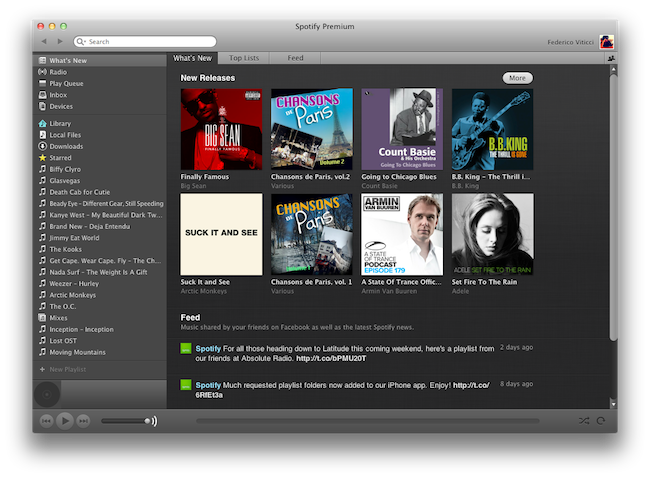
Popular music streaming service Spotify, after much speculation and rumors, is launching today in the United States with an invite-system (for those who signed up last week) and subscriptions to access the various functionalities offered by the European company. Unlike the iTunes Store, or Amazon’s MP3 Store, Spotify allows you to stream a catalog of songs you don’t own, and in spite of the latest version introducing a purchase option, the focus of the service clearly is on streaming, rather than downloading. You can create playlists online, share them with your friends, mark songs as favorite, and browse the latest releases from Spotify, which thanks to support of major music labels happen to be the same of other marketplaces like iTunes. Spotify runs on a variety of platforms including the Mac, and you can read more about the desktop client’s features in our previous coverage.

Whilst Spotify has announced that the service will be open for business today in the US starting at 8 AM ET, the iPhone app, previously available exclusively in some European countries, is now available in the US App Store as well. The app is free, it’s got no iPad counterpart yet, but it lets you stream all the songs you have in your Spotify library, provided you subscribe to Premium plan ($9.99 per month) that gives you access to ad-free music with offline caching capabilities and mobile app support. Read more

Access Extra Content and Perks

Founded in 2015, Club MacStories has delivered exclusive content every week for nearly a decade.

What started with weekly and monthly email newsletters has blossomed into a family of memberships designed for every MacStories fan.

Learn more here and from our Club FAQs.

Club MacStories: Weekly and monthly newsletters via email and the web that are brimming with apps, tips, automation workflows, longform writing, early access to the MacStories Unwind podcast, periodic giveaways, and more;

Club MacStories+: Everything that Club MacStories offers, plus an active Discord community, advanced search and custom RSS features for exploring the Club’s entire back catalog, bonus columns, and dozens of app discounts;

Club Premier: All of the above and AppStories+, an extended version of our flagship podcast that’s delivered early, ad-free, and in high-bitrate audio.

Learn more here and from our Club FAQs.


Grazing 2.0: Once Again, My Favorite iOS Browser

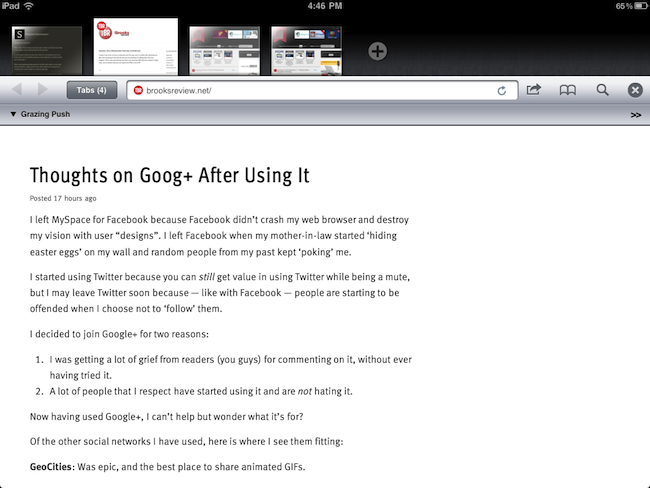
Back in September I first reviewed Grazing, an alternative web browser for the iPad that came out a few weeks after I complained about the average alternative browser for the iPad lacking the ideas, feature set or implementation to properly compete with Safari. Lots of things have changed since then, both with iOS Safari and the third-party development scene. Safari for iPhone and iPad got faster with the Nitro engine, received AirPlay support for any video found on the web and, with iOS 5, is also getting a major facelift with tabs on the iPad and other welcome additions such as tab undo and history right from the toolbar. On the other hand, the past few months have seen an explosion of alternative browsers that, in spite of the lack of Nitro JavaScript engine, are playing around with the craziest ideas when it comes to re-inventing web browsing on the tablet. I was impressed by the feature set of iCab Mobile (perhaps the most popular 3rd party browser for iOS), the UI of Sleipnir and the underlying concept of Portal, without a doubt the most innovative iPhone browser to date. There are dozens (if not hundreds) of alternative browsers for iOS now, and unlike last year many of them are really, really good. Apple still doesn’t allow iOS users to set a different default browser other than Safari, but third-party support has increased in the past months, so we’re starting to see integration with alternative browsers (usually iCab) in apps like Handoff and Mr. Reader.

Developers realized there could be so much more besides copying Safari and putting a sharing menu and tabs in an “alternative” browser. We have seen experiments with visual tabs, gestures, tab re-organization, and more. Is there still room for innovation? With iOS 5 bringing a slew of enhancements to Safari (including direct Twitter integration) and titles like iCab, Portal, Sleipnir, Skyfire and iChromy already available on the App Store, what’s next for third-party iOS browsers?

Grazing 2.0, a major update to the app I reviewed in September, provides an answer to this question by offering an interesting mix of features aimed at turning the app into a multitouch-enabled, platform-connected browsing experience for iOS. Read more

Access Extra Content and Perks

Founded in 2015, Club MacStories has delivered exclusive content every week for nearly a decade.

What started with weekly and monthly email newsletters has blossomed into a family of memberships designed for every MacStories fan.

Learn more here and from our Club FAQs.

Club MacStories: Weekly and monthly newsletters via email and the web that are brimming with apps, tips, automation workflows, longform writing, early access to the MacStories Unwind podcast, periodic giveaways, and more;

Club MacStories+: Everything that Club MacStories offers, plus an active Discord community, advanced search and custom RSS features for exploring the Club’s entire back catalog, bonus columns, and dozens of app discounts;

Club Premier: All of the above and AppStories+, an extended version of our flagship podcast that’s delivered early, ad-free, and in high-bitrate audio.

Learn more here and from our Club FAQs.


New MacBook Airs To Feature Backlit Keyboard

The new MacBook Airs expected to launch this week alongside OS X Lion may feature a return of the backlit keyboard that was omitted from the October 2010 redesign of the popular line. According to AppleInsider, people familiar with the matter have indicated that this month’s refresh will see the return of the backlit keyboard, together with new hardware improvements such as Sandy Bridge processors, Thunderbolt technology, and faster flash memory.

With the release of new models later this month, Apple is set to reinstate a feature to its MacBook Airs that went missing when the company overhauled the ultra-thin notebooks into more cost-affordable products late last year, AppleInsider has learned.

According to people familiar with the matter, backlit keyboards will join the string of hardware enhancements planned for the new 11.6- and 13.3-inch notebooks, which are also expected to adopt high-speed Thunderbolt ports, an upgrade to Intel’s Sandy Bridge architecture, and possibly high-speed 400MBps flash memory.

The lack of a backlit keyboard in the 2010 redesign of the MacBook Air family generated quite a backlash online, especially considering the previous iterations of the MacBook Air came with a backlit option by default. Many speculated Apple had to remove the backlit keyboard due to design issues and battery life constraints; the upcoming refresh is said to feature the same design of the 2010 MacBook Air, thus suggesting Apple has either figured out a way to implement the backlit system in the ultra-thin chassis of the machine, or listened to customers’ feedback and decided the feature had to return. A backlit keyboard helps in low-light conditions, and it’s currently implemented in all versions of Apple’s MacBook Pro line.

The new MacBook Airs’ part numbers have already leaked online, suggesting an upcoming refresh for the entry/upgraded 11-inch and 13-inch models. No details on whether Apple will tweak pricing of the line have surfaced yet, however, based on recent speculation, it seems fairly certain that the new machines will come with Lion pre-installed on a possible July 14th launch.

[Old-gen MacBook Air keyboard image via]

Access Extra Content and Perks

Founded in 2015, Club MacStories has delivered exclusive content every week for nearly a decade.

What started with weekly and monthly email newsletters has blossomed into a family of memberships designed for every MacStories fan.

Learn more here and from our Club FAQs.

Club MacStories: Weekly and monthly newsletters via email and the web that are brimming with apps, tips, automation workflows, longform writing, early access to the MacStories Unwind podcast, periodic giveaways, and more;

Club MacStories+: Everything that Club MacStories offers, plus an active Discord community, advanced search and custom RSS features for exploring the Club’s entire back catalog, bonus columns, and dozens of app discounts;

Club Premier: All of the above and AppStories+, an extended version of our flagship podcast that’s delivered early, ad-free, and in high-bitrate audio.

Learn more here and from our Club FAQs.


Apple To Developers: You Can Now Submit Lion Apps

Following the release of the Xcode 4.1 Golden Master seed and with OS X Lion rumored to be nearing its public release, Apple has just informed registered Mac developers that they can now submit apps built for Lion to the Mac App Store.

OS X Lion, the eighth major release of the world’s most advanced operating system, will soon be available to millions of Mac users around the world. Submit your Lion apps for review now so they can be on the Mac App Store when Lion ships this month.

In the past weeks, in spite of various developer previews of Xcode 4.1 for Lion available on the Dev Center, developers were unable to submit apps built specifically for the new OS. In OS X Lion, developers can take advantage of hundreds of new APIs to enable features like full-screen mode, push notifications for apps, new Aqua controls including iPad-inspired popovers, auto-save and versions, as well as sandboxing and multi-touch gestures.

Lion is rumored to hit this week, alongside new MacBook Airs with Sandy Bridge processors and Thunderbolt, and new Mac Pros. The GM build of Lion was seeded on July 1, leading to speculation that, after two weeks and with no major bugs found, the final version is ready to become available on the Mac App Store at $29 any day now. Several developers we polled in the past week told us they were ready to submit their new apps, but Apple (and Xcode) wouldn’t let them. With the release of Xcode 4.1 GM today, Apple flipped the switch on Lion submissions, but it’s unclear how many apps the Review Team could manage to approve before the rumored Lion launch. Clearly Apple wants some Lion-ready apps to be ready for Lion’s debut, so it’ll be interesting to see how this will play out in the next 48 hours.

Apple announced Lion would come out sometime in July as Mac App Store exclusive. In the past, Apple began accepting iOS 4 submissions on June 11 (roughly 10 days ahead of iOS 4’s release) and Mac App Store submissions in November, whilst the Mac App Store went public on January 6.

Access Extra Content and Perks

Founded in 2015, Club MacStories has delivered exclusive content every week for nearly a decade.

What started with weekly and monthly email newsletters has blossomed into a family of memberships designed for every MacStories fan.

Learn more here and from our Club FAQs.

Club MacStories: Weekly and monthly newsletters via email and the web that are brimming with apps, tips, automation workflows, longform writing, early access to the MacStories Unwind podcast, periodic giveaways, and more;

Club MacStories+: Everything that Club MacStories offers, plus an active Discord community, advanced search and custom RSS features for exploring the Club’s entire back catalog, bonus columns, and dozens of app discounts;

Club Premier: All of the above and AppStories+, an extended version of our flagship podcast that’s delivered early, ad-free, and in high-bitrate audio.

Learn more here and from our Club FAQs.


TV Forecast HD Is A Beautifully Refined iPad App That Keeps Track Of Your Favourite TV Shows

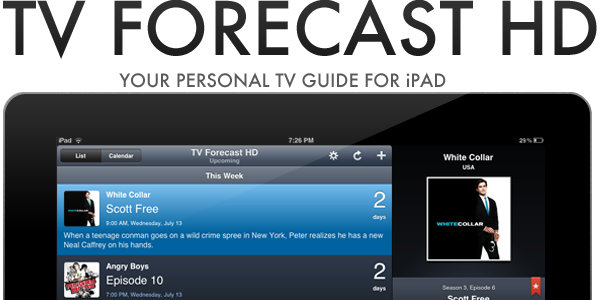
If you are anything like me, you probably don’t watch much live TV anymore; instead just watching a few shows a week on TV and the rest via an online catch-up service. If that sounds like you as well, you may be interested in a new iPad app that makes it easier to track when your favorite shows are airing on TV. The app, TV Forecast HD, is developed by Big Bucket Software (also the developer behind The Incident) and is an entirely redesigned version of TV Forecast, which is currently available for the iPhone. Jump the break for the full review of TV Forecast HD, which has just been made available today.

Read more

Access Extra Content and Perks

Founded in 2015, Club MacStories has delivered exclusive content every week for nearly a decade.

What started with weekly and monthly email newsletters has blossomed into a family of memberships designed for every MacStories fan.

Learn more here and from our Club FAQs.

Club MacStories: Weekly and monthly newsletters via email and the web that are brimming with apps, tips, automation workflows, longform writing, early access to the MacStories Unwind podcast, periodic giveaways, and more;

Club MacStories+: Everything that Club MacStories offers, plus an active Discord community, advanced search and custom RSS features for exploring the Club’s entire back catalog, bonus columns, and dozens of app discounts;

Club Premier: All of the above and AppStories+, an extended version of our flagship podcast that’s delivered early, ad-free, and in high-bitrate audio.

Learn more here and from our Club FAQs.