
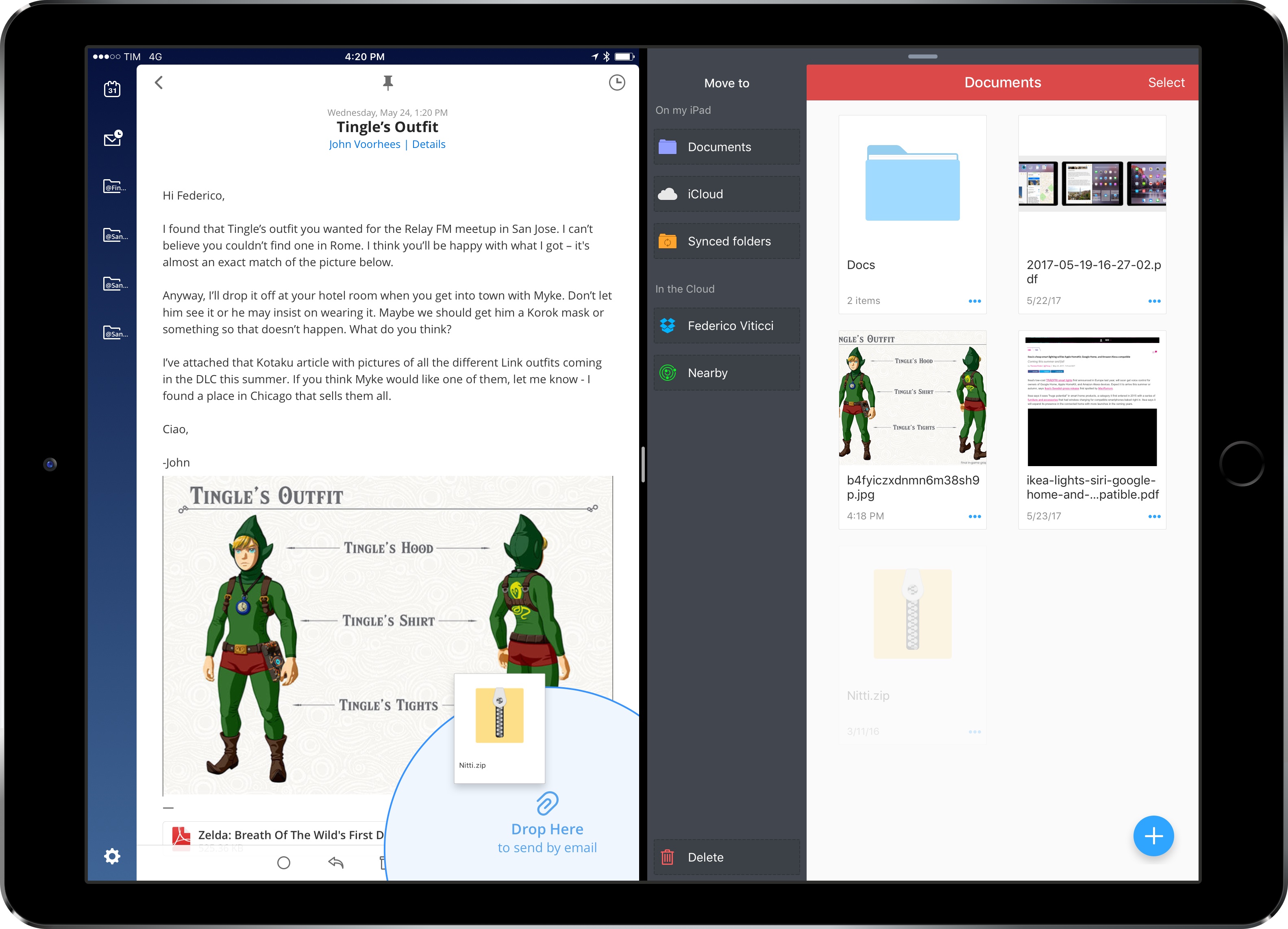
In my iOS 11 wish list for iPad and concept video, I focused on system-wide drag & drop – a feature that could reshape how iPad users move documents and data between apps. Readdle, makers of the popular Spark and PDF Expert, aren’t waiting for Apple to add a native drag & drop framework to iOS, though. Today, in addition to the release of Documents 6, the company is updating most of their iPad apps with a custom drag & drop feature that simplifies the transfer of documents between two apps in Split View. I’ve been testing this functionality for the past week, and, even if it’s not system-wide iOS drag & drop, it’s been enough to pull me back into Spark and PDF Expert – at least for now.
Posts tagged with "featured"
Readdle Brings Split View Drag & Drop to Their iPad Apps
iOS 11: iPad Wishes and Concept Video
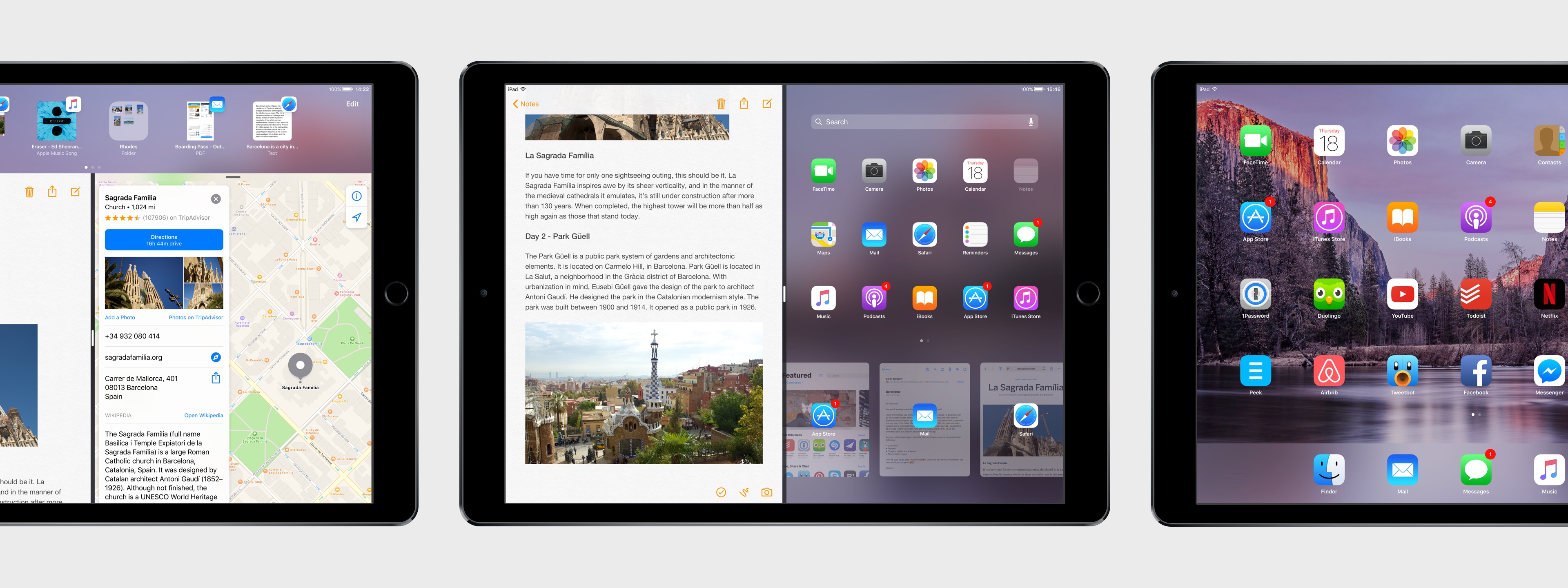
Once heralded as a promising sign of Apple’s renewed commitment to the iPad, iOS 9 has begun to feel like a one-hit wonder.
iOS 9 represented a profound change for Apple’s approach to the iPad. After years of stagnation and uninspired imitation of iPhone interface paradigms, iOS 9 allowed the iPad to explore the true potential of its large canvas; for the first time since the original tablet, Apple was creating new iPad-only features rather than adapting them from the iPhone. Split View, Slide Over, and Picture in Picture were drastic departures from the classic iPad interaction model that, however, perfectly fit the device.
As I concluded in my iOS 9 review:
This year, the iPad is getting the first version of iOS truly made for it. After too many unimaginative releases, Apple has understood the capabilities of the iPad’s display and its nature of modern portable computer. Free of dogmas and preconceptions of what an iPad ought to be, iOS 9 fundamentally reinvents what an iPad can become going forward.
In a span of six months, the one-two punch of iOS 9 and iPad Pro redefined the concept of portable computer again, setting Apple on a new path for the iPad ecosystem. Or, at least, it seemingly did.
Since late 2015, Apple hasn’t had too much to show for the iPad. A smaller version of the iPad Pro was released in early 2016, though the new device mostly adapted features from the bigger version to a more compact form factor, introducing inconsistencies to the iPad line in the process, such as the True Tone display (still exclusive to the 9.7” iPad Pro). iOS 10, while a solid upgrade overall, focused on iPhone users and lifestyle enhancements; for iPad users, iOS 10 was a disappointment that failed to build upon iOS 9. The first iPad Pro – launched in November 2015 – has lingered without updates, raising questions on the actual need for one of its marquee features – the Smart Connector that only Apple and Logitech have supported so far. And amid consistently declining sales, the company’s only “new” hardware after the iPad Pro has been a lower-priced and rebranded iPad Air – a solid entry model, but another adaptation.
We haven’t seen something truly new, bold, and transformational happen on the iPad platform in nearly two years. It’s time for Apple to step up their game and continue pursuing the vision for the future of computing set forth in 2015. There’s so much more work to be done with iOS, multitasking, and the redefinition of computing for the multitouch era. The iPad Pro can be a computer for everything, but it needs another leap forward to become the computer for everyone. And that can’t happen without a serious reconsideration of its software.
The iPad needs another bold, daring step towards the future. With iOS 11, Apple has an opportunity to pick up where they left off with iOS 9, forging a new direction for the iPad platform.
Every year ahead of WWDC, I collect some of my thoughts about the current state of iOS and consider where Apple could take their software next. I’ve been doing this for the past several years going back to iOS 6 in 2012. I’ve referred to these stories as “wishes” because they encapsulate all the aspects I’d like Apple to improve in their mobile OS. Last year, we added a concept video to the mix. This year, I wanted to prepare something different and more specific.
iOS for iPhone is, I believe, at a point of sufficient maturity: aside from particular feature additions, I don’t think there’s anything fundamentally missing from the iPhone.1 The iPad now bears the proverbial low-hanging fruit of iOS. There are obvious areas of improvement on iOS for iPad, which is, effectively, two years behind its iPhone counterpart. The iPad’s lack of meaningful software advancements allows us to explore deeper ideas; thus, in a break with tradition, I decided to focus this year’s iOS Wishes exclusively on the iPad and where Apple could take its software next.
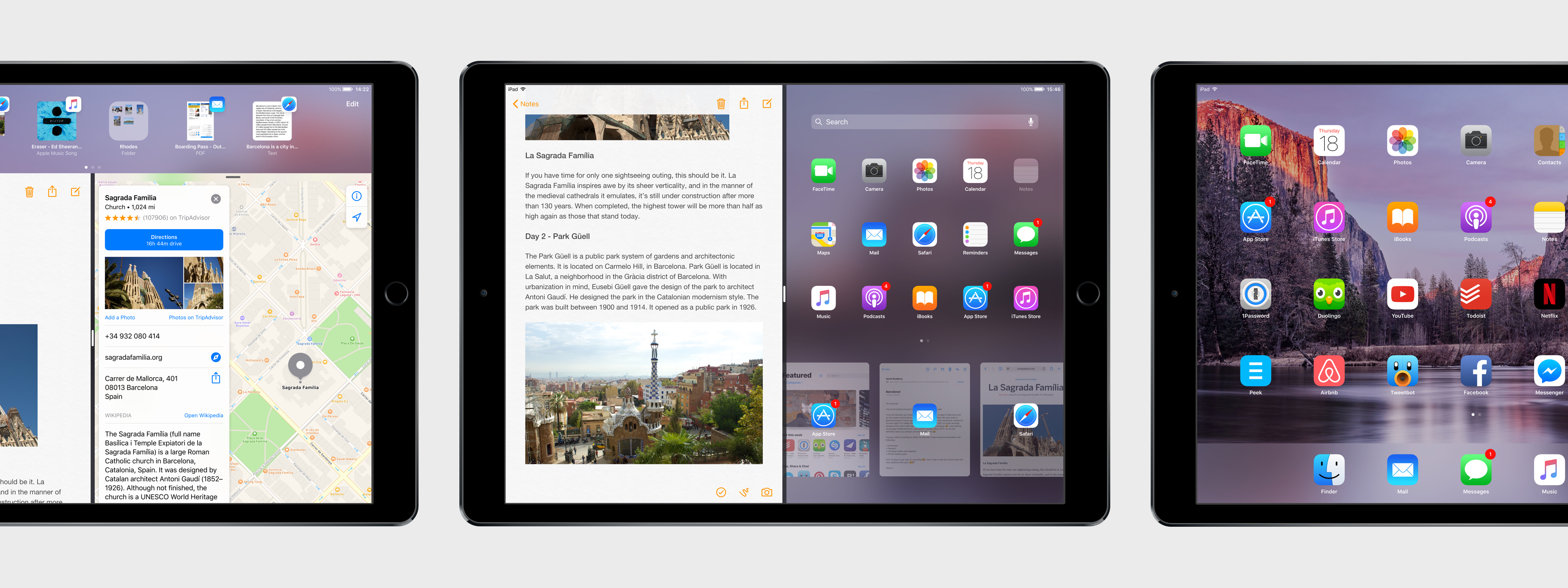
Like last year, I collaborated with Sam Beckett to visualize my ideas for iOS 11 on the iPad with a concept video and detailed mockups. This time, instead of showcasing our ideas as standalone concepts, we imagined a “day in the life” theme for the video, showing how enhancements to iOS for iPad would work in practice. Rather than showcasing random bits of possible features, we imagined an underlying task to be accomplished (planning a vacation in Barcelona) and how better iPad software could help.
I’ve been thinking about some of these ideas since iOS 9 (you can see a thread between my iOS 10 concept and this year’s version), while others would be a natural evolution for iOS on the iPad. Once again, Sam was able to visualize everything with a fantastic concept that, I believe, captures the iPad’s big-picture potential more accurately than last year.
Below, you’ll find our iOS 11 for iPad concept video, followed by an analysis of my iPad wishes with static mockups. I focused on foundational changes to the iPad’s software – tentpole features that would affect the entire OS and app ecosystem.
This isn’t a prediction of what Apple will announce at WWDC; it’s my vision for what the future of the iPad should be.
Things 3: Beauty and Delight in a Task Manager
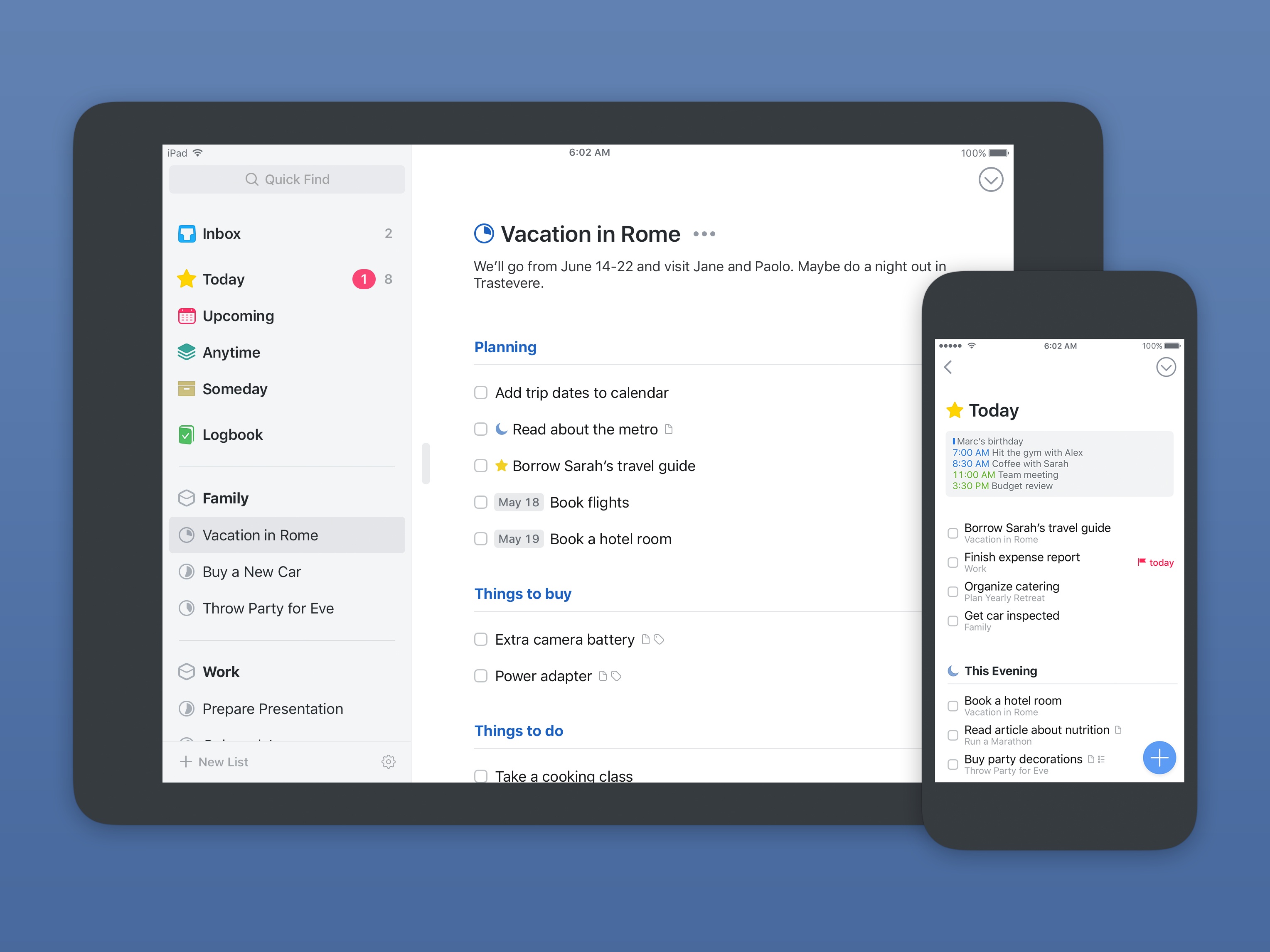
Today Cultured Code launched the long-anticipated next version of its task management app, Things, for iPhone, iPad, and Mac. Things has been one of the go-to task managers on Apple platforms since its initial release in 2008, and for good reason; the team at Cultured Code is known for the thought and care they put into their apps. For much of its life, Things has been a shining example of quality iOS and macOS development.
Over the last nine years, Things has been quick to adopt the latest OS features introduced by Apple in an effort to keep the app current; more substantial updates, however, have been few and far between. It took four years for Things 1 to give way to Things 2, and the gap between versions 2 and 3 has been even longer. Many of the once-loyal Things users have moved on to newer, more modern options for task management. But now, Things 3 has finally arrived.
Was it worth the wait?
Workflow Update Restores Google Chrome and Pocket Actions, Extends Apple Music Integration
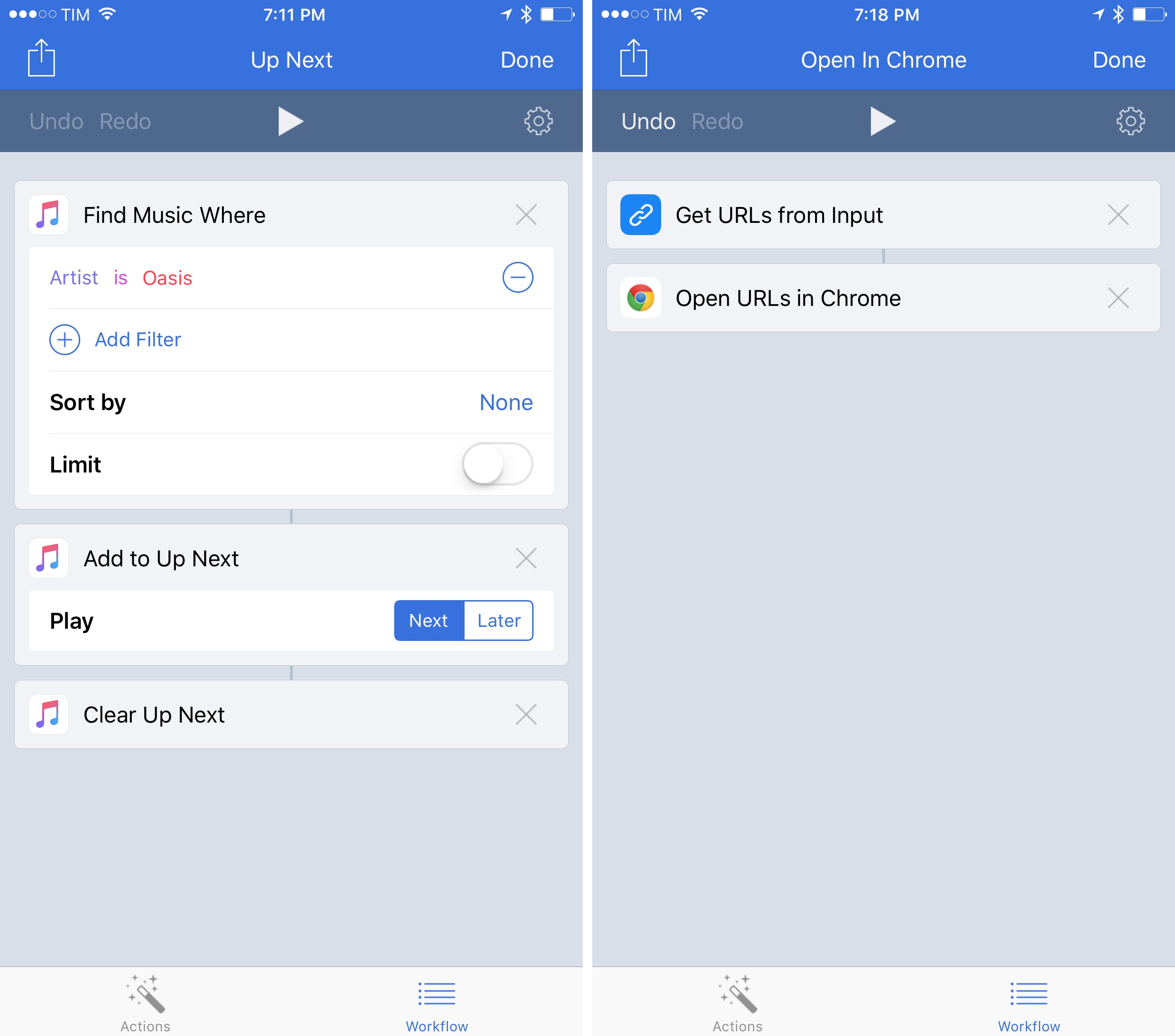
In the first update following Apple’s acquisition in late March – and despite rumors that claimed the app would no longer be supported – Workflow has today restored some of the features that were removed in version 1.7.3 of the app (which was released when Apple confirmed the acquisition) and has brought a variety of changes and improvements, including new Apple Music actions.
Prizmo Go Review: Smarter OCR with the iPhone’s Camera
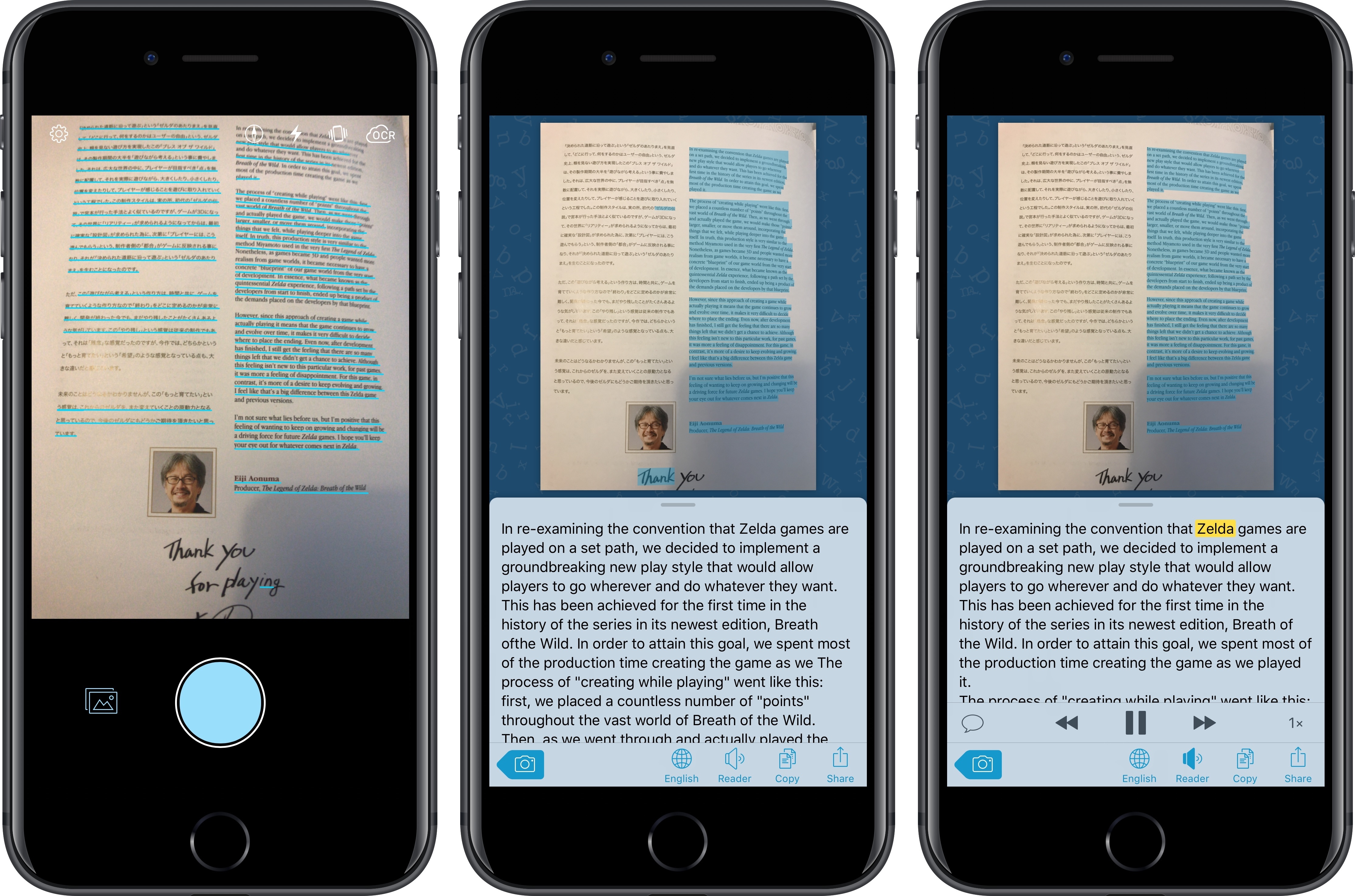
I’ve long been using Prizmo to quickly extract text contained in photos using the iPhone’s camera. Developed by Creaceed, Prizmo has always stood out among iOS scanner apps thanks to its accurate and fast OCR. While most scanner apps focus on digitizing documents and exporting PDFs, Prizmo complemented that functionality with the ability to recognize and share text with just a couple of taps. Prizmo could be used as a scanner app for paperless workflows, but I preferred to keep it on my devices as a dedicated utility to effortlessly extract and share text.
With Prizmo Go, released today on the App Store, Creaceed is doubling down on Prizmo’s best feature with a separate app that’s been entirely designed with OCR and sharing text in mind. While OCR was a feature of Prizmo, it becomes the cornerstone of the experience in Prizmo Go, which takes advantage of impressive new OCR technologies to make character recognition smarter, faster, and better integrated with other iOS apps.
App Camp for Girls is Coming to Chicago
App Camp for Girls is making a big jump geographically this summer. The camp for middle schoolers who self-identify as female, trans (regardless of identity), or gender non-conforming, was founded in 2013 by Jean MacDonald and Grey Osten in Portland, Oregon to address the gender imbalance in technology professions. Since then, App Camp has started camps in other cities including Seattle and Phoenix, but the debut of a camp in Chicago, Illinois this summer marks the first time a camp has been held east of the Mississippi River.
iPad Diaries: DEVONthink’s New Advanced Automation
iPad Diaries is a regular series about using the iPad as a primary computer. You can find more installments here and subscribe to the dedicated RSS feed.
When I covered DEVONthink To Go in the first iPad Diaries column back in February, I briefly mentioned the app’s limited support for URL schemes and automation. I concluded the article noting that DEVONthink’s advanced file management features were ideal candidates for my writing workflow – particularly given the app’s ability to store different types of documents, reference them with unique links, and search them with Boolean operators. I also expanded upon the idea of using DEVONthink as my only iOS file manager in the latest episode of Mac Power Users.
I’ve been moving more work documents and other research material (web archives and PDFs, mostly) to DEVONthink over the past two months. The turning point occurred a few weeks ago, when DEVONtechnologies began adding advanced x-callback-url automation to DEVONthink’s beta channel and were kind enough to let me test and provide feedback for the functionality.
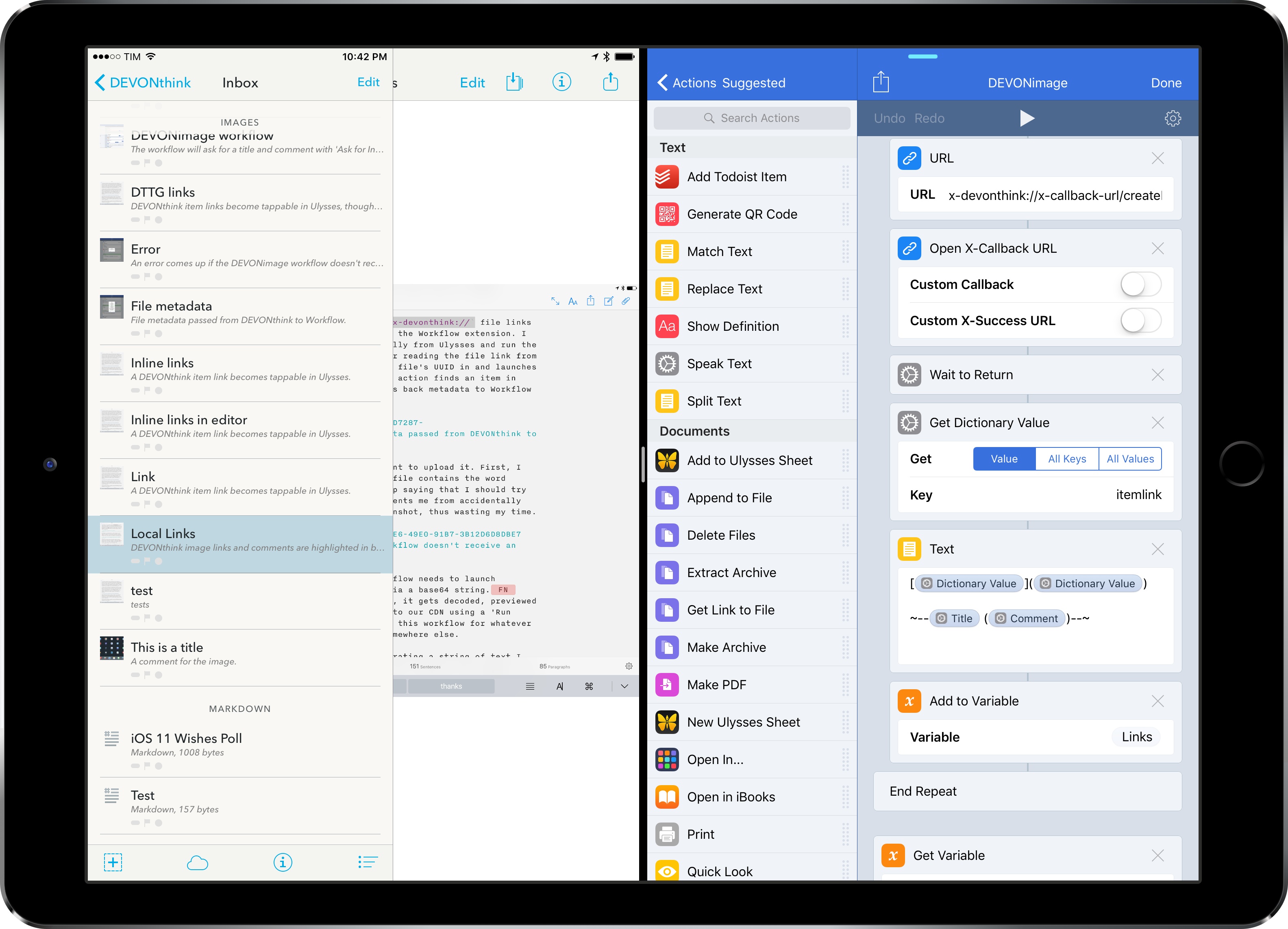
I was genuinely excited by the prospect of a scriptable DEVONthink: due to iOS’ lack of a deeply integrated Finder, I’ve always wanted a file manager that could be extended and enhanced through automation and other apps. With an improved set of URL commands and various optimizations for usage in Workflow, DEVONthink To Go can now be that kind of file manager. I made my decision: this is the app I’m going to use to manage the research content for my iOS 11 review this summer.
The automation features introduced by DEVONtechnologies in the latest DEVONthink for iOS go deep into the app’s structure, covering discrete functionalities such as file creation, search, and data retrieval. These changes will enable a greater number of users to integrate DEVONthink with their favorite iPad apps and workflows. And while the new commands are documented in the app, I thought it’d be useful to provide some concrete examples of how we can take DEVONthink to the next level through automation.
Introducing AppStories
In February 2010, nearly a year after I started MacStories, I registered a domain for a project I knew I wanted to launch in the future: AppStories.net.
Seven years later, AppStories finally joins the MacStories family. AppStories is the first MacStories podcast, hosted by yours truly and John Voorhees, and it’s all about the world of apps. Every week, John and I will cover our favorite apps, the human stories behind the apps we love, as well as the impact of apps on our economy, culture, and personal lives. And we’ll always do so in about 30 minutes.
You can check out AppStories’ website here, or, even better, subscribe on Apple Podcasts.
You can also find AppStories on:
- Overcast
- Pocket Casts
- Any other podcast app with our RSS feed
Alternatively, you can just hit Play on our embedded episode card below to start listening to the first episode of AppStories.

AppStories is an important milestone for the MacStories team, as well as an idea I’ve been pondering for several years. Just like MacStories, we’re committed to AppStories and we’ll keep doing this for a long time. Despite its long gestation, this is just the beginning for AppStories, which will become an essential complement to MacStories going forward. I am extremely excited about AppStories and the plans we’ve outlined so far.
If you’re not interested in the backstory, I’d love for you to check out the first episode and subscribe. But if you want to learn more and understand what our goals for AppStories are, allow me to start from the beginning.