Posts in news

Evernote Acquires Penultimate, Will Remain A Separate App

With a blog post published this morning, Evernote has announced the acquisition of Penultimate, a digital handwriting app for iPad developed by independent studio Cocoa Box. Penultimate, which we have covered on several occasions on MacStories in the past, is one of the richest – and best selling – handwriting apps for iPad, featuring smooth virtual ink to create notes users can send to a variety of services including Dropbox and Evernote. The latter was only added in January, and clearly caught Evernote’s attention as the company, after raising another funding round last week, is now focused on expanding its ecosystem of connected apps and services to new areas and platforms.

The acquisition will let Penultimate live on as a separate app, but more connected to Evernote, similarly to how Skitch – also part of the Evernote family – works now. It appears Penultimate will soon come to more devices, and gain deep Evernote search capabilities as well as a new synchronization option.

From Penultimate’s blog post:

Importantly, Penultimate is not going away: it remains an independent application, and will continue to espouse the virtues of ease of use, elegance, and “that special something” that have kept you coming back. But I also think you’ll be thrilled, and even surprised, by how much more the app will be able to do for you as we work together to improve it and connect more profoundly with Evernote’s capabilities.

Evernote, on the other hand, writes:

Penultimate is hugely popular. In fact, according to Apple, it’s the #4 best-selling paid iPad app of all time. When you have such a great product, the last thing you want to do is mess with it. That’s why Penultimate creator, Ben Zotto, is joining Evernote to head up future app development. Penultimate will stay a separate, elegant application and will get many much-requested Evernote-y improvements including full search and synchronization. Ben will also lead the effort to put handwriting and digital ink functionality into other Evernote products and platforms, so you’ll see handwriting cross-pollination popping up everywhere.

Penultimate isn’t the only handwriting and note-taking app for iPad to feature Evernote integration – others like Noteshelf and Notability also have basic support for Evernote – yet due to its elegant interface and simple approach to handwriting, Penultimate has always managed to maintain its top position in the App Store’s charts.

In its goal to build a “company for the next 100 years”, Evernote has been spending the past year revamping its ecosystem of services and apps that connect to Evernote accounts to bring together text, audio, images, and documents to help people “remember things”. The company acquired Skitch and iOS text editor Essay, launched two new iOS apps (Hello and Food), a browser extension (Clearly), and recently announced it is working on a task-management application following the acquisition of another iOS app, Egretlist. With the acquisition of Penultimate, it’ll be interesting to see whether Evernote will also make changes to its own iPad app to include deeper integration with the standalone handwriting software, and if the main Evernote interface will gain new filtering tools to better organize text notes and handwritten ones (which already support optical character recognition for search when saved to Evernote).

Check out a video featuring Evernote’s Phil Libin and Penultimate’s Ben Zotto after the break.
Read more
Apple Extends MobileMe’s 20 GB Free Upgrade to iCloud Until September 30

As noted by Macotakara (via AppleInsider), Apple has quietly extended the free period of 20 GB of iCloud storage given to previous MobileMe subscribers until September 30, 2012. When Apple started transitioning customers from MobileMe to iCloud last year, they noted MobileMe services would stop functioning on June 30, 2012, providing detailed instructions for users to migrate accounts and data to the new platform. In the same MobileMe Transition Q&A webpage, Apple confirmed former MobileMe subscribers would get access to 20 GB of iCloud storage for free until June 30, 2012.

Whilst MobileMe services are still set to go offline on June 30, it appears Apple recently made changes to extend the free storage period until the end of September. Apple’s website now reports:

MobileMe members with 20GB of purchased storage receive a complimentary iCloud storage upgrade of 20GB, and accounts with additional purchased storage (40GB to 60GB) receive a complimentary upgrade of 50GB after moving to iCloud. These free upgrades are good through September 30th, 2012. After that date, you can continue the upgrade at the regular price or let it expire and use the free 5GB plan.

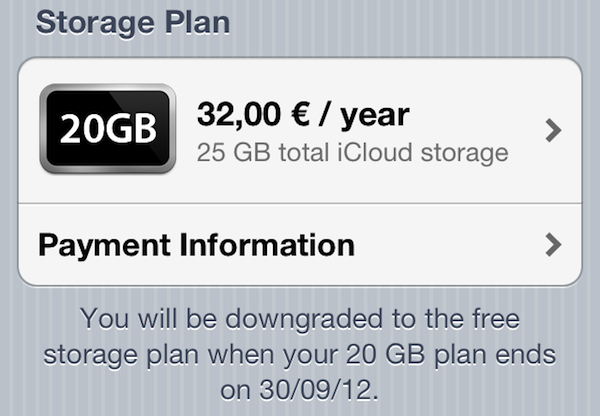
On iOS devices, as pictured above, the free storage plan is now reporting a downgrade date of September 30, 2012.

Recently, Apple began offering free copies of OS X Snow Leopard to old MobileMe subscribers still on Leopard in order to let them upgrade to Lion (which is available on the Mac App Store for 10.6), and thus iCloud. The company also started reminding iWork.com users of the impending closure of the service, and featured banners on the me.com webmail to remind users about the June 30 MobileMe deadline.

More details on iCloud storage and international pricing for new customers are available in our overview from last year.


Concept Video Shows New Text Selection Method for iPad

Remember how, before the iPad was unveiled in January 2010, speculation was running wild as to whether Apple would simply use a larger virtual keyboard on the device? Back then, some rumors claimed the bigger nature of the device would force Apple to come up with some crazy and revolutionary way to type text on screen. As it turned out, Apple simply replicated the iPhone’s soft keyboard on the initial version of iPhone OS 3.2, making it almost laptop-size. In fact, the biggest change to the iPad’s software keyboard only happened with iOS 5.0 last year with the introduction of the split keyboard.

That’s not to say everything related to the iOS keyboard is perfect and Apple should stop improving on it. As the plethora of Dropbox text editors have showed, there is a need for different, possibly customizable keyboards that give better access to text selection tools.

In my list of wishes for iOS 6, I forgot to mention I really would like to see easier, faster text selection coming to the iPhone and iPad. I believe iOS’ text selection method is one of the best around, yet Apple could do better. For writers, selecting text – not typing it – simply isn’t nearly as fast as on a laptop. And the problem is not the keyboard – the issue persists with external Bluetooth keyboards – it’s the design of iOS itself that forces you to get your hands off the keyboard to manipulate text.

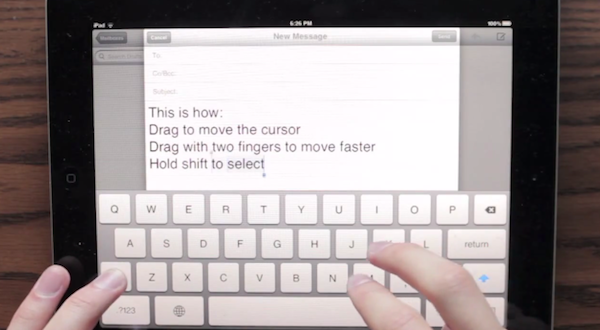
iDownloadBlog has posted an interesting concept video by YouTube user “danielchasehooper”, showing an interesting possible take on text selection on the iPad. By allowing users to tap and swipe on the keyboard, this system could, in theory, allow for faster selection, also in combination with keys like Shift. Almost every area of iOS now supports taps and swipes: why not the keyboard?

Concepts are what they are – ideas – but sometimes Apple seems to consider them. I don’t know if this video will turn out to be a feature Apple will evaluate – albeit it really makes a lot of sense in my opinion, design-wise – but I sure hope something’s cooking for iOS 6 in regards to text selection.


Spotify for iPad Now Available

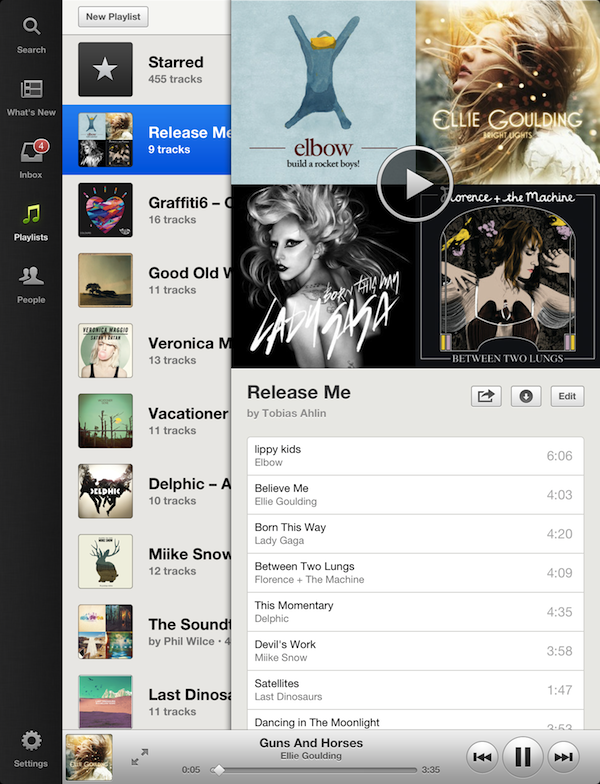
After years of speculations and subtle hints, music streaming service Spotify is today unveiling its official app for the iPad. The Next Web has the first details on the app; you can find Spotify for iPad on the App Store.

Fully optimized for the Retina display and taking advantage of Apple’s AirPlay technology to stream audio to other sources, the official Spotify app has been completely re-imagined to use the device’s larger screen, and give users more space to browse music, access their playlists, and inbox. The app uses a Twitter-like panel navigation to load playlists and artists, with music controls available at the bottom alongside an option to enlarge the album view. Relying on linen and sepia tones reminiscent of apps like Reeder, Spotify for iPad doesn’t simply look like a bigger version of its iPhone version – something the company is even joking about in the promo video. For instance, the larger screen has allowed Spotify to introduce features like instant, unified search for artists, albums, and playlists, or a full-screen cover art view that users can swipe on to change songs.

Spotify for iPad requires a Premium subscription. We will update this post with more information and our first impressions during the day, as the app is propagating now in iTunes. In the meantime, you can find more screenshots and a video after the break.

Update: Here’s our look at Spotify for iPad.

Read more


PlaceTagger 2 Releases Universal Build, iCloud Support, Mac App Store Version

PlaceTagger is a veteran iPhone app that has been around for years – originally an app that allows photographers to use their iPhone to geotag the photos taken with a traditional digital camera. Return7, the company behind PlaceTagger and other great apps like Billminder and Debtminder, has a reputation for innovating in every App Store category they take on. This release of PlaceTagger 2.0 including a universal build for iOS devices, a new Mac App Store version, and even iCloud support binding them together, has certainly lived up to their outstanding reputation.

There is no shortage of iOS apps tailored to photographers but PlaceTagger has really excelled in the niche area of providing a quality geotagging product to users of all experience levels. Version 2.0 does a remarkable job at implementing a simplistic user experience for what could have been an extremely complicated outcome. The iOS app is designed to run on iPhones as well as 3G enabled iPads. Although it is possible to run this app on a wifi-only iPad or an iPod touch connected to a wifi network, the results may vary and it is not officially supported. Overall, I found the user interface to be pleasantly minimal while still providing the necessities required to effortlessly start capturing GPS data.

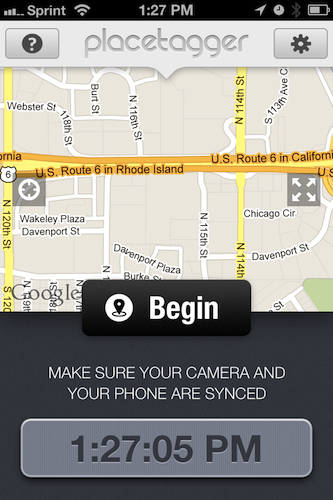
When I first launched the iOS app, my eyes were drawn to a large clock and message reminding me to ensure the time on my camera matched the time on my phone. This was easy to check and was honestly the only thing I had to configure during my entire time using the suite of PlaceTagger apps. Once I had my camera’s clock synced to my iPhone I simply tapped the “Begin” button and stuffed my phone back in to my pocket so I could snap some pictures with my digital camera. I am not a professional photographer or even a decently skilled photographer so I usually rely on my iPhone to take outstanding photos. While I was testing PlaceTagger, I used my point-and-shoot Canon IS770, an iPhone 4S to log GPS data, and PlaceTagger on my MacBook Air to tag the photos. Apart of the new features in version 2 is the ability to tag photos on the iPad with the camera connection kit, however I had neither of these available so I opted for the Mac app. When I was finished taking pictures of my two Jack Russell Terriers, Bob and Daisy, I pulled out my phone and tapped the “Finished” button. That was the only interaction with the iOS app that I had – two taps on one button.

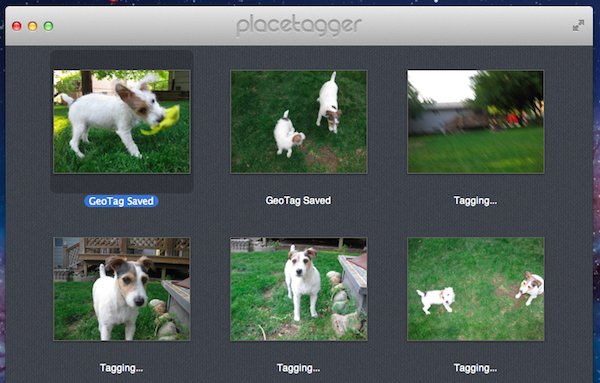
I jumped over to my MacBook Air, popped in my camera’s SD card and pointed the Mac App Store version of PlaceTagger to the pictures on the memory card. Below each picture was a bit of text saying “Location Matched” and all I had to do was select the “Tag Photos” button to complete the process. Right then it clicked, PlaceTagger had magically synced all of the GPS data between my devices with no settings, options, or configuration – it just worked.

PlaceTagger 2 has the most invisible implementation of iCloud I have ever seen.

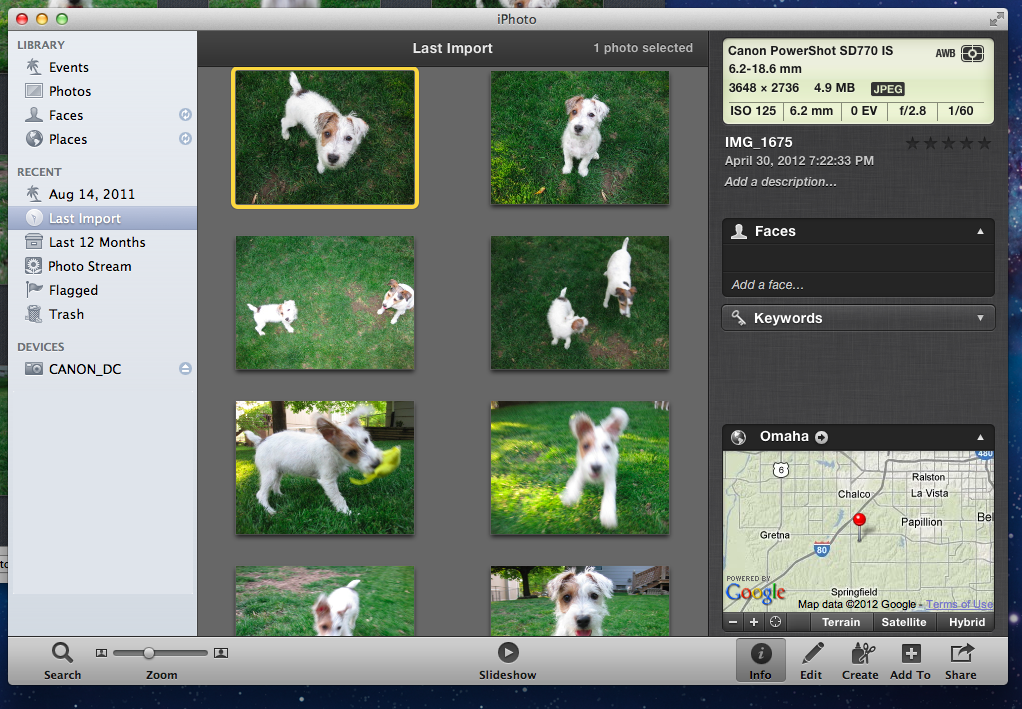
When the tagging process was complete, I simply imported my photos in to iPhoto just as I normally would and experienced no issues. In iPhoto’s “Info” section for each of these photos is now a little Google Map containing the exact location the photo was taken.

If you are a user of a standard digital camera and have an iOS device then I highly recommend PlaceTagger 2 to add GPS data to all of your future photos. This suite of geotagging apps does not just add functionality to your Apple devices, but it also breathes new life in to older technology like my Canon SD770. You do not have to be a prosumer to enjoy the benefits of PlaceTagger because its polished user interface and refined feature set makes it the ideal companion app to photographers of any skill level.

PlaceTagger 2 is currently available on the iTunes App Store for $4.99 and there is also a version on the Mac App Store priced at $4.99


iTunes Match Launches In Italy [Update: Coming To Greece, Portugal, Austria and Slovenia Too]

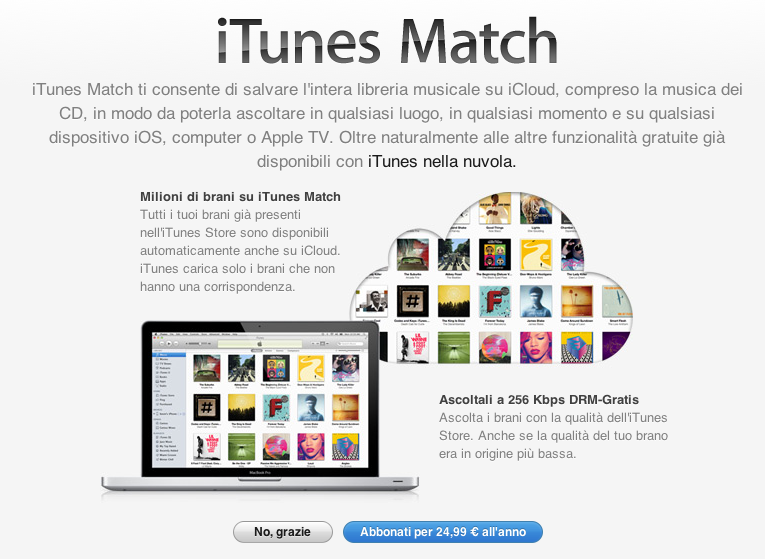
Earlier today, Apple updated its Terms and Conditions for the Italian iTunes Store to include information about iTunes Match, the company’s music service powered by iCloud. Launched in November 2011 in the United States (here’s our original hands-on), the service was later brought to more countries on December 15 and January 17, including South America, the UK, and other European countries.

Lei può abbonarsi a iTunes Match pagando un canone annuale. Per abbonarsi Lei deve aver registrato una carta di credito valida nell’archivio di iTunes. L’abbonamento non è rimborsabile (salvo richiesto dalla legge applicabile), e si rinnoverà automaticamente per periodi di un anno finché Lei non lo cancellerà. Il Suo account sarà addebitato non più di 24 ore prima della scadenza del periodo di abbonamento corrente. Lei può annullare il rinnovo automatico modificando le impostazioni dell’account iTunes Store sul Suo computer. Lei non sarà più in grado di accedere ai Suoi Contenuti iTunes Match su iTunes Match dopo la scadenza del Suo periodo di abbonamento.

Back in March, it was reported that Apple was holding a series of meetings with SIAE – the Italian association that represents “artists and editors” – to get the green light on launching iTunes Match in Italy.

According to Apple’s official support document about iTunes Match and iTunes in the Cloud availability, Italy still isn’t listed among the countries with support for Match and iTunes in the Cloud; as of today, iTunes Match is available in 37 countries worldwide.

Whilst the update of iTunes’ terms and conditions to include additional iTunes Match certainly confirms the company has made progress on obtaining rights to launch the service, it should also be noted that, back in February, Japan was rumored to be getting support for iTunes Match soon. In the case of Japan, however, only support for iTunes in the Cloud was spotted (and was eventually launched), whilst today’s updated agreement specifically mentions iTunes Match in Italy. Read more


Tweetbot 2.3 Adds New Gestures, Integrations, UI Refinements

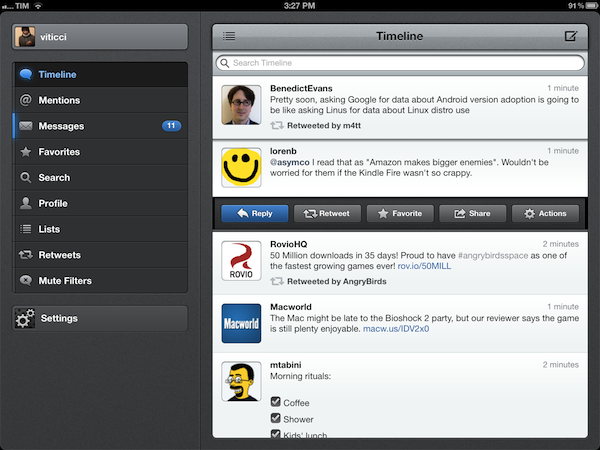
Less than a month after a major 2.2 update that added iCloud sync for timelines, DMs, and mute filters, Tweetbot is back today with a significant update on the iPhone and iPad that redefines some of the gestures and interactions introduced with the original version 1.0 (2.0 on the iPhone). Overhauling the standalone tweet detail and conversation views that, based on intuitive gestures, were two of Tweetbot’s hallmark features, Tweetbot 2.3 unifies single tweets, actions, replies, and conversations within redesigned screens that, with a bit of practice, I believe will ultimately help saving time and precious taps around the app.

New Tweet Detail View

Quick access: swipe right to left on a tweet.

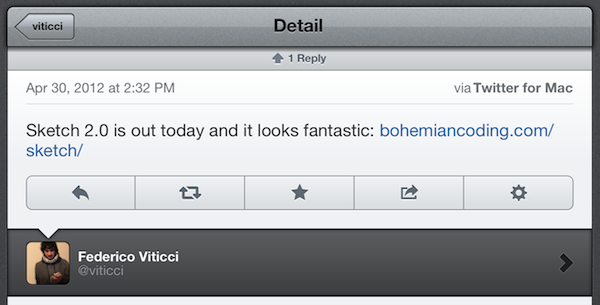
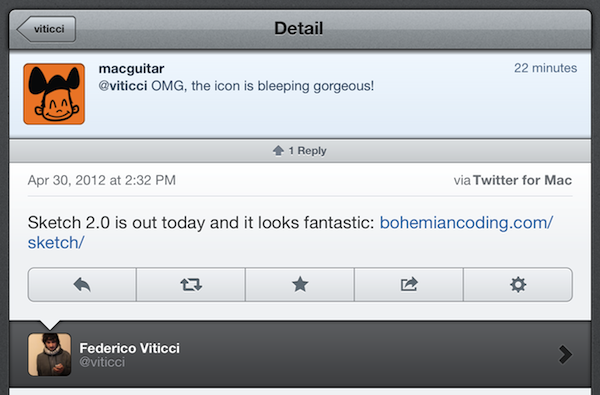
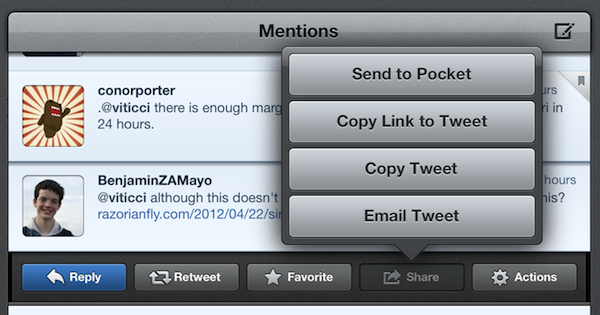
The single tweet view – the screen that displays a user’s single tweet alongside the action bar, geo-location and client info, and other data – has been redesigned to accomodate inline conversations and replies. Providing the usual context for author, buttons to reply, retweet, fave, share, and view, the new tweet detail view elegantly puts a banner-like notification up top to indicate how many replies a specific tweet received; if the tweet belongs to a conversation, Tweetbot 2.3 displays a “In reply to…” section at the bottom (down to the original tweet that started the conversation), with additional replies above.

The developers have managed to cram a lot of information and elements into a single screen without sacrificing usability and clarity – unlike other apps, it’s always clear which tweets belong to a conversation and which ones generated other replies.

To go back to the timeline from the tweet detail view, you can now quickly swipe with one finger from left to right. Here’s a recap of all the gestures and tap actions supported in Tweetbot from our review of the iPad version (interactions are mostly the same on iPhone).

New Conversation View & Sharing

Quick access: swipe left to right on a tweet.

Similarly, the new conversation view of Tweetbot 2.3 displays both conversations and replies inline. Accessible with the usual swipe-to-reveal action, the conversation view loads replies in a neatly separated section just like the aforementioned tweet detail view.

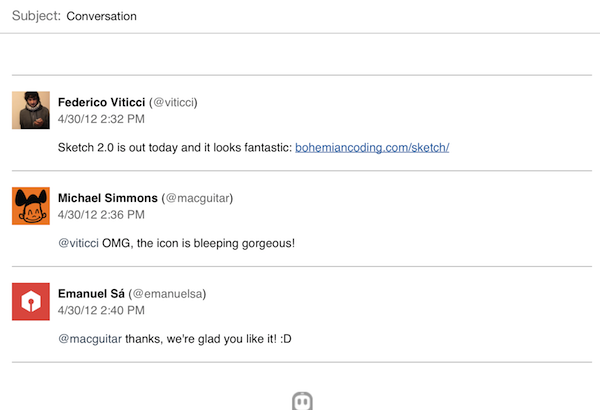
New in 2.3, conversations can now be uploaded directly to social curation platform Storify for further sharing with the world; the uploading process is automatic and doesn’t require a dedicated login, meaning that Tweetbot will simply publish a conversation, such as this one, to Storify using your Twitter account. Whilst I hope for a future version of Tweetbot to let me save “all replies” to a specific tweet from the detail view (right now, it’s only enabled in the Conversation window), I think Tapbots did the right thing in simplifying the curation aspect of Storify and make it available as a direct option without additional configuration required.

Also new in the 2.3 conversation view (but enabled for single tweets and DMs as well): the app now has an improved email format when sending tweets to someone else via email.

More Features in 2.3

Several additional refinements and improvements went into the development of Tweetbot 2.3. First off, Droplr support: for URLs, images, and videos, users have now the option to choose Droplr as a sharing service in the Settings. When shared, videos now have a dedicated “play” thumbnail to differentiate them from images, and thumbnail support has been added for Vimeo links, too.

The app now correctly recognizes $stock links, allowing you to easily fire up a search for $AAPL or your favorite stock, and save it for future usage.

The tweet drawer has been reorganized, with the last two buttons gaining more order in the process.

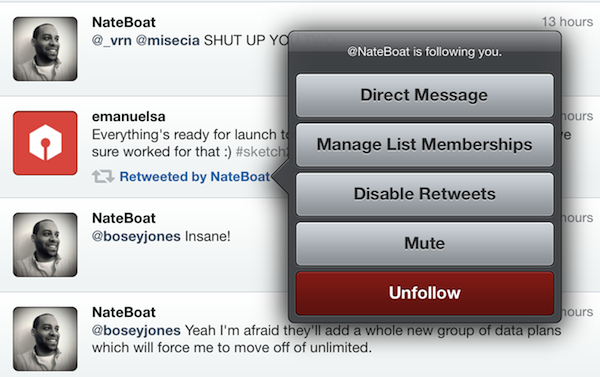
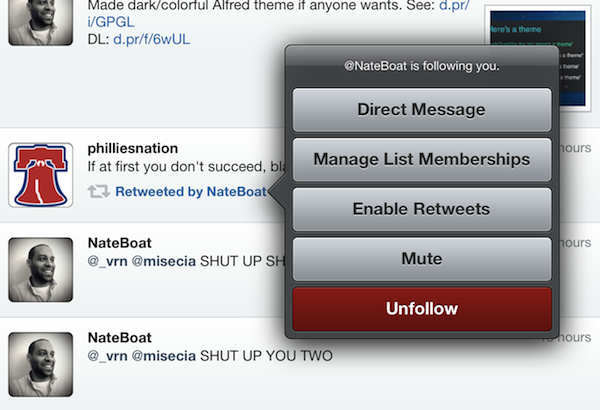
Last, some minor touches in version 2.3 will contribute to improving usability and to allowing users customize their timelines to their needs and tastes: retweets from specific users can now be disabled at any time, and it’s possible to quickly open the last saved draft by holding down the tweet compose button. The timeline sync bookmark icon is now an optional setting, and Tweetbot is capable of uploading high-res images when on WiFi.

With important improvements and UI refinements aimed at increasing the app’s ease of use and display of information, Tweetbot 2.3 is another solid and rich update that adds powerful functionality without compromising the app’s interaction and workflow. You can get Tweetbot 2.3 on the App Store today.


DevRocket Is A Photoshop Plugin To Boost Your iOS Design Workflow

Just a few hours ago I wrote a bit about Screeshot Journal, an app to easily manage and investigate your iPhone and iPad screenshots in order to ease your design workflow. But to take pictures of an app which deserves to be viewed in such large resolutions, such app must have a solid UI design. To speed up and simplify the process of creating iOS UIs, developers at UI Parade — one of the greatest resources for UI inspiration by the way — just released their own Photoshop plugin called DevRocket.

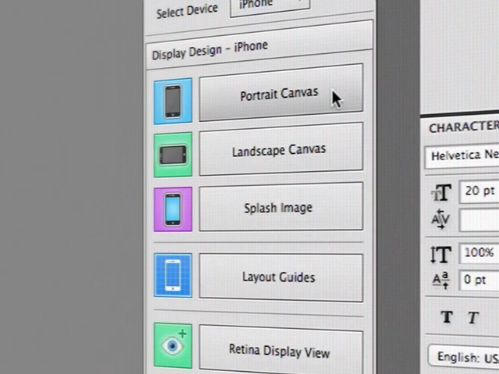
DevRocket is a sweeping blow of all design presets and saving possibilities iOS UI designers could need for their process of designing new apps. It supports designing for all devices (iPhone and iPad) and Retina resolution presets as well. With DevRocket, you can:

  • generate portrait, landscape and splash display canvases, which include the native iOS status and navigation bars
  • design the same interface for Retina and non-Retina devices at the same time
  • save those designs with one click cut down the complete UI to individual “UI snips” for Xcode
  • create icons out of preset canvases (with adjustable corner radius and correct naming for Xcode)

Besides all these features, DevRocket looks nice and easy to use. It is definitely worth a try for all iOS designers who use Photoshop to design their app UIs, and who are constantly after a nitro boost for their productivity and workflow. There’s also a little demo video on Vimeo (and embedded after the break) showing the plugin in action. You can get DevRocket for $10 (payment via PayPal).
Read more


Rovio: Angry Birds Space “Fastest Growing Mobile Game” with 50 Million Downloads in 35 Days

Angry Birds maker Rovio has today announced the impressive milestone that the latest entry in the Angry Birds franchise, Angry Birds Space, has become the “fastest growing mobile game yet” with 50 million downloads in 35 days.

Angry Birds Space hit 50 million downloads within 35 days, making it the fastest growing mobile game yet and breaking all our previous records. This has been simply amazing, and the whole Rovio team is thrilled to see such a fantastic reception for the game.

It’s unclear whether Rovio is counting desktop versions in the total number of downloads for the mobile game, but the figure is still impressive and substantial nevertheless of how iOS, Android, PC, and Mac downloads have been split so far. Considering Rovio’s previous numbers, it is safe to assume the majority of downloads are really coming from mobile platforms like iOS and Android.

Angry Birds Space was released on March 22. In the three days following the launch, the company announced users had already downloaded the game over 10 million times.