Posts in news

F-Secure’s Automated Flashback Removal Tool

F-Secure Flashback Removal Tool

F-Secure Flashback Removal Tool

Talking about Apple’s upcoming Flashback removal tool and F-Secure’s guide on how to check whether you’ve been infected, reader Phạm Duy Nguyên pointed us to a free tool F-Secure put out this morning that automatically checks for the infection, quarantines it if found, and lets you delete the malware from your system once it’s trapped in an archive on your desktop. The free removal tool takes the trouble or fear out of using the command line by providing a simple point-and-click utility. If you or friends and family are looking for easy solutions before Apple releases their removal tool, point them to F-Secure’s Flashback Removal Tool.

[F-Secure via @nguyenhimself]


Apple’s London Stores Prepare For Olympic Visitors And Journalists

Apple is beginning to  prepare its London retail stores for an onslaught of international visitors and journalists when the city hosts the 2012 Olympics in a few months time. TUAW learnt from a “high level Apple retail employee” in London that the stores will be stocking international replacement MacBook Pro, MacBook Air and MacBook keyboards. It’ll allow the retail stores to quickly repair any damaged laptops with the correct international keyboard, particularly for journalists from overseas, where time is of the essence. Traditionally such replacement keyboards for a non-UK MacBook would have to be ordered in.

As my source told me, “London is going to be overrun by an onslaught of journalists when the games begin. We want to be prepared should they need help with their equipment during the time they are here.”

As TUAW notes, the Olympics will bring in about 325,000 extra visitors to London during the event, as well as over 10,000 print journalists as well as photographers, TV and radio reporters. The source also noted that Apple may potentially also stock new MacBooks that feature American, Asian and other international keyboards - but this is apparently only under consideration at this point.

[via TUAW]


Apple to Provide Flashback Removal Tool

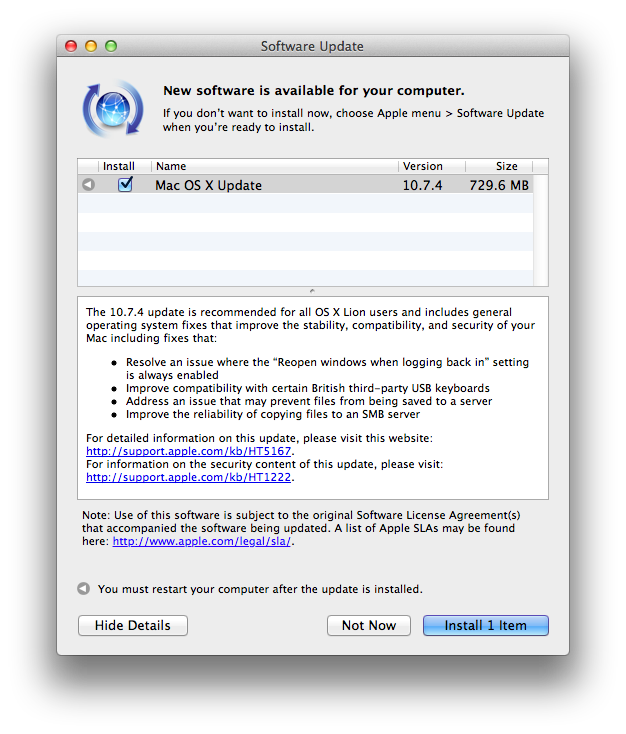
This evening, Apple has announced that they will be developing a tool to remove the Flashback trojan horse that has infected over half a million Macs. While Apple responded by releasing an updated version of Java on April 3rd (for both OS X 10.6 and 10.7), users who haven’t ran Software Update on their Macs are still susceptible to becoming infected if they visit a website with a malicious Java applet. According to Macworld, Flashback harvests usernames and passwords from web browsing activities.

In response to the widespread infection, Apple is working with ISPs to shut down the servers Flashback uses to communicate with its authors and perform its commands. In addition, Apple is developing and will be releasing a special removal tool focused on removing the Flashback trojan from infected systems. A release date is not known at this time, but in the meantime, you can follow this guide from F-Secure or use this handy tool to see whether you are infected. Instructions are given to remove the malicious program manually. Apple’s solution will likely be automatically included in a future Software Update that takes care of the infection for the user.

[Apple Support via The Loop | Flashback info via Macworld]


Tim Cook To Speak at D10 Conference

Apple CEO Tim Cook will be the opening night speaker at the D10 Conference, AllThingsD confirmed today. Taking place at the end of May (May 29-31) in Rancho Palos Verdes, California, the D10 conference, which celebrates its 10th anniversary this year, includes names like Zynga’s Marcus Pincus, Sean Parker, and New York mayor Michael Bloomberg among the list of confirmed speakers.

Walt Mossberg and I could not be more thrilled to announce that Tim Cook, CEO of Apple, will be the opening-night speaker at our 10th D: All Things Digital conference.

It will be Cook’s first appearance at D, as well as his first time being onstage at an event not run by Apple or for investors since he was named CEO last August.

AllThingsD’s “D” conferences saw a number of important speakers sharing their views on the world of technology on stage. As AllThingsD describes it, one of D’s greatest strengths is the focus on unscripted conversations:

D is different from other conferences: no canned speeches, no marketing pitches, and no bull. Instead, creators and executive producers Walt Mossberg and Kara Swisher put the industry’s top players to the test during unscripted conversations about the impact digital technology will have on our lives now and in the future. The results are unprecedented glimpses into the ideas and strategies of the industry’s most creative thinkers.

In Apple’s case, Steve Jobs made a series of appearances at D over the years, including one at D8 two years ago, where he famously discussed Apple’s stance on Flash, the lost iPhone 4 prototype, Apple’s internal culture, and more. The D10 conference will certainly be a good opportunity for Tim Cook to calmly and publicly go on the record about recent controversies and debates such as the one about China workers at Foxconn, the dividend, or more simply, the direction where Apple is heading.

In February, Tim Cook also spoke at the Goldman Sachs Technology Conference.


Tweetbot Gets iCloud Sync for Timelines, DMs, and Mute Filters

Two months ago, I took a look at the state of iCloud-enabled apps for Mac and iOS, sharing somewhat unsurprising results that showed few applications successfully were using iCloud sync across devices (not to mention platforms), and that developers were frustrated for the lack of extensive documentation by Apple. In these past 60 days, very little has changed on Apple’s side – if anything, we’ve only seen more third-party developers trying to figure out ways to properly use iCloud and make it work in their apps. Tapbots, makers of Tweetbot (our reviews for iPhone and iPad versions of the app), are releasing today an update to their Twitter client, which brings iCloud sync for various Twitter functionalities to the iPhone and iPad.

I have been able to test iCloud sync in Tweetbot for a few weeks now, and whilst I was initially skeptical about the service, I am pleased to report that Tapbots has come up with a solid, clever system that might just convince you switch from Tweet Marker – the only third-party solution to sync Twitter timelines that’s been widely adopted to date – if you’re planning to use Tweetbot as your main client.

iCloud sync, unlike Tweet Marker, works exclusively inside Tweetbot across its iPhone and iPad versions. You won’t be able to start iCloud sync on Tweetbot for iPhone and, say, find your timeline synced on Twitterrific. If you’re still looking for a real cross-platform syncing solution for Twitter, Tweet Marker remains your best option. If you, however, are you using the two Tweetbots as your default Twitter apps anyway and happen to be intrigued by iCloud sync, you might want to consider giving this new option in version 2.2 a try. Once enabled in the Sync settings, iCloud integration will sync mute filters, timeline positions, and DM read status across all instances of Tweetbot. This means that, if you’re using iCloud on your iOS devices running Tweetbot, the app will keep your position in the Twitter timeline synced similarly to how Tweet Marker works, only it will also sync your direct messages’ read status (if you read a DM on your iPhone, it will also be automatically marked as read on the iPad) and mute filters set in the app’s Preferences. In my tests, both Tweet Marker and iCloud have worked reliably when syncing timelines, but I switched to iCloud full-time for the added convenience of syncing DMs and filters across Tweetbot, and because of the lack of Tweet Marker-enabled apps (that I like) on my desktop. In fact, at least for the time being, I’m still using Twitter’s official client on my Mac. With iCloud sync, I can keep more data synced across Tweetbot for iPhone and Tweetbot for iPad, which I use on a daily basis. Please note that, while iCloud is supposed to be “invisible” to the user, working all the time in the background, there may be a short delay of 10-15 seconds when syncing the timeline position across clients, although I have noticed this sporadically. I suggest you use Tweetbot as you normally would, switching from one client to another when you really need to, avoiding keeping both apps open at the same time just to see if iCloud is working.

Version 2.2 of Tweetbot also brings other improvements and bug fixes throughout the app; most notably, images can now be closed with a pinch gesture on the iPad (similarly to how you can close images in Photos) and both iTunes and YouTube links have gained thumbnail previews in the timeline.

For the past months, I have been increasingly using my iPad as my primary computer, and thus Tweetbot has become the Twitter client I spend the most time using on my iOS devices. This newest update increases the overall stability and performances of the app, but more importantly it brings a native, consistent way to sync data across platforms that, at this point, can only get better in the future – and it’s already working admirably now.

You can get Tweetbot 2.2 on the App Store today.


Second Apple Store in Rome To Open On April 21

(The location of the Apple Store at Porta di Roma. Image via Macity)

According to iSpazio [Google Translation], Apple will open its second retail store in Rome, Italy, on Saturday, April 21. Currently, Apple only has one retail store in Rome. The new one, located at the Porta di Roma shopping mall, should open on the same day Rome celebrates its birthday, commemorating the city’s founding in 753 BC. iSpazio managed to take some exclusive shots of the progress being made with the store’s construction, supposedly showing the usual layout of retail stores located inside Italian malls. iSpazio says the opening date has been confirmed by an “inside source”.

Italian website Macity reported back in January that Apple had started working on the new store, sharing photos of the old Co.Import location under construction. Opening in between Benetton and Bershka retail stores (Benetton is an Italian fashion firm, Bershka is a retailer part of the Spanish Inditex group), the Apple Store will be located on the same floor of heavily trafficked H&M and Media World. The Porta di Roma shopping mall, easily reachable by bus or by car from the GRA, has long been rumored to be a favorite location for Apple to open a retail store, albeit speculation has also suggested the company would like to have a third retail store in downtown Rome.

Recently, Apple has also been rumored to be considering making its new retail store in Turin its “most important” Italian one. Apple was also on the verge of launching a new flagship store in Milan, but the company didn’t manage to get permissions from the city. Currently, Apple has 9 retail stores in Italy.


Apple Informs Australian WiFi + 4G iPad Owners Of Refund Offer, Tells Resellers To Update Marketing

Apple today began emailing Australians who had purchased the new iPad WiFi + 4G model, informing them of their option to get a full refund if they had purchased it on the basis of thinking it would work with Australian 4G LTE or WiMAX networks. The offer is available to anyone who purchased the model before March 28th and they can return it for a full refund until the 25th of April.

It follows events from last week when the ACCC alleged Apple of misleading customers over the 4G capabilities of the new iPad and Apple responded by offering refunds and agreeing to clarify its marketing. Users who wish to obtain the refund must return the iPad and accessories to the original point of purchase and inform them that they had purchased the iPad on the “basis that it was compatible with current Australian 4G LTE networks or WiMAX networks”.

As noted by 9to5 Mac, Apple has also begun informing Australian iPad resellers to update their iPad signage to more accurately describe the iPad’s cellular capabilities in Australia. Notably the new signage includes the paragraph that Apple and the ACCC agreed on last week:

This product supports very fast cellular networks. It is not compatible with current Australian 4G LTE networks and WiMAX networks.

Jump the break to view the full email that Apple has sent to Australian consumers who purchased the “WiFi + 4G” model of the new iPad.

Thanks Stuart Hall, reseller information via 9to5 Mac.

Read more


Apple Releases iAd Producer 2.1

Apple today released an update to iAd Producer, its Mac application aimed at allowing designers and developers easily create and test rich advertising banners to feature on Apple’s iAd platform. The new version of the app, 2.1, provides support for WebGL assets in iAd content, brings support for the new iPad, and supports the new media object in iAd JS.

From the release notes:

  • Provides improved load and save performance for iAd projects.
  • Improves the performance of exported ad units.
  • Facilitates better pre-load behavior for assets in exported ad units.
  • Allows ad upload and testing with iOS devices connected via USB.
  • Reduces device memory usage for image views.
  • Enables use of image sprites.
  • Provides support for on-device debugging.
  • Enables Twitter integration in iAd content.
  • Simplifies visualization of animations by providing an onion-skinning view.
  • Expands the types of assets that can be imported and managed in the asset library to include common document types.
  • Supports the new media object in iAd JS.
  • Provides support for integration of WebGL assets in iAd content.
  • Extends device support to include iPad (3rd generation).

Version 2.0 of iAd Producer was released in November. iAd Producer is available for download here.


Sparrow 1.1 for iPhone Available, Push Coming “With or Without Apple”

Sparrow for iPhone, the alternative email client for iPhone I reviewed three weeks ago, has an update on the App Store today, adding a number of functionalities that didn’t make it into version 1.0 of the software. Sparrow 1.1 allows you to show or hide the dock badge per account, open links through a built-in web browser (which includes options to open in Safari, and mail a link), and selectively choose which folders or labels to show in the app. There are new actions to empty trash or spam, and you can now activate a Send & Archive option in the Settings to instantly archive a message or conversation as you send a new email.

About push, which had to be removed from the final version of Sparrow 1.0 – the developers tested push notifications while the app was in beta, and they worked well, but Apple didn’t approve the implementation – the developers are confident Apple will revise its position. They will submit version 1.2 of the app soon, re-including support for push notifications. And if Apple won’t approve Sparrow with push for the second time, the developers say they are working out a solution to include push in other ways “with or without Apple”. It will be interesting to see whether Sparrow will consider adding push notifications through external services such as Boxcar, which recently raised new funding to build a push notification service for mobile developers. Update: the beta version of Sparrow I tested included push through a method that let the app run in the background leveraging the VoIP API. It’s not clear whether Apple will ever revise its position on letting a non-VoIP app use the VoIP API.

Thanks to your amazing support, we feel confident that Apple might revise its position on the Push API. We’ll submit a first version of Sparrow 1.2 including it. This might delay Sparrow 1.2 validation but we’re already working with some partners to include Push in future versions of Sparrow without needing Apple clearance.

Sparrow 1.2 for iPhone will also include landscape support, 9 more languages, and a gesture to swipe up or down between messages. The team is also working on Sparrow 1.6 for Mac, which will bring fixes and POP support.

Sparrow is a fantastic email client for iPhone, as I’ve already detailed in my review, and this 1.1 release adds some nice features that didn’t make the cut in the original 1.0. You can find Sparrow 1.1 on the App Store today.