

Here are today’s @MacStoriesDeals on hardware, iOS, and Mac apps that are on sale for a limited time, so get them before they end!
Read more
Posts in Featured
#MacStoriesDeals - Friday

Access Extra Content and Perks
Founded in 2015, Club MacStories has delivered exclusive content every week for nearly a decade.
What started with weekly and monthly email newsletters has blossomed into a family of memberships designed for every MacStories fan.
Club MacStories: Weekly and monthly newsletters via email and the web that are brimming with apps, tips, automation workflows, longform writing, early access to the MacStories Unwind podcast, periodic giveaways, and more;
Club MacStories+: Everything that Club MacStories offers, plus an active Discord community, advanced search and custom RSS features for exploring the Club’s entire back catalog, bonus columns, and dozens of app discounts;
Club Premier: All of the above and AppStories+, an extended version of our flagship podcast that’s delivered early, ad-free, and in high-bitrate audio.
Apple Preps Yerba Buena For Next Week’s iPhone Event

Less than a week ahead of next week’s media event, rumored to be focused on the next-generation iPhone, Apple has started decorating the Yerba Buena Center for the Arts with its typical banners to indicate the upcoming event. Earlier this week, Apple sent invitations to the press for the event they will hold in San Francisco on September 12th, starting at 10 AM PST.
As usual, our friend @SteveStreza has managed to capture a series of photos of the work in progress at Yerba Buena.
Update: We’ve had a go at recreating the poster after it was discovered that the poster was created by stretching iPhone app icons vertically.
We are updating this post with more photos of Apple’s banners at the Yerba Buena Center past the break — these banners are typically of little indication of what the company will announce, but they’re always interesting to check out, if anything from a design standpoint.
Access Extra Content and Perks
Founded in 2015, Club MacStories has delivered exclusive content every week for nearly a decade.
What started with weekly and monthly email newsletters has blossomed into a family of memberships designed for every MacStories fan.
Club MacStories: Weekly and monthly newsletters via email and the web that are brimming with apps, tips, automation workflows, longform writing, early access to the MacStories Unwind podcast, periodic giveaways, and more;
Club MacStories+: Everything that Club MacStories offers, plus an active Discord community, advanced search and custom RSS features for exploring the Club’s entire back catalog, bonus columns, and dozens of app discounts;
Club Premier: All of the above and AppStories+, an extended version of our flagship podcast that’s delivered early, ad-free, and in high-bitrate audio.
iPhone 5: The Rumors
Written by Graham Spencer, Cody Fink and Federico Viticci.
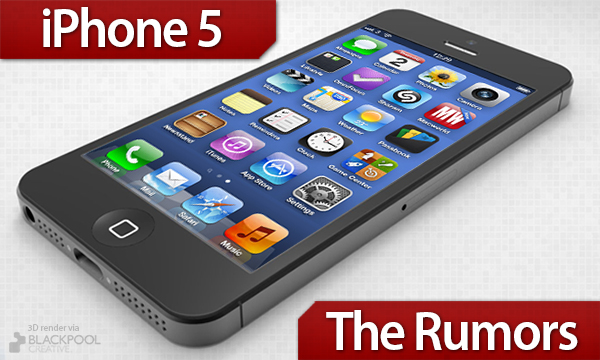
On Wednesday, September 12, Apple will likely announce the next-generation iPhone, rumored to be called “iPhone 5”. Initially reported by iMore in July, Apple’s September event will put the final word on what is believed to be the biggest upgrade to the iPhone’s line since the iPhone 4. And quite literally so.
Whilst CEO Tim Cook promised earlier this year to be “doubling down” on secrecy for unreleased products, a large number of alleged drawings, internal and external parts, and even software references have “leaked” in the past months, pointing to a device similar to the 4/4S family, but featuring a bigger screen. Moving to a taller screen would, supposedly, allow Apple to pose the iPhone 5 as a much more significant upgrade than the iPhone 4S (if only for the design alone), which, however, still managed to sell “fairly” well. And – again, based on ongoing speculation – a bigger display would allow developers (and Apple itself) to show more content to the users, enabling a new kind of experience for reading, browsing the web, playing games, and watching movies.
But it’s not just about the new screen. Below, we’ve assembled a timeline of sorts, organized by sections, linking to the most likely and popular rumors or leaked photos that have been posted to date.
While we don’t normally report on rumors that pop up on a daily basis, all signs at this point seem to suggest information posted online by various outlets is correct; recently, Jim Dalrymple of The Loop confirmed/denied a variety of rumors on the new iPhone. As Rene Ritchie of iMore wrote, while Apple could have spent some of its $100+ billions in the bank to orchestrate a complex series of “fake” leaks to create a “surprise effect” next week, they don’t have more time than anyone else on this planet, so the parts floating around – everyone seems to have one these days – are most likely accurate.
This, though, doesn’t mean we know how the next iPhone will be like. As you’ll see below, there are leaked displays, new dock connectors, motherboards, and even measurements, but this doesn’t necessarily imply we can be 100% sure this is what the next iPhone will look like. We can only attest with a certain degree of probability that, yes, Chinese manufacturers have given us a pretty good idea of what the new iPhone should be like, but only Apple can pull the curtain off what appears to be a major milestone for the iPhone’s product line.
So jump past the break, and check out the gallery of photos and links we’ve put together. Just don’t fall in the trap of believing this is all there is to the new iPhone’s story, because as we’ve learned in the past, there’s more to new Apple products than connector cables and leaked components.
The experience – how hardware and software integrate with the device – is still up for Apple to redefine next week.
Access Extra Content and Perks
Founded in 2015, Club MacStories has delivered exclusive content every week for nearly a decade.
What started with weekly and monthly email newsletters has blossomed into a family of memberships designed for every MacStories fan.
Club MacStories: Weekly and monthly newsletters via email and the web that are brimming with apps, tips, automation workflows, longform writing, early access to the MacStories Unwind podcast, periodic giveaways, and more;
Club MacStories+: Everything that Club MacStories offers, plus an active Discord community, advanced search and custom RSS features for exploring the Club’s entire back catalog, bonus columns, and dozens of app discounts;
Club Premier: All of the above and AppStories+, an extended version of our flagship podcast that’s delivered early, ad-free, and in high-bitrate audio.
Apple Confirms: Media Event on September 12
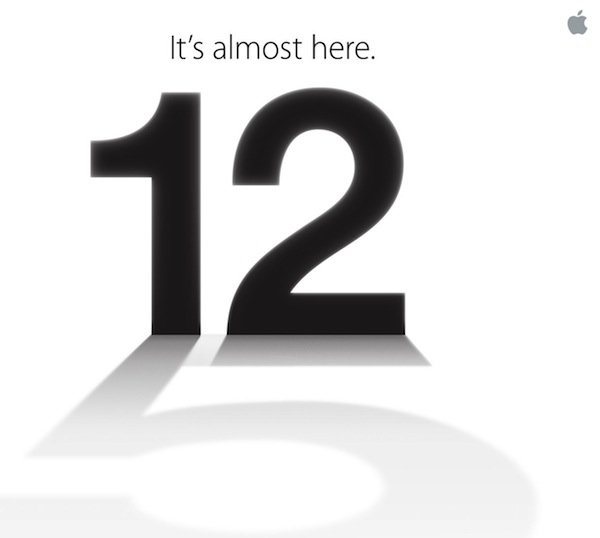
As first reported by The Loop’s Jim Dalrymple, Apple just sent out invitations to the press for a media event taking place on September 12 in San Francisco. The event will take place at the Yerba Buena Center for the Arts at 10:00 AM.
Apple is widely rumored to be introducing the next-generation iPhone at the event. As it can be seen in the invitation’s graphic, the shadow of the number “12” is a actually a “5”, suggesting the new iPhone will, indeed, be called “iPhone 5”. In recent months, there has been a lot of speculation as to whether Apple would call the new device simply “the new iPhone” (following “the new iPad” earlier this year), although some suggested “iPhone 5” would make more sense in terms of marketing considering the previous 4/4S monickers. However, others noted that, because the new iPhone would be the sixth generation model, the “iPhone 6” name would be more appropriate.
Obviously, the invite’s image is only a hint of a possible product name, but a strong one nevertheless. If previous invites are of any indication (see “let’s talk” as related to Siri last year), there’s a good chance the device will be called “iPhone 5”.
Lately, a lot of purportedly “leaked” parts of the new device have also pointed to a major redesign featuring a taller screen, thinner and lighter design, new speaker and dock connector, and more powerful A6 processor. iMore was first to report weeks ago about the future redesigned dock connector and September event. According to the website, the new iPhone should go on sale on September 21.
The next major version of iOS, iOS 6, is also currently being tested by developers, and it’s expected to become publicly available a few days before the launch of the next iPhone.
Access Extra Content and Perks
Founded in 2015, Club MacStories has delivered exclusive content every week for nearly a decade.
What started with weekly and monthly email newsletters has blossomed into a family of memberships designed for every MacStories fan.
Club MacStories: Weekly and monthly newsletters via email and the web that are brimming with apps, tips, automation workflows, longform writing, early access to the MacStories Unwind podcast, periodic giveaways, and more;
Club MacStories+: Everything that Club MacStories offers, plus an active Discord community, advanced search and custom RSS features for exploring the Club’s entire back catalog, bonus columns, and dozens of app discounts;
Club Premier: All of the above and AppStories+, an extended version of our flagship podcast that’s delivered early, ad-free, and in high-bitrate audio.
Denominations: A Simple Currency Converter
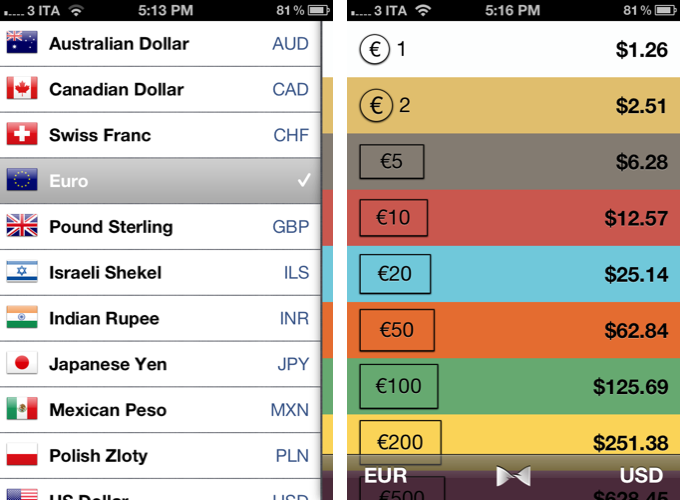
Developed by Abraham Vegh, Denominations is a simple currency converter that focuses on the concept of converting money to another currency, rather than the functionality alone.
Most currency converters on the App Store feature a number pad for entering values – like a calculator – and a menu to choose currencies to compare. Denominations is different: instead of letting you enter your own numbers, it comes with a predefined set of amounts to compare. You can set two currencies, and quickly switch between them with the tap of a button. Denominations’ focus is on the idea of understanding conversions in another currency without having to think too much.
I don’t think Denominations can replace currency converters like Currencies – after all, I still need to convert the amounts I want – but I believe it has some neat possible usage scenarios worth considering. For instance, as a tourist I might just want to know “how many pounds are 10 Euros”, instead of doing my own manual conversion at the coffee shop. Or I might need to know that, approximately, my dinner will cost around 50 Euros, which Denominations says are worth 62 dollars today (rates are updated server-side every 15 minutes). Quick, at-a-glance information that doesn’t require me to think and manually enter numbers.
Denominations’ design is concise, with a flat color scheme that’s reminiscent of the simplicity of Clear, again signifying a trend in recent App Store releases to focus on information rather than ornamental menus. Developer Vegh is already working on adding more currencies, bug fixes, and tweaks for an upcoming version.
Denominations is available at $1.99 on the App Store.
Access Extra Content and Perks
Founded in 2015, Club MacStories has delivered exclusive content every week for nearly a decade.
What started with weekly and monthly email newsletters has blossomed into a family of memberships designed for every MacStories fan.
Club MacStories: Weekly and monthly newsletters via email and the web that are brimming with apps, tips, automation workflows, longform writing, early access to the MacStories Unwind podcast, periodic giveaways, and more;
Club MacStories+: Everything that Club MacStories offers, plus an active Discord community, advanced search and custom RSS features for exploring the Club’s entire back catalog, bonus columns, and dozens of app discounts;
Club Premier: All of the above and AppStories+, an extended version of our flagship podcast that’s delivered early, ad-free, and in high-bitrate audio.
August 2012 In Review

August has been the lull between July’s Mountain Lion release and September’s inevitable iPhone announcement. But that’s not to say it was a quiet month - it certainly wasn’t. On the news front, we saw Apple and Amazon reacting to Mat Honan’s ‘epic hacking’, the first Mountain Lion update, internal promotions at Apple and of course - the verdict in the Apple v. Samsung trial. August also saw big Pixelmator, Things, Instagram, Drafts and Buzz Contacts app updates amongst a bunch of other updates and new release apps. Finally, in the stories department, we wrote up a bunch of how-to’s and I talked about the rise of third party services and fall of Google in iOS. Be sure to stay tuned this September, it’s going to be a big month.
You can review past ‘Month In Review’ posts here.

- Firemonkeys Announce Real Racing 3, Coming Later This Year
- Apple Removes Native YouTube App From iOS Beta
- Mat Honan: How Apple and Amazon Security Flaws Led to My Epic Hacking
- Apple Posts New iPad Advert: “All On iPad”
- Amazon And Apple Take Steps To Fix Security Holes Revealed By Mat Honan’s Hack
- Starbucks Signs Up For Square
- Growl 2.0 SDK Gives Developers Access to Mountain Lion’s Notification Center
- OS X Mountain Lion Updated to 10.8.1
- Jury Finds Mostly Against Samsung, Apple Entitled To Damages Of $1.049 Billion
- Craig Federighi and Dan Riccio Promoted to Senior Vice Presidents
- Session Videos From The One More Thing Conference Now Available For Purchase
- Buying a New iPad or iPhone? Have an Apple Specialist Walk You Through the Latest Features over the Internet.

The Highlights
- Review: The New Day One
- Pixelmator 2.1: Retina Graphics, Mountain Lion Ready, iCloud Support and Great New Features
- Angry Birds Update Adds New “Power-Ups”, 15 New Levels
- It’s Getting Partly Cloudy On Your iPhone
- Instagram 3.0: Maps. New User Profiles. Infinite Scrolling.
- Ecoute Is The Best Music Player For iOS. Period.
- Drafts 2.0: New Fonts, New Look, A Brand New Kind of Sync, And Now On iPad
- Review: Things 2 With Cloud Sync
- Tweet Marker Plus Relaunches As Watermark, Adds Support For App.net
- Buzz Contacts 2.0 Refines Interface, Improves Navigation
Everything Else
- Scratch Review
- Droplings Simplifies Public Sharing With Dropbox
- Weather HD 2 — Yet Another Weather Forecast App?
- I Want A Simple Event-Planning App. Pronto!
- Shuffler.fm Is The Perfect Tool For Genre-Specific Music Discovery
- Flip’s Escape Offers Tons Of Pixel Fun For iOS
- Kindle for iOS Updated To 3.2 with Adjustable Margins

- Apple by CLOG — A Book Review
- Kuvva — Beautiful Art For Your Desktop. Automated.
- The Rise Of Third Party Services And Fall Of Google In iOS
- Sprinkle a Dash of Cocoa in Your AppleScripts
- Plain Text, Macros, Markdown, and Nebulous Notes
- Turn URLs and Webpages Into PDFs In Your Dropbox
- Use Dribbble and Instagram as an Apple TV Screen Saver
- Send Favorite Tweets To OmniFocus’ Inbox
Access Extra Content and Perks
Founded in 2015, Club MacStories has delivered exclusive content every week for nearly a decade.
What started with weekly and monthly email newsletters has blossomed into a family of memberships designed for every MacStories fan.
Club MacStories: Weekly and monthly newsletters via email and the web that are brimming with apps, tips, automation workflows, longform writing, early access to the MacStories Unwind podcast, periodic giveaways, and more;
Club MacStories+: Everything that Club MacStories offers, plus an active Discord community, advanced search and custom RSS features for exploring the Club’s entire back catalog, bonus columns, and dozens of app discounts;
Club Premier: All of the above and AppStories+, an extended version of our flagship podcast that’s delivered early, ad-free, and in high-bitrate audio.
Turn URLs and Webpages Into PDFs In Your Dropbox
I stumble across a lot of interesting webpages on a daily basis. Sometimes it’s a video I want to watch later; sometimes it’s an article I don’t have time to read right away. Other times, I find a webpage that I want to keep around for future reference. For me, there’s a difference between articles to read later and reference material: whereas a new item added to Instapaper has a short life span in terms of attention (read, share, archive), a webpage I want to keep around forever needs to be turned into a document I can read anywhere, highlight, annotate, and carry around between platforms and devices. For that, I like PDFs.
I keep a “PDFs” folder in my Dropbox that contains all the documents I check upon regularly for work and personal purposes. They can be eBooks, tutorials, or guidelines from Apple that are essential to my writing online. Thanks to the increasing support for cloud services in apps like PDF Expert, GoodReader, and iAnnotate, I can keep a single copy of a PDF in my Dropbox, use the app I want to annotate the document with, and forget about duplicates thanks to sync. Furthermore, I’m fairly sure that, due to their popularity, PDFs will still be readable and supported 20 years from now, so I don’t have to worry about data preservation and file formats.
Lately, I have become obsessed with turning longer articles I find on the Internet also into PDFs for long-term archival. For as much as I like Instapaper, I can’t be sure that the service will be around in the next decades, and I don’t want my archive of longform and quality content to be lost in the cloud. So I have come up with a way to combine Instapaper with the benefit of PDFs, Dropbox, and automation to generate documents off any link or webpage, from any device, within seconds.
(Disclaimer: what follows is an explanation of a hack I created for personal use. It uses publicly available tools and apps to fill a personal need. You shouldn’t create PDFs off websites and redistribute them – you should support the sites you read instead).
In short, I use the Instapaper Text bookmarklet to fetch a webpage’s text and images (while preserving hyperlinks and great typography) and I convert the resulting page to PDF using wkpdf. Created by Christian Plessl, wkpdf is a command line tool that uses WebKit and RubyCocoa for rendering HTML content to PDF. Since wkpdf uses WebKit’s HTML rendering, it can generate good-looking PDFs that maintain most CSS2 and CSS3 stylings and properties. I have tried another command line tool for file conversion, Pandoc, but I like wkpdf better for straight HTML to PDF conversion. Read more
Access Extra Content and Perks
Founded in 2015, Club MacStories has delivered exclusive content every week for nearly a decade.
What started with weekly and monthly email newsletters has blossomed into a family of memberships designed for every MacStories fan.
Club MacStories: Weekly and monthly newsletters via email and the web that are brimming with apps, tips, automation workflows, longform writing, early access to the MacStories Unwind podcast, periodic giveaways, and more;
Club MacStories+: Everything that Club MacStories offers, plus an active Discord community, advanced search and custom RSS features for exploring the Club’s entire back catalog, bonus columns, and dozens of app discounts;
Club Premier: All of the above and AppStories+, an extended version of our flagship podcast that’s delivered early, ad-free, and in high-bitrate audio.
Plain Text, Macros, Markdown, and Nebulous Notes

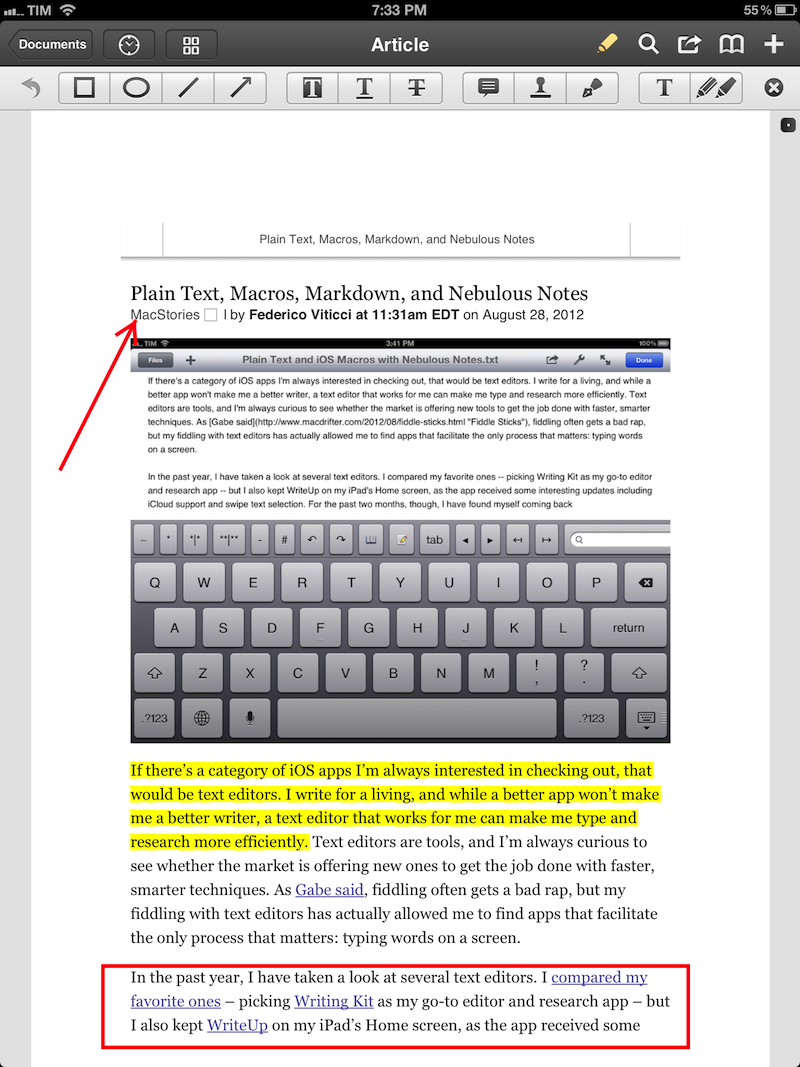
If there’s a category of iOS apps I’m always interested in checking out, that would be text editors. I write for a living, and while a better app won’t make me a better writer, a text editor that works for me can make me type and research more efficiently. Text editors are tools, and I’m always curious to see whether the market is offering new ones to get the job done with faster, smarter techniques. As Gabe said, fiddling often gets a bad rap, but my fiddling with text editors has actually allowed me to find apps that facilitate the only process that matters: typing words on a screen.
In the past year, I have taken a look at several text editors. I compared my favorite ones – picking Writing Kit as my go-to editor and research app – but I also kept WriteUp on my iPad’s Home screen, as the app received some interesting updates including iCloud support and swipe text selection. For the past two months, though, I have found myself coming back to another text editor that I had been previously recommended by various Internet pals: Nebulous Notes. And in spite of my publicly stated praise for Writing Kit, I have been getting lots of writing done with it – so much that I haven’t used any other app for my posts and notes. Read more
Access Extra Content and Perks
Founded in 2015, Club MacStories has delivered exclusive content every week for nearly a decade.
What started with weekly and monthly email newsletters has blossomed into a family of memberships designed for every MacStories fan.
Club MacStories: Weekly and monthly newsletters via email and the web that are brimming with apps, tips, automation workflows, longform writing, early access to the MacStories Unwind podcast, periodic giveaways, and more;
Club MacStories+: Everything that Club MacStories offers, plus an active Discord community, advanced search and custom RSS features for exploring the Club’s entire back catalog, bonus columns, and dozens of app discounts;
Club Premier: All of the above and AppStories+, an extended version of our flagship podcast that’s delivered early, ad-free, and in high-bitrate audio.
Jury Finds Mostly Against Samsung, Apple Entitled To Damages Of $1.049 Billion
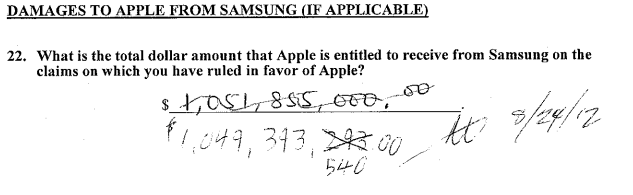
The jury sitting on the Apple and Samsung trial in California has largely found Samsung guilty of infringing on Apple’s intellectual property. The nine jurors unanimously came to agreement, largely finding in Apple’s favour and thus awarding Apple $1.049 billion in damages.
Apple was succesful on a number of claims it put to the jury, but not necessarily against all the phones and tablets that Apple claimed to infringe. One such claim that Apple was particularly succesful in claiming ingringement was the notorious ‘bounce-back’ patent in which the jury found every one of the accused devices infringed on - similarly with Apple’s scrolling and two finger gestures, the jury agreed that nearly all the devices did infringe the patent.
But Apple certainly wasn’t succesful on every front, and one notable area in which the jury did not agree with Apple was in regards to the claim that Samsung’s patents were invalid. In fact the jury didn’t find a single patent, on either side, was invalid.
When the verdict was read, there was minor mistake in the damages calculation that lead the jury to go back and reconsider the decision. It had arisen when Samsung pointed out that the jury had awarded damages for some devices that the jury had said didn’t infringe.
[via AllThingsD, The Verge]
Next: Injunction Hearings
Now that the jury’s verdict has been handed down, the next step will be a preliminary hearing on injunctions. Apple will have to file its requests by August 27th (this coming Monday), at which point Samsung will have two weeks to respond. The actual hearing will be held on September 20th.
[via The Verge]
Samsung Responds To Verdict
Today’s verdict should not be viewed as a win for Apple, but as a loss for the American consumer. It will lead to fewer choices, less innovation, and potentially higher prices. It is unfortunate that patent law can be manipulated to give one company a monopoly over rectangles with rounded corners, or technology that is being improved every day by Samsung and other companies. Consumers have the right to choices, and they know what they are buying when they purchase Samsung products. This is not the final word in this case or in battles being waged in courts and tribunals around the world, some of which have already rejected many of Apple’s claims. Samsung will continue to innovate and offer choices for the consumer.
[via The Verge]
Apple Responds To Verdict
We are grateful to the jury for their service and for investing the time to listen to our story and we were thrilled to be able to finally tell it. The mountain of evidence presented during the trial showed that Samsung’s copying went far deeper than even we knew. The lawsuits between Apple and Samsung were about much more than patents or money. They were about values. At Apple, we value originality and innovation and pour our lives into making the best products on earth. We make these products to delight our customers, not for our competitors to flagrantly copy. We applaud the court for finding Samsung’s behavior willful and for sending a loud and clear message that stealing isn’t right.
[via AllThingsD]
Tim Cook Emails Apple Employees
Today was an important day for Apple and for innovators everywhere.
Many of you have been closely following the trial against Samsung in San Jose for the past few weeks. We chose legal action very reluctantly and only after repeatedly asking Samsung to stop copying our work. For us this lawsuit has always been about something much more important than patents or money. It’s about values. We value originality and innovation and pour our lives into making the best products on earth. And we do this to delight our customers, not for competitors to flagrantly copy.
We owe a debt of gratitude to the jury who invested their time in listening to our story. We were thrilled to finally have the opportunity to tell it. The mountain of evidence presented during the trial showed that Samsung’s copying went far deeper than we knew.
The jury has now spoken. We applaud them for finding Samsung’s behavior willful and for sending a loud and clear message that stealing isn’t right.
I am very proud of the work that each of you do.
Today, values have won and I hope the whole world listens.
Tim
[via 9to5 Mac]
Microsoft Responds To Verdict?
Windows Phone is looking gooooood right now.
— Bill Cox (@billcox) August 24, 2012
Using Bing Local Scout on my Windows Phone to look for a place to drink a pint. Love that UI. Fresh. Unique. Different. That is all.
— Frank X. Shaw (@fxshaw) August 24, 2012
[via The Verge]
Access Extra Content and Perks
Founded in 2015, Club MacStories has delivered exclusive content every week for nearly a decade.
What started with weekly and monthly email newsletters has blossomed into a family of memberships designed for every MacStories fan.
Club MacStories: Weekly and monthly newsletters via email and the web that are brimming with apps, tips, automation workflows, longform writing, early access to the MacStories Unwind podcast, periodic giveaways, and more;
Club MacStories+: Everything that Club MacStories offers, plus an active Discord community, advanced search and custom RSS features for exploring the Club’s entire back catalog, bonus columns, and dozens of app discounts;
Club Premier: All of the above and AppStories+, an extended version of our flagship podcast that’s delivered early, ad-free, and in high-bitrate audio.