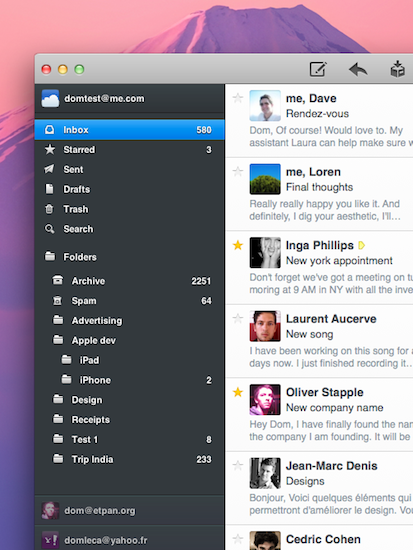
Earlier today, we published an article detailing some of the interface changes set to be introduced in Postbox 2.5, a major update for the popular alternative email application for Mac and Windows that, among other things, was teased by the developers as one of the biggest rewrites of the app to date. With a series of blog posts, the Postbox team had in fact already announced that the client would get an overall improved interface, new toolbar icons on the Mac, a completely re-imagined message view, and a vertical pane view to take advantage of widescreen monitors – admittedly one of the glaring omissions from the previous versions of Postbox. Read more
Apple Announces Q3 2011 Conference Call For July 19
Apple has scheduled its Q3 2011 earnings call for July 19, 2011. The conference call will be streamed live on Apple’s website (audio-only) here.
Apple’s conference call webcast discussing Q3 - 2011 financial results will begin at 2:00pm PT/5:00pm ET on Tuesday, July 19, 2011.
Please note that comments made during this call may include forward-looking statements that are subject to risks and uncertainties, and that actual results may differ materially from these forward-looking statements. For more information on the factors that could influence results, please refer to Apple’s SEC filings.
In Q2 2011, Apple posted revenue of $24.67 billion, with 4.69 million iPads, 18.65 million iPhones and 3.76 million Macs sold. The company also reported quarterly revenue growth of 83% and profit growth of 95% with international sales were 59% for the quarter. In the year-ago quarter, Apple posted record revenue of $15.7 billion with 3.47 million Macs, 8.4 million iPhones, 9.41 million iPods and 3.27 million iPads sold.
The third quarter is set to provide some insight into the sales of the long-awaited white iPhone 4, and whether or not the lack of a new iPhone release this summer has affected the overall sales of the iPhone 4, now a 12-month old device.
We will provide live updates from the call on our site’s homepage on July 19 starting at 2 PM PDT.
[Thanks, Shawn]
Apple Releases Java Updates for Mac OS X 10.6 and 10.5
A few minutes ago Apple released two separate updates for Java on Mac OS X 10.5 Leopard and 10.6 Snow Leopard. The updates are available now on Apple’s website and Software Update desktop app, and they’re both aimed at improving “compatibility, security and reliability” alongside other Java SE 6-related updates.
Java for Mac OS X 10.6 Update 5
Java for Mac OS X 10.6 Update 5 delivers improved compatibility, security, and reliability by updating Java SE 6 to 1.6.0_26.
Please quit any web browsers and Java applications before installing this update.
Java for Mac OS X 10.5 Update 10
Java for Mac OS X 10.5 Update 10 delivers improved compatibility, security, and reliability by updating J2SE 5.0 to 1.5.0_30, and updating Java SE 6 to 1.6.0_26 for 64-bit capable Intel-based Macs.
J2SE 1.4.2 is no longer being updated to fix bugs or security issues and remains disabled by default in this update.
Please quit any web browsers and Java applications before installing this update.
More information about the updates are available in Apple’s support documents here and here.
Designing GitHub for Mac→
Designing GitHub for Mac
It blows my mind that no one tried to do anything special. Git (and it’s DVCS cousins like Mercurial & Bazaar) provide an amazing platform to build next generation clients — and it’s like the entire OS X ecosystem left their imagination at home.
Eventually, I (well, many of us) decided that better native clients (OSX, Windows, Linux, Eclipse, Visual Studio, etc) was the best way to grow GitHub. And since we all use Macs — we should start off with an OS X application.
Kyle Neath has posted an excellent overview of what designing the official GitHub Mac app was like, the challenges he and his team had to face when dealing with Apple’s recent interface changes coming in Lion, and the overall “new trend” of Mac apps inspired by their counterparts.
Check out the whole story and screenshot gallery here.
Postbox 2.5 Will Bring A Completely New Mac Interface
Postbox, the “first-class” email application that shipped a major 2.0 release last year with features such as unified inboxes and quick reply, will have a completely redesigned user interface once the 2.5 version ships this summer on the Mac App Store. Currently in private beta for lifetime Postbox users only, the upcoming 2.5 update has been teased several times by the company in the past weeks, showing off new functionalities like vertical view, a redesigned message view that’s cleaner, elegant and more readable, as well as new toolbar icons also in monochrome variations to get ready for OS X Lion’s new UI paradigms.
Earlier today, the Postbox team has posted a series of screenshots of the UI overhaul they’ve been busy working on with the help of Belgian designer Benjamin De Cock. As you can see from the screenshots in this post and the full gallery here, Postbox 2.5 looks like a massive update design-wise that will be aimed at cleaning the overall experience on OS X which, quite frankly, kind of resembled a Windows program in its previous iterations. With the final goal of “reducing clutter and complexity” in mind, the Postbox team has set out to create an email client that’s just as beautiful as a native Apple app would be, with the addition of unique features like attachment browser, topics, file sidebar, and much more.
There are a lot features and a lot of different ways to use Postbox. It was important for us to account for those different needs, but we also wanted to keep the interface as clean as possible. Mac OS is a huge inspiration for this, as they’re doing a terrific job in reaching people who are less tech-savvy and hardcore geeks. It has been a real benchmark for me for Postbox 2.5.
Postbox 2.5 is a terrific design milestone, and more design improvements are on the way to make Postbox even more user-friendly and accessible for everyone.
The new version of Postbox looks really promising and we can’t wait to get our hands on it to see what’s improved, changed, and refined. Postbox 2.5 will be a free upgrade for existing 2.x customers, so if you haven’t yet, go get Postbox from the Mac App Store at $19.99. Check out more screenshots of the app after the break. Read more
Carousel Instagram Client Gets Gestures, Search, Refined UI
Back in May I reviewed the first version of Carousel, a beautiful Instagram client for Mac that, thanks to the Chameleon framework built by The Iconfactory, brought Instagram’s photo streams and profiles to the desktop with a gorgeous iOS-like user interface. Whilst in the past month, with Lion nearing its final release and the WWDC, we’ve seen several examples of iOS apps making the big leap to the Mac, Carousel was one of the first apps to try the iPhone-inspired approach with a vertical layout, tabs, and popover menus. Together with Twitterrific, Carousel is a fine example of iOS interface schemes coexisting with more standard Mac applications.
Carousel 1.1, released today, adds a number of new features and refinements to make the Instagram experience on OS X even more beautiful and easy to use. First off, search: you can now search for specific @users or #keywords on Instagram, pin your searches as you would in Twitter for Mac, or click on tags and usernames in photo comments, which now are better styled to indicate the original author’s caption. Saved searches sit below the search bar, but to perform a search you’ll have to choose an element from a popover menu. The app has gained a new “likes” tab to see all the photos you’ve liked and a fetch separator to start where you left off in the stream, but more importantly gestures are now supported to easily open a photo in Quick Look (pinch and zoom) or check out a profile (swipe on the photo). It feels very natural and smooth using a Magic Trackpad.
Among the little fixes and refinements, the developers have updated the iOS-like toolbar to make sure the selector is draggable (try it, neat animation in there) and the comment form remains visible even if you click outside of Carousel’s main window.
Carousel 1.1 is a solid update for the most beautiful and intuitive Instagram client currently available on the Mac. You can buy Carousel at $4.99 on the Mac App Store.
“One Time Exception” with Final Cut Pro X Refunds
As noted by The Next Web, amidst criticism surrounding the release of Final Cut Pro X on the Mac App Store (seen by several video professionals and customers as a consumer-level app lacking many of the “pro” functionalities of the previous version) Apple has begun issuing refunds to App Store customers who have bought Final Cut Pro X, Motion, or Compressor. In an attempt to do “damage control” after the criticized release, an alleged email to a customer outlines how the company is making an exception to issue refunds for FCP X, as opposed to their usual policy for iOS and Mac apps.
EOSHD reports the following email:
Moving forward, I understand that you are not satisfied with the app “Final Cut Pro”. I can certainly appreciate you would like a refund, and I would be more than happy to help you out with this today. In five to seven business days, a credit of £179.99 should be posted to the credit card that appears on the receipt for that purchase.
Please note that this is a one time exception because the iTunes Terms and Conditions state that all sales are final.
Apple has been known for not including refunds for apps in their sales policy, thus forcing customers to deeply consider each purchase before clicking the buy button. In a support document, in fact, Apple clearly states that “all sales are final”:
Subject to the iTunes Terms of Sale, all sales on the iTunes Store are final. When you agree to purchase an item by clicking the Buy button (using either 1-Click or Wish List), your Apple ID is charged and the transaction cannot be cancelled. See the iTunes Terms of Sale for additional information.
The same policy is corroborated by the iTunes Terms & Services, which outlines the “final” status of sales and rentals and indicates Apple doesn’t issue refunds for price reductions:
All sales and rentals of products are final.
Prices for products offered via the Services may change at any time, and the Services do not provide price protection or refunds in the event of a price reduction or promotional offering.
However, Apple has also been known for applying a different policy before: by filing a formal request on the App Store customer support website (usually within hours after a purchase) and providing an explanation of what went wrong with a purchase, Apple usually issues app refunds to unhappy customers who believe the software they purchased doesn’t function as advertised or has technical issues that prevent a correct usage. Indeed, this seems to be the most common explanation provided by Final Cut Pro X customers as a thread on Apple Support Communities confirms.
It’s not clear how exactly Apple is making an “exception” with FCP X – whether it’s because several days have passed since the release, or because they never had to deal with large-scale Mac App Store refund request – but it appears the company is moving forward to ensure customers who don’t find FCP X suitable to their needs will get their money back. Refunds are nothing new to the App Store, but this may be the first time Apple has to provide such extended support due to Final Cut Pro’s troubled launch.
How To Child-Proof Your iPhone→
How To Child-Proof Your iPhone
Dave Caolo at 52 Tiger shares a series of interesting tips to “child-proof” an iPhone (though most of these features are enabled on the iPad as well) to make sure kids using a device won’t get access to functionalities like deleting apps and pulling the trigger on in-app purchases. Something I never had the chance to play with is the restriction settings panel for location and email:
Next, exercise (limited) control over location services and email accounts. First, tap Location to see the locations options screen. You can disable/enable location services on an app-by-app basis or turn it off entirely. Once you’ve set this up how you’d like it to be, select Don’t Allow Changes. Likewise, tapping email accounts and then Don’t Allow Changes won’t let you modify existing email, contacts or calendar information or create new ones. Of course, Jr. can still read your mail (and reply to it), so this isn’t entirely useful.
You can read more at 52 Tiger by hitting the source link below, and enable restrictions under Settings->General on your iOS device. Apple has been criticized in the past for not offering the right tools to parents to prevent children from spending money in iTunes, though with iOS 4.3 they introduced a broader set of restrictions and brought the in-app purchase window (when a device asks for your Apple ID password) from 15 minutes down to 5 minutes.
Thunderbolt Firmware Update Released
A few minutes ago Apple released Thunderbolt Firmware Update through its downloads website and the desktop Software Update control panel, targeting all machines running the recently introduced Thunderbolt I/O connectivity standards. Until today, Apple has released new MacBook Pros and iMacs featuring the Thunderbolt technology from Intel. The update brings “performance and stability fixes”.
This update provides Thunderbolt performance and stability fixes.
When your computer restarts a gray screen will appear with a status bar to indicate the progress of the update.
Do not disturb or shut off the power on your computer during this update.
Apple’s release notes don’t specifically mention the targeted machines so we assume it applies to all 2011 Macs with at least a Thunderbolt port. The new MacBook Airs rumored to be getting a Sandy Bridge and Thunderbolt update later this month or in July will likely come with these fixes pre-installed, so if you need to download the patch now go ahead and pull the 486 KB package from Apple’s website.