Federico Viticci

10766 posts on MacStories since April 2009

Federico is the founder and Editor-in-Chief of MacStories, where he writes about Apple with a focus on apps, developers, iPad, and iOS productivity. He founded MacStories in April 2009 and has been writing about Apple since. Federico is also the co-host of AppStories, a weekly podcast exploring the world of apps, Unwind, a fun exploration of media and more, and NPC: Next Portable Console, a show about portable gaming and the handheld revolution.

“Let’s Talk iPhone” Event Rumor Roundup

Tomorrow morning, Apple will hold a press conference in Cupertino, where CEO Tim Cook is widely expected to introduce the next-generation iPhone, a new iOS 5 feature called “Assistant”, and a refreshed line-up for Apple’s iPod family. However, speculation has been running wild in the past months as to whether Apple will announce not one, but two different iPhone models, or perhaps even an iPhone 4 revision to target the low-end market. With rumors of upcoming Facebook integration, voice-recognition features and cheaper iPhone 4 models, Apple’s “Let’s talk iPhone” may turn out to be bigger than expected. Or, as the name of the event suggests, perhaps the company will only focus on the iPhone, leaving other announcements for press releases and minor store updates in the next weeks.

In this post, we’ve rounded up the most recent October 4th rumors and predictions, some old rumors that haven’t been reported in a while, as well as last-minute speculation on what Apple will introduce tomorrow.

Come back tomorrow at 10 AM Pacific on MacStories for our coverage of Apple announcements.

iPhone 4S: This is the device that Apple is rumored to unveil as the “next-generation iPhone” tomorrow. Initially described as an “iPhone 5 inside an iPhone 4 case” for developers’ testing back in April, the iPhone 4S with codename N94 should pack an A5 processor, 1 GB of RAM, SGX 543MP2 GPU (same as iPad 2), GSM-CDMA dual mode, HSPA+, same 3.5-inch screen and design of the existing iPhone 4. The device will come with a new software featured called Assistant for voice-recognition, and possibly a new panoramic photo functionality, likely related to the (rumored) new 8 MP camera. The iPhone 4S name has been spotted on packaging for third-party cases, carrier websites and even Apple’s iTunes 10.5 beta. In the past months, several leaked parts and components have suggested the 4S will share the same design of the iPhone 4, only with largely improved specs.

iPhone 5: The confusion caused by the “iPhone 5” name is due to the fact that it’s been widely used to generally indicate the new iPhone (iPhone 5 comes after iPhone 4) as well as a “completely redesigned” device, as opposed to the iPhone 4S. In fact, several analysts and industry sources believe Apple will announce two new iPhones tomorrow, a 4S for the low-end, and a “real” iPhone 5 as top-line device. The iPhone 5 was rumored to feature a new design months ago, although over time some of its alleged specs have overlapped with the iPhone 4S (improved camera, A5 CPU, 8 MP camera). The distinctive rumor about the iPhone 5 is a new “teardrop” design with tapered edges and thinner form factor, possibly a bigger screen with edge-to-edge LCD and a new “elongated” Home button.

No parts or internal components of the iPhone 5 have been leaked, suggesting such device hasn’t entered production yet and won’t be announced tomorrow.

More iPhone 4S/5 rumors in our roundup.

Read more


Sandboxing and App Culture

Andy Ihnatko and Jason Snell have published two articles on Macworld over the weekend, covering the upcoming sandboxing restrictions that Apple will begin enforcing this November for Mac App Store apps (with its possible implications for Apple’s own technologies like AppleScript) and the broader subject of app culture, which in a way is related to sandboxing and might lead to an overly simplified software environment that some people imagined a year ago.

Ihnatko:

But I fret about AppleScript. I’ve come to think of it as a brilliant and infinitely-resourceful friend who’s been working for twenty years at a company that doesn’t seem to appreciate all of his or her contributions. I’m not worried about Apple killing AppleScript outright; I’m worried that the company doesn’t collectively feel like system automation is a feature that’s worth rescuing if the building ever caught on fire. Some day, Apple’s OS engineers will come up with an idea for a new system architecture that delivers a long list of benefits but which will require tons of work to prevent it from breaking AppleScript. And at that point, scripting on the Mac will finally die.

Snell:

Apple getting serious about app security is a good thing. Unfortunately, many of the apps we Mac users have come to know and love over the years require a broad amount of access to the system for a lot of their key functions. Not as much as SuperDuper, say, but still quite a lot. What I’m hearing from some Mac developers is that they may actually have to remove features from their apps, or reduce their functionality, in order to fit them inside Apple’s new sandbox.

Whilst after the Back to the Mac event in October 2010 we feared the Mac App Store’s lack of trials and license migration options for existing customers would kill the ecosystem and, ultimately, cause the Mac App Store to never take off, that hasn’t been the case. Apple is betting heavily on the Mac App Store as the future of digital distribution for desktop software, and it’s doing so by releasing Lion on the App Store, alongside several other apps (at a discounted price). Since January 6, when the Mac App Store opened for business, third-party developers have rushed to release their apps on it (most of the times with discounted prices) and Apple awarded those who did in time at last June’s WWDC. Some developers needed, obviously, to rethink how their apps would work with Apple’s Mac App Store rules.

The issue mentioned by Ihnatko and Snell isn’t a logistic problem with the infrastructure itself, it’s a real technical question that has arisen lately. How much will sandboxing entitlements affect the functionalities of existing apps? An example is the aforementioned 1Password, whose Mac App Store version won’t allow you to keep its database sync file in Dropbox if that folder is not under your User’s directory. The change wasn’t well received, but that’s just the way it works now. Starting November, it’s safe to assume other apps will need to be updated with this kind of tweaks – a restriction here, some documents can’t be accessed there, and so forth.

You can see how sandboxing, security and app culture are related in Apple’s App Store vision. The concept of “app” has evolved over time to indicate a piece of software that does one thing well, and Apple is doubling down on this new idea by enhancing security (which is a good thing) and making sure an app is limited “to just those operations that it needs to perform”. App and security have come full circle.

In the past nine months, the Mac App Store did just fine for the majority of developers without trials and demo versions. Then Apple introduced in-app purchases and delta updates. Every major change creates victims – those who couldn’t settle down in a new environment – and winners, literally. What will be interesting to observe in the upcoming months isn’t sandboxing itself of Apple’s evilness, but the trade-off third-party developers will seemingly have to come to terms with if they want to keep their apps on the Store., with the same degree of power and innovation we’ve become accustomed to in the past decades.


“iPhone 4S” Name Found In Latest iTunes Beta

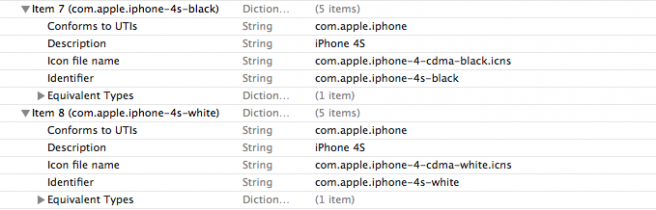
Apple has apparently included the “iPhone 4S” name in a file inside the latest iTunes beta seeded on Friday, 9to5mac reports. As shown in the screenshot above, two strings report “iPhone 4S” in the description, with a link to the same image used by iTunes for the older CDMA iPhone 4. Whilst the iPhone 4 had separate references for colors (black/white) and carrier variations (GSM/CDMA), the “4S” name in iTunes 10.5 beta 9 is only differentiated by color.

Speculation surrounding the next-generation iPhone initially described the “iPhone 4S” as the lower end model with improved specs over the iPhone 4, although recent rumors have suggested the “iPhone 5” may end up being the 4S itself, thus contradicting reports of two different models, one being “completely redesigned”.

The iPhone 4S name recently appeared on packaging for third-party cases and it also supposedly hit Apple’s internal inventory system with the codename N94. The CDMA image associated to the 4S in the iTunes beta may be a placeholder, but the 4S was previously rumored to have dual CDMA-GSM capabilities.

Apple will hold a keynote in Cupertino on Tuesday, October 4th, where it’s widely expected to unveil the next-generation iPhone.


Apple To Announce International iTunes Match on Tuesday?

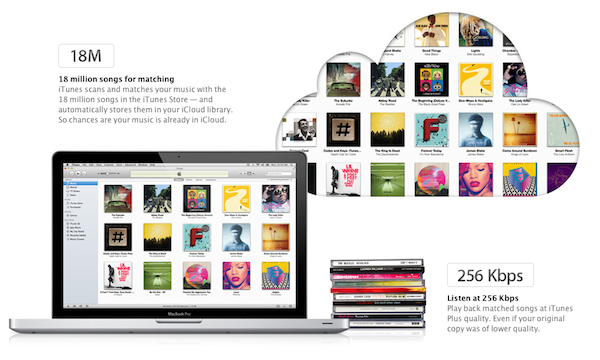
According to a report by Greg Sandoval at CNET, Apple may announce international support for its iCloud music service at the media event scheduled for next week. Apple is said to be in negotiations with record companies and music publishers to gain worldwide music rights for iCloud, although CNET reports nothing has been signed yet, but if negotiations wrap up in time there could be an announcement on Tuesday.

Whilst CNET mentions “access to iCloud”, iCloud music rights most likely refer to the specific iTunes Match service; however, another music-related feature of iCloud – iTunes in the Cloud – is also being tested in the US-only at the moment, as it can be seen on Apple’s international iCloud pages. It’s not clear whether CNET is referring to iTunes Match, iTunes in the Cloud, or both – thus bringing full iCloud access for music worldwide.

Managers at iTunes are trying to lock down worldwide cloud-music rights, CNET has learned.

[…]

Some of the countries that could receive access to iCloud include Germany, France and the United Kingdom, the sources said.

iTunes Match, originally previewed at the WWDC in June, is set to publicly launch this Fall in the United States. Apple hasn’t detailed a public plan for an international rollout of the service, which is currently in beta and requires a US iTunes account with credit card on file. The service costs $24.99 per year for 25,000 songs, but iTunes purchases won’t count against this limit. iTunes Match was previously rumored to be coming to the UK in 2012, however CNET has a solid track record in reporting Apple’s negotiations with the music labels and publishers, correctly predicting ahead of WWDC that Apple would announce a new cloud-based music service.


MacRumors and Jan-Michael Cart Mock Up iOS 5 Assistant

Earlier this week, it was reported the final version of iOS 5 for the next-generation iPhone would include a new functionality called “Assistant”. Based on the acquisition of Siri in 2010 and allegedly using some of Nuance’s voice recognition technologies, Assistant is said to be the next iPhone’s biggest new software feature, which will allow users to “speak” to their device to complete a variety of tasks such as sending text messages, creating calendar events and reminders, or get information on a specific topic only with their voice. Assistant will apparently put the next iPhone’s A5 CPU and 1 GB of RAM to use, providing an effortless experience to execute voice commands with a natural language.

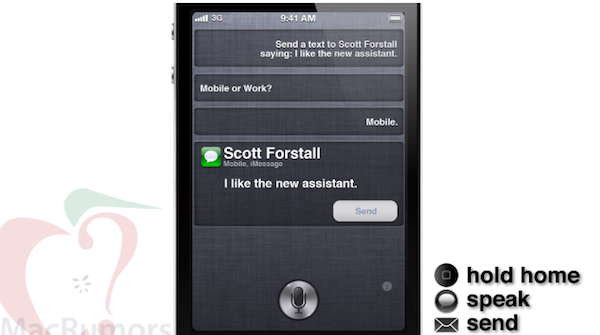
Based on this week’s report and details from “sources with knowledge of the feature”, MacRumors has mocked up Assistant’s activation screen and asked Jan-Michael Cart (author of several iOS 5 and OS X concept videos) to create a quick demo showing what Assistant should look like.

After a long press on the home button, the screen fades and slides up, just like with the multitasking interface. Revealed is a silver icon with an animated orbiting purple flare which indicates a ready state. From what we’ve been told, this image is a close representation of the actual Assistant interface.

From there, the user may be taken to a conversation view that somewhat mimics Siri’s original interface, but in Apple’s own styling.

You may remember MacRumors also commissioned a mockup of the iPhone 5 design in what has become an unofficial representation of the rumored “completely redesigned” device. The Assistant mockup posted today shows an equal attention to detail, and undoubtedly resembles something Apple could do with the multitasking tray, linen background, and styled buttons. Obviously, Apple’s official design will be different, but you can get the basic idea of this feature by looking at the video below.

Voice commands aren’t new to smartphones, but looking at the video and trying to imagine what would Apple do with reliable voice recognition tech, I assume Assistant could still feel “revolutionary” in some way, especially if Apple has really managed to build a “conversation view” that would let you give detailed instructions to your phone. Imagine being able to create quick reminders when you don’t have time to type (for example, while you’re driving) or dictate long emails and text messages directly to your iPhone, which would transcribe everything for you. Assistant is still a rumor, but an exciting one to think about.

Apple will hold a press conference in Cupertino on Tuesday, October 4th, where it’s widely expected to unveil the new iPhone.
Read more


Apple Releases iTunes 10.5 Beta 9

Apple has released a new beta of iTunes 10.5 to developers this afternoon, re-enabling some iTunes Match functionalities that have gone missing after the iCloud music library reset that several developers reported on Apple’s Dev Forums this week. iTunes 10.5 beta 9, available now, contains bug fixes and improvements over iTunes 10.5 beta 8, which was seeded earlier this month.

iTunes 10.5 is required to sync devices running iOS 5, and it brings a number of optimizations and improvements to iTunes’ code, which now runs natively at 64-bit on Lion. The first beta of iTunes 10.5 that implemented support for iTunes Match – Apple’s upcoming backup and scan & match service for music in the cloud – was seeded in late August.

iTunes Match will launch this Fall alongside iCloud, and it will be compatible with OS X and iOS 5 devices.


Apple Removes “iPod Click Wheel Games” From iTunes Store

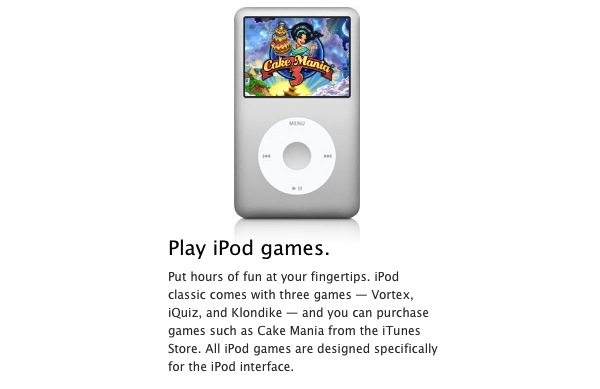
As noted by AppleInsider, Apple has removed iPod click wheel games from the iTunes Store, pulling a link to the category from the App Store’s dropdown menu inside iTunes, and also removing listings for those games that users could play on a click wheel-based iPod. It’s not clear when Apple made the change exactly, but it appears to be recent. Apple updates the App Store’s homepage every week with new features, banners and links to special sections, and the removal of iPod Click Wheel Games (which had their very own category) might have been part of a weekly refresh. There were around 50 games for click wheel iPods in the iTunes Store, including classics like Vortex and Klondike, or other titles like Song Summoner by Square Enix.

Click wheel games were compatible with the iPod classic, as well as older versions of the iPod, iPod nano and iPod mini. They allowed users to control games using an iPod’s touch-sensitive click wheel, and they’re still mentioned on Apple’s iPod classic Features page. Development of click wheel games never really took off with third-party developers, as Apple didn’t make a software development kit publicly available.

The FAQ page for iPod Click Wheel Games has been marked as “archived” and “old article” by Apple on September 21, 2011. The article still reports click wheel games are available in the iTunes Store, but old direct links for such games aren’t working anymore, and games no longer appear in iTunes’ search results.

The removal of click wheel games comes amidst rumors of the discontinuation of the classic and shuffle iPod lines, quite possibly with a formal announcement as early as next week at Apple’s October 4th keynote. The iPod classic was rumored to be nearing discontinuation before, as Apple didn’t announce a refresh at last year’s music event in a clear focus on iOS devices (and the updated iPod nano). Apple’s Steve Jobs allegedly confirmed in an email to a customer that they had no intention to cease production of the iPod classic, which remains the only iPod to offer high capacity with 160 GB of storage. Speculation surrounding the iPod suggests Apple would axe the Classic to make room for a new 128 GB iPod touch, although this year’s iPod touch refresh is believed to be a minor one and there have been no signs of a 128 GB iPod touch in the past months. A 64 GB iPhone prototype surfaced earlier this year, if this can be an indication of Apple looking to bump the storage sizes of its iOS devices.

In 2010, the iPod classic was the 5th most popular MP3 player in the United States.


ClickToPlugin Brings AirPlay Support to Safari for Mac

ClickToFlash, the popular plugin to block Adobe Flash content in Safari and make videos play in higher quality through HTML5, had to go through a series of changes after Apple released Safari 5.1, which dropped support for WebKit Plugins. Those of you who use ClickToFlash on a daily basis may have noticed that ClickToFlash for Safari 5.1 recently got a new home, and it’s been developed by Marc Hoyois as a Safari extension called ClickToPlugin.

Marc Hoyois actually offers both ClickToPlugin and ClickToFlash rewritten as a Safari extension – the former is simply a broader version of ClickToFlash that doesn’t stop at Flash content, but prevents Safari from launching a variety of plugins, including Facebook Video Calling and Java. The same functionality of ClickToFlash is still there, only it’s been split in two versions depending on what you need (if you only want to block Flash, get the new ClickToFlash extension) with a new settings page. As usual, the extension replaces content with a placeholder that doesn’t load automatically and, when possible, allows for a direct plugin-to-HTML5 conversion that, in the case of YouTube, will allow you to load a video’s source in higher quality. ClickToFlash/ClickToPlugin comes with several preferences to tweak and support for many video websites – you should check out the complete list of features and screenshots of the settings at the developer’s website.

An update released earlier this week for the ClickToPlugin/ClickToFlash extensions adds a feature Mac users have been requesting since the introduction of iOS 4.2 last year – AirPlay support in Safari for Mac. While AirPlay had been enabled first in Apple’s iOS apps, then the Mobile Safari browser and third-party apps, Mac users were only given AirPlay support for audio in iTunes, but nothing related to video streaming on OS X. A number of hacks and utilities surfaced to send Mac video to an Apple TV or AirPlay receiver and even turn a Mac into an AirPlay-compatible device, but there’s never been a way to easily select a video in the browser, and instantly beam it to an Apple TV with the click of a button.

The latest ClickToPlugin adds exactly this feature in combination with its built-in HTML5 video recognition and a second utility available on Marc Hoyois’ website called Media Center. Version 2.5.2 of Hoyois’ extension adds a new “AirPlay” option in the HTML5 media player (the one you get if you, say, decide to replace Flash content on YouTube with HTML5 video), enabling you to send video to an Apple TV on your network. The Apple TV’s hostname or IP address needs to be specified in ClickToPlugin’s settings, but it’s set by default to apple-tv.local, which is what Apple gives you with an Apple TV out of the box. The default hostname worked for me and found my Apple TV (connected with WiFi first, then via Ethernet to my AirPort Extreme).

Once ClickToPlugin is set to fetch HTML5 video instead of Flash (you can optionally choose a default resolution – I picked 720p) and the Apple TV is configured to accept incoming AirPlay streams (the extension has support for AirPlay passwords, too), you’ll be able to try AirPlay in Safari by opening a YouTube video, like this one, and choose AirPlay from the source selector on the top left. If your settings are correct, the video should start playing on your Apple TV.

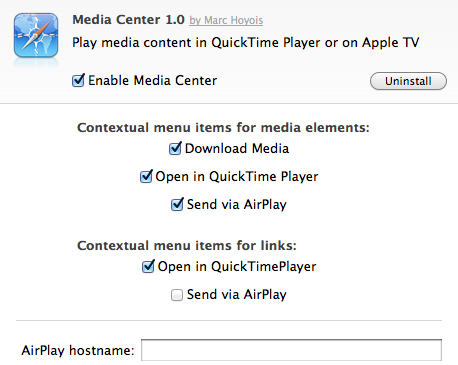
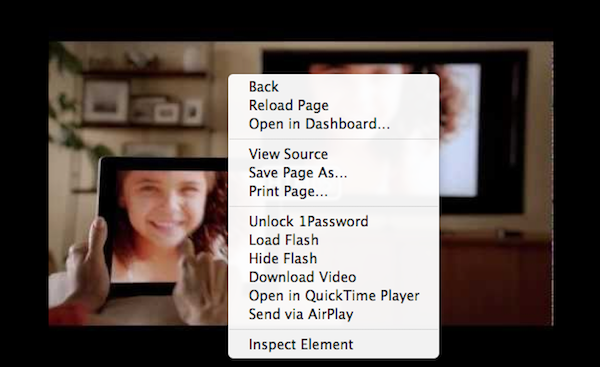
Media Center works in conjunction with the latest ClickToPlugin in that it adds a contextual menu item to links and HTML5 media to download a video file, open it in QuickTime, or send it to an Apple TV via AirPlay. Some of these functionalities are already provided by ClickToPlugin, but I like Media Center’s AirPlay action on right-click and, more importantly, the toolbar button that allows you to stop a a video from being streamed to the Apple TV.

In my tests, ClickToPlugin and Media Center have been fairly reliable, streaming 720p content from YouTube to my Apple TV, although I’ve experienced some connection drops (the video would stop playing after a few minutes on the Apple TV) and errors with the Vimeo website. I need to mention, though, that I’m running OS X, Safari and Apple TV beta software, so that might be the culprit. Even with these betas (OS X 10.7.2, Safari 5.1.1, Apple TV Software beta 6), ClickToPlugin’s AirPlay support worked fine most of the time, and I’m sure optimizations for the new OS and Safari will be available once Apple publicly releases the updates. I’ve also noticed you don’t have to keep a tab open after the video starts playing with AirPlay, but Safari can’t be quit or you’ll lose the AirPlay stream.

I wouldn’t be surprised to see native AirPlay support by Apple in a future version of Safari for Mac (or, even better, systemwide AirPlay support on OS X), but right now, ClickToPlugin and Media Center provide an interesting solution for those who want to comfortably enjoy video from their web browser on a widescreen TV. The extensions surely need some work and refinements, and it would be great to see them land on Chrome someday (if it’s even possible, I don’t know).

Go download ClickToPlugin and Media Center on Marc Hoyois’ website.


Firefox 8 Enters Beta with Twitter Search, New Tab Features

As Firefox 7 hit the public channel earlier this week, Mozilla has published a new blog post detailing some of the features of the new Firefox 8, now available in beta. Keeping true to their renewed schedule for Firefox updates, Mozilla aims to release a new version of their browser every six weeks, which has lead to some confusion among users as to whether it’s really necessary to call every update a major release when there are only minor differences to test.

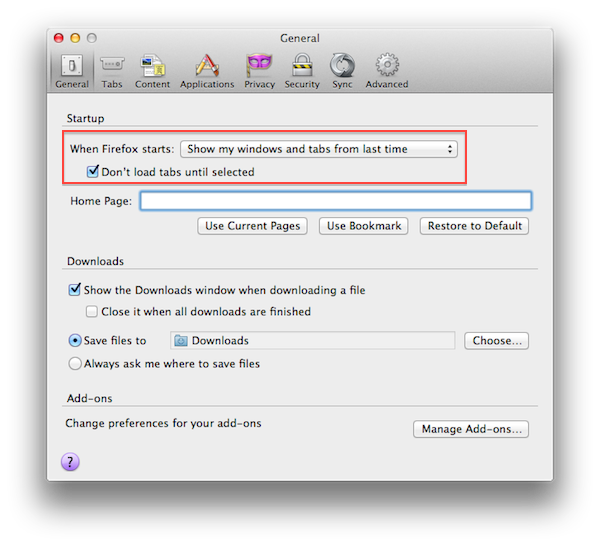
Firefox 8 will deliver some improvements to tab management, allowing users to choose whether tabs should load at start-up, or only when they’re selected. This should allow for faster start-up times when windows with many tabs are restored; from a first test, it indeed appears Firefox 8 will restore the last opened tab, display other tabs’ titles and favicons, but load their contents only when the user clicks on them. Mac users can find this new option under Preferences -> General. Also, a new tab animation should make it easier to re-order tabs.

Another new feature of Firefox 8 is Twitter integration in the search box. By clicking on the search provider’s icon (by default it’s Google), users will have the option to choose Twitter and enter terms to look up on the social network’s Search page.

Firefox 8 also includes:

  • Enhanced control of add-ons: Users will receive a one-time notification to review and confirm third party add-ons they want to keep, disable or delete. When Firefox starts and finds that a third-party program has installed an add-on, Firefox will disable the add-on until the user has explicitly opted in, giving users better control over their Web experience.
  • CORS for WebGL textures: Cross-Origin Resource Sharing (CORS) enables Web developers to load textures from other domains for WebGL in a secure way.
  • WebSockets updates: Firefox now prevents the use of plaintext WebSockets when created from an SSL page, which improves security for users.
  • HTML5 Native Right Click Menu: Web developers can now add items directly to the Firefox right click menu using simple HTML5 markup.
  • HTML5 media elements: Developers can add a lot of video and audio elements to a website without impacting performance

Firefox 8 is expected to be available later this year. The first beta can be download from Mozilla’s website here.