Graham Spencer

917 posts on MacStories since January 2011

Former MacStories contributor.


Details Of Adobe Creative Cloud Revealed: $49.99 Per Month, Includes CS6, Lightroom 4 & 20 GB Cloud Storage

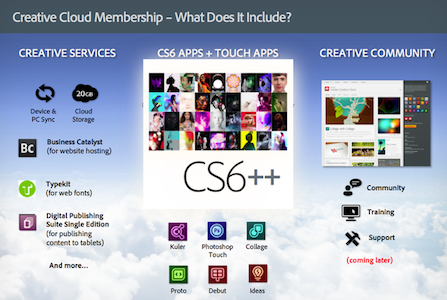
Adobe today announced details of its new Creative Cloud service that will launch in a few months time alongside the Creative Suite 6 release. Priced at $49.99 per month, when signed up for a year’s subscription, the service offers users the full Creative Suite 6 bundle of applications along with 20 GB of cloud storage for device and desktop syncing of documents. The price may seem high, but for those who use Adobe’s Creative Suite and like to be on the latest version, $600 per year may be a good price. Particularly when the alternative is the $2000 up-front cost of each major version, which typically hit every second year.

Adobe Creative Cloud will be available worldwide in the first half of 2012. While traditional licenses of CS software will still be offered, a membership to Creative Cloud provides more benefits than simply owning desktop software. You’ll get all the CS tools, Adobe Touch Apps, and services, plus new features, products, and services as soon as they are released — meaning immediate access to the latest Adobe innovations at no extra cost.

The Adobe Creative Cloud will also include all of Adobe’s touch apps, the Business Catalyst, TypeKit and the Digital Publishing Suite. Lightroom 4 and new web-authoring apps Muse and Edge will also be included in the service’s offerings once they launch. Users will be able to download all the apps individually and on up to two different machines.

Adobe is promising to deliver major new feature updates to their CS6 apps after they launch, many of which will be exclusive to the Creative Cloud service - they blame subscription accounting issues as the reason why it won’t also be delivered to up-front customers of CS6. For businesses, Adobe is set to also introduce a team option that will include additional collaboration and security features for the service - that will set companies back $69.99 per user.

[via The Verge]


Apple Warns Developers Against Using Services That Manipulate App Store Rankings

Apple has today posted a reminder to developers, warning them not to manipulate App Store chart rankings or face potential loss of their Apple Developer Program membership. The warning follows recent publicity surrounding services that have been offering the ability to artificially boost free app rankings in the top charts.

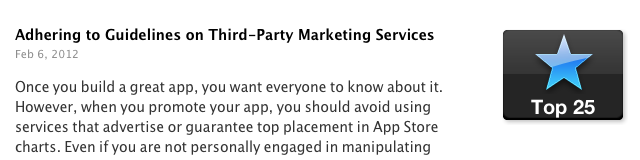
Adhering to Guidelines on Third-Party Marketing Services

Feb 6, 2012

Once you build a great app, you want everyone to know about it. However, when you promote your app, you should avoid using services that advertise or guarantee top placement in App Store charts. Even if you are not personally engaged in manipulating App Store chart rankings or user reviews, employing services that do so on your behalf may result in the loss of your Apple Developer Program membership. Get helpful tips and resources on marketing your apps the right way from the App Store Resource Center.

Yesterday, PocketGamer noted that one company was offering a service for $5000 where they would utilise bots to download an app repeatedly until it breaks into the top 25 charts. That report followed on from a TouchArcade post, where users warned others from using such fraudulent app promotion services which use automated scripts or bots.

[iClarified via MacRumors]


Grand Central Terminal Restaurant Sees Boost In Customers Since Apple Store Opened

Since the opening of Apple’s Grand Central Terminal store, at least one fellow tenant is seeing a 7 percent increase in sales. That tenant is Michael Jordan’s The Steak House, located across the terminal from the new Apple Store and its co-owner, Peter Glazier says the restaurant has seen the boost of sales since the Apple Store opened 7 weeks ago in December.

Glazier makes sure to point out that the boost isn’t due to Apple simply replacing another restaurant (the Apple Store is located where the Metrazur restaurant used to preside). He says “the jump only happened after Apple opened” - not during the months whilst the space was being renovated for Apple.

So far it seems that the “sweetheart deal” that the New York City’s Metropolitan Transportation Authority’s worked out with Apple is paying dividends — despite initial criticism of the deal. That deal saw Apple agree to a $60-per-square-foot lease agreement, with no revenue sharing agreement. The MTA made the argument that such a flagship store would bring in more customers, benefitting other tenants, so far, it seems that argument has been reflected in reality.

[Crains New York via MacRumors]


Quick Review: Remarks

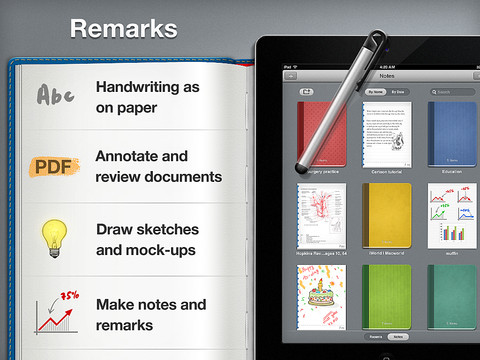
Readdle is today launching their latest iPad productivity app, Remarks. In some ways it is similar to their existing products such as ReaddleDocs or PDF Expert because it features full PDF annotation capabilities, but it is distinctly different because it is the first of their apps to really push the idea of handwriting and note taking as a core function. We’ve reviewed many of Readdle’s products before and by this stage it is clear to us that they make quality productivity software for iOS, so the real question I had when I downloaded this app was what exactly does it let you do and how might it fit into how I work.

What struck me almost instantly was that this app is clearly aimed at being a PDF creation tool, it isn’t like ReaddleDocs or PDF Expert which are more focused as being document management and PDF annotation apps. Remarks may have those same annotation tools but it wants you to create PDF documents, whether it be a handwritten note, drawing or diagram that you want to send to a colleague or perhaps a study note.

In its current form, PDF annotation may be useful but it’s a bit of a pain to get a PDF into Remarks, unlike PDF Expert and ReaddleDocs it doesn’t (yet) have support for cloud services such as Dropbox or SugarSync. Fortunately, this will only be a short-lived annoyance, Readdle plans to have an update ready within two weeks that adds support for cloud services.

Once you do get a PDF into Remarks, you won’t be disappointed - the same powerful annotation functionality that is in Readdle’s other apps is also available in Remarks. So you’ll get the tools to add text, draw shapes and write or draw in freehand on those PDFs, and as usual it is all editable in Preview on the Mac or any other PDF reader such as Adobe Acrobat.

I think for me, this app will come in handy when I need to take down study notes that also require diagrams or illustrations. Things that I can’t do in Evernote, which is very much a text focused note-taking app. In the past I have sketched them down in an exercise book and then for the most important ones I have subsequently drawn them up in Photoshop, OmniGraffle or OmniGraphSketcher, importing those into Evernote. Now I could just use Remarks to make an electronic copy of all my study notes, not just those that are in plain text. I’ll probably still use Photoshop or one of the Omni apps for some of my diagrams that are super important so they are a little neater - but its no longer a requirement.

Before I wrap up, I just wanted to make a quick mention of using a stylus with the iPad. The app does recommend using one and I must admit using a stylus in the context of drawing diagrams and general notes does make a lot of sense - using my finger wasn’t as effective as I had hoped and it soon got tiring. So I foresee myself picking up a stylus in the near future, to make sure I can take full advantage of what Remarks offers.

If you are just looking for an app to annotate PDF documents it might be a better idea to go for PDF Expert or ReaddleDocs. But if you want to do more freeform note-taking, drawing diagrams or creating your own simple PDFs, Remarks is the way to go. Remarks is available in the App Store for $4.99.


To Be Or Not To Be, Is The iPad A PC?

A few hours ago I listened to the latest episode of Shawn Today (a daily podcast from Shawn Blanc available to members of his site), and in it he discussed the issue of whether the iPad is a Personal Computer.  This follows an article by Matthew Panzarino on The Next Web yesterday, titled “Look, tablets are PCs, get over it”. In fact I could point to quite a few articles and discussions about this question of whether tablets (specifically the iPad) are PCs. But Shawn’s episode and Matthew’s post have inspired me to also weigh in on the discussion today, with why I believe the iPad should legitimately be counted within the PC market.

I’ll just start with this question: what computer is more personal than an iPad? The tablet form factor and iOS software combine together to make using the iPad a far more personal computing device than a traditional PC desktop or laptop, where you have to interact with the software from an arm’s length away, using a mouse or trackpad and a keyboard.

So the iPad is personal device, but is it a fully functional computer? John Mello at PCWorld says no, because in his opinion people don’t use it for content creation. Matthew’s article on TNW does a great job at dismantling this oft-quoted “complaint” about the  iPad and I recommend reading his entire argument. When the iPad first came out I must admit I had the same thoughts about the device, but as time has gone on I have increasingly used it for content-creation — whether it be annotating PDFs for studying, writing, and even some (very average) efforts at using iMovie. Content-creation on the iPad will continue to become more common as people adjust to the device and as app developers continue to adapt to creating great software for the iPad – just look at how productivity apps have improved and advanced in the past year on the iPad.

Sure, some content-creation tasks may never be as easy to do on an iPad compared to a more traditional PC – things like advanced video editing or long stretches of writing. But by the same token, a small netbook isn’t good for those tasks either and yet it is counted as a PC. I know I would always choose an iPad over a netbook for virtually any task because in my opinion it is a far more capable personal computer. On the flip side, I think the iPad is actually a better computer for things like annotating PDFs with apps such as PDF Expert. Then for things like advanced video or audio editing it’s only inevitable for those apps to transition to iOS, in fact just today Avid Studio was released – it may be a distilled version of the advanced desktop version, but it will evolve and become increasingly powerful for most tasks that an average user and even “pro-sumer” will need. The iPad is personal and (in my opinion) it is also a functional computing device.

So if you are excluding the iPad from the personal computer category, does that mean there is some checklist of requirements for a device to be a PC? Does it need a keyboard, or perhaps a trackpad or a mouse, or does it just have to be able to install any application you want (without the approval of a gatekeeper such as Apple)? All of these ‘requirements’ are completely arbitrary - with no practical reason as to why they are required to be on a PC. You can still connect a keyboard to the iPad if you need one for extended periods of writing, your finger is the “mouse” and Apple’s App Store has mostly protected consumers from nefarious apps or excessively useless/buggy apps – virtually everything I need is on the App Store (in fact there are over 170,000 apps just for the iPad). You may not like this policy (I can understand that, even if I don’t agree with it), but is it really a reason to bar the iPad from being counted as a PC? Again, that’s completely arbitrary.

Arbitrary: Based on random choice or personal whim, rather than any reason or system.

If you are still thinking that the iPad doesn’t count as a PC, what will all those Windows 8 computers in tablet/slate form be counted as? You can’t bar them from being “a PC” because they will be able to “morph” into what is essentially a Windows 8 laptop with a traditional Windows desktop, use a keyboard (and even mouse) and yet you can use it like them as tablets with a different, touch-based UI.

But if you do count them as a PCs, you surely have to count the iPad as a PC too then. They will be virtually identical devices from a functionality and experience point of view, unless you say the Windows 8 tablet is a PC because it will still have the traditional Windows desktop, and then I go back to the fact that it is an arbitrary requirement. One might actually argue (from what we know at the moment), that the iPad is more functional and will provide a better experience because it has two years of developer support with apps that have been specifically designed for the touch interface, whereas any Windows 8 tablet may be handicapped with the Windows desktop because it isn’t designed for touch-input and Metro may lack many apps at launch. The reality is that both should be counted as PCs: it is the only logical solution.

But…but…..but….

You might now point to the fact that Apple has touted the iPad as a Post-PC device, so surely if Apple themselves aren’t calling it a PC, it shouldn’t then be counted in any PC marketshare analysis. It’s a decent point, but I think Apple did that as more of a marketing move, to point out that it is a different, unique device. In fact, it is the next evolution (if not revolution) of the personal computer. Maybe the solution is just calling the “traditional” PC category something different (Desktops & Laptops perhaps?) that would make much more sense than trying to arbitrarily force the iPad out of the PC category.

One other decent rebuttal may be to then ask, if you are including the iPad, why not also include the iPhone. It’s a very good point, because I think it is also a personal computing device to some degree. I think the reason why it’s legitimate to leave the iPhone and other smartphones out of most PC market analysis is because there are enough points of differentiation between the traditional PC/iPad and the smartphone in the way it is used and experienced. These include the fact that smartphones have a distinct use case of being always-on communication devices, time management devices (Calendar/To-Do apps, etc), time-wasters (Angry Birds in a long queue, anyone?), and are occasionally used for content-creation or content consumption. They are also devices you spend using for a few minutes at a time (typically), multiple times a day — rather than PCs (including iPad), which you use for longer periods of time.

You might claim these are arbitrary reasons and, yes, to some degree they are, but that’s because the line between whether a smartphone can also be counted as a PC is a far blurrier line than that of iPads as PCs. In my opinion at least, it would be OK to include smartphones as PCs in a market analysis if there is a good reason as to why it’s an important conclusion - such as an analysis of trends. A good example of this is Horace Dediu, who included smartphones as PCs in the final graph of his article entitled “The rise and fall of personal computing”.

So as Matthew Panzarino said yesterday in a very succinct title and what I completely agree with, “tablets are PCs, get over it”.


Avid Brings Its Video Editing Tools To The iPad With Avid Studio

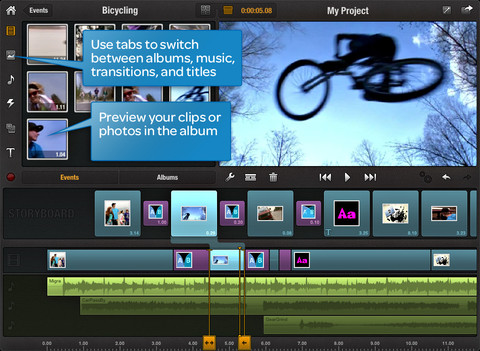
Avid has today brought its “pro-sumer” video production tools to the iPad with its new Avid Studio app. Avid is the maker of a number of high-end video and audio production tools that have also gained appeal in the pro-sumer marketplace.

The new iPad app is claimed to be a “distilled” version of their more complete film-editing applications available on the desktop. This certainly won’t be a replacement for Avid’s full-featured tools, but it may be good option for small projects or for people who want something a little bit more than what Apple’s iMovie for iPad offers. Avid believes the app is a complement to their existing offerings with users able to transfer project files between the apps through iTunes or iCloud.

“We’ve seen a shift in how creation is happening, and it’s really happening on almost any device,” said Tanguy Leborgne, vice president of consumer and mobile technology strategy at Avid. “We think the tablet is more than just a consumer device; more and more people are creating on it.”

Priced at just $4.99 for the first month and $7.99 after that, the app is also priced at a very competitively for its capabilities. Pro-sumer video editing apps on the desktop start at least $60 and go up to $299, with Avid’s desktop app itself at $129.99.

[Via AllThingsD]


Localized Flipboard Content Guides Come To UK & Ireland, Australia and Canada

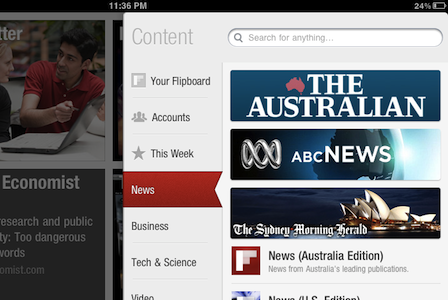
Flipboard has today launched three new localized ‘Content Guides’ in Australia, Canada and the UK and Ireland. Users in these countries will now be shown recommendations that match their location. For example, Australian Flipboard users will now see The Australian, ABC News and the SMH prominently displayed in the News section of the content guide and UK users will be recommended the BBC, The Guardian and The Telegraph amongst others.

The localised recommendations aren’t just for the News section but the other categories such as Business and Tech & Science too. Similarly, it doesn’t mean that no international publications are recommended anymore, it just means that local publications are now recommended more prominently. Flipboard now has six Content Guides for countries outside the US with France, Taiwan and Hong Kong previously receiving localised Content Guides. Flipboard also has a dedicated app for the Chinese market which also has its own Content Guide.

Users in these countries needn’t do anything to receive the new content guides - they are automatically loaded based on the Region Format of the iPad (you can change yours in Settings > General). The Flipboard team does note that they are working on a way to easily change regions from within the app so you can look at recommendations for other regions.

[Flipboard Blog via The Next Web]


January 2012 In Review

Starting this month we’re launching a new, month-in-review feature that will summarize the past month’s big news stories, apps and editorials that we have published on MacStories. Each month we’ll give links to all those big stories and give a summation of the big events: for example, this month we detail Apple’s Education Event and include links to all the important articles related to it. We’ll also include links to new apps, app updates and app reviews that we think are worthy of your attention. Finally, we’ll be including links to our standout editorial stories from the past month - the stories we are most proud of.

We hope you enjoy this new feature and find it useful. Our hope is that it gives some perspective on the events of the past month, particularly when news flows so fast these days.

Apple’s Education Event

The big news of January was probably Apple’s Education Event that was held on January 19th in New York. The education-themed event saw the release of iBooks 2.0 which featured the ability to read new multi-touch books and, specifically, textbooks. In order to promote the creation of these new multi-touch books, Apple also released the free iBooks Author application for OS X, allowing virtually anyone to create a beautiful and interactive book for the iBookstore. The event also saw the release of an iTunes U app for the iPhone and iPad to give students and teachers more control over their courses.

Apple’s Q1 2012 Earnings Call

The other significant piece of news from January was Apple’s Q1 2012 earnings call in which Apple revealed it had just had the best quarter in its history, posting $46.33 billion in revenue, selling 37.04 million iPhones and 15.43 million iPads during the blowout quarter. The Next Web pointed out an interesting statistic that by selling 37.04 million iPhones during the 14 week quarter, Apple had actually sold more iPhones than babies had been born during the same time period. We also posted some of the more interesting details and statistics from the earnings call in a follow-up post which is well worth the read. A final article related to the earnings call is the one about how the iPhone ASP rose in Q1 2012, despite the addition of the “free” iPhone 3GS.

Apple Continued To Rollout Products Internationally

January saw the next big wave of iPhone 4S launches in China and 21 other countries on January 13th, making the 4S available in over 90 countries. Apple’s recently launched iTunes Match also became available in 19 additional countries around Europe and South America - taking the total number of countries with iTunes Match to 37 - making it another quick international rollout.

Supplier Responsibility

This month the issue of working conditions at Apple’s suppliers again came under close inspection. It started with the NPR program ‘This American Life’ investigating the issue in one of its episodes. Apple then released its annual Supplier Responsibility report (earlier than last year) and revealed its list of suppliers for the first time. Towards the end of the month, The New York Times featured an editorial on the issue - focusing on Apple. We also linked to a paidContent article that put the NYT article into perspective and rationally laid out the reality that Apple can’t solely change manufacturing overnight.

Jailbreak

January saw the untethered A5 jailbreak finally being released, to the joy of many iPhone 4S and iPad 2 owners who had been holding out for a jailbreak for quite some months. In fact the demand for the jailbreak saw nearly 1 million downloads of the tool in just the first 24 hours. Jailbreak certainly hasn’t become irrelevant just yet.

New SVP of Retail

On January 31, Apple announced John Browett has been hired as new Senior Vice President of Retail, a position left open since Ron Johnson left Apple to become the new CEO of J.C. Penney. Browett has been the CEO of European technology retailer Dixons and previously held various executive positions at Tesco, including CEO.

Everything Else

New apps, updates to apps and reviews that we published in January 2012.

January Quick Reviews

A selection of the best editorial pieces that we published on MacStories in January 2012.

January MacStories Reading Lists


Obama, Romney Election Campaigns To Use Square In Fundraising Efforts

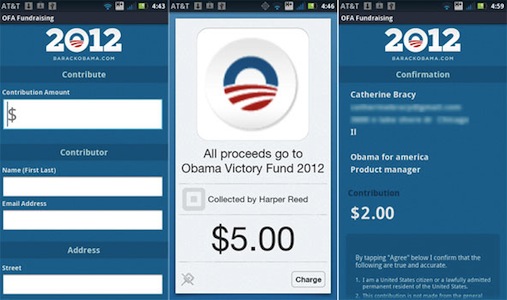
Square looks set to play a big part in the 2012 US Presidential race, with both the Obama and Romney camps announcing this week that they will be adopting the tool to give their grassroots fundraising efforts a boost. The mobile payments company uses a small accessory that plugs into the headphone jack of an iPhone, iPad or Android phone and works with a companion app to accept payments from credit cards.

The Obama re-election campaign will begin using Square straight away, initially with campaign staffers and “some approved volunteers”. But the ultimate goal is to develop their own Obama Square app that they can distribute on the App Store - allowing anyone to get the app and Square attachment and go around collecting donations. To comply with the Federal Election Commission’s (F.E.C.) rules, the app will need to collect the name, address, city, state, ZIP code, occupation and employer of the contributor, along with contribution size and collection date.

If the Square rollout is successful, and others follow, campaigns could send out armies of volunteers brandishing the Square credit card reader and collecting millions of dollars in micro-payments from political supporters.

The Romney campaign similarly announced today that they will also be trialling Square and likely developing their own, Romney-themed Square app. They will conduct a “beta-test” of the Square app and accessory on Tuesday night’s Florida primary election.

Daniel Rubin, strategic partnerships manager at Square, who works with political campaigns and major nonprofit organizations, said Square was partnering with a number of campaigns to make 2012 the year mobile payments change the way donations are collected on the ground. “It’s now easier than ever to give to campaigns of any political stripe,” Mr. Rubin said. “At a campaign, or any political event, donors will be able to give on the spot. They won’t have to run home and get a check or fill out long paper forms.”

[via The New York Times]