This Week's Sponsor:

Crickets

The first alarm app for families.


Posts tagged with "music"

Rdio Launches API for Mobile Devices

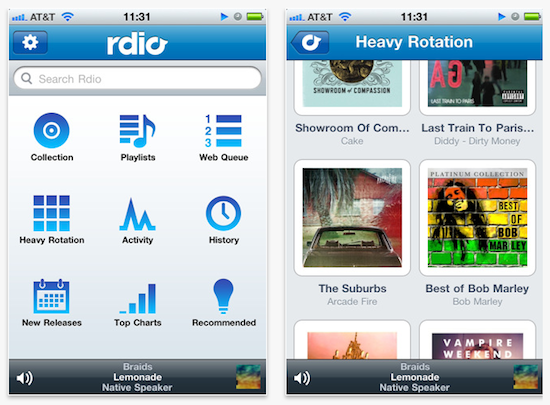
Music streaming service Rdio, quite popular in the US and Canada but currently unavailable due to regional restrictions in the rest of the world, announced yesterday the release of an API for iOS and Android devices that will allow developers to build apps that are integrated with Rdio’s music and social functionalities. The API – documentation available here and here – will let third-party devs build apps that search “all the artists, songs, albums, playlists, and top charts in Rdio’s catalog of over 8.5 million songs.” On top of that, the API will also bring playlist creation and editing outside of the official Rdio app, as well as the possibility to show a user’s Heavy Rotation, collections or follow other people. For a first release, it sounds like a solid API for iOS and Android.

Attending Google I/O 2011? Take a closer look at our Mobile API on Android devices at Rdio’s Developer Sandbox at Moscone Center in San Francisco. If you won’t be there or want to see the API in action yourself, download the Rdio Music Quiz from the iPhone App store.

While our Mobile API doesn’t yet support our affiliate program, it will soon. So make sure to sign up for it now and start building that incredible mobile app you always wanted to make.

The current API and service terms won’t let developers create paid apps that directly plug into Rdio. Still, with Spotify struggling to launch in the US and an impressive userbase and app selection after a few months, Rdio has the chance to maintain a healthy ecosystem for music streaming apps in the US, and take it from there to Europe. Rdio has big plans for sure, and it’ll be interesting to follow its developments in the next months, especially after Apple will unveil its rumored cloud music service with full labels’ support.
Amazon Cloud Player Now Works with iOS Safari

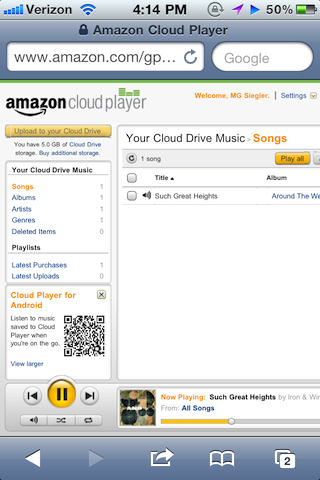
Back in late March, Amazon launched Cloud Player for the web and Android devices, an online interface that, relying on music uploaded to your Amazon account via Cloud Drive, allowed you to stream music from the cloud via a web browser or the native Android application, built into the OS with direct connection to Amazon’s servers to fetch and stream songs on the go. The service, however, wasn’t working with iOS devices, and it wasn’t a Flash issue: somehow, the website itself didn’t want to cooperate with Mobile Safari on iPhones, iPod touches and iPads. We noted that there was a way to make it work by using an alternative browser like iCab Mobile and changing the app’s user agent, but it was convoluted and far from being a reliable alternative to playing music locally in the iPod app, or from third-party services like MOG and Spotify, which do have native iOS apps. The lack of iOS compatibility for Cloud Player left many wondering whether the company intentionally decided to block the service, betting exclusively on the Android platform – which is the foundation for Amazon’s new app marketplace.

As noted by TechCrunch today, however, Cloud Player seems to be working in the iOS browser now. Songs stream just fine, and they even pause automatically during an incoming phone call or if a Push Notification is received. It’s unclear how Amazon exactly “unlocked” the feature and why it went online so quietly without any major announcement, but my guess is the Cloud Player team simply added a string to allow Mobile Safari to start a QuickTime streaming session within the browser.

You might think this had to due with Flash or another technology that iOS wasn’t compatible with, but it wasn’t. It looked like something else was simply blocking it from working. Well, good news. That’s no longer the case.

If you visit Amazon’s Cloud Player through the Safari web browser on an iOS device, you’ll see that it does in fact now work. You’ll first hit a warning page telling you that your browser is not supported, but just ignore that. Click into the music in your drive and it will begin playing.

MG Siegler notes the implementation is still far from perfect (uploading requires Flash, but you wouldn’t be able to upload files from iOS anyway) and the solution implies listening to music in a regular browser window. Still, it’s a start for Amazon, and it reignites speculation of a native Cloud Player app for iOS coming in the near future. The website, for now, is restricted to US access only.

Rumors in the past months pointed at Apple building a full-featured music streaming service based on iTunes, wrapped inside the upcoming iCloud infrastructure for Mac and iOS devices. There’s little doubt at this point Apple hasn’t at least considered the possibility of letting users upload their music collection or subscribe to an à la carte service for streaming songs off the cloud. With the WWDC roughly a month away, we should know more about Apple’s cloud plans and new music options soon.


AirServer Brings AirPlay For Everything to OS X

During the past months, I’ve stumbled upon several Mac apps that enable to turn your computer into an AirPlay receiver. None of them, however, provided the same amount of stability and functionality I’ve found today in AirServer, a $3 app that easily turns your Mac into an AirPlay device for audio, photos and videos. Since Apple introduced AirPlay with iOS 4.2 back in November, many have wondered whether it’d be possible to use the streaming features of the protocol (for music and other kinds of media) on a Mac, rather than on iPhones, iPads, and Apple TVs. The number of Mac apps that came out promising to bring AirPlay on the desktop was quite overwhelming: from simple utilities to stream music to more complex solutions like Banana TV, developers didn’t even refrain from creating similar alternatives for iOS devices, turning an iPad into a receiver for video. And if that’s not enough, remember a few weeks ago a hacker cracked the encryption keys used by Apple in the AirPort Express station – opening the door to even more apps with AirPlay / AirTunes integration.

AirServer brings some clarity and unification with a $3 purchase and a simple package that runs in the menubar. That’s it, no UI. Heck, the icon can be removed from the menubar, if you want. What AirServer does is simple: it turns a Mac into an AirPlay receiver for anything. Provided you have an iOS device (or another Mac) to start a streaming session, you’ll be able to listen to music (or any other audio) or watch videos and photos coming from AirPlay on your Mac’s big screen. I have an iMac at home, and AirServer is just perfect on it: I can fire up Instacast on my iPhone and listen to my favorite podcast on better speakers (pardon me if I don’t have external speakers); I can find a cool YouTube video and instantly beam it to my Mac without sharing any link; I can take my entire Camera Roll and show photos of my last vacation to my (poorly sighted) parents on the iMac. Now we’re talking.

As for quality, I have tested AirServer on two different local networks with pretty good results. Videos stored on device start playing almost instantly; music quality was great, with a couple of lags on my slower home network in a 2-hour playing time; photos stream just fine with responsive touch controls as you swipe. AirServer takes a minimal footprint on your Mac, and I’ve also noticed it reproduces the fading effect you get on the iPhone when you change your audio source. Overall, the app is stable and I was pleased to see an update was issued a few hours after I bought the app.

To sum up: at $3 you get an AirPlay receiver for Mac that supports audio, videos (even from Youtube and other apps) and photos. If you love AirPlay, get AirServer.


Spotify 0.5 Goes Live with iPod Sync, New UI

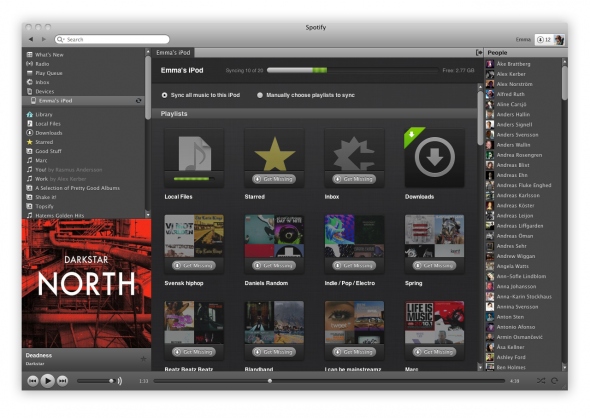
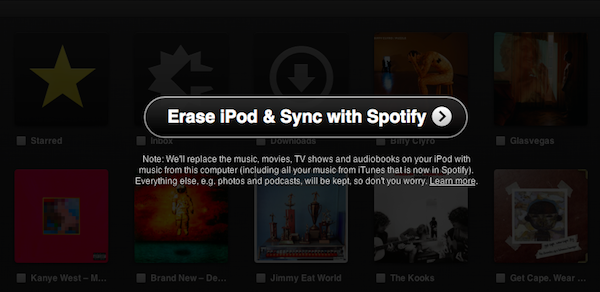
Officially announced yesterday, Spotify began rolling out the promised 0.5 update for the desktop client a few minutes ago, featuring an updated UI and the much anticipated playlist and MP3 sync for iPod Classic, Shuffle, and Nano, alongside wireless sync for iOS and Android devices running the Spotify mobile application. The updated desktop client, available now for download here, comes with a slightly redesigned user interface that’s inspired by the latest iOS and OS X Lion builds: there’s lots of “linen background” going on, redesigned toolbar icons with a more flat look, new translucent buttons to reveal and expand the album artwork, as well as a general polish that clearly brings OS X graphical elements to mind. If you’re familiar with iOS and the latest Lion developer builds, you’ll feel right home with the new Spotify. I like the app’s new look.

Spotify 0.5 can sync playlists, local files and purchased tracks to an iPod (non-iOS) via USB or iOS device wirelessly. The interface to manage sync is quite simple and intuitive, as there’s a new Devices tab in the sidebar that lists all the iPhones or iPods you’ve connected to Spotify. Once connected, the app will display all your playlists, starred items and local files in a new window, allowing you to choose whether you want to sync “all music” to a device, or only specific playlists. Whilst iPhones and iPod touches get the possibility to sync anything as they’ll be able to stream songs later using the mobile app, classic iPods can only receive local files – meaning MP3s Spotify has found on your computer or songs you’ve purchased through the service’s new store. Songs and playlists that are not found will display a “Get Missing” button that takes you to the embedded web store. Tracks start at 50p, but Spotify is also offering MP3 bundles at a higher price.

Overall, Spotify 0.5 looks like a really solid update that shows the path the company has taken: becoming the ultimate music player on the desktop and mobile thanks to a combination of streaming, cache, purchases and sync. Check out more screenshots below. Read more


“On the way to Woodstock” for iPad Takes You Back To 1969

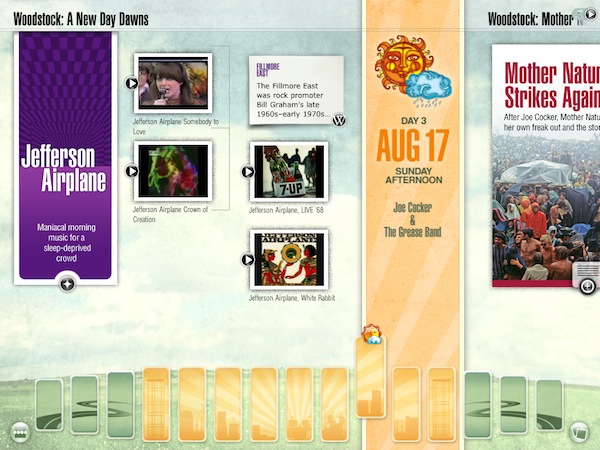
From the same creators of The History of Jazz, an interactive timeline about jazz music that was featured multiple times by Apple in the past, comes a new “book” for the iPad called On the way to Woodstock that takes where the previous digital experience left off to offer over 100 hours of video, audio, and editorial content related to the 1950’s, 1960’s and each of the artists that performed at the 1969 Woodstock Art & Music Fair. The History of Jazz was incredibly successful in the way it transcended the meaning of “digital book” to offer an experience that was closer to what Push Pop Press is doing now with Our Choice for iPhone and iPad: more than a simple book and closer to an interactive media gallery packed with content of all kinds, On the way to Woodstock is a digital, multitouch-based homage to the culture, politics and style of the 50’s and 60’s, as well as the historic bands and artists that performed at the legendary Woodstock festival.

I have downloaded the app a few minutes ago, and there’s so much stuff to do with its it’s difficult to get the hang of it in a short amount of time. You can look at photos and read descriptions; browse the timeline at the bottom by tapping on the colored bars and check out every single moment of the Woodstock fair with videos, bios, articles and exclusive photographs; you can even enter a special “screensaver mode” to turn your iPad into the perfect Woodstock-themed coffee table book. The app is full of content, information, and media. It’s definitely a rich experience that will engage you in reading and watching for hours, and perhaps even coming back a few times after you’re done consuming everything the app has to offer. Like I said I’ve been playing with On the way to Woodstock for less than an hour, but the attention to detail, the animations, the options and the selection of songs and videos are amazing. The app also packs related content from iTunes, YoutTube and Wikipedia and lets you check out the original Woodstock set lists as well.

On the way to Woodstock is the perfect app to showcase the versatility of the iPad, something Apple would be proud of. You can get the app here at $6.99, and watch the demo video after the break. Read more


Spotify Now Lets You Sync MP3s To Your iPod Without iTunes

Spotify, the music streaming service that counts millions of active users in Europe but has been struggling to launch in the US due to the lack of deals with major music labels, announced some important new features last night, both for Premium and Free users. With an update to the official desktop app that will automatically roll out to all users in the next few days to “ensure technical quality”, Spotify now allows you to sync your music to an iPod Classic, iPod Shuffle or iPod Nano without using iTunes at all. With the new Spotify, users will be able to place the MP3s they bought (more on this in a minute) or saved locally inside a playlist (as they usually do) and sync these playlists to an iPod thanks to the new “Devices” section in the app’s sidebar. It’s worth noting that Spotify doesn’t allow sync via USB cable to iOS devices, as they’re only focusing on standard iPod models now. However, with the updated mobile app for iPhone and iPod touch (now also available to free users for playlist sync, whilst Premium subscribers retain the ability to stream everything) users get the possibility to sync playlists wirelessly. Clearly, Spotify has set out to become the standard music player for many both on the desktop and mobile devices, although the software still can’t sync back to iOS devices like iPhones and iPads through a USB cable. Plus, the lack of a native iPad app still makes it impossible for iPad users to properly enjoy the Spotify experience.

For the first time, seamlessly manage any iPod classic, iPod nano and iPod shuffle in Spotify. Simply connect your iPod to your computer via your USB cable and watch it magically appear in the new ‘Devices’ section of your Spotify sidebar.

iPod integration was your biggest request, but there are also a lot of Spotify Free users out there who are iPhone and Android phone owners. You asked for the ability to buy your MP3 playlists and sync to your phones. So we’ve got you covered too…

As of today, everyone can download the Spotify Mobile iPhone & Android apps to wirelessly sync your MP3 playlists in Spotify from your computer to your phone. Fire up your mobile app and see your phone appear in the ‘Devices’ section of the Spotify sidebar, ready to rock and roll. No cables required!

As mentioned above, users can now take the music they bought or already own on the go all the time. Spotify is, in fact, launching a new “download service” that, through a simple click&buy interface, allows you to purchase a range of MP3 bundles offered by the service starting at 50p per song. I haven’t managed to test the new music store and iPod Classic integration as the update is still rolling out and I don’t have it available, but from what Spotify unveiled last night, it really looks like the company’s intention is to take on Apple and (the future) iTunes with a mix of streaming, local cache, USB sync, and online store. The variety of apps offered by Spotify surely gives them an important head start in the music streaming scene for mobile devices, but they obviously still can’t compete with the music catalogue offered by iTunes. And when Apple finally rolls out is iCloud service for music with iTunes integration, it’ll be interesting to see how Spotify will react.

[image via TechCrunch]
Read more


Planetary: Your iPad’s Music Library Becomes A Galaxy

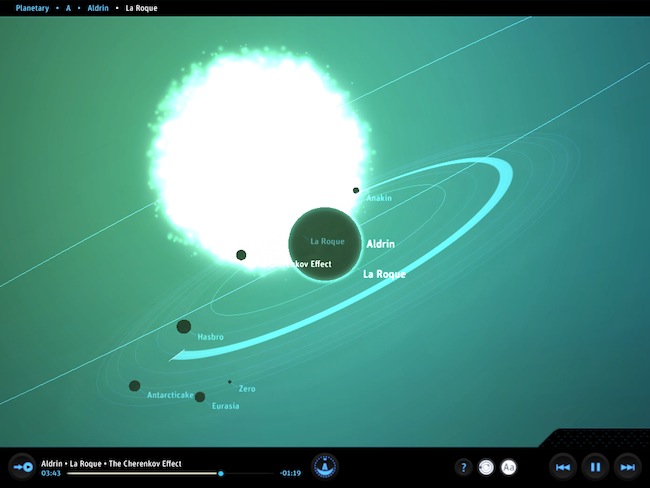
In what might be the coolest music experiment that has landed on the iPad to date, company Bloom Studio released earlier today Planetary, a new way to explore your iPad’s music library. Bloom Studio promises to deliver “playful, explorable, visually compelling views on personally relevant information from services like Facebook, Twitter, Instagram, and iTunes”, and Planetary is the realization of this mission statement: not only it’s based on the crazy concept of turning your iPad music library into a galaxy, it also works exceptionally well. Since I got my eyes on the teaser website a few days ago, I was looking forward to trying the actual product and see whether it could really bring a different way of exploring music to the tablet: now that I’m using the app, available for free, I have to say Planetary is one of those apps you have to try for yourself, rather than watching in some YouTube demo videos.

So here’s the gist: your music is a galaxy, artists are stars, albums are planets. In the 3D view of Planetary, no two planets are the same as the graphics are generated automatically off an album cover from the iPod app. Similarly, songs are moons: the more you listen to a song, the bigger the moon grows. And there’s more: each moon orbits at a speed related to the song’s length. Indeed, crazy stuff that doesn’t really make any sense until you try it. But on the other hand, it’s clear Bloom Studio set out to create an interesting experiment based on data visualization that merges files synced to your iPad, music, and space. I’m sure Buzz Aldrin would be proud.

While Planetary features some standard music controls like play / pause and back / forward, the key area of the app is support for multitouch gestures: you can pinch the galaxy to zoom on a star, pan and rotate a planet to check out all moons and orbits – overall, do all sorts of zooming and viewing to enjoy the pleasure of having your music available in the form of a galaxy. Like I said above, you just have to try it and see how it works with your music.

At the price of free, Planetary needs to be downloaded now and experienced with a rich iPod library synced to your iPad. Personal recommendation: for greater results, try to sync some Explosions In The Sky.


Music Hunter: Intelligent Music Discovery For iPad

If there’s another industry the iPad is disrupting (together with media consumption, digital reading, medical applications – you name it), that’d be music discovery. The category isn’t nearly as popular as news readers and social aggregators and RSS apps, but two apps that came out in the last months which I also reviewed here on MacStories, Aweditorium and Discovr, are leading the way towards better, more interactive, beautiful discovery of new artists and songs on mobile devices. Where Ping failed at empowering people to share, buy and discover new music, apps like Aweditorium make it super-simple to “touch” music you’ve never listened to, explore genres and albums you didn’t know you might be interested in, share the results with your friends on Twitter and Facebook. The iPad does its job extremely well in this case: with a large screen that’s meant for swipes and taps, it easily becomes a piece of glass functioning as a wall for music. Like those walls in guitar shops advertising this week’s shows from those unknown bands your friend keeps talking about all the time. Here, that’s what music discovery on the iPad is all about: the intertwinement of social, digital stores, and personal taste.

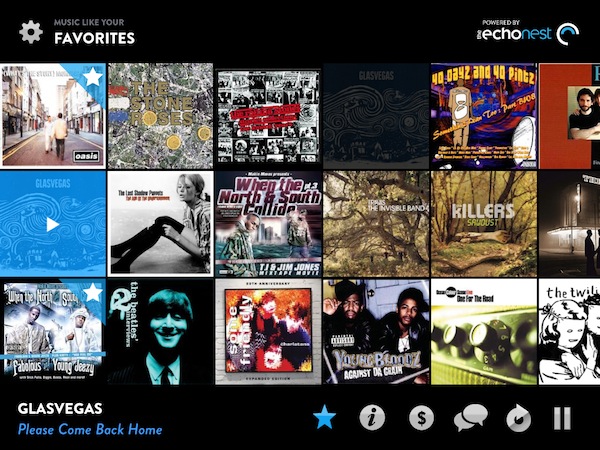
Music Hunter is the latest entry in the music discovery market for the tablet, and at $0.99 it offers a sweet way to find new songs to purchase later on the iTunes store. While Aweditorium and Discovr are based on indie artists and correlation between music you already know, respectively, Music Hunter starts up with a window displaying two sliders: one for genres, one for styles. As you move the sliders, you can get to results like “high energy hip hop” or  ”90’s electronic music” that will load a wall of artists with the first song picked for you. The results are generally accurate as they’re based on the echonest engine, the same infrastructure that powers Discovr for iPad. Like Discovr, song previews are fetched from iTunes and a button allows you to quickly jump to the store and hit Buy. You can scroll through the wall to see more songs and previews, or mark something as favorite and start exploring from there as the app allows you play “music similar to your favorites.” There’s no support for AirPlay (unlike Aweditorium), but you can check out quick artist bios from a popup window that can be activated from the bottom toolbar. What I like about Music Hunter is that it packs a lot of features: you can search, adjust the settings at any time (and thus load other genres and styles) or aggregate different artists and music styles into the Favorites for the ultimate personal playlist. Everything’s really minimal and good looking.

If you’re a fan of Aweditorium and Discovr, Music Hunter is the app to add to your collections of music discovery tools. It’s elegant, well integrated with iTunes and “intelligent” in the way it aggregates results from echonest. Go download the app here.


Rumor: Apple’s Cloud Music Service Won’t Be Free

A new report by Cnet today claims Apple will charge users a fee for its rumored cloud-based music service, although no exact details on pricing have been provided. Citing “music industry insiders”, Cnet says Apple could offer the service free of charge initially as a promotion, but eventually they’ll have to charge users to keep the service running and pay music labels. It’s unclear whether the new cloud service will offer different kinds of monthly and annual subscriptions, although Cnet points to an old report that suggested Apple could go for a $20/year fee.

Don’t expect Apple’s cloud-music service to come free of charge, at least not forever.

Apple plans to eventually charge for its cloud music service, sources told CNET. Users would be able to store their digital media on the company’s servers.

Music industry insiders told me that Apple has indicated it could offer the service free of charge initially but that company will eventually require a fee. Google is also expected to charge for a similar service.

Several reports in the past weeks indicated Apple was working on a complete MobileMe revamp featuring new cloud-based music functionalities, social and location features, as well as a new price point to make basic parts of the service (such as syncing options) free for all iOS and Mac users. Last week, it was reported work on Apple’s new music service had been finalized, with the company seeking to close deals with music labels to push ahead the release of its new iTunes-in-the-cloud offering. Cnet also claimed Apple had signed a deal with the Warner Music Group, whilst Peter Kafka at MediaMemo said Apple had already closed deals with at least two of the four major music labels, with Apple’s Eddy Cue visiting New York City to ink the remaining deals.