This Week's Sponsor:

Crickets

The first alarm app for families.


Posts tagged with "music"

iTunes In The Cloud: Apple Signs Deal with Warner Music

Following last night’s report on Apple readying the launch of the rumored cloud-based music service based on iTunes after having recently “completed work” on it, Cnet weighs in today claiming the company has signed a deal with Warner Music to offer streaming of the labels’ artist catalogue and songs on the new iTunes cloud service. Cnet notes how Warner Music is only one of the four big players in the music industry, with EMI, Sony and Universal still out of the picture:

Apple has an agreement with Warner Music Group to offer the record label’s tracks on iTunes’ upcoming cloud-music service, music industry sources said. It is unclear whether Warner was one of those two that had previously licensed Apple or whether the label inked a new agreement on Friday.

Indeed, Peter Kafka at MediaMemo posted a follow-up to Reuters’ original report on the finalized cloud service yesterday, claiming that Apple had actually already signed deals with two of the major music labels, and Apple’s Eddy Cue was set to fly to New York City today to arrange the remaining deals. It’s not clear now whether Warner Music was part of the rumored labels that had signed in the past months, or one of the two that needed to be convinced today. Cnet’s report doesn’t provide additional details on the deal.

Speculation surrounding this new cloud-based service from Apple indicates the company has both considered an option to let users back up an existing music collection to the cloud and stream it anywhere, as well as a second iTunes Store-like functionality offering the possibility to stream songs you don’t own through a monthly or annual subscription.


iPhone-based iDrive With BMW Apps Demoed On Video

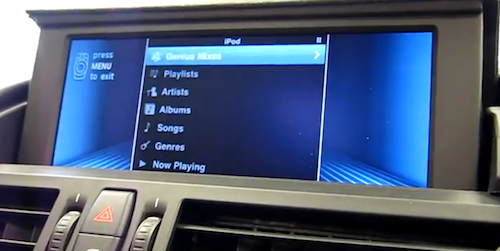
Back in July 2010 we reported German-based car manufacturer BMW was looking forward to integrating Apple’s iPhone into their automotive experience with a system called iDrive that, featuring a “plugin” option co-developed with Apple, would allow users to connect their iPhones to the car’s dashboard to access a variety of information and media like music from Pandora and the iPod app, as well as status updates coming from Twitter and Facebook.

Autoblog got the chance to try the new iDrive system built into all BMW models from Series 1 to 7 that will begin shipping next month, and reports the integration is really smooth and impressive on a technical side as all rendering is done on the iPhone, with the car’s dashboard only functioning as a screen. A you can see here and in the video embedded below, the iPhone fits in a cradle in the car’s console and is directly connected to the iDrive; with an active 3G connection on the iPhone and the BMW app installed, users will be able to stream music off Pandora’s radio stations with their own accounts, mark songs as favorite and even create new stations using the car’s iDrive knob. The integration goes as far as enabling users to access their Facebook and Twitter streams, with the possibility to generate automated status updates with your location and estimated time of arrival to a specific POI (based on the car’s navigation system) so you don’t have to type the whole message using the knob. BMW also decided to restrict some sections of Twitter and Facebook while a car is in motion, so drivers won’t be distracted by the streams.

BMW calls its Facebook and Twitter integration “Automotive Grade,” which is a nice way of saying “minimalist.” And as it should be. The primary function is less about reading status messages and updates, and more about sending a quick, pre-programmed post on the go. The system can pull in hundreds of data points from the vehicle and navigation system, allowing you to update your status with location information, weather and a host of other data. Want to let your friends know when you’ll be at the restaurant? The app can pull in your location and destination from the sat-nav and post an update saying you’ll be there in 15 minutes. And if the pre-packaged responses aren’t up to snuff, once you unhook the phone from the cradle, you can create your own canned responses and updates directly in the app, which also keeps track of vehicle mileage, service data and a handful of other useful bits of information.

Last, there’s the plugin functionality based on Apple’s iPod Out feature that’s been designed by Apple engineers, and as the name suggests plugs directly into an iPhone’s iPod.app music library to display artist’s information, album artwork and everything you would expect from iOS on a BMW car’s dashboard. It looks really neat and I wish I had the chance to try it out, too.

Videos of BMW iDrive and the background story embedded below. Read more


Robick: Visual Audio iPhone App for Learning Music By Ear

Previously, we’ve covered the Capo range of apps for the iPhone, iPad, and desktop that help students learn music by ear via setting repeating segments, altering the tempo & pitch, and giving students the ability to adjust an equalizer. When we previously covered these apps, the Capo mobile applications were more limited in some respects compared to it’s older desktop sibling - not a bad thing, but it would be nice to bring over the ability to adjust highs and lows for example instead of just only pitch and tempo. Robick is an alternative take on plugging in tracks from your iPod’s library, and altering them in such a way that helps you learn parts of a song. The developer noted to me it was primarily designed for learning Jazz (I’m assuming for Japanese students), and the interface reflects a modern edge and a shifting paradigm that’s quite neat.

Read more


Apple’s Cloud Music Service Almost Ready to Launch?

According to Reuters, Apple “has completed work” on its rumored cloud-based music service that will allow users to store their music online, and access it anywhere using a computer or an iOS device connected to the Internet.

Apple Inc has completed work on an online music storage service and is set to launch it ahead of Google Inc, whose own music efforts have stalled, according to several people familiar with both companies’ plans. Apple’s plans will allow iTunes customers to store their songs on a remote server, and then access them from wherever they have an Internet connection, said two of these people who asked not to be named as the talks are still confidential.

Reuters also claims Apple hasn’t secured any deal with music labels yet, and industry sources said several labels are hoping to close these deals before the service’s launch. Similarly to Amazon’s recently launched Cloud Drive and Cloud Player, Apple could introduce a service that works on the web and mobile devices, and offers a way for users to “digitally lock” their own media in the cloud – quite possibly without even needing the blessing of music labels to do so. Amazon, for instance, was initially rumored to be in a lot of trouble with licensing deals after the Cloud Player launch, but as of today no major music label has sued the online retailer – which basically gives its users an online space to store their DRM-free songs. Amazon, however, is reportedly in talks with labels anyway to come up with a more “advanced” plan that meets the music industry’s expectations and requirements.

Apple, on the other hand, might launch a service that acts as a remote backup location for a user’s iTunes library, and it could be part of the rumored new MobileMe – a complete revamp of the suite of online sync tools that’s also expected to be free, and deeply integrated into future versions of iOS. A number of reports in the past months indicated Apple was building an online iTunes backup solution with built-in streaming capabilities, although others claimed the company was also focusing on a subscription-based model for streaming the entire iTunes Store catalogue – similarly to how music service Spotify requires a premium subscription to stream music you don’t own.

Last, Reuters reports:

Apple and Google are keen to offer services that give music fans more flexibility to access their media wherever they are rather than tying them to a particular computer or mobile device.

In late 2009, Apple bought Lala, a cloud-based music company, but closed it down in April 2010, leading to speculation that it would launch an Apple-branded cloud service.

Interestingly enough, a series of downtimes and errors in iTunes and the App Store during the past 2 days lead many to believe Apple moved its iTunes servers to the new data center in North Carolina, which was set to become fully operative in Spring 2011. Read more


Seamless: Transition Playing Music From Your Mac To Your iPhone

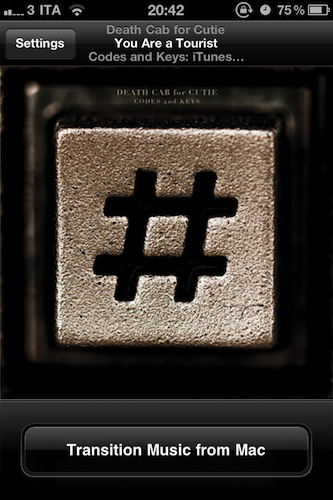
I’ve been there before: I’m working, I’m listening to some Oasis or Death Cab for Cutie on iTunes on my Mac, and iCal reminds me I have to go out. I take my iPhone, I quit iTunes, and I realize I was really liking the song I was listening to. So I’m forced to fire up the iPod app on my iPhone, find the song again, and start listening from the beginning of the track. I could manually move the on-screen cursor to the exact position the song was on iTunes, but it’s quicker this way, plus I really have to go out. Seamless, a new iPhone app by Five Details, provides the simplest solution to this problem: a button.

Once installed on the Mac (for free) and on your iPhone ($0.99 in the App Store) Seamless will communicate with your Mac to see what song is playing. If the song is found on your device’s iPod library and you’re ready to leave your computer, tap “Transition Music” and the song will quickly fade on your Mac, and magically start playing on the iPhone. Same position, same song, one button. You can do the opposite, too: you’ve just got home, with a song playing on your iPhone. Tap the button, and music will start playing on your Mac . This happens in less than a second, provided that both devices are on the same local WiFi network.

While Seamless is intriguing, clever and almost magical in its concept, there are some execution issues to iron out. For instance, I couldn’t get the app to work last night (it kept saying the “song was not present” on my iPhone, but it was) and the developer told me it’s because of a bug that won’t find songs on a synced device unless you’re playing from a playlist – not just the Music library. So I created a playlist, synced it to my iPhone, and now the app works just fine. This bug will be fixed soon with an update, I was told. And of course, the app won’t work at all if you don’t sync music – don’t expect Seamless to be able to transition music you haven’t synced on your iPhone.

As long as you keep in mind that this version might require syncing a playlist and that you can’t just transition music you don’t have on your iPhone, Seamless is a great idea. It’s simple, and it’s only $0.99 in the App Store. Check out the promo video featuring the omnipresent Adam Lisagor below.
Read more


Sonos Brings AirPlay Support With Latest Software Update

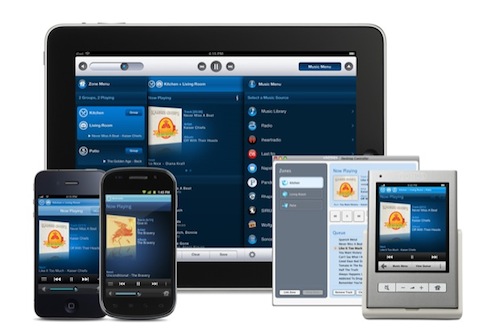
Sonos, makers of beautiful and efficient wireless music system including the S5 I reviewed here, announced today the release of the official Android client, and a software update that brings official AirPlay support to the Sonos Desktop Controller, and better multitasking integration on the iOS apps. What’s curious is that I was already able to accomplish AirPlay streaming by connecting a Sonos S5 to an AirPort Express as you can read here. I guess Sonos, however, added some overall polish to the desktop app to indicate support for AirPlay – I can’t test the feature now, but I can say that it was already working very well when I first connected an S5 to my AirPort Express with the line-in cable. Last, an update to the iPhone and iPad app should bring support for iOS multitasking (finally), although said update still isn’t available in the App Store.

Press release is embedded below. I’m a huge fan of Sonos’ products, so I’ll make sure to check out the new iOS app and updated AirPlay integration as soon as I can. [via CrunchGear] Read more


Alarmify Wakes You Up With Spotify Tunes

I’ve never really been a huge fan of third-party alarm applications for the iPhone, mostly because many of them can’t run in the background and, at the end of the day, they don’t provide any additional feature that I’d miss from Apple’s simple, unobtrusive Clock app. Sporadic Daylight Savings bugs aside, the Clock app does exactly what I need: it lets me set up alarms and lock my iPhone at night. I don’t need to stare at a flip clock while I’m in bed, I don’t need weather integration, nor do I feel I’m missing out because the Clock app doesn’t have themes. It’s simple, and it works for me.

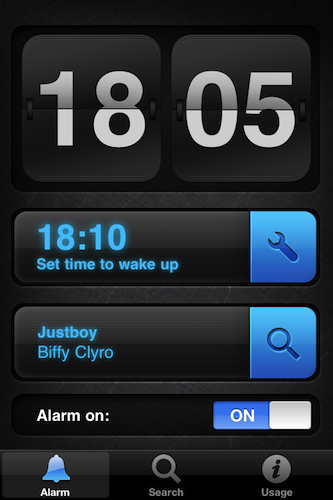
But Alarmify, a project by three students from Hyper Island, wants to bring something different to the iOS alarm scene by integrating music with the whole passive experience of scheduled alarms. Sure, picking songs from the iPod app isn’t new to unofficial alarm clocks for iOS: but how many of them integrated Spotify – the music streaming service – to let you choose a song you want to wake up? As far as I know, none of them did. And that’s exactly what Alarmify is doing, for free, with a beautiful interface.

As you fire up Alarmify, you’re presented a dashboard with a clock, a menu to set an alarm and another tab to find a song from Spotify. You’ll need to have the official Spotify iPhone app installed on your device – which unfortunately is only available to Premium users and it’s not on sale in the US App Store. The app basically acts as a bridge between the alarm you set and Spotify – when the alarm goes off, the app will launch Spotify and start playing a song. Which brings me to a major caveat of Alarmify: you’ll have to leave it running all night, as it can’t work in the background and forward a song to Spotify when the iPhone is locked. Not exactly “great”, but at least you can turn the device in landscape mode to get an elegant flip clock.

For Spotify users looking for an alarm app that can wake you up with songs, Alarmify is a no-brainer. Get it for free in the App Store.


JBL’s On Air Wireless AirPlay Speaker Dock Now Shipping

Unofficially revealed by the FCC in December 2010 and teased a few weeks ago by JBL itself with a signup product page, the On Air Wireless speaker dock with AirPlay functionalities is now shipping to Best Buy locations and Apple Stores. We’ve covered the On Air Wireless in the past, but here’s a quick recap: the device has built-in AirPlay support, meaning that it can receive audio from iOS devices, or Macs through iTunes; with the integration of an LCD display, it can also display artists’ information and album artwork for a richer wireless music experience; with the exclusive HALO radial design, it should guarantee an optimal audio quality to send music throughout your room. It is one of the first speakers (let alone speaker / dock) to display metadata coming from AirPlay, but there’s more: the thing has got playback control buttons, a clock with dual alarms to wake you at different times of the day, a digital FM radio and a USB port for firmware updates. It can be yours for $349 – it’s a premium product with lots of functionalities and deep AirPlay integration clearly meant for iOS and Mac users.

Press release below, order page available on the Apple online store. [via Engadget] Read more


Cracked AirPort Express Key Could Allow AirPlay Streaming To Any Device

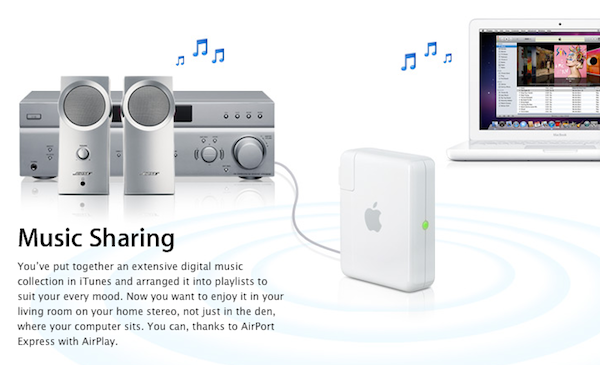
When Apple introduced AirPlay with iOS 4.2, they brought wireless streaming for music and video to iOS devices, as well as iTunes on the desktop thanks to the old AirTunes technology that allowed music streaming to an AirPort Express station connected to speakers with a simple audio jack. After the unification of streaming under the AirPlay name, several hacks in the past months allowed iOS and Mac users to enable streaming on unsupported devices such as iPhones or Macs. Developer James Laird, however, has achieved a different goal than simply activating audio and video receiving functionalities: by reverse engineering the AirPort Express (and thus AirTunes) private key used by Apple to stream audio to external music speakers, he released ShairPort, an open source AirPort Express emulator.

My girlfriend moved house, and her Airport Express no longer made it with her wireless access point. I figured it’d be easy to find an ApEx emulator - there are several open source apps out there to play to them. However, I was disappointed to find that Apple used a public-key crypto scheme, and there’s a private key hiding inside the ApEx. So I took it apart (I still have scars from opening the glued case!), dumped the ROM, and reverse engineered the keys out of it.

The concept behind ShairPort is very simple: instead of enabling streaming from an app to an official AirPlay device from Apple or third-party vendor, Shareport can turn any software or hardware into a wireless music receiver thanks to the cracked private key used by Apple. Being the project open source, virtually anyone could build a hardware receiver or application that streams music just like the AirPort Express station does through the AirTunes protocol.

While it’s very unlikely that manufacturers will adopt this hack to turn their devices into AirPlay receivers (why using the hack when you can just become an official AirPlay partner?), I’m sure we’ll see interesting things on the software end this week. ShairPort can be installed anywhere, opening to the possibility of gaming consoles, computers, or mobile devices gaining AirPlay functionalities previously reserved to the AirPort Express.

Go download ShairPort here. [via MacRumors]