
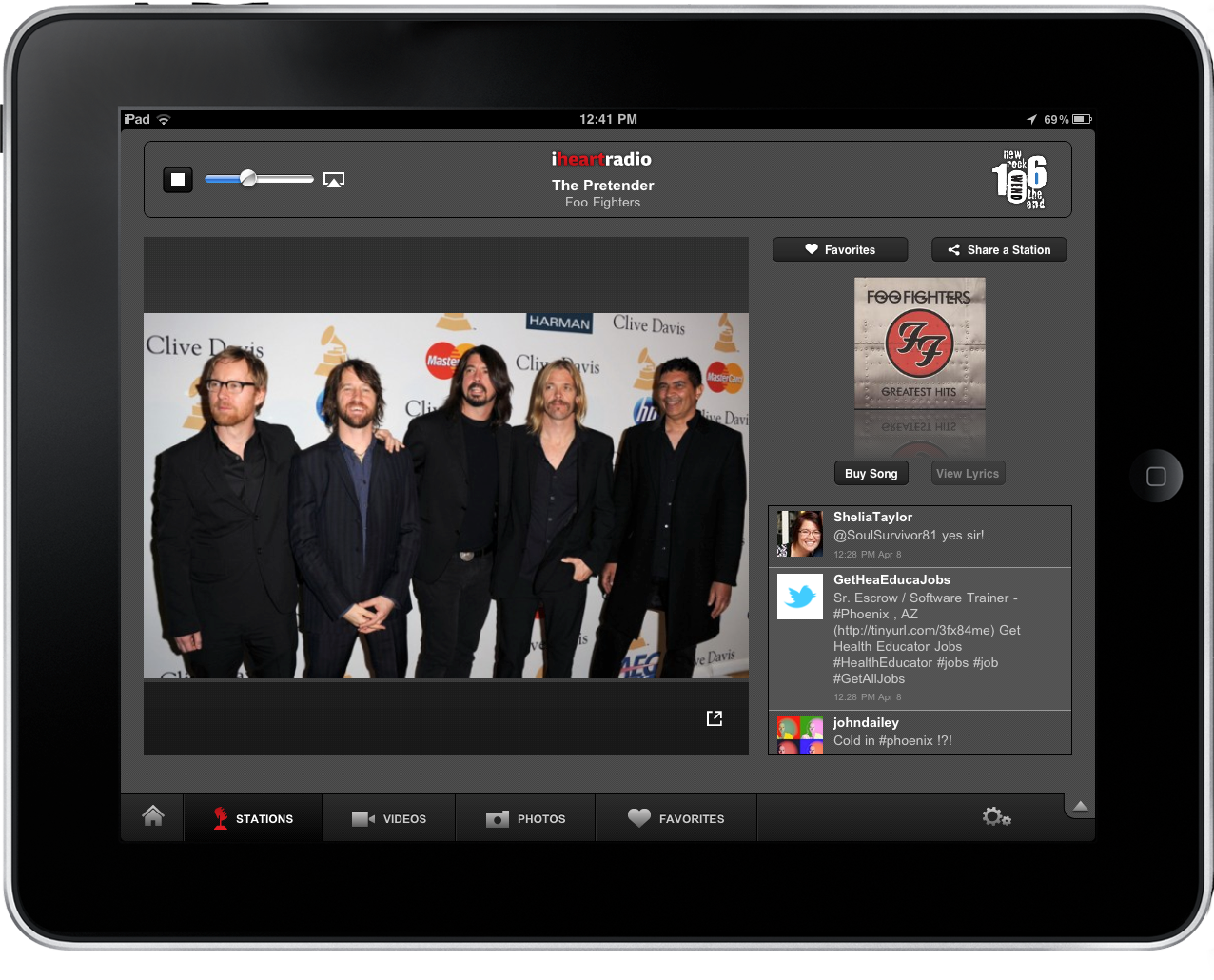
It’s Friday afternoon, and if you’re not already slacking off at work why not put your feet up on your desk and turn on some tunes. The iheartradio app has launched on the App Store, giving you access to all of your favorite artists, local (Clear Channel) and national radio stations, artist interviews and videos, and image galleries captioned off for your entertainment. It’s been a while since I’ve checked out an iheartradio app (which is gratuitously advertised by my local radio station), but I have to say I’m impressed with just how fast the iPad app is. Radio station’ connect instantly, there’s AirPlay built in to pipe tunes and video to your Apple TV, and you can favorite stations so you can quickly access all of your favorite radio channels from a handy playlist. If you hear a song that tickles your boom-tubes, you can purchase the song from iTunes in a snap. The features only get better, and we’ll conclude our short review just past the break.
Posts tagged with "music"
Hands on With iheartradio for iPad
Plex Releases Major 1.1 Update: The King Of iOS Media Players
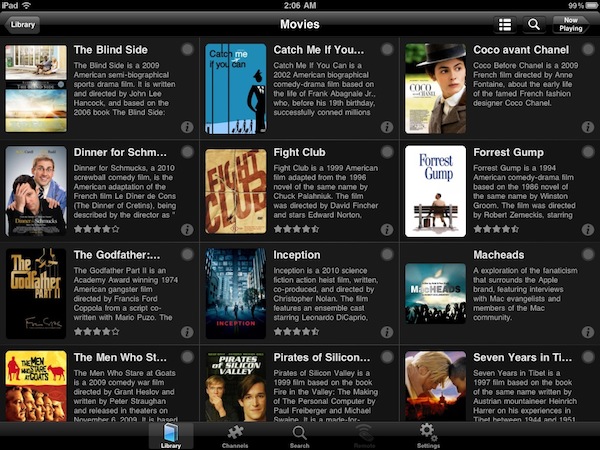
If you’re serious about your media library, you’ve probably heard of Plex: dubbed as the “solution for local and online media”, Plex is a fantastic multi-platform media center that runs on Macs and Windows PCs and has great iOS and Android clients. Once installed on your desktop machine (which becomes a “server”) Plex can fetch music, movies and TV shows stored on your computer or anywhere else on an external hard drive, organize them properly into categories by adding the correct metadata, and handle streaming to the clients (such as the iPhone or iPad apps) with live conversion of unsupported video formats. All your media can also be played locally on a computer without the need of a mobile client thanks to the desktop Plex app, which is highly customizable: you can add your own themes, install plugins (like Spotify) and connect to online content providers such as the CNN, Vimeo, Cnet TV, Youtube, Apple Movie Trailers and many others. If that’s not enough for you, Plex can also enable you to connect to your media library remotely via WiFi or 3G with a global hostname, through the iOS apps. Read more
Spotify iPhone App Updated With New Design
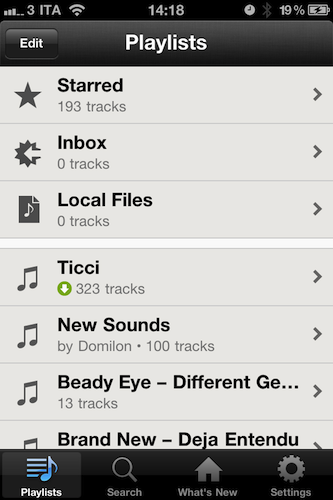
In spite of the issues with music labels the company is facing in the attempt to launch the service in the United States, Spotify is still committed to making great mobile apps to stream, organize and cache music for offline access while on the go. A major update to the iPhone client (not available in the US App Store) was released last night, and you can find it here for free.
The Spotify iPhone app requires a Premium account: this subscription enables you to use the mobile apps for iOS, Android and other devices, removes ads and lets you stream songs at a higher bitrate. Premium also allows you to save music offline and access the service from another country (that’s what I do). The new iPhone app (version 0.4.11) is a rather big update as it brings a completely new (and elegant) UI design, much cleaner than before. With this new design style, I can’t wait to see what the iPad app will look like – Spotify hasn’t detailed plans for an iPad client but that’s most likely in the works and (finally) ready to ship. The new Spotify for iPhone has also been localized into French and Spanish, and marks the comeback of the Edit button to create and manage playlists, select them for offline usage and delete them. In the main screen, the “Local Files” tab indicates the music files wirelessly synced from Spotify on your computer. The (very unstable) iPod integration feature has been removed in this version.
Spotify for iPhone is available here. More screenshots below. Read more
The Spotify Box
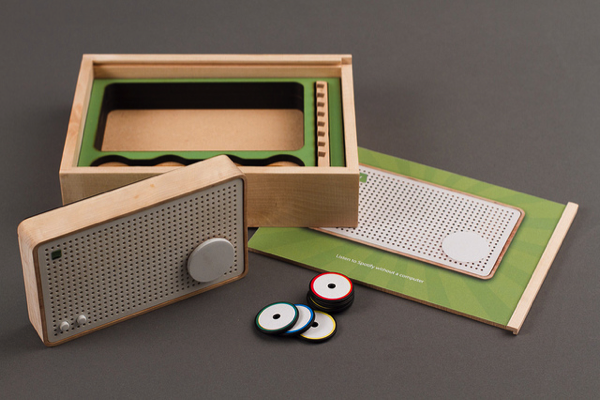
Occasionally minds more creative than mine combine technologies physical and virtual to create delightful products that make radio nerds like me ooze with excitement. If the fat grin on my face isn’t enough to show you just how much I enjoy this particular concept, then you must clearly be an American (at least we still have Rdio) or perhaps you can’t appreciate the simpler times when wood vinyl FM/AM radios played fuzzy music from our bedroom dressers. The concept – evolved through research and development from Jordi Parra – bonds RFID tags (which look kind of like poker chips) with a Spotify URL that when attached to the radio playback a playlist or radio station over WiFi. While the radio itself stores the information you assign from Spotify over USB, the RFID tags are nothing more than the “on switches” that relate to the stored playlists. These playlists are associated with colors, thus to play a particular sample of songs you’d simply attach a red RFID tag to the radio for example. The beauty of a concept like this is that it maintains the simplicity of a manual radio, while introducing and integrating with modern and intuitive technologies. The world may be going digital, but there’s still something about being able to touch music with your fingers that emotionally makes the analog experience so much more palatable and personal. Parra’s prototype doesn’t have a name, but the Spotify Box as it’s dubbed on Vimeo is a great reminder that good design doesn’t always have to have a touchscreen, or even an LCD display. It’s a return to the basics, and while I understand a student project such as this would take a considerable amount of effort to produce, I do wish Jordi and his team all the best if something like this gets off the ground. If you do start a Kickstarter, you’ve got my support.
Past the break we’ve embedded the concept video, and you can also check out the project in it’s entirety on Zenona. There’s a Flickr group if you want to see the project from draft to inception, but I have to say: having this much access to the workings of the prototype Spotify Box can drive an author to be a little too giddy, don’t you think?
iBackupTunes: Copy, Backup & Share Your iOS Music Library
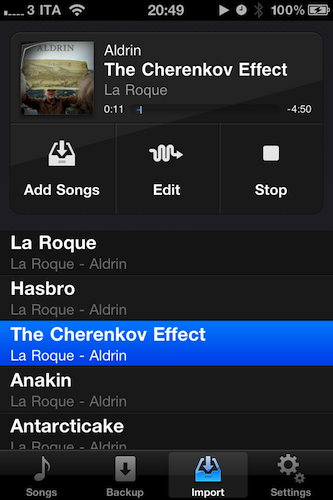
Released yesterday in the App Store, iBackupTunes by drahtwerk is one of the most powerful music apps for iOS I’ve recently installed on my iPhone and iPad. This time, though, I’m not talking about a new iPod replacement app that aims at enhancing music playback with Wikipedia or last.fm integration: instead, iBackupTunes is “powerful” in the way it lets you copy songs and albums off your synchronized iPod library, back them up locally on your device and share them with others, even wirelessly. Whilst the procedure of importing songs might sound a little too complicated at first, iBackupTunes provides a graphical user interface that makes it easy to choose music, listen to it, and back it up. Read more
Music Labels Bringing “Enhanced Albums” To The iPad

Remember iTunes LP? It’s an experiment from Apple that never really took off in popularity (although Apple doesn’t disclose iTunes Store sales numbers) that aimed at offering a richer experience for consuming music by adding graphic elements to albums like artworks, lyrics, photos and videos. For a few dollars more than the usual iTunes price, the LP version of an album comes with additional content – but the big problem is, aside from desktop computers this content can’t be viewed anywhere else. Not on the iPhone, not on the iPad or Apple TV. It’s a locked format that, in spite of Steve Jobs’s promises, failed at catching on among iOS users and consumers overall. Still, is the idea of a “rich music experience” dead among music labels? Not at all.
The New York Times reports Universal and EMI have been experimenting with music albums sold as apps for the iPad at a higher price. The obvious trick is, these apps have extra content and visuals to justify the expense: once again, it’s all about photos, videos, lyrics, and so forth. Released by the EMI music group last week at $9.99, “Until One” for iPad gives you access to Swedish House Mafia’s latest album, including a photo gallery, documentaries and written accounts from the band. The whole package is touted as “highly interactive” and meant for multitouch. On top of that, the app also includes 2 full-length music videos and links to the band’s Twitter and Facebook profiles. So for 10 bucks and a 659 MB download, you get a music album with lots of videos, photos, and other stuff. Not a bad deal if you’re a fan of the band, but something most users in the App Store will likely ignore. That’s why EMI and others are looking to extend this concept to a wider catalogue of artists and albums.
The Universal Music Group has teamed up with a video company, Eagle Rock Entertainment, to create iPad versions of films about classic albums like Nirvana’s “Nevermind,” with social networking features that allow fan commentary. This month, Bjork announced that her next project, “Biophilia,” will encompass “music, apps, Internet, installations and live shows.
“This is very much a test of a really new and exciting technology platform that will push the boundaries of what you can do on a tablet,” said Cosmo Lush, the company’s vice president for digital business development.
I can’t stress enough how much I believe this is one of the paths to follow to deliver music content in this new mobile era, especially to owners of new devices like the iPad. The coffee table + music + photo gallery concept has always intrigued me as one of the most interesting ways to add real value to an audio-only product – that sense of “owning your music” that got lost somewhere during the CD-to-MP3 transition years ago. Perhaps these music labels will fail hard at reinventing the genre on the iPad because “it’s too little, too late”, but I’m still one of those waiting for Apple to show us that iTunes LP and Extras can make a lot of sense on iOS devices, and especially on the iPad.
This Music Video Features iPhones with FaceTime

After the music video shot entirely using the iPad 2’s cameras, here comes another one – this time from Canadian band The Blue Stones – which features a couple of iPhone 4s and FaceTime. The video itself was recorded using an HD camera (you can tell from the 1080p option available in the Youtube embed), but band members had the idea to add a unique geek twist to the whole concept, and play the song back recording everything via FaceTime.
Duct tape was used to cover the FaceTime UI on the iPhones (pretty much like movie directors constantly modify the iPhone’s on-screen interface to maintain the “fiction” effect) and, overall, the result is interesting. If only because it shows how much popular iOS devices have become over the years and how FaceTime video quality is far from perfect most of the times (unlike Apple’s webpages suggests in the screenshots).
Eavesdrop: Share Your iOS Music Library Over WiFi & Bluetooth

When I was in high school, I remember we didn’t have iPhones with wireless sharing capabilities or music streaming apps like Pandora and Spotify. But we did have some iPod Classics, and sharing headphones with friends asking you to listen to your “new songs” was normal. And sharing headphones was annoying: you were forced to mess with cables, you didn’t get the full quality of a song, you always ended up with broken earbuds after a few days. Though, like I said, that was normal.
We have better ways of listening to music nowadays: streaming aside, we have portable Bluetooth speakers like the Jambox and iPod nanos that fit in every pocket and are relatively cheap. Eavesdrop, a new app for the iPhone released a few days ago, aims at taking the whole “local music sharing with your friends” concept a step further by enabling you to broadcast your iPod.app library over WiFi and Bluetooth. Read more
Rumor: Cloud-based iOS 5 Coming this Fall with New Location & Music Services
Following the speculation that Apple might soon seed a GM build of OS X Lion to developers, TechCrunch now reports the long-awaited major revamp of iOS, dubbed iOS 5, has been pushed back to fall, with a possible WWDC preview in June. The rumor is interesting because it breaks Apple’s usual release cycle and media event pattern: in the past years, Apple previewed a new version of iPhone OS (and then iOS) with a media event in March / April, and then released it by the WWDC, or soon after that together with the availability of a new iPhone model. And in the past years, this plan has worked quite well for Apple: developers had time to test the OS in the months leading up to the WWDC, whilst everyone else was getting ready for a new iPhone in June / July. According to TechCrunch, this is about to change.
Citing “two solid sources”, MG Siegler reports this year’s plan involves a preview of the new OS at the WWDC, and a public release “this fall”. Putting the pieces together, as TechCrunch also notes, pushing iOS 5 back to fall would play well with Apple’s usual music event in September. But why would Apple use the music event to do some major iOS-related announcement? TechCrunch speculates it’s all about the cloud: the rumored “music locker” service will be ready this fall, and being a major new feature of iOS 5 Apple might as well wait until September to unveil it. iOS 5 is also rumored to introduce a new UI, a new notification system, direct OS X integration. Read more