

Here are today’s @MacStoriesDeals on iOS, Mac, and Mac App Store apps that are on sale for a limited time, so get them before they end!
Posts tagged with "app store"
#MacStoriesDeals - Thursday
#MacStoriesDeals - Friday
Here are today’s @MacStoriesDeals on iOS, Mac, and Mac App Store apps that are on sale for a limited time, so get them before they end!
#MacStoriesDeals - Thursday
Here are today’s @MacStoriesDeals on iOS, Mac, and Mac App Store apps that are on sale for a limited time, so get them before they end!
#MacStoriesDeals - Wednesday
Here are today’s @MacStoriesDeals on iOS, Mac, and Mac App Store apps that are on sale for a limited time, so get them before they end!
In-App Purchase Revenue Growing as Developers Adopt “Freemium” Model
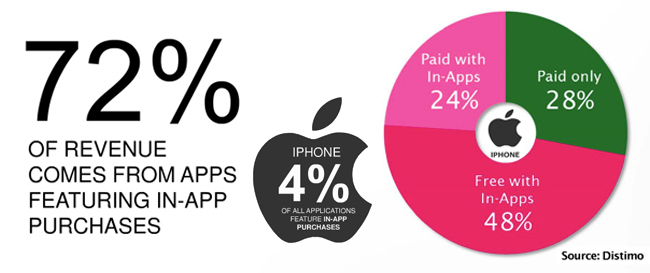
Many developers build iOS software hoping that their app will be the next Angry Birds, but they struggle at what price to sell it. A free app can bring downloads but your pockets are still empty. Maybe you should consider adding in-app purchases to your app, no matter the base price. Distimo has released a new report that suggests that in-app purchases are the way to go if you want to make money in the App Store. In-app purchases account for 72% of revenue, improving from 28% at this time last year. Here’s another stunning number, only 4% of apps in the App Store even offer in-app purchases.
Freemium apps (free to download, but require an in-app purchase to expand the app) are growing particularly faster in the in-app purchasing paradise. Free app downloads have increased by 34% since 2010 while paid downloads only grew 7% in the same time frame. Distimo’s research only covered the Top 200 in each category, but that’s a strong selection of the App Store’s money makers.
Freemium apps made up 48% of total App Store revenue while paid apps with in-app purchases accounted for 24%; the remaining 28% came from paid apps. If you look at the top grossing apps for the iPhone (iPod Touch) and iPad App Stores, freemium games take up several spots. Freemium apps also account for 65% of the Top 100 grossing games in the US App Store.
Besides games offering in-app purchases, comic apps are also making waves, especially in the iPad App Store. Magazines are one more category that is taking advantage of the freemium pricing model.
GigaOM didn’t envision this exactly back in February when Apple let in-app subscriptions into the stores. “Essentially, it looks like more and more developers are embracing the idea that making recurring payments an attractive option for App Store shoppers is the key to coming up with a sustainable business model. Apple’s isn’t the only store where developers are figuring that out, either. In-app purchases are already in use by 68 percent of the 25 top grossing Android apps, despite only being introduced in March of this year.”
Could we possibly see the day when there aren’t “regular” paid apps in the Top 300 grossing list? What do you prefer as a user – a one-time fee to buy the entire app, or having to keep putting quarters into your Apple arcade machine? [via GigaOM]
Smartphone Games “Front and Center” at Tokyo Game Show 2011→
Smartphone Games “Front and Center” at Tokyo Game Show 2011
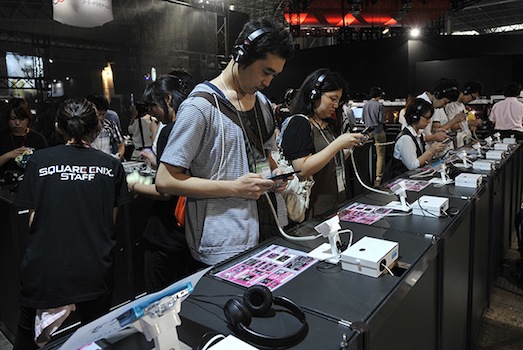
Wired has an overview of what’s going at Tokyo Game Show – annual exposition of Japanese videogames – this year: smartphone and tablet games are “dominating” the show floor, whilst long-time publishers of regular console games decided not to have a booth.
In their place, dominating a massive section in the center aisle of the show floor, are smartphones and tablets: iPhones, Android phones, PlayStation phones and all manner of Japan-only devices with keys that easily let the country’s millions of texters type out entire novels’ worth of kanji messages. Cellphone games have been part of Tokyo Game Show for more than a decade, but until this year, the casual time-killers lurked on the periphery of the show, in the backs of the booths, attracting few onlookers.
The impressive growth of the mobile gaming industry is no secret to those who have been keeping an eye on the explosion of “app stores” through 2010 and 2011. But Wired makes a good point in its TGS coverage: there’s one niche of gamers mobile games have failed to attract, and that’s hardcore gamers. The “regular console games” that have dominated the Tokyo Games Show in the past years, and which are struggling to impress on iPhones, iPads, and Android handsets.
One challenge for Gree and other mobile gamemakers: Creating mobile games that appeal to hard-core gamers as well as casual players. Gree President and CEO Yoshikazu Tanaka noted the dilemma.
“I was just walking around the show floor,” he said at a press briefing Thursday, “and what I thought while I was looking around was, ‘Console games seem much more interesting than social games. They’re more cool.’”
Gree, for instance, is the company that bought OpenFeint and announced a CEO replacement this week. The issue is a complex one: Angry Birds is selling millions of copies (350 million to date), yet hardcore gamers still can’t find proper mobile counterparts for their favorite PS3, Xbox 360 and Wii games. Big companies like EA are reinventing themselves with strong mobile offerings, and revenue speaks clearly.
I believe the scarcity of “hardcore games” or lack thereof is more related to the youth of these mobile platforms, as well as ongoing technological advancements. Lets’s see what the A6 will bring.
[image via]
Sparrow Developers Working on “Sparrow for iPhone”
As revealed by Dominique Leca to Business Insider, the company he co-founded is now working on an iPhone version of Sparrow, which is in the very early stages of development and simply known as “Sparrow for iPhone” at the moment. For those not familiar with the Mac app, Sparrow is an alternative email client for OS that started out as a mix between classic email and Tweetie-like UI to deliver a fresh Gmail experience on the desktop, and eventually evolved into a powerful solution to access Gmail (including features like shortcuts, stars, and labels) as well as classic IMAP. The app got more social and better integrated with Lion, adding full-screen mode and a completely redesigned sidebar for navigating through your inboxes. Some people say Sparrow’s success is due to the fact that the app does email, but it doesn’t feel like email; Sparrow is sold at $9.99 on the Mac App Store with a lite version available, and a licensed version also up on the devs’ website.
We previously reported on Sparrow adding Twitter’s Loren Brichter to the team of advisors, raising $250,000 in funding over the last months; according to Leca, Sparrow has made more than half a million dollars since the Mac App Store release, although they don’t like the fact that Apple’s store for OS X apps lists both indie software and applications from Apple such as Final Cut Pro X, iWork, or OS X Lion.
In the interview, Leca also reveals they’ve started working on an iPhone version of Sparrow, aimed at enhancing Apple’s Mail experience with a different and faster UI, attachments from the compose view, and lots more. If we had to speculate on Sparrow’s focus for iOS, we’d say porting the Gmail integration that has characterized the desktop app to iOS would be a good idea.
Still, the problem for Sparrow is that Apple has always been reluctant in accepting apps that “duplicate functionality”, such as email applications. That’s why Google hasn’t released an official Gmail app for iOS yet, whilst Android has one. Apple does, however, accept third-party browsers for iOS, albeit they’re based on the same engine of Safari – they can’t use their own interpreters. This is the reason behind the lack of a real Firefox version for the iPhone – the Firefox Home that Mozilla ships is actually based on WebKit, like any other alternative browser for iOS. They’re basically skins on top of Safari’s engine, with different functions and interfaces. Same applies to photo album management apps, which are simply connected to the Camera Roll (and Apple’s Photos app) through an API. An API or similar technique doesn’t exist for email messages, thus the lack of third-party email apps for iOS. Much has changed since 2008 (for instance, Apple now accepts web app wrappers such as MailWrangler), but native third-party email apps still haven’t made it to the App Store.
Leca seems somewhat confident in Apple’s intention to start opening up iOS soon to approve apps like Sparrow for iPhone, which in order to work would have to feature its own email assets in order to directly work with Gmail, out of Mail app, with a different UI and compose view. From the interview:
BI: So do you think they’ll approve it?
DL: I think they will. They’re accepting third party browsers, so why not mail? This would be really inconsistent. Opera has a browser out there, and I think Mozilla has one coming too.
BI: So you think it’s only a matter of time until Apple loosens the chains?
DL: Yeah, I guess so. In regards to apps that compete with their own apps, I think iOS is sufficiently settled and I think people have been evangelized enough now so Apple will feel more secure opening it up.
The current iPhone mail app is just about perfect, but we’re just making things faster in terms of UI, and we’re adding a lot of small details for power users, like attaching images straight from the compose window.
We’re looking forward to Sparrow’s upcoming features on the Mac and mobile version, although I’m personally not sure as to whether Apple could really decide to let others sell email apps or real browsers in the App Store. Sure, the platform is mature enough to let users easily differentiate between Apple’s default solutions and standalone apps, but that would mean giving up a bit of control on the ecosystem, something that Apple has carefully nurtured in the past three years. I believe Sparrow would also be a great addition to the iPad – which I use regularly to manage and respond to emails – but, again, I don’t know why and how could Apple free developers from the ties of Safari and Mail in the near future. [Business Insider via MacRumors]
A Trusted System
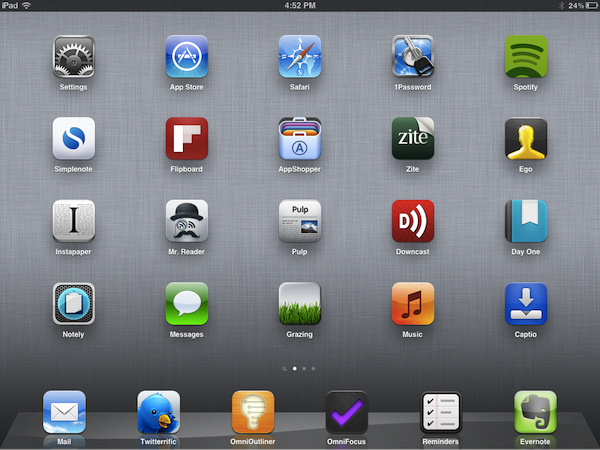
Over the past few months, I’ve noticed a trend emerging in my daily app consumption and workflow: as the App Store gets populated by thousands of new applications every day and developers struggle to get noticed in the sea of iPhone and iPad releases and “promotions”, I increasingly tend to rely on “a trusted system”, rather than constantly tweaking my home screen or dock to accommodate new apps from “indie devs” to try out, and perhaps replace with something else entirely the week after.
More than a trend, people who know me well might argue that I have a problem: I switch between apps less, and thus I am becoming that kind of guy that doesn’t care about what’s new in spite of my professed interest for innovation and good software.
But that’s my point exactly, and there’s an important difference between caring about new apps and trusting only a few selected ones for my work that I’d like to point out in this article.
Why should I buy the latest to-do app for iPhone or the next RSS reader for the iPad? Why should I constantly tweak and fiddle when the trusted system I’ve built is serving me so well? Some people, including me, are big advocates of App Store discovery and innovation: you never know what hidden gem the Productivity category might hide beneath hundreds of “wallpaper customizers”, and therefore it is an app lover’s job to navigate the App Store with the sole purpose of discovery in mind. With half a million apps to choose from, those who set out to explore the intricate App Store maze are the Magellans of the digital distribution era. Yet, I believe app discovery should be the reason behind good information and curiosity, not the ultimate goal towards getting things done or simply enjoying iOS devices.
We, as geeks, want to be – or at least “feel” – productive with our iPhones and iPads. Whereas we look at “the average user” and justify our expenses saying that unlike those people, we actually do stuff with Apple devices, the other end of the spectrum is equally true in my opinion, but we often don’t see it: all kinds of people (“the users”) are now serious about iOS, and whilst for some buying an iPhone will always be related to the status symbol, more customers than we, as geeks, usually think of are starting to look at iPhones and iPads as productivity platforms. It’s not just for the nerds or the fashion victims anymore. And as people get serious about iOS, they develop the “trusted system awareness” in that they start looking for apps to rely on without hesitation on a daily basis.
For me, the trusted system has become a synonym of great software developed by people that are serious about the bits and Xcodes they work with. Software from people that have something to lose if things go south. Apps from developers that are deeply invested in the platform – apps from people that often do this for a living but that are also users of their own creations. And this synonym has led me to trust the smaller, indie devs less, because I always fear the app I’m showing interest in will be discontinued tomorrow and never come back to support my needs.
It’s not like this hasn’t happened before. Too many times I’ve decided to fit an app in my workflow, only to find out months later the developer had no willingness whatsoever to maintain it or at least come clean and say “look, it was just an experiment”. And I can understand that point of view, really. I’m not saying garage developers and seven year-olds shouldn’t take their first steps in iOS development and see what’s like to gain popularity in the App Store. Not at all. I’m looking at us, the users who are serious about iOS, and deconstructing the difference between being curious, which is legitimate, and not getting anything done because of the constant tweaking, which is poisonous.
We need to separate work from leisure and app discovery. If we’re really committed to proving that iOS devices can be fantastic replacements for trucks, we need to get serious and understand that switching between apps and feverishly mining for the latest productivity goldmine won’t make you smarter or “more productive”. On the other hand, developers need to understand that just because they’ve released a new Google Reader client or GTD app, they shouldn’t expect thousands of users to jump on board and hit Buy.
iOS users have come to the point where the trusted system is more important. They know what developers and “names” to follow in the long term, and they’re happier when said developers provide an ecosystem for their apps that will make spending money on three different platforms less painful.
From personal experience, I see myself “trusting” people like The Omni Group, Evernote, The Iconfactory, Agile Bits, Edovia, Smile, Acrylic Apps or Tapbots more and more every day. I know I can get actual work done by using their apps, I know I can look forward to great customer support and shoot them a tweet when I’ve got a question – I can spend $50 bucks knowing that the work and enjoyment I’ll get in return will be greater.
But that’s not to say I’ve stopped giving the benefit of the doubt to “new kids on the block”, or that I’ve given up on trying to find the hidden gems in the App Store caves. Those who read this site know that I’ve started using Mr. Reader and Grazing Browser on my iPad and iPhone – apps from two relatively less-known developers that, however, have showed outstanding support, commitment to their software and a steady flow of software updates in the past weeks. To me, these seem like people who are serious about what they do. And I’m willing to trust them even if they haven’t been around for 10 years like others in this industry. More apps like Prowl, Notesy and Notely also come to mind.
iOS devices are now playing an important role in our lives, and we shouldn’t stop exploring all the ways to make them better with new apps, and different workflows. But I believe no one can blame us for choosing the trusted system when it’s time to work, and stop tinkering.
Banca: Convert Currencies Swiftly With this Beautiful iPhone App
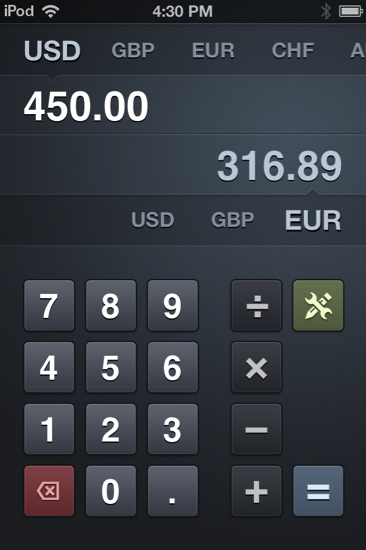
With the US economy in flux, it’s a good idea to keep a close eye on your dollar. As world travelers we find ourselves spending a good dime overseas, and international friendships online can lead to an occasional penny dropped in each other’s PayPal bucket. As foreign currency plays a big role in today’s lifestyles and businesses — boundaries are practically absent — knowing how the USD compares to the Euro or the Australian dollar at the press of the button becomes very useful. Radiant Tap’s Banca for the iPhone isn’t just a calculator, but a currency converter (it supports all of the world’s currencies) that’s both beautiful and incredibly elegant in design.