
Every once in a while, I come across a third-party app that either resets my expectations for a particular niche of software on iOS or creates an entirely new category altogether. I’ve had quite a few of these moments in the 17 years I’ve been writing app reviews at MacStories: Editorial, Workflow, Obsidian, Sky, and, most recently, OpenClaw come to mind. Over the past few weeks, I’ve had another such moment with Open Minis, a new chatbot app for iPhone and iPad that I can best describe as getting a preview of Siri AI’s agentic future, today.
Open Minis is an on-device agent that lets you use any frontier model for conversations, with a twist: unlike other AI wrappers, this app deeply integrates with all sorts of native Apple system frameworks using official APIs available to third-party developers. Open Minis can control Reminders and Music, which we have seen before, but also Calendar, Maps, HomeKit, HealthKit, and Files; it can even work with frameworks such as Vision for OCR, Apple NLP for natural language processing, the iOS clipboard, speech recognition and dictation, NFC, and Bluetooth. Furthermore, Open Minis comes with its own configurable workspace in the Files app, has an on-device memory system, and features browser-use capabilities via a (once again, native for iOS developers) built-in WebKit web view.
Effectively, Open Minis is what would happen if you rolled Claude Code and OpenClaw into one intuitive agentic experience designed for Apple users, with a powerful tool-calling harness that can improve and tweak itself, and with integrations specifically designed for the Apple ecosystem. It is the most impressive indie app I’ve seen in a while. If you were disappointed by the lack of power-user capabilities in Siri AI, this is a real, currently shipping example of what Siri AI could be if only it were powered by a frontier model with truly agentic functionalities.
The iOS CLI
The trick hidden up Open Minis’ sleeve is as ingenious as it is obvious: all the Apple framework integrations it supports are powered by command-line interfaces (CLIs) that bridge native Apple APIs (EventKit, MusicKit, HomeKit, etc.) to a code environment that modern LLMs can understand and operate with. To make all of this work behind the scenes, the developer of Open Minis had to create dedicated CLIs for each of these frameworks, which – and here comes the other trick – are driven by a model harness that has access to a built-in Linux terminal and is sandboxed to the app’s workspace.
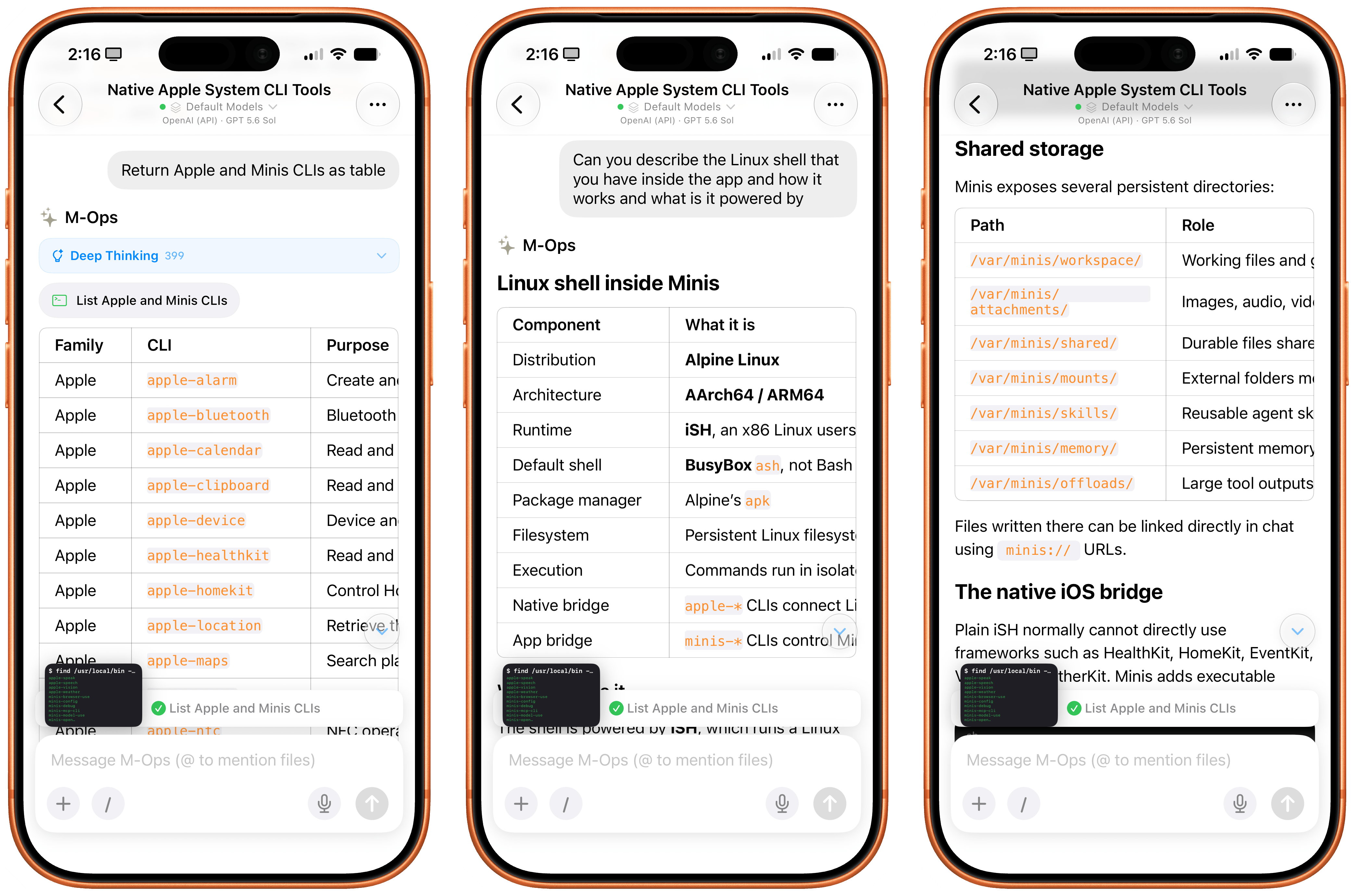
Specifically, Open Minis runs a version of iSH, a popular Alpine Linux shell that operates a persistent, emulated Linux environment for ARM64 architecture in a sandboxed fashion. The shell inside Open Minis can download external packages from the web using Alpine’s apk package manager (which means that you can access popular tools such as ffmpeg and yt-dlp directly from the app), has its own Linux filesystem (exposed in the Files app as a native file provider location), and is able to call bridged Apple CLIs, as well as any kind of MCP server (via MCP code execution, another trend in the AI industry these days). Think about it this way: if Claude Code or Codex on the Mac can do anything across the entire filesystem by virtue of running in the Terminal app, Open Minis can do (almost) anything within its app sandbox thanks to a built-in terminal emulator – including running Python, using Git and SSH, and accessing standard Unix text utilities.
However, this doesn’t mean that, when using Open Minis, you’ll be looking at a terminal UI all the time: the underlying shell is simply what makes all of this possible behind the scenes. The app can display a picture-in-picture terminal preview that you can open to preview what it’s doing, but you don’t have to. The app’s main interface is your classic, chatbot-style UI that, depending on the model you’re using, will display interleaved thinking blocks, tool calls, and messages in a conversation transcript.
The other hidden power of Open Minis (which is reminiscent of OpenClaw, or, perhaps more aptly, a self-improving system such as Hermes Agent) is that it can inspect and modify its own workspace via dedicated Minis CLIs. For example, you can ask Minis – in natural language, of course – to add a new model or MCP server, and the app will bring up a native settings screen and ask for permissions to do so. If you want to store a password or API token, the app won’t do it in plain text: it’ll display a native, Keychain-based page where you can securely store your credentials. And more importantly, Minis’ own CLIs are used to recall previous conversations via the app’s memory system (based on Markdown files), create skills, and answer questions about the app itself. For instance, when I asked Minis to describe what Apple CLIs it has for iOS users, it happily provided a full guide:
Or when I asked to recall all the things we worked on during the day, Minis used one of its CLIs to read transcripts of previous chats (which, again, are simply stored in the Files app), recall memories, and present me with a useful summary of all the tasks we completed.
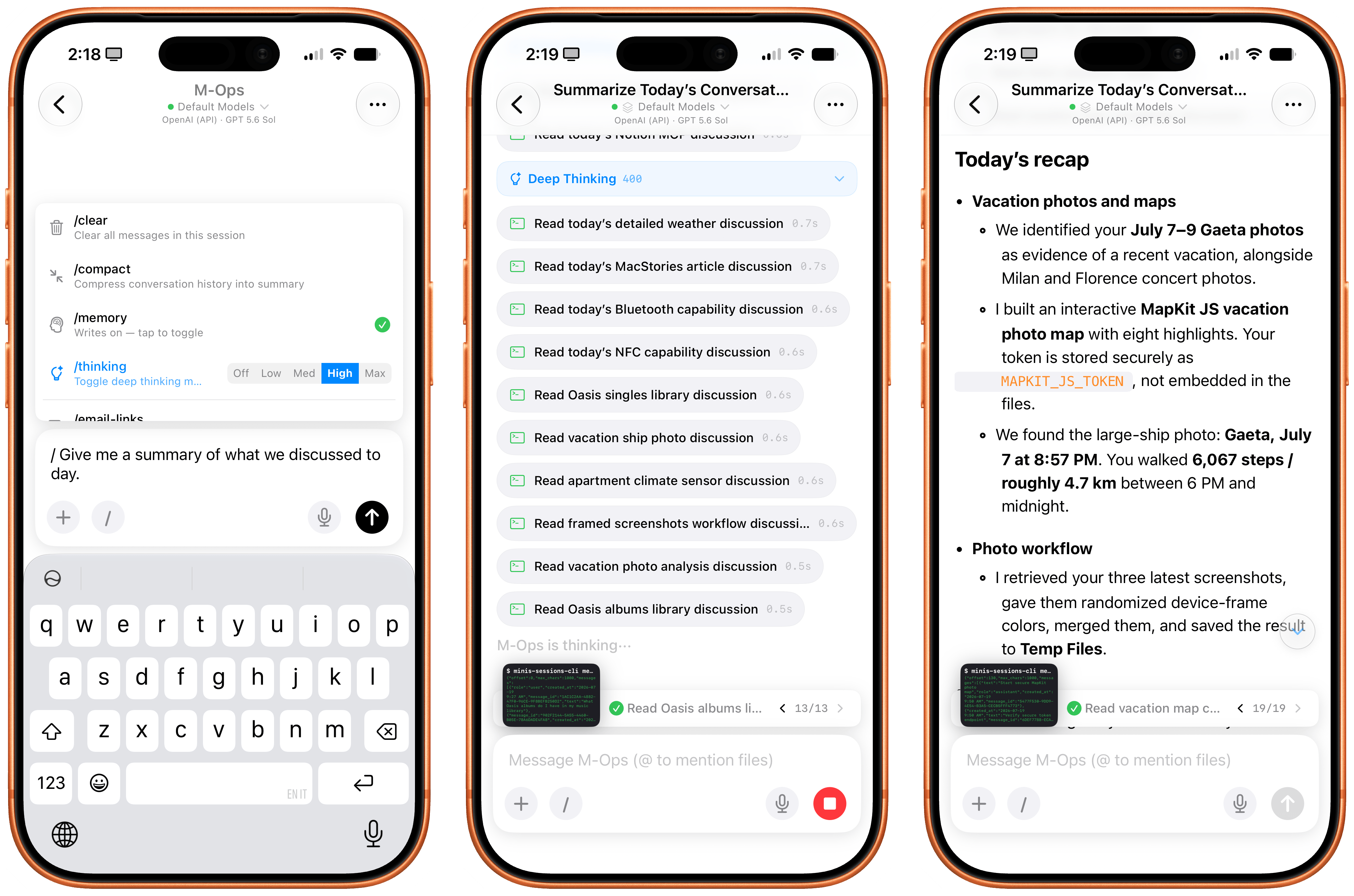
The same is true for adding new functionalities to Minis. Since it’s running a Linux shell with access to Python and can store assets in a persistent Files workspace, I figured I could ask Minis to install my own Apple Frames CLI for itself by giving it a link to my GitHub repo. GPT-5.6 Sol (my model of choice in the app) didn’t hesitate: it found all the dependencies for the Frames CLI, installed them, pulled the CLI’s official skill, and was good to go a minute later. And since Minis also comes with a native Photos integration, I was able to ask:
Grab my three most recent screenshots, randomize their frame colors, merge them, and save the image to my Temp Files folder.
A few seconds and Apple CLI calls later, Minis saved the resulting framed image to a folder of my choosing. The ability to work in any folder in the Files app outside of Minis’ sandbox is another official iOS API that the app is leveraging; we first saw the ability to “mount” specific folders from the Files app in Working Copy years ago, and the feature was later adopted by the likes of Ulysses, iA Writer, MWeb, and other document-based apps. In Open Minis, you can bookmark any folder from any file provider location in the Files app and tell your agent to save files to or read them from there.
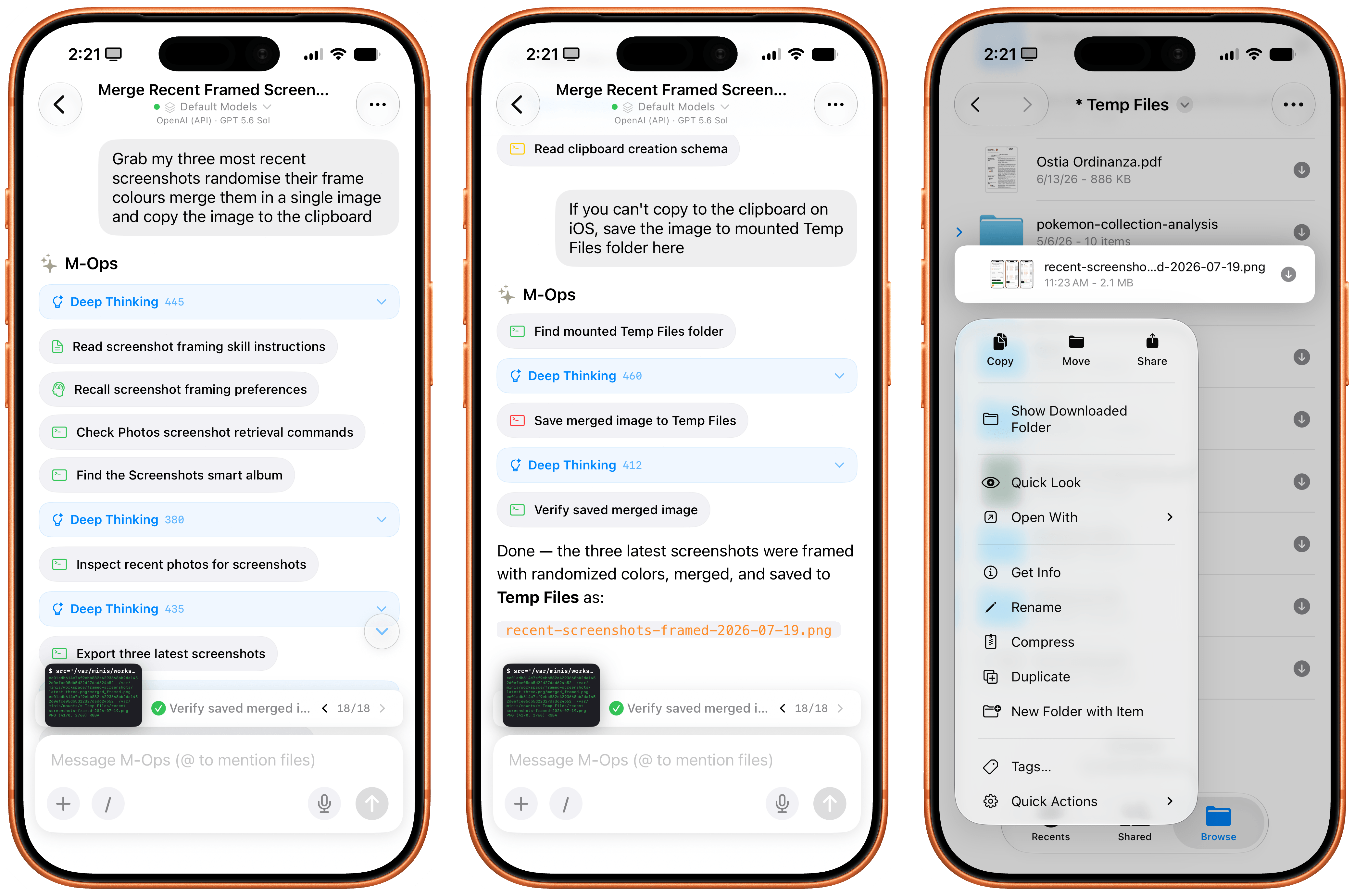
Minis can’t write images to the iOS clipboard, but it can save files in any (previously bookmarked) location of the Files app.
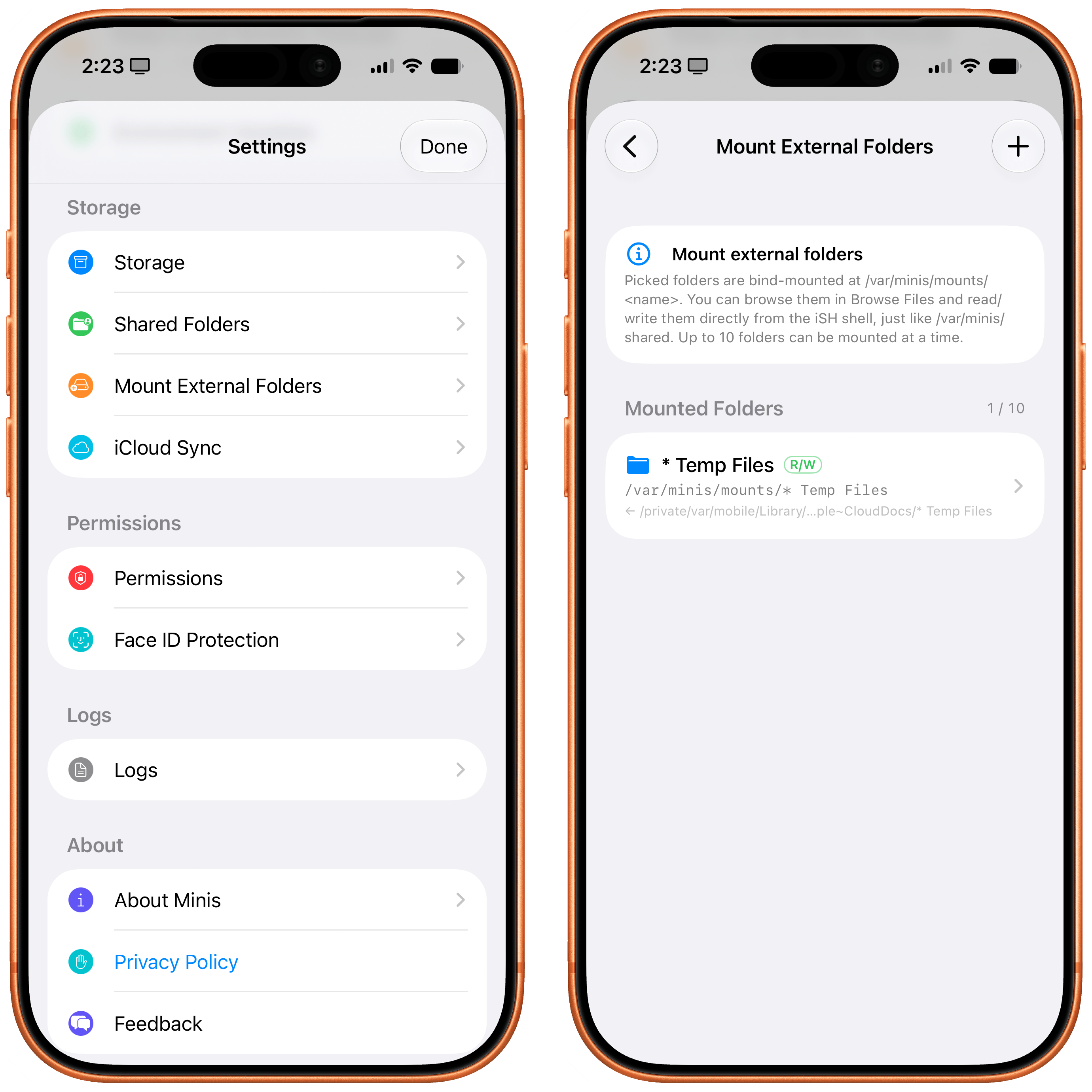
This feels magical to me, but it’s merely one of the many examples of what is possible when you combine large, powerful models with the more-open-than-you-think, secure nature of iOS and iPadOS.
Working with Open Minis on iOS
All of this a lot to wrap your head around at first, and there’s no denying that Open Minis is a power-user tool designed for people who, like me, enjoy using frontier models and living at the bleeding edge of AI. What’s different in this case, though, is the fact that Open Minis – unlike other apps – embraces its Apple-first nature by fully supporting technologies that are made by Apple, released to third-party developers, and not being used by Siri AI at all at the moment.
It’s impossible to “review” an AI chatbot app since everyone’s use cases are so different, but I’m going to nevertheless describe a few scenarios that should give you an idea – and hopefully reset your expectations, too – of what can be accomplished with an AI that has deep hooks into iOS.
For starters, you can use any model you want in Open Minis, including the latest GPT-5.6 models, Claude Fable, anything from OpenRouter, and more. (I even asked Open Minis to create our own proxy for the OpenAI API, running on my Mac Studio, so I could use Sol in Fast mode; it works!) You can press the / button above the keyboard to trigger reasoning levels, compaction, memories, and skills; you can also create model groups, model defaults, and subagents from the app’s settings, then ask the model to use a specific set of subagents for a particular task, and it’ll do it.
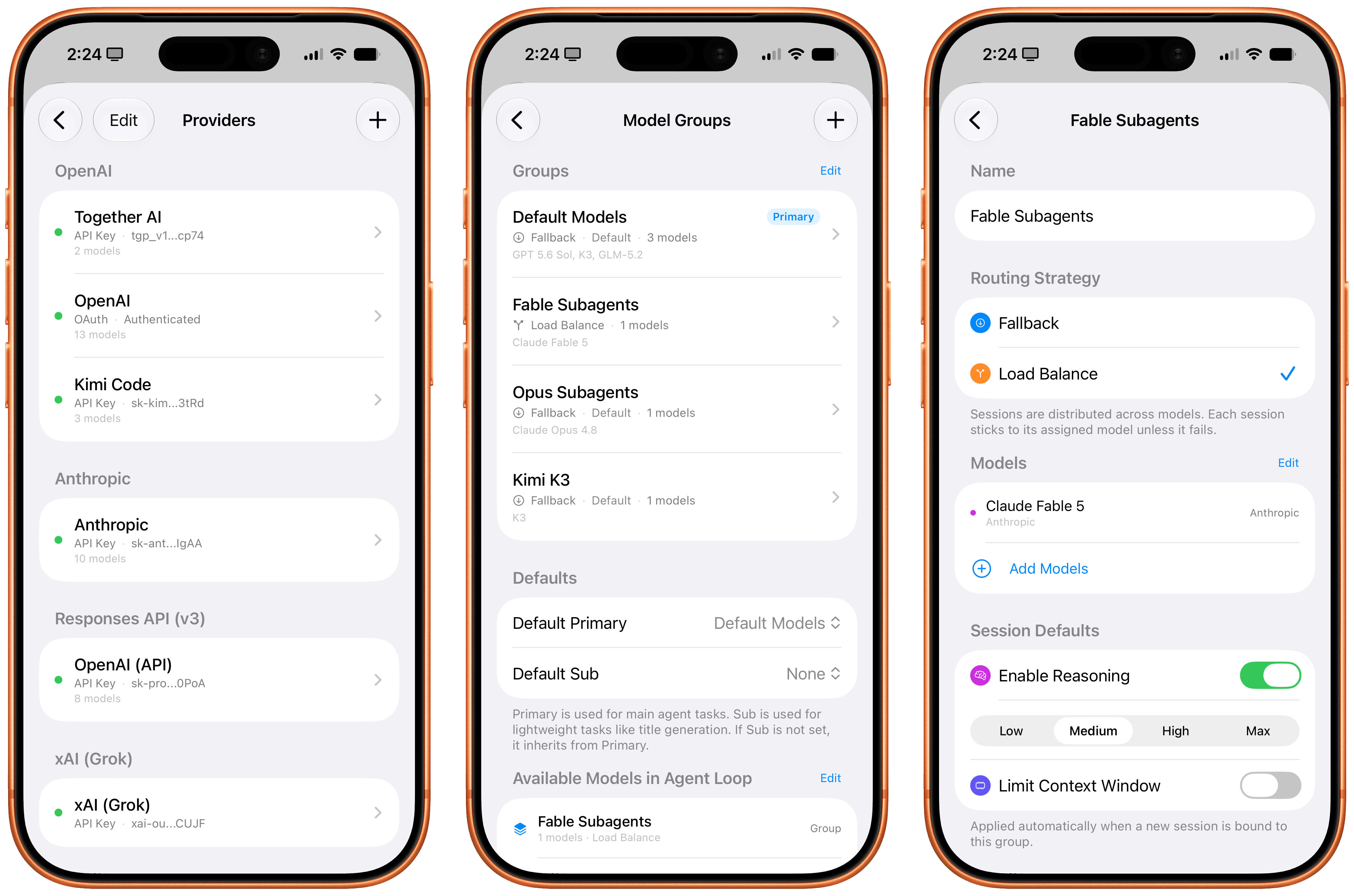
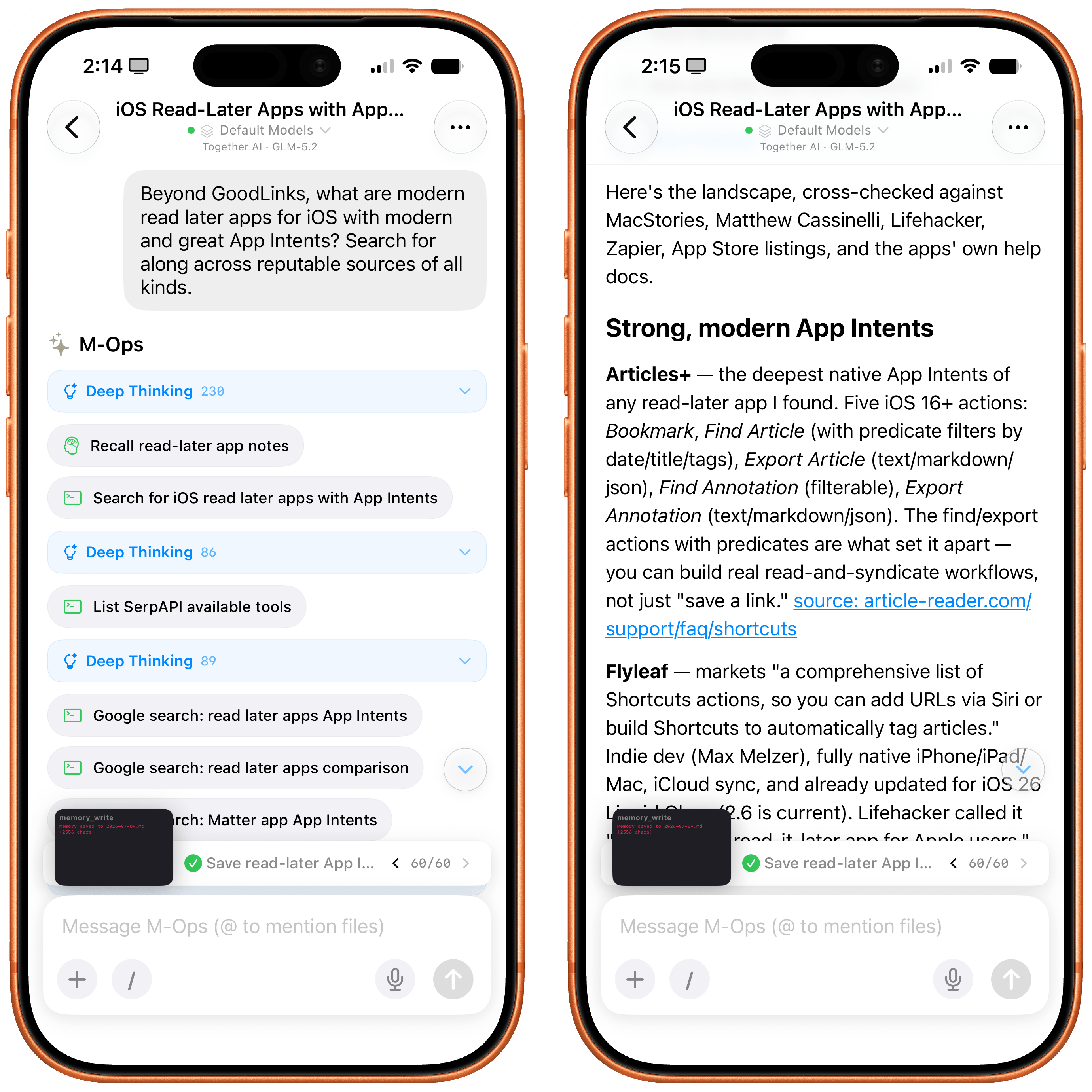
Approach this app with this concept in mind: nearly everything about it is open and configurable by just talking to it. Short of rewriting the app’s code itself, you can ask Open Minis to tweak all sorts of things about itself and its own settings, and the agent will do it. Personally, I find this to be a more effective, elegant, and stable harness than OpenClaw for these kinds of things. Even though the app’s UI could use some polish (I don’t like the reasoning picker, and I wish I could collapse thinking steps by default), it is incredibly fun to tune Minis’ workspace to your liking by talking to a model. You can, in fact, just do things.
A few days ago, I was curious about the state of the temperature and humidity in our apartment. So I asked Minis:
Get me a concise report of the state of the temperature and humidity in my house, present it as a nice table.
A native HomeKit permission prompt and a couple minutes later, Sol in Minis parsed a raw dump of temperature and humidity readings from each sensor, reviewed each room configured in HomeKit, and presented the results. Siri AI, for comparison, presented…something:
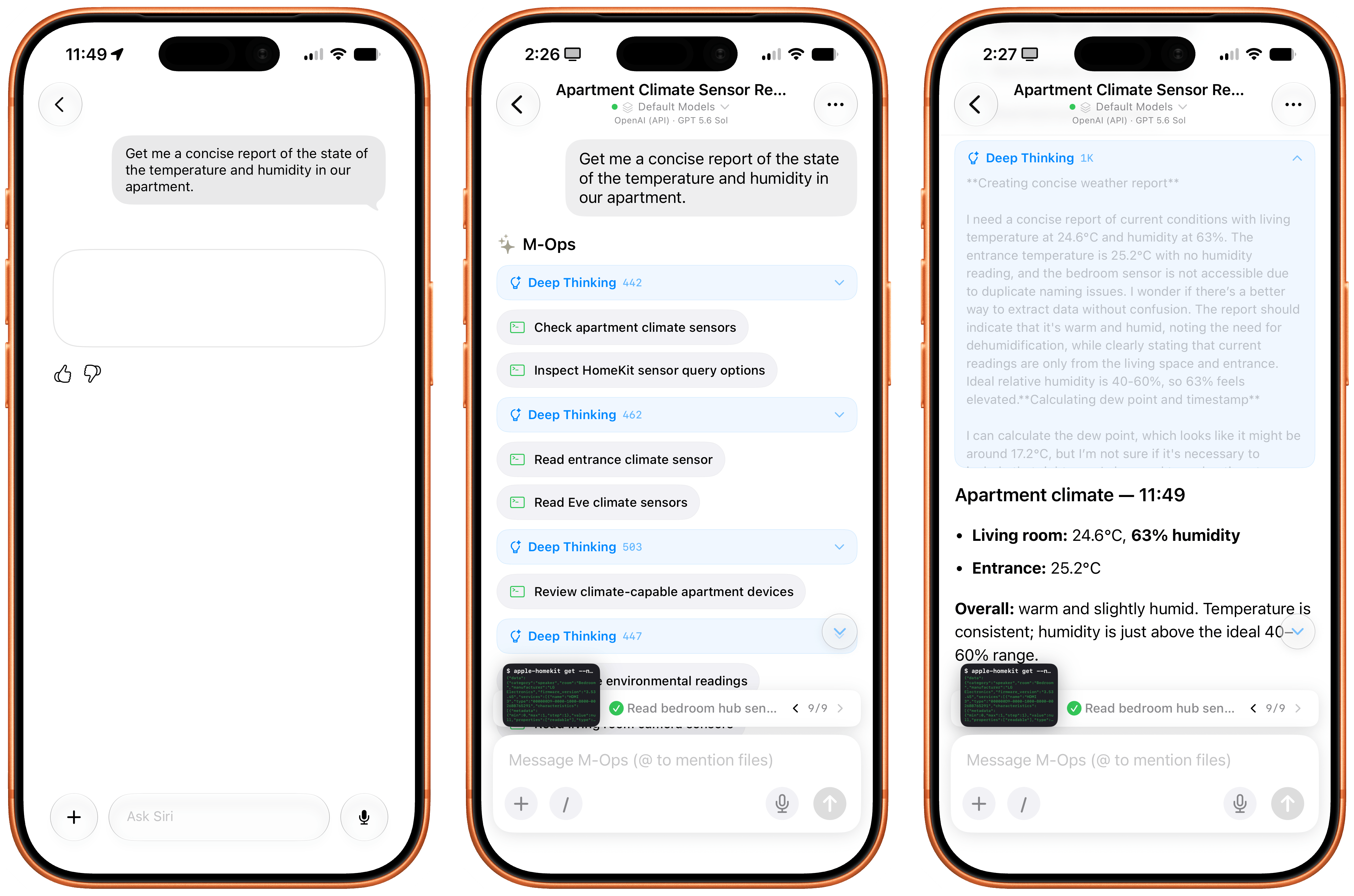
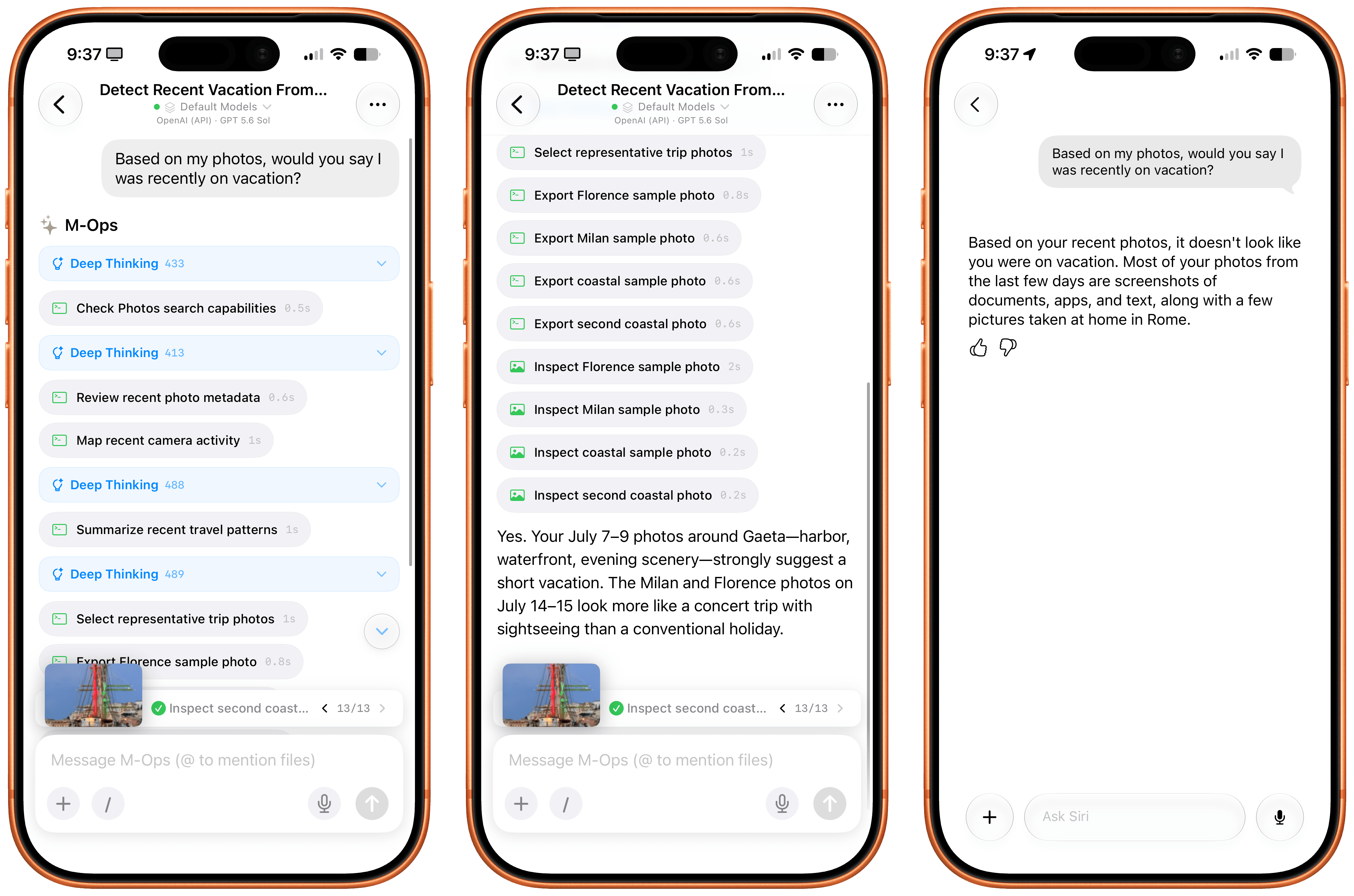
I also figured it’d be cool to compare the Photos integration in Open Minis to Siri AI’s photo library access. In theory, they’re both using the same framework, with the same metadata for each photo, but Siri AI also has access to “personal context”, right? So, I asked:
Based on my Photos, would you say I was recently on vacation?
I will let the results speak for themselves:
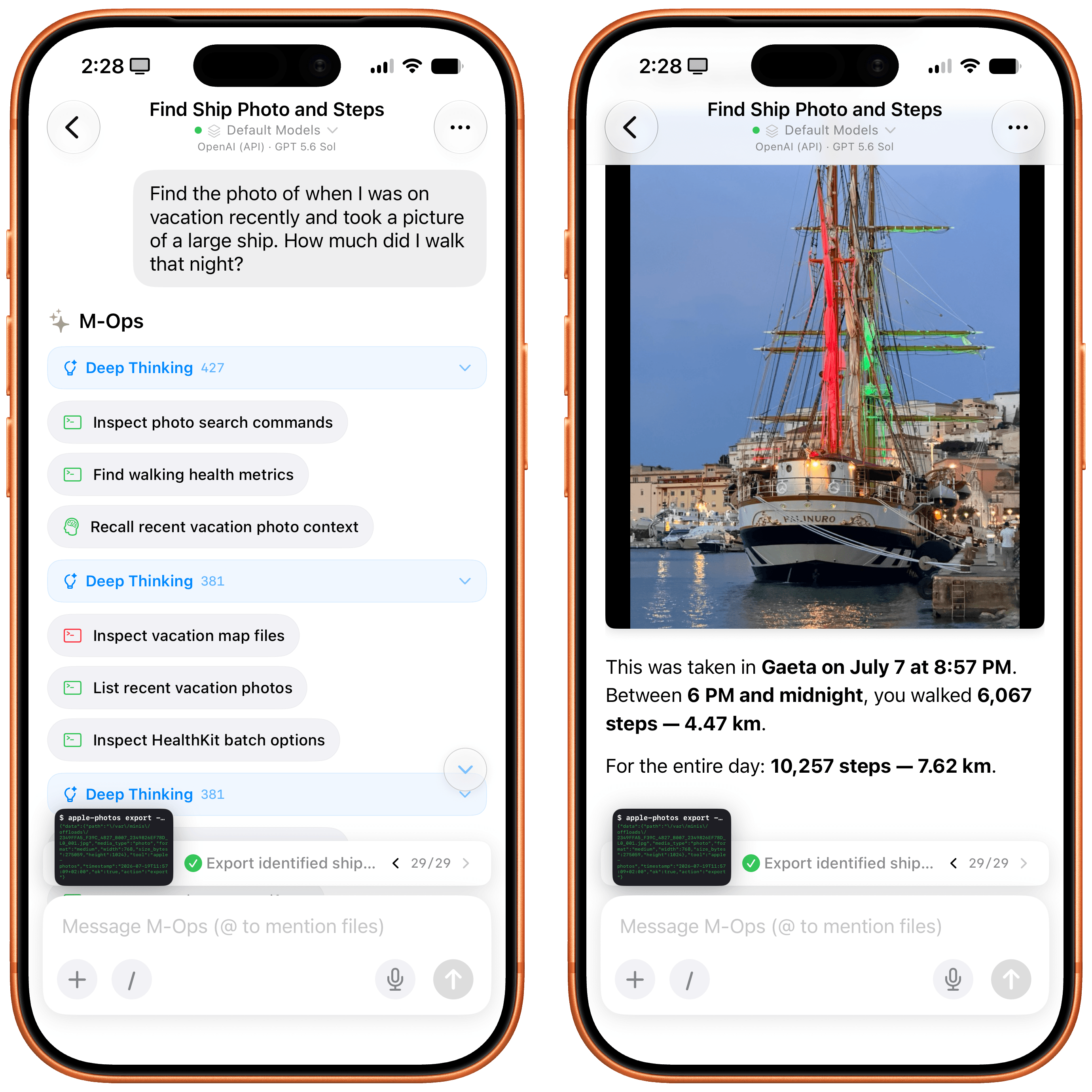
How about HealthKit? Again, keep in mind that Open Minis isn’t employing any “hacks” or workarounds here; it’s simply accessing the same native Apple APIs and frameworks that all developers can use. I asked:
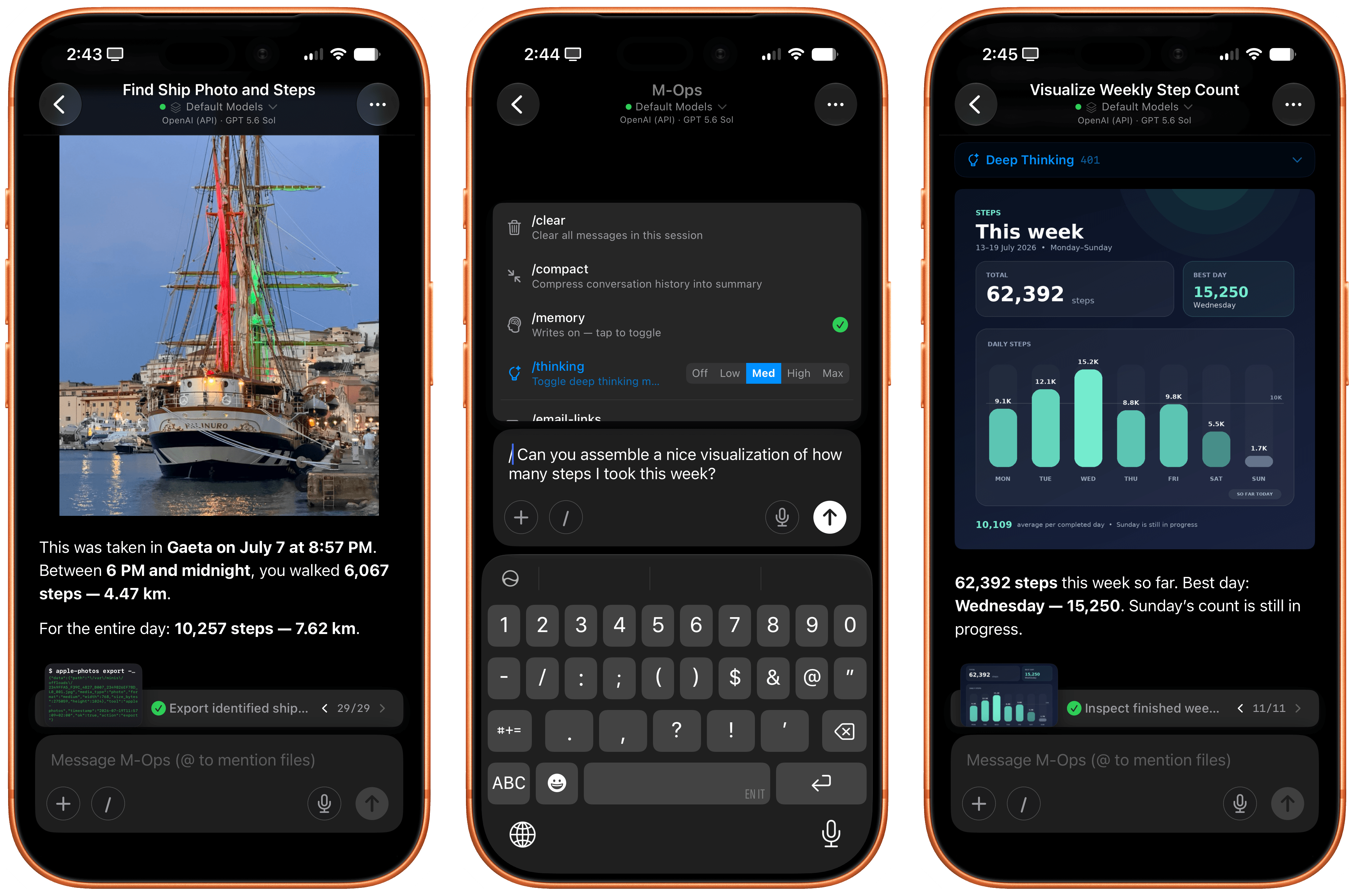
Find the photo of when I was on vacation recently and took a picture of a large ship. How much did I walk that night?
Minis started thinking about this request in a different way: it checked its memory first, and it realized that we recently discussed my recent vacations, so it could immediately short-circuit the process of finding out about those dates. Then, it started filtering my photos by those dates, found the original photo of the Palinuro vessel, and…yeah:
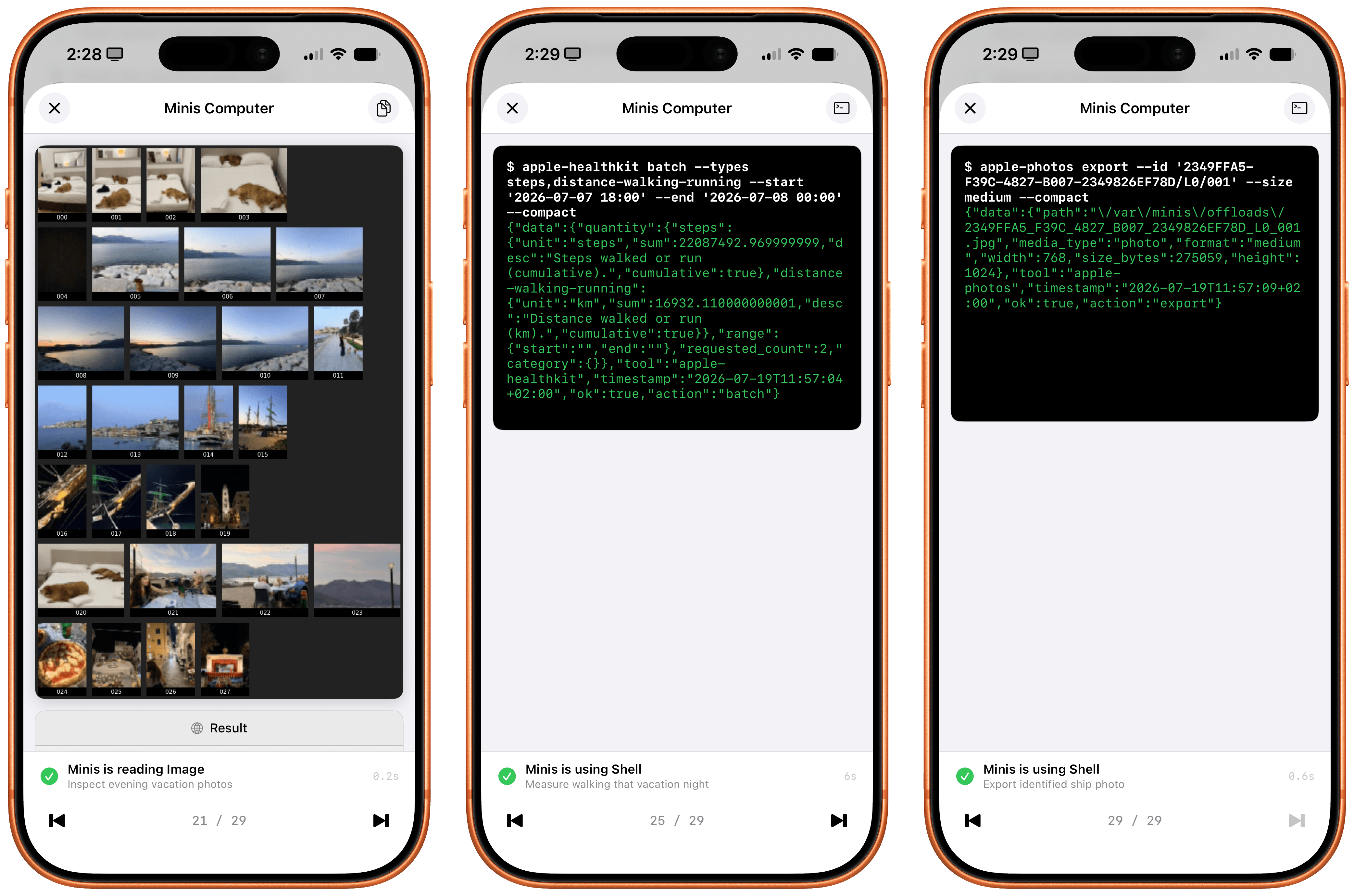
Inspecting the thinking steps in the request is also a fun exercise in seeing how a frontier model driven by an exceptional iOS harness can reason through a problem like this. The model – using the ‘Minis Computer’ (i.e., the aforementioned Linux shell) – fetched memories as Markdown files from the Files app, called the Apple Photos CLI, assembled a contact sheet with a grid of photos, picked two candidates, selected the best photo, isolated the date, called HealthKit for that date, and only then built an answer. And since all of this is based on deterministic code that was executed on-device, the response was fast and did not contain any hallucinations.
I then decided to go a step further: I asked Minis to take photo highlights from my recent vacations, put them on a map powered by Apple’s MapKit JS, and create a nice, interactive HTML artifact with photos on a map. I used Kimi K3 for this. Minis first asked me to securely store my MapKit developer token, then got to work. It collected photos and parsed metadata returned by the Photos app, and a couple of minutes later, there it was:
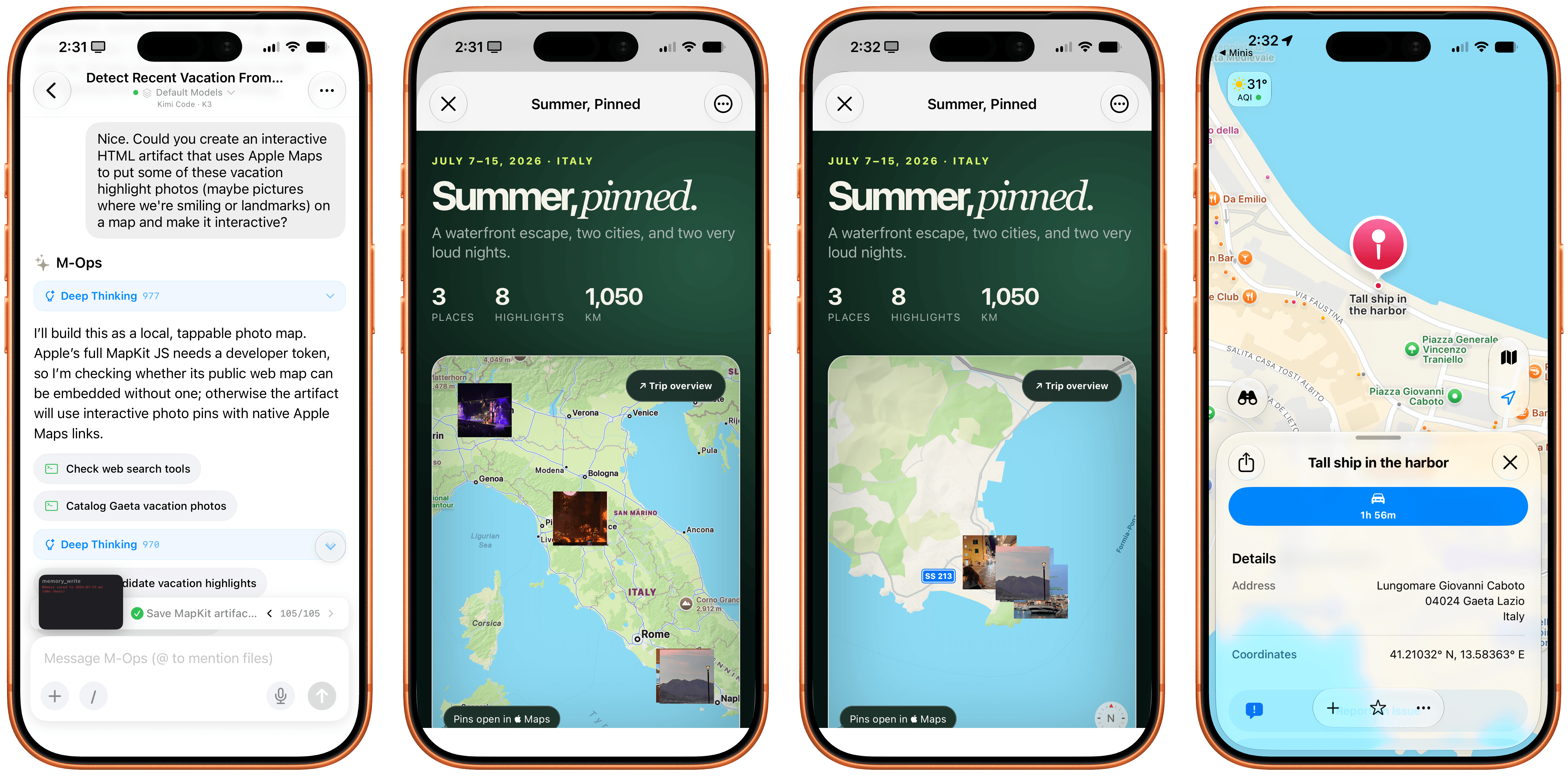
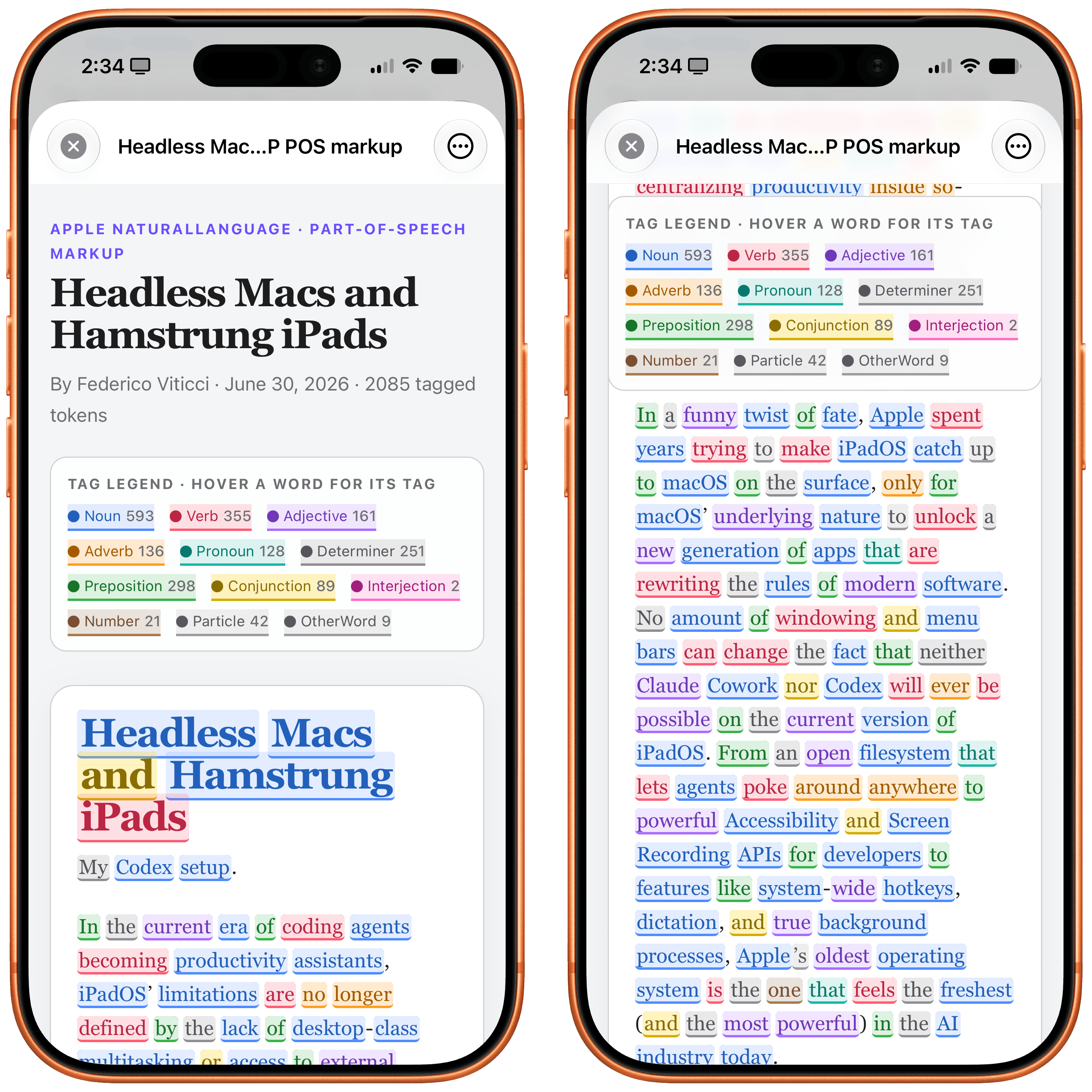
Notice how the HTML artifact itself is presented with WKWebView – another native Apple framework that lets Minis’ agent display webpages with the same WebKit rendering engine used by other web apps on iOS. I also combined web views with Apple NLP, the Natural Language Processing framework that’s available to Minis as another CLI. I asked the app to fetch my most recent iPad article from MacStories, scrape it as Markdown via Firecrawl, tag its different parts of speech with Apple NLP, and present it nicely. Not a problem:
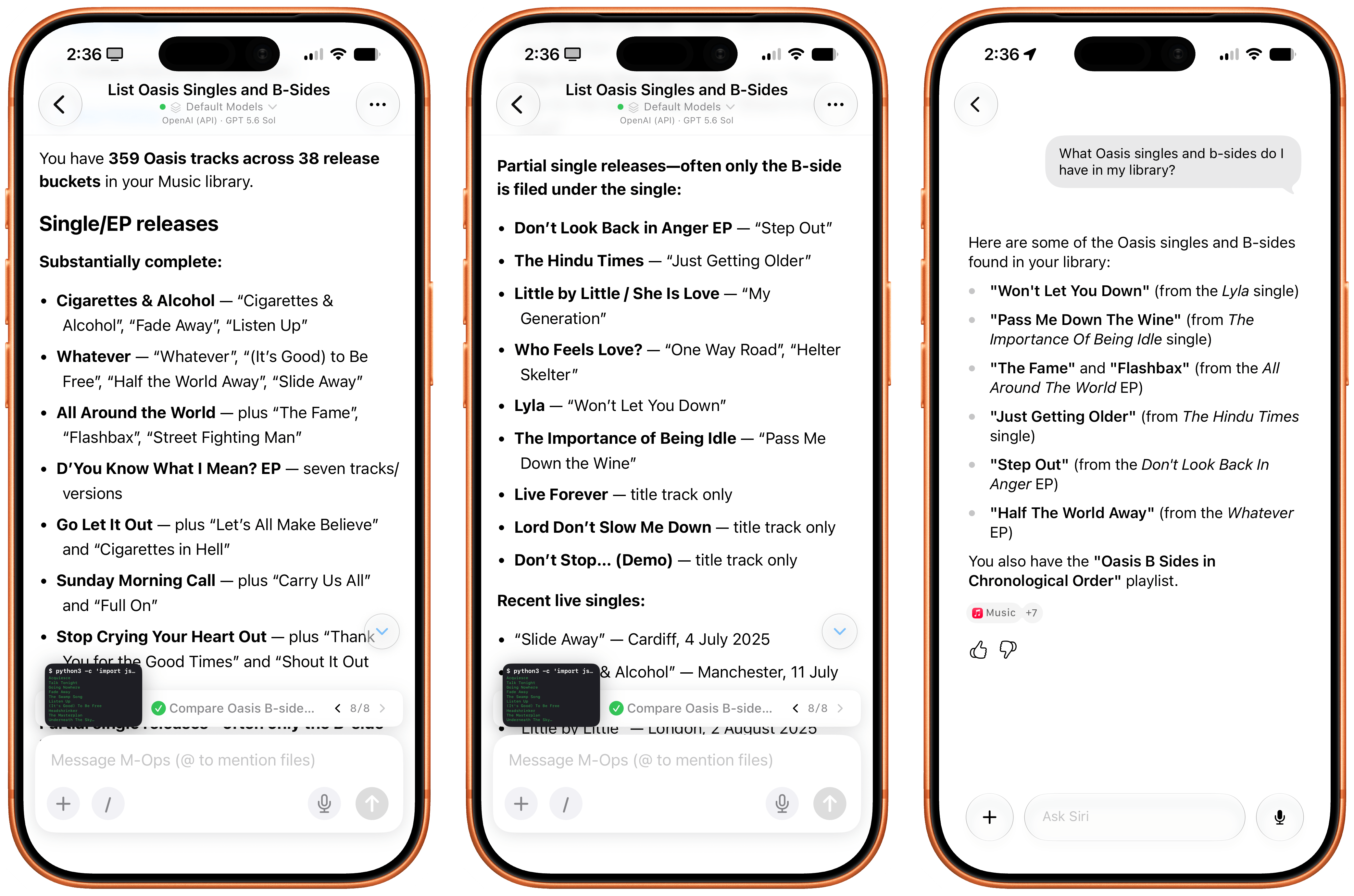
Music is also a first-class citizen in Open Minis: by integrating with the Apple Media framework, agents can see what’s in your music library and find information about the albums, songs, and artists you’ve saved. Which means that if I ask Minis…
What Oasis singles and b-sides do I have in my library?
…Minis can inspect my library, cross-reference results with the web, de-duplicate matches, and present results in a way that Siri AI just can’t do right now since its capabilities are limited and the model can’t reason for longer on any specific query:
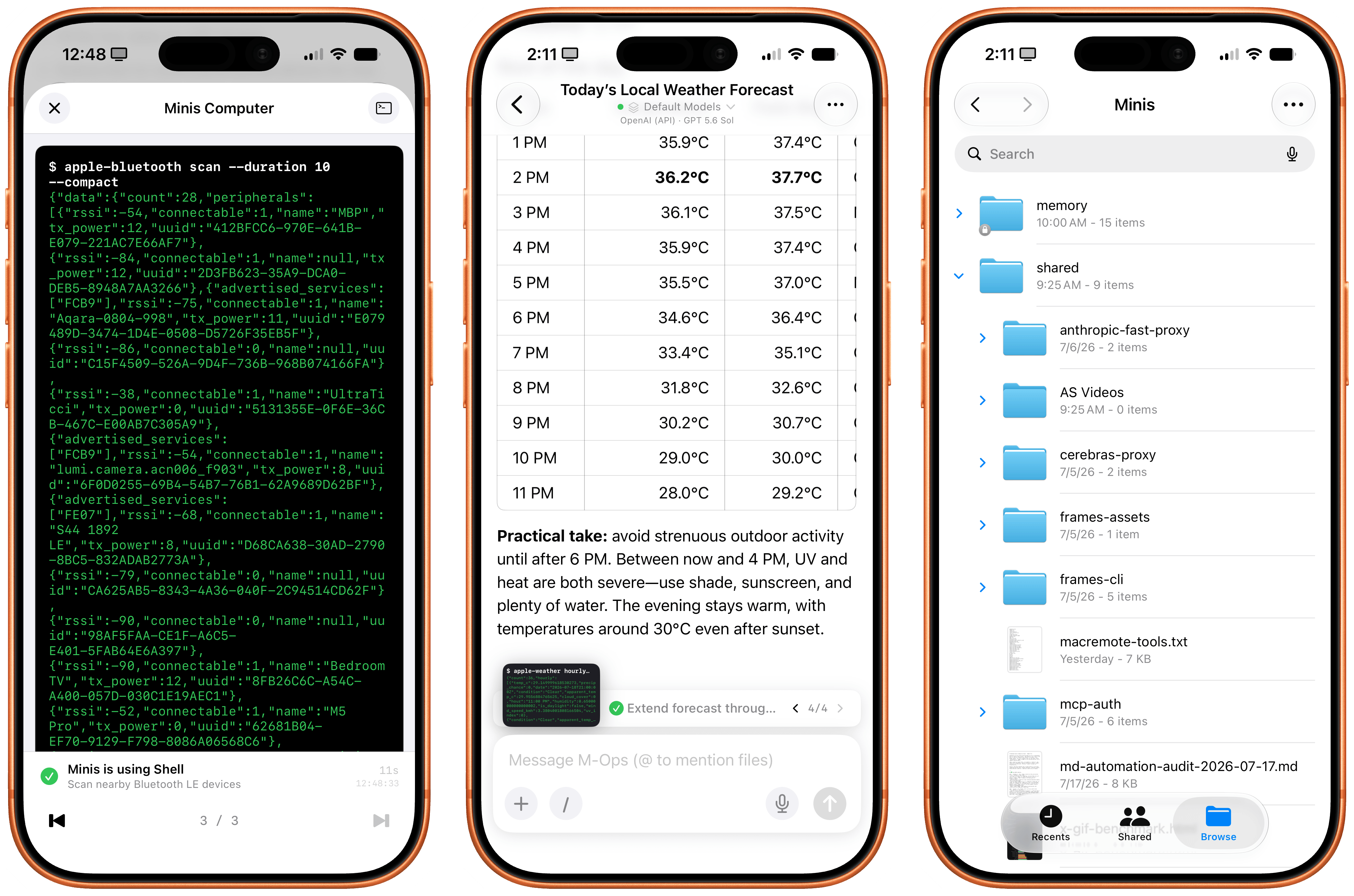
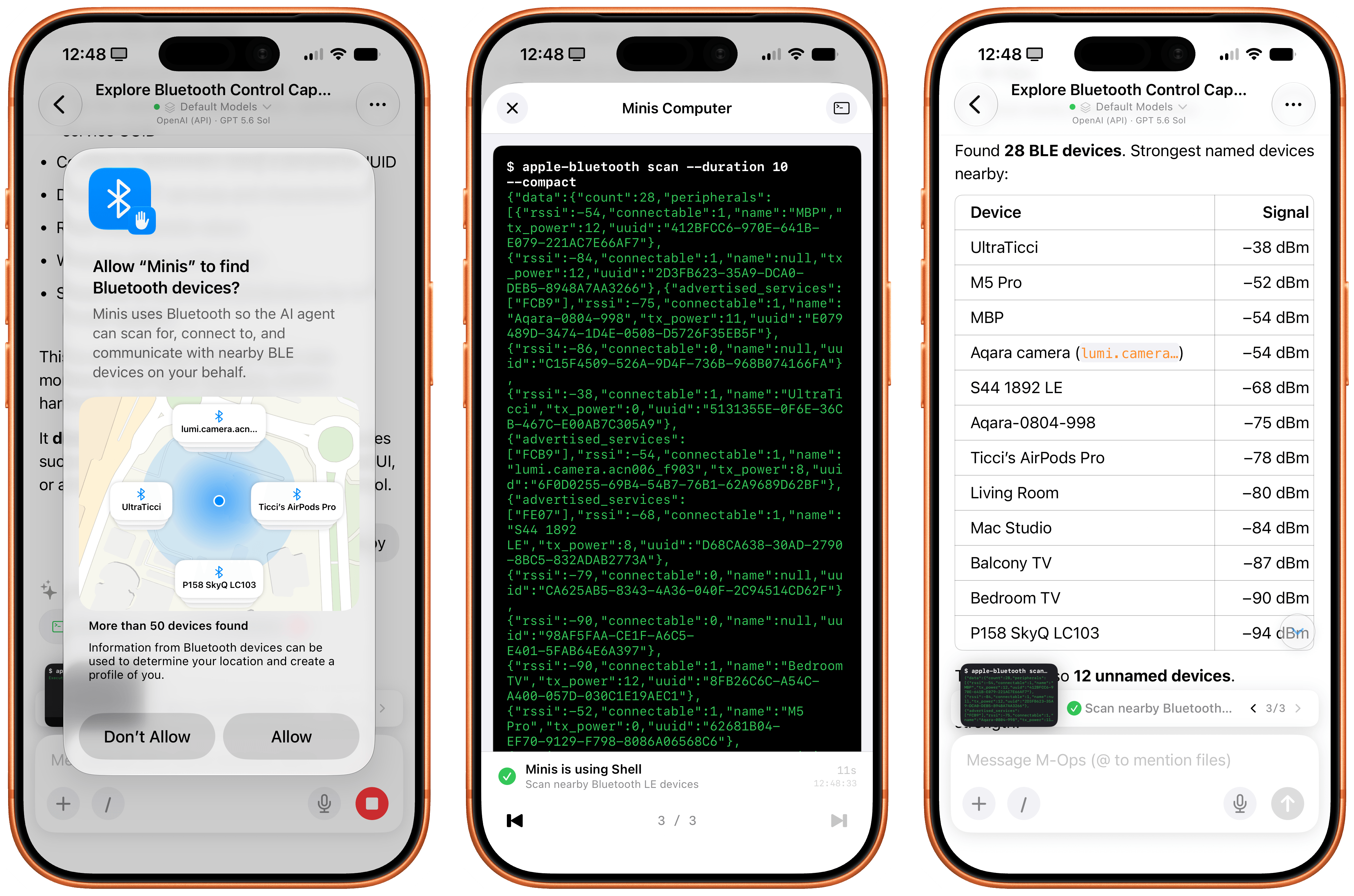
I can go on. Open Minis can access the native Bluetooth framework, scan nearby Bluetooth LE devices, and find out details about them:
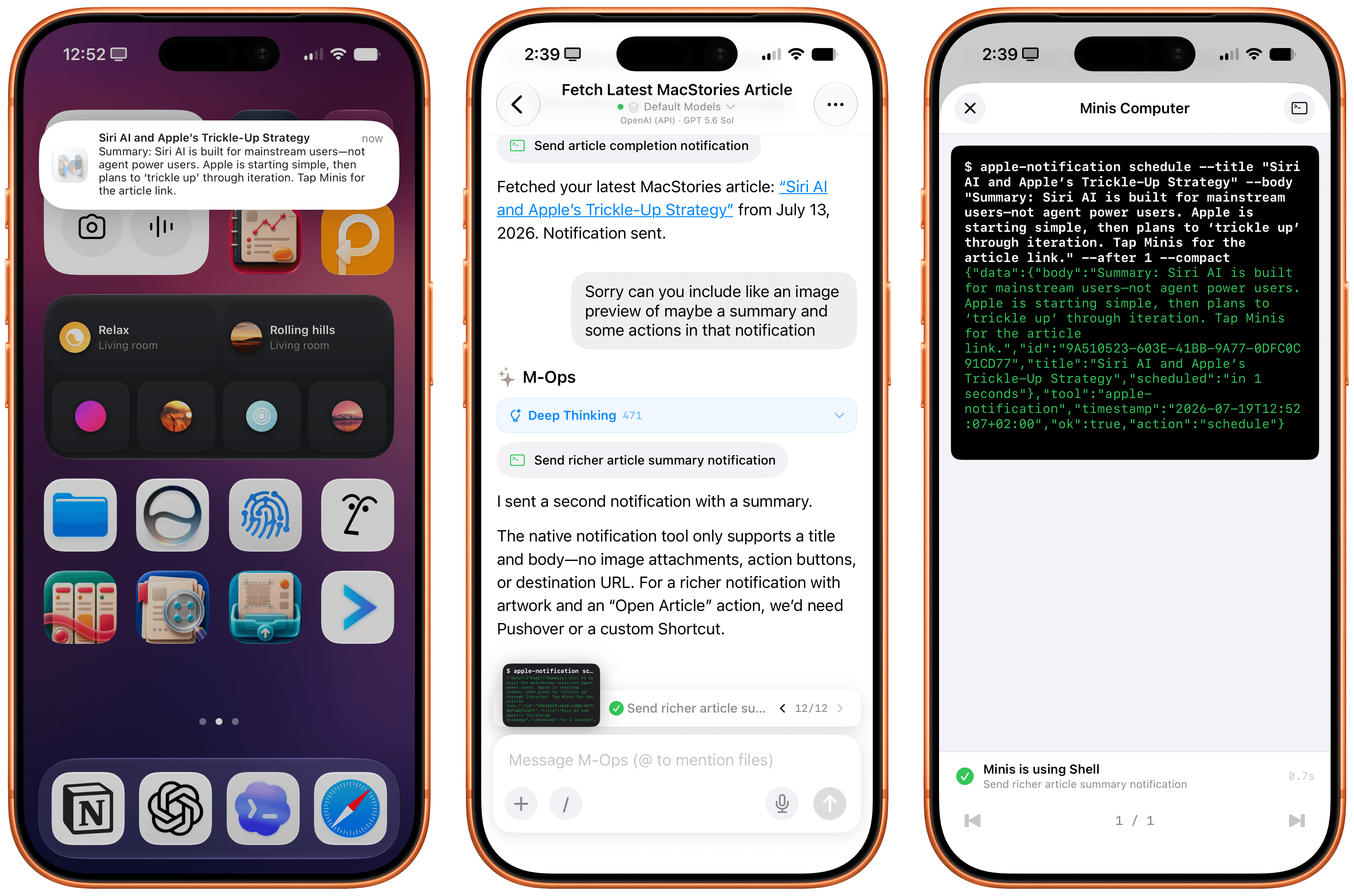
It can send you real notifications when it’s done with a task, and you can even program those notifications to have a custom title and body text:
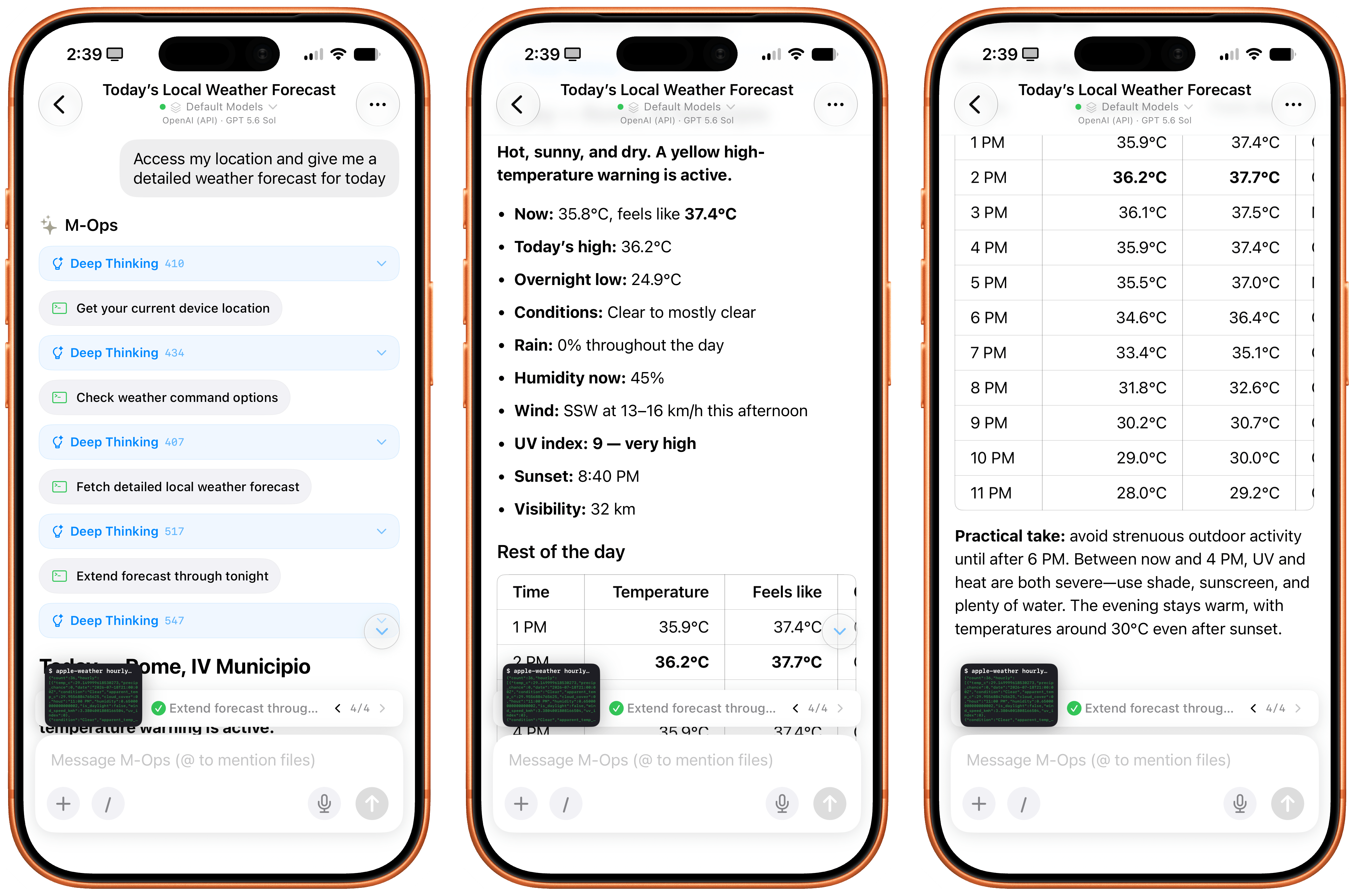
The app can also access your current location, extract locations from calendar events, and use the native Apple Weather APIs to give you detailed weather forecasts:
I think you get the idea.
By combining intelligent reasoning models with extensive integration on Apple platforms, Open Minis can deliver an agentic experience with no equal on iOS right now, which also serves as a fascinating preview of Siri AI’s potential future for power users. As a result of all this, while I still enjoy Siri AI as a basic voice assistant more capable than it was before, I’ve completely replaced its text-based chatbot functionalities with Open Minis powered by either GPT-5.6 Sol or Kimi K3.
iOS Agents Are Coming
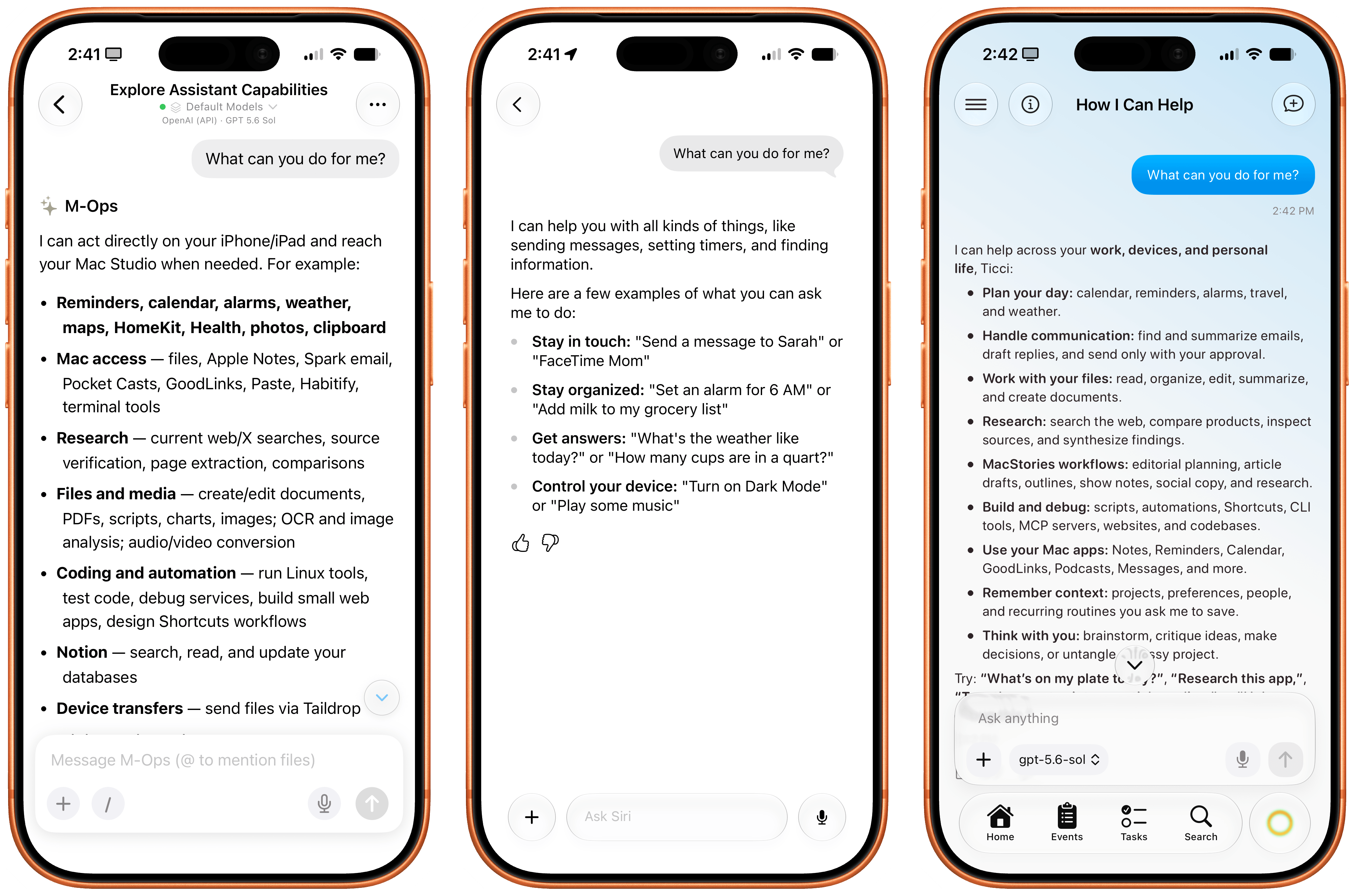
It is ironic that, on the cusp of Siri AI launching to millions of users in English only in a few months, here we have a single indie developer who is shipping an app that puts Siri AI to shame when it comes to getting work done with LLMs on iPhone and iPad today – with any model you want, in any language or region.
Over the next few months, I expect more developers to ship products comparable to (and perhaps even exceeding) Open Minis, based on the same idea of an on-device agentic harness that combines LLMs with iOS-specific integrations. One worth keeping an eye on is Halo, an upcoming iOS agent from Tanmay Sonawane that aims to combine LLMs, iOS integrations, memory, and proactive features based on Andrew Karpathy’s pioneering work on AutoResearch in an elegant, iPhone-native experience. I’m in the early testing group for Halo, and it’s a very promising product that, unlike Minis, runs in a loop on-device (displayed via Live Activities) to gather insights about your conversations, upcoming tasks and events, and more.
As I wrote months ago, I’m surprised that none of the big AI labs are exploring this space more in depth. As Open Minis proves, now that models have grown incredibly capable at long-running tasks and tool calling, there’s a real case to be made for agents that can tap into the iOS filesystem, apps such as Photos and Calendar, and technologies like Vision OCR, location, and speech-to-text at virtually no cost. Can you imagine what a “real” Codex or ChatGPT Work for iPhone and iPad could be with a similar system to Open Minis’ and the agentic loop and harness that drive OpenAI’s models? What could Anthropic do with a Claude Cowork powered by Fable that could access the Files app, run CLIs, and sync your workspace files across devices?
With Siri AI, Apple is finally shipping a pretty good chatbot with world knowledge and personal context. Open Minis feels like the beginning of a whole new category of agentic apps for iPhone, which power users like myself can start relying on and fitting into their workflows today.
