New Mineral Discovery Will Ease Component Supply Pressures For Consumer Electronics

As the market for consumers electronics continues to grow, there is one problematic question that faces the industry - can supply keep up with demand? More specifically, there are a number of “rare earth” minerals that are crucial in creating electrical components for an array of consumer electronics that include the iPhone and iPad but also more generally in LCD TVs and laptops, but have been very hard to locate in large quantities.

The concern about supplying such rare earth minerals may be quelled, however, with Japanese scientists discovering huge deposits of these rare earth minerals on the floor of the Pacific Ocean around Hawaii. more promising is that the deposits are of a heavy concentration with just “one square kilometer (0.4sq miles) of deposits [from the region] able to serve one-fifth of the current global consumption”. The discovery was made by a team from the University of Tokyo, led by Yasuhiro Kato, an associate professor of earth science.

He estimated rare earths contained in the deposits amounted to 80bn to 100bn tonnes – compared to global reserves currently confirmed by the US Geological Survey of just 110m tonnes that have been found mainly in China, Russia and other former Soviet Union countries, and the US.

The news has been met with positivity by consumer electronics companies and has seen a boost in share prices of non-Chinese mining companies that specialise in rare earth mineral mining. It comes after consumer electronics companies last year faced uncertainty when China last year slashed rare earth exports. The move, primarily in trade of the minerals of tantalum and yttrium, was frowned upon because China currently produces 97% of the global supply.

Sony said at the time that the move was a hindrance to free trade. Japan, which accounts for a third of global demand, has been stung badly, and has been looking to diversify its supply sources, particularly of heavy rare earths such as dysprosium used in magnets.

[Via The Guardian]


Postbox 2.5 Giveaway: Five Copies For Email Lovers

You don’t just like to process your inbox, you like to dominate it with open tabs, a gorgeous interface, and tagging that just works with you to empty the ol’ breadbox instead of collecting crumbs. Postbox 2.5 is a great update to an already fantastic alternative to Mail, Thunderbird, and Outlook on the Mac — you can’t do any better than that gorgeous conversation view (which carriers over to your senders), a vertical thread pane so you can overview your email quickly, or that redesigned compose screen which really makes sending messages pretty slick. There is some OmniFocus integration built in for GTDers, and the recent 64-bit upgrade makes finding messages faster than ever (easier than ever too if we count the recent improvements in Spotlight integration). Postbox is a superb email client that offers you a lot of choice in how you want to tackle email, all through a powerful, smart, and now redesigned interface. We wholeheartedly recommend Postbox to readers as an upgrade to Mail, and we recommend you to both check out Postbox on their website and download the trial. Postbox is normally $29.99 online and in the Mac App Store, and is currently on sale for $19.99.

The great folks at Postbox gave us some coupons to pass out so you can grab a free copy of Postbox, so we’re going to give away five copies to our delightful readers. Check past the break for the full rundown.

Read more


BeachWeather: A Weather App To Check On Your Favorite Beaches (With A Huge Database)

In the past few weeks, I’ve bought, reviewed and overall enjoyed a couple of different weather apps for my iPhone. Let alone the useful weather widget Apple is introducing with iOS 5, I’ve found myself going back to apps like WeatherSnitch and the recently updated Shine (which now includes data for international locations) to check on forecasts and the simple weather data I need to get by on a daily basis. This new app by StudioDalton, however, called BeachWeather, might just be what I was looking for this summer’s vacation: rather than a new default weather app to tweak by adding the locations of the beaches I’ll visit throughout this summer, a beautiful and focused weather utility that’s specifically aimed at checking how’s weather like…at the beach. By weather, I mean forecasts, UV index, wind speeds, and air & sea temperature – not the most complex data points when having to check on whether or not you can go to the beach with your friends and family.

BeachWeather, released today, impressed me because of its colorful design (which kind of reminded me of Robocat’s Outside for the general color scheme) and, more importantly, huge database of locations available inside the app. See, every year I go with my friends to a beach 45 minutes away from my town, and that’s not exactly a “popular” beach. Not one of those you see on television or rendered on tourist guides. It’s next to the camping I spent most of my summers in, and I still enjoy going there when I’ve got some free time. But it’s certainly not one of those beaches you constantly stumble upon on Google Image Search when you’re looking for “vacation in Italy”. Yet, BeachWeather’s database had this very specific beach available, alongside others a few miles away from it. None of those can be deemed as “popular”, nor do they often appear in other weather apps for the iPhone. In fact, unlike other weather apps, BeachWeather is, well, focused on beaches, not cities and towns. I don’t know what kind of online database/service the developers are using, but I was definitely impressed with my (local) results. Obviously, your mileage may vary depending on your location, but after taking a peek inside other countries’ locations I can say the database is really, really huge.

In the app, you can add multiple locations by browsing by country, or getting recommendations based on your location. Recommendations were accurate and, in fact, I added the first three ones the app suggested. When dealing with multiple locations configured in BeachWeather, the app presents a “card” interface to swipe between available beaches and check on weather forecasts. The app provides a 3 day forecast with data organized in tabs and associated with an icon or color depending on what’s the weather like. At the bottom of the card, you can navigate between Today: Morning, Today: Afternoon, Tomorrow: Morning, Tomorrow: Afternoon, and a forecast for the third day. A screenshot of the card can be shared on Twitter, Facebook, or via email, and you can tap on the forecast’s icon to get a translucent black popup telling you what does it mean – e.g. “clear” or “mostly cloudy”. In my tests, weather data from BeachWeather seemed to fall in line with those of other websites like the Italian Meteo.it or the universal Yahoo Weather. Other apps like WeatherSnitch, Apple’s Weather and Shine reported forecasts similar to BeachWeather.

BeachWeather is a real gem if you’re like me and you need an answer to the question “What’s the weather like at the beach today?”. You can download BeachWeather at $0.99 on the App Store.


PhotoForge 2 Update: iPad Version and iOS 5 Fixes

Back in May I covered the release of PhotoForge 2, the successor of a popular image editor for iOS that, with the point-upgrade, gained a completely redesigned user interface, as well as a broader set of options aimed at turning the application into the most powerful image editing software for iPhone and iPod touch. Released as a standalone app (as the App Store doesn’t allow for paid upgrades) and sporting revamped social sharing functionalities with an OS X-like dock UI, PhotoForge had an incredibly successful launch – but one piece was missing: the iPad version. The developer teased the app ahead of the launch as a universal application for iPhone and iPad, yet in May users only got the “smaller” iPhone counterpart that, due to the limitations of the device, couldn’t fully take advantage of real screen estate for image editing.

Released today as the promised universal update, PhotoForge 2 now runs on the iPad as well and it’s available for download right now at $1.99. The iPad version of PhotoForge 2 doesn’t surprise, but it’s better than the iPhone version: whereas most of the times I’d despise an iPad porting that only makes the iPhone UI bigger, this time the conversion seems appropriate for PhotoForge: controls are made bigger but don’t get in the way because of the iPad’s large screen, toolbars provide a nice minimal frame around the photo you’re editing. And because the iPad 2 comes with cameras, this means you’ll be able to edit and improve photos shot with your device. Furthermore, the new PhotoForge 2.0 fixes several bugs reported by developers running iOS 5. The same features of the iPhone version have been ported over: layers, exposure control, brightness and contrast, or standard RGB levels are all there. The app comes with a selection of effects similar to those seen in Instagram and Camera+ that you can apply to your files in real time, in seconds. As also tested on the iPhone’s original version, the app has full layer management capabilities with handy controls on the side, a detailed info panel to check metadata of an image, and various sliders and menus to tweak the appearance of a file with levels, curves, brightness and noise regulation, or noise reduction. There’s a lot to explore and play with in PhotoForge 2, and I like I said the iPad’s screen makes the whole experience ultimately better when it comes to tapping, sliding and moving your finger around to edit an image.

Other changes in this release include:

  • Mask painting has been dramatically improved. Painting is now incredibly fast even on super large images.
  • New composition mode while mask painting allows you to see the layers below, making masking the easiest way to selectively apply filters and effects to your photos.
  • Cropping handles have been redesigned and implemented making cropping much easier to control than before.
  • The rotation gesture in the cropping tool has been removed and replaced with 1 degree rotation buttons.
  • Added ability to save photos back to the documents directory. Making it very easy to get your images back onto your computer.
  • Can now save images in JPEG, PNG and TIFF. PNG and TIFF will maintain any transparency in your images. (Not all upload locations support all image formats).
  • Can now control compression quality of JPEG.

PhotoForge 2 was the image editor to have on the iPhone, and the universal update is simply a must-have at this point. You can download PhotoForge 2 at $1.99 on the App Store. Check out more screenshots of the app after the break. Read more


Verbs 2.0 Now Available for iPhone, Adds Pro Service

We covered Verbs back when it was released in December and again in January; it’s a great IM client for the iPhone that has a nice design and excellent execution.

Today #include tech posted on their blog that they have introduced a Pro version in today’s update (2.0) of Verbs. Verbs 2.0 focuses on performance, memory management, improved Address Book integration and photo uploading issues from the camera.

Version 2.0 features and improvements:

  • Enable Push Notifications and stay logged in for up to 7 days (Verbs Pro).
  • The text entry field grows vertically as you type longer messages.
  • Send Chat logs via email. (preview here)
  • Send links in received messages to Instapaper for reading later.
  • Horizontal swipe action in the chat view to switch between chats.
  • Pinch gesture to zoom out a conversation.
  • Tap and hold the unified accounts cell to sign in/out of all accounts.
  • Faster buddy list scrolling.
  • The collapse Offline buddies preference was not getting saved between launches.
  • Now displays AIM buddies “Mobile” status with a blue icon.
  • Shows buddy presence above the chat thumbnails.
  • Fixed the delay when the buddy list favorite header is tapped.
  • Resets the keyboard to display alphabets after sending a message.
  • Fixed issues with uploading pictures taken from camera.
  • Change application settings through URL Schemes.
  • Bug fixes and better memory management.

Read more


OS X Lion GM Now Available

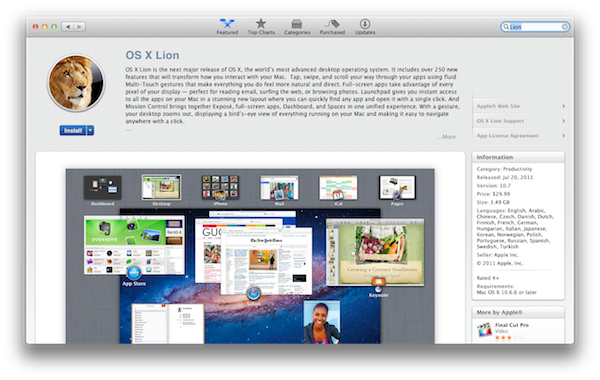
Apple has just released the GM seed for OS X Lion. It’s available now for registered developers in the Mac Dev Center. Build number is 11A511, and Lion is expected to be released publicly later this month. A GM seed is usually seeded to developers a few weeks ahead of the final release. At the WWDC ‘11, Apple announced that the upcoming version of OS X would be released exclusively on the Mac App Store as a digital download priced at $29.99. The company said Lion would come out in July, without specifying an exact release date. With over 250 new features including the Launchpad – a new way to launch and manage apps in iOS-style – Mission Control, new Mail and extensive usage of multitouch gestures, Lion is set to refine the desktop OS adding elements and user interactions heavily borrowed from Apple’s success on the iPhone and iPad.

Apple has already detailed the Lion upgrade process for businesses and education, and confirmed that new Macs bought after June 6 will be capable of getting Lion for free through a request within 30 days of Lion’s release.

In addition to the OS X Lion Golden Master, Apple has also released Xcode 4.1 Developer Preview 7 and OS X Lion Server GM seed. Both GM seeds of Lion need to be redeemed in the Mac App Store with a redemption code – previously, Apple had made available builds both through the Dev Center and Software Update for minor changes to the developer preview code. Read more


The New York Times Enables In-App Subscriptions For Their iPad And iPhone Apps

The New York Times has today released an update for their iPad and iPhone apps that now enables users to purchase in-app subscriptions for their content that is behind a paywall. There are three subscriptions available for the content, the first is $15 for website plus iPhone access, then $20 for website plus iPad and finally all digital access (website, iPad and iPhone) for $35 – all of which are charged on a monthly basis.

The implementation of Apple’s subscription service comes the day after the rumored deadline that was imposed by Apple. Although that deadline was made somewhat easier for content providers after Apple backed down on certain requirements of the subscription guidelines. Most notably is that they are no longer forced to offer in-app purchases or subscriptions for content and that they can offer the content at a different price to what they offer on their websites.

However, one rule that didn’t change was that if an app offered In-App purchases or subscriptions, they cannot offer users an external link to purchase content from outside the Apple ecosystem. The New York Times seems to have played nice with this rule, but has offered existing subscribers an easy way to gain access to the content for free – as is permitted by Apple. Today’s implementation comes after they first implemented their paywall for the iPad app in April of this year and nearly four months after they first promised that they would implement iOS subscriptions. It also follows the adoption of iOS subscriptions by other publications such as Wired Magazine, The Daily, The Telegraph and Bloomberg’s BusinessWeek.

Read more


Captio 2.0 Released, Adds iPad Version

Back in September I reviewed Captio, a simple utility for the iPhone aimed at letting you easily send an email to yourself with just one tap. What’s the deal with sending emails to yourself, when you can take a note in apps like Simplenote, Evernote, or Apple’s Notes app itself? For some people, quickly sending an email with apps like Captio, or Note 2 Self, is faster than opening up a full note-taking app and creating a new note with the proper formatting options, tags, or more. Captio allows you to launch the app, type, and hit the Send button to find the note later in your inbox. When combined with desktop tools like OmniFocus, which has excellent support for email integration, Captio and similar apps become simple yet powerful solutions to get thoughts out of your brain and into your trusted GTD system. The same applies to online services like Basecamp, Evernote or Remember The Milk, which support quick email input.

Captio 2.0, released today, finally adds native iPad support to send notes from your device to your preferred email account, and – this is also new in version 2.0 – lets you configure an IMAP account in-app if you don’t want notes to be delivered using the developers’ email system. I found that notes delivered via IMAP took a few seconds more than the developers’s built-in account, but if you don’t want to route your notes through an external service now you have an option. The interface designed for the iPad is very straightforward, with the popular linen background sitting below a floating panel to write your note and insert attachments. In spite of its simplicity, Captio’s design is elegant and pleasant. In this new version, you can also access a notes archive to see old emails you sent for one month. In the preferences located in the Settings app (not the account settings in Captio), you can choose to disable the message footer, repeat the first line of the note in the email body, and tweak the subject prefix. On top of that, TextExpander Touch support has been enabled in Captio 2.0 as well.

At this point, with local storage, IMAP options and a native iPad version, Captio has become the best way to send an email to yourself from any iOS device. You can download Captio at $1.99 on the App Store. Check out more screenshots of the app after the break. Read more