TeleTweet: Tweeting with Morse Code

It’s the week of morse code I guess. After showcasing iToneMaker on Thursday, Federico pointed me to TeleTweet by Shacked Software, a lovely designed iPhone app with a rather bootless set of functions, but a very passionate creation background which was the reason why it drew my attention.

TeleTweet is a Twitter client. It connects to your account, and lets you enter tweets using morse code, publishing them to your account. This is a rather strange approach, but I had a lot of fun with it.

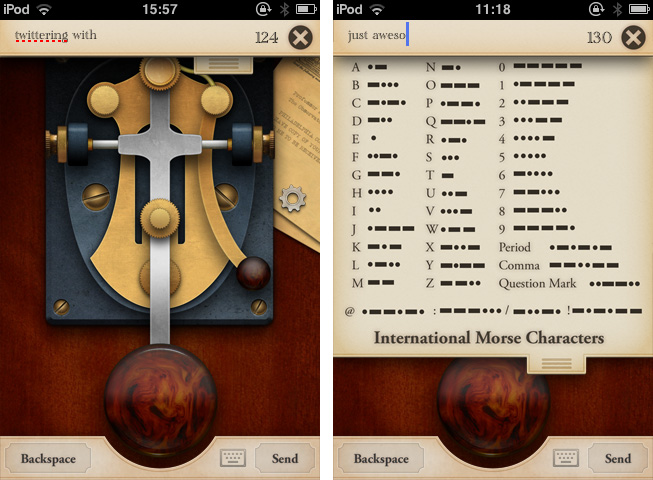
To understand how the app works, let’s take a look at the truly unique design, as it’s the app’s main feature and also the visual door to what it does. TeleTweet is an on-screen morsing station with a big paddle triggering the long and short morse signals and the corresponding sounds. The combinations of the triggered lengths are then converted into characters and appear in the post panel at the top of the screen. For users like me, who never used morse code before, there’s also a dropdown listing of all alphabetic letters and some useful special characters like “@” and their appropriate code. You can also bring up a “normal” QWERTY keyboard if you like — a feature which seems a bit useless to me, since you lose all the special features of the app, not just in usability terms, but also design-wise.
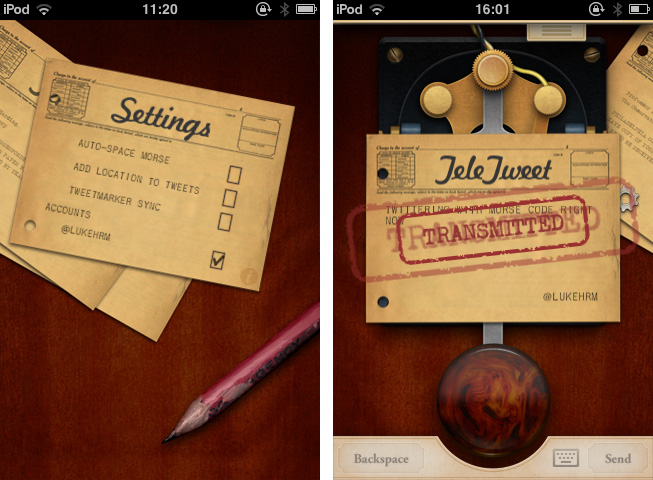
Entering tweets in TeleTweet takes its time, but it’s a lot of fun and, to a certain extent, it serves the goal of teaching the user morse code. This isn’t simply accomplished through the functionality itself but also with the app’s antique, warm look and its lovely animations (like the stamped envelopes when you send a tweet). It really shows a clear love for steampunk design from the IconFactory designers responsible for it, and it made me stick to the app for a long time.

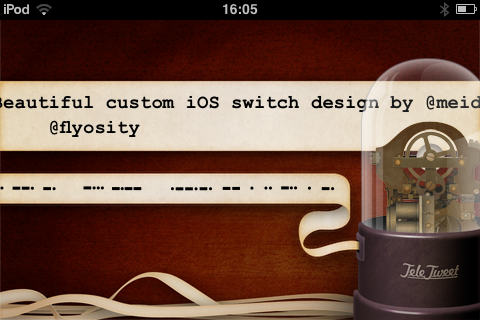
Sometimes completely forgotten, TeleTweet shows a deep attention to sound design: it clatters and squeaks and rumbles everywhere you touch. It’s very authentic. And I didn’t recognize the coolest thing about TeleTweet until I read through the developers’ website for the second time: if you connect to your Twitter account you can turn your iPhone sideways to show your Twitter stream — in real time morse code and its translation in monospace characters. I was just stunned at first, and then literally laughed. It’s hilarious and beautiful at the same time.
You shouldn’t buy TeleTweet if you want a decent Twitter client or a really useful tool to learn morse code. TeleTweet is a nice mix of both but does not completely serve the needs to meet the high feature standards of dedicated apps. What really makes the app attractive is its design.

If you’re a lover of high UI standards or steampunk design, go get TeleTweet for $0.99, and even if you’re not using it at all afterwards, it will surely stimulate your eye’s desire for detailed pixel work. Isn’t that what we’re all after from time to time?

By the way, in less than a week it’s Samuel Morse’s birthday — he’s the inventor of the morse code system.



Happy 3rd Birthday, MacStories!

Three years ago, I started MacStories because I didn’t have a job. Along the way, the “hobby” became a new job in itself, and it now allows me to run a site read by millions of people every month. More importantly, the site has allowed me to get to know some amazing people: my co-workers, developers and designers, and you, our readers.

Three years is not an incredible milestone. Yet, because April 20, 2009, feels so distant to us, I thought it would be appropriate to quickly look back at things we’ve done, and lay out a foundation for the plans we’re excited to execute in the future.

We’re not perfect. We have been guilty of focusing too much on “quick” news reporting and speculation about Apple in the past years, and, in retrospect, I think we could have handled some things differently. But I also like to look at this differently: along the way, we’ve found our style. It’s not perfect, but at least it’s what we love to do. It’s the very notion of “getting better” that implies starting from somewhere. And if not everyone will agree that the articles we publish today are better than the ones from 2009, we are surely happier with the words we post in 2012.

On a personal note, I want to thank the MacStories team for allowing me to turn a passion into my dream job. Cody, Chris, Graham, Don, and the most recent additions to the crew, Gabe and Lukas, are amazing colleagues and, more importantly, friends that, like me, share a common goal: to write about the devices and software we love, and the ecosystem of stories and people around them.

As a team, we’d like to thank you, our readers, for showing up every day and allowing us, with your opinions and support, to run MacStories exactly the way we want to: with passion and a shared sentiment that, ultimately, people are always interested in a good story.

We want to keep bringing you the news, reviews, stories and everything in between that you’re now used to seeing on MacStories. In three years, we hope to be able to look back at this article, and say that we’ve gotten “better”.

We hope to have as much fun along the way as we have had in the past three years. That’s why we created a small list of the stuff we’re proud of (you can find it below): to remember we had fun, but that we can also do better.

It’s our goal to make MacStories a better site in every aspect: more readable, with more quality content, more stories, and new options for our readers to enjoy our articles on any device. We’ll be making some changes to the site soon, and we hope you’ll enjoy them.

Thanks for reading MacStories. Here’s to the next three years, starting today.

- Federico


Our first post, and original logo from 2009:

And our version 2.0 design for 2009-2010:


Reviews

Hardware Reviews

Editorials & Analysis

Miscellaneous

Sections


Apple Set To Open Second Perth Store Later This Year

Apple is set to open their second retail store in Perth, Australia later this year according to a report by PerthNow. Apple has reportedly begun recruitment for the second store, named in their job advertisement as “South Perth”. PerthNow believes that the store will be located in the suburb of Booragoon, inside the large Garden City shopping centre.

Apple has apparently taken over two of the shops in the centre (Esprit and Sportsgirl) and possibly others that are near Kmart, whilst the centre is also relocating a lift and remodelling stairs nearby. When asked for a comment, the owner of Garden City said that they were currently “remixing the area” but did not specify who the new tenant was.  PerthNow believes the store will open sometime in the second half of this year, possibly even July.

[via PerthNow]


Iris: A Beautiful and Simple Instagram App for iPad

Instagram may have been acquired by Facebook, but this isn’t stopping third-party developers from coming up with clever solutions to use the Instagram API. If anything, if Facebook will live up to its promise of keeping Instagram alive while growing and improving its network, everyone’s favorite photo sharing service may see even bigger numbers and user adoption. And there’s no better way to use official APIs than building software the developers of the original app are ignoring, at least for now.

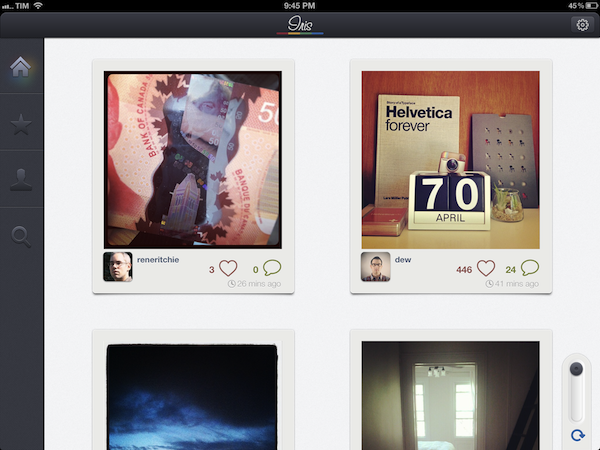
For the past few weeks, I have been trying a new Instagram app for the iPad called Iris. It’s available now on the App Store and it’s optimized for the Retina display. While Instagram has started experimenting with a new API to allow other developers to upload pictures to the service, Iris doesn’t let you upload photos using the iPad’s camera and the app’s custom interface. Instead, Iris is another app focused on providing a beautiful experience for browsing and liking Instagram photos, and, in my opinion, it is the most attractive solution that’s been brought to the market to date.

Iris puts great focus on large thumbnails for photos, a light background to make Instagram’s filters really pop, and a dark sidebar to switch between your feed, popular items, profile, and search. Iris allows you to browse either via large thumbnail previews or smaller ones; the layout change can be activated with a switch in the lower left corner. In the lower right corner, the developers have implemented a “pull to refresh” command, which literally requires you to pull a slider to refresh the main view. You can also hit the associated refresh button if you feel uncomfortable with pulling, but I found the gesture quite clever and fun. Unlike other apps, Iris doesn’t have standard pull to refresh at the top of the view.

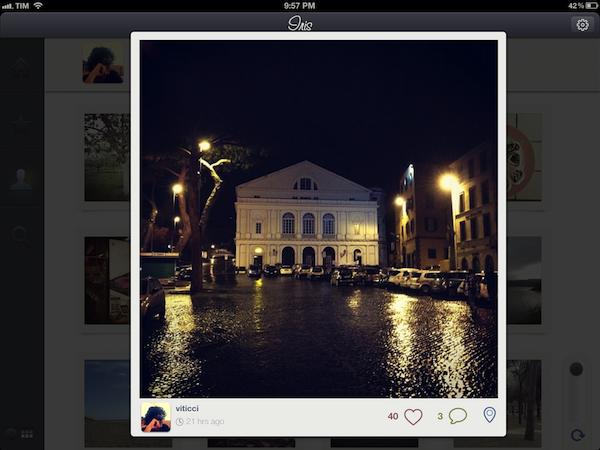
To navigate, Iris uses a mix of tabs, “load more” buttons, and panels. For instance, the main feed gives you a vertical list of photos from people you follow, and once you reach the end of the list you can hit a “load more” button to fetch more items. I found the refresh times acceptable, and I like the custom popup dialog that shows up when you load sections or refresh pages. You can tap on a photo to bring it up at its original size; you can like with a double tap (like the original Instagram), or by hitting the heart icon below a photo. In the same area, you can find buttons to comment, and view a photo’s location. Comments are displayed in a panel that loads at the side of the screen and is reminiscent of Loren Brichter’s Twitter for iPad. If you tap on a user’s avatar while viewing a photo, the user’s profile will slide up from the bottom of the screen, and, if I had to point out a minor UI annoyance I noticed, you’ll have to hit a “back” button to make the profile view slide down again. I find the action confusing as back buttons are typically associated with the content area moving to the right.

The Popular section is pretty self-explanatory; I did find some nice touches in the profile view. You can view the people you follow and your followers in dedicated panels; you can follow/unfollow in-app, and of course check out another user’s complete set of photos. In your Profile, you can also hit a globe icon to have a history of your Instagram shots displayed as Iris pins on a Google map – it’s a neat summarization of the places you “visited” with Instagram.

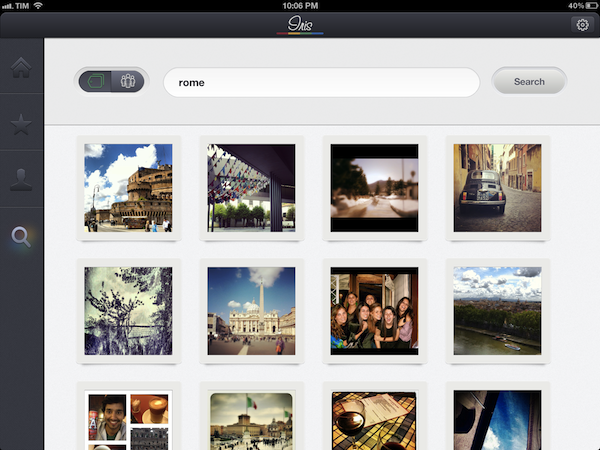
The search function of the app is very basic as well: you can search for people and “tags”. While people results will open in the aforementioned side panel, tags will simply return associated photo results in a regular grid view.

If Instagram were to release an official iPad app, I think it’d be extremely similar to Iris’ approach. A minimal, beautiful interface for the Instagram community that takes advantage of the iPad’s display to lay out large thumbnails and photos. Instagram would obviously want to implement a camera in a (possible) official app – right now, Iris doesn’t let you upload anything, and has to display photos at low resolution on the iPad’s Retina display. The effect, however, is nice (especially thanks to filters, which help hiding some pixellation here and there), and I bet it gets a lot better on older iPad models.

Iris offers a simple, good-looking and enjoyable Instagram experience on the iPad, so if you’ve been looking for a great iPad app to browse your favorite photos, $1.99 should be a no-brainer.


The Humble Botanicula Debut

Spring is here, and what a better way to get you in the mood than a new game called Botanicula. Botanicula is a point’n’click exploration game created by the makers of award-winning Machinarium, development studio Amanita Design and Czech band DVA. Five friends, little tree creatures, set out on a journey to save the last seed from their home tree which is infested by evil parasites. Humble Bundle is debuting this game and offering more cross-platform titles (DRM free) to raise money for the habitat conservation charity World Land Trust. Donate for a great cause and get a bundle of excellent games in return. If you donate more than the average, you can acquire the bonus title Windosill, not otherwise available with the initial line up. If you bought these games separately, it would cost around $53, but they are letting you set the price. If you pay at least $5, you can optionally get a key to redeem the games on Steam (for Mac and Windows).

The Humble Botanicula Bundle includes lots of great titles such as Machinarium, Samorost 2, Windosill and the full-length feature film Kooky (with art direction by Amanita Design founder Jakub Dvorský), giving you plenty of unique Indie gaming to romp through this Spring. Soundtracks are also included with Botanicula, Machinarium, and Samorost 2. You can find links to all the great games below.

There’s fourteen days left to donate, so you have plenty of time to cash in your paycheck and donate to a worthy cause. Be sure to check out The Humble Botanicula official launch video after the break and get amped up!

Read more


Interview: Justin Williams

In our ongoing series of interviews with developers and creators in the Apple community, I recently had the chance to talk with Justin Williams, the founder of Second Gear and developer of Today, Elements, and MarkdownMail. When he’s not busy developing new features for his apps or sketching out ideas, Justin also writes his personal weblog at carpeaqua. You can follow him on Twitter as @justin. The interview below was conducted between January 18 and April 19.

MacStories: Hey Justin! Could you introduce yourself to the readers who haven’t heard about you or haven’t tried any of your apps before?

Justin Williams: I’m Justin Williams. I’m the Crew Chief and lead developer at Second Gear. You may or may not have heard of our products:

  1. Elements — the original Dropbox syncing Markdown text editor for iOS.
  2. MarkdownMail — A quick and easy way to send HTML emails on your iOS device written in Markdown syntax.
  3. Today — A daily calendar app for Mac OS X.

I also write about technology and user experience at carpeaqua.com and post bad jokes on Twitter at @justin. Read more


Produce Morse Ringtones With iToneMaker

Some of you who are interested in electronic music may know Moog analog synthesizers and guitar effects. With their big stainless steel knobs, LEDs and very elaborate technology behind them, they create enormously noisy, grungy and disturbing sounds. The company also managed to create a very polished music production app for the iPad, animoog. The UI designer of today’s pick, iToneMaker Morse Code, was definitely inspired by this company’s product design, but nevertheless the app is a very unique and lovely compiled ringtone maker for your iPhone.

As the name might already suggest, the app’s sound production is based on the morse code principle. Hence you have to type in a word or a random letter/digit combination as the basis of your new ringtone into a message panel within the main window. The slightly different sounds of the single characters are played consecutively and result in the final ringtone.

Within this main window you can also change the basic elements of your ringtone: like “normal” analog synths, iToneMaker is based on (in this case obviously digital) oscillatory sound production. You can choose between triangular, saw and square oscillators and adjust their pitch, speed and break length between the morse sounds via custom sliding controls. Just push the central play button and your ringtone is played back, over and over… it can get pretty annoying, I warrant you.

If you are not satisfied with the output of these few controls - which happened to me literally every time I tried to produce an agreeable sound - you can additionally superimpose more editing features via the option button. You’ll find reverb and low-pass filter regulators plus some different effector types and the ability to change pitch while a morse tone is played. Besides that, developers Eiji and Tom kindly created some presets to choose from so that you never have to start from scratch completely and possibly never get to a passable ringtone result.

But let’s go back to the Moog-inspired UI. The knobs marking the advanced features are designed threedimensionally with a reflecting silver tone and are definitely dominating the individual style of the app. Everything else has got a monochromic look to it and the selector buttons feature a very nice custom indicating orange LED-design when their function is active. iToneMaker is coherent in every little detail and works really smooth with iOS 5 on my 3rd generation iPod touch. Even the implementation of the address book in order to use a friend’s name as a morse code pattern and entering longer character lines works as fast as the rest does.

There is just one small problem to the UX which I consider as relatively disadvantageous: if you superimpose the options panel it overlaps the (actually pretty big) play button and you can not stop the playback from there, if your ringtone is still running. But for an app which features such a cool and elaborated interface and is still available for free, this seems like a quite acceptable problem to me.