Posts in news

iPhone 5 To Include New iOS 5 “Assistant” Voice Feature

In a new article published this morning, 9to5mac claims to have the details surrounding Assistant, a new software service that has been built on top of Apple’s acquisition of Siri last year, and which should be enabled on the next generation iPhone. According to the website, Assistant will run on next-gen hardware as it’ll require the iPhone 5’s purported A5 processor and 1 GB of RAM. These hardware upgrades have been rumored before, and it wouldn’t come as a surprise if Apple decided to bump the specs of the iPhone 4 to accomodate more RAM, which would allow for more tasks running in the background. Such tasks would include Assistant, which is described as a brand new way to have “an infinite amount of information” available at the sound of your voice.

9to5mac reports Assistant will work with your voice, and it’ll be activated similarly to how Voice Control can be opened on older versions of iOS. Unlike Voice Control, Assistant should take up a smaller section of the screen – like the multitasking tray – and it’ll be associated to the Home button. Assistant-related code has been found in the iOS 5 SDK before, and 9to5mac confirms the new service will be integrated with contacts, messages, Maps, email and pretty much any other feature that supports systemwide frameworks on iOS – like Calendar and the message sheet.

Some of the features mentioned in the article:

  • There’s an “info” button in the Assistant UI to “view some of the most commonly spoken commands”.
  • You can create calendar events, reminders, get directions, send text messages directly with a voice command.
  • Find My Friends will be integrated with Assistant, and there will be privacy settings to control how you “can be found” when you’re online with your iOS device.
  • There is a “conversation view” to speak back and forth with the Assistant to confirm voice commands, and give further instructions like “send email to Mark’s work address”.

More details are available in the original article – such as Wolfram Alpha integration and the user interface design of Assistant.

Back in March, it was reported Siri would be “a big part” of Apple’s announcements at WWDC, but the company didn’t showcase any voice-related functionalities at its developer conference. That move would make sense if Assistant has been made exclusive to the new iPhone, which obviously didn’t get an announcement at WWDC either, and is currently rumored to be unveiled at Apple’s headquarters on October 4th. The voice recognition features of Siri were based on Nuance’s technology, which is also rumored to be in an agreement with Apple for the upcoming iOS 5. Previous iOS 5 betas revealed hidden functionalities (not enabled on existing hardware) related to “dictation”, a feature that, supposedly, would let users “speak text” they want to write on screen.
YouTube Testing New Mobile Layout

Following the Cosmic Panda experimental design launched in July, it appears YouTube is now testing an updated mobile layout that borrows some of the color schemes and interface elements of this summer’s refresh for desktop web browsers. The new mobile layout can be enabled at m.youtube.com/new_visual_design, and I’ve noticed this by opening the YouTube website from my iPhone (running the latest iOS 5 beta, but it works on iOS 4 too) earlier today. A quick Google and Twitter search seems to confirm that the new mobile layout is a recent change that, similarly to Cosmic Panda, is opt-in and needs to be manually activated.

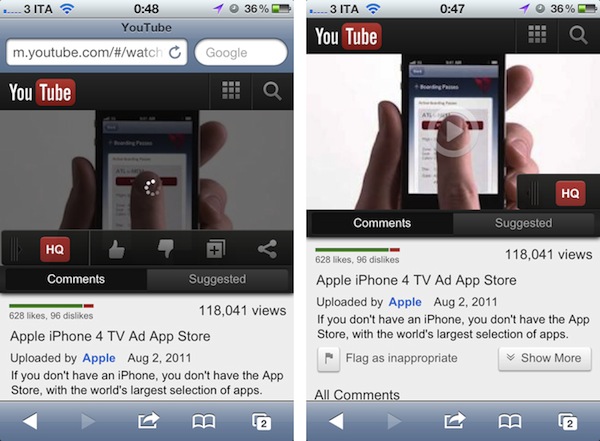
Once enabled, the new design brings a much darker color palette that presents videos against dark toolbars and buttons – I assume this should make videos a little easier on the eye, but the effect is sort of ruined by Safari’s blue address bar. Unlike the standard mobile layout, launched last year, when saving this new design to the iPhone’s Home screen you won’t get a Retina-ready icon or full-screen web app. This, again, should be related to the experimental nature of the design.

The new mobile layout brings updated buttons and a new toolbar to toggle HQ on videos, give them a thumbs up/down, and share them. The HQ toggle comes with a neat fading animation and the video thumbnail has new loading and Play controls, too. Read more


October 4th Event To Be Held On Apple Campus

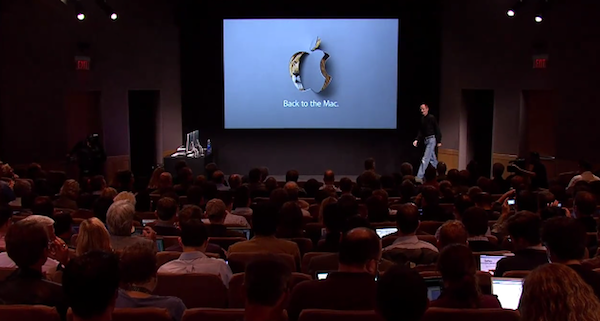
Apple’s Town Hall Auditorium during the Back to the Mac event, October 2010

John Paczkowski at AllThingsD follows-up on his earlier report of Apple’s next media event scheduled for October 4th, claiming that the keynote will be held on Apple Campus in Cupertino, rather than the Yerba Buena Center for the Arts, as usual with Apple’s fall event. Details aren’t clear, but it’s possible Apple didn’t want to book a full date for the Yerba Buena Center as the keynote was too much of a “moving target”.

Perhaps, the company felt a more intimate venue was best for newly installed CEO Tim Cook’s first media event. Perhaps YBCA was simply already booked. Whatever the reason, the world will get it’s first look at the next iPhone at Apple’s Town Hall Auditorium in early October.

Apple’s Town Hall Auditorium has been used on several occasions to preview upcoming versions of iOS to the press. Last October, Apple held its “Back to the Mac” media event at Town Hall to preview the new version of OS X, Lion, iLife ‘11 and announce updated MacBook Air models.

Rumors surrounding Apple’s next iPhone model have claimed the company has been working on either a completely redesigned device, or a minor update unofficially dubbed “iPhone 4S”. Several sources previously reported the next iPhone would ship in mid-October on AT&T, Verizon and Sprint in the United States; it is widely believed the new device will come with Apple’s upcoming iOS update, iOS 5, pre-installed and ready to be configured with iCloud. AllThingsD also reports Apple’s new CEO, Tim Cook, will preside over the event.


Google+ for iOS Update: Mobile Hangouts, New Notification Settings, And More

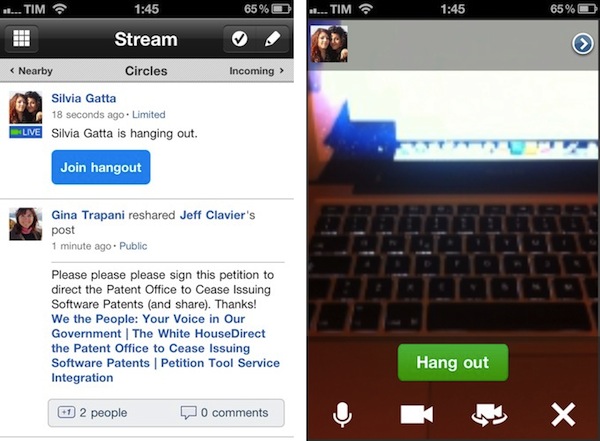
A major update to the official Google+ app for iOS has been released on the App Store, and it adds the features mentioned by Google earlier this week when the service hit official “beta” status (open to everyone) after a limited field-trial period. As previously announced by Google, the mobile app for iOS now comes with Hangouts support – meaning that you’ll be able to join a Hangout directly from your iPhone or iPod touch. I haven’t been able to test this yet as none of my friends is currently streaming a Hangout session, so I can’t comment on the app’s performances with video yet. When covering the functionality for the Android app, however, Google wrote:

In life we connect with others in all sorts of places, at all different times. And the connections you make unexpectedly are often the ones you remember the most. We think Hangouts should keep pace with how you socialize in the real-world, so today we’re launching it on the one device that’s always by your side: your mobile phone. To get started, simply find an active hangout in the Stream, and tap “Join”.

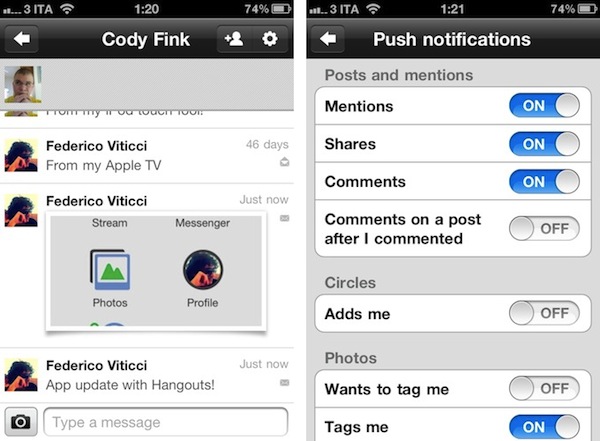
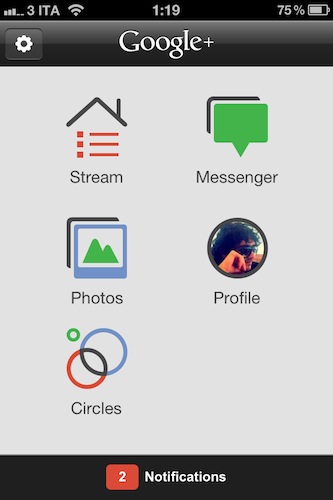
The most notable change as you fire up the updated app is Huddle, which has been renamed to Messenger and now supports photos. You can easily attach photos from your Library or snap new ones within a Messenger thread, and Google claims there have been some reliability improvements as well.

Throughout the app, I’ve spotted several optimizations that should make the mobile Google+ experience more enjoyable. For one, granular controls on notification settings now allow you to selectively receive push notifications for mentions, shares, comments, or comments on a post after you commented. You can also be notified about new people circling you, and new tags or comments on photos. Considering iOS 5’s upcoming Notification Center functionality, these changes should make for an optimal experience when dealing with the incoming stream of notifications from Google+.

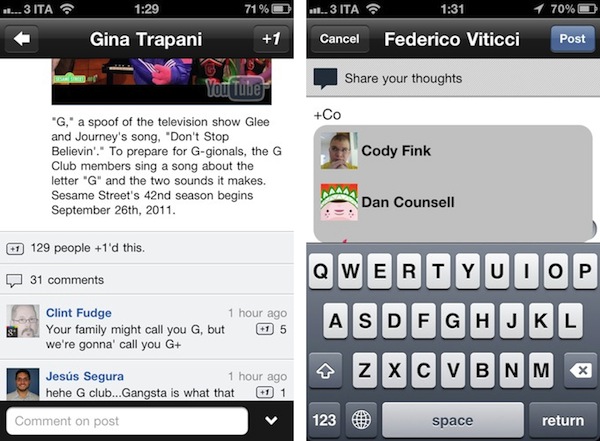
Other improvements in Google+ for iOS include the possibility to +1 comments, a map view in the profile for places you’ve lived, and a new feature to share posts with individuals only, instead of circles. Furthermore, Google mentions improvements to search in the changelog, and better support for +mentions (in the compose view, you’ll get a popup dialog to pick users, similar to Twitter).

The new Google+ update for iPhone feels like an important step forward in bringing the app up to parity with the website, as well as the mobile Android client. You can get it here on the App Store.

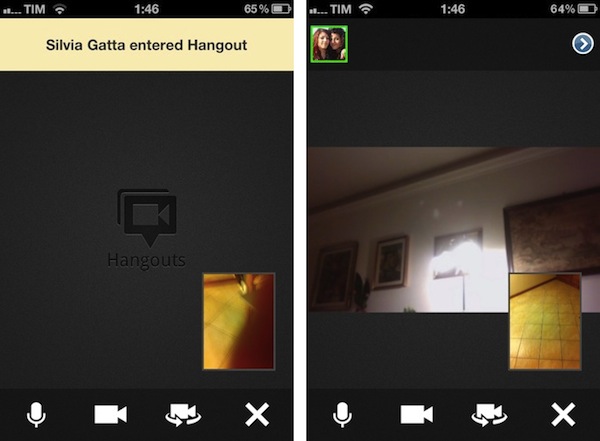
Update: I’ve run some first mobile Hangout tests, and performances seemed pretty reliably on my home network. Video quality was slightly worse than Apple’s FaceTime on the same connection, but it was a very slightly difference. What matters is that you’re able to join a Hangout directly from your stream as one of your friend starts it, and as you click “Join” you’ll be brought to a new dark screen that will load your camera view (front-facing by default), as well as your friend’s. There are notifications for new people joining a Hangout, and as multiple members join you can open a new screen to instantly add them to a circle.  There are buttons in a bottom toolbar to mute audio, freeze the camera, switch between front and rear-facing cameras, and leave the Hangout.

Overall, the process of joining a Hangout from my iPhone was pretty smooth, though on my friend’s end, she told me she was logged out at some time, and had to re-enter the Hangout. During those few seconds, I was left alone with a black screen as you can see in an image below. Hangouts on desktop web browsers have been recently enhanced with new features as you can read in Google’s blog post.


WordPress 2.9 for iOS Gets New Text Editor, Fixes

WordPress has released an update to their iOS client earlier today, adding a number of features that have been requested since the original release of the blogging client for iPhone and iPad. I’ve been trying the latest WordPress, and while it’s still far from being the perfect app to write long articles on the go, the new features introduced in the latest update surely contribute to enhancing the overall experience.

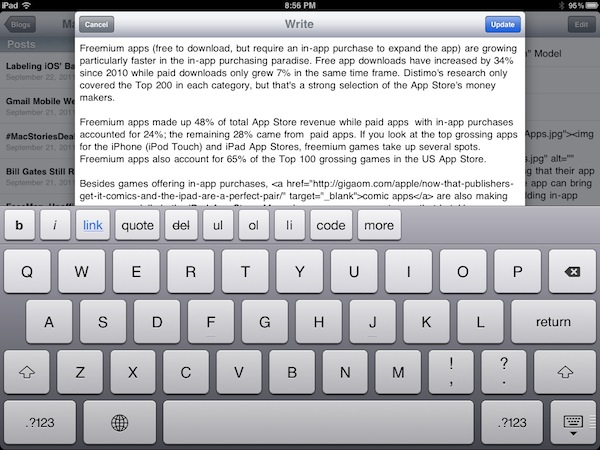
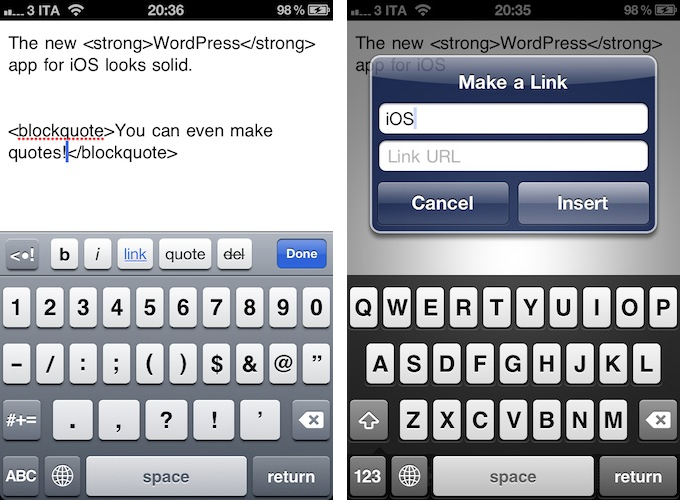
For one, WordPress 2.9 has a refreshed text editor. It’s not the same visual editor you’d get on a self-hosted WordPress blog – it still forces you to write with visible HTML, then hit a button to preview text – but it’s got an additional keyboard row both on the iPhone and iPad with buttons for bold and italic text, adding links, quotes and strikethroughs, bulleted lists, and more. The app is pretty smart in that text will be automatically wrapped between HTML tags both when you hit the buttons as you type, or manually select text afterwards. I’d like to see the possibility of manually arranging and customizing the extra keyboard row in a future update, but there’s no doubt the feature gets the job done for now.

Editing is done in a pop-up window on the iPad (my main writing machine when I’m on the go), with buttons along the bottom to switch between HTML, settings, preview, and attach media. Whereas the iPad app lets you switch between modes with the tap of a button, on the iPhone you’ll have to hit “Done” to go back to the previous view (with settings, title, categories, etc.).

WordPress mentions two more features in the iTunes changelog:

Full Screen Editing. No more teeny-weeny content editor — now you can view more text at a time while you post on the go.

Reading Made Easy. Keeping track of your favorite blogs has never been easier. Browse all the latest posts on blogs you follow in one place, right from your iPhone.

WordPress 2.9 comes with three minor fixes as well, which include posting pictures that you’ve already taken with Quick Photo (introduced in version 2.8), and stats/referrer links that can be opened in-app. In a post on the WordPress for iOS blog, the developers explain the new “Read” feature:

If you have one or more WordPress.com blogs in your WordPress for iOS app you’ll now see a Read button in the blogs list. This is the fastest way to keep up with posts from blogs you’re following on WordPress.com. Here’s how it works: if you go to any WordPress.com blog and click the Follow button, you’ll not only get email notifications about new posts from that blog, they’ll also show up right in the app!

WordPress 2.9 is an interesting update, one that I’m sure will get more writers to consider the iOS app as a feasible alternative when a laptop is not available. I’m definitely looking forward to version 3.0, which is going to be the “biggest update to the WordPress for iOS app since its birth”.

Download WordPress for iOS here.


Support for Quad-Core ARM CPUs Found in Xcode

As reported by Chris Foreman at Ars Technica, code strings related to Marvell’s ARM-based quad-core CPUs have been found in the latest source code of Clang, Apple’s compiler for Xcode. Specifically, Ars Technica notes Clang shows support for Marvell’s Armada XP processor with an “undefined” open source flag, suggesting that only Apple can internally build code targeted towards such CPU.

A developer who works on low-level ARM assembly coding for security products was the first to alert Ars that support had been added for Armada’s Cortex A9-compatible processors in the latest version of Xcode (a claim that we later confirmed first-hand). The source code for a part of Clang that interprets what CPU type is being targeted for optimization includes a definition for an architecture type of “armv7k” and CPU type “pj4b”. PJ4B is a specially optimized CPU design used in Marvell’s quad-core Armada XP embedded processors. Source code available from the LLVM project, including Apple-specific branches, doesn’t contain any reference to the Marvell design.

There are a number of reasons why Apple would like to test support for ARM-based quad-core CPUs. First is low-power consumption, a characteristic of ARM architectures that has allowed Apple to build mobile devices with amazing battery life. Second is performance – just like the dual-core A5 provides faster graphics and performances than the first-gen A4, it wouldn’t be a surprise to know Apple is testing quad-core processors for the next generation of phones and tablets. On the other hand, the MacBook Airs were rumored earlier this year to be considered as the first Mac model to switch to ARM (again, the rumors mentioned battery life, extreme portability, and other often-quoted ARM advantages), although such transition would require developers to update their OS X applications to work with ARM, possibly only on MacBook Airs to start with. Many doubt Apple will switch Macs to ARM in the short term, especially considering Intel’s upcoming Ivi Bridge and Haswell processors (supposed to tackle the battery life and power consumption issues).

It’s interesting to note, however, that Apple is at least testing ARM-based quad-core CPUs internally, and that these references have made it into Clang’s source code.


Western Digital Unveils Next Generation of My Passport Portable Drives

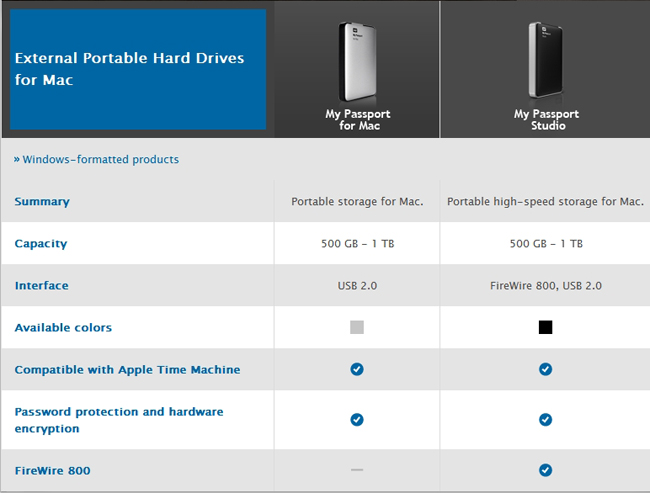
Today Western Digital introduced its newest generation of the popular My Passport portable hard drives for Mac users. They’re more compact and elegant than before with slim, all-metal designs. The My Passport Studio is a great portable solution for photographers, videographers, graphic artists or any creative that needs large amounts of storage data. It offers storage up to 1TB and has multiple connectivity options with two FireWire 800 ports and one USB 2 port. The FireWire port on the device allows for daisy-chaining with other devices such as HD camcorders, as well as Apple’s new Thunderbolt Display (which features Thunderbolt, FireWire, USB, and Ethernet ports).

The My Passport for Mac is another option for students and users that don’t need FireWire ports but still demand up to 1TB of storage.

Whether you are a member of the creative community or simply use your Mac to enjoy digital content on-the-go, users will find the perfect portable storage solution with WD’s My Passport Studio and My Passport for Mac high-capacity portable hard drives,” said Jim Welsh, executive vice president and general manager of WD’s branded products and consumer electronics groups. “We know the value our customers place on their digital content, which is why we set demanding requirements for durability, security, and long-term reliability, with all our drives.

These two drives are available right now via the WD Store (and other retails) and start at $99 for the 500 GB My Passport for Mac, and $129 for the 500GB My Passport Studio.


Financial Times’ Web App “More Popular” Than iOS App

Reuters reports on the Financial Times’ web app’s performances, noting that the HTML5-optimized version of FT.com has now 700,000 users, proving it to be “more popular” than the newspaper’s iOS app. Financial Times made headlines when it couldn’t agree with Apple on iTunes’ subscription rules for publishers – which require companies to give a 30% revenue cut to Apple, and make sharing of subscriber data opt-in. It was previously reported that 50% of iTunes subscribers opted to share their personal information; however, the Financial Times wanted more control over its mobile application, and decided to develop an HTML5 version instead. The iOS app was then pulled from the App Store.

People who are using the app are spending much more time with the content,” he said. “They are consuming about three times as many pages through the app as they are through the desktop in an average visit.”

The FT’s Web-based mobile app accounts for 15 percent of FT.com subscriptions and 20 percent of total FT.com page views from mobile users, Grimshaw said.

After launching the new web app on June 7, the Financial Times reported after three weeks they achieved 200,000 downloads, with 100,000 in the first week alone. In spite of its web app nature, the iOS-optimized FT app recommends users to “add it to their home screens”, requesting access to increased database size for local cache.

Apple has been doing a number of things to address the issues with subscriptions and delivery of content on iOS devices. They first launched iTunes app subscriptions in February, making it easier for users to subscribe to newspapers and magazine with their existing iTunes accounts. Then at WWDC the company announced Newsstand, a new unified virtual shelf on iOS devices for content a user is subscribed to. Adobe has already announced its publishing tools will be updated to take advantage of iOS 5’s Newsstand. The Financial Times is not the only publisher to find an alternative route out of Apple’s App Store, as Amazon released a web-based version of its Kindle reader with direct integration with the Kindle Store.

Both the Financial Times and Amazon couldn’t comply with Apple’s subscription rules, even after Apple slightly modified them to open up to more publishers in June.


“iPhone 4S” Name Shown On OtterBox Case Packaging

According to a series of tweets posted earlier today by @chronic on the @chronicwire Twitter account, accessory maker OtterBox has built over 3 million cases for a rumored upcoming “iPhone 4S” device. As seen in the photos posted online, the packaging of one of such cases depicts the “iPhone 4S” name, as well as what appears to be a redesigned position for the iPhone’s volume buttons, seen on the right of the device. You can check out more photos over at Twitter.

Chronic has been a source of Apple-related “leaks” in the past. For instance, he posted screenshots of several internal iOS 5 settings (high-quality YouTube and FaceTime over 3G), as well as information in the weeks that lead up to Apple’s Back to School promotion in June. Chronic was, however, incorrect in reporting MacBook Air updates weeks before Apple actually shipped the refreshed models.

There’s been a controversy in iPhone-related rumors in the past months as to whether Apple will ship a “completely redesigned” iPhone 5 in October, an iPhone 4-like “iPhone 4S” device (such name was first used by 9to5mac in discussing an A5-powered iPhone 4), or both. According to recent speculation, Apple is set to hold a media event to introduce the next iPhone on October 4th. A number of cases from third-party manufacturers have surfaced in the past months, showing both signs of a redesigned device and something very similar to the iPhone 4 – thus the discrepancy in iPhone 4S-iPhone 5 rumors. You can read more about this in our iPhone rumor roundup and retrospective.