Posts in news

Apple Updates FCP X With Multicam Editing, Enhanced XML

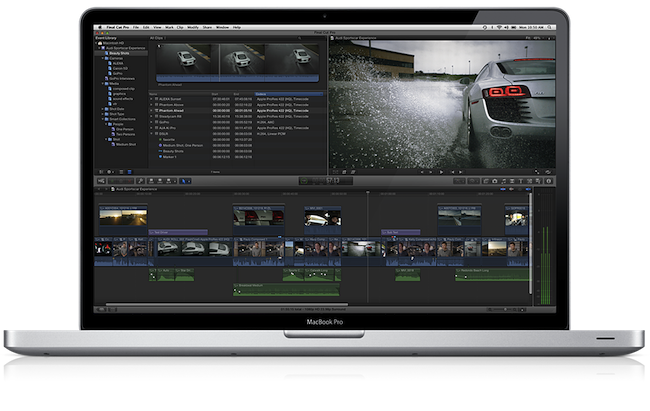
With a press release, Apple today announced a major update to its professional video editing tool Final Cut Pro X. The new version, 10.0.3, available as a free update on the Mac App Store, introduces several highly requested features and fixes, including multicam editing, enhanced XML 1.1 support, and advanced chroma keying. A free trial of Final Cut Pro X is available on Apple’s website.

Following a controversial launch in June (when the company even made an exception with refunds), Apple responded to negative FCP X feedback promising that more functionalities and improvements would be released in the following months. Today’s update brings multicam editing from up to 64 different angles of videos and photos, and XML for advanced interchange with different plugins and applications that support the Final Cut Pro X ecosystem, such as DaVinci Resolve, CatDV (color correction and media management), and the 7toX app from Intelligent Assistance which “uses XML to import Final Cut Pro 7 projects into Final Cut Pro X”.

Final Cut Pro X v10.0.3 includes a collection of groundbreaking new tools for editing multicam projects. Final Cut Pro X automatically syncs clips from your shoot using audio waveforms, time and date, or timecode to create a Multicam Clip with up to 64 angles of video, which can include mixed formats, frame sizes and frame rates. The powerful Angle Editor allows you to dive into your Multicam Clip to make precise adjustments, and the Angle Viewer lets you play back multiple angles at the same time and seamlessly cut between them.

Final Cut Pro X builds upon its robust, one-step chroma key with the addition of advanced controls including color sampling, edge adjustment and light wrap. You can tackle complex keying challenges right in Final Cut Pro X, without having to export to a motion graphics application, and view your results instantly with realtime playback.

The Loop has more details on Apple’s implementation of multicam editing using audio waveforms:

What’s really different in Apple’s implementation of multicam is how the company does its automatic syncing. Of course, you can sync camera angles by using the timecode or the less accurate method of using the time of day, but Apple has a new way of syncing camera angles — audio waveforms.

Townhill explained that with Final Cut Pro X, you can now sync scenes using the audio waveform captured with the camera. This doesn’t have to be the final audio used in the scene, but it can be used for syncing purposes. Of course, manually syncing cameras is still available at any time.

Furthermore, Apple states in the press release that ”broadcast monitoring in Final Cut Pro X is currently in beta and allows you to connect to waveform displays, vectorscopes, and calibrated, high-quality monitors to ensure that your project meets broadcast specifications. Final Cut Pro X supports monitoring of video and audio through Thunderbolt I/O devices, as well as through third party PCIe cards.” This update also allows users to import and edit layered Photoshop graphics, and import/export effect parameters through XML 1.1.

At the moment of writing this, the Mac App Store still reports 10.0.2 as the latest FCP X version available. The update should go live later today at this link.


Obama, Romney Election Campaigns To Use Square In Fundraising Efforts

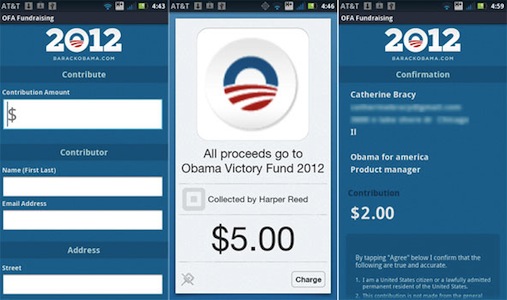
Square looks set to play a big part in the 2012 US Presidential race, with both the Obama and Romney camps announcing this week that they will be adopting the tool to give their grassroots fundraising efforts a boost. The mobile payments company uses a small accessory that plugs into the headphone jack of an iPhone, iPad or Android phone and works with a companion app to accept payments from credit cards.

The Obama re-election campaign will begin using Square straight away, initially with campaign staffers and “some approved volunteers”. But the ultimate goal is to develop their own Obama Square app that they can distribute on the App Store - allowing anyone to get the app and Square attachment and go around collecting donations. To comply with the Federal Election Commission’s (F.E.C.) rules, the app will need to collect the name, address, city, state, ZIP code, occupation and employer of the contributor, along with contribution size and collection date.

If the Square rollout is successful, and others follow, campaigns could send out armies of volunteers brandishing the Square credit card reader and collecting millions of dollars in micro-payments from political supporters.

The Romney campaign similarly announced today that they will also be trialling Square and likely developing their own, Romney-themed Square app. They will conduct a “beta-test” of the Square app and accessory on Tuesday night’s Florida primary election.

Daniel Rubin, strategic partnerships manager at Square, who works with political campaigns and major nonprofit organizations, said Square was partnering with a number of campaigns to make 2012 the year mobile payments change the way donations are collected on the ground. “It’s now easier than ever to give to campaigns of any political stripe,” Mr. Rubin said. “At a campaign, or any political event, donors will be able to give on the spot. They won’t have to run home and get a check or fill out long paper forms.”

[via The New York Times]


Apple Hires John Browett To Fill Senior Vice President Of Retail Position

Apple has this morning announced that it is hiring John Browett to serve as the company’s senior vice president of Retail - a position that he will fill from late April. Browett has been the CEO of European technology retailer Dixons since 2007 and has considerable experience in the field, also holding executive positions at Tesco including CEO of Tesco.com.

“Our retail stores are all about customer service, and John shares that commitment like no one else we’ve met,” said Tim Cook, Apple’s CEO. “We are thrilled to have him join our team and bring his incredible retail experience to Apple.

Browett will become responsible for the retail strategy at Apple and lead the expansion of Apple retail stores around the world. He will be taking over the position that Ron Johnson had held until he left Apple last November to become chief executive of JC Penney.

Apple’s full press release and Dixons’ full press release are included after the break.

Read more


Apple Releases iOS-like AirPort Utility 6.0 for Lion

Earlier today Apple pushed a series of updates for its AirPort Utility software, as well as a firmware update for AirPort Base Station and Time Capsule.

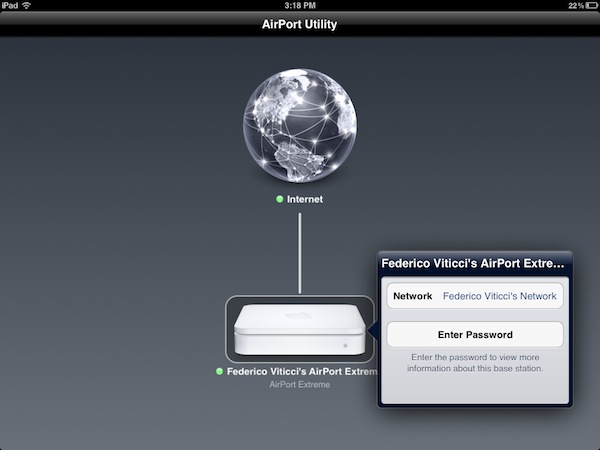
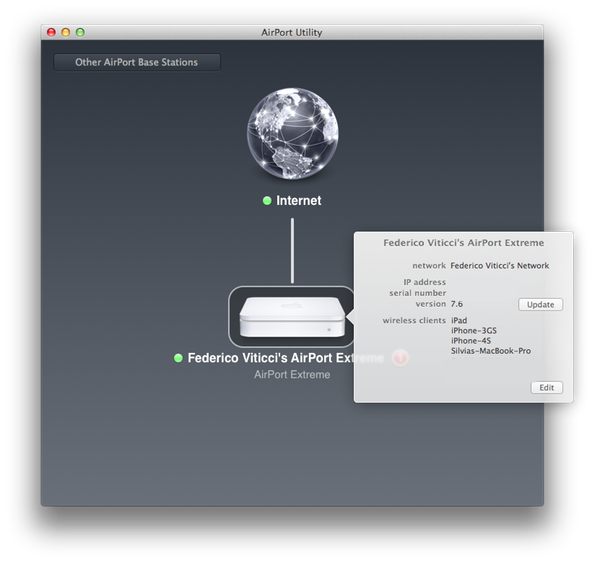
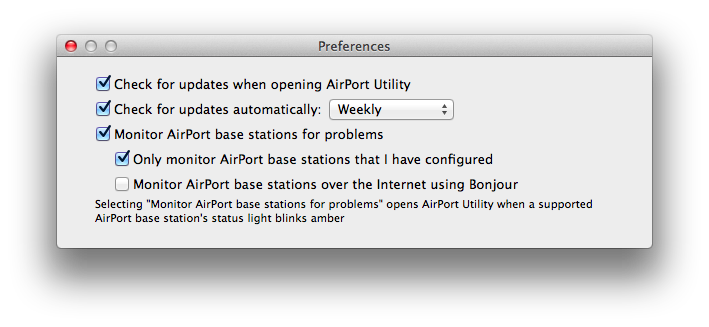
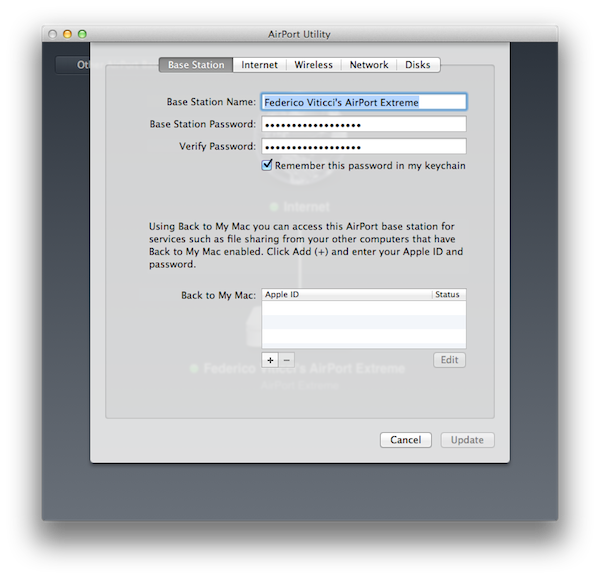
AirPort Utility has been updated to both version 5.6 (latest one was 5.5.3) and 6.0,the latter  available now as 14.3 MB download in Software Update. Whilst 5.6 is a minor update that ”resolves an issue with using network passwords stored in the Keychain” and ”works with AirPort Express 802.11g and AirPort Extreme 802.11g base stations”, AirPort Utility 6.0 is a major rewrite of the application that now resembles its iOS counterpart released in October of last year.

Above: AirPort Utility for iOS 5 on iPad. Below: the new AirPort Utility for Lion.

We’ll update this story with more details and screenshots in a few minutes. In the meantime, you can find the download links below. Apple also updated the AirPort Base Station and Time Capsule firmware, which reaches version 7.6.1 and brings the following changes:

This update is for all 802.11n AirPort Express, 802.11n AirPort Extreme and Time Capsule models. It fixes an issue with wireless performance and provides support for remote access to an AirPort disk or a Time Capsule hard drive with an iCloud account.

Direct links:

AirPort Utility 5.6 for Mac OS X Lion

AirPort Utility 6.0 for Mac OS X Lion

AirPort Base Station and Time Capsule Firmware Update 7.6.1


Lion Full-Screen, New Tab Page Sneak Into Early Firefox 12 Build

One of the next versions of Firefox, Firefox 12, may feature a series of new interface elements and functionalities that should both appeal to OS X Lion users and introduce new navigation options for those who dont’ want to save their-most accessed websites in a bookmarks bar anymore. As first noted by ExtremeTech, an early version of a proposed new tab page design snuck into a nightly version of Firefox; per Mozilla’s multiple channel releases, users of Firefox can test different versions of the browser, which range from Nightly to Aurora, Beta, Stable, and those uploaded directly to Mozilla’s FTP servers.

ExtremeTech wrote about the new tab page:

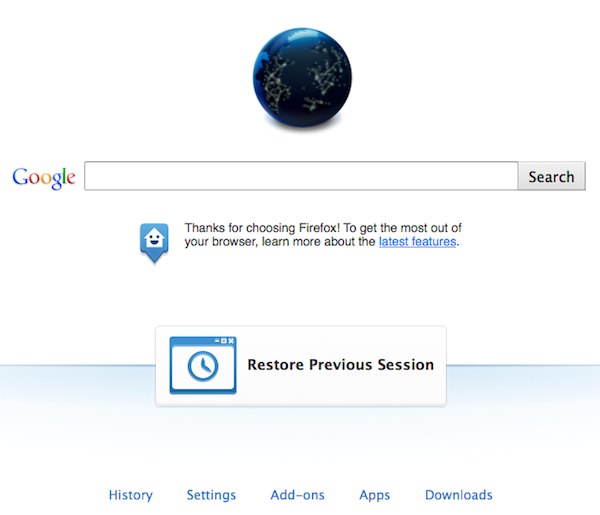
The Firefox home tab is a lot more exciting. Basically there are two phases: The first phase will add “launchers” at the bottom — one-click links to your downloads, settings, apps, and so on (pictured right). Phase two is a complete reworking of the home page paradigm, weaving in favorite apps, recent websites, and even instant messaging (pictured below). Phase one is expected to roll out with Firefox 12, but at the time of writing the code still hasn’t been committed.

However, as also noted in an update to the original post, it appears Mozilla has pulled the functionality from the Nightly release of Firefox, leaving it in the “UX version” available for download on Mozilla’s servers. Upon comparing the standard Nightly build to the UX one, I noticed the latter already contains the grid design for top websites pictured above, and full-screen support for Lion.

I wasn’t able to activate ExtremeTech’s home tab page design with search, Top Apps, Top Sites and Chat in a single window; the current Firefox UX Nightly build features shortcuts along the bottom of the window to open History, Settings, Add-ons, Apps, and Downloads. A new “Restore Previous Session” button is also provided in case you haven’t set Firefox to automatically re-open previously open tabs on launch.

Changes that appear in Firefox Nightly builds typically carry over to the other stages of development and are further tweaked with refinements and bug fixes, but there could be changes in the features that Mozilla decides to implement once version 12 hits the beta channel. As for Lion support, Mozilla failed to deliver any significant optimization since the OS’ release back in July, unlike competitor Chrome which added new scrolling, full-screen support and gesture navigation (among other things) fairly quickly. A designer at Mozilla mocked up some ideas that the company could deliver in a future version of Firefox for Lion, but as of version 12 nightly (Firefox stable is currently at version 9) it seems those ideas haven’t been taken into consideration yet.


Why The iPhone’s Average Selling Price Increased Despite The “Free” iPhone 3GS

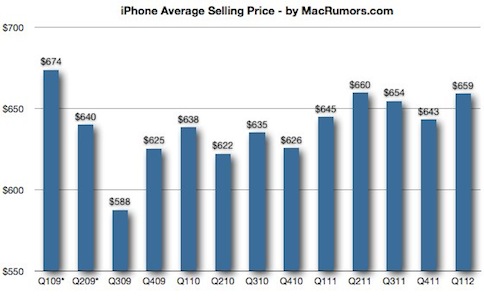
Earlier this week Apple released its Q1 2012 financial results and it was a blockbuster quarter, Apple’s best ever with $46.33 billion in revenue. One of the key factors that drove this sky-high figure was the sale of 37 million iPhones at an average selling price (ASP) of $660 — iPhone sales actually contributed to 53% of Apple’s revenue for the quarter.

Significantly, this was the first full quarter where Apple offered a “free” iPhone in the US to customers going on contract — the iPhone 3GS. Previously Apple had offered the 3GS alongside the iPhone 4 at a reduced price, but with the 4S the iPhone 4 fell to $99 and the 3GS became free. One would have presumed that the iPhone ASP would thus fall with the addition of another lower-priced iPhone model but in fact the ASP increased from the previous quarter and at $660 the iPhone ASP is near the highest it has ever been.

How has the ASP risen despite the presence of the “free” 3GS?

There are a few reasons as to why the ASP has increased and a big reason is that in addition to the new lower-priced 3GS ($345), Apple also introduced the 64GB iPhone 4S that is at a higher price-point ($849) than the previously most-expensive iPhone. This new higher-priced model would seem to have offset any reduction in the ASP that the iPhone 3GS would have caused - particularly given Q1 2012 was the 4S launch quarter and demand was very high for the new iPhone model.

Whilst Apple didn’t give out details on what the breakdown was of sales between the iPhone 4S, 4 and 3GS, an estimate from Consumer Intelligence Research Partners suggests that in the last quarter the iPhone 4S represented 89% of all iPhone purchases in the US. The report showed that only 4% of iPhone purchases last quarter were for the 3GS and 7% for the iPhone 4. This backs up the notion that the higher-priced iPhone 4S 64GB model (estimated to be 21% of iPhone 4S purchases) actually offset any decrease in the ASP and probably drove the increase in ASP to $660.

How will the iPhone ASP fare in the following quarters?

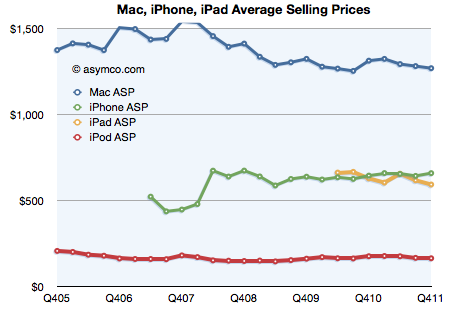
As Horace Dediu of Asymco points out, there is usually a slight uptick in the iPhone ASP during a launch and holiday season. This would suggest that in the following quarters the ASP may decrease a little as the high launch demand for the 4S subsides a little. It is unlikely to drop that much though, with the iPhone ASP typically hovering somewhere between $620 and $660. Dediu also investigated the historical ASPs for the iPhone, iPad, iPod and Mac and found that “Apple does not change pricing but rather stakes out a specific price point as resonating with consumers given their positioning”. The above chart demonstrates this point quite well.

[Sources: MacRumors, Asymco, AllThingsD]


Valve Releases Steam Mobile for iPhone

Back in March, we reported game developer Valve – best known for hits such as Half-Life and Portal – was “looking into” a Steam expansion for mobile devices.  Today, we can see the results with the official Steam Mobile app for iPhone now live in the App Store for free. You can read more about Steam Mobile on Valve’s website, too.

With the free Steam app for iOS, you can participate in the Steam community wherever you go. Chat with your Steam friends, browse community groups and user profiles, read the latest gaming news and stay up to date on unbeatable Steam sales.

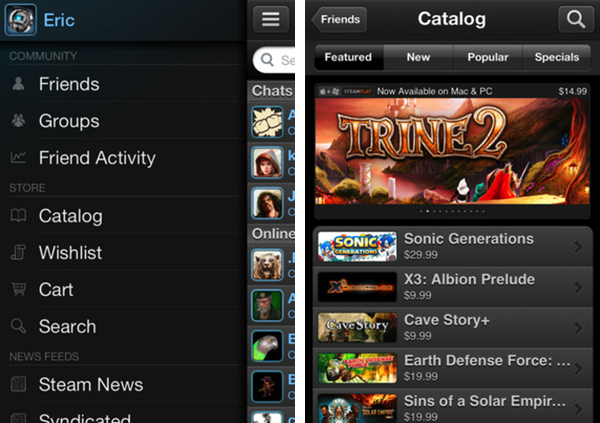
Steam Mobile for iPhone brings the Steam experience from the web to iOS, allowing users to check on their friends’ status, chat, browse the Steam game store and manage their wish list, and even add new items to the cart. Judging from the screenshots – we can’t try the app yet, as it’s in “closed beta” – it appears you can easily open a game’s page and check out its description, screenshots, add it to the wish list or your Steam cart; the Catalog section has tabs to browse Featured, New, Popular games and “Specials”, whereas other navigation options are located in a Facebook-like sidebar that contains links to Friends Activity, News Feeds, and more.

You can download Steam Mobile here, but it’s likely you won’t be able to use the app right away as you have to “express interest” in the beta first. Steam Mobile has also been released for Android today.


Launch Center 1.1 Adds Scheduled Launch Actions

We reviewed App Cubby’s Launch Center when the app was released back in December after Apple rejected an initial version based on Notification Center. Even without fancy Notification Center integration, Launch Center has become one of my new favorite apps, earning a spot in my iPhone’s dock because of its greatest achievement: allowing me to save an unlimited number of shortcuts for actions that I repeat every day (such as calling my mom or iMessaging my team) in a single place. I’d argue that I even prefer Launch Center without Notification Center support as it’s more focused.

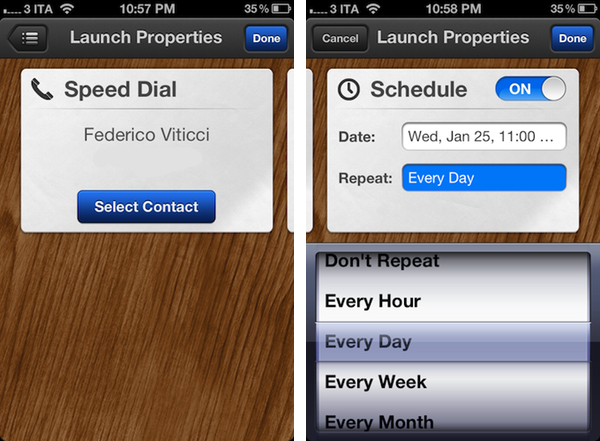
And today with version 1.1 it gets even better. Launch Center 1.o, in fact, allowed you to create shortcuts through custom URLs and activate them with a single tap. But you still had to remember you had to do something – you’ve got your nice action to call your dad, but what if you forget to call him? The shortcut becomes useless. Similarly, your iOS device comes with alarms, but you can’t associate actions to them; it’s easy to set an alarm in three hours for something “important”, and forget what it was all about. Launch Center’s new scheduled launch actions are a fantastic mix of shortcuts and alarms: you can now assign a custom alarm to each of your shortcuts. When the time comes, Launch Center will fire off a local iOS notification that will show up in Notification Center, and take you to the configured action…which will activate and call your dad with one tap, to finish the example above. It’s genius.

I use Launch Center every day and I can already see scheduled launch actions becoming an integral part of my workflow – imagine setting up alarms for emails, messages or just about any app you know you’re going to use at a certain point in time. Launch Center 1.1 combines the speed of custom URLs with local notifications to create smart alarms that have both context and the appropriate speed to feel immediate and intuitive.

Launch Center 1.1 is available in the App Store at $0.99.


Evernote Working On Todo List App Following Egretlist Acquisition

During the past year, note taking/memory management service Evernote set out to build a platform around its services, which span the web, iOS devices, OS X and Windows through a set of cross-platform tools and native applications. The company launched Trunk, a unified showcase of third-party applications that integrate with the Evernote API, and updated its iOS and Mac offerings with richer user interfaces and new functionalities. Furthermore, Evernote acquired image annotating service Skitch and released an iPad version of it; they also launched four standalone Evernote-based apps: Food and Hello, for remembering meals and people, respectively; Clearly, to read web articles in an elegant format; Peek, to help students learn more through Evernote’s visual presentation.

Whilst it sounds fairly obvious for Evernote to be considering new platforms and opportunities to expand upon the concept of preserving human memory – a subject that offers itself to a broad range of implementations – Alexia Tsotsis over at TechCrunch shares some juicy details behind Evernote’s various acquisitions that led to the dedicated Evernote apps we see today.

As it turns out, Evernote CEO Phil Libin has confirmed the company purchased four startups in the past year alone: among those, Readable became Evernote Clearly, Notable Meals became Evernote Food and an another one, called Minds Momentum, was acquired in order to get the assets for an upcoming Evernote todo list application. TechCrunch doesn’t share any more details, however a quick Google search confirms that Minds Momentum was the company behind Egretlist, an iPhone app to manage todos based off Evernote that we reviewed here.

We wrote:

This isn’t an application meant to replace Evernote with a prettier interface, but rather complement it. Egretlist is strictly focused on managing to-do lists with your various notebooks. On the surface, that might pretty tame. But when you combine to-do lists with Evernote, suddenly the functionality becomes stellar. As you read in the real-estate example, being able to just sync not only with yourself, but others using Evernote’s service, makes for an always online, always updateable task-list not dissimilar to Basecamp to-dos and milestones.

Basically, Egretlist provided an effortless way to create todos and format them in a native interface that would, however, sync back to Evernote’s main client to make those todos readable, and possibly editable as well, from your desktop computers. Interestingly, Minds Momentum also developed another paid Evernote-based app, Egretlinks, which ran universally on the iPhone and iPad and allowed users to manage web clippings from their Evernote notebooks. Both Egretlist and Egretlinks haven’t been updated in months, the developers’ Twitter account is silent, and the website is still showing iPhone 3GS screenshots for the apps.

Evernote isn’t new to this kind of acquisitions. iOS text editor Essay, for instance, was bought by Evernote to power their iOS rich text editor and few people knew about it until the developer published a blog post.

From my perspective, it only makes sense for Evernote to look forward to revamping the todo management aspect of the service. Note taking and memory management often overlap with todo creation and completion these days, and Evernote’s built-in checklist/todo support is stripped down to minimal functionality without really offering a compelling way to add tasks and reminders. I’m first to admit I’ve used Evernote to remember things to do more than a couple of times in the past.

Minds Momentum’s acquisition, I believe, also plays well with Evernote’s plan in the long term. Rather than supercharging the main client with hundreds of features, Evernote has taken the ecosystem approach in choosing to offer a centralized service with a main general purpose client and several different standalone apps for more specific purposes. The Evernote app itself isn’t the proverbial Swiss army knife: the whole service is. Honestly, I don’t want the Evernote app to incorporate a text editor and a task management tool and food diaries, and it appears that the company seems to be thinking the same thing – nurturing an ecosystem can be much more profitable and rewarding (both for the company and its users) than feature creep.

I look forward to Evernote’s “upcoming” todo list application, just as I can’t wait to get my hands on a public version of the latest Mac beta (which adds some sweet improvements in the text editing UI) and refreshed iOS clients. Expect more Evernote news soon.