

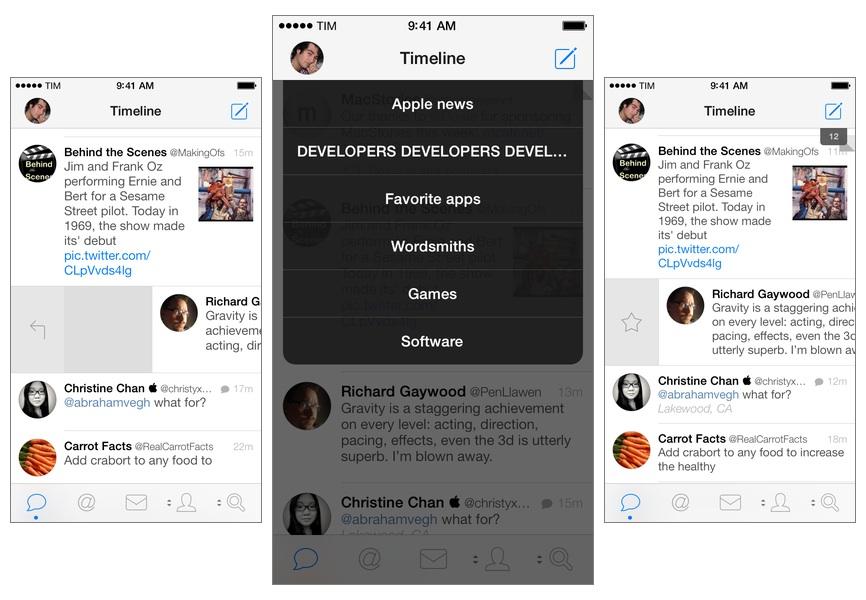
Tweetbot for iPhone may have grown up, but it hasn’t forgotten about the features and design decisions that made it a powerful and popular Twitter client among iOS users for the past two years. Tweetbot 3.1, available today on the App Store, improves upon last month’s major release by bringing back some old features of Tweetbot 2.x and introducing new ones, always taking advantage of iOS 7’s design and structure in interesting ways. Read more
Posts in news
Tweetbot 3.1 Brings Text Size Controls, Timeline Switcher, Quick Actions
Skitch for iOS Gets “Open In” Support, Maps, Other Enhancements
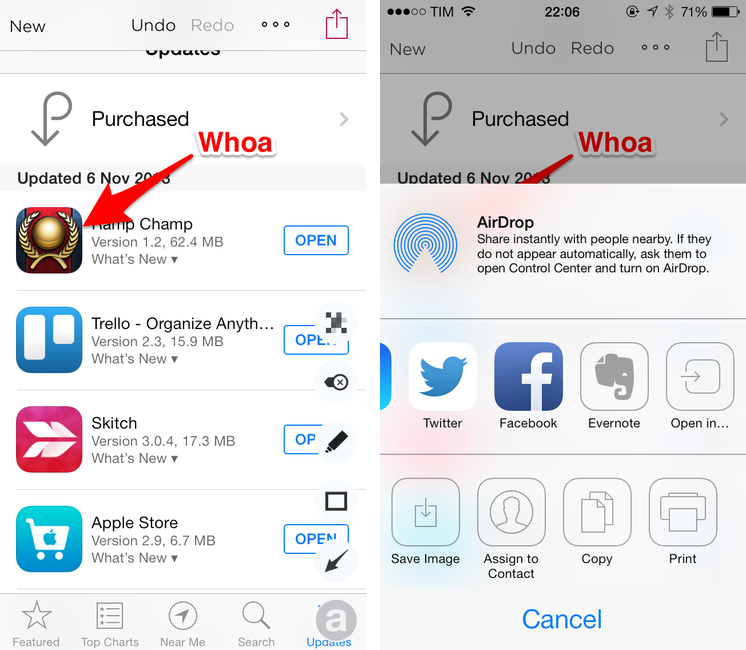
Released in late September, Skitch 3 for iOS was a great reimagination of Skitch, but it lacked some handy features like Maps integration and an Open In menu to send annotated images to other apps. I called Skitch 3 “a fun, quick annotation app with a lot of tools but a focus on speed and straightforwardness”, noting how it became my go-to image annotation app (again).
With today’s 3.0.4 update, Evernote has brought a series of minor but welcome enhancements that make Skitch more powerful and integrated with other iOS apps. Notably, an Open In option has been added to the sharing menu, allowing Skitch to send annotated images directly to iPhone and iPad apps (in my case, Droplr).
As detailed on the Evernote blog, other additions include an overflow menu that contains a Crop function and a “Clear All Annotations” shortcut; possibility to annotate your current location on a map view; and new controls for Evernote notebooks. While Skitch 3 wants to be an annotation app that can be used without Evernote sync, users who want to send images to Evernote can now choose a default notebook in the Settings.
I like today’s Skitch update, especially for Open In support (my Skitch > Droplr > Tweetbot is now much simpler). Skitch 3.0.4 is available on the App Store.
Doxie Flip: A Flatbed Scanner For Paperless Workflows
Disclaimer: The folks at Doxie purchased a MacStories sponsorship for this week and sent me a Doxie Flip as a gift. I didn’t promise any review or coverage in exchange for me selling the sponsorship and receiving the device. As always, this article contains my impressions and honest opinion.
Like many others, I’ve been trying to go paperless and get rid of paper documents as much as possible. Aside from the fact that paper is a waste of storage space, it’s easy to lose and it’s impossible to search: even with a solid archival system, it’s likely that you’ll eventually misplace an important receipt or lose hours trying to track it down only to find out it was in the drawer under your desk. And what about old photos or notebooks? Unless you take action and find a way to digitize them today, time will get ahold of them and they will be gone. I bet that you don’t have fancy equipment to preserve your personal documents and photos for decades (or centuries).
It’s much better to use a database that can hold digital copies of your documents, allowing you to trash the physical counterparts or, in general, have the peace of mind that time doesn’t destroy pixels (although it does come with a whole new set of problems). The barrier to entry to paperless workflows, though, is pretty high: while there are great “getting started” resources such as David Sparks’ book, there are many questions that follow the decision of going paperless. Which storage service should you use? Is it preferable to keep documents as PDFs or JPEGs? 300, 600 DPI, or more? Should you use a dedicated scanner or an iPhone app? Dropbox or Evernote? And so forth.
I decided to go paperless about a year ago and I’ve been tweaking and improving my workflow since then. I have scanned hundreds of health and work-related documents and when I thought that the system I had set up was future-proof, it miserably failed and I needed to rewrite it. I struggled to find iOS apps to scan receipts on the go, and I had to go back and reimagine several aspects of my workflow because apps that I relied upon were updated and their feature sets changed. If I haven’t detailed my paperless workflow on MacStories yet it’s because I’m still ironing out the kinks on the software side.
As far as hardware goes, I’ve been a satisfied Doxie user for almost two years now. We have two Doxie scanners at home (a Doxie Go and a Doxie One) that we regularly use to scan documents (paper sheets) and old photographs we want to keep on our computers or upload somewhere (usually Facebook). I think that Doxie makes good stuff and I like the company’s focus on enabling cordless and PC-free paperless workflows. The Doxie One and Go aren’t the world’s most powerful scanners, but they produce good quality, searchable PDFs and we like them because they don’t demand any desk space as they’re small and portable.
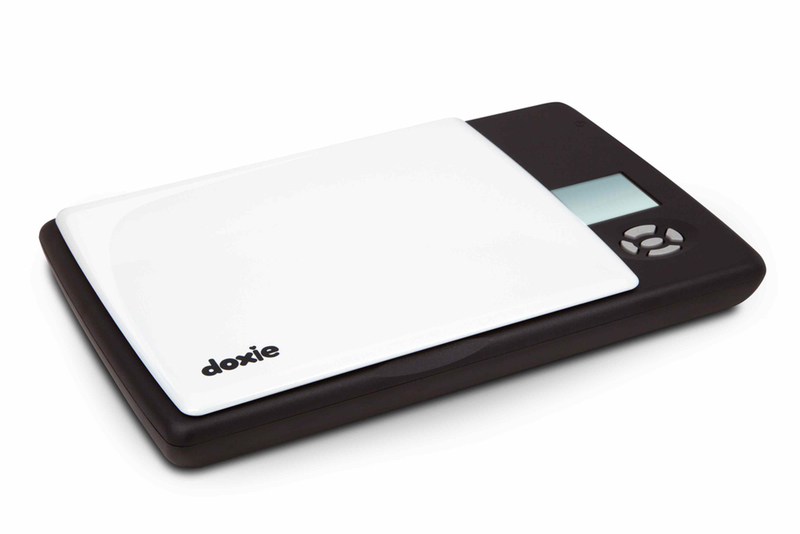
For the past few weeks, I’ve been trying the Doxie Flip, the company’s new flatbed scanner that, unlike the One and Go, is meant for pocket notebooks, old photos and postcards, books and magazines, and just about anything that you can put above the device’s 4x6” glass surface – or below, as you can remove the lid and flip the scanner over. The Flip retails for $149, and, like other Doxies, it saves images to an SD card that can be used in conjunction with a dedicated Mac app or on iOS through Apple’s Camera Connection Kit.
Interesting for iOS 7
Back in December 2012 I linked to Interesting, an iPhone news aggregator developed by Mike Rundle that was focused on providing simple access to tech and entertainment news in a delightful design. I wrote:
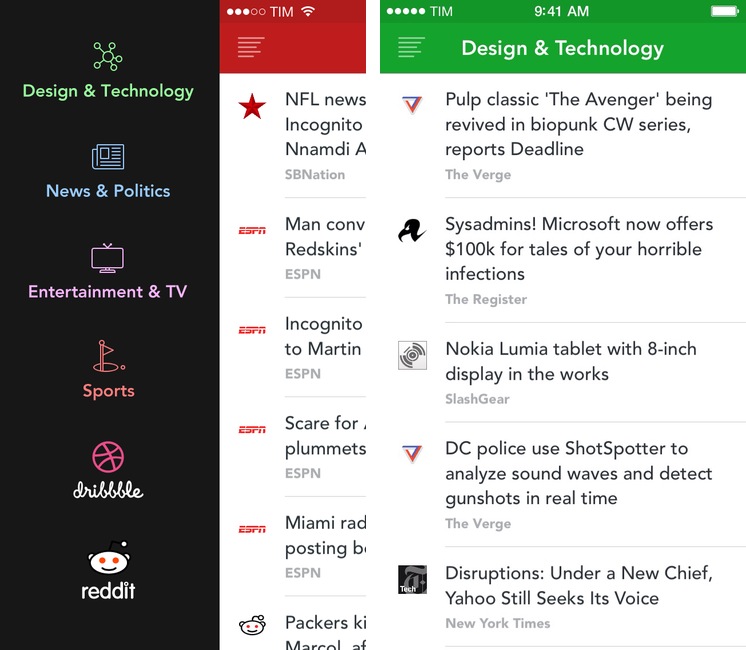
Interesting collects new articles from a variety of sources and displays a list of entries in reverse chronological order. Tapping on an item opens an embedded web view, which has a toolbar for navigation, refresh, and sharing options. Sharing includes Pocket and Twitter integration, Copy Link, Open in Safari, and Mail Link. Interesting has four sections: Design & Technology; News & Politics; Entertainment & TV; and Sports. The built-in list of sources includes websites like The Next Web, Wired, SBNation, CNN, SPIN, and various sub-reddits.
Released today, Interesting 2.0 is a major update to the original app that introduces a new interface for iOS 7 and adds more content sources to allow users to fetch even more articles to preview in the app or open in Safari.
Poster Updated for iOS 7
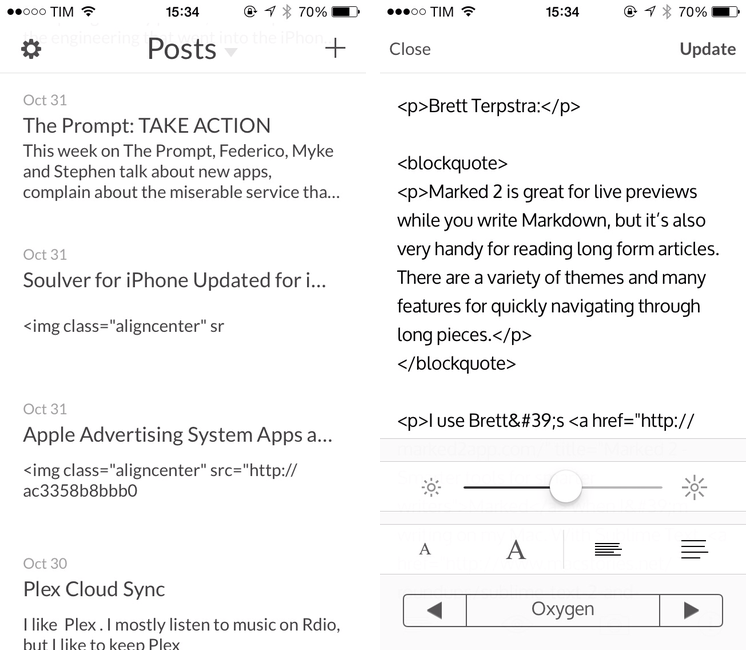
In June, Automattic acquired Poster, a popular WordPress client for iPhone and iPad that featured Dropbox integration, Markdown support, and advanced actions for power users. Poster was, before Editorial, the app that I used to write articles from my iPad and iPhone, and I wasn’t thrilled when developer Tom Witkin announced the app would be discontinued.
To my surprise, the app – which was pulled from the App Store after the acquisition – has been updated to version 3.0 this week, adding iOS 7 compatibility and fixes. There are no new notable additions, but the entire Poster UI has been updated for iOS 7 and there is a new line height option in the preview menu; Witkin got rid of textures and iOS 6-style buttons, adding subtle animations for navigation and other menus. It’s still the same Poster, only with an iOS 7 interface and less crashes.
However, the bad news is that, because the app isn’t available on the App Store anymore, only old customers can download the updated version. If you bought Poster in the past, open the App Store, find the Purchased section, and look for Poster; tap Open/Download, and the app should be reinstalled with the new version 3.0 that Witkin made for iOS 7.
Witkin figured out a way to update Poster for old customers who don’t want to switch to the official WordPress client, and I’m glad he did because some of Poster’s more advanced functionalities are still nowhere to be seen in WordPress for iOS or other text editors. I don’t know if Witkin will keep on releasing compatibility updates in this way, and, unless major changes are made, Poster will eventually stop working with future versions of iOS or WordPress – but until that day, you can enjoy Poster 3 for iOS 7. It’s still a great app.
Soulver for iPhone Updated for iOS 7 with Syntax Highlighting, More Unit Conversions, New UI
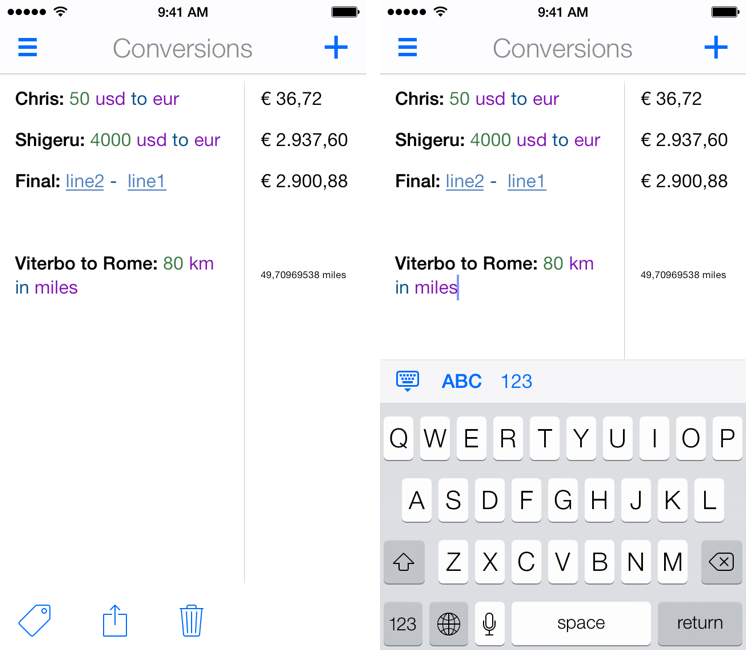
I’ve written about Soulver before: a calculator that isn’t really a calculator, Soulver lets you work with numbers for calculations and other operations using text commands across multiple lines. Soulver is, in a way, the Fantastical of calculators: using natural language, it lets you do quick calculations without having to tap dozens of buttons or scroll long menus. As the developers call it, Soulver is a “notepad calculator”.
Considering iOS 7’s focus on typography and legibility, I was looking forward to seeing how Acqualia would update Soulver (which is heavily text-based) to take advantage of the new OS, and I wasn’t disappointed. Version 2.3, released today, builds upon the app’s existing feature set to offer a redesigned interface (and icon), more unit conversations, and syntax highlighting.
If you’ve used other iOS 7 apps like Byword, you know how syntax highlighting is beneficial to the user experience: numbers turn green, units are purple, operations are blue, and plain text is standard black. Syntax highlighting makes lines more scannable because operations and individual bits of text stand out more; furthermore, because Soulver allows you to type units manually (you can write “USD”, “usd”, “dollars”, etc) you’ll instantly know if what you typed has been recognized by the app thanks to color highlights. Besides being nice visually speaking, syntax highlighting – a simple addition in theory – makes the experience of using Soulver considerably better.
With the update, Acqualia has added new unit conversion types, which come in handy for people who, like me, often trigger the app using a URL scheme that lets them type queries in apps like Drafts or Launch Center Pro. Like Fantastical, I’m faster at writing with natural language on my iPhone than tapping menus and lists, so the addition of more units allows me to use Soulver as the primary unit converter app on my device.
Soulver 2.3 includes other design improvements such as simplified navigation and easier access to total when the keyboard isn’t shown. The app hasn’t been updated on the iPad for almost a year now, and I hope that Acqualia is working on an iOS 7 update for that platform as well. Soulver 2.3 for iPhone is $2.99 on the App Store.
Apple Advertising System Apps and Features in App Store Search Results
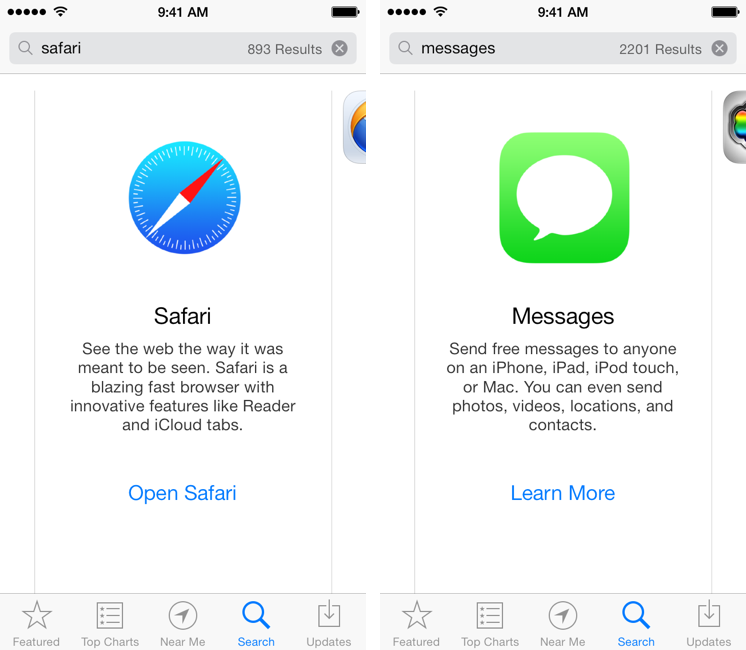
This morning, I noticed a tweet by Lukas Burgstaller with a screenshot of Apple’s Safari browser showing up in App Store search results for the “browser” search query. I did some tests, and I’ve discovered other search results advertising built-in iOS system apps and features with banners and links to open an app or read more information about it. I’m not sure when Apple started displaying their own built-in apps in the App Store search results, but it’s an interesting (and, I believe, good) idea worth discussing.
If you search for common terms like “web”, “SMS”, or “movies” in the iOS 7 App Store you’ll see special search results for Apple apps like Safari, Messages, and iTunes with a large icon, a description, and a link to learn more or open an app (such as Safari). These results appear on the App Store for iOS 7 devices (I wasn’t able to display them on a Mac using iTunes) and, in my tests, they also worked for queries like “browser”, “messages”, “cloud”, “internet”, “Siri”, and “text”. I’ve tried several other queries, but I couldn’t see results for other apps like Reminders, Calendars, Mail, Photos, Music, or Notes. Read more
Apple Q4 2013 Results: $37.5 Billion Revenue, 33.8 Million iPhones, 14.1 Million iPads Sold

Apple has published their Q4 2013 financial results for the quarter that ended on September 28, 2013. The company posted revenue of $37.5 billion. The company sold 14.1 million iPads, 33.8 million iPhones, and 4.6 million Macs, earning a quarterly net profit of $7.5 billion.
We’re pleased to report a strong finish to an amazing year with record fourth quarter revenue, including sales of almost 34 million iPhones,” said Tim Cook, Apple’s CEO. “We’re excited to go into the holidays with our new iPhone 5c and iPhone 5s, iOS 7, the new iPad mini with Retina Display and the incredibly thin and light iPad Air, new MacBook Pros, the radical new Mac Pro, OS X Mavericks and the next generation iWork and iLife apps for OS X and iOS.
For Q1 2014, Apple is providing guidance of revenue between $55 billion and $58 billion. Read more
Dispatch 1.3 Gets Unified Inbox, Dropbox and Droplr Integration, Action and URL Scheme Improvements
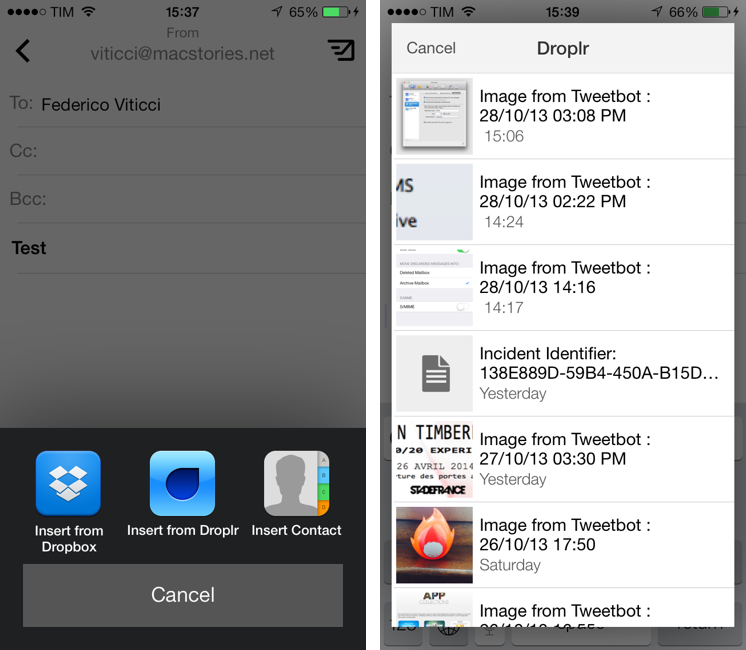
Dispatch is my favorite third-party email client for the iPhone. Released in June, Dispatch stood out from similar apps as it implemented a powerful feature set that took advantage of native iOS apps to bring inter-app communication and snippets to mobile email. In September, the app was updated with iOS 7 background fetch, message search, and a change to individual message links that allowed iOS apps to open specific messages directly in Dispatch. Thanks other several minor features and details (such as custom salutations and link actions), Dispatch became a fantastic alternative to Apple’s Mail app for users who wanted more out of their iPhone email client.
With today’s 1.3 update, Dispatch gets even more powerful and versatile with the addition of a unified inbox: a feature that I had been asking for since the first version of the app, unified inbox is a new top-level item in the app’s sidebar and it groups all, unread, and starred messages from all your configured accounts’ inboxes. From the All Inboxes view, you can manage and respond to messages as usual, but you can also search and compose a new message without switching to an individual account’s view. Read more