Posts in Featured

CloudApp 1.5 Released With Lots Of New Features

Popular desktop sharing tool CloudApp – the app that was once teased “every Mac user’s dream” – is receiving a major update today that sees the release of the app in the Mac App Store for the first time since the January 6th grand opening, and the addition of several new features built on top of a complete rewrite aimed at making the app more stable, faster, and better integrated with OS X. CloudApp 1.5, available for download here, is a milestone update that turns a simple utility to share screenshots and files on the Internet into a full-featured “clipboard in the cloud” that now works in real-time, and can plug directly into a Mac’s system clipboard.

The first version of CloudApp, released last year, allowed users to quickly share almost anything on a Mac (links, images, documents, .zip files) by hitting a hotkey that sent selected items to the cloud, automatically returning a short URL to share with your friends on Twitter, Facebook, or email. What made CloudApp stand out from the crowd of Mac sharing utilities (like Tinygrab or Droplr) – elegance of the design aside – was the powerful Raindrop system that enabled developers to build plugins that connected CloudApp with other third-party applications like Chrome, Aperture, Photoshop and iTunes. With a single desktop shortcut, users could instantly share a .png of the Photoshop project they were working on, post a link of a song playing in Spotify, or shorten the URL of the frontmost browser window. And if you selected multiple files in the Finder and hit the shortcut, CloudApp would upload them simultaneously, too. Not to mention the fact that there was an option to automatically upload any new screenshot taken with the Mac’s Grab utility, and check out most recent files’ view count in the menubar. CloudApp 1.5 still has all these features, only they’re backed by a new Streaming API and a second hotkey that doesn’t require Raindrops, but simply uploads the latest item in your Mac’s clipboard, whatever it is.

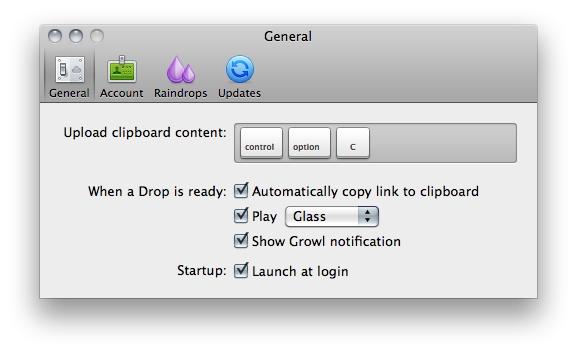
As seen in the latest Cloud2go update, the Streaming API means files and shortened URLs pop up everywhere (desktop app, web, mobile clients) as soon as they’re shared, and the view count in the menubar and webapp updates in real-time as well. The app is constantly communicating with its servers to push recent items and display how many users have clicked on your links. Alongside bug fixes, however, the biggest new feature is the separation of the Raindrops’ keyboard shortcut and system hotkey: whatever you copy with the standard CMD+C action can be accessed and uploaded by CloudApp using a second shortcut that gets the latest entry directly from your Mac’s clipboard. This is incredibly handy in my opinion as you don’t have to rely on app-specific raindrops and conditions – you just copy something like you normally do and hit a shortcut to upload. It works everywhere, and it’s fast. The Raindrops are still there, though: they’ve been improved with an official SDK and update notifications, and I’m told new raindrops to upload new files from a specific Finder folder and QuickTime recordings will be released soon.

Overall, CloudApp 1.5 is a solid update that dramatically enhances the functionalities of the app. While retaining the simplicity that made the app popular in the first place, CloudApp 1.5 adds a series of new features that extend the app’s capabilities to a whole new level, making it extremely integrated with Mac OS X. Get it here.


Access Extra Content and Perks

Founded in 2015, Club MacStories has delivered exclusive content every week for nearly a decade.

What started with weekly and monthly email newsletters has blossomed into a family of memberships designed for every MacStories fan.

Learn more here and from our Club FAQs.

Club MacStories: Weekly and monthly newsletters via email and the web that are brimming with apps, tips, automation workflows, longform writing, early access to the MacStories Unwind podcast, periodic giveaways, and more;

Club MacStories+: Everything that Club MacStories offers, plus an active Discord community, advanced search and custom RSS features for exploring the Club’s entire back catalog, bonus columns, and dozens of app discounts;

Club Premier: All of the above and AppStories+, an extended version of our flagship podcast that’s delivered early, ad-free, and in high-bitrate audio.

Learn more here and from our Club FAQs.


Apple Introduces New iMacs with Thunderbolt and New Quad-Core Processors

Right on cue, Apple has just introduced an updated line of iMacs on its online store, which notably feature the Thunderbolt technology and come with the new quad-core processors from Intel. The refresh brings the iMacs in line with the MacBook Pros that received an update in February, which also added Thunderbolt and “Sandy Bridge” processors, as well as a general speed bump. The new iMacs also feature a FaceTime HD camera and new AMD Radeon HD graphics for better gaming performances, photo editing and video processing; the 27-inch models come with two Thunderbolt ports for greater expansion with future Thunderbolt-enabled peripherals.  The new iMacs feature quad-core Intel Core i5 “Sandy Bridge” processors, but customers have an option to order a Core i7 in the configuration page (only for high-end 21.5-inch and 27-inch models, base models don’t support Core i7).

With next generation quad-core processors, powerful new graphics, Thunderbolt technology and a FaceTime HD camera, we’ve made the world’s best desktop even better.”
“Our customers love the iMac’s aluminum enclosure, gorgeous display and all-in-one design,” said Philip Schiller, Apple’s senior vice president of Worldwide Product Marketing. “With next generation quad-core processors, powerful new graphics, Thunderbolt technology and a FaceTime HD camera, we’ve made the world’s best desktop even better.”

The new iMac features quad-core Intel Core i5 processors with an option for customers to choose Core i7 processors up to 3.4 GHz. These next generation processors feature an integrated memory controller for an amazingly responsive experience and a powerful new media engine for high-performance video encoding and decoding. With new AMD Radeon HD graphics processors, the new iMac has the most powerful graphics ever in an all-in-one desktop.

Press release is available here and embedded below. The official iMac page on Apple.com has just been updated with a detailed explanation of all the new specs.

As for other specs:

Graphics:

  • 21.5-inch iMac base model: AMD Radeon HD 6750M graphics processor with 512MB of GDDR5 memory
  • 21.5-inch iMac: AMD Radeon HD 6770M graphics processor with 512MB of GDDR5 memory
  • 27-inch iMac base model: AMD Radeon HD 6770M graphics processor with 512MB of GDDR5 memory
  • 27-inch iMac: AMD Radeon HD 6970M graphics processor with 1GB of GDDR5 memory (Configurable to AMD Radeon HD 6970M with 2GB GDDR5, only at the Apple Online Store.)


Video support and Camera:

  • FaceTime HD camera
  • Simultaneously supports full native resolution on the built-in display and up to a 30-inch display (2560 by 1600 pixels) on an external display
  • Support for extended desktop and video mirroring modes

Connections:

  • One Thunderbolt port on 21.5-inch iMac
  • Two Thunderbolt ports on 27-inch iMac
  • Mini DisplayPort output with support for DVI, VGA, and dual-link DVI (adapters sold separately)
  • One FireWire 800 port; 7 watts
  • Four USB 2.0 ports
  • SDXC card slot
  • Slot-loading 8x SuperDrive with 4x double-layer burning (DVD±R DL/DVD±RW/CD-RW)
  • Audio in/out
  • 10/100/1000BASE-T Gigabit Ethernet (RJ-45 connector)
  • IR receiver

Read more

Access Extra Content and Perks

Founded in 2015, Club MacStories has delivered exclusive content every week for nearly a decade.

What started with weekly and monthly email newsletters has blossomed into a family of memberships designed for every MacStories fan.

Learn more here and from our Club FAQs.

Club MacStories: Weekly and monthly newsletters via email and the web that are brimming with apps, tips, automation workflows, longform writing, early access to the MacStories Unwind podcast, periodic giveaways, and more;

Club MacStories+: Everything that Club MacStories offers, plus an active Discord community, advanced search and custom RSS features for exploring the Club’s entire back catalog, bonus columns, and dozens of app discounts;

Club Premier: All of the above and AppStories+, an extended version of our flagship podcast that’s delivered early, ad-free, and in high-bitrate audio.

Learn more here and from our Club FAQs.


Google Chrome Canary Lands On OS X

With an unexpected move that was reported earlier today by MG Siegler at TechCrunch, Google decided to (finally) release Chrome Canary for Mac. The new, highly unstable and cutting-edge version of Chrome is available for download here. What made Chrome Canary the proverbial unicorn among Mac users is the fact that this version of the browser is considered a pre-developer build – a step above Chromium, but an anticipation of things to come in the Google Chrome Dev, Beta and Stable channels. Available for several months on Windows, Canary is, put simply, the Chrome version to use if you want to see the latest developments, and try early features that will be implemented on other Chrome channels at a later date. Canary is not meant for daily, stable usage – instead, it’s best to run it alongside a beta or stable Chrome installation.

The Google team writes on the official Chromium blog:

The Mac version of Google Chrome Canary follows the same philosophy: it automatically updates more frequently than the Dev channel, and does not undergo any manual testing before each release. Because we expect it to be unstable and, at times, unusable, you can run it concurrently with a Dev, Beta, or Stable version of Google Chrome. Your Canary data remains separate, but if you set up Sync in each version of Chrome that you use, you can automatically continue using the same set of bookmarks, extensions, themes, and more.

The current stable version of Chrome is labelled 11; meanwhile, the Dev and Beta channels are already using version 12, whilst Canary has already made the jump to version 13 – the one that’s going to come out as stable in at least a couple of months from now. But if you want to test the latest features and experience the bleeding edge, Canary is awaiting here. With a shiny new yellow icon.

Access Extra Content and Perks

Founded in 2015, Club MacStories has delivered exclusive content every week for nearly a decade.

What started with weekly and monthly email newsletters has blossomed into a family of memberships designed for every MacStories fan.

Learn more here and from our Club FAQs.

Club MacStories: Weekly and monthly newsletters via email and the web that are brimming with apps, tips, automation workflows, longform writing, early access to the MacStories Unwind podcast, periodic giveaways, and more;

Club MacStories+: Everything that Club MacStories offers, plus an active Discord community, advanced search and custom RSS features for exploring the Club’s entire back catalog, bonus columns, and dozens of app discounts;

Club Premier: All of the above and AppStories+, an extended version of our flagship podcast that’s delivered early, ad-free, and in high-bitrate audio.

Learn more here and from our Club FAQs.


Planetary: Your iPad’s Music Library Becomes A Galaxy

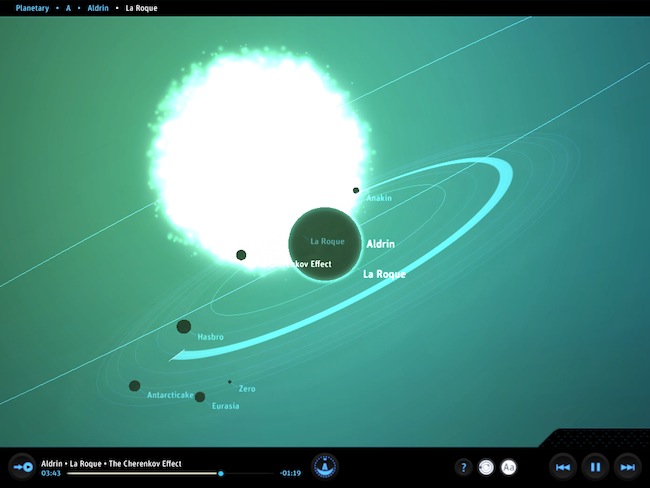
In what might be the coolest music experiment that has landed on the iPad to date, company Bloom Studio released earlier today Planetary, a new way to explore your iPad’s music library. Bloom Studio promises to deliver “playful, explorable, visually compelling views on personally relevant information from services like Facebook, Twitter, Instagram, and iTunes”, and Planetary is the realization of this mission statement: not only it’s based on the crazy concept of turning your iPad music library into a galaxy, it also works exceptionally well. Since I got my eyes on the teaser website a few days ago, I was looking forward to trying the actual product and see whether it could really bring a different way of exploring music to the tablet: now that I’m using the app, available for free, I have to say Planetary is one of those apps you have to try for yourself, rather than watching in some YouTube demo videos.

So here’s the gist: your music is a galaxy, artists are stars, albums are planets. In the 3D view of Planetary, no two planets are the same as the graphics are generated automatically off an album cover from the iPod app. Similarly, songs are moons: the more you listen to a song, the bigger the moon grows. And there’s more: each moon orbits at a speed related to the song’s length. Indeed, crazy stuff that doesn’t really make any sense until you try it. But on the other hand, it’s clear Bloom Studio set out to create an interesting experiment based on data visualization that merges files synced to your iPad, music, and space. I’m sure Buzz Aldrin would be proud.

While Planetary features some standard music controls like play / pause and back / forward, the key area of the app is support for multitouch gestures: you can pinch the galaxy to zoom on a star, pan and rotate a planet to check out all moons and orbits – overall, do all sorts of zooming and viewing to enjoy the pleasure of having your music available in the form of a galaxy. Like I said above, you just have to try it and see how it works with your music.

At the price of free, Planetary needs to be downloaded now and experienced with a rich iPod library synced to your iPad. Personal recommendation: for greater results, try to sync some Explosions In The Sky.

Access Extra Content and Perks

Founded in 2015, Club MacStories has delivered exclusive content every week for nearly a decade.

What started with weekly and monthly email newsletters has blossomed into a family of memberships designed for every MacStories fan.

Learn more here and from our Club FAQs.

Club MacStories: Weekly and monthly newsletters via email and the web that are brimming with apps, tips, automation workflows, longform writing, early access to the MacStories Unwind podcast, periodic giveaways, and more;

Club MacStories+: Everything that Club MacStories offers, plus an active Discord community, advanced search and custom RSS features for exploring the Club’s entire back catalog, bonus columns, and dozens of app discounts;

Club Premier: All of the above and AppStories+, an extended version of our flagship podcast that’s delivered early, ad-free, and in high-bitrate audio.

Learn more here and from our Club FAQs.


Caffeinated RSS Reader for Mac Finally Out As Beta

Back in December 2009, I was browsing Ember looking for some cool new apps to cover on MacStories. As I browsed the online gallery to find interesting projects worth a mention on the site, I stumbled upon the first screenshots of a new RSS reader for Mac, Caffeinated. The app looked elegant and super-slick, and as you may remember from my initial coverage of the private alpha version, it was also a fast way to access Google Reader from the desktop. But since then, the app disappeared from our radars and lots of things changed in RSS app landscape: Reeder for Mac was released as beta, Google Reader clients for iOS started proliferating implementing features that weren’t previously possible on the desktop. Caffeinated, however, wasn’t dead at all: it was being rebuilt from the ground up, and that was a long process looking back at my first article. As promised by the developer a few weeks ago, a first beta of Caffeinated is finally available today.

From a design perspective, not much has changed since my initial coverage. The app still looks as slick as ever with minimal sidebars and iOS-like scrolling and cells, but it’s the underlying engine that went under a massive re-construction. The app is way faster than I remembered, perhaps not as fast as the current Reeder for Mac beta but definitely snappy and promising. The app takes less than a second to start up with a neat opening animation, subscriptions can be manually refreshed with a keyboard shortcut but there’s no way to set automatic reload times yet. In fact, this first beta of Caffeinated is so limited there’s no access to the Preferences yet, and sharing options haven’t been implemented. As the developer writes:

Caffeinated was built for speed and customisability. The app is theme-able, the API exists but I have yet to write documentation or build in appropriate preferences, if you are interested in themeing with this beta, just give me a shout and I can walk you through it – its really not that difficult.

This is mainly a usable taster of what is to come…so be patient ( I know you have already! ) but it will be worth the wait in the end.

Overall, this first beta of Caffeinated – quite possibly one of the most anticipated Mac apps of 2010, before some users lost hope and began to think the project went the way of the dodo – is pretty buggy and clearly unfinished, but it’s a sign of interesting things to come in the (hopefully) near future. If you want to take Caffeinated for a spin, go download beta 1 here.

Access Extra Content and Perks

Founded in 2015, Club MacStories has delivered exclusive content every week for nearly a decade.

What started with weekly and monthly email newsletters has blossomed into a family of memberships designed for every MacStories fan.

Learn more here and from our Club FAQs.

Club MacStories: Weekly and monthly newsletters via email and the web that are brimming with apps, tips, automation workflows, longform writing, early access to the MacStories Unwind podcast, periodic giveaways, and more;

Club MacStories+: Everything that Club MacStories offers, plus an active Discord community, advanced search and custom RSS features for exploring the Club’s entire back catalog, bonus columns, and dozens of app discounts;

Club Premier: All of the above and AppStories+, an extended version of our flagship podcast that’s delivered early, ad-free, and in high-bitrate audio.

Learn more here and from our Club FAQs.


Things Cloud Sync Beta Goes Live

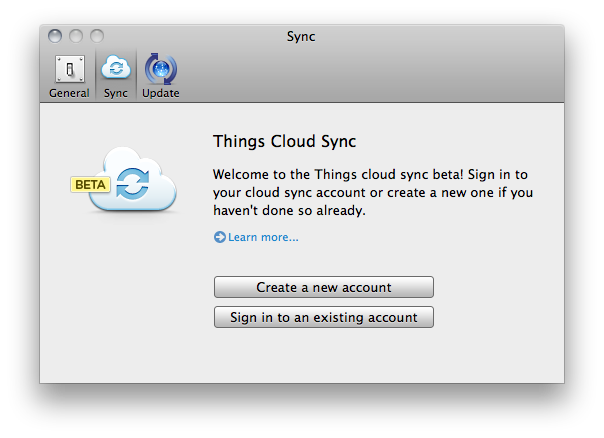
Years in the making, Cultured Code finally flipped the switch on the initial beta of Cloud Sync for Things, the popular GTD application for Mac, iPhone and iPad. Things, featured several times by Apple in the past and winner of a Design Award in 2009, was long criticized for the lack of over-the-air sync for tasks and projects across desktop and mobile devices, something that was implemented by other GTD-oriented applications like OmniFocus and Wunderlist with decent results in the past few years. Cultured Code, however, decided to wait before making a public announcement about their OTA sync plans; then, back in December, they revealed that, yes, they were working on a sync service for Things (which counts thousands of users worldwide), but it would take longer than expected due to the extremely unique nature of the product. And today, Cultured Code is letting registered beta users try the first version of Things Cloud Sync, although with some limitations.

We’re not able to test the actual implementation of sync right now, but details can be gathered from the developers’ blog and official sync page. This first version of cloud sync for Things will only work Mac-to-Mac, as the iOS clients haven’t been updated to test the functionality yet. The initial rollout of cloud sync is meant to test the reliability and scalability of the service, which, unlike most OTA sync tools out there, doesn’t want you to manually trigger a sync session but it’s aimed at constantly transmitting changes to the cloud – think of a continuous client for GTD. As Cultured Code explains, this is all based on a database system that makes sure current beta users can run the limited Things 1.5 version without corrupting their existing personal Things database. As explained in “State of Sync, Part III”:

Things will sync frequently. While there will be a way to initiate sync manually there should hardly be any reason for doing so. Every change you make is transmitted to the cloud almost instantly. No matter when you quit the app, your data is safe with the server already. Whenever you open Things, switch applications, or wake your computer from sleep, Things will check back with the server to see if there are any updates to pull.

Things will always connect to the server using an encrypted connection. Not only during log-in, as many web sites do, but for every connection. This means that your to-dos will never be sent in the clear.

The current beta of Things 1.5 can be downloaded here, but Cloud Sync is exclusive to users who signed up to Cultured Code’s list months ago and are receiving an activation email today. To stay up to date with Things sync development, follow Cultured Code’s blog here.

Access Extra Content and Perks

Founded in 2015, Club MacStories has delivered exclusive content every week for nearly a decade.

What started with weekly and monthly email newsletters has blossomed into a family of memberships designed for every MacStories fan.

Learn more here and from our Club FAQs.

Club MacStories: Weekly and monthly newsletters via email and the web that are brimming with apps, tips, automation workflows, longform writing, early access to the MacStories Unwind podcast, periodic giveaways, and more;

Club MacStories+: Everything that Club MacStories offers, plus an active Discord community, advanced search and custom RSS features for exploring the Club’s entire back catalog, bonus columns, and dozens of app discounts;

Club Premier: All of the above and AppStories+, an extended version of our flagship podcast that’s delivered early, ad-free, and in high-bitrate audio.

Learn more here and from our Club FAQs.


iOS 4.3.3 Coming Within Two Weeks

According to BGR, Apple is looking to roll out an iOS 4.3.3 update within two weeks and “possibly sooner” which, as previously announced, will improve the way iPhones and iPad 3G models handle the location database file required to quickly fetch nearby antenna and WiFi hotspot information.

We’ve been sent the OS and while we haven’t loaded it on our iPhone just yet, here is what we have been told it will address:

- The update will no longer back up the location database to iTunes.

- The size of the location database will be reduced.

- The location database will be deleted entirely when Location Services are turned off.

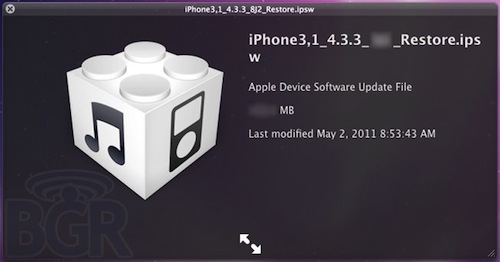
The website also reports iOS 4.3.3 will address battery life issues and introduce iPod bug fixes. On March 21st, BGR reported iOS 4.3.1 would be released within “one or two weeks” and they made a similar prediction for iOS 4.3.2, which came out on April 14th. Apple announced in its Location Tracking Q&A that an update coming out in the “next few weeks” would fix several bugs related to location tracking. With BGR posting a screenshot of the final firmware file, it’s very likely that Apple will release the update later this week.

Sometime in the next few weeks Apple will release a free iOS software update that:

- reduces the size of the crowd-sourced Wi-Fi hotspot and cell tower database cached on the iPhone,

- ceases backing up this cache, and

- deletes this cache entirely when Location Services is turned off.

In the next major iOS software release the cache will also be encrypted on the iPhone.

Update: as pointed out by one of our readers, the image above confirms build number of the new OS will be 8J2.

Access Extra Content and Perks

Founded in 2015, Club MacStories has delivered exclusive content every week for nearly a decade.

What started with weekly and monthly email newsletters has blossomed into a family of memberships designed for every MacStories fan.

Learn more here and from our Club FAQs.

Club MacStories: Weekly and monthly newsletters via email and the web that are brimming with apps, tips, automation workflows, longform writing, early access to the MacStories Unwind podcast, periodic giveaways, and more;

Club MacStories+: Everything that Club MacStories offers, plus an active Discord community, advanced search and custom RSS features for exploring the Club’s entire back catalog, bonus columns, and dozens of app discounts;

Club Premier: All of the above and AppStories+, an extended version of our flagship podcast that’s delivered early, ad-free, and in high-bitrate audio.

Learn more here and from our Club FAQs.


New “MacDefender” Malware Targets Mac Users

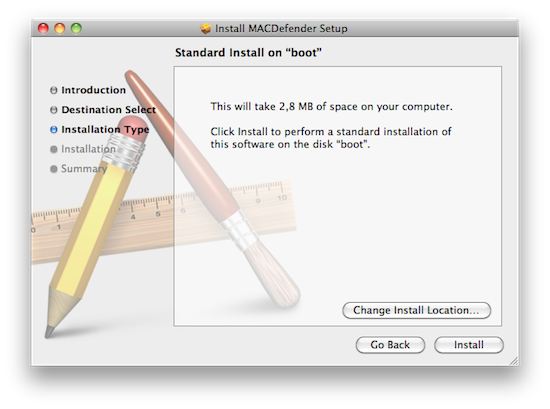
According to several discussion threads posted on Apple Support Communities, a new malware called MacDefender.app is quickly spreading among Mac users using the Safari browser to visit certain websites, especially Google Images. The application, disguised as a virus scanning tool and completely unrelated with the official MacDefender software, gets installed automatically without a user’s consent upon opening a webpage, although it’s not clear what kind of websites allow this kind of installation, and whether MacDefender “phones home” once running on a Mac to download additional pieces of code (like most malwares on Windows do). Some users are reporting they found the app installed on their Macs after visiting webpages linked on Google Images, some say it’s only happening with the Safari desktop browser, others claim the app can’t be removed with a simple drag & drop to the system’s Trash as, once installed, the process will beging running automatically on OS X. Again, it’s not clear what kind of malware MacDefender.app is and the proportion of this “spreading” across Mac OS X machines, but the number of threads on Apple Support Communities seems to suggest at least hundreds of people have experienced the issue in these past few days. Read more

Access Extra Content and Perks

Founded in 2015, Club MacStories has delivered exclusive content every week for nearly a decade.

What started with weekly and monthly email newsletters has blossomed into a family of memberships designed for every MacStories fan.

Learn more here and from our Club FAQs.

Club MacStories: Weekly and monthly newsletters via email and the web that are brimming with apps, tips, automation workflows, longform writing, early access to the MacStories Unwind podcast, periodic giveaways, and more;

Club MacStories+: Everything that Club MacStories offers, plus an active Discord community, advanced search and custom RSS features for exploring the Club’s entire back catalog, bonus columns, and dozens of app discounts;

Club Premier: All of the above and AppStories+, an extended version of our flagship podcast that’s delivered early, ad-free, and in high-bitrate audio.

Learn more here and from our Club FAQs.


TweetyPop Is Like Time Machine For Twitter

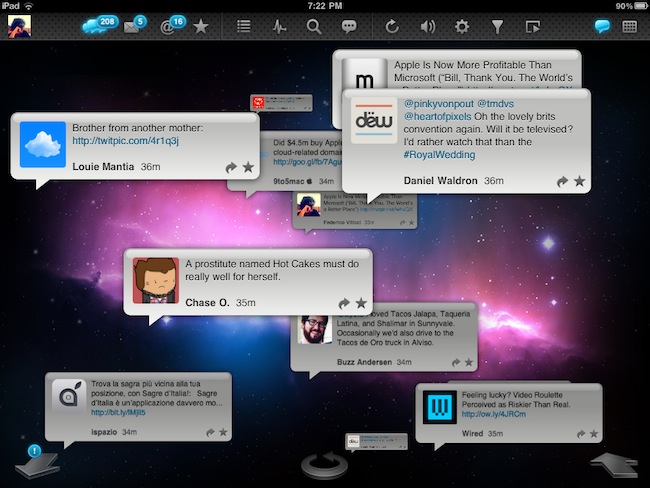
Released yesterday in the App Store at $1.99, TweetyPop wants to offer a different way to read your Twitter timeline and interact with status updates. While regular Twitter clients like Twitter for iPad, Twitterrific and Osfoora are focused on empowering you to read tweets in a vertical timeline which you can interact with to reply, fave tweets, or just discover cool links to check out later, TweetyPop resembles the Mac’s Time Machine in the way it operates: tweets are placed on a three-dimensional space, and you have to move the tweet “bubbles” with your finger to fling them off the screen and move forward in the timeline. Just like Time Machine, you make progress in time: only you have tweets instead of files and you can do stuff with these tweets, too.

The app’s got a traditional list view as well, but that’s not really the point. What TweetyPop wants to achieve – and I guess the reason why the developers created it in the first place – is being the alternative app that lets you sit down and explore Twitter in time. A scrollbar on the right lets you quickly move to a couple of hours ago or a just a few minutes back; big arrows at the bottom allow you to dismiss old tweets and load new ones, or go back in time again. The concept’s really simple if you’re used to Time Machine or Lion’s Versions. In fact, the app’s even got the same space-inspired background that you can’t change. Once you get the hang of it – you can scroll, move tweets around, reply, fave and follow links – you might want to check out the additional icons along the top. These buttons enable you to use Twitter’s usual functionalities like replies, DMs and favorite tweets, as well as lists, trends, or search. In every section, tweets are displayed as bubbles against a Time Machine-esque timeline like in the main page. This might be a little disorienting at first for mentions and direct messages, but I believe TweetyPop wants to disorient you, in a good way. It’s very, very different from anything else I’ve tried on the iPad in a year of existence of the platform.

I also like the fact that the app’s got some interesting options to play with. You can send items to Instapaper or OmniFocus, filter the timeline by “all tweets” or “new tweets only” and enable auto-play to let the app automatically scroll for you and create a slideshow for your tweets. The slideshow speed is configurable in the settings.

At $1.99, I’d give TweetyPop a try if only because it’s different. Sure, it won’t replace Twitter for iPad or Twitterrific, but it has the chance to become that alternative Twitter app that does one thing well and surprises you with its original ideas and interactions. Plus, the time exploration effect for tweets is just neat. Go download the app here. Promo video below.

Read more

Access Extra Content and Perks

Founded in 2015, Club MacStories has delivered exclusive content every week for nearly a decade.

What started with weekly and monthly email newsletters has blossomed into a family of memberships designed for every MacStories fan.

Learn more here and from our Club FAQs.

Club MacStories: Weekly and monthly newsletters via email and the web that are brimming with apps, tips, automation workflows, longform writing, early access to the MacStories Unwind podcast, periodic giveaways, and more;

Club MacStories+: Everything that Club MacStories offers, plus an active Discord community, advanced search and custom RSS features for exploring the Club’s entire back catalog, bonus columns, and dozens of app discounts;

Club Premier: All of the above and AppStories+, an extended version of our flagship podcast that’s delivered early, ad-free, and in high-bitrate audio.

Learn more here and from our Club FAQs.