Posts in Featured

Apple Design Award Winner djay Goes on Sale, Gives Us Three Copies To Celebrate

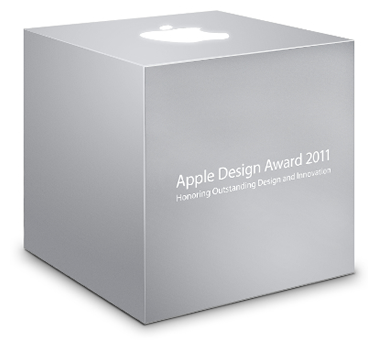
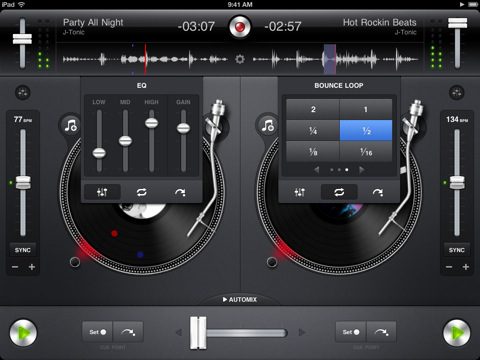
There’s no way we could deny the opportunity to give away a few copies of djay having gotten up close and personal with all those sexy pixels, which were recognized by the top dogs at Apple before they handed out the all-to-well-known Apple Design Award to Algoriddim. It doesn’t surprise us that such talent didn’t go unrewarded: turntables come alive with artist artwork, finger friendly equalizers can be easily adjusted, and let’s not forget the terrific automix mode for the amateur DJs in the house. Apple chose djay for its utilization of Core Audio, which helps the app pump out pristine sound at “ultra-low latencies”, and if cables aren’t your thing then AirPlay can get you set up with your preferred AV receiver. Taking advantage of the iPad 2’s A5 processor, djay for the iPad hums along as you scratch tracks, record your own sessions, and pull DRM free songs from your library with just a flick of the finger. To celebrate on their achievement, djay is on sale for $9.99 (normally $19.99) in the App Store for a limited time, so get it while it’s hot!

We’re also giving away three copies of this Apple approved app past the break - we wouldn’t want you to miss out on one of the biggest apps of this year.
Read more

Access Extra Content and Perks

Founded in 2015, Club MacStories has delivered exclusive content every week for nearly a decade.

What started with weekly and monthly email newsletters has blossomed into a family of memberships designed for every MacStories fan.

Learn more here and from our Club FAQs.

Club MacStories: Weekly and monthly newsletters via email and the web that are brimming with apps, tips, automation workflows, longform writing, early access to the MacStories Unwind podcast, periodic giveaways, and more;

Club MacStories+: Everything that Club MacStories offers, plus an active Discord community, advanced search and custom RSS features for exploring the Club’s entire back catalog, bonus columns, and dozens of app discounts;

Club Premier: All of the above and AppStories+, an extended version of our flagship podcast that’s delivered early, ad-free, and in high-bitrate audio.

Learn more here and from our Club FAQs.


First Third-Party iOS 5 Widget Released In Cydia

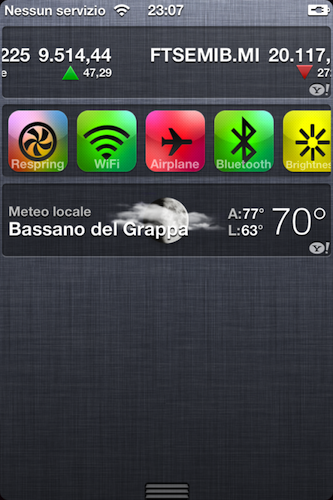
A few hours after the release of redsn0w for iOS 5 beta 1, some developers found out it was technically possible to develop widgets for iOS 5. In the new OS, in fact, Apple is restricting the use of “widgets” (they don’t even call them this way) to the Stocks and Weather applications, which, through the Settings, can have a “widget” or “ticker” in the new Notification Center. Currently, the widget section of Notification Center can only be used on the iPhone, as the iPad didn’t get the functionality for some reason.

iSpazio reports [Google Translation] the first third-party, fully functional iOS 5 widget has been released in Cydia, and it’s called UISettings. Available for quite some time in Cydia as an extension of the multitasking bar, the app has been completely rewritten to work as a widget under iOS 5, providing shortcuts for a system respring, a WiFi and Bluetooth switch, as well as AirPlane mode and Brightness controls. The concept’s similar to the popular SBSettings tweak, though UISettings is limited to a handful of shortcuts and controls.

The widget can be downloaded from the developers’ beta repo (http://qwertyoruiop.com/beta), and a new version is already in the works. The possibility of developing and releasing custom widgets in Cydia may offer an interesting alternative to Apple’s restrictions if the company decides to prevent developers from building third-party widgets in iOS 5, although everything can change come the final release of the OS this summer. Apple may even announce new Store sections for widgets (or Safari extensions) and surprise developers a few weeks ahead of iOS 5’s release. This is just speculation on our side however, so in the meantime you can download UISettings and check out how a custom widget integrates with Apple’s Notification Center.

Access Extra Content and Perks

Founded in 2015, Club MacStories has delivered exclusive content every week for nearly a decade.

What started with weekly and monthly email newsletters has blossomed into a family of memberships designed for every MacStories fan.

Learn more here and from our Club FAQs.

Club MacStories: Weekly and monthly newsletters via email and the web that are brimming with apps, tips, automation workflows, longform writing, early access to the MacStories Unwind podcast, periodic giveaways, and more;

Club MacStories+: Everything that Club MacStories offers, plus an active Discord community, advanced search and custom RSS features for exploring the Club’s entire back catalog, bonus columns, and dozens of app discounts;

Club Premier: All of the above and AppStories+, an extended version of our flagship podcast that’s delivered early, ad-free, and in high-bitrate audio.

Learn more here and from our Club FAQs.


“iCloud Is The Operating System”

The conversation my friend Francesca and I were having in front of a good cup of coffee ended when she concluded that iCloud was the operating system.

At first, that silly statement didn’t make any sense to me. I laughed, and tried to explain her that it’s not the operating system – the one you have to download and install on your computer or device – rather, I told her iCloud was a new way to keep all her content stored somewhere else she could access at any time. But the more I went on to illustrate the advantages of pushing media from the Internet (“the cloud”) to devices without a USB cable, the more she kept asking why would that be any different from having the operating system on the Internet, “doing stuff for you automatically.” Read more

Access Extra Content and Perks

Founded in 2015, Club MacStories has delivered exclusive content every week for nearly a decade.

What started with weekly and monthly email newsletters has blossomed into a family of memberships designed for every MacStories fan.

Learn more here and from our Club FAQs.

Club MacStories: Weekly and monthly newsletters via email and the web that are brimming with apps, tips, automation workflows, longform writing, early access to the MacStories Unwind podcast, periodic giveaways, and more;

Club MacStories+: Everything that Club MacStories offers, plus an active Discord community, advanced search and custom RSS features for exploring the Club’s entire back catalog, bonus columns, and dozens of app discounts;

Club Premier: All of the above and AppStories+, an extended version of our flagship podcast that’s delivered early, ad-free, and in high-bitrate audio.

Learn more here and from our Club FAQs.


Reeder for Mac: Now Available On The Mac App Store

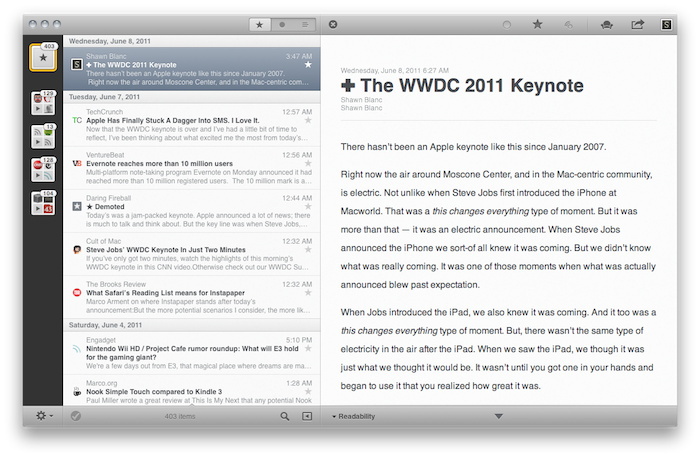
Over the past eight months, I’ve been following very closely the development of Reeder for Mac, a port of the popular Google Reader client for iOS to the OS X platform. As I was one of the first people to try the original Reeder for iPhone back in 2009, I immediately accepted Silvio Rizzi’s invite to join the beta testing group of Reeder for Mac in September 2010. Lots of things have changed since then. Sure, I never stopped using Reeder for Mac as my default desktop client, but there’s no doubt the app has gone through so many interface changes, design overhauls and feature additions I had to re-calibrate my workflow every time the developer updated something. That’s what you get by beta-testing things, but the evolution of Reeder for Mac was different: from our exclusive preview, to the first public beta and the one we reviewed last month, you can see how the app turned into something completely different from the experience I initially fell in love with. And that’s a good thing – the last full rewrite made Reeder for Mac insanely fast on Snow Leopard and ready to go on Lion. But enough with the beta talk. Read more

Access Extra Content and Perks

Founded in 2015, Club MacStories has delivered exclusive content every week for nearly a decade.

What started with weekly and monthly email newsletters has blossomed into a family of memberships designed for every MacStories fan.

Learn more here and from our Club FAQs.

Club MacStories: Weekly and monthly newsletters via email and the web that are brimming with apps, tips, automation workflows, longform writing, early access to the MacStories Unwind podcast, periodic giveaways, and more;

Club MacStories+: Everything that Club MacStories offers, plus an active Discord community, advanced search and custom RSS features for exploring the Club’s entire back catalog, bonus columns, and dozens of app discounts;

Club Premier: All of the above and AppStories+, an extended version of our flagship podcast that’s delivered early, ad-free, and in high-bitrate audio.

Learn more here and from our Club FAQs.


iOS 5: 8 Other Features We Love

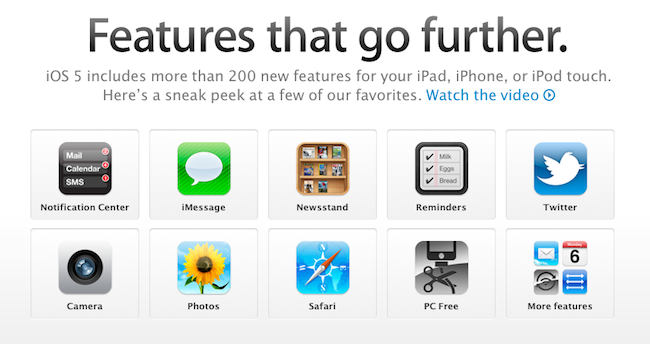
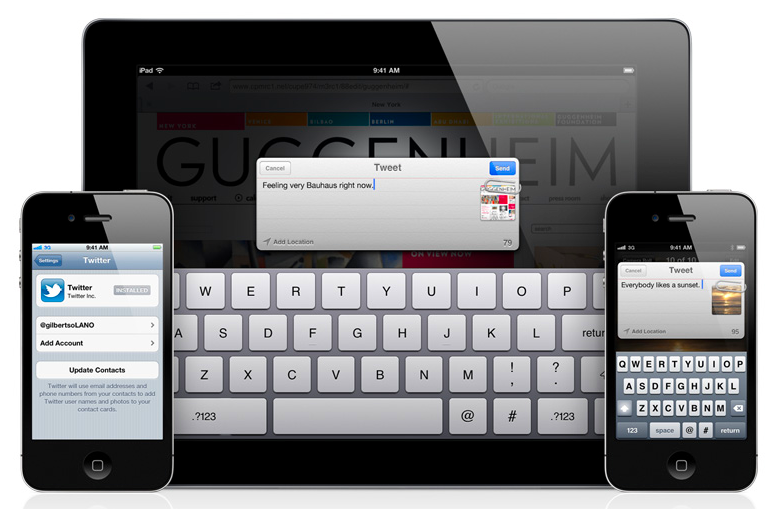
Since Apple’s official presentation of iOS 5 at the WWDC keynote on Monday and the release of the first beta to developers, lots of things have been said about Apple’s new modus operandi based on watching the community, seeing what developers and jailbreakers are building to improve the OS and answer the needs of hardcore iOS users, and going back to the drawing board to take inspiration from what the ecosystem has created to offer a native solution, designed from Apple, in most cases better than the competition or third-party solutions. If you followed our keynote coverage and WWDC ‘11 roundup, you know what’s new in iOS 5 and what we’re referring to: the new notification system is heavily inspired by jailbreak tweaks like LockInfo and Mobile Notifier (which were inspired by Android’s notifications); the new Reminders app will likely eliminate the need of simple to-do list application from the App Store (but not complex GTD software like OmniFocus); the iMessage solution built by Apple sounds like RIM’s BlackBerry Messenger, it’s exclusive to iOS 5 users and keeps your messages in sync with iCloud.

With hundreds of new features, there’s a lot to discover in iOS 5, and more will come with future betas and the final release this Fall, we’re sure. The way I see it, Apple didn’t “kill” anything as several pundits are claiming: it’s called progress. Whilst the term “killing” implies a voluntary action of willing to do something against someone, with iOS 5 Apple doesn’t want to “kill” Remember the Milk, Dropbox, or Boxcar. Apple sees where the platform is going and skates to where to puck is going to be. I agree with our editor Cody when he says it’s not really about copying, as much as it’s about improving existing solutions to provide a better experience for everyone. Nothing’s really new nowadays, but there’s still room for innovation. It’s a subtle difference.

So with iOS 5, we have lots of innovations, new features, improvements, and all of the above. You’ve probably already read everything about the most important functionalities in our roundup, so here’s what we’re going to do next: rather than assembling a list of every single screenshot of what’s new in iOS 5 beta 1, we’ve collected the 10 best new things (some of which you may not have seen yet) we’ve found in iOS 5 beta. Read more

Access Extra Content and Perks

Founded in 2015, Club MacStories has delivered exclusive content every week for nearly a decade.

What started with weekly and monthly email newsletters has blossomed into a family of memberships designed for every MacStories fan.

Learn more here and from our Club FAQs.

Club MacStories: Weekly and monthly newsletters via email and the web that are brimming with apps, tips, automation workflows, longform writing, early access to the MacStories Unwind podcast, periodic giveaways, and more;

Club MacStories+: Everything that Club MacStories offers, plus an active Discord community, advanced search and custom RSS features for exploring the Club’s entire back catalog, bonus columns, and dozens of app discounts;

Club Premier: All of the above and AppStories+, an extended version of our flagship podcast that’s delivered early, ad-free, and in high-bitrate audio.

Learn more here and from our Club FAQs.


The Best of the Best: Apple Design Awards 2011 Winners Announced

The Apple Design Awards “recognize outstanding achievement and excellence” in apps made specifically for Apple platforms and devices. For the first time, this year’s ADAs (which will be announced tonight at the WWDC 2011 in San Francisco) will award developers of applications for all iOS devices and Macs: whilst last year’s edition skipped the Mac to focus on iOS, 2011 is back at full speed to celebrate great, usable, and well-designed apps available in the Mac and iOS App Stores. For the full list of 2010 ADAs winner, check out our previous coverage here.

So what’s in for tonight? As you may be aware of we’re not in San Francisco to attend WWDC (let’s leave that to developers), but we’ll be following the events as they unfold on Twitter, also thanks to a few developer friends who are actually there to enjoy the show. We will update this story with the fresh names of winning apps and devs as soon as we get them, as well as Apple’s official statements about this year’s ADAs once the official page gets updated later today or tomorrow.

So follow us on Twitter as @macstoriesnet, come back to this post in around 10 minutes from now, and let’s wait and see who’s going to grab the prizes this year at WWDC.

You can check out the full list of winners after the break.

Read more

Access Extra Content and Perks

Founded in 2015, Club MacStories has delivered exclusive content every week for nearly a decade.

What started with weekly and monthly email newsletters has blossomed into a family of memberships designed for every MacStories fan.

Learn more here and from our Club FAQs.

Club MacStories: Weekly and monthly newsletters via email and the web that are brimming with apps, tips, automation workflows, longform writing, early access to the MacStories Unwind podcast, periodic giveaways, and more;

Club MacStories+: Everything that Club MacStories offers, plus an active Discord community, advanced search and custom RSS features for exploring the Club’s entire back catalog, bonus columns, and dozens of app discounts;

Club Premier: All of the above and AppStories+, an extended version of our flagship podcast that’s delivered early, ad-free, and in high-bitrate audio.

Learn more here and from our Club FAQs.


The Big WWDC 2011 Keynote Roundup

Apple unleashed a volley of updates this afternoon to iOS, OS X, and introduced the new iCloud that’s bound to make an Apple user blush with excitement. With notifications, over the air updates, AirDrop, and wireless file syncing, Apple is addressing nearly all of the complaints I can think of from users across the board.

We’ve covered a lot on MacStories this afternoon between our detailed posts where you can learn more about new and popular features, to our live blog where we consolidated all of the news into once place. Below, you’ll find a briefing on what’s new in all of these components, and how they fit together in Apple’s vision of the future.

Read more

Access Extra Content and Perks

Founded in 2015, Club MacStories has delivered exclusive content every week for nearly a decade.

What started with weekly and monthly email newsletters has blossomed into a family of memberships designed for every MacStories fan.

Learn more here and from our Club FAQs.

Club MacStories: Weekly and monthly newsletters via email and the web that are brimming with apps, tips, automation workflows, longform writing, early access to the MacStories Unwind podcast, periodic giveaways, and more;

Club MacStories+: Everything that Club MacStories offers, plus an active Discord community, advanced search and custom RSS features for exploring the Club’s entire back catalog, bonus columns, and dozens of app discounts;

Club Premier: All of the above and AppStories+, an extended version of our flagship podcast that’s delivered early, ad-free, and in high-bitrate audio.

Learn more here and from our Club FAQs.


“Automatic Downloads” Lets You Push Purchases Over The Air

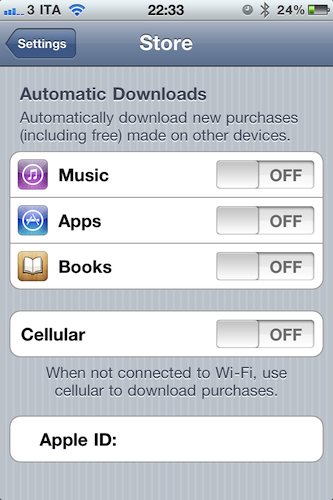
Revealed last week with a leaked screenshot from iTunes and officially announced earlier today at the WWDC keynote, the “Automatic Downloads” feature for iOS device is now live and accessible from the Store menu inside the Settings app on an iPhone, iPod touch or iPad running iOS 4.3. Here’s how it works: once enabled in the Store menu, the new functionality will allow you to beam apps, books and songs across devices – Macs, iPhones and iPads. For a first test, I enabled the menu on my iPhone, and started downloading a free app on my Mac. Within the seconds, the download started on my iPhone, which wasn’t connected via USB – it was an OTA download based on the fact that I hit “download” on my MacBook Pro.

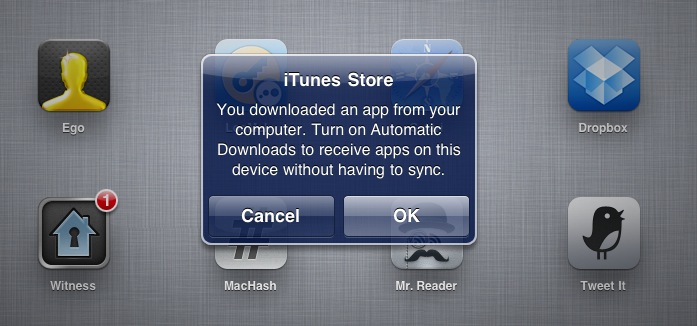
The iPad, which was not enabled to have Automatic Downloads, alerted me to say I had to activate the feature if I wanted to see purchases becoming available on it.

Once activated on the iPad too, I downloaded an app on my iPhone and it started downloading both on the iPhone and iPad, automatically. But what about updates, not new purchases or free downloads? The system seems to be a bit unstable now: I had three app updates on my Mac, and I downloaded them. Those updates were showing up on the iPad App Store app with a red badge, but the download didn’t start automatically as with a new purchase / download. However, as soon as I opened the App Store on my iPad, those updates were gone – as if the device downloaded them in the background without me seeing a loading indicator. Maybe Apple simply needs a better UI for app updates (again, not new purchases) or better integration with iTunes 10.2.2 on the desktop (the announced iTunes 10.3 is not available yet).

To test the new Automatic Downloads for iOS and Macs, go to the Store menu on your iPhone and iPad and turn the switches to “on”. You can also decide to use cellular data when not on WiFi.

Access Extra Content and Perks

Founded in 2015, Club MacStories has delivered exclusive content every week for nearly a decade.

What started with weekly and monthly email newsletters has blossomed into a family of memberships designed for every MacStories fan.

Learn more here and from our Club FAQs.

Club MacStories: Weekly and monthly newsletters via email and the web that are brimming with apps, tips, automation workflows, longform writing, early access to the MacStories Unwind podcast, periodic giveaways, and more;

Club MacStories+: Everything that Club MacStories offers, plus an active Discord community, advanced search and custom RSS features for exploring the Club’s entire back catalog, bonus columns, and dozens of app discounts;

Club Premier: All of the above and AppStories+, an extended version of our flagship podcast that’s delivered early, ad-free, and in high-bitrate audio.

Learn more here and from our Club FAQs.


Lion Server to be $49.99 From the Mac App Store

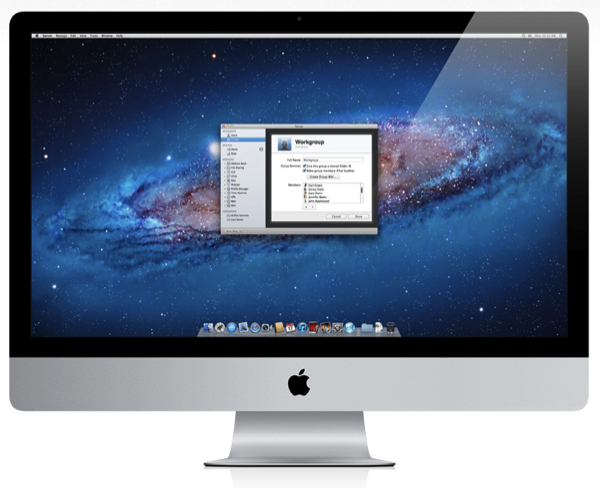
What was thought of as an extension to OS X Lion will be a full blown upgrade for $49.99 from the Mac App Store: Apple has just launched a brand new Lion Server page detailing all of the management features you can expect from the Server App to Xsan support.

Let’s start with the basics: you get to manage AirPort wireless base stations and Time Capsules, monitor traffic and bandwidth, all while controlling who gets access to the server with simple account management options. The server supports VPN for encrypted access to your network, an internal wiki, private iChat services, Time Machine for company backups, calendaring, file sharing, email support, and contact sharing all in one place.

For iPad file sharing, there’s webDAV file sharing (which doesn’t sound as tasty as the features iCloud promises), but there are push notifications so Lion Server can notify users of important email or assigned meetings. Time Machine backs up on the server can be conducted for WiFi, ensuring everyone’s company essential goods are backed up in a safe place.

iCal Server 3 and Mail Server 3 are updated to take advantage of push notifications in Lion Server. While iCal Server 3 gives anyone the power to update a schedule or a meeting (which is subsequently updated on everyone else’s devices), Mail Server 3 allows you to search attachments on the server, and also includes a webmail component so you can check those corporate messages outside of the office in a secure environment.

Wiki Server 3 is another big feature in Lion Server that’s a cross between your standard wiki and 37 Signal’s Backpack, giving users the ability to upload files to a page and download them when needed. Wikis can contain information about people, podcasts, specific company pages, and more that can be easily navigated from the navigation bar. A special People Browser gives you web browser and computer independence for looking up contact information that can be browsed anywhere.

Lion Server also includes a profile manager that allows you to remotely manage iPhones and iPads from a central location. If you’re away from the office, the profile manager is available from a web browser so you can manage devices from anywhere.

Look for Lion Server to be released with Lion this July.

[via Apple]

Access Extra Content and Perks

Founded in 2015, Club MacStories has delivered exclusive content every week for nearly a decade.

What started with weekly and monthly email newsletters has blossomed into a family of memberships designed for every MacStories fan.

Learn more here and from our Club FAQs.

Club MacStories: Weekly and monthly newsletters via email and the web that are brimming with apps, tips, automation workflows, longform writing, early access to the MacStories Unwind podcast, periodic giveaways, and more;

Club MacStories+: Everything that Club MacStories offers, plus an active Discord community, advanced search and custom RSS features for exploring the Club’s entire back catalog, bonus columns, and dozens of app discounts;

Club Premier: All of the above and AppStories+, an extended version of our flagship podcast that’s delivered early, ad-free, and in high-bitrate audio.

Learn more here and from our Club FAQs.