
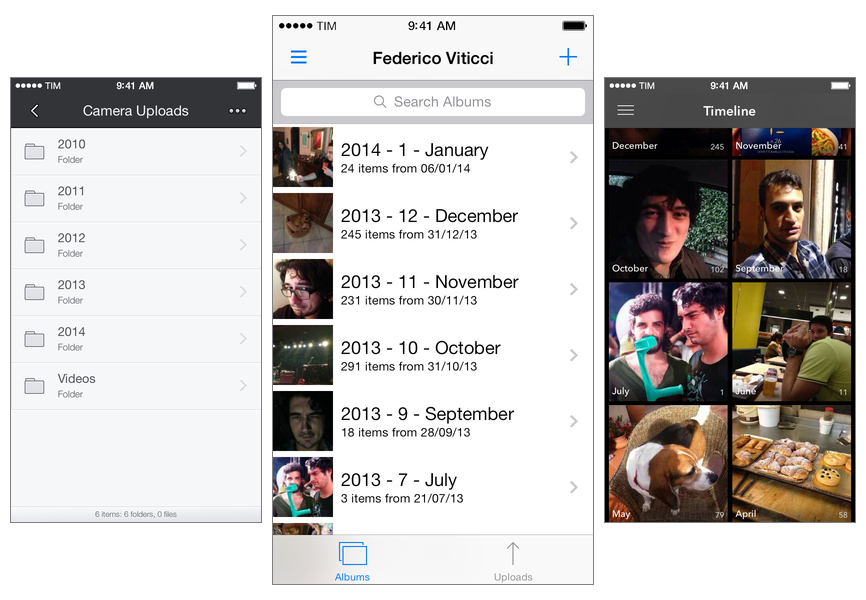
I listened to the latest episode of Mac Power Users, where David, Katie, and my friend Bradley discussed their photo management workflows, the limitations of iPhoto and iCloud, and shared some tips on how to get the most of modern third-party photo services and Apple’s Photo Stream. It’s a great episode and a solid complement to our photo management episode on The Prompt, always with Bradley (he’s the photo management guru these days, having written a book on the topic). For both follow-up reasons and because it’s the new year and hence a good moment to re-evaluate how technology is supposed to be working for us, I thought I’d give an update on my photo management workflow.
Posts in Featured
My Photo Management Workflow, Early 2014

Access Extra Content and Perks
Founded in 2015, Club MacStories has delivered exclusive content every week for nearly a decade.
What started with weekly and monthly email newsletters has blossomed into a family of memberships designed for every MacStories fan.
Club MacStories: Weekly and monthly newsletters via email and the web that are brimming with apps, tips, automation workflows, longform writing, early access to the MacStories Unwind podcast, periodic giveaways, and more;
Club MacStories+: Everything that Club MacStories offers, plus an active Discord community, advanced search and custom RSS features for exploring the Club’s entire back catalog, bonus columns, and dozens of app discounts;
Club Premier: All of the above and AppStories+, an extended version of our flagship podcast that’s delivered early, ad-free, and in high-bitrate audio.
My Must-Have iPhone Apps, 2013 Edition
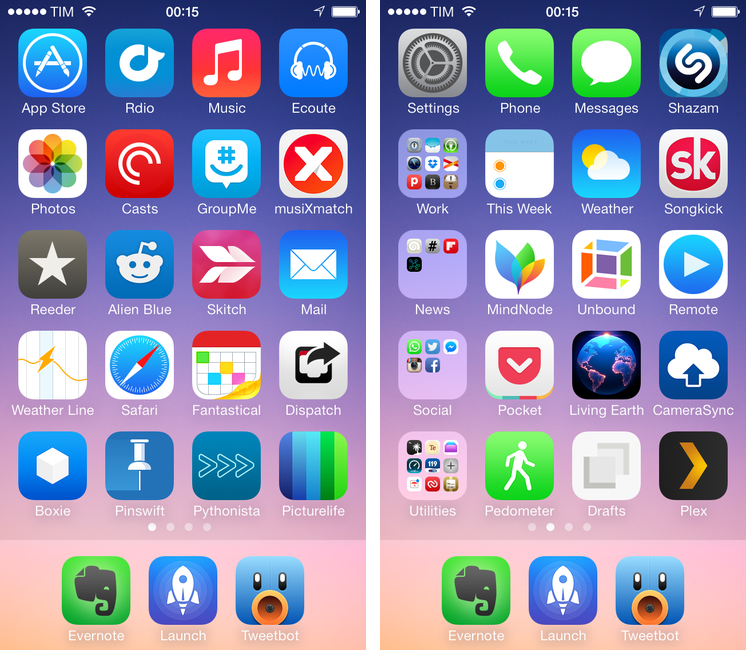
For the past three years, I’ve been running a series called “My Must-Have Mac Apps” that, once a year, would list the apps that I found indispensable on my Mac. This year, considering the changes that I went through from a workflow perspective, I thought it would be appropriate to start focusing on iOS as well. The first installment was about the iPad; then, I covered the Mac; today, I’m going to conclude this year’s series with the iPhone.
Like many others, I don’t use the “phone” part of the iPhone much. The iPhone is my portable computer. And I have lots of apps on it.
My workflow has changed a lot over the years. I used to have a MacBook Pro and I later got an iMac and replaced the MacBook Pro with a MacBook Air. I thought that I’d always need the Air but then I was forced to work from an iPad and I didn’t like it. As I kept trying, I ended up liking my iPad setup so much that I turned it into a tool more versatile than my Mac and wrote a book on it. But the way I use my iPhone has never changed: the iPhone is the computer that’s always with me. If anything, the software that runs on it has evolved through the years, with apps getting more powerful, inter-connected, and, in some cases, “desktop class”. And then, earlier this year, iOS 7 happened.
As expected, iOS 7 provided a fantastic opportunity for developers to reimagine and redesign their apps to take advantage of Apple’s new OS features and design language. Three months into iOS 7, I think that the developer response has been remarkable, but the results are very much still in flux. For the apps that I use on a daily basis, I’ve seen a few major relaunches of apps rebuilt from the ground-up for iOS 7, apps that still have to be optimized for it, and a lot of “compatibility redesigns” that brought lighter color schemes and translucencies without substantially altering the way an app works or is structured for iOS 7. As Apple itself is still trying to fully understand their own new design language, I think it’s fair to assume that third-party developers will need more time to really “get” iOS 7.
As I thought about the apps I wanted to include in this year’s last installment of the Must-Have Apps series, I realized that there was a good mixture of software that was built before and after iOS 7. As usual, my goal was to mention apps that I consider must-haves for my daily workflow, and for this reason you’ll find a mix of brand new iOS 7 apps, minor iOS 7 design updates, and a few pre-iOS 7 apps too. When it comes to having the best tool for the job, I value utility over fashion, and I cherish an old app if it still is the best for me.
The list below includes my 50 top picks and is organized in four sections: Main, for apps that I use several times every day; News, for discovering links and staying on top of RSS; Entertainment, for media consumption; and Utilities, for single-purpose apps that I use often but not heavily every day. Each app is listed with its App Store link and, at the end of the article, you’ll find my iPhone app of the year.
Access Extra Content and Perks
Founded in 2015, Club MacStories has delivered exclusive content every week for nearly a decade.
What started with weekly and monthly email newsletters has blossomed into a family of memberships designed for every MacStories fan.
Club MacStories: Weekly and monthly newsletters via email and the web that are brimming with apps, tips, automation workflows, longform writing, early access to the MacStories Unwind podcast, periodic giveaways, and more;
Club MacStories+: Everything that Club MacStories offers, plus an active Discord community, advanced search and custom RSS features for exploring the Club’s entire back catalog, bonus columns, and dozens of app discounts;
Club Premier: All of the above and AppStories+, an extended version of our flagship podcast that’s delivered early, ad-free, and in high-bitrate audio.
My Must-Have Mac Apps, 2013 Edition

For the past three years, I’ve been running a series called “My Must-Have Mac Apps” that, once a year, would list the apps that I found indispensable on my Mac. This year, considering the changes that I went through from a workflow perspective, I thought it would be appropriate to start focusing on iOS as well. The first installment was about the iPad; today, I’m going to talk about the Mac.
As I wrote when Mavericks was released, I don’t need my Mac as much as I used to. I can do most of my work from iOS (particularly from my iPad mini), but that doesn’t mean that I don’t need a Mac for some tasks or that I’ve stopped using it altogether. I still have to use a few OS X-only apps and tools to get work done – stuff that wouldn’t be possible on an iPad, no matter how hard I try.
I may not be covering new Mac app releases on a weekly basis anymore, but, honestly, 2013 has been the year of iOS 7, with thousands of third-party developers shifting their focus to Apple’s mobile platform in order to update and redesign their apps in time for September. And the fact that Mavericks didn’t bring a radical new design or groundbreaking user features didn’t help either, as developers of Mac apps chose to release updates that focused on under-the-hood improvements and general optimizations.
And yet, in spite of a new design direction and several changes to built-in apps, iOS 7 still doesn’t come with valid alternatives to the stuff OS X is great at: a filesystem with easy management of files that can be opened by multiple apps, precision editing with a cursor, command line utilities, system-wide automation tools, and more. For as much as the iOS ecosystem is maturing and changing at an incredible pace, I haven’t stopped using my Mac and there are some things that can only be done on OS X. And therefore, like every year, I have put together a list of the apps that I consider my must-haves – apps that I install every time I set up my Mac and that I use regularly.
This year, I’ve simplified the list and gotten rid of extra layers for apps that I’m no longer using. You can compare the 2013 list to last year’s one and follow links from there to go back to previous years. You also won’t find last year’s section for price and Mac App Store stats at the bottom: developers often make price changes and release new versions of their apps outside the Mac App Store, so, ultimately, those stats couldn’t be properly contextualized over time.
The list below is organized in four sections: Main, for apps that I use several times every day; Writing, for tools that I employ to research and craft articles for MacStories; and Image & Video Editing, listing apps that allow me to put together screencasts, GIFs, and images for the site. Each app is listed with its App Store/website link and, at the end of the article, you’ll find my Mac app of the year.
Read more
Access Extra Content and Perks
Founded in 2015, Club MacStories has delivered exclusive content every week for nearly a decade.
What started with weekly and monthly email newsletters has blossomed into a family of memberships designed for every MacStories fan.
Club MacStories: Weekly and monthly newsletters via email and the web that are brimming with apps, tips, automation workflows, longform writing, early access to the MacStories Unwind podcast, periodic giveaways, and more;
Club MacStories+: Everything that Club MacStories offers, plus an active Discord community, advanced search and custom RSS features for exploring the Club’s entire back catalog, bonus columns, and dozens of app discounts;
Club Premier: All of the above and AppStories+, an extended version of our flagship podcast that’s delivered early, ad-free, and in high-bitrate audio.
#MacStoriesDeals Holiday Edition: Best Deals for iPhone, iPad, and Mac Apps

Christmas is upon us once again! #MacStoriesDeals is the best place to find great deals for Mac and iOS apps and games, Apple hardware deals, and some great book and audio specials.
There are thousands of software and hardware deals online. We carefully pick the best ones and collect them in a single post with links to buy or share discounted products. You don’t need to be overwhelmed by App Store holiday deals because we take care of finding the best stuff for you.
Bookmark this post, and come back every day to find updated deals for each category. Updates will be listed as new entries at the top of each category.
You can find us as @MacStoriesDeals on Twitter.
Access Extra Content and Perks
Founded in 2015, Club MacStories has delivered exclusive content every week for nearly a decade.
What started with weekly and monthly email newsletters has blossomed into a family of memberships designed for every MacStories fan.
Club MacStories: Weekly and monthly newsletters via email and the web that are brimming with apps, tips, automation workflows, longform writing, early access to the MacStories Unwind podcast, periodic giveaways, and more;
Club MacStories+: Everything that Club MacStories offers, plus an active Discord community, advanced search and custom RSS features for exploring the Club’s entire back catalog, bonus columns, and dozens of app discounts;
Club Premier: All of the above and AppStories+, an extended version of our flagship podcast that’s delivered early, ad-free, and in high-bitrate audio.
Apple Airs iPhone 5s Holiday Commercial Featuring AirPlay

Just in time for the holidays, Apple today aired and published a new iPhone 5s commercial focused on AirPlay and the impact that capturing memories can have on real life scenarios. The commercial, called “Misunderstood”, was first spotted by 9to5mac and subsequently posted by Apple on their official website and YouTube channel.
The commercial is interesting for a variety of reasons. The underlying theme is fairly straightforward: there’s a family gathering for Christmas, with parents, grandparents, kids, and other relatives getting together to celebrate the holiday. It’s snowing and kids are playing outside, running, building a snowman, and taking walks with their parents. Inside, adults are making preparations, cooking, talking by the Christmas tree – perhaps they’re seeing each other after months of work and normal life routine that prevents them from being always together, all the time. It’s a typical Christmas family reunion.
There’s a teenager with a 5s who in the first half of the commercial is shown constantly checking his iPhone: he’s holding the iPhone as he greets his relatives, he’s absorbed in the display and apps while everybody else is seemingly having a good time, and, again, he goes back to his iPhone while others are looking at the festive tree inside the house. At one point, his grandfather throws a hat towards his iPhone’s camera to grab his attention – “Put that thing down and come join us!”, the commercial seems to say. We’ve all seen (or been) this kid in our lives, full of electronic devices.
And then the commercial changes: as the entire family is gathered in the living room, the boy walks in, his iPhone in hand, and turns on an Apple TV connected to the television. He connects the iPhone to the Apple TV wirelessly with AirPlay, and he starts streaming a video. This is where Apple reveals the story behind the ad: the kid wasn’t just isolating himself from his family because he was bored and he needed his apps – he was making a home video for his family. The perspective changes: what, from the outside, looked like a teenager ignoring family members reveals photos and videos taken with the iPhone’s camera and (likely) edited with iMovie. There are touching clips of kids playing, people hugging, laughing, kissing, and just having the good time that everybody wants to have for Christmas – when life routine is far away in the city and you get to wake up late and take a walk with your kid in the snow. Heads turn in the living room – “How did you make this?”, you can almost hear people ask.
The iPhone shown in the first half of the commercial wasn’t being used as an escape device to kill boredom – it’s advertised as a creation device used to create memories, edit videos, and share a touching moment with family members that you don’t see much often anymore. From the iPhone’s camera point of view, now mirrored via AirPlay onto the big screen for others to see, everything makes more sense: seeing relatives and watching them talk, play, and share personal moments. The iPhone was used to record life rather than escape from it. The home video ends, notably, with a selfie; people are happy, the kid is happy. Cut to family house seen from outside. Happy holidays from Apple.
Apple’s new commercial may be deemed as unrealistic by some (an Apple TV at your grandparents’ house? Teens not using Snapchat?), but it’s good. It’s relatable, human, and it highlights the iPhone’s best features (the 5s’ camera, SloMo, powerful video editing, streaming, music) with the personal touch that Apple has been employing in the past years for commercials such as Photos, Music, and FaceTime Every Day. It’s a clever commercial in that it sells a product while telling a story that people know – but from the angle of technology empowering us in new ways.
The inclusion of the Apple TV and AirPlay is interesting. AirPlay, in its various forms, has long been considered one of Apple’s most undervalued features, and the company is trying to position it as an easy to use and useful companion to the main iPhone experience. There are no screens showing how AirPlay is activated or the Apple TV interface, but the message is there: there’s a way to show iPhone videos on the television. It’ll be interesting to see if Apple will follow-up to this in future commercials.
As Christmas approaches, Apple is once again advertising the iPhone as an experience more than a gadget. It’s not about the camera sensor, the faster processor, the apps, or wireless streaming taken individually – it’s about how all these elements, together, make technology (in this case, Apple’s technology) fit into our lives, empowering us.
You can watch the commercial below.
Access Extra Content and Perks
Founded in 2015, Club MacStories has delivered exclusive content every week for nearly a decade.
What started with weekly and monthly email newsletters has blossomed into a family of memberships designed for every MacStories fan.
Club MacStories: Weekly and monthly newsletters via email and the web that are brimming with apps, tips, automation workflows, longform writing, early access to the MacStories Unwind podcast, periodic giveaways, and more;
Club MacStories+: Everything that Club MacStories offers, plus an active Discord community, advanced search and custom RSS features for exploring the Club’s entire back catalog, bonus columns, and dozens of app discounts;
Club Premier: All of the above and AppStories+, an extended version of our flagship podcast that’s delivered early, ad-free, and in high-bitrate audio.
Ecoute 2 Review
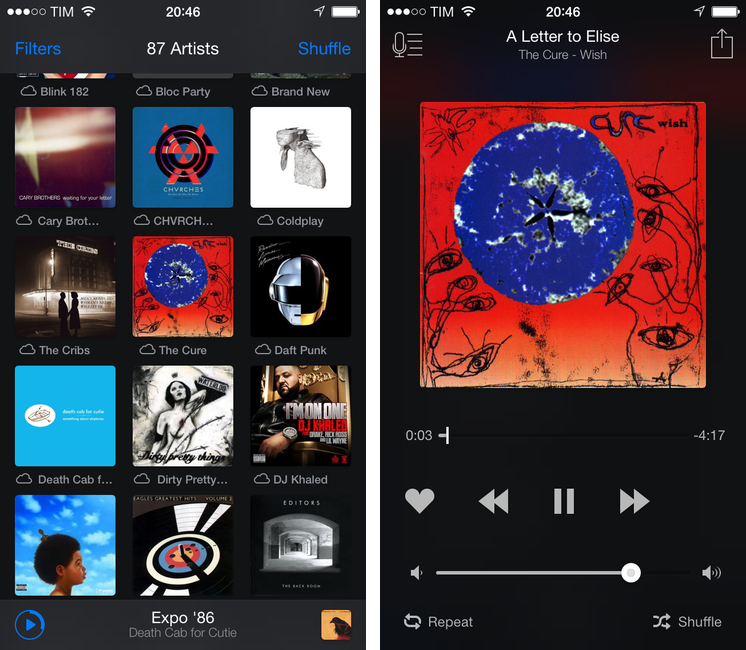
Last year, when we reviewed Ecoute, we called it the best music player for iOS. Apple’s Music app has never been packed with features when compared to iTunes on the Mac, but it’s the app that the majority of people use because it’s free and built into the operating system.
With iOS 7, Apple redesigned the Music app with some questionable choices for artist and album navigation and more advantages over third-party clients through the inclusion of iTunes Radio streaming and a special widget in Control Center to like songs and add them to your wish list. The Music app is, effectively, irreplaceable if you care about iTunes Radio and managing your music and playlists, but I think that the new Ecoute for iOS 7 does several things better than Apple’s app. Read more
Access Extra Content and Perks
Founded in 2015, Club MacStories has delivered exclusive content every week for nearly a decade.
What started with weekly and monthly email newsletters has blossomed into a family of memberships designed for every MacStories fan.
Club MacStories: Weekly and monthly newsletters via email and the web that are brimming with apps, tips, automation workflows, longform writing, early access to the MacStories Unwind podcast, periodic giveaways, and more;
Club MacStories+: Everything that Club MacStories offers, plus an active Discord community, advanced search and custom RSS features for exploring the Club’s entire back catalog, bonus columns, and dozens of app discounts;
Club Premier: All of the above and AppStories+, an extended version of our flagship podcast that’s delivered early, ad-free, and in high-bitrate audio.
Tydlig: An Innovative Free-Form Calculator for iOS
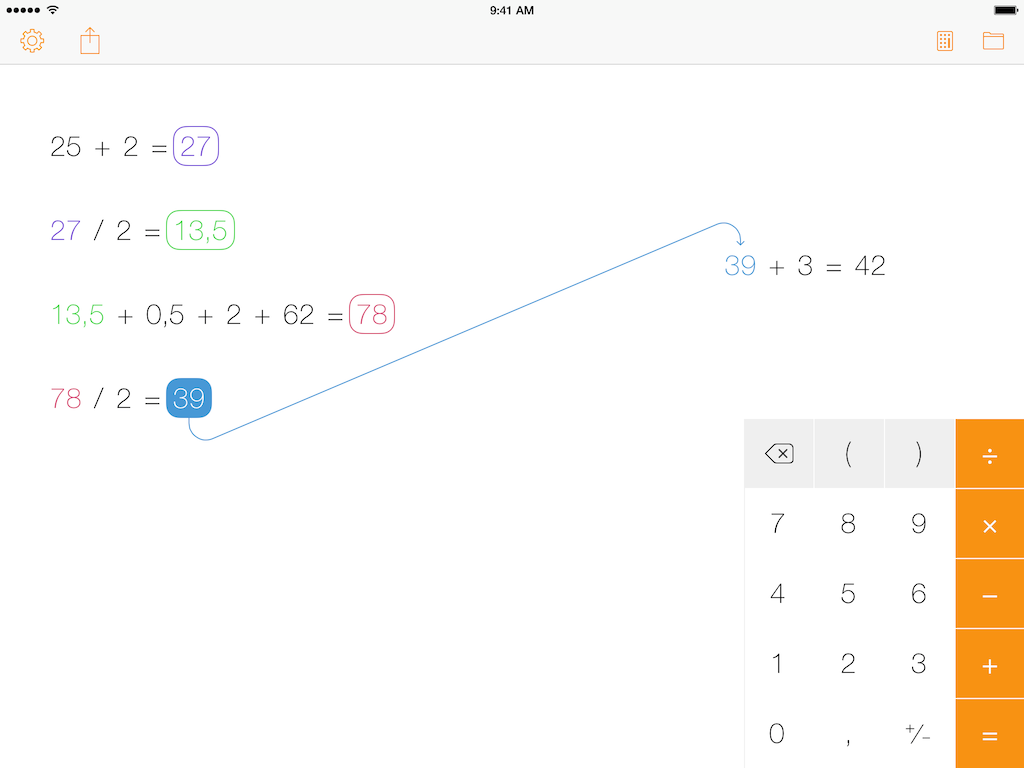
Developed by Andreas Karlsson, Tydlig wants to reimagine how a calculator should work in the modern age of iOS devices and multitouch screens. Rather than mimicking every aspect of old physical calculators in the transition to pixels, Tydlig eschews conventions by turning an iPhone or iPad’s screen into a canvas where numbers can be placed anywhere, linked together, and rearranged. The result is a breath of fresh air into the landscape of iOS calculators, but it also takes a while to get used to it and it likely won’t appease purists. Read more
Access Extra Content and Perks
Founded in 2015, Club MacStories has delivered exclusive content every week for nearly a decade.
What started with weekly and monthly email newsletters has blossomed into a family of memberships designed for every MacStories fan.
Club MacStories: Weekly and monthly newsletters via email and the web that are brimming with apps, tips, automation workflows, longform writing, early access to the MacStories Unwind podcast, periodic giveaways, and more;
Club MacStories+: Everything that Club MacStories offers, plus an active Discord community, advanced search and custom RSS features for exploring the Club’s entire back catalog, bonus columns, and dozens of app discounts;
Club Premier: All of the above and AppStories+, an extended version of our flagship podcast that’s delivered early, ad-free, and in high-bitrate audio.
Party DJ Brings iTunes DJ Feature Back to iOS 7 With App for iPhone and iPad
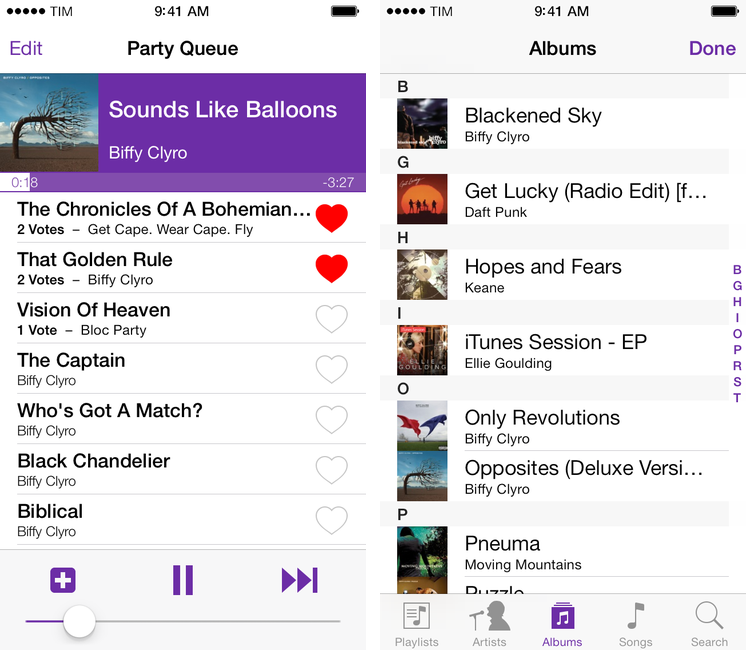
Developed by Alex Price, Party DJ is an iOS 7 app that brings back one of the old features of iTunes DJ and Apple’s Remote app: the possibility to collaborate with friends on what music to play through a voting system. The app, available today on the App Store, comes in two versions: a paid, $1.99 “host + remote” app to handle playback and queue management, and a free Remote companion to install on iPhones or iPads that can vote songs. Price is the developer behind CameraSync, a longtime favorite of mine, and I was immediately intrigued when he showed me Party DJ a few weeks back. Read more
Access Extra Content and Perks
Founded in 2015, Club MacStories has delivered exclusive content every week for nearly a decade.
What started with weekly and monthly email newsletters has blossomed into a family of memberships designed for every MacStories fan.
Club MacStories: Weekly and monthly newsletters via email and the web that are brimming with apps, tips, automation workflows, longform writing, early access to the MacStories Unwind podcast, periodic giveaways, and more;
Club MacStories+: Everything that Club MacStories offers, plus an active Discord community, advanced search and custom RSS features for exploring the Club’s entire back catalog, bonus columns, and dozens of app discounts;
Club Premier: All of the above and AppStories+, an extended version of our flagship podcast that’s delivered early, ad-free, and in high-bitrate audio.
Launch Center Pro 2.1: Fleksy Keyboard, Lists, Photo Attachments, and Share Sheets
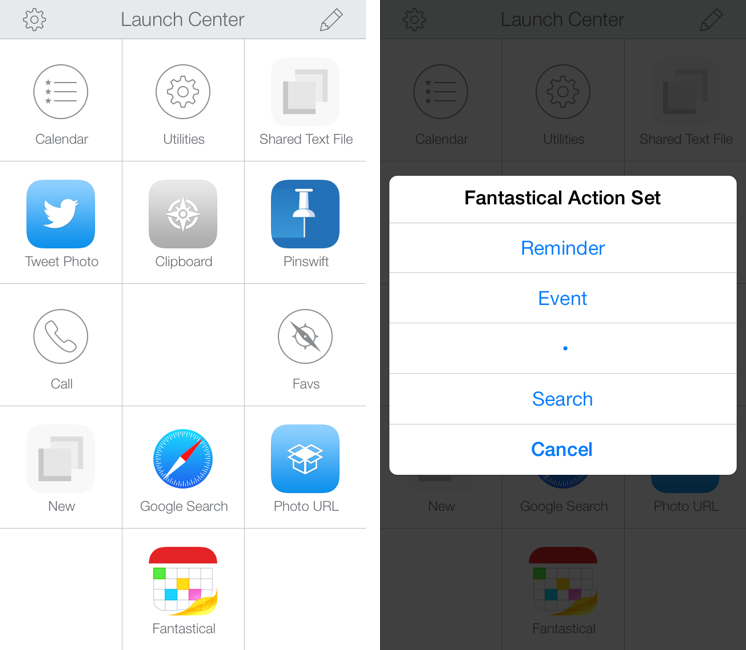
In October, Contrast released Launch Center Pro 2.0, a free update to their shortcut launcher and automation tool for iOS that brought a new interface for iOS 7 and, among other minor additions, Dropbox integration. Launch Center Pro is one of the three apps I keep in my dock[1], and I use it several times a day to create new tasks in Fantastical, launch Google searches, open my favorite websites, and more.
Today, Contrast is launching Launch Center Pro 2.1, a seemingly not-so-major update that, however, brings important changes to the app, including a new way to build visual actions and support for the new third-party Fleksy keyboard. I don’t think it’s an exaggeration to say that version 2.1 is just as important as 2.0 for heavy users of Launch Center Pro. Read more
Access Extra Content and Perks
Founded in 2015, Club MacStories has delivered exclusive content every week for nearly a decade.
What started with weekly and monthly email newsletters has blossomed into a family of memberships designed for every MacStories fan.
Club MacStories: Weekly and monthly newsletters via email and the web that are brimming with apps, tips, automation workflows, longform writing, early access to the MacStories Unwind podcast, periodic giveaways, and more;
Club MacStories+: Everything that Club MacStories offers, plus an active Discord community, advanced search and custom RSS features for exploring the Club’s entire back catalog, bonus columns, and dozens of app discounts;
Club Premier: All of the above and AppStories+, an extended version of our flagship podcast that’s delivered early, ad-free, and in high-bitrate audio.