Federico Viticci

10766 posts on MacStories since April 2009

Federico is the founder and Editor-in-Chief of MacStories, where he writes about Apple with a focus on apps, developers, iPad, and iOS productivity. He founded MacStories in April 2009 and has been writing about Apple since. Federico is also the co-host of AppStories, a weekly podcast exploring the world of apps, Unwind, a fun exploration of media and more, and NPC: Next Portable Console, a show about portable gaming and the handheld revolution.

Apple Developing “Scanner” iOS App with OCR?

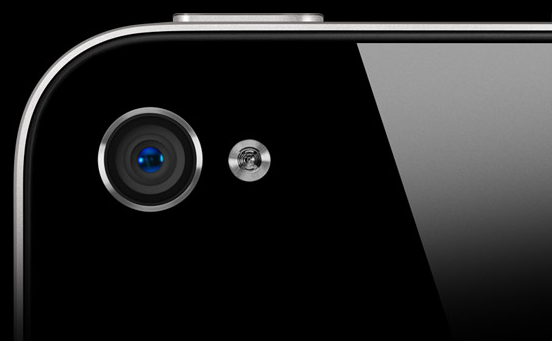
9to5mac reports “a source at Apple” informed them the company is working on a native “Scanner” app for iOS devices, which would allow users to use an iPhone, iPod touch or iPad camera to scan documents or business cards on the go, and have them recognized & exported as PDF, or to other iOS apps like Pages and Contacts. The report says “it isn’t certain” when this app will be released and if it will be directly bundled into a future version of iOS, however the website suggests such scanning functionality would require a better camera other than the existing 5 MP one on the iPhone 4. The iPhone 5 is widely expected to have an 8 MP camera.

The user opens the app and holds the iPhone over the document or object they want scanned.  They then snap a picture of it.  Apple’s on-board software then resizes the image to ‘letter’ or business card, A4 or whatever depending on original document.  Resizing includes aligning edges that get skewed by a single scan point rather than traditional scanning methods.  The user can then manually change the size of the document or the use.

This “Scanner” app would also use either local / cloud-based OCR (optical character recognition) to separate images from text and make scanned text available for copying and pasting across iOS applications. Notably, iOS comes with an “Open in…” menu that enables third-party and native apps to communicate with each other’s supported documents and file types – 9to5mac does suggest the Scanner app would be capable of scanning a business card, and automatically add a new entry to the Contacts app.

There are a number of apps in the App Store that can turn iOS devices into portable scanners, some of them we’ve reviewed on MacStories before. Apple has also been granted a series of patents related to a possible scanning functionality for mobile devices.


iOS 5 Beta 8 on Friday, GM Next Week, France Telecom CEO Suggests iPhone 5 Launching October 15th

Two new rumors posted earlier today seem to suggest Apple is getting ready to release the last seeds of iOS 5 to developers, targeting an early October launch for the new OS, alongside the next-generation iPhone.

According to BGR, “a trusted source” claims Apple will release the eighth beta of iOS 5 this week, on Friday, with the Golden Master build to follow on or around September 23rd. Yesterday, a report claimed Apple will send a final version of iOS 5 to assemblers between September 23rd - 30th so that the iPhone 5 will come pre-loaded with iOS 5. It is believed iPhone assemblers in China are waiting for a final version of iOS 5 to install on the devices – as with new Macs released this summer with Lion pre-installed, Apple might want to release a new iPhone already running iOS 5 out of the box. BGR has a solid track record when it comes to pinpointing iOS beta releases, and the website also suggests Apple will requests “technical acceptance” of iOS 5 GM to carriers by October 5th. It is well-known carriers get exclusive versions of Apple’s iOS before the final release in order to test features like voice calling, texting, Internet browsing and perhaps even FaceTime on their networks.

Meanwhile, France Telecom CEO Stéphane Richard [Mac4Ever via MacRumors] has suggested that, based on what they heard, the iPhone 5 should launch on October 15th. October 15th is a Saturday – that would be unusual for iPhone releases, which usually happen on Thursdays or Fridays. Furthermore, previous speculation hinted at an iPhone 5 launch on October 7th - 14th – it is not clear whether Richard is referring to general date for the widely believed mid-October timeframe, or if he’s really heard something about an October 15th European launch.

It’s also worth mentioning that, if the iPhone 5 comes with iOS 5 pre-installed, the new OS would need to come out days ahead of new hardware alongside iTunes 10.5, currently in beta and required to sync iOS 5 devices with a Mac or PC. In the past, Apple released new versions of iTunes and iOS ahead of new hardware to get customers ready for the upgrade, and allow journalists/reviewers to restore the OS on a review unit if needed.

Hypothetically, based on this recent speculation, Apple could follow this timeline:

  • iOS 5 beta 8: Friday, September 16th
  • iOS 5 GM: Friday, September 23rd

  • iPhone 5 pre-orders: Friday, September 30th [link]

  • iOS 5 launch: October 5th - October 7th

  • iPhone 5 U.S. release: October 7th - October 14th [link]

For a timeline of iPhone 5 news and speculation, check out our rumor roundup and retrospective.

Update: AppleInsider is now reporting iOS 5 could come out on Monday, October 10th, based on information received from a source at AppleCare division.

Apple has reportedly informed its AppleCare division to expect an influx of iOS-related inquiries from customers beginning Monday, Oct. 10, perhaps signaling when the company plans to release iOS 5 to existing device owners.

For instance, one person familiar with the matter said his local AppleCare call center has been told to expect an eightfold increase in customer calls on that day, and that staff are being advised ahead of time for the increased traffic.

Assuming the October 10th date is correct, the iPhone 5 wouldn’t come out on October 7th, as some speculated. However, it wouldn’t be the first time Apple published a major iOS update on a Monday. Alongside iOS 5, Apple is also expected to publicly release iCloud, and OS X 10.7.2.


Apple Readying Third-Generation AirPort Express

According to AppleInsider, Apple is readying the release of a third-generation AirPort Express station, the second version of the device to use the 802.11n wireless standard. The website reports “people familiar with the matter” claim Apple is working on an update to AirPort Utility, version 5.6, which contains strings mentioning ”AirPort Express 802.11n (2nd Generation) base station” in the developer notes. The current version of AirPort Utility, 5.5.3, was last updated in June amidst rumors of iCloud functionality deeply tied with a caching system for software updates. Such rumors didn’t materialize at WWDC, and no further mentions of caching systems for iOS and OS X appeared in the developer betas released this summer.

The AirPort Express station (model MB321LL/A) was updated in 2008, adding initial support for 802.11n; the first version of the base station came out in 2004. AppleInsider reports third-party resellers claim the existing MB321LL/A model has been discontinued, whilst Amazon expects new stock to become available in 2 to 5 weeks.

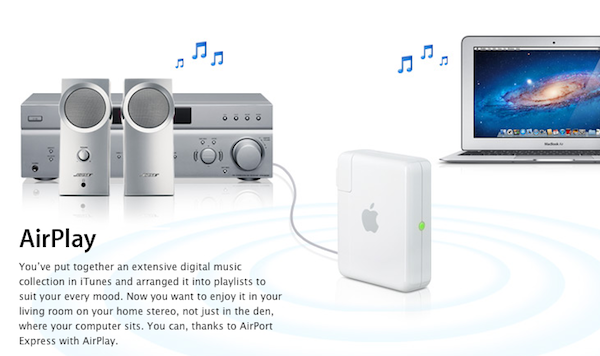
One of the AirPort Express’ most promoted functionalities is support for AirPlay (nèe  AirTunes), which allows users to beam audio to the station using iTunes or compatible iOS apps, provided a set of speakers is connected to the AirPort Express through the built-in mini-jack output. Similarly, the AirPort Express enables wireless printing thanks to a USB port. Other features include Internet Sharing, extreme portability, and easy setup with AirPort Utility (which can automatically configure AirPort stations on a network).

Apple’s line of wireless routers saw updates for the Time Capsule and AirPort Extreme base station in June. The quietly-introduced new versions revealed significant power boosts and performance improvements, as well as new wireless cards from Broadcom.

[image via]


Apple Releases MacBook Air EFI Firmware Update 2.1

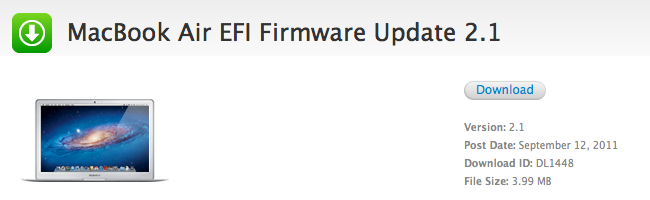
Earlier today Apple released an EFI Firmware Update for the MacBook Air, which reaches version 2.1 and adds a number of fixes for Thunderbolt Displays and Target Disk Mode. Too, the update enhances performances of Lion Recovery when used through an Internet connection (to re-download Lion from Apple’s servers).

This update includes fixes that enhance the stability of Lion Recovery from an Internet connection, and resolve issues with Apple Thunderbolt Display compatibility and Thunderbolt Target Disk Mode performance on MacBook Air (mid 2011) models.

The MacBook Air EFI Update will update the EFI firmware on your notebook computer. Your computer’s power cord must be connected and plugged into a working power source. When your MacBookAir restarts, a gray screen will appear with a status bar to indicate the progress of the update. It will take several minutes for the update to complete. Do not disturb or shut off the power on your MacBookAir during this update.

The new MacBook Airs were released on July 20, alongside the announcement of the new Apple Thunderbolt Display (the renamed Cinema Display), which packs Thunderbolt alongside an Ethernet port to allow for easy daisy-chaining of peripherals and network access. The Thunderbolt Display, priced at $999, is shipping in 2-3 weeks from Apple’s website, though the company announced the product in July with a 60 day shipping estimate. MacRumors reported last week Thunderbolt Displays were shipping to retail stores ahead of upcoming availability.


OS X Lion, MacBook Airs Driving Mac Growth In September Quarter

According to the latest NPD data and a note issued by Piper Jaffray analyst Gene Munster – reported by Business Insider – Mac sales for the first two months of Apple’s Q4 are up 22%, with Wall Street’s estimates averaging 16% growth for the entire quarter. Apple is expected to announce its Q4 results sometime in October, and back at the Q3 earnings call in July the company anticipated there would be a “future product transition” that would affect the September quarter – suggesting the next-generation iPhone would ship before the end of Q4.

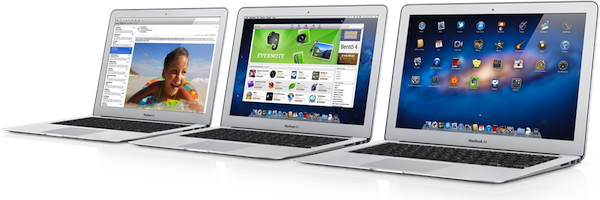
As for the Mac, Munster indicates the release of OS X Lion, updated MacBook Airs and Mac minis on July 20 helped contributing to the 22% year-over-year growth in the same period; NPD data suggests Apple could sell between 4.4 and 4.6 million Macs in the quarter. In Q3, Apple sold 3.95 million Macs, and Tim Cook noted the MacBook Pros made up for the majority of Mac sales. It is no secret, however, that ever since the refresh in October 2010 the updated MacBook Air line has been growing in popularity among existing Mac users as well as new customers, with several analysts calling it Apple’s new crown jewel.

Meanwhile, Apple announced 1 million copies of Lion sold after 24 hours of availability, but hasn’t released new data since then. Apple has encouraged customers to upgrade to the new OS thanks to heavy promotion in the Mac App Store and by releasing a USB thumb drive for those unable to download the 4 GB OS installer. Lion also comes pre-installed on the new Macs released this summer, certainly another selling points for the Airs and minis.


Automatically Saving PDFs (And Clipboard) to Evernote Using Keyboard Maestro

Automatically Saving PDFs (And Clipboard) to Evernote Using Keyboard Maestro

Over the weekend, I posted my initial impressions on Keyboard Maestro, a fantastic assistant for your Mac that will help making your OS X workflow faster, and personalized. Today Brett Kelly at Nerd Gap shares a tip to automate the process of virtually printing a PDF from Mail.app to Evernote:

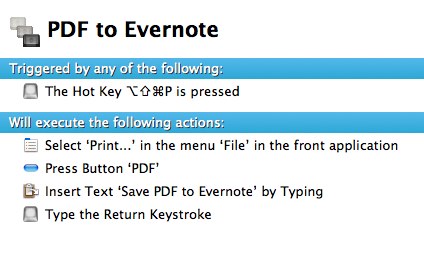
Clicking this menu option will render whatever the current thing is as a PDF and shove it into Evernote. This Keyboard Maestro recipe automates the following steps that make up this process:

- Click “File” then “Print” in the current application menu

- Click the “PDF” button at the bottom left of the Print dialog

- Type “Save PDF to Evernote” to select the appropriate option (this is the only way I could do this with some certainty that it would work, though there were other options)

- Type Return

The Keyboard Maestro macro above works with any Mac app that supports the Print… menu, although, for some reason, Google Chrome Canary returns an error at the “Click PDF button” action. Safari, Mail, Sparrow – they can all print to Evernote using Keyboard Maestro.

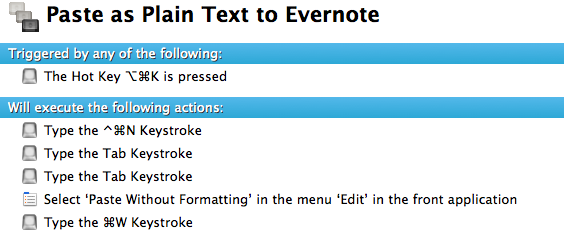
Alternatively, if you don’t want to save PDFs to Evernote, you can set up this macro to quickly create a new note using Evernote’s helper (the menubar icon), paste without style, and close the window. It’ll take less than a second to perform through Keyboard Maestro, and it’s a nice way to quickly get your latest clipboard entry onto Evernote as plain text.

You’ll need to set title and tags later, as this only pastes the clipboard in the note’s body.

Permalink

TestFlight’s New SDK Brings In-App Updates, Checkpoints, More

In the recent months, TestFlight has become many developers’ favorite way of distributing internal “beta” builds of their iOS applications to testers. Thanks to the over-the-air installation method introduced by Apple in iOS 4, services like TestFlight allow developers to stop worrying about manually sending .ipa files to testers by relying on a unified web interface that collects testers’ UDIDs (deprecated in iOS 5), alongside other device information and app installation data. TestFlight has been largely successful thanks to its ease of use, nicely designed web apps and user adoption – with the release of a new SDK for developers, as noted by TechCrunch, the company aims to take a step further in letting developers access even more data from their testers and beta apps.

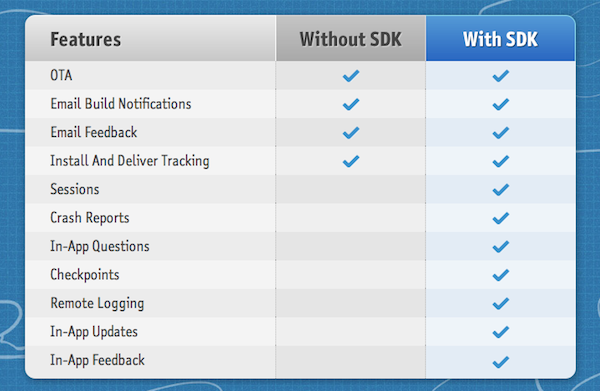
The SDK, available here, brings sessions, crash reports and checkpoints to TestFlight-installed apps. This means developers will be able to discover how testers are using their applications, and how far they’re getting thanks to virtual “checkpoints” placed in the app (useful for, say, level-based games, easter eggs or new, unusual interfaces). With in-app updates, beta apps built through TestFlight’s SDK will directly notify users of available updates without the need of checking email for new TestFlight updates. Similarly, in-app questions will enable developers to run small survey directly into their beta apps.

  • Over-The-Air - Painless App Distribution. Send your beta apps over the air with ease. It’s simple, painless, and magical.
  • Team Management - Get everyone on board. Manage devices and create custom distribution lists to selectively send builds over the air.
  • Feedback - Get the memo. Gather more feedback with in app forms and emails, which is all organized in your dashboard.
  • Reports - The Black Box of beta testing. Solve the mystery of beta testing. No longer wonder which testers installed the app, started testing, or opened their email invite. Reports bring transparency to beta testing, all in real time.
  • Checkpoints - Flag down insight. Monitor tester engagement and trigger in-app questions by placing checkpoints throughout your app.
  • Crash Reports - Crash, but don’t burn. Real time reports with environment snapshots, full session activity, and your NSLogs.
  • Enterprise - Enterprise signed IPA’s. The added benefit of unlimited devices with all the TestFlight features, at no charge.
  • In-App Questions - What’s up? Get the answers you need, by asking questions the moment a checkpoint is reached.

The TestFlight SDK allows you to track how beta testers are testing your application. Out of the box we track simple usage information, such as which tester is using your application, their device model/OS, how long they used the application, logs of their test session, and automatic recording of any crashes they encounter.

To get the most out of the SDK we have provided the Checkpoint API.

The Checkpoint API is used to help you track exactly how your testers are using your application. Curious about which users passed level 5 in your game, or posted their high score to Twitter, or found that obscure feature? With a single line of code you can find gather all this information. Wondering how many times your app has crashed? Wondering who your power testers are? We’ve got you covered.

Information gathered by the TestFlight SDK is sent to the web dashboard in real time, or after an app has been put in the background/terminated. The SDK has been in testing with selected developers for some months now, and the new features seem very welcome among the community. Developers using TestFlight include Spotify, Adobe, Marco Arment of Instapaper, The Iconfactory and Halfbrick, not to mention thousands of smaller “indie” devs trying out the service for the first time.

The TestFlight SDK supports Apple’s Enterprise distribution as well, and is available as a free download here.


Apple: A Step Ahead, and Three To The Side

Here’s a thought: Apple isn’t ahead of its competitors only in terms of hardware design, software, and product marketing. When Apple takes a step ahead, it also takes three more to the side – and that’s what’s helping them shape the industry today.

We often refer to Apple as a company “ahead of the competition” with products like the iPhone, iPad, OS X and iTunes. I believe what’s driving the single “step ahead” isn’t the (successful) combination of products and customer satisfaction – it’s the company itself, its culture, the image they want to show to the world. The “step ahead” is Apple’s DNA.

But consider the three steps to the side that help Apple differentiate itself from the competition, and roll out products and services that people are actually willing to pay for. These three steps are taken in regards of hardware, software, and the overall message the interplay of both has to deliver.

Hardware: iPhone, iPad, iPod, Mac. These products have an attractive design, and they’re the result of Apple’s deals to secure components before anyone else at a lower price, for the long-term. That’s why it took months for competitors to figure out multi-touch after the first iPhone, and why Ultrabooks still can’t match the MacBook Air.

Software: iOS, OS X, iTunes, iCloud. Software is the soul to Apple’s products, it is the reason why Apple hardware “just works”.

Message: Apple wants to make the best products in the world. Products they can sell for a profit, and make people happy with at the same time. Through the right combination of prices, attractive design, and marketing, the “interplay of hardware and software” is what defines Apple’s message.

Apple strives to innovate, but wants to do so by being unique with its own hardware, software, and message. Competitors often try to take their risks with either hardware, software, or the message, but they can’t do all three at the same time.

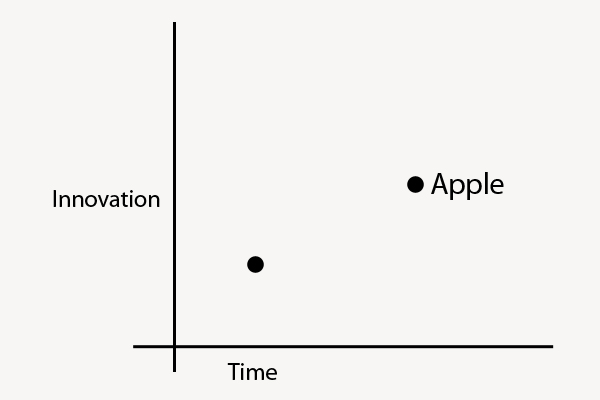
This is where competitors and Apple stand:

You can also think of “Innovation” as “Liberal Arts” and “Time” as “Technology”. When Apple takes a major leap forward, it does so because it’s in their DNA to innovate and sit at the intersection of Technology and Liberal Arts; alongside the single breakthrough in terms of innovation, they take three equally disruptive steps to the side to stand out from their competitors thanks to the great efforts they’ve gone through to advance in technology.

Technology evolves with time. Apple’s three steps allow them to have a considerable time advantage – this is the reason why many phones today still can’t match the original iPhone from 2007.

Four years ago, Steve Jobs said:

iPhone is a revolutionary and magical product that is literally five years ahead of any other mobile phone.

But is still ahead just because Apple kept iterating on the original idea?

Technology isn’t a 100 meters sprint race. Companies that want to be successful can’t keep running the same race, more of the same following more of the same. Just take a look at RIM. Apple knows that technology alone is not enough. And thus evolving with time alone (upgrading the same product with new hardware) won’t matter much if risks aren’t taken other directions as well.

Apple reinvented itself as it was moving ahead. Steve Jobs, announcing the iPad in January 2010:

Everybody uses a laptop and a smartphone. And a question has arisen lately: is there room for a third category of device in the middle? Something that’s between a laptop and a smartphone. And of course we’ve pondered this question for years as well. The bar’s pretty high. In order to really create a new category of devices, those devices are going to have to be far better at doing some key tasks. Better than a laptop. Better than a smartphone. Now, some people have thought…that’s a netbook. The problem is, netbooks aren’t better at anything. They’re slow, they have low quality displays and they run clunky old PC software. So, they’re not better than a laptop at anything. They’re just cheaper. They’re just cheap laptops. We don’t think they’re a new category of device.

Progress, ultimately, is adaptation. This started with the iPhone in 2007, and ends with iCloud in 2011. When iOS 5 and iCloud come out this Fall, there will be a brand new vision – and therefore, kind of adaptation – moving forward. A company that constantly adapts to an ever-changing market generates desires for the new, whilst simplicity and usability lead to customer satisfaction. At a higher level, it is the interplay of progress and simplicity that keeps Apple growing.

Technology and liberal arts aren’t mutually exclusive.


Western Digital Unveils “WD 2go Pro” iOS App To Stream & Download Media From The Cloud

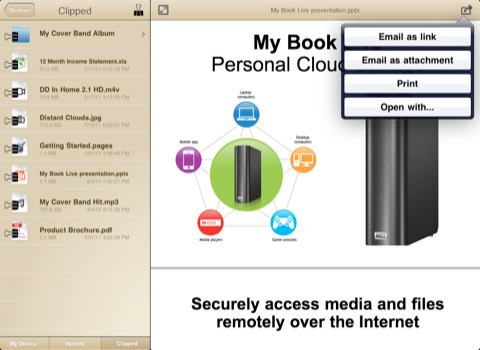
Earlier today Western Digital launched WD 2go Pro on the App Store, a $2.99 universal app for iPhone and iPad to access and download media and documents stored in a My Book Live account. My Book Live, unveiled by the company last year, allows users to set up a NAS (network attached storage) device, and access documents from a “personal cloud” with different user accounts over the Internet. The first version of My Book Live came with an iOS app to view photos stored in the cloud, while the free WD 2go enabled remote viewing for media, and documents.

WD 2go Pro is different from the free application in that it enables users to download files for offline access, set a passcode, and sync entire folders from My Book Live to a mobile device. Furthermore, the Pro version lets users email files, share them as links, and print/open documents through third-party apps.

The WD 2go mobile app supports most major file types including Microsoft Word documents, Microsoft Excel spreadsheets, PowerPoint presentations, Apple Keynote, and more. So you can pull up that presentation and show it off on your iPad in 1024 x 768 resolution.

WD 2go Pro is available at $2.99, and it requires a My Book Live account with an iPhone, iPod touch, or iPad running OS 4.x or later. Check out the original My Book Live promo video below. Read more