Federico Viticci

10763 posts on MacStories since April 2009

Federico is the founder and Editor-in-Chief of MacStories, where he writes about Apple with a focus on apps, developers, iPad, and iOS productivity. He founded MacStories in April 2009 and has been writing about Apple since. Federico is also the co-host of AppStories, a weekly podcast exploring the world of apps, Unwind, a fun exploration of media and more, and NPC: Next Portable Console, a show about portable gaming and the handheld revolution.

The Obvious Ending Of Instagram’s Tale

Earlier today, Facebook announced it has “agreed” to acquire Instagram, the popular photo sharing service that recently launched an Android app, adding 1 million users in 12 hours to its existing 30 million iPhone users. Here’s Instagram’s announcement, Zuckerberg’s post on Facebook, and some nice numbers for context. Both companies say Instagram “isn’t going away”, though they will be working on expanding the network while keeping the Instagram “we know and love”. If it sounds confusing on a practical level, here’s how we can put this announcement in perspective.

Unlike Flickr, Facebook didn’t miss out on mobile (its iPhone app is the most popular free app on the App Store, ever), but unlike Flickr, Facebook is also many experiences in one. Facebook is the social network, not just the photo network or the bookmark network. Facebook is none of them and all of them at the same time. And as such, Facebook understands that the mobile photo sharing aspect of the social network could be done better.

How better? Instagram better. Even without a business model – something the company has been criticized for not figuring out on day one – Instagram amassed more than 30 million users in roughly 2 years, and it has somehow redefined the way we think of photos shot quickly, modified, and shared on the go on multiple social networks. Photos that don’t require a sign up to be seen, but that do require registered users to “like” and comment. Photos that, even if not of the highest quality, still appeal to the mobile user who wants to touch up his picture of food or a concert with some nice, vintage-like filters. Instagram is fast, intuitive, and free to use for anyone.

Some are already comparing Instagram’s acquisition to Google buying YouTube years ago. I can see the similarities, but there are some differences to keep in mind. Whilst Google’s publicized core product, search, hasn’t directly benefitted from YouTube, Google’s real business, advertising, certainly has in some way. With the Instagram acquisition, I do believe Facebook knows the app is fascinating because it is an app, separate and fun to use, rather than a complicated interface for the big, large network with thousands of features. And I think Facebook could figure out a way to keep the essence of Instagram alive, at least from an interaction perspective, while altering the network in ways to bring tighter integration with Facebook profiles.

The obvious hypothesis is that Instagram could remain a separate product – maybe just rebranded “Instagram by Facebook” – to become the Facebook app for photos. Facebook already has a dedicated Messenger app for messages; they understand that Facebook is so complex and rich now, people want some experiences of it to become standalone, more intuitive products. Photos are perhaps the biggest experience of Facebook – well, aside from the concept of “friending” itself – and Facebook must have figured out mobile users want to be able to shoot, edit, and share in seconds. They also must have noticed how users liked Instagram’s self-contained approach to a feed of photos that tell stories without necessarily using text captions. So perhaps Facebook could leverage its most visual experience yet – the Timeline – to integrate Instagram in a way to ensure photos are automatically saved in a dedicated album, nicely laid out on Facebook.com, but also available as a separate, still Facebook-made feed that only displays photos.

The “Facebook app for photos”, indeed: allow users to easily migrate Instagram accounts to Facebook, turn old Instagram comments and likes into Facebook’s versions of the same things, allow users to enjoy Instagram as a way to a) post photos, b) share them publicly, and c) have a feed of photos from friends or people you follow. It helps that Facebook has already enabled Subscriptions, which could be translated to Instagram followers. The transition should be simple, technically speaking; Facebook could benefit from a product that already has some users that are sharing to Facebook anyway, and that seemingly like the whole idea of filters.

Facebook was already playing around with that idea, too.

But will the transition be simple from a conceptual perspective? As with most popular acquisitions these days, nerds – who tend to be early adopters of social products – react with outrage and disbelief to news like today’s one.

There are five stages of web grief:

  • Disbelief
  • Outrage
  • Data exporting
  • Account deletion
  • “Five best alternatives to [x]”

In two hours, we have already seen all these headlines. You can love or profoundly hate Facebook, and I’m no judge of your criticism for Zuckerberg’s company. I am just trying to make some sense out of this.

There are some people who fell in love with Instagram, and now don’t accept the fact the company “sold out” to Facebook. It’s an understandable sentiment, as Facebook clearly will try to do something to connect its network with Instagram, otherwise they wouldn’t spend $1 billion. These are the people that liked Instagram because it was a social, but intimate, fun experience to share photos. A separate network with very few features, a focus on photos, and a general feel of “independence” that contributed to its rise to 30 millions. We all root for the small guys to succeed in this era of recession and corporate acquisitions. These people don’t simply fear Instagram will lose its “cool” – they are genuinely concerned their data is going to be acquired by Facebook. That’s why Facebook must be careful in how they figure out a migration from Instagram to its large network. But as for the factors above, there’s no doubt Instagram will lose its product independence eventually.

Some people, however, are more judgmental. They seem to think that every business is a mission, and that we’re all in this intricate, complex Web labyrinth to change the world one app at a time. We are not. A very few people, the Steves and Bills of this modern age, are in for the long haul – to change the way we think, and the way we live through technology. But the majority of founders – even the most passionate ones – run businesses as they should: like a business. With real money, not just ideals, to administer at the end of each month. With employees to take care of and investors to respond to. With privacy concerns, legal departments, offices, salaries, support teams, and families waiting at home, wondering why you’re sweating so much for a website anyway. Instagram is a startup with 10 employees, two co-founders, a lot of users, and no business model to start making money. Facebook comes in and offers $1 billion. What is Instagram going to say, no?

I am not saying what Instagram did was “right”. Let’s get real, it’s not about “right” or “wrong”. It’s a business. And if the solution to this business happens to be a huge social network with lots of money in the bank, and possibly a decent existing structure to migrate our product without screwing our users too much, even better. Facebook and Instagram did the obvious thing: they understood they needed each other and got together. The outcome of this choice is more blurry for now, because while Instagram gets the money, Facebook will have to do things right and figure what makes Instagram great, keep it alive, and improve on it while further connecting it to Facebook. I do hope Instagram will be kept around for the long term.

As usual, the users decide. If you are using Instagram on a daily basis, and you are sending all your photos to Facebook, then maybe this announcement won’t change anything, and perhaps you’ll enjoy some new Facebook-only perks too. If you are concerned about privacy, think Instagram has no way to work as a Facebook product, or generally don’t like the idea of a “Facebook owned” service, then you are perfectly justified to delete your account.

But we should stop thinking about web services as experiences bound to stay independent to change the world, because that is a bubble. The obvious ending is what’s best for the business.
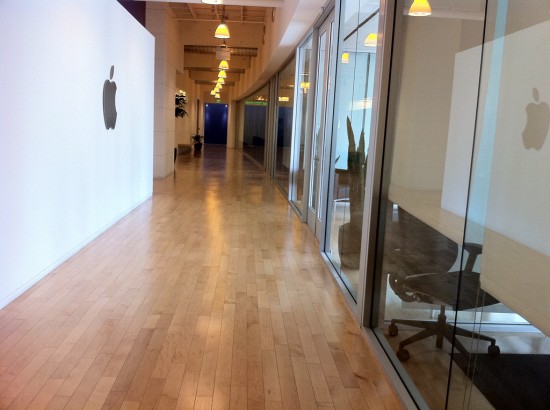
“Bartending” by Stephen Hackett Shows The Human Side of Apple Retail

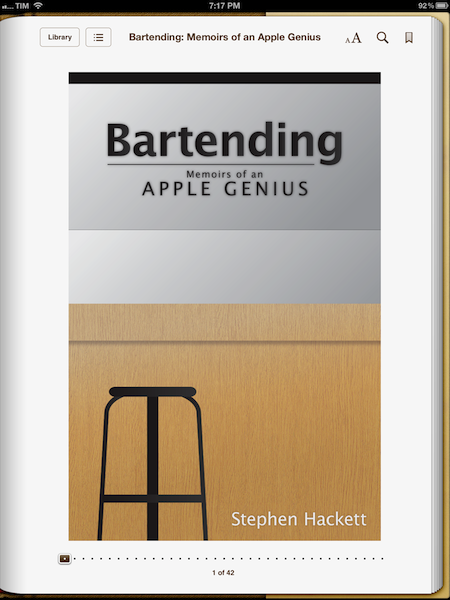
In the past months, I’ve read a lot of books about Apple, and in particular about Steve Jobs. Bartending by Stephen Hackett, however, is the only one that struck me as being completely honest and real in the subject it covers: Apple’s retail stores as a genuine, living collection of stories and people. Not just a business.

Bartending: Memoirs of an Apple Genius, is short, direct, and entertaining. You can probably finish it in 40 minutes if you’re in the mood of reading about Apple’s retail employees and the stories of customers who happen to swing by the Genius Bar every day. And if you like a style that’s fun, cuts to the point, and isn’t ashamed of recollecting the real thoughts of an Apple Genius who sees all kinds of customers on a daily basis, I bet you will devour Bartending from cover to cover in less than an hour. It is a pleasure to read Stephen narrate how he helped a woman recover the precious photos of her children after her hard drive failed, or how the iPhone represented a major shift both in terms of audience, and at the Bar.

I like to think of Bartending as more than “a book about the Genius Bar”. Whether or not you are aware of how Apple’s retail behemoth works behind the scenes, Bartending provides a fun and enlightening look at the interactions that occur every day on both sides of the business. In front of and behind the Genius Bar. I think Stephen’s greatest accomplishment with this book is that he explains with a human, friendly tone that, in spite of the gadgets and dollars involved with the business, the people ultimately define the stories we remember. And if the rules can be bent a little for the good of the customer – to “surprise and delight” – even better. That’s what makes this book a story of its own that fits in the Apple Community so well.

Bartending is a must-read. Get it today at $8.99 on Amazon (iBooks-friendly ePub version also available here).


Drafts Review

In the past months, there’s been a surge of “launcher apps” – lightweight utilities that allow iOS users to perform common tasks such as calling someone or starting a FaceTime call without having to use Apple’s apps, and thus their entire interfaces. However, while the concept of launchers and shortcuts has been around for years in the App Store – especially on the quick dial side, apps like Favorites first explored the idea of turning contacts into shortcuts – several of the utilities we have recently reviewed have leveraged the simplicity of such concept to build more powerful solutions to help users save time. With a combination of clever interface designs, new APIs and URL handlers, apps like Launch Center, Buzz, and World Contacts+ are redefining the way users think of interoperability and customization on the iOS platform. App Cubby’s Launch Center has especially gained a well deserved spot in many’s iOS dock thanks to its extensive support for third-party apps and a polished UI.

For the past week, I have been able to use Agile Tortoise’s Drafts, a new iPhone app that’s like “Launch Center for text” – a utility that allows you to save short snippets of text – the drafts – and act on them by sharing them through a number of services or system actions.

Drafts is very simple. Surprisingly so, if you expected to find options to enter custom URL handlers for apps that are capable of accepting text inputs. In fact, my mention of Launch Center is only theoretical, as both utilities share the same underlying ideology – to aggregate a set of actions and supported apps for a specific input into a single interface – but the first version of Drafts doesn’t come with the same amount of customization and tweaks you can find in Launch Center. Still, when it comes to text, Drafts has proved to be an invaluable addition to my workflow that, like Launch Center, got its spot in my iPhone dock.

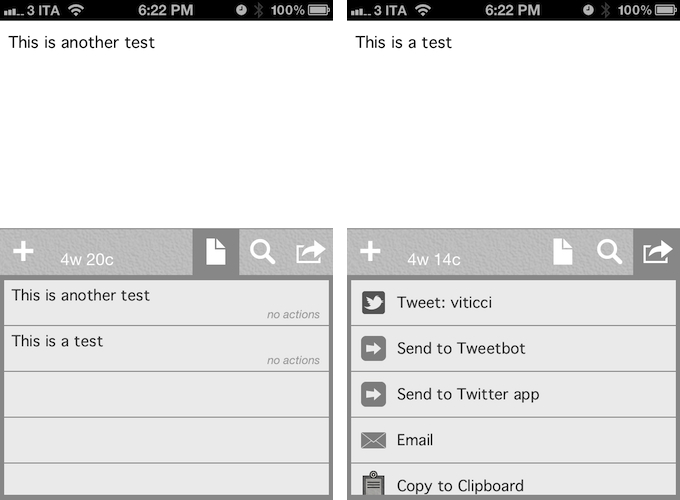
Drafts saves snippets of text. The app displays a word & character count for these snippets, which can be saved locally and accessed at any time by hitting the drafts icon in the app’s toolbar. Because Drafts 1.0 is iPhone-only, iCloud support hasn’t been added yet – your snippets won’t be synced across devices. You can search for any word across your drafts, and add new ones by simply pressing a + button. In the Settings, you can set the app’s Appearance, choosing between 13 fonts (American Typewriter, Baskerville, Cochin, Courier, Georgia, Gill Sans, Helvetica Neue, Hoefler Text, Marker Felt, Palatino, Times New Roman, Thonbury, and Verdana), three font sizes, and four themes. I chose Grayscale.

You can use Drafts as a notepad, a scratchpad of sorts, or a draft manager for your tweets, much like the defunct Birdhouse used to. Drafts sports a nice integration with Twitter, enabling you tweet natively using iOS’ support for Twitter, and letting you directly forward text to Tweetbot or the official Twitter app. If you choose to send text to these apps, the compose screen will open with the text already pasted, and you will just have to hit Send to publish a new tweet. I suspect support for more Twitter apps is coming in a future update.

Drafts isn’t just about Twitter, though. You can pick a draft, and email it to someone using the native iOS mail framework. You can copy a draft to the system clipboard, or, if you like to write in Markdown, preview the formatting, copy the Markdown to your clipboard, or email it. Being a huge fan of Markdown (which I use on a daily basis for my writing on MacStories), this is a nice addition.

Drafts is neither a text editor nor a minimal Twitter client. Drafts is a frictionless way to capture and save ideas that also happens to be integrated with system functions and applications you may be already using to elaborate on those ideas. Drafts can be used as an inspirational notepad to store the genius idea you have while you’re brewing coffee, or when you’re busy writing something else (just fire up Drafts, and quickly dictate your text if you have an iPhone 4S). I would like to see an even faster way to email text (like Captio or Note 2 Self do) as well as support for Evernote and more text-based iOS apps in a future update, so here’s to hoping the feedback on this initial version will be strong enough to encourage Greg Pierce, the developer of Drafts and Terminology (which the app also supports for definitions), to consider more functionalities and an iPad counterpart. In this first version, Drafts supports TextExpander touch, but there is no option to forward text to Apple’s Messages app.

Drafts 1.0 is a very good start, especially if you’ve been looking for a standalone draft manager for Twitter. You can get the app at $0.99 on the App Store.


Tweetbot Gets iCloud Sync for Timelines, DMs, and Mute Filters

Two months ago, I took a look at the state of iCloud-enabled apps for Mac and iOS, sharing somewhat unsurprising results that showed few applications successfully were using iCloud sync across devices (not to mention platforms), and that developers were frustrated for the lack of extensive documentation by Apple. In these past 60 days, very little has changed on Apple’s side – if anything, we’ve only seen more third-party developers trying to figure out ways to properly use iCloud and make it work in their apps. Tapbots, makers of Tweetbot (our reviews for iPhone and iPad versions of the app), are releasing today an update to their Twitter client, which brings iCloud sync for various Twitter functionalities to the iPhone and iPad.

I have been able to test iCloud sync in Tweetbot for a few weeks now, and whilst I was initially skeptical about the service, I am pleased to report that Tapbots has come up with a solid, clever system that might just convince you switch from Tweet Marker – the only third-party solution to sync Twitter timelines that’s been widely adopted to date – if you’re planning to use Tweetbot as your main client.

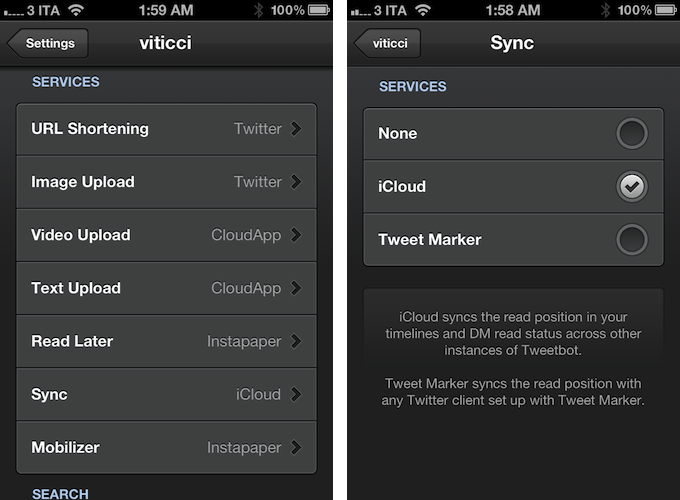
iCloud sync, unlike Tweet Marker, works exclusively inside Tweetbot across its iPhone and iPad versions. You won’t be able to start iCloud sync on Tweetbot for iPhone and, say, find your timeline synced on Twitterrific. If you’re still looking for a real cross-platform syncing solution for Twitter, Tweet Marker remains your best option. If you, however, are you using the two Tweetbots as your default Twitter apps anyway and happen to be intrigued by iCloud sync, you might want to consider giving this new option in version 2.2 a try. Once enabled in the Sync settings, iCloud integration will sync mute filters, timeline positions, and DM read status across all instances of Tweetbot. This means that, if you’re using iCloud on your iOS devices running Tweetbot, the app will keep your position in the Twitter timeline synced similarly to how Tweet Marker works, only it will also sync your direct messages’ read status (if you read a DM on your iPhone, it will also be automatically marked as read on the iPad) and mute filters set in the app’s Preferences. In my tests, both Tweet Marker and iCloud have worked reliably when syncing timelines, but I switched to iCloud full-time for the added convenience of syncing DMs and filters across Tweetbot, and because of the lack of Tweet Marker-enabled apps (that I like) on my desktop. In fact, at least for the time being, I’m still using Twitter’s official client on my Mac. With iCloud sync, I can keep more data synced across Tweetbot for iPhone and Tweetbot for iPad, which I use on a daily basis. Please note that, while iCloud is supposed to be “invisible” to the user, working all the time in the background, there may be a short delay of 10-15 seconds when syncing the timeline position across clients, although I have noticed this sporadically. I suggest you use Tweetbot as you normally would, switching from one client to another when you really need to, avoiding keeping both apps open at the same time just to see if iCloud is working.

Version 2.2 of Tweetbot also brings other improvements and bug fixes throughout the app; most notably, images can now be closed with a pinch gesture on the iPad (similarly to how you can close images in Photos) and both iTunes and YouTube links have gained thumbnail previews in the timeline.

For the past months, I have been increasingly using my iPad as my primary computer, and thus Tweetbot has become the Twitter client I spend the most time using on my iOS devices. This newest update increases the overall stability and performances of the app, but more importantly it brings a native, consistent way to sync data across platforms that, at this point, can only get better in the future – and it’s already working admirably now.

You can get Tweetbot 2.2 on the App Store today.


Gum Max Review

With a 2.1A output and 10,400mAh capacity, the Gum Max is an external backup battery by Just Mobile that works with iOS devices. Anyone who has used iOS devices extensively – perhaps some of you even use the iPad as their primary computer – knows that, for as much as Apple has focused on making iOS devices extremely user-friendly from a battery life standpoint, the battery is going to run out eventually. And if you use a lot of high-speed 3G data, watch some videos, and play a game or two, that battery indicator up in the iOS status bar is going to run out faster.

Just a few days prior to receiving my Gum Max review unit, I waited in line at the Apple Store in Rome to buy the new iPad. There, I had the chance to experience how important it is to be able to rely on iOS devices without a source of power constantly available – sure, Apple employees allowed us to use the store’s MacBooks to charge our iPhones, but it just seemed rude to me to go there every few hours just to grab a USB port without doing anything else. Waiting in line for more than 20 hours, using a lot of 3G and taking several photos of videos with my iPhone 4S, I had to recharge my device multiple times – and when I didn’t want to use the USB ports kindly provided by Apple’s employees, I had to use my friends’ portable battery packs. There, I realized I really needed to get a backup battery for iOS devices for the future. Indeed, power and battery life seem to be two common concerns these days.

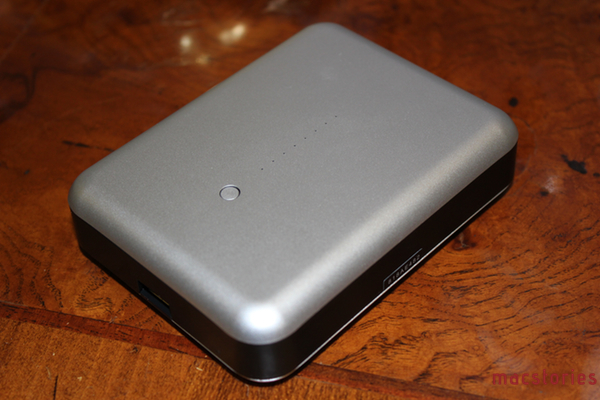
The Gum Max is not one of those battery packs that you can use as a case for the iPhone. The Gum Max actually looks (and weighs) like an external drive, only it can charge iOS devices through USB. The device has a green LED indicator to show how much juice it’s got left to power your iPhone or iPad, and input and output (to recharge the Gum Max, and recharge your iOS devices) are separate, but they both use USB (regular and micro) through cables that are provided in the box. As with many Just Mobile products, the Gum Max looks like something Apple would produce, with a clean and elegant design highlighted by a sturdy aluminum shell. I like the design of the Gum Max, but how it works is what matters in critical situations.

I ran a series of tests to see how the Gum Max would recharge my iPhone 4S, iPad 2, and new iPad. Overall, the Gum Max can easily recharge an iPhone 4S from 0% to 100% in two hours, get an iPad 2 from 0% to 90% with a single charge, and recharge half of the new iPad’s bigger battery with a single charge.

Gum Max Tests

iPhone 4S, started at 3:47 AM. From 0% to 37% in 30 minutes; up to 79% after 67 minutes.

iPhone 4S, started at 11:15 PM. From 0% to 68% in 60 minutes; up to 98% in 115 minutes.

iPad 3, started at 1:10 AM. Up to 28% in 100 minutes.

iPad 3, started at 2:09 PM. Device turned on at 2:17 PM. Up to 35% in 122 minutes; 42% in 145 minutes; 51% in 176 minutes; Gum Max turned off at 5:05 PM with device at 52%.

iPad 2, started at 10:14 PM. Device turned on at 10:23 PM, reached 44% at 11:44 PM, Gum Max turned off with iPad at 90%.

At $109, you have to consider whether getting 5 hours of a new iPad back will be worth the expense, assuming you’re getting the 10 hours of battery life promised by Apple, which I have indeed noticed with my iPad (it is a 4G model, and I don’t keep brightness at 100%). Is a full iPhone charge or an iPad going back to 50% going to a considerable improvement for your work, or the way you rely on iOS devices on the go? And is that improvement going to be worth $109 over time? Especially for iPhone users, I think having a full charge back in two hours can be critical in some scenarios (last year, I spent a night at the hospital to help a friend, my phone died at 3 AM, and I couldn’t reach my parents). For third-generation iPad users, the utility of a battery pack like this is more debatable, as the new iPad is slower at charging, and it’ll completely drain the Gum Max while remaining at only 50%. For previous iPad owners, 90% of charge from zero sounds like a good investment in my opinion.

With these differences in mind, the Gum Max is a fine accessory, it’s very portable, and it comes with an elegant black carrying pouch. You can get it here.


Second Apple Store in Rome To Open On April 21

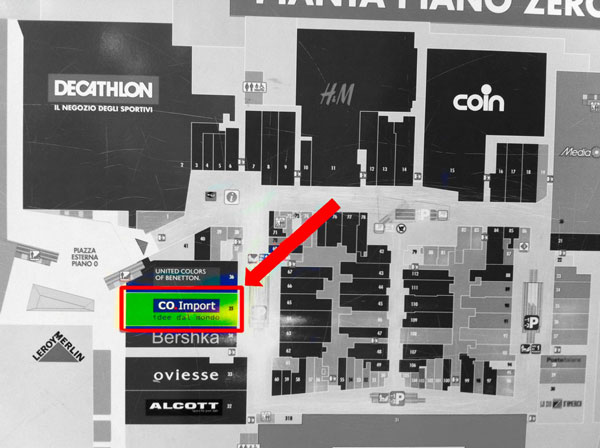
(The location of the Apple Store at Porta di Roma. Image via Macity)

According to iSpazio [Google Translation], Apple will open its second retail store in Rome, Italy, on Saturday, April 21. Currently, Apple only has one retail store in Rome. The new one, located at the Porta di Roma shopping mall, should open on the same day Rome celebrates its birthday, commemorating the city’s founding in 753 BC. iSpazio managed to take some exclusive shots of the progress being made with the store’s construction, supposedly showing the usual layout of retail stores located inside Italian malls. iSpazio says the opening date has been confirmed by an “inside source”.

Italian website Macity reported back in January that Apple had started working on the new store, sharing photos of the old Co.Import location under construction. Opening in between Benetton and Bershka retail stores (Benetton is an Italian fashion firm, Bershka is a retailer part of the Spanish Inditex group), the Apple Store will be located on the same floor of heavily trafficked H&M and Media World. The Porta di Roma shopping mall, easily reachable by bus or by car from the GRA, has long been rumored to be a favorite location for Apple to open a retail store, albeit speculation has also suggested the company would like to have a third retail store in downtown Rome.

Recently, Apple has also been rumored to be considering making its new retail store in Turin its “most important” Italian one. Apple was also on the verge of launching a new flagship store in Milan, but the company didn’t manage to get permissions from the city. Currently, Apple has 9 retail stores in Italy.


When It Comes to 7.85” iPad, The Question Is “Why”

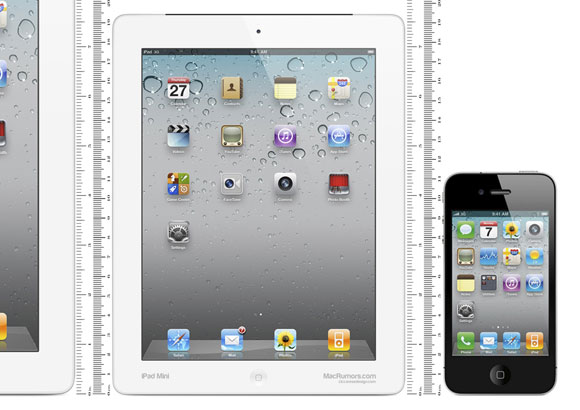
(MacRumors’ mockup of a 7.85-inch iPad)

In the latest episode of his weekly podcast with Dan Benjamin, The Talk Show, Daring Fireball’s John Gruber suggested he has heard from “numerous” sources within Apple about a 7.85-inch iPad being tested in the company’s labs.

MacRumors offers a transcript:

Well, I don’t know. What I do know is that they have one in the lab…a 7.85 inch iPad that runs at 1024×768… it’s just like the 9.7” iPad shrunk down a little bit. Apps wouldn’t need to be recompiled or redesigned to work optimally on it. It’s just the iPad smaller.

First off, I haven’t listened to the show yet, as I’d like to reflect upon some ideas I’ve been saving for the past months when rumors about this “smaller iPad” kept coming out. As for why 7.85 inches would be the ideal size for a smaller iPad, AppAdvice’s A.T Faust had a good explanation a few weeks back.

When it comes to this fabled smaller iPad, I don’t think the question we should be asking is “really?”. Of course Apple has a smaller iPad in their labs. Of course it has a 4:3 ratio to maintain existing resolution schemes. I’m more doubtful about the rumors of partners in China mass-producing these units, but I’m sure there are all kinds of neat product prototypes at Cupertino. For the same reason, do you think Apple hasn’t tested all the possible combinations of iPhone form factors? Bigger MacBook Airs? Different Apple TV designs? Do you really believe the world’s most valuable company…no, any sufficiently successful tech company gets an electronic device “just right” on their first try? Of course there are prototypes and iterations. And that a smaller iPad is one of them should be no surprise.

The question that we should be asking is: why would Apple want to release a smaller iPad? Now that’s an interesting discussion, as there are a number of factors worth considering in regards to expanding the iPad line to smaller versions.

Let’s start with the simple one: Apple won’t release a smaller iPad to “respond” to Samsung and the likes. Please note the difference between “consider” and “release” here. Because even if we agree that the rumor of prototypes in the labs is no surprise, then we’d argue on a reason for releasing such product, and I think competition is not a valid one. Apple won’t release a smaller iPad because it feels threatened. Apple is an engineering company at heart, they look at the data, and data suggests there is no need to feel threatened. Sure, Amazon’s Kindle Fire is rumored to be fairly successful, but I bet it’s not that profitable for the company. Amazon didn’t build it with iPad-quality components. So if people would like a first-class smaller iPad, this brings me to the next point: hardware.

Retina

There are two popular assumptions going on these days: that a smaller iPad would be perfect for portable eBook reading, and that it would have the resolution of older iPads – 1024x768 pixels. Here’s my problem with this discussion: I don’t see Apple as the company going backwards in terms of specs. I don’t see them coming out with an iPad that’s new and smaller, more portable and lightweight, but carrying the resolution of last year’s iPad. The Retina display isn’t just a display for Apple, it’s a standard that sets the bar higher. Why did the iPod touch gain a Retina display (even if not of the same quality as the iPhone’s)? Because Retina was the new standard in 2010, and Apple had to bring it over to the other 3.5-inch device, the iPod touch. The way I see it, the same reasoning applies, both in terms of philosophy and product concept, to the iPad: the third generation’s iPad Retina display has set the bar higher and I don’t see Apple coming out with a new iPad that shows its pixels once again. With a 7.85-inch screen and the same resolution of older gen iPads, 163ppi wouldn’t look nearly as good as the new iPad’s 264ppi (the original iPad had 132ppi). Apple is a company that iterates, slowly, but inexorably, and the Retina revolution is now indeed impossible to prevent.

So let’s assume Apple does have a smaller iPad with a Retina display. That would make for incredible image quality at 326ppi, but it would create a series of new problems from a software perspective. A 7.85-inch iPad with a 2048x1536 “Retina” display, in fact, would come at 326 ppi – the same as Retina iPhones and iPods. Whilst that would play well in terms of keeping the math unified across the board, it could pose a question for developers. Even without having to update graphics for the new resolution (and maintaining the same size of tap targets), a physically smaller device will inevitably make the user interface run on a more physically constrained display, and what makes sense on a 10-inch display doesn’t necessarily work just as fine on a 7.85-inch one. Apps will run with their existing designs, but there’s the possibility some developers would still want to optimize some graphical elements for the new size.

And then, of course, there is the hardware side of this debate. If Apple had to put a bigger battery (1mm thicker) in the new iPad to compensate for the resources required by more processing power and the Retina display, what makes us think that consumer technology is “already there” to power a Retina display on an even smaller iPad? Batteries small enough and capable of powering a Retina display may already exist, but I assume they wouldn’t be ready for mass production on a large scale. More importantly, if they don’t exist yet, it wouldn’t be a surprise either, as Apple had to make its existing battery bigger (something they don’t usually do) to power its new iPad. For as much as miniaturization is one of Apple’s big focuses, I don’t think we have the right technology to make such a device usable for a long period of time (keep in mind it would supposedly be used a lot for reading). The smaller a device gets, the harder it becomes to balance factors like battery life, temperature, and thickness, and that explains why Apple had to wait until the fourth iteration of the iPhone to implement a high-resolution display.

Now, considering all the points I have mentioned above, we have a plethora of alternative theories and combinations as to why Apple could still figure out a way to produce a smaller iPad. Of all them, I find this idea by Odi Kosmatos particularly interesting because it plays well with the math described above: Odi makes the case for a smaller iPad (7-inch as opposed to the rumored 7.85-inch model) that carries a 1920x1080 resolution that could allow for 326ppi and Retina iPhone apps running at native size on the device. While I find the numbers fascinating, I believe Apple would never do an “iPad” that doesn’t run iPad apps – that’s just absurd. But a device that “sits” in the middle, like the original iPad did for smartphones and computers? A device in between iPhones and iPads? Now that’s an intriguing theory which goes back to the old eBook-reading device rumor: I don’t think the market is so saturated yet that there’s a real need for a new savior that sits in the middle of existing options, but we’ll see.

Smaller?

The other big theory is that, assuming a smaller iPad with Retina display would be unfeasible in the short term, a 7.85-inch iPad with 1024x768 resolution would still be good enough for portability, gaming, kids, and education. Some notes about these possibilities: let alone the fact that I still have to hear of people not buying iPads because they really hate the 9.7-inch form factor, is the existing iPad really not that portable? You can picture the rumored device by looking at the iPad’s display and imagining a smaller iPad inside it. Is that a considerable difference in terms of portability?

Is there really a market of consumers not buying iPads because they want a smaller iPad, or are the nerds simply excited about the rumors? Let’s get real: what would a 7.85-inch iPad do incommensurably better than a regular iPad to give it a reason to exist? You can immediately tell the difference between an iPod nano and an iPod classic, a 13-inch MacBook Air and the 15-inch MacBook Pro (one of the reasons why I think the 13-inch MacBook Pro is a weird choice). Would the 7.85-inch iPad be a product that can stand out on its own, making the few inches less a reason for potential consumers to choose it?

About the “gaming, kids, and education” theory: when I think of all the possible explanations, this is the one that makes some sense, although I still don’t see it as the reason to release a smaller iPad. Apple is a consumer electronics company, and with their iOS devices they have made sure every possible market segment can benefit from them. From doctors and pilots to writers and teachers, iPhones and iPads can appeal to everyone. Why? Because it’s the software that makes the difference. By releasing a smaller iPad, Apple would put the focus on dedicated hardware, rather than software, for the first time in years. Oh, but you can argue Apple did make an iMac for education. Fair enough, but I’ll argue that the Mac market is nowhere near the size of the iOS market. Is it worth producing and releasing a smaller iPad specifically aimed at certain market segments? Personally, I don’t think so – but I could be wrong. What I am certain of is that the Retina display is inarguably better than old displays in every way, and textbooks and games benefit from it. Would a smaller, non-Retina iPad meant for textbooks and games be as appealing as the bigger iPad with a Retina display running the same apps?

Why?

As you can see, I am not saying Apple will never release a smaller iPad, because I don’t know, and because saying “never” when it comes to Apple rumors is always a big bet. My point is, when rumors are getting out of hand, it is always better to shift the conversation away from the “what” and back to the “why” to understand if what we are arguing about does even make sense. And in the case of the 7.85-inch iPad, there are a series of technological issues, software questions, and market debates that leave me skpetical as to whether Apple may release such a product this year.


Apple Releases iAd Producer 2.1

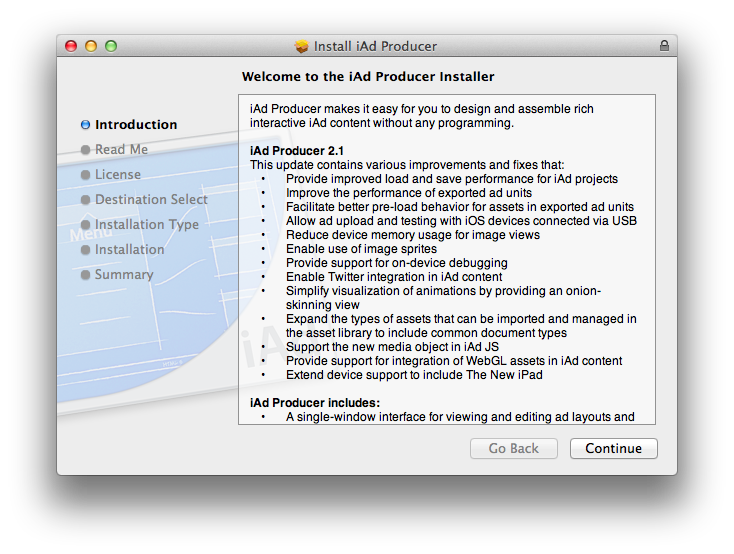
Apple today released an update to iAd Producer, its Mac application aimed at allowing designers and developers easily create and test rich advertising banners to feature on Apple’s iAd platform. The new version of the app, 2.1, provides support for WebGL assets in iAd content, brings support for the new iPad, and supports the new media object in iAd JS.

From the release notes:

  • Provides improved load and save performance for iAd projects.
  • Improves the performance of exported ad units.
  • Facilitates better pre-load behavior for assets in exported ad units.
  • Allows ad upload and testing with iOS devices connected via USB.
  • Reduces device memory usage for image views.
  • Enables use of image sprites.
  • Provides support for on-device debugging.
  • Enables Twitter integration in iAd content.
  • Simplifies visualization of animations by providing an onion-skinning view.
  • Expands the types of assets that can be imported and managed in the asset library to include common document types.
  • Supports the new media object in iAd JS.
  • Provides support for integration of WebGL assets in iAd content.
  • Extends device support to include iPad (3rd generation).

Version 2.0 of iAd Producer was released in November. iAd Producer is available for download here.