Federico Viticci

10935 posts on MacStories since April 2009

Federico is the founder and Editor-in-Chief of MacStories, where he writes about Apple with a focus on apps, developers, iPad, and iOS productivity. He founded MacStories in April 2009 and has been writing about Apple since. Federico is also the co-host of AppStories, a weekly podcast exploring the world of apps, Unwind, a fun exploration of media and more, and NPC: Next Portable Console, a show about portable gaming and the handheld revolution.

This Week's Sponsor:

SaneBox

Clear the Clutter, Keep What Matters.


Rovio Officially Introduces “Amazing Alex”, Launching In July On iOS and Android

Initially teased back in May, Finnish game maker Rovio formally announced its next game for iOS and Android today, launching a dedicated website, a set of wallpapers, and a video to reveal more details of the upcoming title. Coming “in July 2012” for iOS and Android (in May, Rovio said the game would launch within two months), Amazing Alex will be a puzzle game focused on letting Alex – the main character – build chain reactions across different locations, levels, and using a variety of objects to create fun and engaging Rube Goldberg-like devices and machines.

Rovio acquired the game from developers Snappy Touch and Mystery Coconut – it was originally called Casey’s Contraptions – and reworked it with a new physics engines, new graphics, and further developing the character of Alex.

Whilst it’s still unclear whether Amazing Alex will be a paid title or a “freemium game”, Rovio is already promising 100 levels, regular free updates, 35 interactive objects, and the possibility of building and sharing puzzles with your friends. A promo video posted on Rovio’s website (and also embedded below), doesn’t show any actual gameplay footage, but suggests a highly colorful and distincitive setting for the game.

You can check out the teaser site for Amazing Alex here, and follow @amazingalex on Twitter for future updates.
Read more


Retina Mac Numbers→

Retina Mac Numbers

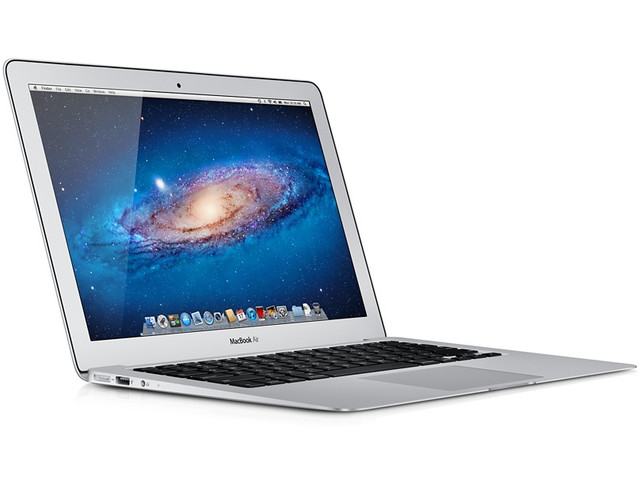
Ryan Block did some math over at gdgt, and came up with a great analysis of the future of Retina displays on the Mac, and estimated resolutions and PPI counts for various upgrades. He notes how, assuming Apple will bring the Retina display to other Mac models and the external Thunderbolt display, the low-end 11-inch MacBook Air could actually be the most peculiar change due to its high pixel density.

Now, one area where things get a little wonky for Apple is in the MacBook Air line of devices (as you’ll see below). The current, non-Retina display on the 13-inch Air actually has the same resolution as the 15-inch MacBook Pro (1440 x 900), thus giving it a much higher pixel density (127 PPI) than, say, the 13-inch Pro (113.48 PPI).

And as it happens, the humble 11-inch Air actually has the highest pixel density of all the non-Retina computers Apple currently makes, with a PPI of 131. That’s pretty damn high for Apple’s lowest-end laptop.

According to recent speculation, the 13-inch MacBook Pro could be the next model to receive a Retina upgrade in October. At WWDC, like the “regular” 15-inch version, the 13-inch MacBook Pro received a speed-bump upgrade with new processor and faster graphics. Apple said they view thinner and Retina-ready devices as the future of laptops, so it only makes sense for the entire MacBook family to get a high-resolution display eventually.

Read Ryan’s analysis here for a full comparison of every Mac model (including iMacs) against proposed Retina resolutions.

Permalink

App Store “Game Collections” Gathers All Previous Game Bundles

In our story about the first four years of App Store, we noted how Apple had been collecting apps and games in custom “sections” that, unfortunately, are often rarely updated and hard to find in the App Store once they are removed from the homepage.

For years now, Apple has been refreshing the App Store on a weekly basis to include custom “sections” showcasing hand-picked apps and games. These sections typically come with rotating banners and smaller “mini-banners” on the App Store’s homepage, and are later grouped into an “App Store Essentials” macro-section that includes several of past sections and recommendations.

Custom sections provide a decent solution to browse titles Apple has previously “curated”; however, these sections aren’t usually updated as often as they are created — N.O.V.A. 3, a new shooter game by Gameloft, still isn’t listed under Benchmark Games: Stunning Graphics, whilst the majority of reviewers and publications have outlined the game’s remarkable graphic capabilities.

With today’s weekly refresh of the App Store’s homepage, it appears Apple has started taking some first steps into a new direction – grouping all previous game bundles into a bigger “collection”. Aptly named Game Collections and linked from the App Store’s homepage, the section offers a roundup of every selection Apple offered to date.

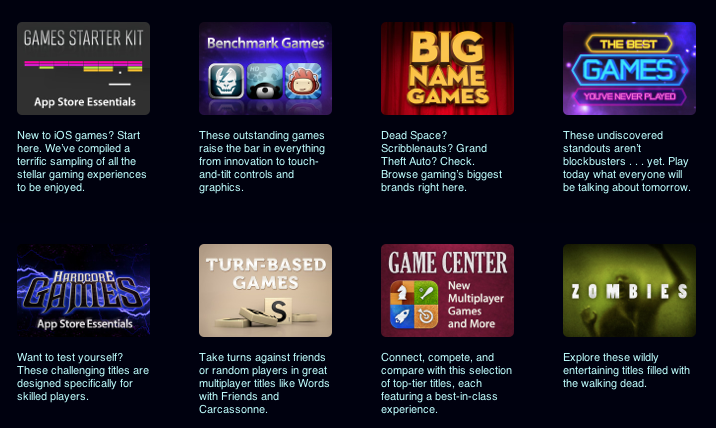
Game Collections includes:

Previously only available through the App Store’s homepage or partially through the dedicated Games category page, the new Game Collections feature brings some much needed organization to the custom sections Apple has been “curating” over the years. They are now accessible from a single place, and Apple notes how they will be “updated on a regular basis”.

As of today, “regular” apps still aren’t being organized into a unified collection. Right now, the App Store Essentials page is the best way to browse previously featured selections, but it also still mixes games and apps, and doesn’t provide the same elegant and simple layout of Game Collections. Hopefully Apple will provide an “App Collections” page as well, bringing past handpicked app selections and features in a single page.

Apple has been making a series of improvements to the App Store’s navigation lately. Aside from the complete App Store revamp coming in iOS 6, Apple redesigned the App of the Week section and renamed it to Editor’s Choice, leaving the former “App of the Week” to free app promotions.

App Store navigation and curation has long been an issue for third-party developers, with Apple’s Phil Schiller recently weighing in, too, noting how ”you can still get discovered and get a hit overnight”.


Why Apple Is Making The Mac Harder To Use→

Why Apple Is Making The Mac Harder To Use

Michael Schechter weighs in on today’s news that TextExpander 4 couldn’t be released through the Mac App Store due to Sandboxing restrictions:

I know I’m not the average Mac user, but I’m far from the geekiest. While there will always be things that need to exist outside of the Mac App Store for the geeky amongst us, the exclusion of something as useful and harmless as TextExpander shows the flaws in the current execution of App Sandboxing. The idea of protecting users from harm makes sense; the execution of protecting users from conveniently installing and maintaining useful software makes none.

This morning, Macdrifter brought a reasonable explanation as to why Apple’s Sandboxing is, ultimately, benefitting the average Mac user who doesn’t use apps like TextExpander, but wants a Mac to be secure and “safe”:

New Mac owners lose the fear that Windows has instilled. I’ve seen it happen over and over. Ever so slowly, they begin to realize that installing software doesn’t have to be scary. Everything on the App Store is “safe” because Apple is moderating the content.

We actually saw this coming. Back in October 2011, when Sandboxing was still on track to become effective in November, I commented on two pieces by Andy Ihnatko and Jason Snell, noting how the concept of “app” – software that “does one thing well” – coupled with enhanced security for Mac users allowed Apple to position Sandboxing as a powerful technology for the new App Store market.

As a security measure, Sandboxing is a good thing for the user. It forces apps to access only the system resources they need, and, generally, it reinforces the belief that Apple-vetted apps are safer than software downloaded from the Internet. But like I said, the real problem – and I guess the reason why people like Michael and I don’t appreciate the consequences of this change – is that developers of existing apps sold on the Store are being forced out of the door. I also wrote:

The problem with Sandboxing, I believe, is that it introduced a change that is forcing developers of existing apps to reconsider functionalities that are not compatible with the Mac App Store anymore. If this will lead to serious fragmentation of Mac software with a proliferation of deeply different Mac App Store and “website versions” of the same apps, we’ll see.

And we did see the first result with TextExpander 4. It’s still too early to judge, but if these first signs are of any indication, then we should be thanking whoever thought of Gatekeeper at Apple, as it will bring some security to software downloaded outside of the Mac App Store. Similarly, we should appreciate the efforts of developers like ManyTricks and Smile, who are thinking of clever ways to offer upgrades without “officially” using the Mac App Store.

There is an argument to be made about Apple not particularly “liking” apps that change system behavior, like TextExpander. If that’s the case, why approving them for Store sale in the first place? I understand that plans evolve and things can take unexpected turns; however, today’s TextExpander update unarguably shows that this isn’t the top notch user experience Apple typically shoots for.

Geeks will always know how to get around the Mac App Store’s limitations; Sandboxing is showing its first trade-offs, including “harder” upgrades and fragmented applications, but we’ll have to wait more to understand its long-term impact.

Permalink

GoodReader 3.15.0→

GoodReader 3.15.0

GoodReader is a powerful PDF reader and file manager. It is not the prettiest app available on iOS, but in terms of functionality, I’ve yet to find a single solution that integrates good PDF annotation features and support for file management and remote servers as well as GoodReader does.

Especially on the iPad, the app has become a part of my daily workflow as it allows me to connect to AFP servers (such as my Mac mini), Dropbox, and iCloud. GoodReader is one of the few apps with real folder-based iCloud storage for documents (as I have previously detailed), and, on top of solid integration with web services, it comes with powerful file management options and support for several file types including .webarchives, Office documents, audio, and video.

The latest version of GoodReader for iPad, released yesterday, adds a number of useful options for PDFs, such as an eraser tool for freehand drawings (available as annotations), and possibility to email a PDF annotation summary. While I don’t use GoodReader as my main PDF reader (I like PDF Expert better for that), the fact that it can sync entire folders with Dropbox means I can still get my fully-annotated documents coming from other iOS apps that sync with Dropbox, like the aforementioned PDF Expert, or the recently released PDFPen 1.2.

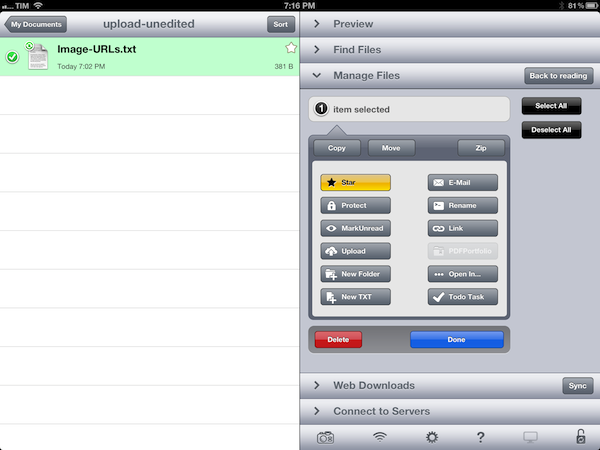
On the file management side, version 3.15.0 is also a notable update. If you have configured the app with Dropbox, you can now generate a public link for any file or folder (GoodReader can browse the entire contents of your Dropbox) to share with your friends. Another new button, “Upload” puts a convenient shortcut into GoodReader’s file management popover so you’ll be able to instantly beam new files to remote servers (I use this to upload images to Dropbox). Last, with a new bookmarklet, GoodReader is capable of saving HTML5 video directly from Safari – and this works with YouTube as well (it’ll save .mp4 files into GoodReader).

GoodReader for iPad is only $4.99 on the App Store.

Permalink

Launch Center Pro Review

Launch Center Pro has become my second SpringBoard. I have been testing the app for the past month, and it’s a fantastic upgrade over Launch Center, which we have covered on multiple occasions on MacStories. If you were a Launch Center user before, you’ll most definitely want to check out the new, separate Pro version.

For many, it’s difficult to see the appeal of software like Launch Center. Originally conceived as a Notification Center-based launcher for common actions such as toggling Bluetooth settings and custom URLs supported by third-party apps, Launch Center turned into a powerful hub to collect shortcuts for system actions and app-specific URLs. The discontinuation of Settings shortcuts in iOS 5.1 didn’t diminish Launch Center’s functionality, which gained support for several third-party applications and a nicer interface with support for icons and even more actions.

What started as an interesting hack to put shortcuts in Notification Center eventually became a utility that, in its niche, is redefining the concept of “launching actions”, rather than apps. This goes back to a fundamental issue behind the nature of the iOS Home screen – as I have previously written – and Launch Center Pro, while retaining the basic functionality of Launch Center, doubles down on this very distinction between finding apps and launching actions.

Read more


The World Of Selling Access To iOS Betas→

The World Of Selling Access To iOS Betas

Andy Baio reports on the not-so-underground world of selling access to iOS betas to people who are not developers, but are simply interested in trying the latest OSes during their beta stages.

For a small developer, unauthorized activations are a lucrative business that’s likely worth the risks. UDID Activation publishes their order queue on their official site, which shows more than 2,300 devices activated in the last week alone. At $8.99 for each activation, that’s more than $20,600 in revenue, with $2,277 paid to Apple for the 23 developer accounts. Their homepage claims that more than 19,000 devices were activated so far, and that’s only one of several services. And since device activations only last for a year, each service can reuse their expired slots with no additional cost.

Without having to read the warnings that Apple puts on the Developer Center (and that, as Baio details, appear to be completely ineffective against sellers of paid activations), it’s important to remember that betas need to be tested by developers because only people with a technical knowledge can report bugs, send feedback, and lead to a better final product. The iOS beta isn’t meant for the general public: it is a an ongoing collection of changes, updated APIs, and visual refinements that only a developer can properly evaluate, understand, and criticize.

That’s not to say regular users shouldn’t be interested in trying the latest toys before they are released because Apple’s site says so. We at MacStories, too, have access to iOS betas but we are not developers ourselves; however, that access is necessary to have a better understanding of things to come (without breaking the NDA). The negative side-effect of spreading iOS betas to users who aren’t willing to treat them for what they are – betas – is, instead, a worrying amount of iTunes reviews for apps that can’t be updated for iOS 6 yet. We have written about this last year, and Rene Ritchie recently posted his thoughts on the matter as well.

It’s okay to be curious about the future. But the proliferation of “UDID Activation” websites has generated a number of repercussions on third-party developers, and that’s a problem Apple needs to fix.

Permalink

Retina MacBook Pro Runs Three External Displays, Downscales Apps Automatically→

Retina MacBook Pro Runs Three External Displays, Downscales Apps Automatically

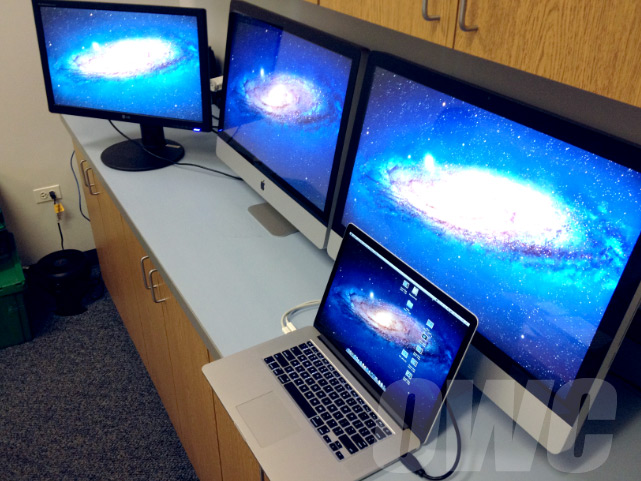
Other World Computing’s Mike H. has posted a photo showing the 15-inch Retina MacBook Pro running three external displays simultaneously (via MacRumors). Including the built-in Retina display set at “best for Retina” in System Preferences, the new MacBook Pro can run four displays at their native resolutions – OWC tested two iMacs as external monitors via Thunderbolt, and an additional LG display connected via HDMI. In their tests, ”moving images and media didn’t create any lag” and video playback was possible on all four displays.

As noted by Steve Streza in his extensive review of the device, the Retina MacBook Pro is also capable of automatically downscaling apps to non-Retina resolutions even if you move an application’s window between two displays:

If you connect a second display, it’s probably not going to be a Retina display (at least not yet). Luckily the OS seems to handle this all magically, and downscales the window appropriately and without any input. If you drop the window halfway between the two displays, the one half on the Retina display will be high-resolution, and the other half is downscaled. In other words, it just works.

The Retina MacBook Pro has been well-received among reviewers, albeit computer repair firm iFixit gave the device a low repairability score due to Apple’s decision to not make it user-serviceable, causing a controversy that Richard Gaywood elegantly summarized at TUAW.

Permalink

Different and Familiar

Ted Landau speculates on what might happen with the next version of OS X:

This means limiting software on Macs only to apps that come from the Mac App Store (possibly also allowing Gatekeeper-approved software from elsewhere, but I doubt it). It would also mean cutting off end-user access to the Mac’s operating system (a trend begun with Apple making the user’s Library folder invisible in Lion, but which would vastly expand in 10.9). It would mean the ejection of any third-party software that “tweaks” the operating system. Apple would also remove its own system-level utilities, such as Terminal (Apple doesn’t permit anything like Terminal on iOS devices). It is even possible that the Finder would be eliminated (as I previously considered). Finally, it would mean that the software used to develop software (e.g., Xcode) would no longer run (just like you can’t now develop software for iPads on iPads).

In his speculation about a possible OS X 10.9, Landau envisions a Mac ecosystem where Pro machines (MacBook Pro, Mac Pro) will run the “real” OS X, with consumer products (MacBook Air, iMac) left with a “simpler” version of the operating system that’s basically iOS with a keyboard and Mac apps. I think this speculation is misguided.

Apple knows that Mac users are loyal to the platform because it is different from iOS devices. Mac hardware revenue may not be at the same level of iPhones and iPads, but in the last quarter, it still represented 13% of the company’s revenue with 4 million Macs sold. Not to mention that, as Tim Cook himself has noted on several occasions, the “halo effect” has helped Apple transition iPhone and iPad users interested in a similar, yet different platform to the OS X ecosystem.

The key is familiarity. By refining the feature set and enabling new functionalities across Mac and iOS devices, Apple is ensuring an iPhone user can have a basic understanding of a MacBook Air, and vice versa. “iOS-ification”, as this process has been called for convenience numerous times in the past, has really turned into the simple strategy of allowing familiar features to act the same across devices, while leveraging the differences of each device to make it intuitive and easy to use. Notification Center works the same on iOS 6 and Mountain Lion, yet on the Mac, you get support for Hot Corners. Familiar, but also unique.

If users wanted an iPad with a keyboard – because that’s effectively what Landau is proposing – they’d get an iPad with a keyboard. The problem is, this possible scenario has already been addressed by Apple: at the Q2 2012 conference call, Tim Cook famously noted how some would like to converge a toaster and a refrigerator – with unpleasant results for the users. People have different requirements: millions of customers decide to buy a Mac every quarter, and it’s very likely that the majority of them already owns an iPhone or iPad. They know the differences, but they also appreciate the familiarity.

This speculation is reminiscent of old rumors about a “simpler” iPhone nano – a mythical device capable of running a slimmed-down version of iOS. Why would Apple want to separate OS X into two products when, by default, the OS retains many of the “simple touches” of iOS? The Mac’s greatest strength is customization – Apple puts a Launchpad in your Dock, but you can explore the contents of your filesystem with the Terminal if you want. Putting functionalities on the same level no matter the device you’re using hasn’t impacted the nature of the Mac in a way that has turned OS X into a completely different product. If anything, it made the Mac better.

Apple already makes a separate version of OS X, and it’s called OS X Server. That is an entirely different take on the operating system, with features that wouldn’t appeal to the average consumer (or even professional). But does its existence somewhat justify the theory of new OS X Consumer product?

To paraphrase Craig Federighi, OS X makes it easier than ever to work with the devices we already have in our lives. And that has been possible thanks to an effort to turn the Mac’s nature into a more comfortable and familiar habitat for users interested in a different kind of experience. Landau thinks OS X “Professional” would come without any restriction (“restrictions” can already be disabled in Lion and Mountain Lion) and even drop some “iOS-related features”. How would that help the ecosystem? And why do we keep thinking of “professional users” as weird-looking programmers who don’t like anything Apple has brought to OS X – even going as far as suggesting features should be dropped?

Professional users enjoy the improvements made to OS X as much as the 99% does. I believe that features like Notification Center and Power Nap are additions that will unarguably make OS X easier and more powerful (and they are both iOS-inspired). How would pro users react to an unarguably worse Mac without those great functionalities?

OS X won’t magically become more “professional” by excluding features and familiar elements. The way I see it – and judging from recent statements and keynotes, the way Apple sees it, too – Apple simply needs to keep making OS X a better product by refining patterns and interactions based on decades of computing with today’s technologies and trends in mind. That might mean a Library hidden by default, or a different file save dialog box that makes iCloud front and center in Mountain Lion. There have been bumps on the road (Sandboxing criticism; iCloud issues), but I’d argue that both Lion and Mountain Lion haven’t taken anything away from the pro user, for as much as many have been crying wolf in regards to filesystem access and the Mac App Store (case in point: Gatekeeper is coming to OS X 10.8).

Apple will bring more iOS-inspired features to OS X. Or perhaps they will add OS X functionalities to iOS. The point is, in doing so, I have no doubt Apple will consider the unique traits of each platform, and they will develop the features accordingly. But splitting OS X in two just for the sake of easy profits (“It’s an iPad laptop!”) sounds like a step backwards and one towards fragmentation. Furthermore, we shouldn’t associate Apple’s delay with a “real” update for the Mac Pro line with the future of OS X.

Ultimately, the goal isn’t to forcibly transition every iOS user to the Mac as part of an evil plan blindly based on “money”. It’s to provide a great ecosystem of products that keeps users happy, and Apple profitable. And in a solid ecosystem, differences aren’t seen as disadvantages: they are core strengths if they can work better together.