Federico Viticci

10762 posts on MacStories since April 2009

Federico is the founder and Editor-in-Chief of MacStories, where he writes about Apple with a focus on apps, developers, iPad, and iOS productivity. He founded MacStories in April 2009 and has been writing about Apple since. Federico is also the co-host of AppStories, a weekly podcast exploring the world of apps, Unwind, a fun exploration of media and more, and NPC: Next Portable Console, a show about portable gaming and the handheld revolution.

Different and Familiar

Ted Landau speculates on what might happen with the next version of OS X:

This means limiting software on Macs only to apps that come from the Mac App Store (possibly also allowing Gatekeeper-approved software from elsewhere, but I doubt it). It would also mean cutting off end-user access to the Mac’s operating system (a trend begun with Apple making the user’s Library folder invisible in Lion, but which would vastly expand in 10.9). It would mean the ejection of any third-party software that “tweaks” the operating system. Apple would also remove its own system-level utilities, such as Terminal (Apple doesn’t permit anything like Terminal on iOS devices). It is even possible that the Finder would be eliminated (as I previously considered). Finally, it would mean that the software used to develop software (e.g., Xcode) would no longer run (just like you can’t now develop software for iPads on iPads).

In his speculation about a possible OS X 10.9, Landau envisions a Mac ecosystem where Pro machines (MacBook Pro, Mac Pro) will run the “real” OS X, with consumer products (MacBook Air, iMac) left with a “simpler” version of the operating system that’s basically iOS with a keyboard and Mac apps. I think this speculation is misguided.

Apple knows that Mac users are loyal to the platform because it is different from iOS devices. Mac hardware revenue may not be at the same level of iPhones and iPads, but in the last quarter, it still represented 13% of the company’s revenue with 4 million Macs sold. Not to mention that, as Tim Cook himself has noted on several occasions, the “halo effect” has helped Apple transition iPhone and iPad users interested in a similar, yet different platform to the OS X ecosystem.

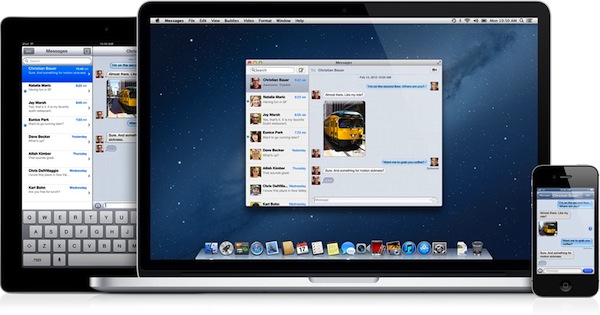
The key is familiarity. By refining the feature set and enabling new functionalities across Mac and iOS devices, Apple is ensuring an iPhone user can have a basic understanding of a MacBook Air, and vice versa. “iOS-ification”, as this process has been called for convenience numerous times in the past, has really turned into the simple strategy of allowing familiar features to act the same across devices, while leveraging the differences of each device to make it intuitive and easy to use. Notification Center works the same on iOS 6 and Mountain Lion, yet on the Mac, you get support for Hot Corners. Familiar, but also unique.

If users wanted an iPad with a keyboard – because that’s effectively what Landau is proposing – they’d get an iPad with a keyboard. The problem is, this possible scenario has already been addressed by Apple: at the Q2 2012 conference call, Tim Cook famously noted how some would like to converge a toaster and a refrigerator – with unpleasant results for the users. People have different requirements: millions of customers decide to buy a Mac every quarter, and it’s very likely that the majority of them already owns an iPhone or iPad. They know the differences, but they also appreciate the familiarity.

This speculation is reminiscent of old rumors about a “simpler” iPhone nano – a mythical device capable of running a slimmed-down version of iOS. Why would Apple want to separate OS X into two products when, by default, the OS retains many of the “simple touches” of iOS? The Mac’s greatest strength is customization – Apple puts a Launchpad in your Dock, but you can explore the contents of your filesystem with the Terminal if you want. Putting functionalities on the same level no matter the device you’re using hasn’t impacted the nature of the Mac in a way that has turned OS X into a completely different product. If anything, it made the Mac better.

Apple already makes a separate version of OS X, and it’s called OS X Server. That is an entirely different take on the operating system, with features that wouldn’t appeal to the average consumer (or even professional). But does its existence somewhat justify the theory of new OS X Consumer product?

To paraphrase Craig Federighi, OS X makes it easier than ever to work with the devices we already have in our lives. And that has been possible thanks to an effort to turn the Mac’s nature into a more comfortable and familiar habitat for users interested in a different kind of experience. Landau thinks OS X “Professional” would come without any restriction (“restrictions” can already be disabled in Lion and Mountain Lion) and even drop some “iOS-related features”. How would that help the ecosystem? And why do we keep thinking of “professional users” as weird-looking programmers who don’t like anything Apple has brought to OS X – even going as far as suggesting features should be dropped?

Professional users enjoy the improvements made to OS X as much as the 99% does. I believe that features like Notification Center and Power Nap are additions that will unarguably make OS X easier and more powerful (and they are both iOS-inspired). How would pro users react to an unarguably worse Mac without those great functionalities?

OS X won’t magically become more “professional” by excluding features and familiar elements. The way I see it – and judging from recent statements and keynotes, the way Apple sees it, too – Apple simply needs to keep making OS X a better product by refining patterns and interactions based on decades of computing with today’s technologies and trends in mind. That might mean a Library hidden by default, or a different file save dialog box that makes iCloud front and center in Mountain Lion. There have been bumps on the road (Sandboxing criticism; iCloud issues), but I’d argue that both Lion and Mountain Lion haven’t taken anything away from the pro user, for as much as many have been crying wolf in regards to filesystem access and the Mac App Store (case in point: Gatekeeper is coming to OS X 10.8).

Apple will bring more iOS-inspired features to OS X. Or perhaps they will add OS X functionalities to iOS. The point is, in doing so, I have no doubt Apple will consider the unique traits of each platform, and they will develop the features accordingly. But splitting OS X in two just for the sake of easy profits (“It’s an iPad laptop!”) sounds like a step backwards and one towards fragmentation. Furthermore, we shouldn’t associate Apple’s delay with a “real” update for the Mac Pro line with the future of OS X.

Ultimately, the goal isn’t to forcibly transition every iOS user to the Mac as part of an evil plan blindly based on “money”. It’s to provide a great ecosystem of products that keeps users happy, and Apple profitable. And in a solid ecosystem, differences aren’t seen as disadvantages: they are core strengths if they can work better together.
Alien Blue 2.6

Alien Blue 2.6 for iPhone

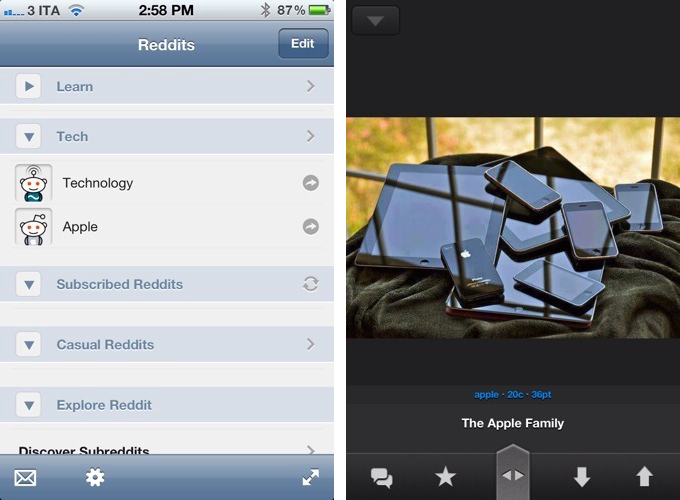
The latest update to Alien Blue, the best Reddit client available on the iPhone, adds a number of features, interface refinements, and improvements that bring the app on par with the iPad version, last updated in May. Alien Blue 2.6 is a major update that adds iCloud sync, subreddit grouping and discovering functionalities, and an entirely new Canvas view that offers a more convenient layout to browse Reddit images.

When version 2.1 of Alien Blue for iPad came out adding subreddit grouping, I wrote about the feature:

Subreddit grouping, however, has changed the way I use Alien Blue. Aside from the convenience of neatly categorizing similar subreddits in the app’s sidebar, each group can be turned into a “front page” collecting all the most upvoted links of each subreddit. This means that, for instance, I was able to create a “Learn” group within Alien Blue, throw TodayILearned, HistoryPorn, Wikipedia, and ExplainLikeImFive in there, so that when I’m in the mood of learning new things and cool facts, I can enjoy my own “Learn” Reddit front page made of the subreddits I grouped. It’s incredibly smart.

In using the iPhone update released last night, I was pleasantly surprised to see that the iCloud sync promised by the developer weeks ago worked as advertised. Upon logging into the app with my Reddit account, Alien Blue took seconds to fetch my existing groups of subreddits. In scrolling through my various front pages and tapping on links (Alien Blue for iPhone now has “optimal” views for articles, images, and videos – which are incredibly handy on the iPhone), iCloud also synced read statuses back to the iPad, dimming links that had already been checked out on the iPhone. Unlike most iCloud-enabled apps I have tried, Alien Blue’s cross-device implementation looks solid.

Among the new features (a complete list is available on Reddit), the updated Canvas view stood out because of its elegant design and gesture-based navigation. Setting its color scheme to black to make image thumbnails really pop out on the Retina display, I was able to quickly skim through images with taps (load a single image), swipes (swipe horizontally to navigate, swipe vertically to go back to grid view or advance pages), and double-taps (open image in full-screen mode). Even more than on the iPad, Canvas view makes for a great mobile browsing experience on the iPhone’s smaller display.

Alien Blue 2.6 is a great update, and the app is available for free on the App Store with a $1.99 in-app purchase to unlock more features (including Canvas and Retina thumbnails).

Permalink

A Newsstand-like Platform For iOS 6 Podcasts

A Newsstand-like Platform For iOS 6 Podcasts

Jake Marsh writes about a possible implementation of Apple’s rumored standalone Podcasts app for iOS 6 [via Marco Arment]:

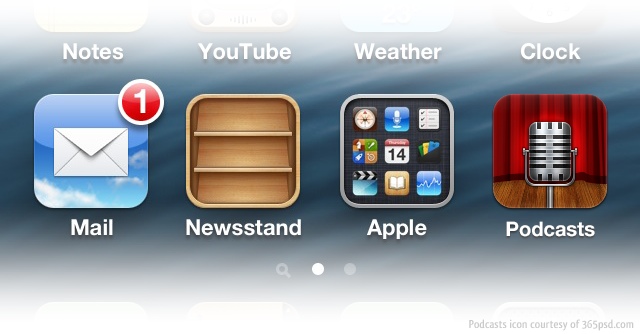
Now the really big one. A universal (iPhone & iPad) iOS application entitled “Podcasts”. This application would provide a way to browse available shows, read about them and subscribe to your favorites. Basicallly extending the existing functionality avaiable in the Podcasts section of the iTunes Store today.Since Apple will now control the experience end-to-end, they can now provided fantastic support for things like new episode push notifications.

As Cody wrote last week when AllThingsD was first to report on speculation about a separate podcast app for iOS 6 devices, podcasts have been neglected for a long time on iOS. Bundled with iTunes within a unified interface for the Store, support for podcasts on iOS has spurred the creation and popularity of third-party solutions like Instacast and Downcast, which make it extremely easy to create playlists, stream episodes without downloading them, and sync settings (including play position) across devices. These are all features Apple’s iOS iTunes app is lacking, but it doesn’t necessarily mean Apple is ignoring the podcast category.

As we suggested, Apple could provide a separate directory for discovering podcasts and a native podcatcher to simplify the process of listening, downloading, and managing podcasts and playlists. What Marsh envisions isn’t too dissimilar from Newsstand – a platform that allows developers to host content on Apple’s servers and manage new releases from iTunes Connect, and that enables iOS users to conveniently browse audio and video content through a dedicated storefront.

It’s important to keep in mind that, if Apple were to provide a new platform for Internet audio and video producers, they’d likely want to see a revenue opportunity to at least break even and cover the costs of offering a better experience. With Newsstand, Apple got several publishers (including Time) on board with the revenue cut business model whilst providing an integrated solution to the end user. With podcasts on iOS, there is certainly room for improvement – but it has to make sense for Apple too, not just the developers and end users.


Permalink

Mozilla Developing “Junior” Browser for iPad

Mozilla Developing “Junior” Browser for iPad

The Verge’s Chris Welch writes about Mozilla’s latest iOS effort: an iOS browser app called “Junior” aimed at rethinking the tablet’s basic interactions for web browsing with a new interface and touch controls.

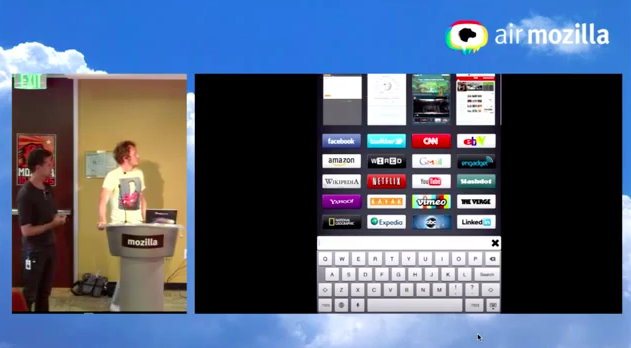
So here comes the fun stuff,” said Alex Limi as he began discussing the prototype iPad browser Mozilla has been working on for several months. “We wanted to make something entirely new. We wanted to look into how we could reinvent the browser for a new form factor,” he said. He goes so far as to deem Safari for iPad “a miserable experience” all the while acknowledging that it remains the best option available in terms of tablet-based browsing. iOS is a platform where Mozilla has yet to make an impact, he admits. “There are a lot of reasons we should be on iOS even though we can’t bring our rendering engine there.” Ultimately he says Junior was born out of necessity: as of now, Mozilla has “no vehicle on one of the biggest consumer platforms in the world.

According to Mozilla’s own blog post, Junior (which hasn’t been given a release date) will make browsing more “fun” and “ergonomic”. In spite of the lack of additional details, Mozilla will surely have to use Apple’s WebKit engine to release Junior as a browser app on the App Store, putting it on the same technical level of other third-party browsers like iCab and Maven.

The demo given by the Mozilla design team shows a functioning web browser with full-screen mode, visual tabs and bookmarks, and large touch-based controls sitting at both sides of the screen to access new pages and standard browser controls like Back and Refresh. Looking at this first demo, it appears Junior will be somewhat inspired by apps like Grazing, which has long experiment with “thumb controls” to facilitate the process of interacting with the browser without losing the convenience of holding the iPad comfortably.

With Safari getting an even faster engine and iCloud tabs on iOS 6, it will become harder for developers to gain mass traction with third-party browsers. Safari is integrated with the system (iOS users can’t replace their default browsers in the Settings) and, with iOS 6, it will work with iCloud to synchronize tabs across devices. But the “big players” like Mozilla and Google have a chance to leverage their existing desktop ecosystem to build mobile companion apps that, even if not as capable as their computer counterparts, could implement features like “official” tab and bookmark sync to provide solid experiences to users accustomed to other browsers on their Macs or PCs. Google is rumored to be working on an iOS version of Chrome; Mozilla could, in theory, build Firefox Home (which is currently a separate app) straight into Junior to keep a Firefox user’s session synced and stored in the cloud.

Check out Mozilla’s Junior presentation here.

Permalink

Strophes

I have a good ear for the English language, but most of the times when I’m listening to music I still want to know exactly what a song says. Unfortunately, for the past years I had to cope with poor solutions to check out a song’s lyrics on the Mac; even worse, all of those methods sported no kind of integration whatsoever with the services I use to listen to music on a daily basis. It’s not just about iTunes anymore: today, my library is on Rdio, new releases are streamed every Tuesday, and I may casually check out a YouTube video or two as I look for that old live set or creepy 80’s Italian music video. Music comes from multiple sources, yet there hasn’t been a single, integrated app that could help in displaying lyrics on the desktop without using ugly and ad-filled lyrics websites.

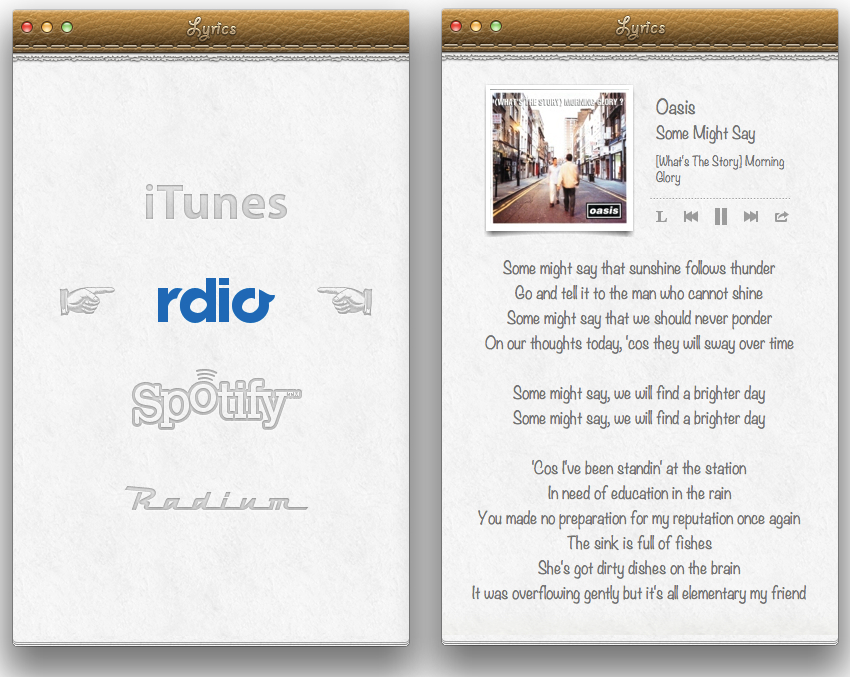
Developed by Italian Alfredo Delli Bovi, Strophes wants to be the beautiful Mac app that’s integrated with the music apps you’re already using.

Before I delve into the app’s feature set, though, it is worth mentioning how Strophes’ deep skeuomorphic roots will likely fence several users off as they will look at bits of torn paper and stitched leather in disbelief and utter despise for interfaces mimicking real life object. Personally, whilst I am not the biggest fan of Apple’s Calendar and Find My Friends, I recognize how, to most users, Strophes’ appeal lies in its strong resemblance to recent Apple trends and design patterns. In that regard, Strophes almost feels as the app Apple would create if they were to offer their take on displaying song lyrics, which is to say – Strophes is a natural fit for the Mac platform, and, more importantly, it just looks better than any other lyrics app I’ve tried.

Strophes works with a variety of music players, such as Rdio. The full list includes iTunes, Spotify, and Radium as well; through an optional Safari extension – which needs to be downloaded from Strophes’ website – you’ll also be able to load lyrics for videos playing on YouTube.com. Strophes is extremely simple in the way it works: it plugs directly into your active music player, checks for the song that’s playing, and displays lyrics inline fetching them off the Internet. The app uses a lyrics database to find lyrics, and it also displays album artworks and artists information above the actual lyrics. Strophes can control music players, too, but I prefer to keep The Iconfactory’s Take Five on my Mac for those playback and pausing duties. Strophes automatically loads another song as the music player changes, and, as far as features are concerned, it can also visualize an artist’s bio through last.fm integration, and translate lyrics.

In my tests, Strophes has been reliable. Working in tandem with Rdio, it only failed to find lyrics a couple of times; when it did, it provided a link to open lyrics in the web browser. Most of the times, the app loaded lyrics just fine and within seconds.

Strophes is, by far, the best lyrics app I have found on OS X, and it works with the apps I am already enjoying to listen to my music library. You can get Strophes at $4.99 on the Mac App Store.


Skype 5.8 for Mac Adds Mountain Lion Support, New Contact List

Out today, Skype 5.8 for Mac brings a series of changes meant to make the app ready for Apple’s upcoming Mountain Lion, simplify the interface, and improve support for video calls coming from mobile devices. Whereas Skype 5.6, released in March, added support for Lion’s full-screen mode, version 5.8 gets the app ready for Apple’s next major iteration of OS X so you won’t have to “worry about compatibility”. Unfortunately, after an initial test, Skype 5.8 crashed while I was browsing the integrated Facebook feed. The app works on the latest Mountain Lion developer preview, but it seems like Skype will still need to finely tune the software to avoid unexpected quit.

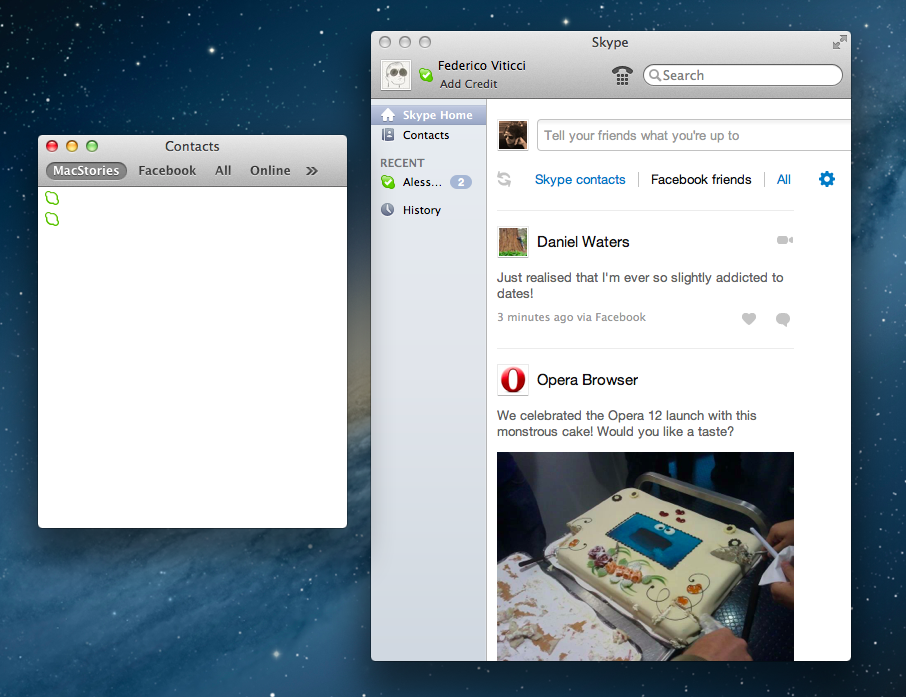
Perhaps more importantly for Mac users, the latest Skype brings back the old Skype’s simplified floating contact list that disappeared after the much criticized transition to version 5.0. Quite ironically, a simplified contact list wasn’t amongst the most shared ideas Skype asked its user base to submit in a contest to propose design ideas; however, the company clearly listened to feedback, and decided to bring back the Contacts Monitor (available from the Window menu through a CMD+3 shortcut) to offer more streamlined access to contacts and groups.

The Contacts Monitor is a resizable floating window listing groups in a toolbar, and contacts with status indicators below them. It provides filters for All, Skype, Facebook, and Address Book contacts, and it allows you to start new chats either via double-click or right-click. The Contacts Monitor is certainly more intuitive and easier to navigate than Skype’s integrated Contacts interface for Skype and Facebook friends. It’s a welcome addition.

In version 5.8, Skype also added better support for video calling from mobile devices. In 5.8, video calls in portrait or landscape mode are automatically adjusted to the right orientation when displayed on a desktop computer. Last, according to Skype, the possibility to open chats in separate windows is “coming soon”.

Skype 5.8 is available as a free download here. You can read the company’s official blog post here.


Reeder 3.0 Review

In 2009, reading news on the iPhone was different. The App Store was only one year old; Twitter wasn’t the information network adopted by mass media and millions of users we interact with today; there was no iPad, no universal apps, and no Flipboard. In 2009, reading news on an iPhone meant having to choose between few decent Google Reader clients, some Twitter apps, and lots of “mobile optimized” web apps.

Then in late 2009, Reeder came around. Created by Swiss developer Silvio Rizzi, I remember writing one of the first public reviews of Reeder for iPhone, which unlike the majority of contestants in the space at the time, sported a highly custom “sepia” interface that would later went on to define Reeder as a brand. Crafted with care and an eye for speed, Reeder not only stood out because it was beautiful to look at – the app was fast, visibly more responsive than Byline and NetNewsWire, easy to navigate in spite of its new UI paradigms, and focused on letting the user easily share links on other networks and services. Reeder 1.0 wasn’t perfect; version 2.0, released a few months later, fixed some glaring omissions of its predecessor (namely, lack of saved state), and introduced an even faster syncing engine and more link sharing options.

Reeder took off. The success of the iPhone app allowed Rizzi to become one of the most well-known names in the indie iOS developer community, redefining iPad RSS readers with a brand new version of Reeder, and then again capturing a large portion of the OS X market with the highly-anticipated Reeder for Mac.

In spite of its obvious merits, it is hard to pinpoint the exact reason behind Reeder’s rise to the top of Google Reader clients. There are hundreds, if not thousands, of Google Reader apps on Apple’s App Store now. Rizzi isn’t the “fastest” developer around (Reeder for iPhone was last updated in November 2011), and many valid RSS clients have been released in the past two years, some of them combining traditional RSS functionalities with deeper social integration to offer more compelling, modern alternatives to standard Google Reader syncing and browsing. Yet Reeder has managed to maintain its top position as the go-to Google Reader client for millions of iPhone users.

That’s not to say, however, that Reeder’s constant success and popularity don’t have to account for the profound change in news reading habits that occurred in the past two years. Sometime around 2010 – and I tend to associate this shift with the release of the iPad – a new breed of apps begin grazing the surface of established mobile news reading trends and conventions. Flipboard turned the world of RSS aggregators upside down with embedded discovery and direct integration with social feeds; Twitter clients got more capable, leveraging mobilizers and read-later services to provide a better experience with URLs; Zite brought automatic and intelligent curation to a platform based on RSS, while popular news organizations like CNN and NYTimes kept improving their own iOS apps.

In 2012, people don’t find their news exclusively through Google Reader anymore. That wasn’t true in 2009 either, but the growth of the App Store has certainly catalyzed the process: news travel fast, on a variety of channels, on multiple aggregators, in real-time and in multiple forms. We have become news gatherers.

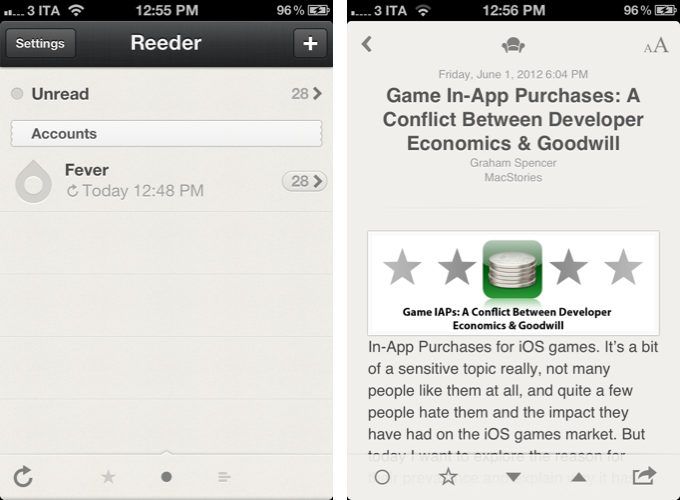
Reeder 3.0, released today, holds true to its roots of a Google Reader client, but tries to modernize the overall approach and feature set with support for a new service, improved Readability syncing, more sharing options, and a refreshed look. In the first major rewrite of the app since 2010, is Reeder still relevant? Read more


Apple’s Phill Schiller On App Store Curation and Promotion For Developers

Apple’s Phill Schiller On App Store Curation and Promotion For Developers

In an interview with The Wall Street Journal published yesterday, Apple’s Phill Schiller weighed in on App Store curation, promotion of third-party apps, and traditional retail selling space.

The opportunity is the best it has ever been for software developers,” Mr. Schiller said, adding that he thinks the app store is a far more democratic way to sell software than traditional retail stores with limited shelf space.

Mr. Schiller also pointed out that Apple promotes apps in multiple ways, such as popularity charts and featured app lists. “Every other day you hear about another app going off the charts,” he said. “You can still get discovered and get a hit overnight.

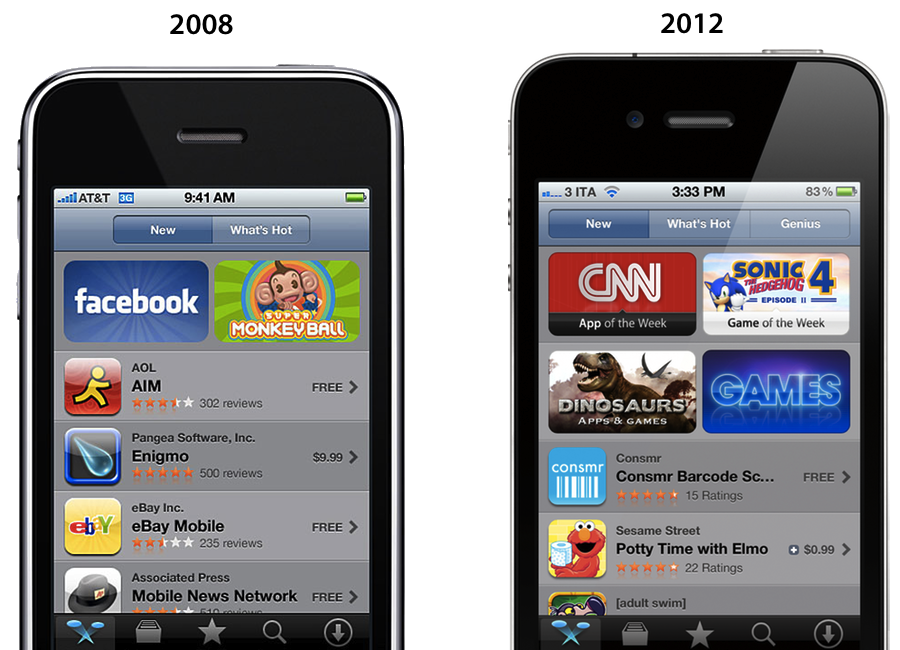
There’s no doubt Apple has done a “tremendous amount” (Schiller’s words) to help apps get discovered on the App Store. With the iPhone and the App Store, Apple created a new economy that, in the U.S. alone, has spurred the creation of over 200,000 jobs. But as I have outlined last month, the App Store of 2012 isn’t the same that launched in 2008 to 900 apps: there are over 650,000 apps on the App Store today, and while Apple has done a lot for developers, it could optimize the layout of the Store to do more and better. I wrote:

Custom sections provide a decent solution to browse titles Apple has previously “curated”; however, these sections aren’t usually updated as often as they are created — N.O.V.A. 3, a new shooter game by Gameloft, still isn’t listed under Benchmark Games: Stunning Graphics, whilst the majority of reviewers and publications have outlined the game’s remarkable graphic capabilities.

The IconFactory’s Craig Hockenberry also noted how Apple could bring its “personal touch” to the App Store to showcase great software with different methods than simple Top Charts, or “curated lists” that are often abandoned and never updated.

Instead of fighting for a short-term placement in the Top 100 lists, we’d fight for a long-term product review. Look at the amazing things developers do to earn an ADA and imagine if that happened once a week. Earning that “Apple approval” could ensure a product’s success for a long time. Which would be great for both customers and developers alike.

Hopefully Apple is thinking about this stuff. Earlier this year they acquired app recommendation service Chomp, and they revamped their “App of the Week” section with a new “Editor’s Choice” tag. The redesigned App Stores of iOS 6 come with Facebook integration and improved layout for descriptions and screenshots, something developers have been asking for. It’s too early to tell, but it seems like the iOS 6 App Store is on track to deliver great improvements for navigation and user interaction this Fall; to improve discoverability and promotion, however, Apple should also consider tweaking longstanding minor, yet important aspects such as filters, search, and Category sorting options.

Read the full interview with Schiller (who also confirms a new tracking tool for developers being discussed at WWDC sessions) here.

Permalink

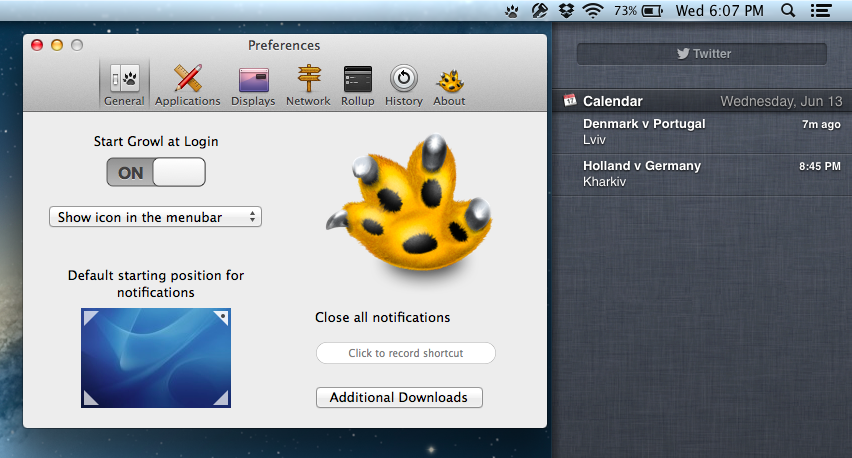
Growl 2.0 To Support Notification Center On Mountain Lion

Developers of Growl, the popular third-party notification app for OS X that received a major update with version 1.3, announced today their plans to embrace Apple’s Notification Center on Mountain Lion, and allow developers an easy integration with the Mac’s upcoming native notification system.

With a blog post published earlier today, lead developer Chris Forsythe laid out plans for a future version 2.0 of the app:

For Growl 2 we’re simply going to add a Notification Center action display as well. This is going to make it easy for anyone who wants to see notifications in Growl, and also in Notifcation Center. We don’t know of any downside to doing this, and see it as sort of a simple yet powerful way to get what you want done. There may be some caveates to doing this that we can talk about once 10.8 is out, but there may not be. We’ll all just find out together.

This will be achieved with a new architecture that will enable Growl to handle visual notifications and actions separately:

Also, for Growl 2, we’ve done some really neat things. One of the really neat things that we’ve done is split the action and visual notifications, so that both could fire at the same time.

Let me give you an example of how this would work. You could have a Smoke display, and the MailMe action fire from the same notification if you wanted. This is great and makes things really powerful.

As we’ve already written, the introduction of Notification Center won’t necessarily “sherlock” Growl as a notification alternative for Mac users and developers. While Notification Center will undoubtedly provide an excellent native solution for developers of Mac App Store apps – ultimately serving the average user with a notification system that works out of the box, – Growl will still remain a capable third-party app that offers fine grained controls over notifications with several customization options.

Furthermore, because Notification Center will only work with Mac App Store apps but Mountain Lion will still support external software through Gatekeeper for enhanced security, Growl will also be a fantastic way for developers of apps sold outside of the Mac App Store to enable desktop notifications in their software.

You can read the technical details on the future of Growl over the the official blog. Growl is available on the Mac App Store for $1.99.