Posts tagged with "photos"

Instagram Hits 10 Million Users in 355 Days - A Brief Retrospective

The Instagram developers have announced their photo-sharing service has now 10 million registered users:

Last October, we launched Instagram live in the App Store. Today, less than one year later, we’re happy to announce that the Instagram community now consists of over 10 million registered users.

The first version of Instagram, which I reviewed here, was released on October 6th, 2010, exactly 355 days ago. Last week, Instagram released a major 2.0 upgrade, which includes live filters, and updated UI, and several optimizations to the code. Here’s a quick look back at Instagram’s history in the past 12 months:

  • October 6th, 2010: Instagram released on the App Store.
  • December 7th, 2010: Instagram gets inline viewer on Twitter.com.

  • December 21st, 2010: Instagram reaches 1 million registered users.

  • January 27th, 2011: Instagram 1.1 is out with hashtag support and some optimizations.

  • January 28th, 2011: Twitterrific, a popular third-party Twitter client for the Mac and iOS, adds native Instagram support for photo URLs.

  • February 8th, 2011: Instagram announces its official API.

  • February 26th, 2011: The first results of Instagram’s API are in.

  • March 10th, 2011: Flipboard, Apple’s iPad app of the year, adds native Instagram integration.

  • March 11th, 2011: Instagram 1.5 brings new effects and News Feed.

  • April 2nd, 2011: Here comes the first Instagram client for Mac based on the API.

  • April 15th, 2011: Instagram 1.6 focuses on performances.

  • May 16th, 2011: Instagram 1.7 gets a new profile view.

  • May 23rd, 2011: Instagram announces 4.25 million users.

  • May 26th, 2011: Instagram 1.8 improves the comment section.

  • August 3rd, 2011: 150 million photos have been uploaded to Instagram.

  • September 20th, 2011: Instagram 2.0 released.

  • September 26th, 2o11: Instagram hits 10 million users.

From the timeline above, I had to exclude several of the minor updates Instagram released, or amazing third-party apps that plug into the service to extend its capabilities (not to mention celebrities and brands). And as with last year’s original release, Instagram is still an iPhone-only app.

Has there ever been an iPhone app with such terrific third-party and user support in just 355 days?

Leaked Photos Show “iPhone 4S” Device with A5 Chip, iPhone 4 Design

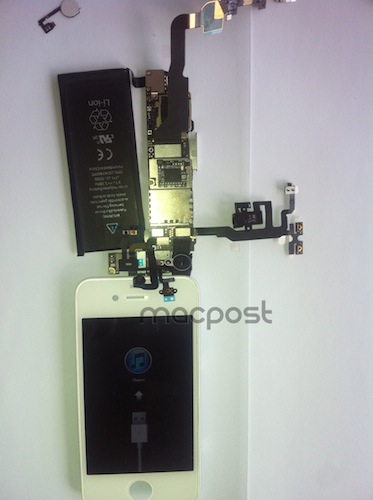
A photo discovered earlier today by PhoneArena on Chinese microblogging service Weibo seemed to “confirm” that the next-generation iPhone would indeed run a modified version of the A5 CPU first introduced by Apple in the iPad 2 last March. As usual with photo leaks, the image was blurry and the A5 logo on the integrated chip in the mainboard could have been easily faked with Photoshop. Several outlets, however, suggested that the photo could be real, albeit belonging to the rumored “iPhone 4S” device in the works, rather than the real, “all-new” next-generation iPhone 5. Comparisons of this morning’s photo with previously posted iPhone 4S/5 parts seemed to confirm the theory that the newly captured part was legit.

There’s been much controversy and speculation in recent months as to whether Apple will introduce a single iPhone 4-like update in the next weeks, a major redesign called “iPhone 5”, or both. Most recent rumors are claiming Apple will release two new iPhone models this Fall to target different market segments – namely, there’s a great opportunity for Apple in China and other pre-paid markets, where a cheaper, off-contract “iPhone 4S” could possibly sell very well and still appeal to consumers as a premium device. Apple executives have hinted at the pre-paid market before.

A new photo which seems to corroborate this morning’s alleged leaked has been published by MacPost, which claims it depicts the new “iPhone 4S” with an A5 chip and slightly updated battery. As many noted this morning, the battery unit in the allegedly leaked photos reports “1430 mAh”, instead of the iPhone 4’s 1420 mAh. MacPost’s follow-up picture shows a partially-assembled device displaying iTunes’ activation screen, as well as an iPhone 4-like white front panel. According to the website, this should confirm the “4S” nature of the device (that is, the “minor” upgrade – identified by many as N94 – and not the “real” iPhone 5), also because of the several components that are shown in the photo, and “leaked” on the Internet over the past months. Those components they mention were deemed as “iPhone 5 parts” at the time. Furthermore, the front panel’s speaker grille is heavily resembling of white iPhone 4 prototypes prior to the white iPhone 4’s public debut.

There’s still much confusion floating around Apple’s plans for the next iPhone(s), and it is worth noting the same A5-enabled, white, iPhone 4-like device was spotted back in April running on T-Mobile network. 9to5mac shares my personal theory in that if these photos are legit, they’re most likely to portray an early iPhone 4-like prototype for a next-generation iPhone, rather than a recent “final design” unit.

According to an article from The New York Times published last week, a “fairly different” iPhone 5 with better specs (A5 CPU, 8 MP camera) is just “weeks away”.


“Shrine of Apple” Wants To Photograph Every Apple Product Ever Made

Brought to my attention this morning by The Loop’s Jim Dalrymple, Shrine of Apple is a new website that launched last night with a very ambitious goal: to photograph every Apple product ever made. Not just the ones from 2007 up until today – all of them. From the About page:

Our mission is to showcase the entire spectrum of products that Apple have sold to the public since 1976 – every product Apple Inc has ever produced, in the highest quality and definition possible. Every desktop, every laptop, every notebook, monitor, iPod, iPad, iPhone, mouse, keyboard, modem, cable, port, adapter, docking station, memory expansion card….and that’s just their hardware. Operating systems, productivity suites and all the great software titles that Apple have published will make an appearance too!

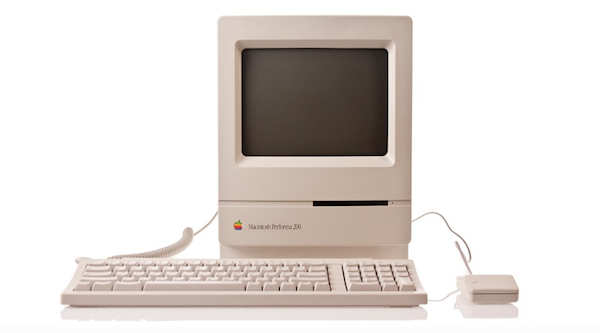
The website launched with a relatively small collection of products, with many more queued up for the next weeks. Shrine of Apple’s database consists of detailed high-res photos of products complete with original packaging when available, manuals, and cables. The website’s categories include Desktops, Displays, iPads, iPhones, iPods, Laptops, Peripherals, PDAs, Servers and Software, with more to come. The current selection includes old gems like the Apple IIe Numeric Keypad, Lisa 7/7 Office software, and the Macintosh PowerBook 150.

With high-res photography, descriptions, related links and a true passion for Apple products, I wouldn’t be surprised to see Shrine of Apple becoming a de-facto standard for Apple fans looking up information on old computers and devices, provided by someone who really “knows” and cares about these products, not a faceless online database. Shrine of Apple is, in fact, the creation of Jonathan Zufi, “leading expert in the field of mobility and wireless devices by day – vivid Apple collector by night”.

Make sure to check out Shrine of Apple, and follow the website on Twitter for updates on new products and photos.


Luminance Is An Elegant Photo Editor for iOS

On the Mac, there’s no shortage of photo editors: from Aperture and Lightroom for those users who want more control over how their photos are processed and organized to more lightweight and user-friendly solutions like FX Photo Studio or The Iconfactory’s Flare, one can stay assured photos imported on a Mac will always find a proper companion app to be edited, sorted in collections, and shared online on Facebook or Flickr. On iOS, the situation is quite different: because the iPhone is a portable camera itself, there’s been a surge of apps like Instagram or Camera+, which allow users to shoot, edit, and upload photos using a single interface to do it all. Whereas the insanely successful Instagram has managed to gain millions of users because of its simple approach to lightweight photo editing and one-tap uploading, others apps like the aforementioned Camera+ or Camera Genius give users more options and functionalities such as advanced image filter adjustments, effects, and presets. And with iOS 5 on the horizon, it looks like developers of photo taking/editing apps for the iPhone and iPad will have even more tools and APIs to play with in order to natively integrate their software with new built-in image editing functions offered by iOS.

Being able to shoot a photo, quickly edit it and upload it in seconds from your iPhone is fine, but sometimes you want to sit down, check out all the photos you’ve taken, and take your time to process them, adjust them to your liking, and file them away onto a collection or social network of choice. That’s what desktop image editing tools are for – they give you the peace of mind to go through hundreds of photos without needing to quickly fire them off to your Instagram followers. You could argue that image editors are meant for a desktop computer (you sit down with your laptop, connect your camera, and start editing), but why avoid the fact that iPhones and iPads are powerful devices capable of doing just about anything nowadays? PhotoForge 2, an image editor I’ve reviewed before here on MacStories, proved that it’s possible to work with a full-featured image editing environment on iOS without feeling constrained by real screen estate and lack of mouse cursor.

Luminance, a new image editing app for the iPhone and iPad available at $0.99 on the App Store, provides a more streamlined alternative to PhotoForge and other image editors I’ve tried on iOS, offering an interesting set of effects, presets and basic versioning system that makes it easy to import photos from a device’s camera roll, and start editing in a focused space right away. Read more


Google’s Photovine App Now Open for All

Back in July we covered the release of Photovine for iPhone, an image sharing app developed by Google’s internal Slide team that, among other things, is also responsible for Disco, a group messaging app, and Pool Party. Powered by a slick design and attention to detail, the Photovine app that was released last month didn’t allow everyone to sign up and start sharing photos as the system was invite-only without an open sign-up. With an update pushed last night on the App Store, Photovine has revamped Facebook and Twitter integration from within the app and finally opened registrations without the need of a beta invite.

Unlike the popular photo sharing app and iPhone-based social network Instagram, Photovine doesn’t revolve around the simple concept of photos uploaded to a user stream and shared with followers. Rather, Photovine is based on “vines” – photos connected by a caption and contributed by you, your friends, and other people using Photovine. So, for example, say you’d like to share a photo about your newly acquired MacBook Air, you can start a vine called “My new MacBook” and your friends will be able to let the vine “grow” with new photos related to the caption, and the photo you originally posted. This is best explained by Photovine’s promo video, which we’ve embedded after the break.

Photos in a vine can obviously be liked and commented on, each user has its own dedicated page with a profile picture and followers/following/likes counts, and an Inbox tab in the bottom toolbar allows you to check on messages you’ve received from other users, or notifications such as new followers, comments, and likes. This is not too dissimilar from Instagram’s implementation of “activity”. Users can add new photos to an existing vine (or even “watch” a vine if they’re interested in it) or create a new one from scratch – Photovine comes with a beautiful custom camera interface that lets you snap your own photo, or pick one from the Camera roll. Indeed the whole app sports a gorgeous and clean design that makes it easy to jump through vines, user profiles, and comment on photos shared by others.

Photovine for iPhone is an interesting concept with a good-looking interface and additional social functionalities to forward photos to Twitter and Facebook, and find friends on those social networks as well. You can download Photovine for free on the App Store. Read more


LogMeIn Updates: Full Lion Support, Ignition Gets Better File Manager

LogMeIn, the powerful remote desktop sharing tool that offers a variety of other services for professionals and businesses, released a series of updates in the past week to enhance support for file management in Ignition, the iOS app we’ve reviewed here on MacStories, and bring full OS X Lion support to LogMeIn Free, Pro and Ignition desktop users. With a blog post this morning,  the company has announced a compatibility update that resolves the issues when trying to connect to a machine running Lion, rumored to be publicly released next week. I have tested the update (which can be installed by opening LogMeIn’s preferences, then About->Check for Updates) on my two Macs running OS X Lion GM and I successfully managed to log in (both via screen sharing and file manager) from my iPad, iPhone, and the web. Read more


The New Brain Behind Your Photos

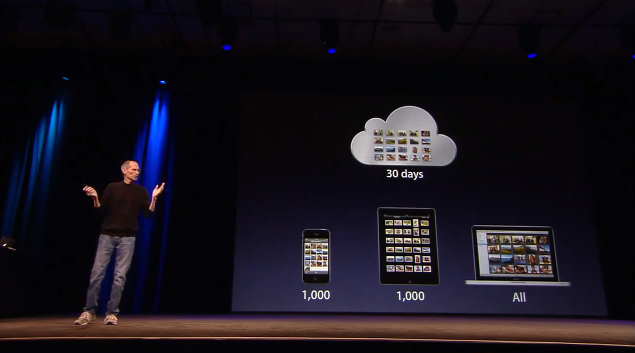
One of the new features of iCloud that was announced at WWDC but was slightly overlooked by bloggers and iOS users is Photo Stream. Built into the native Photos app for iOS devices, iPhoto for Mac and the Pictures folder on Windows PCs, Photo Stream will allow you to automatically find on any device the photos you’ve taken on an iPhone, iPod touch or iPad. With the addition of the Apple TV 2nd gen, Photo Stream will let you watch these photos on the bigger screen with your friends and family. How does it work? For those that missed the announcement, here’s a quick recap: because iCloud automatically stores, updates and pushes your content on all your registered devices (be them iPhones, iPads, or Macs and PCs running the iCloud control panel), Photo Stream acts as an extension of the mobile Camera Roll that, rather than just storing pictures locally, also pushes them to the cloud as soon as they’re taken, provided you’re on a WiFi connection. If you’re not on WiFi, Photo Stream will upload the photos from the Camera Roll to iCloud as soon a a new connection is established.

As explained by Steve Jobs on stage, and later demoed by Eddy Cue, the main purpose of Photo Stream is that of easing the process of importing photos shot on, say, an iPhone to an iPad or Mac for better viewing. With previous versions of iOS, users were forced to email pictures themselves and open the message on OS X to save the photos (facing at the same time a risk of quality loss due to email limitations); create an account on social services like Flickr or Facebook to upload photos from their mobile devices to avoid a desktop transfer process; even worse, users had to go home, find a USB cable, connect their iPhone to a computer, launch iPhoto or Image Capture and manually import the most recent photos. That’s a long and tedious process Apple wants to eliminate with a smart, automatic system that always puts the most recent photos on all your devices. In fact, Photo Stream can display the 1,000 most recent photos on iOS devices, whilst files are stored on iCloud for 30 days due to storage limitations on both ends (iOS and Apple’s server farms). On desktop computers, which come with more storage, Photo Stream stores all photos. Again, this new functionality works out of the box with any iOS 5 device configured with an iCloud account, and Photo Stream can be enabled in the Settings app. On the desktop’s side, right now Apple is requiring developers to download a special beta version of iPhoto and the iCloud control panel to test Photo Stream, but once iCloud publicly launches this fall everything will be baked in with no further configuration needed.
Read more


Carousel Instagram Client Gets Gestures, Search, Refined UI

Back in May I reviewed the first version of Carousel, a beautiful Instagram client for Mac that, thanks to the Chameleon framework built by The Iconfactory, brought Instagram’s photo streams and profiles to the desktop with a gorgeous iOS-like user interface. Whilst in the past month, with Lion nearing its final release and the WWDC, we’ve seen several examples of iOS apps making the big leap to the Mac, Carousel was one of the first apps to try the iPhone-inspired approach with a vertical layout, tabs, and popover menus. Together with Twitterrific, Carousel is a fine example of iOS interface schemes coexisting with more standard Mac applications.

Carousel 1.1, released today, adds a number of new features and refinements to make the Instagram experience on OS X even more beautiful and easy to use. First off, search: you can now search for specific @users or #keywords on Instagram, pin your searches as you would in Twitter for Mac, or click on tags and usernames in photo comments, which now are better styled to indicate the original author’s caption. Saved searches sit below the search bar, but to perform a search you’ll have to choose an element from a popover menu. The app has gained a new “likes” tab to see all the photos you’ve liked and a fetch separator to start where you left off in the stream, but more importantly gestures are now supported to easily open a photo in Quick Look (pinch and zoom) or check out a profile (swipe on the photo). It feels very natural and smooth using a Magic Trackpad.

Among the little fixes and refinements, the developers have updated the iOS-like toolbar to make sure the selector is draggable (try it, neat animation in there) and the comment form remains visible even if you click outside of Carousel’s main window.

Carousel 1.1 is a solid update for the most beautiful and intuitive Instagram client currently available on the Mac. You can buy Carousel at $4.99 on the Mac App Store.


Facebook Working on Instagram-like Photo Sharing App

TechCrunch has posted a screenshot of what they claim to be a new photo sharing app for iPhone developed by Facebook and soon to be released in the App Store. The new app, internally codenamed “Hovertown” or “WithPeople” according to the website, from a first look at the leaked documents looks like a mix of Instagram, Color, Path and With. With the exception of Instagram  (for those who don’t know, an iPhone app / social network that allows you to share photos in seconds with cool built-in effects and geo-tagging capabilities), all the other apps mentioned by MG Siegler are photo sharing solutions meant to capture what’s around you, with people that are with you, are share it with people you know. Basing on these alleged similarities and the screenshot itself, Facebook may be working on an iPhone app that leverages the social graph and location information to share places, people and moments in single shots or entire photo streams.

How do we know? We have obtained roughly 50 MB of images and documents outlining the entire thing.

To be honest, we’re still sorting through all of them. But again, the app looks amazing. We’ve heard that internally it is being called either “Hovertown” or “WithPeople”. And while it looks like a stand-alone app right now, there are also signs that it could be eventually integrated into Facebook’s main iPhone app — as well as the main site.

It’s unclear whether the new photo product may be integrated with the official Facebook iPhone app (which is heavily web-based as far as the interface goes) in a new photos tab or if Facebook is really planning on releasing it as a standalone application. The Facebook iPhone app is the most popular free app of all time, and it wouldn’t be a surprise to see Facebook growing its catalogue of official software for the iOS platform. Facebook has been criticized for not having a native iPad app, a choice that has allowed third-party developers to build their own paid and successful solutions for the tablet. Read more