This Week's Sponsor:

Hello Weather

Half Off for WWDC Week, Just in Time for Summer.


Posts tagged with "app store"

Review of WTHR - A Simpler, More Beautiful Weather App

I admit it, I have a bit of a fetish for weather apps. My taste in them is a bit different than all the other categories because I am a data geek when it comes to what’s happening outside. Apps like WeatherSnitch do a great job showing you a lot of info on a small screen but many don’t present them to the user very effectively. Until Dark Sky for iPhone came out, I didn’t think I could use a weather app that focused on the important details instead of all of them. Since then I have changed the way I use weather apps and rely on Dark Sky for short forecasts / radar and iOS’ built-in Weather app for extended forecasts until today.

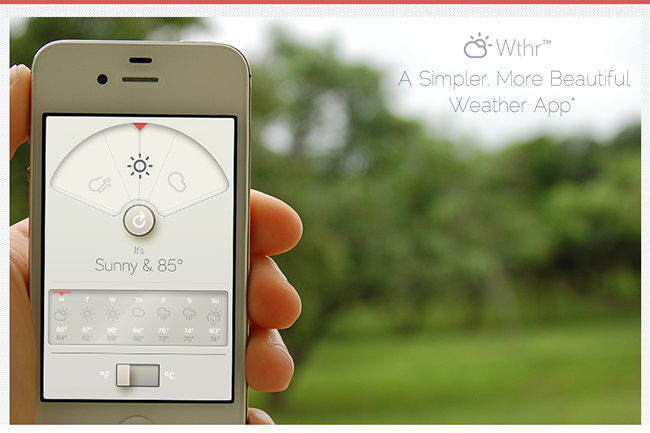
WTHR is a brand new weather app from David Elgena. He wanted to build a weather app based on Dieter Rams’ 10 principles of design so the user could stop wasting time staring at weather radars and atmospheric pressure readings and spend more time enjoying what’s happening outside. WTHR started as a mockup on Dribbble about a month ago and received a lot of attention there. More mockups and a programmer later, WTHR was submitted to Apple and is available today.

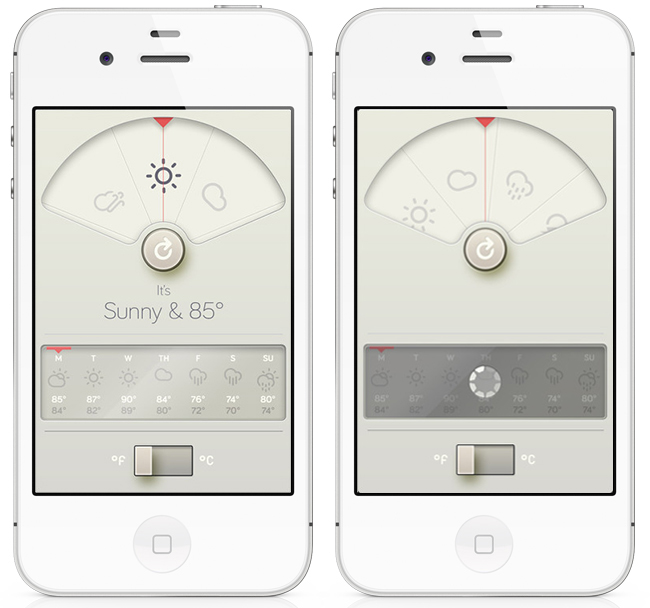
WTHR is one of the best looking weather apps available — I love the style and simplicity of it. I appreciate that it hides the status bar to give your entire iPhone the look of being a handheld weather device with zero distraction. Launch the app, watch the animations, get your forecast and go. Some people may not like the color scheme but if you know Dieter Rams’ designs you understand where the colors come from. When you launch the app, it asks for your location then the UI presents the weather data in a retro-futuristic style. There’s only 2 buttons to interact with, one to refresh the forecast and the other to flip from Celcius to Fahrenheit. The refresh animation is great and the spinning notification in the 7-day forecast almost looks like a Rams dial. Underneath the current forecast is a 7 day extended forecast. All the weather icons are Adam Whitcroft’s wonderful Climacons which look perfect to the stylings of WTHR.

David Elgena told me that they are already working on future updates to include, but not complicate, more features and data like multiple locations and a dark mode. “My intentions with WTHR was really to create something as beautiful as the device that hosts them… and I do believe that even UI designers and app developers could gain inspiration from Dieter Ram’s product designs. Too often we load digital products with features and hidden or hard to use interfaces because we are suddenly given this almost infinitely layered product, the real discipline is control. There is no difference from when Dieter Rams was designing his first clock face…to an app on the iPhone. I look forward to creating more apps in the future…and continually improving upon WTHR.”

The lack of contrast in the 7-day forecast can make you squint a bit — an option to switch to a 5-day forecast could help. I’m glad the app icon wasn’t designed with the same skeuomorphism in mind, as I am not a fan of doing this in iOS because it clashes too much with most other icons. International iOS users – don’t worry, WTHR uses a global geo-location weather API so no one is exempt from using this great app. The weather data is a little different than what iOS uses but only a few degrees at times as Federico noticed in Italy. WTHR has gained a spot on my home screen with its beautiful, focused purpose. WTHR is available for 99¢ via the App Store.


App Store “Game Collections” Gathers All Previous Game Bundles

In our story about the first four years of App Store, we noted how Apple had been collecting apps and games in custom “sections” that, unfortunately, are often rarely updated and hard to find in the App Store once they are removed from the homepage.

For years now, Apple has been refreshing the App Store on a weekly basis to include custom “sections” showcasing hand-picked apps and games. These sections typically come with rotating banners and smaller “mini-banners” on the App Store’s homepage, and are later grouped into an “App Store Essentials” macro-section that includes several of past sections and recommendations.

Custom sections provide a decent solution to browse titles Apple has previously “curated”; however, these sections aren’t usually updated as often as they are created — N.O.V.A. 3, a new shooter game by Gameloft, still isn’t listed under Benchmark Games: Stunning Graphics, whilst the majority of reviewers and publications have outlined the game’s remarkable graphic capabilities.

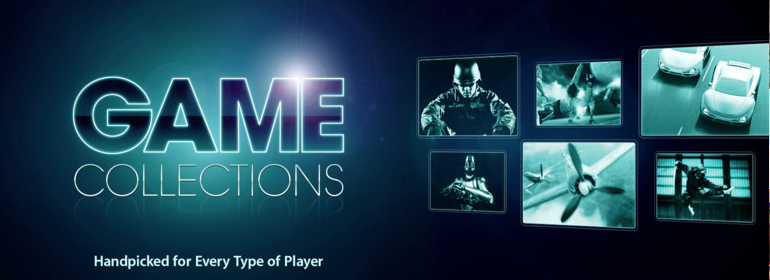
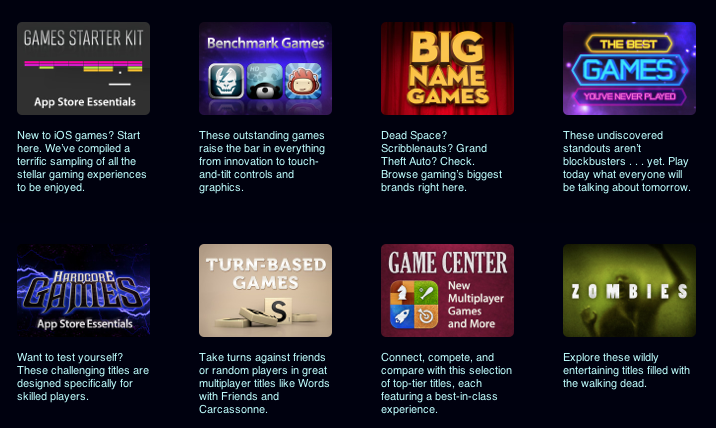
With today’s weekly refresh of the App Store’s homepage, it appears Apple has started taking some first steps into a new direction – grouping all previous game bundles into a bigger “collection”. Aptly named Game Collections and linked from the App Store’s homepage, the section offers a roundup of every selection Apple offered to date.

Game Collections includes:

Previously only available through the App Store’s homepage or partially through the dedicated Games category page, the new Game Collections feature brings some much needed organization to the custom sections Apple has been “curating” over the years. They are now accessible from a single place, and Apple notes how they will be “updated on a regular basis”.

As of today, “regular” apps still aren’t being organized into a unified collection. Right now, the App Store Essentials page is the best way to browse previously featured selections, but it also still mixes games and apps, and doesn’t provide the same elegant and simple layout of Game Collections. Hopefully Apple will provide an “App Collections” page as well, bringing past handpicked app selections and features in a single page.

Apple has been making a series of improvements to the App Store’s navigation lately. Aside from the complete App Store revamp coming in iOS 6, Apple redesigned the App of the Week section and renamed it to Editor’s Choice, leaving the former “App of the Week” to free app promotions.

App Store navigation and curation has long been an issue for third-party developers, with Apple’s Phil Schiller recently weighing in, too, noting how ”you can still get discovered and get a hit overnight”.


Why Apple Is Making The Mac Harder To Use

Why Apple Is Making The Mac Harder To Use

Michael Schechter weighs in on today’s news that TextExpander 4 couldn’t be released through the Mac App Store due to Sandboxing restrictions:

I know I’m not the average Mac user, but I’m far from the geekiest. While there will always be things that need to exist outside of the Mac App Store for the geeky amongst us, the exclusion of something as useful and harmless as TextExpander shows the flaws in the current execution of App Sandboxing. The idea of protecting users from harm makes sense; the execution of protecting users from conveniently installing and maintaining useful software makes none.

This morning, Macdrifter brought a reasonable explanation as to why Apple’s Sandboxing is, ultimately, benefitting the average Mac user who doesn’t use apps like TextExpander, but wants a Mac to be secure and “safe”:

New Mac owners lose the fear that Windows has instilled. I’ve seen it happen over and over. Ever so slowly, they begin to realize that installing software doesn’t have to be scary. Everything on the App Store is “safe” because Apple is moderating the content.

We actually saw this coming. Back in October 2011, when Sandboxing was still on track to become effective in November, I commented on two pieces by Andy Ihnatko and Jason Snell, noting how the concept of “app” – software that “does one thing well” – coupled with enhanced security for Mac users allowed Apple to position Sandboxing as a powerful technology for the new App Store market.

As a security measure, Sandboxing is a good thing for the user. It forces apps to access only the system resources they need, and, generally, it reinforces the belief that Apple-vetted apps are safer than software downloaded from the Internet. But like I said, the real problem – and I guess the reason why people like Michael and I don’t appreciate the consequences of this change – is that developers of existing apps sold on the Store are being forced out of the door. I also wrote:

The problem with Sandboxing, I believe, is that it introduced a change that is forcing developers of existing apps to reconsider functionalities that are not compatible with the Mac App Store anymore. If this will lead to serious fragmentation of Mac software with a proliferation of deeply different Mac App Store and “website versions” of the same apps, we’ll see.

And we did see the first result with TextExpander 4. It’s still too early to judge, but if these first signs are of any indication, then we should be thanking whoever thought of Gatekeeper at Apple, as it will bring some security to software downloaded outside of the Mac App Store. Similarly, we should appreciate the efforts of developers like ManyTricks and Smile, who are thinking of clever ways to offer upgrades without “officially” using the Mac App Store.

There is an argument to be made about Apple not particularly “liking” apps that change system behavior, like TextExpander. If that’s the case, why approving them for Store sale in the first place? I understand that plans evolve and things can take unexpected turns; however, today’s TextExpander update unarguably shows that this isn’t the top notch user experience Apple typically shoots for.

Geeks will always know how to get around the Mac App Store’s limitations; Sandboxing is showing its first trade-offs, including “harder” upgrades and fragmented applications, but we’ll have to wait more to understand its long-term impact.

Permalink

Why Upgrade Pricing Isn’t Coming To The App Store

The 2012 WWDC keynote has come and gone, and we now know which of the many rumored announcements turned out to be true and which turned out to be false. But there was one unrumored announcement many developers were hoping would be true that failed to materialize altogether: the option to offer paid upgrades and true demo versions for their apps.

Demos and paid upgrades are something that App Store developers (where “App Store” encompasses both iOS and Mac) have long since wanted, as Wil Shipley explained in his blog post “The Mac App Store Needs Paid Upgrades” and as John Gruber and Cabel Sasser discussed on episode 5 of The Talk Show. No doubt there are many Apple users, especially longstanding Mac fans, who would be happy for the opportunity to support their favorite developers and be rewarded with lower prices for new versions of their favorite apps as well (the “99¢ IS TOO EXPENSIVE” crowd need not apply). As Shipley’s post lays out, it would seem there are many good reasons for Apple to implement these. So why haven’t they?

I think it comes down to one of Apple’s core values: simplicity.

The fact that Apple chose to name their online retail presence the “App Store” is, I think, telling. Remember that Apple aims squarely for the mass market (much to the consternation of some advanced and pro users) and remember what shopping at a real life store is like for that market.

When most people go to a store, they don’t expect to take home products that catch their eye and try them out for a limited time. They don’t expect to get reduced prices on the latest version of a product they’ve paid for before. The retail model of a typical store from a consumer’s point of view is simple. You walk in, look for something you want, pay for it, and walk out. This is exactly how Apple’s physical stores work, and it is how their digital stores are designed to work as well.

Whether this is the way digital stores should work is another discussion, and one that is certainly well worth having. But if we assume that this is how Apple wants their stores to work, their policies for not allowing demos and upgrades make sense. In Apple’s physical stores, and indeed nearly all retail establishments, take-home trials and upgrade pricing is nearly unheard of. At best they offer demo units of products you can try, but only ones they choose and only while you remain at the store. Try insisting on half-price for the next-gen MacBook Pro with Retina display because you bought a 13” MacBook Air two years ago and see how far you get before you’re asked to leave.

Developers and longtime computer users may be used to the shareware, time trial, pay-full-price-once-upgrade-cheaply-forever model of buying and selling software, but regular people, the mass market that Apple continues to court first and foremost, aren’t. Adding demos (“I thought this app was free, but now it’s telling me I have to pay to keep using it? What a ripoff!”) and paid upgrades (“Wait, I bought this app last year and now I have to pay again to keep using it? Screw that!”) would introduce a layer of confusion and make buying an app a more arduous process, which would result in people buying fewer apps.

At least, that’s the rationale behind Apple’s decision not to implement them. To be clear: what I just wrote is not my opinion of how things should be. This is only my guess at Apple’s reasoning.

So if Apple is basing their digital stores on their physical ones, how should developers like Wil Shipley and Cabel Sasser handle the problem of making enough money from past and future customers in order to eat and make more cool software? I think Apple thinks they should take cues from how Apple handles their own software transitions: no upgrade pricing, just one reasonable price that is palatable to its target audience. Make your software great and easy to buy, and more people will buy it.

Yes, there are edge cases where some unlucky customers will fall through the cracks (those who bought your old app right before the new one came out) and those who won’t be happy to pay again for the “same” app regardless of how much time has passed (two words: “Tweetie 2”). And it would be great for customers and developers alike if Apple implemented a way to stop selling an old app but still let devs provide bug fixes. But Apple knows that while you can’t please everyone, you can make good money by pleasing the majority. And as long as the majority likes affordable, straightforward app-buying, that’s what they’ll continue to offer.


Apple’s Phill Schiller On App Store Curation and Promotion For Developers

Apple’s Phill Schiller On App Store Curation and Promotion For Developers

In an interview with The Wall Street Journal published yesterday, Apple’s Phill Schiller weighed in on App Store curation, promotion of third-party apps, and traditional retail selling space.

The opportunity is the best it has ever been for software developers,” Mr. Schiller said, adding that he thinks the app store is a far more democratic way to sell software than traditional retail stores with limited shelf space.

Mr. Schiller also pointed out that Apple promotes apps in multiple ways, such as popularity charts and featured app lists. “Every other day you hear about another app going off the charts,” he said. “You can still get discovered and get a hit overnight.

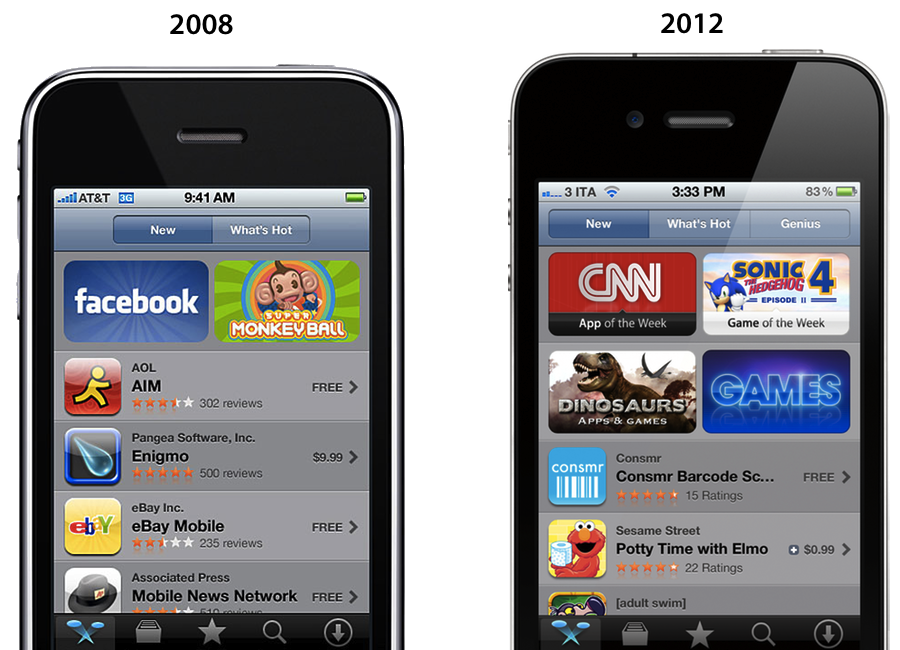
There’s no doubt Apple has done a “tremendous amount” (Schiller’s words) to help apps get discovered on the App Store. With the iPhone and the App Store, Apple created a new economy that, in the U.S. alone, has spurred the creation of over 200,000 jobs. But as I have outlined last month, the App Store of 2012 isn’t the same that launched in 2008 to 900 apps: there are over 650,000 apps on the App Store today, and while Apple has done a lot for developers, it could optimize the layout of the Store to do more and better. I wrote:

Custom sections provide a decent solution to browse titles Apple has previously “curated”; however, these sections aren’t usually updated as often as they are created — N.O.V.A. 3, a new shooter game by Gameloft, still isn’t listed under Benchmark Games: Stunning Graphics, whilst the majority of reviewers and publications have outlined the game’s remarkable graphic capabilities.

The IconFactory’s Craig Hockenberry also noted how Apple could bring its “personal touch” to the App Store to showcase great software with different methods than simple Top Charts, or “curated lists” that are often abandoned and never updated.

Instead of fighting for a short-term placement in the Top 100 lists, we’d fight for a long-term product review. Look at the amazing things developers do to earn an ADA and imagine if that happened once a week. Earning that “Apple approval” could ensure a product’s success for a long time. Which would be great for both customers and developers alike.

Hopefully Apple is thinking about this stuff. Earlier this year they acquired app recommendation service Chomp, and they revamped their “App of the Week” section with a new “Editor’s Choice” tag. The redesigned App Stores of iOS 6 come with Facebook integration and improved layout for descriptions and screenshots, something developers have been asking for. It’s too early to tell, but it seems like the iOS 6 App Store is on track to deliver great improvements for navigation and user interaction this Fall; to improve discoverability and promotion, however, Apple should also consider tweaking longstanding minor, yet important aspects such as filters, search, and Category sorting options.

Read the full interview with Schiller (who also confirms a new tracking tool for developers being discussed at WWDC sessions) here.

Permalink

Angry Birds Space Downloaded 100 Million Times in 76 Days

This morning, Rovio Entertainment (@RovioHQ) tweeted that their latest franchise hit, Angry Birds Space, has been downloaded 100 million times in just over a period of two months.

When we last heard from Rovio, Angry Birds Space was touted as the “fastest growing mobile game” after hitting 50 million downloads within the first 35 days, and 10 million downloads within the first 3 days. Comparatively, when Angry Birds first launched in December of 2009, it took until June, 2010, to reach 5 million downloads.

As the popularity of the iPhone and Angry Birds has exponentially increased, Angry Birds fans are more than happy to get a dose of the kid and adult friendly gameplay. Rovio recently reported that Angry Birds was downloaded one billion times in May, after reporting 648 billion downloads in December. Apple’s all time record charts noted Angry Birds as the top paid iPhone app, with an HD version on the iPad being the second top paid app.

When we looked at Angry Bird’s success last November, we charted its exponential growth and made note of its addictive gameplay. At the time, gamers were racking up more than 300 million minutes per day playing Angry Birds, putting in well over 200,000 years of pig crushing, crate smashing, and star collecting fun.

[Rovio via iDownloadBlog]


Updated Editor’s Choice Section Hand Picks Best of the Best

Last week’s App Store update introduced Editor’s Choice banners on the iOS and Mac App Stores that highlighted that week’s best apps. In turn, App of the Week became Apple’s way of promoting cherry picked apps while offering them for free (similar to app deals found on Amazon’s App Store for the Kindle Fire). This week, Apple has subsequently introduced a rebranded “App of the Week” as the Editor’s Choice section in the iOS App Store, showcasing both iPhone and iPad apps. The Editor’s Choice section of the App Store aims to showcase the highest quality and the most innovative apps on their store, with the showcase being divided into new and previous picks. Apple recommends that you check back often to check for new applications.

The Editor’s Choice section for the iPad can be found here, while the Editor’s Choice section for the iPhone can be found here.


Inkflow Has One Great Idea

When we talk about hotly contested app markets for the iPad, we’re either talking about iOS text editors or sketching apps — today we’re focusing on the latter. Between Adobe, Autodesk, Paper, and Penultimate, something needs to be dramatically imaginative and different to make it stand out in a section of the App Store that is well contested and already populated with great apps. Sometimes an app like SyncPad stands out by providing new and interesting features (in this case it’s immensely useful for presentations), but very rarely does an app come along that can compete with these established tools on the iPad. Similar to how Instapaper and Pocket (once Read It Later) have captured the “read later” space, the aforementioned apps broadly cover everything you’d likely need or want when it comes to writing, drawing, and sketching.

Read more


A Web Developer’s look at Diet Coda

A Web Developer’s look at Diet Coda

Diet Coda is great. Seriously. This app might not be your first choice to do serious work on (yet). However, if the only reason you’re taking your huge, heavy laptop with you on that otherwise relaxing vacation is just in case you get the 5-alarm-fire call from your boss because of a major bug that needs to get fixed RIGHT NOW (don’t they all?), Diet Coda and an iPad with an LTE/3G connection could be all you need.

Joesph Schmitt gives an honest perspective of the good, the bad, and what he’d like to see come down the pipeline for Diet Coda in the future. Diet Coda isn’t and shouldn’t be your replacement for a desktop app like Coda 2 or Espresso, but it is a fantastic companion touchscreen editor that it makes it relatively easy to dart around your projects and apply changes as needed. I’m trying not to take for granted having an always on-hand iPad app that lets me seamlessly implement changes as they come to mind — I think people forget that even having a tool like Diet Coda on the iPad is something special (especially when it has that quality Panic user interface behind it). If you’re looking for a reasonable review that weighs the pros and cons of Diet Coda, I’d say Schmitt does a good job of summarizing the praises and complaints — you’ll be well prepared as to what to expect concerning a mobile editor. As of now, Diet Coda is still $9.99 on the App Store, half-off during its initial launch period.

Permalink