This Week's Sponsor:

Clic for Sonos

The native app Sonos should’ve made. No lag, no hassle, just music. Save up to 50%.


Posts tagged with "app store"

Enforcing Rule 2.25

Apps that display Apps other than your own for purchase or promotion in a manner similar to or confusing with the App Store will be rejected

Earlier today, a number of people noticed a change in the App Store Review Guidelines that took place back on September 12. Specifically, Keith Andrew at PocketGamer noted how the new rule 2.25 could pose serious risks for any app that promotes other apps with direct linking.

The wording is typically vague, but clause 2.25 appears to give Apple carte blanche to put any app that promotes titles from a different developer out of action. At the moment, we understand Apple’s likely prime targets are pure app promotion services, such as (but not necessarily including) FreeAppADay, AppoDay, AppGratis, Daily App Dream and AppShopper, amongst others.

Matthew Panzarino at The Next Web and Darrell Etherington at TechCrunch followed up on the news of the late “discovery” with more details on possible implications and comments from developers of apps that might fall under rule 2.25.

There seems to be a lot of confusion on Twitter in regards to the exact scope of this new rule. In particular, due to some poor sensationalistic headlines that are unfortunately published on a regular basis, some are speculating Apple will start banning all apps that promote other apps or any kind of “aggregator” that collects links to multiple App Store apps. That’s just silly and simply not true. Read more


Drafts 2.0: New Fonts, New Look, A Brand New Kind of Sync, And Now On iPad

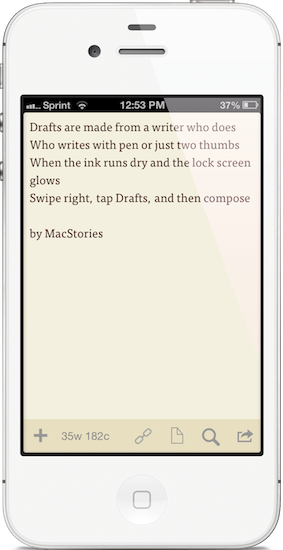
"Drafts are made for a writer who does. Who writes with pen or just two thumbs. When the ink runs dry and the lock screen glows. Swipe right, tap Drafts, and then compose."

“Drafts are made for a writer who does. Who writes with pen or just two thumbs. When the ink runs dry and the lock screen glows. Swipe right, tap Drafts, and then compose.”

I like to think of Drafts as the Field Notes of iOS. It’s inexpensive yet of high quality, unassuming but sharp, highly portable and convenient. While the icon, a simple white chiclet key, doesn’t emphasize Draft’s suave user interface, it is symbolic of the keyboard shortcut for Safari and other browsers, where ‘command + D’ adds the open webpage as a bookmark. The name Drafts itself may curtail ideas of long-form note-taking, although it’s not antagonistic towards writers feeling inspired to write more than a few sentences. Drafts is considerably the everyman’s notebook, unfraught with bindings and covers, instead fitted between two panes of glass in Apple’s iPhones.

Drafts, for those whom haven’t read the original review, is simply a digital notebook for capturing thoughts, lists, and ideas in plain text or Markdown. Those ideas can then be shared with social networks like Twitter or Facebook, your email or calendar, with friends on Messages, to a capturing tool like Evernote, or into a folder on Dropbox. If you’d like, you can use it like Birdhouse for drafting Tweets, or you can use it like Notes for grocery lists and reminders. No matter how you use it, your journal is held together in a simple list, organized by date last accessed, and is quickly searchable.

Read more


Kuvva — Beautiful Art For Your Desktop. Automated.

Currently, in the San Francisco Museum Of Modern Art, you can visit an exhibition with works of Japanese photographer Naoya Hatekayama. He has a very extensive portfolio of stunning landscapes, buildings, and Tokyo underground photography, which reach very high auction prices. One of his underground photos really caught my eye, and I dreamed of having it as a homescreen wallpaper for my iPad. I desperately tried to find digital copies of his works, regardless of whether I could get them for free or had to spend some money. But usually, professional photographers, including Hatekayama, only show their work to the public through museum exhibitions and printed photo books, not digitally. This way of publishing art has both advantages and disadvantages: on one hand, printing is the only effective way of keeping the copyright handling of your pictures and piracy of digital copies somewhat under control. Yet, it also means that many people interested in photography, especially those who do not live in big cities with renowned museums exhibiting photography, don’t have access to it. And obviously they cannot be used as wallpapers (although this would be for private, non-commercial use).

On the other hand, art which was created digitally is most of the time solely distributed digitally, hence it’s often available as a free download. However, when it comes to wallpapers for both OS X and iOS, I personally prefer photos over digital art. Of course, real pixel lovers need good resources for both kind of background images to ensure their displays are always a pleasure to look at. Websites like InterfaceLift or Poolga may completely satisfy your needs for photographic and digitally crafted backgrounds, but you always need to rely on multiple resources, which means you have to spend a lot time searching, saving, and organizing. Kuvva, founded by @djbradfield and @Nalden and based in Amsterdam, is a new web-based application project that tries to solve this problem by building up an extensive resource of handpicked photographs and digital wallpapers you have fast and easy access to. Read more


Apple Builds Mosaic With Deconstructed iOS Icons for Store Opening

Apple Builds Mosaic With Deconstructed iOS Icons for Store Opening

As noted by iPordelante (via ONE37), Apple has built a unique billboard to announce the future opening of a new retail store in Barcelona, Spain, at Passeig de Gràcia. In pure Gaudí style, Apple has actually built a mosaic off pieces of deconstructed iOS app icons, such as Safari, Photos, and iTunes.

A demonstration of Apple’s typical attention to detail, the mosaic for the upcoming Apple Store also shows how the company cares about the particular aspects and unique traits of a retail location, from marketing to gadgets.

In the past, Apple used iOS icons to build an animated wall at WWDC 2010; this year, they used App Store application icons to create an interactive “app table” for WWDC ‘12 attendees.

Check out more photos here.

Permalink

AppBot Sends Developers A Daily Digest Containing New Reviews Of Their Apps

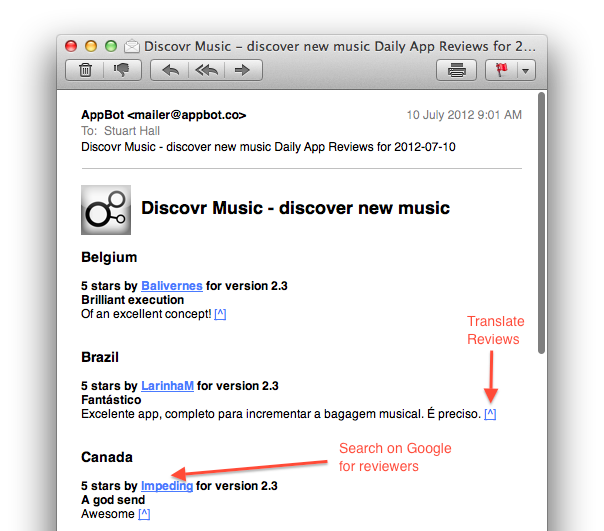
The Filter Squad development team (creators of Discovryesterday launched AppBot, a neat little service that’ll keep track of App Store reviews and email you a daily digest containing the latest reviews of your apps. AppBot was initially an internal tool for the two development teams but is now a free service in beta that’s bound to be helpful to some other developers who are keen to read new feedback from users but don’t want to have to take the effort of finding all the new reviews (in all the various countries).

In a blog post, Discovr’s Stuart Hall writes that despite some “not so amazing” reviews, they are a “good indication of the average user’s feeling towards your app”. By keeping a track of reviews, you can get a “good sentiment of how you are app is being perceived” - a key factor when word of mouth is such a driving factor of success on the App Store.

So the discovr team made AppBot to solve the problem of easily keeping track of new reviews of their apps from multiple countries. It neatly integrates a link to translate reviews from countries that don’t speak English and allows you to Google search the reviewer names. The app will also send you a list of Apple front page features (Editor’s Choice, New & Noteworthy etc.) to you weekly. You can sign up here and it doesn’t require access to your iTunes Connect account, so anyone can technically use AppBot to keep tabs on any new app.


Apple Removes Negative Reviews From Apps Affected By DRM Bug [Updated]

Earlier this week, an error in Apple’s DRM code generation for App Store apps caused a number of app updates to crash on launch. The issue, initially reported by Instapaper developer Marco Arment, began spreading to more than 100 iOS and Mac app updates including GoodReader, Angry Birds HD Free, and The Early Edition. As the bug was causing updated apps to crash immediately after launch without even displaying an error message, several users became upset with the developers of the apps – as they didn’t know the issue was on Apple’s servers – and began leaving negative reviews on the App Store. Developers, on the other hand, had to deal with a issue that they couldn’t fix, while explaining to customers how they should back up their data and wait for a solution.

Last night, Apple officially acknowledged the issue and explained it was associated with DRM code generation on the App Store. Apple said they had fixed the issue, and Macworld reported that, according to their sources, Apple would also remove all negative reviews that had been left during the hours the bug was spreading on various international App Stores.

As of this morning, it appears Apple has indeed removed negative reviews from apps affected by the bug. Apps like Instapaper, GoodReader, and The Early Edition are showing no reviews for the latest versions available, which are the ones that were crashing earlier in the week. We haven’t checked on every single app that was affected, but it is safe to assume at this point Apple will remove all reviews (not just negative ones) from any app that received a corrupted update.

Apple hasn’t issued a public apology to developers, but the removal of reviews will definitely help in leaving this issue behind without having to deal with the aftereffects on the App Store as well.

Update: As noted by several readers on Twitter, it appears Apple didn’t completely wipe the old reviews left during the DRM outage – it re-issued app updates for the same version of the app, and moved the “Current Version” reviews to “All Versions”.

In spite of the version being the same – for Instapaper, the affected version was 4.2.3 – the old reviews are not showing up in the Current Version section of the App Store. This helps hiding possible negative reviews from the section that it loaded by default in iTunes.

By re-issuing the old version as an update again, Apple is making sure customers can re-install the fixed version of an app without having to delete it first, as noted by Marco Arment. It is unclear whether the old reviews will still affect overall ranking of an app.


Apple Rectifies Corrupted App Store Downloads, Advises Users to Delete and Reinstall Broken Apps

Late Tuesday evening, Instapaper developer Marco Arment was met with a nasty surprise when some users updating to Instapaper 4.2.3 found that their updated app instantly crashed after opening. Upon investigating and hearing similar reports from other developers, Marco found that the App Store itself was corrupting app updates, leaving users with broken apps and developers with one star reviews from confused and upset customers. Writing at Marco.org, Marco addressed the issue to his audience and began gathering a large list of apps that were also affected, calling on Apple to quickly resolve the problem as developers dealt with the consequences.

On Thursday evening, Apple acknowledged the problem to AllThingsD and Macworld, informing the publications that the issue had been resolved.

Lex Friedman from Macworld writes,

Around 6:00 p.m. PT, Apple acknowledged the problem to Macworld, describing it as “a temporary issue that began yesterday with a server that generated DRM code for some apps being downloaded.” Apple added: “The issue has been rectified and we don’t expect it to occur again.”

Customers with affected applications should be able to delete and reinstall a working application through the App Store.

Additionally from Macworld,

Sources told Macworld that Apple will be removing one-star app reviews developers earned unfairly because of the company’s server issue.

As Matthew Panzarino from The Next Web points out, both Apple customers and developers have little to no recourse when problems like this occur. Developers currently have no way of effectively communicating with customers outside of developer blogs.

When the one-star reviews started rolling in, there was very little that developers could do to notify users of their app that it was an issue with Apple’s packaging of their apps, not the apps themselves. The users just saw that the app was crashing on launch and rated it accordingly.

Reinstalling applications also leads to users possibly losing information — Glasshouse Apps’ is still dealing with the aftereffects as the company prepares an app update and advises users on the best course of action that will keep their news feeds and data intact. The developers of GoodReader have also written a step-by-step guide that helps customers back up, reinstall their app, and restore data onto their devices.

While Apple has acknowledged and fixed the issues disrupting application updates on the App Store, they have not yet issued an apology to developers, nor did they want to themselves acknowledge that they’d be removing one-star app reviews apps received because of the error. If Apple should do anything more, they certainly need to reach out and apologize to developers, who’ve unfortunately had to run damage control to prevent one-star reviews and angry customers.

[Sources: Macworld via AllThingsD]


Some App Updates Resulting In Instant Crashes Due To Presumed Apple CDN Issue

In the last 24 hours or so, a number of apps that have been updated by users have crashed on launch due to a problem presumed to be connected to the App Store’s content distribution network (CDN). A number of popular apps from Instapaper, Readdle Scanner Pro, Angry Birds Space HD Free and CommBank Kaching amongst others have been just some of the affected apps. The issue, not affecting every customer, occurs when a user updates their apps and goes to launch them but instead the app crashes before it can load.

Instapaper was one of the first to be affected by the issue with an update that went live late on July 3rd. Developer Marco Arment was instantly “deluged” by support requests complaining of instant crashes with the latest version. After a bit of digging and looking at his support requests, Marco believes it comes about due to a corrupt version of the updated app being distributed by the App Store CDN in some regions. For Instapaper the issue was resolved (a non-corrupt version propagated to all regions) within two hours but it isn’t known if it was due to Marco’s emails to the App Review team or just an issue resolved with time.

If you’re a developer, and you have a non-critical update pending release, I suggest waiting a few days for this to presumably get sorted out before releasing it. [Marco Arment]

Apple has yet to make any statement on the issue and Marco and the other developers affected by the issue have yet to receive responces from any of the developer relations groups at Apple either. You can view a tentative list of apps affected by the issue over at The Next Web and at Marco’s personal blog which also goes into detail about the issue.

It may be wise to hold off from updating any apps for the time being as well, with the issue affecting people across all regions and all different apps. If you’ve already been affected by the issue, the only real way to fix it is to delete the app and try re-installing the app - but this will only work if the app is no longer corrupted on Apple’s side.

[Sources: Marco.org and The Next Web]


App Store Adding New “Food & Drink” Category

The App Store will soon be updated with a new “Food & Drink” category, according to developers of existing iOS applications who received an email from Apple today about the upcoming change. “In the next few weeks”, applications will be automatically migrated to the new category; currently, the App Store doesn’t provide a specific category for these types of apps, which have been typically listed under Lifestyle by their developers. According to Apple, the new category will include “apps that help users cook and bake, mix drinks, manage recipes, find new restaurants and bars, and learn what their friends like to eat and drink”. Food & Drink won’t include diet, grocery shopping, coupon clipping, or food-related game apps.

The new category is another change coming to the App Store, which Apple has been tweaking and revamping with new features lately. Ahead of a major redesign coming with iOS 6, Apple re-organized its selection of Editor’s Choice apps and App of the Week selections, providing a standalone category with weekly updates. Recently, Apple also started grouping previous game bundles into a macro category accessible from the App Store’s homepage.

The dedicated Food & Drink category comes after thousands of apps have been successful in using iOS devices as tools to manage recipes and find local restaurants. Notably, iOS 6 will also feature Yelp check-ins in the new Maps applications – a renewed focus on this area that will surely benefit from a new category on the App Store.

Currently, Apple only offers a custom Cooking section to showcase handpicked app selections for recipes, drinks, shopping, and reference material.

Update: the new category will appear “in the next few weeks” according to Apple.