More on iPad Multitasking
Multiple screens from the same app in Split View. iPad users should be able to view multiple pages or documents from the same app at once. Whether it’s a Pages document or Safari tabs, the convenience of multiple windows on OS X would translate well to multiple app panels in Split View on iOS.
Activate multitasking from an external keyboard. The Smart Keyboard and keyboard shortcuts are essential aspects of iOS 9 on the iPad, but Slide Over and Split View are completely shut off from keyboard integration. It’d be nice to enable multitasking and switch apps (as well as navigate favorites and search in the app picker) without touching the screen.
Split View for every Apple app. Why don’t Music, App Store, and other apps support Split View? If time constraints last year were the reason6, it’s time to fix that in iOS 10.
Extensions
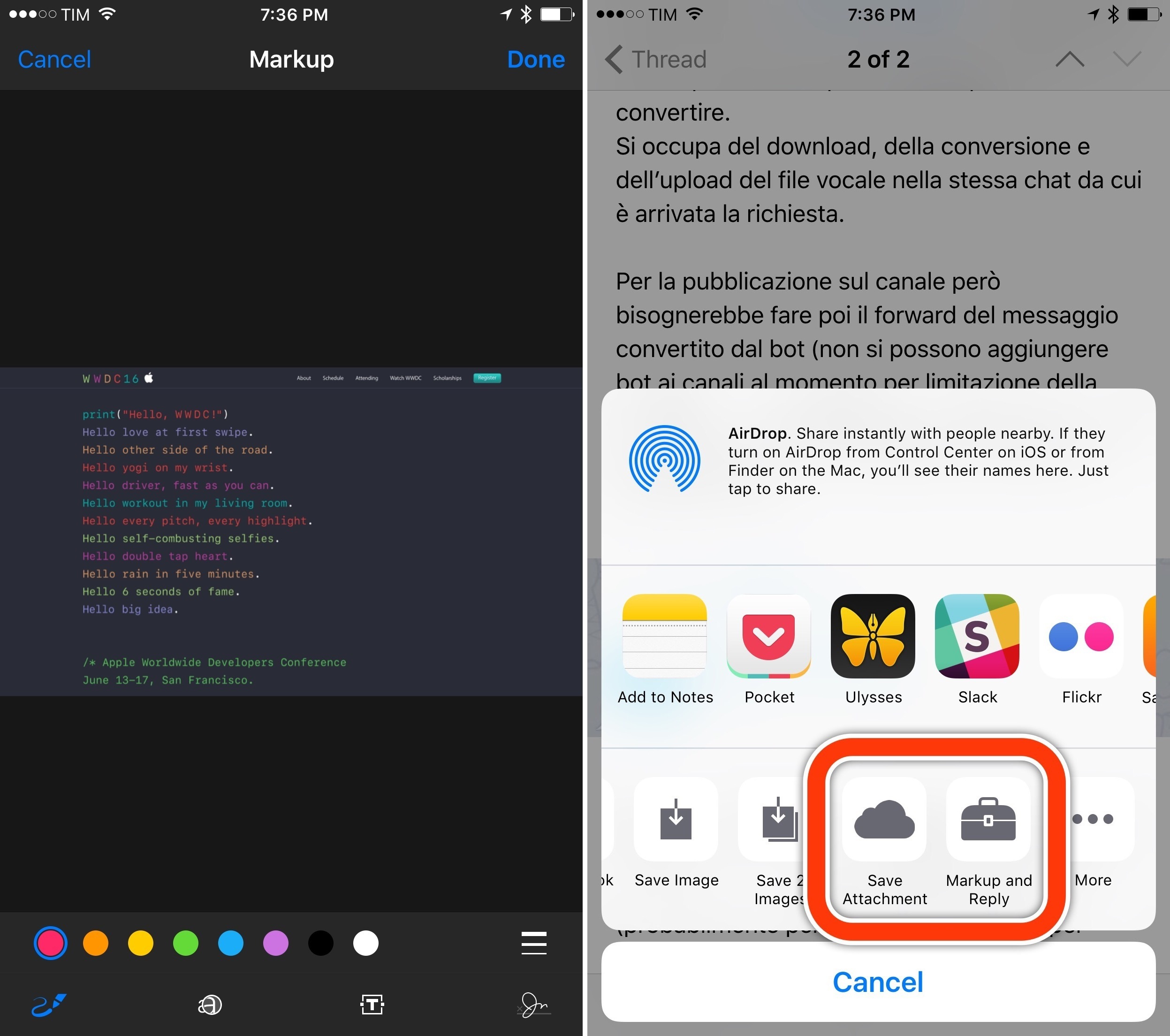
System-wide Markup, Print to PDF, and Save to iCloud extensions. Mail in iOS 9 has two extensions that aren’t available elsewhere on the system – Markup (to annotate images and PDF documents) and Save Attachment (to save files to iCloud Drive). These two action extensions should be available at a system level for every app to use.
Similarly, while not officially documented by Apple, the 3D Touch trick to print anything to PDF should become an action extension to convert any printable document into a PDF file.
A new Messages share extension. Apple’s share extension for Messages is quite obsolete at this point – it launches to a blank ‘To:’ field that requires you to type a person’s name or address before sharing. The new extension could be pre-populated with recent chats and favorite contacts – apps like Telegram, WhatsApp, and Group Text+ have done a much better job in this regard.
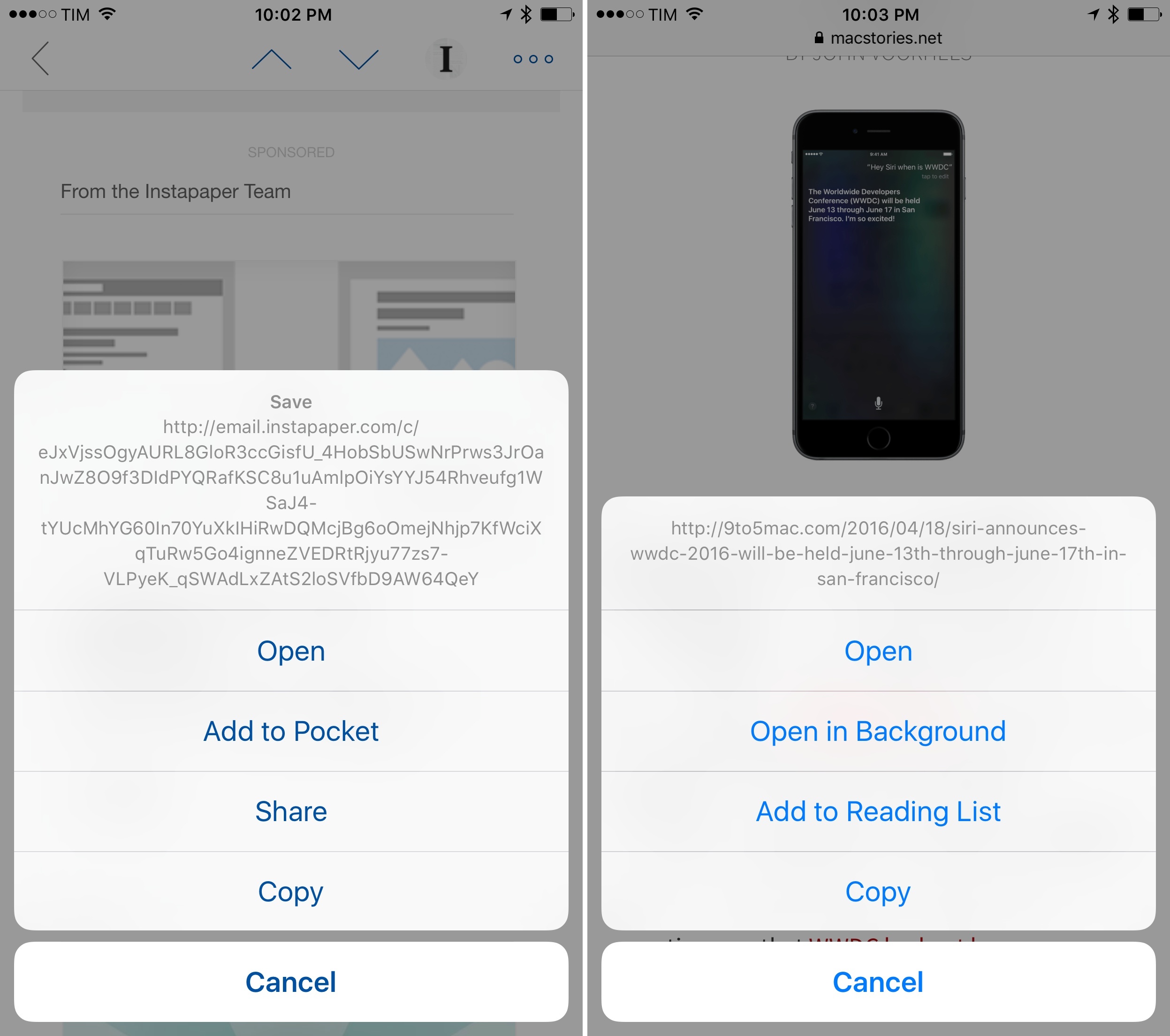
Long-pressing links as an extension point. Sharing links is one of the most common actions on iOS, and yet the tap & hold menu for links is vastly underserving iOS users with options to Copy or Open.
I’d like to see Apple revamp this menu with an option to share a link with extensions – Airmail has a custom menu for links that Apple should take a look at.
System Enhancements
Remote App View Controllers. With iOS 9, Apple continued their work on remote view controllers and introduced Safari View Controller, a way for apps to embed Safari web views without creating their own mini browsers from scratch. In iOS 10, I’d like to see a way for any app to present its view controller and show native content in other apps.
I’ve been thinking about this for a few months. Here’s how I imagined it would work when I wrote about the iPhone 6s:
I can’t help but wonder what happens when app content becomes previewable with 3D Touch even if that app isn’t in the foreground. When you’re in Messages and you preview a link, an instance of Safari is called by 3D Touch to preview a webpage inside Messages. With iOS 9, Apple has introduced a new deep-linking framework to match web links with native app content, which is already supported by apps like Twitter and Dropbox. What if an app’s native view could be summoned with 3D Touch by peeking at a Universal Link? What if you could, say, peek at a tweet with the native Twitter app when in Safari, or peek and pop a Dropbox file from Slack? If you consider all the pieces that Apple has laid out over the years (the secure app sandbox, Universal Links, extensions, the back button), iOS’ deep-linking puzzle could come together quite nicely under 3D Touch.
Imagine this: a Spotify link you share over iMessage would open a Spotify View Controller for that song; a tweet would be previewed with the native Twitter app; a Google Docs link would…who am I kidding, it’d take ages for Google to support it anyway.
The point is – extending view controllers besides Mail and Safari would accomplish three things:
- Leverage Universal Links to a deeper extent;
- Increase communication between apps with native previews;
- Save time thanks to 3D Touch and peek & pop activation for third-party view controllers.
Safari View Controller is one of my favorite iOS 9 features. I want the same model (fast, secure, private) to work for as many apps as possible.
Faster animations. iOS’ slow animation time has been criticized since iOS 7 in 2013; three years later, users are still coming up with clever workarounds to reduce the time iOS spends animating apps in and out. I’d like to see iOS 10 speed up animations throughout the entire system.
Install iOS without iTunes. If you need to restore (not update) iOS, you still need iTunes. While that made sense in 2010, it prevents iPad users from having the peace of mind that they’ll absolutely never need an additional computer. Imagine if you bought a Mac and they told you that to reinstall OS X from scratch you’d need a Windows PC. Apple could consider something akin to Internet Recovery on OS X – a built-in solution to reinstall iOS over the Internet instead of plugging a device into iTunes.
Screen recording. One of my favorite additions to OS X in recent years is the built-in screen recording mode for iOS devices in QuickTime. I’d like to see Apple bring the same feature to iOS. Screen recording would be beneficial to different types of users – educators, students, screencasters, bloggers, developers, and video creators. For privacy reasons, I wouldn’t expect screen recording to be an API open to third-party apps.7
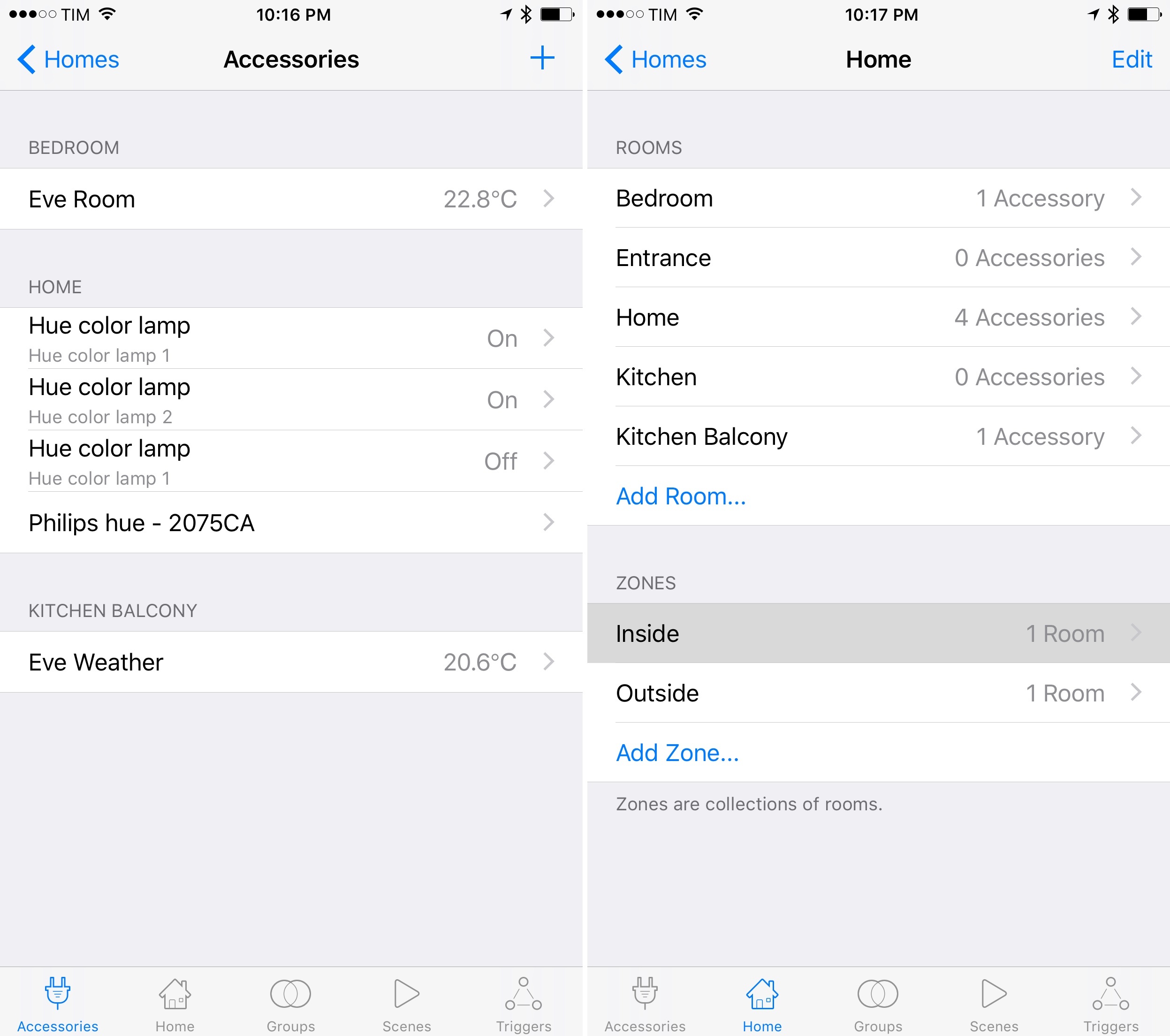
Home app. After Apple introduced HomeKit in iOS 8, many were expecting to see a new default app dedicated to managing accessories and connected home automation devices.
This hasn’t happened yet, and it’s confusing to force users to download third-party apps to manage information an iOS device already knows. Imagine if Apple built HealthKit without a Health app to view recorded data. For HomeKit to take off, a Home app is an obvious first step.
A Safari download manager. Downloading files on iOS is still a lottery: sometimes it works, sometimes it doesn’t, and the “interface” for downloading files with Safari is…not good.
Apple should bring a download manager to Safari, and integrate it with Safari View Controller so developers could also take advantage of it.
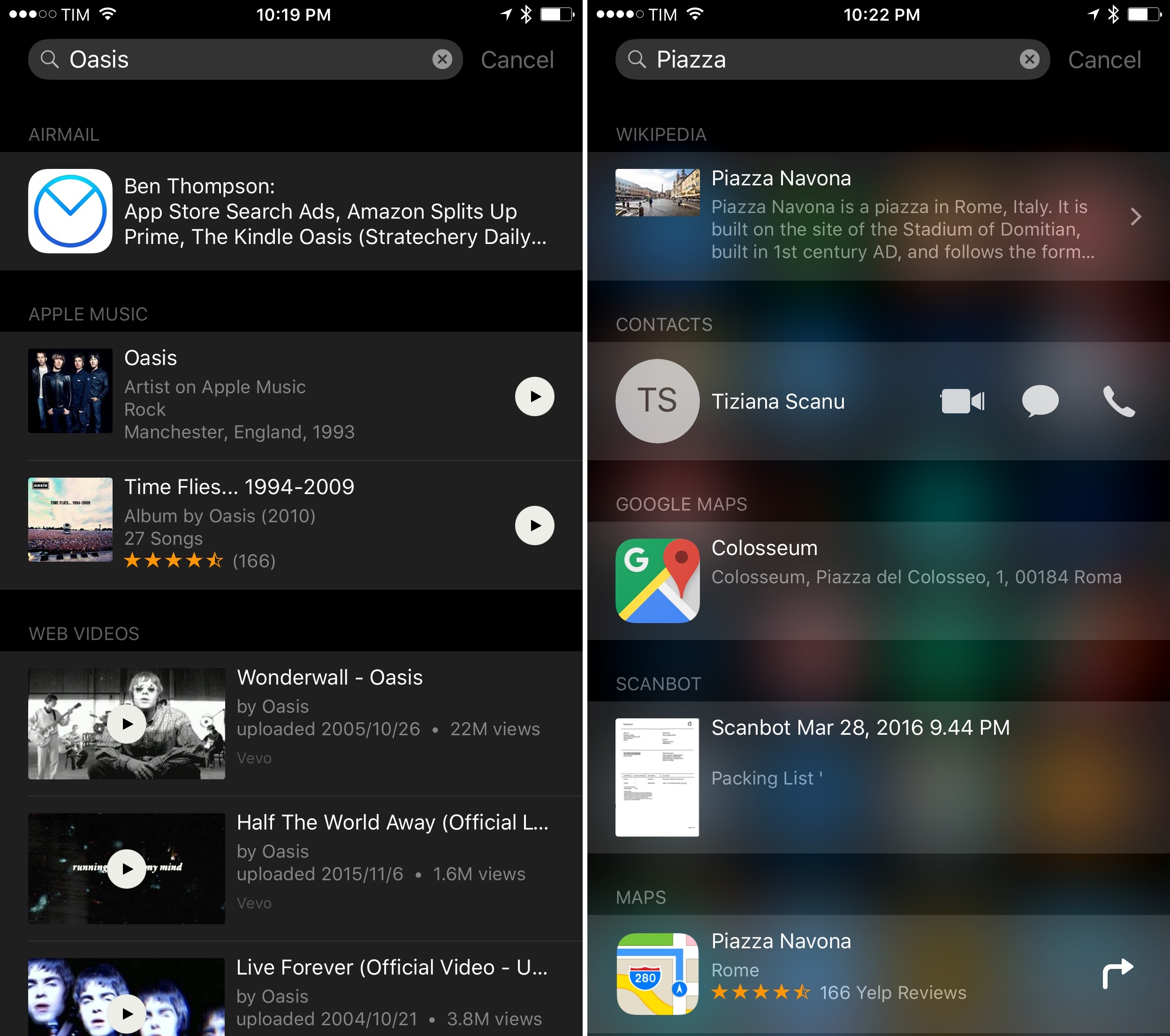
Actionable results in Spotlight search. One of the most interesting details in the revamped Search feature of iOS 9 is the presence of buttons to play music, start directions, and place phone calls directly from results.
However, Apple has limited these actionable results to only a few data types for now. It’d be nice if developers could embed more actionable buttons in search results for activities like sharing a document from search, jumping straight to editing a file, or start AirPlay without opening the app that contains a media result.
Xcode for iOS. Apple calls the iPad the future of computing, but that future still needs a Mac to be written. Developers can’t create iPad software without a Mac, and that’s because there’s no iOS version of the company’s IDE. Last year, I heard rumors of a version of Xcode being demoed on an iPad Pro inside Apple, and John Gruber heard the same. I don’t know if that version was a replica of the desktop IDE or a playground-only version, but the time is right for Xcode to come to iOS. A new generation of programmers is waiting.
Notes
OCR for images and documents. The new Notes is my favorite Apple app update from last year. With its increased versatility, it’s fair to assume users are now storing all kinds of images and documents in Notes, including PDFs. After building an Evernote importer, Apple should implement one of the competing service’s most popular features – optical character recognition for text contained in images and documents. While they’re at it, they should make text searchable from both the Notes app and Spotlight, too.
Automatic shape recognition. One of the best aspects of OmniGraffle and OneNote is the fact that those apps can automatically recognize shapes drawn with a finger/Pencil and convert them to geometric versions. This would be a terrific addition to Notes’ sketching mode – it could be a toggle to enable/disable hand-drawn shape recognition at any time.
Native document attachments and multiple images. Currently, you can only attach one image at a time to a note. PDFs and other files can only be added with the share extension. In addition to redesigning the image picker to allow for multiple images and videos at once, Apple should add a file picker to import any kind of attachment into a note.
Audio and Video
Picture in Picture for iPhone Plus. Picture in Picture on the iPad is amazing, and I think it would also make sense on bigger iPhones. Adding Picture in Picture as a Plus-only feature would differentiate the iPhone line further – something that Apple has already started doing with landscape interfaces and the software keyboard.
Concurrent audio streams. After nine iterations, iOS still can’t handle simultaneous audio streams – if you’re listening to a song and want to watch a muted video (which is normal on a desktop computer), you can’t. This has also become a problem for podcasters who want to have conversations and record audio on iOS: if they want to record a conversation with other people, they’ll need multiple iOS devices as they won’t be able to do it all on an iPad. I’d like to see iOS 10 enhance the system audio framework with the ability to have multiple audio streams and control them individually.8
Group FaceTime audio and video. Speaking of conversations on iOS, FaceTime – one of the defining features of Apple’s devices – is due an upgrade. Skype has proven that group audio and video calling with multiple participants on mobile is possible; Apple should lead by example with FaceTime, too. The company could also consider the ability to record FaceTime audio conversations and save them to a file.
iPad
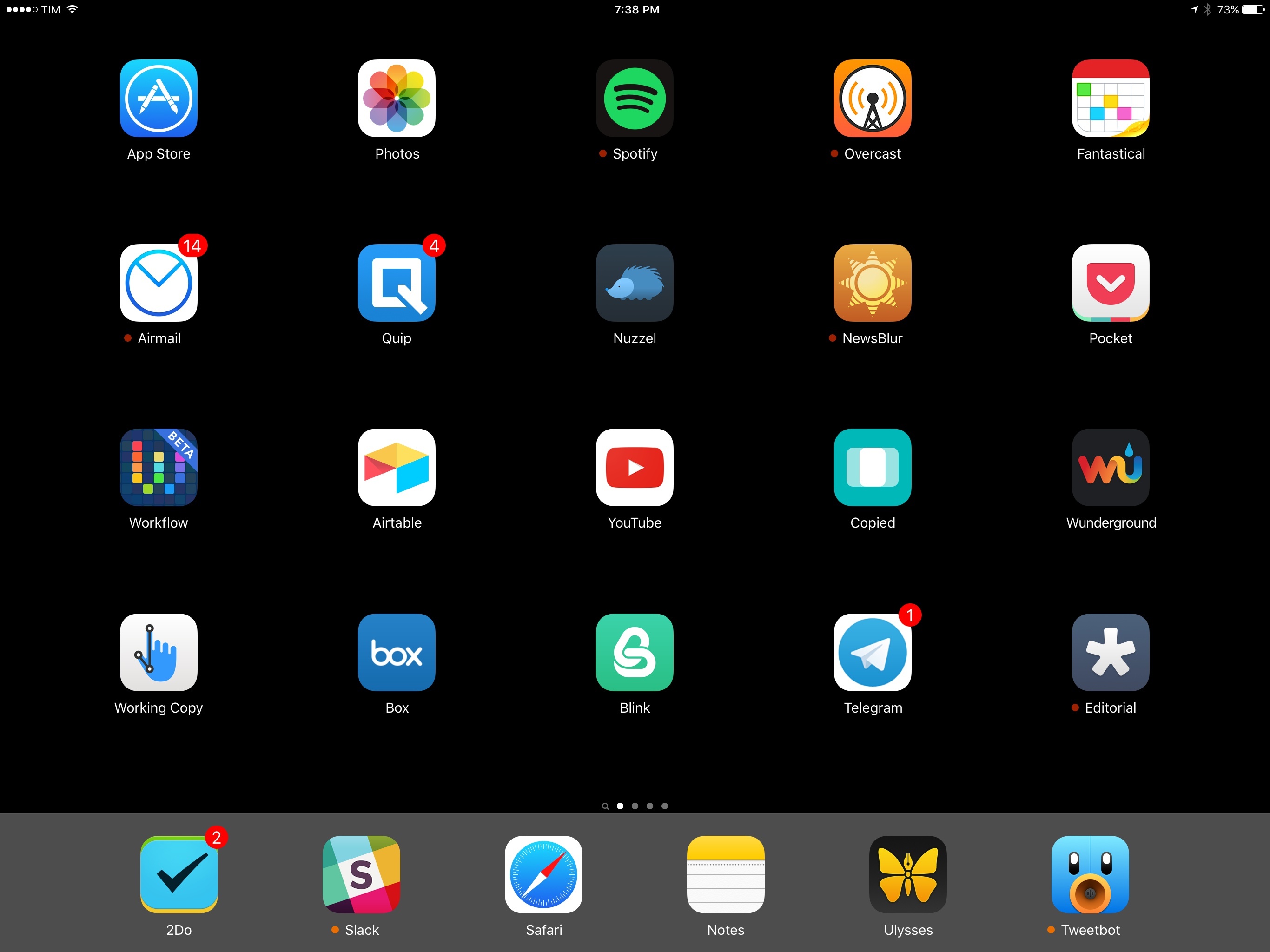
Take better advantage of the iPad Pro’s Home screen. The 12.9-inch iPad Pro’s Home screen is a disappointing blown-up version of the classic iPad Home screen. Apple isn’t taking advantage of the extra space in any meaningful way.
I would like to see them explore a denser app icon grid (6x6 in landscape, perhaps) as well as a Dock that snaps to the side in landscape (like on the iPhone Plus).
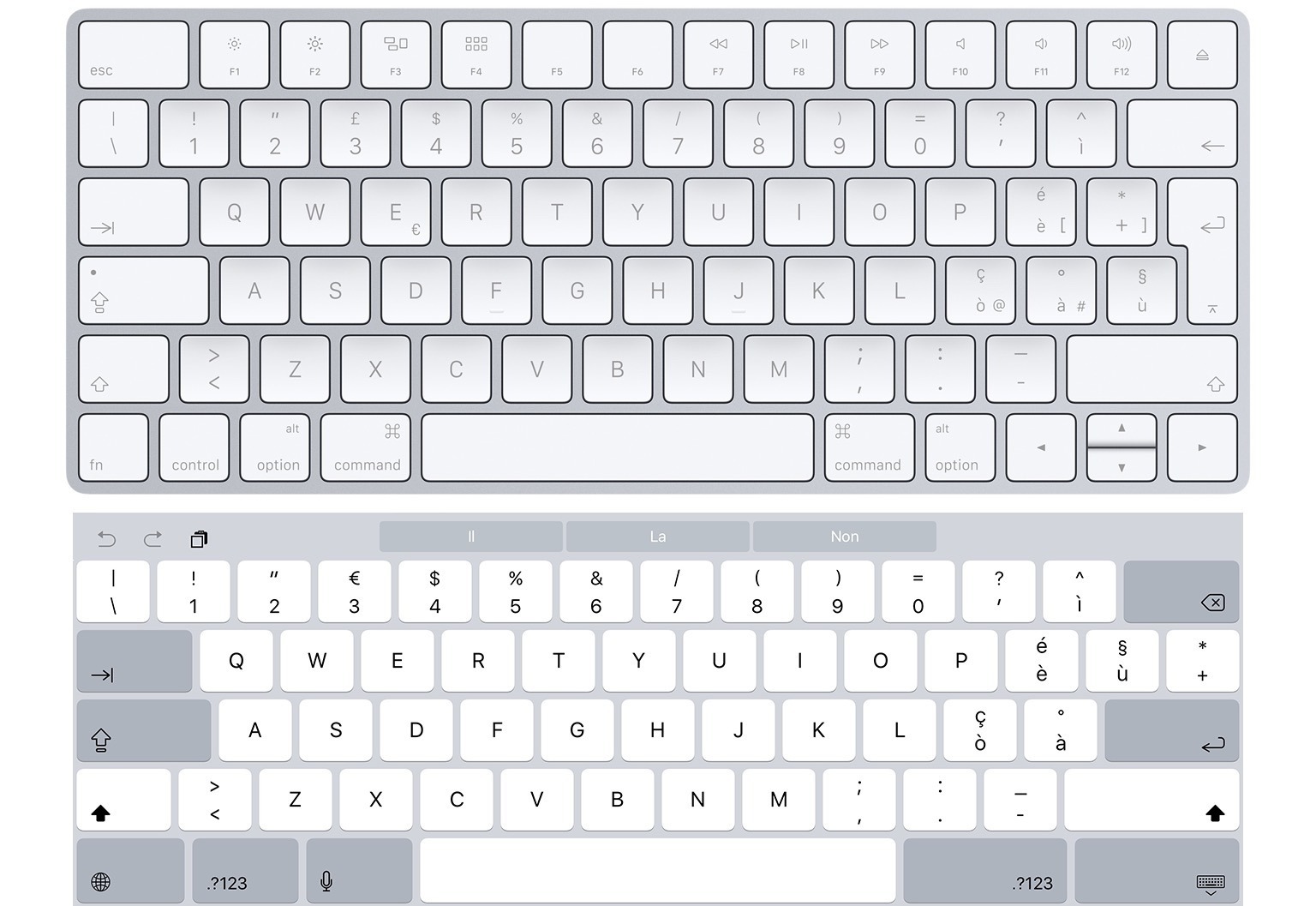
Proper layouts for European software keyboards on iPad Pro. As I noted in my original iPad Pro review, Apple designed “European” layouts for the software keyboard that aren’t really European – they’re rushed adaptations of the American keyboard layout.
I’d like to see the Italian software keyboard be more closely modeled after our hardware keyboards – with an elongated Enter key underneath Backspace – not some version based off American hardware keyboards.
Low Power Mode. Since its addition in iOS 9, Low Power Mode has helped me get precious extra minutes of battery life from my iPhone without being too aggressive in reducing system performance and resources. Low Power Mode could be just as handy on the iPad to squeeze more battery life out of it every day.
Add missing apps. I have no idea why Calculator and Weather still aren’t available on the iPad.9 It’s been six years.
Apple Music
Lyrics for every song. No streaming music service has figured out how to support lyrics for millions of songs. Musixmatch is (as far as I know) the only service with the rights to almost every song you can think of, and Spotify has been clever enough to directly integrate with them on OS X and Android. But Apple can do better than Spotify. If anyone has the money to invest in licensing lyrics from as many right holders as possible, that’s Apple. Lyrics in Apple Music would be a fantastic differentiator.
New artist release notifications. Spotify gets this right: if an artist you follow releases new music, you get an alert. Users shouldn’t have to browse the front page or listen to Zane Lowe to find out about new music they might like. Apple should add an option to be alerted of interesting new releases when they occur – preferably with an option to start listening from the notification itself.
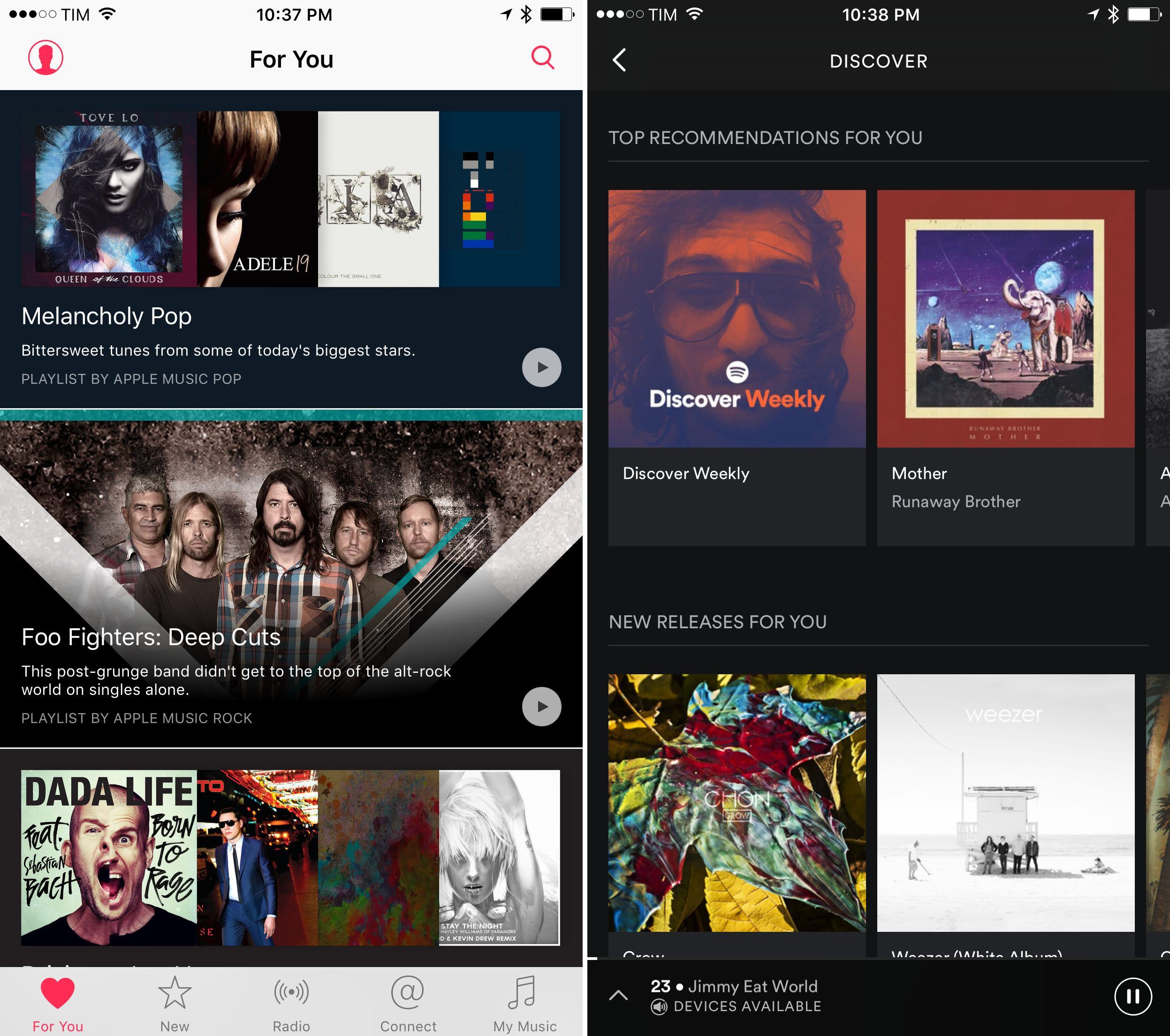
Less generic For You recommendations. Unlike Spotify’s Discover Weekly and Browse section, Apple’s For You recommendations tend to recommend albums from well-known bands and playlists with popular songs dubbed ‘Intro To’.
Since I moved back to Spotify a couple of months ago, I discovered more new bands I like in a couple of weeks than I did in 9 months of Apple Music. The fact that Spotify gives me new music I didn’t know before is not up for debate, and if the same isn’t happening with Apple Music, I’d wonder why that’s the case.
Smart playlists. One of the best features of iTunes, still not available on mobile devices nine years after the launch of iOS. Just think about the possibilities of smart filters for all the artist and songs available on Apple Music.
Add audio files to Music. If you have a bunch of MP3s and want to add them to the Music app on iOS, you can’t. You’ll need a Mac for that. In 2016, that’s anachronistic and in direct contrast with the company’s vision. Just like Apple added an API in iOS 9.3 for apps to add Apple Music songs to your library, there should be a way to import arbitrary audio files without iTunes.
Photos
Proper GIF support. What happens when you save an animated GIF in the Photos app? No one really knows. With every modern web service now offering built-in support for GIFs, Apple’s “implementation” is downright baffling. Animated GIFs should carry a ‘GIF’ label similar to Live Photos, and users should be able to save them natively from the web and other apps.
Faces support in Photos. This one’s fairly self-explanatory – iCloud Photo Library understands faces in photos, and there’s a Faces view in the Photos app for OS X, but the same view is absent on iOS. Users should be able to browse Faces on their iPhones, where they would make the most sense.
View and edit metadata. Our photos contain a lot of additional information that isn’t always available to see clearly in Apple’s Photos app. Photos for iOS should be extended to present metadata (for location, camera type, and more) like it can on OS X; users should also have the ability to view and edit metadata without having to buy third-party apps from the App Store.
3D Touch
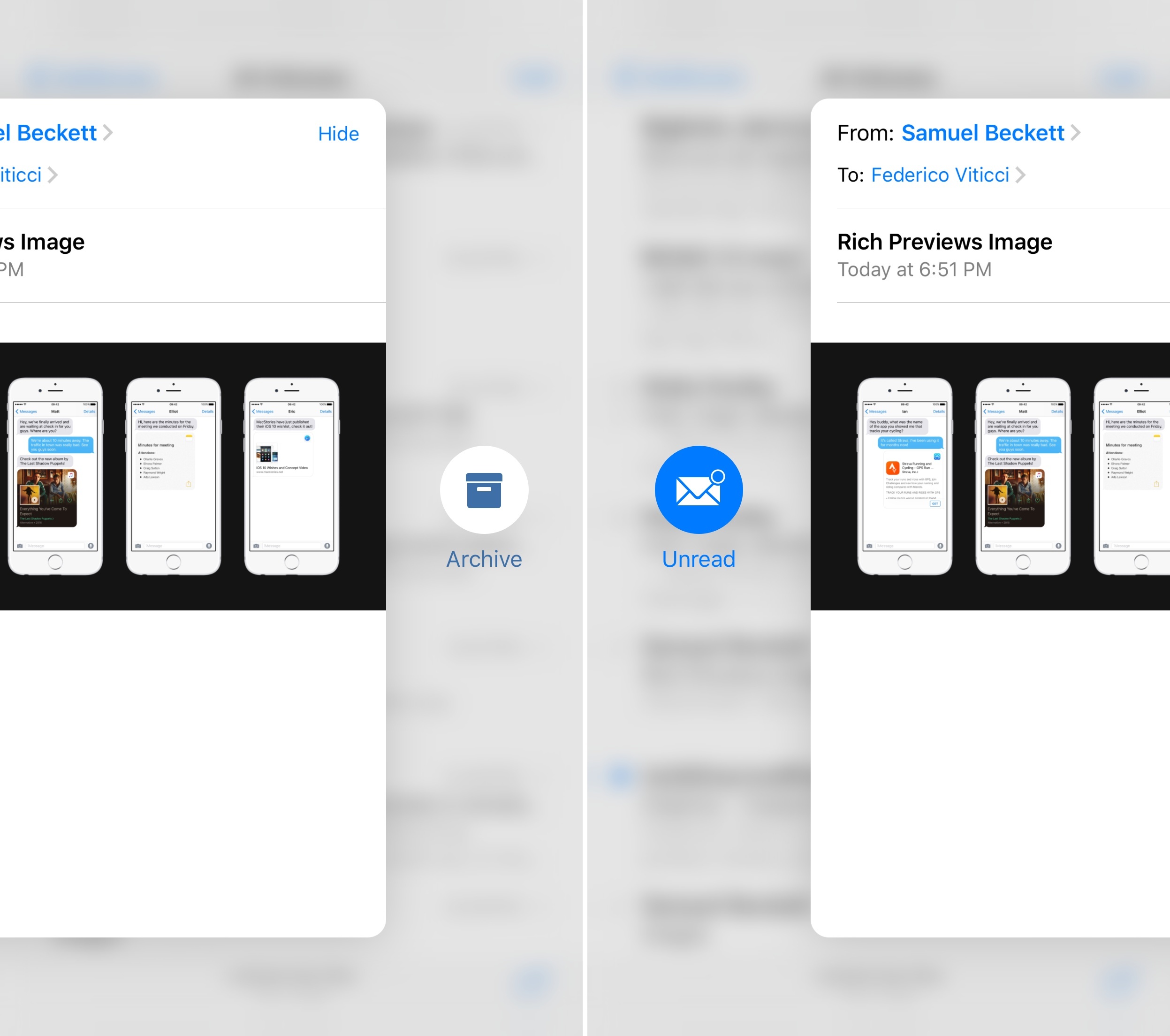
Horizontal peek actions for developers. In iOS 9, developers only have access to peek actions available by swiping a peek preview upwards.
However, Apple is using an additional set of actions in their Mail app – buttons revealed by swiping a peek sideways. It’d be great if developers could also support these in their apps.
Wake Lock screen. Since the iPhone 6s brought a faster Touch ID sensor, it’s become nearly impossible to click the Home button to view notifications without being taken to the Home screen. Given the new iPhone’s display with 3D Touch, I’d love a way to press the screen to wake it without unlocking it.
Family Sharing
Shared iCloud storage. Family Sharing owners on iOS should be able to allocate storage space to members and buy additional storage for them. I don’t want my parents to worry about storage for their iCloud accounts – improved Family Sharing should take the pain out of this.
Shared iPad for everyone. One of the Education features in iOS 9.3, Shared iPad, looks like a promising foundation for one of the functionalities I’ve wanted to see on the iPad for years – support for multiple user accounts. Currently in preview for schools, Shared iPad allows multiple students to log into their profiles and have separate app environments on the same iPad thanks to iCloud and caching. A similar system would be fantastic for families who don’t want to buy multiple iPads for one household.
Note sharing. Every popular note-taking service offers a sharing component to collaborate with others. Family Sharing seems like a perfect match for Notes, which would join Reminders and Calendars with support for items shared with members of a family.
The Future Is Bright
I have big hopes for iOS 10 and its subsequent releases throughout the year.10
With iOS 9, it felt like Apple was finally ready to let the iPad be the iPad. After several years spent refining iOS for iPad in lockstep with its iPhone counterpart, iOS 9 put the iPhone and iPad on two separate lanes. Both are moving towards the same goal – the future of computing – but each is evolving at its own pace.
I genuinely believe that Apple sees the iPad and iOS as the future of how we’ll get work done. iOS 9 paved the way for a road that will take us farther than classic desktop computers have ever taken us.
I want to see iOS 10 build on Apple’s vision for new ways to work and communicate. I want to see iOS 10 empower people, developers, and everyone in between to be creative, productive, entertained, in better shape, and free of the constraints of traditional computing. I want to see iOS 10 take another bold step towards the future we’ve been promised.
We’ll find out in a couple of months.