This Week's Sponsor:

Clic for Sonos

The native app Sonos should’ve made. No lag, no hassle, just music. Save up to 50%.


This Music Video Features iPhones with FaceTime

After the music video shot entirely using the iPad 2’s cameras, here comes another one – this time from Canadian band The Blue Stones – which features a couple of iPhone 4s and FaceTime. The video itself was recorded using an HD camera (you can tell from the 1080p option available in the Youtube embed), but band members had the idea to add a unique geek twist to the whole concept, and play the song back recording everything via FaceTime.

Duct tape was used to cover the FaceTime UI on the iPhones (pretty much like movie directors constantly modify the iPhone’s on-screen interface to maintain the “fiction” effect) and, overall, the result is interesting. If only because it shows how much popular iOS devices have become over the years and how FaceTime video quality is far from perfect most of the times (unlike Apple’s webpages suggests in the screenshots).

Check out the video below. [via TUAW]
Read more


LogMeIn for iOS: Remote File Transfer Made Easy

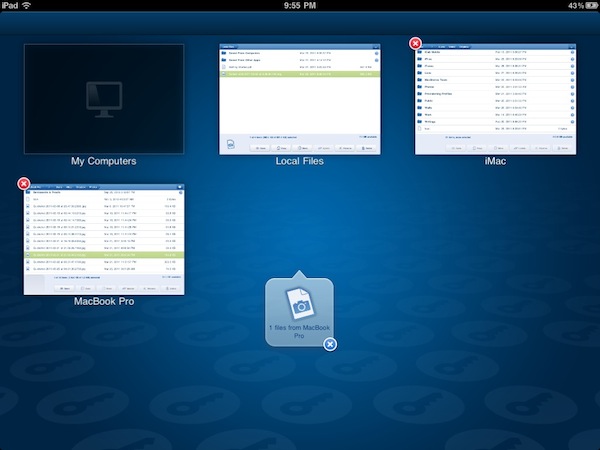
Reviewed a couple of times in the past by our editor Cody Fink, LogMeIn Ignition for iOS has been around for a while in the App Store. In fact, in spite of popular apps like Edovia Screens and iTeleport allowing users to remotely access their computers’ screens, thousands of users installed LogMeIn’s software for the iPhone (and later, iPad) on day one and never thought of going back to another app. That’s what Cody did, whilst I settled with Screens as my go-to app for displaying my Mac’s desktop on iOS devices. Recently, however, I decided to take LogMeIn Ignition for a spin, and I was surprised to find out the new features introduced in the latest update are exactly what I was looking for.

LogMeIn comes with VNC functionalities, but I will keep on using Screens for that. It’s a matter of a personal preference, and you can read more in my Screens review. Edovia’s elegant and simple solution to remotely connect to a Mac’s screen has incredibly useful, reliable and easy to configure for me, so I won’t switch over to LogMeIn as far as screensharing is concerned. Rather, I’ve been intrigued by LogMeIn “file transfer” option added in version 2.0, which aims at offering users a simple way to copy and move files across computers and iOS devices using LogMeIn’s desktop companion. Best of all, once you spend your 30 bucks to purchase LogMeIn Ignition in the App Store, screensharing and file transfer will be offered as free services with no need to buy an additional LogMeIn Pro subscription. Read more


Apple Store Grand Opening This Week in Dresden, Germany

[Above: the Altmarkt-Galerie in Dresden, Germany]

Apple’s retail expansion continues at a steady pace as a new grand opening is planned later this week in Dresden, Germany. Confirmed by Apple today, the new store will be located at the Altmarkt-Galerie and will follow an extended opening schedule throughout the week:

  • Thursday: 8 AM to 10 PM
  • Friday: 9:30 AM to 10 PM
  • Saturday: 9:30 AM to 12 AM

As the iPad 2 is reportedly sold out in several European countries, the new Dresden store might be a good opportunity for German Apple fans to find units available. Apple is working on dozens of grand openings for 2011: at least two new stores are planned for Italy; a new one in Anchorage (Alaska) and openings in Paris and Palo Alto are planned as well.


iPad 2 Reportedly Sold Out in Australia, Italy, UK, Canada

Attention, potential iPad 2 buyers: following the international rollout of the device across 25 countries last Friday, it appears that the device can’t be found anywhere. Every store has run out of iPads. The Apple online store reports a 3-4 weeks delay in many countries. Authorized resellers have run out of tablets, too. Apple fans worldwide are going crazy whilst Steve Jobs is enjoying an iPad 3 and an iPad 4 prototype in his home office.

Apple-related jokes aside, a number of reports in the past days have surfaced indicating several international Apple retail stores and resellers are completely out of stock. The Daily Mail says UK stores were sold out of iPads on Friday night / Saturday morning; rumor has it the same is happening in Italy, Canada and Australia. Of course Apple didn’t provide any detailed sales numbers and they haven’t issued a press release (yet), but basing on these initial reports it looks like the iPad 2 was off to a great launch.

Or, as some people speculate, the long lines around the globe and the multiple sell-outs were nothing but a clever marketing strategy to cover the fact that Apple is having production issues with the iPad 2 and large scale shipments. Stores are out of stock and Apple.com returns a 4-week long wait, but according to several bloggers this is due to the fact that Apple is having problems with the iPad 2 manufacturing chain – a rumor that was semi-debunked by Apple itself by launching the new tablet in March (rather than June) but that might still partially hold true if reports of these rapid sell-outs are real.

Reportedly sold out or not, if you’re really willing to get your hands on an iPad 2 now the best method is, yet again, the simplest one: drive to an Apple Store and ask. Then, leave a comment below and let us know.


Rediscovering A Must-Have Movie Utility: Air Video

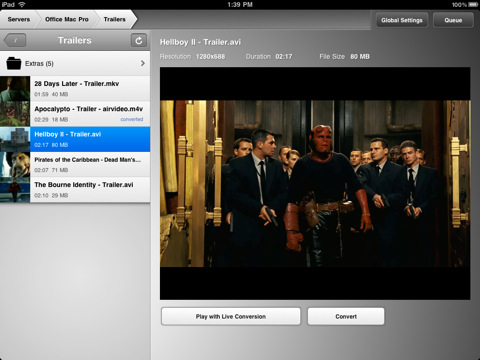
In the sea of App Store releases and updates, it’s easy to get lost and forget about that great app you used to love. New apps come around, better alternatives for just about anything are provided by developers and, especially if you’re geek, you know what it means to constantly tweaking your workflow to accomodate the latest offering in the iOS or OS X panorama. In the past week, I’ve rediscovered an app I had for a long time, but somehow managed to leave unused in my iTunes app library: Air Video.

I’ve always been a fan of Air Video and have been following the development (and updates) closely. Yet, for the reasons mentioned above, during the past months I kind of forgot how useful this app used to be, and how greatly it could improve my media consumption experience. So when the iPad 2 showed up at my doorstep and the thinner design made it crystal clear that it was easier (for me) to hold with one hand, I remembered about Air Video. And I’ve fallen in love with it all over again. Read more


#MacStoriesDeals - Monday

If you didn’t already know, we’ve set up a new twitter account for Deals, it’s @MacStoriesDeals. We’ll tweet the daily deals there as well as exclusive weekend deals too. Help spread the word! Here are today’s deals on iOS, Mac, and Mac App Store apps that are on sale for a limited time, so get ‘em while they’re hot!

Read more


Meet The Plasticine iPad

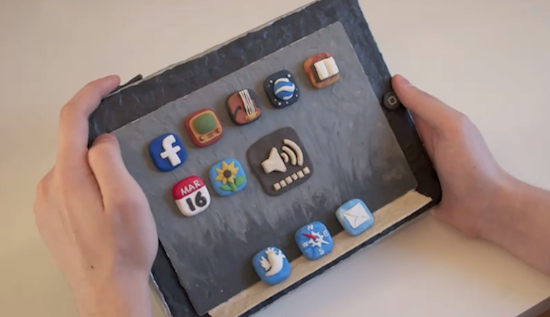
iOS devices are beautiful examples of industrial design and we know they can also resist the most terrible accidents thanks to their great build quality, but none of them is as cute as the plasticine iPad 2 we found on Youtube. Perfectly “compatible” with multitouch and coming with a handful of third-party apps installed, this alleged prototype from Cupertino (not really, but we like the idea) does 3D projections without glasses as well, with real-time manipulation. Of course it also does games, maps, Twitter and web browsing.

Seriously though, the work that went into this stop-animation video must have been huge, and you should check it out below.
Read more


Never-used 20th Anniversary Macintosh Available on eBay

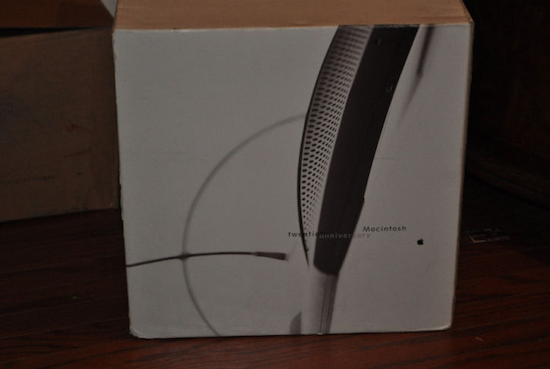
In the spring of 1997 Apple released a $7,499 computer produced in 12,000 limited copies and designed by Jonathan Ive. This computer, the Twentieth Anniversary Macintosh, was in fact the first “big project” for Ive at Apple, but its sales didn’t go very well. Widely regarded by true Apple aficionados as a unique piece of Apple history that can also run Mac OS 9 (initially developed with System 7 in mind), this Macintosh model was built by Ive to “have a very small footprint” on the desktop and be easy to “move around”. Many see it as the father of the popular iMac line that was introduced a year later, and to good reason: the Twentieth Anniversary Macintosh provided a better way to manage and install cables, had a standalone keyboard and, overall, was the first example of “all-in-one” design.

A never-used Twentieth Anniversary Macintosh has surfaced on eBay, and it’s currently bidding at $1,025.00. The box was opened for inspection, but the computer was never used and the packaging parts are still sealed. From the description of the item:

The TAM comes in one large box, with four smaller boxes inside consisting of the accessory box, keyboard, system and subwoofer. The accessory box was opened only to inspect the condition of the batteries out of concern that the corrosion of them over time could have damaged other components. The batteries did in fact expand but did not leak, causing no damage to any of the other accessories. The accessories themselves are all new, otherwise untouched, including the thick users manual which is still shrink-wrapped, and a special TAM pen and pencil set which come in a special Apple embossed leather case. The system and subwoofer boxes remain sealed, and therefore are to be in perfect condition, but because testing was not performed this system is being sold in as-is condition. Servicing of TAM’s is no longer available directly from Apple, but may be available thru an independent authorized service center.

The “TAM” was only released in the US, Japan, France, Germany, and UK – this is a great chance to get your hands on it if you’ve got money to spend (the auction will likely go up very soon) and you want to add a piece of Apple’s Macintosh history to your collection. Check out a video of Jony Ive talking about the Twentieth Anniversary Macintosh below, courtesy of Electronista.
Read more


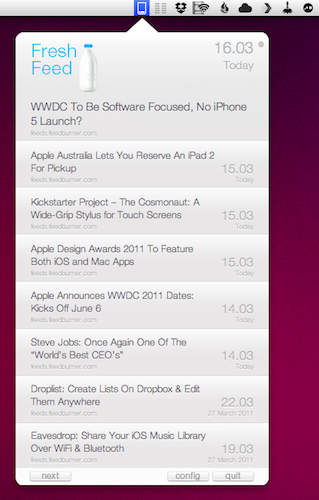
Fresh Feed Elegantly Puts RSS In The Menubar

There are many ways to consume RSS feeds on the Mac platform: when it comes to syndicating content from your favorite websites, apps like NetNewsWire and the Reeder beta come to mind, although many people simply prefer to keep an eye on Google Reader (the most used service nowadays to subscribe and follow feeds) in their desktop browser.

Over the years several alternatives have surfaced that enable users to read RSS feeds in different ways on the desktop. Fresh Feed, a free utility in the Mac App Store, does what many other apps have tried, but in a very elegant way: it puts RSS items in the menubar, and allows you to open them as new tabs in the browser. Where Fresh Feed really shines, in my opinion, is the user interface: it looks like a bigger iPhone app placed in the menubar, yet it doesn’t feel “weird” as several other Mac apps that try to resemble their iOS counterparts. Its “cells” for new RSS entries look sweet and polished. They’re chronologically ordered, but you can scroll with your trackpad to load as many articles as you can. A click on the “more” button loads the item in your desktop browser, automatically leaving Fresh Feed. To add new RSS feeds, you have to open the Preferences and paste a website’s feed URL.

There’s no option to set refresh times or auto-import feeds from Google Reader, unfortunately. If you just want to use Fresh Feed to stay up to date with the articles from a specific website, however, and not your entire Google Reader list, this might just be the app you need.

Looking forward to future updates with more features, Fresh Feed is a free download in the Mac App Store.