BlackBerry Messenger for iOS Coming On April 26? [Updated]

According to a rumor posted by BGR a few weeks ago, RIM was looking for a way to expand its BlackBerry Messenger platform to iOS and Android devices, with a release coming soon in the App Store. RIM apparently wasn’t happy about the hundreds of apps clearly inspired by BBM available for iPhones and iPads, and decided to develop a version of Messenger that doesn’t have all the features available to BlackBerry owners, but still allows iOS users to communicate with their friends and family. A compromise, that is, to have BlackBerry Messenger available on as many platforms as possible.

A poster on MacRumors Forums now suggests BlackBerry Messenger for iOS may be launching in the App Store on April 26. At a “social media conference” in Toronto, RIM’s co-CEO Jim Balsillie allegedly revealed that BBM and “other services” will come to the iPhone on April 26 through the App Store. Balsillie also confirmed that they plan to release an update “this summer” with a new notification system, which may or may not suggest RIM knows something about iOS 5 and the improved notifications Apple has been rumored to be working on. But, then again, it is unclear why would RIM know about such an important aspect of iOS and Balsillie’s statements might just be speculation on his side.

Looking back at BGR’s report, however, it sounded like the Android version was set to come out first:

Right now, we have heard that Android is definitely a go. But again, we’re not sure on timing, though our sources are confident that it will launch some time this year. RIM chose Android first because of the fact that it could develop and integrate something like this much easier with an open platform, but the plan is to build and deploy an iOS version at some point as well.

So it is possible that in the next few days an Android version of BBM will be unveiled, with the iPhone app scheduled for a late April launch. The rumor hasn’t been confirmed by RIM, but chances are they are really looking for a way to rise among the competition in the App Store (made of apps like WhatsApp, Textie and Ping) by releasing an iOS counterpart of BBM, which counts millions of users worldwide. [via TUAW]

Update: BGR now reports they have contacted RIM and, apparently, Jim Balsillie didn’t speak at any conference in Toronto this week.

RIM tells us that the story, reporting that BlackBerry Messenger would arrive as an app for Apple’s iPhone on April 26th, is false. “RIM did not hold a conference in Toronto this week, and Jim Balsillie did not speak at any event in Toronto this week.


Apple Announces Q2 2011 Conference Call For April 20

As widely anticipated in the past few days, Apple has scheduled its q2 2011 earnings call for April 20, 2011. The conference call will be streamed live on Apple’s website (audio-only) here.

Apple’s conference call webcast discussing Q2 - 2011 financial results will begin at 2:00pm PT/5:00pm ET on Wednesday, April 20, 2011.

Please note that comments made during this call may include forward-looking statements that are subject to risks and uncertainties, and that actual results may differ materially from these forward-looking statements.

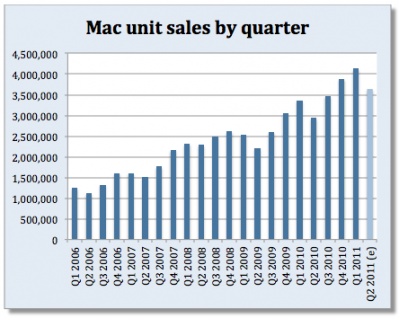
In Q1 2011, Apple posted a record revenue of $26.74 billion with 7.33 million iPads sold, 16.24 million iPhones and 4.13 million Macs. The company posted record net quarterly profit of $6 billion, or $6.43 per diluted share. 19.45 million iPods were sold during the quarter. In the year-ago quarter, Apple posted revenue of $13.50 billion with 2.94 million Macs sold, 8.75 million iPhones and 10.89 million iPods sold.

The Q2 2011 earnings call is expected to provide more insight into Verizon iPhone sales numbers and the iPad 2, which was released on March 11 in the US and also went on sale last week in 25 more countries – just in time to fit into Apple’s second fiscal quarter window.


Music Labels Bringing “Enhanced Albums” To The iPad

Remember iTunes LP? It’s an experiment from Apple that never really took off in popularity (although Apple doesn’t disclose iTunes Store sales numbers) that aimed at offering a richer experience for consuming music by adding graphic elements to albums like artworks, lyrics, photos and videos. For a few dollars more than the usual iTunes price, the LP version of an album comes with additional content – but the big problem is, aside from desktop computers this content can’t be viewed anywhere else. Not on the iPhone, not on the iPad or Apple TV. It’s a locked format that, in spite of Steve Jobs’s promises, failed at catching on among iOS users and consumers overall. Still, is the idea of a “rich music experience” dead among music labels? Not at all.

The New York Times reports Universal and EMI have been experimenting with music albums sold as apps for the iPad at a higher price. The obvious trick is, these apps have extra content and visuals to justify the expense: once again, it’s all about photos, videos, lyrics, and so forth. Released by the EMI music group last week at $9.99, “Until One” for iPad gives you access to Swedish House Mafia’s latest album, including a photo gallery, documentaries and written accounts from the band. The whole package is touted as “highly interactive” and meant for multitouch. On top of that, the app also includes 2 full-length music videos and links to the band’s Twitter and Facebook profiles. So for 10 bucks and a 659 MB download, you get a music album with lots of videos, photos, and other stuff. Not a bad deal if you’re a fan of the band, but something most users in the App Store will likely ignore. That’s why EMI and others are looking to extend this concept to a wider catalogue of artists and albums.

The Universal Music Group has teamed up with a video company, Eagle Rock Entertainment, to create iPad versions of films about classic albums like Nirvana’s “Nevermind,” with social networking features that allow fan commentary. This month, Bjork announced that her next project, “Biophilia,” will encompass “music, apps, Internet, installations and live shows.

“This is very much a test of a really new and exciting technology platform that will push the boundaries of what you can do on a tablet,” said Cosmo Lush, the company’s vice president for digital business development.

I can’t stress enough how much I believe this is one of the paths to follow to deliver music content in this new mobile era, especially to owners of new devices like the iPad. The coffee table + music + photo gallery concept has always intrigued me as one of the most interesting ways to add real value to an audio-only product – that sense of “owning your music” that got lost somewhere during the CD-to-MP3 transition years ago. Perhaps these music labels will fail hard at reinventing the genre on the iPad because “it’s too little, too late”, but I’m still one of those waiting for Apple to show us that iTunes LP and Extras can make a lot of sense on iOS devices, and especially on the iPad.


Gamer Develops Homebrew iControl App For A-10 Flight Simulator

In succession of the wireless hack we found this morning, this afternoon brings us another case of the iPad being modified for new and awesome things. Flight simulator DCS A-10C is virtual combat simulator for the A-10C Warthog, giving wannabe pilots the opportunity to take to the air in the one world’s most advanced (and vicious looking) combat fighters. Use of Multi Function Control Displays (MFCDs) in the game (those fancy on-screen controls in the cockpit) would traditionally take the eyes of the pilot off of their environment in-game, but an iPad mod utilizing the game’s API brings the MFCDs to the iPad’s display, giving the pilot an additional monitor to work with alongside the joystick and throttle. The iPad provides a way to tap into different displays and control sets in the cockpit, all the while the gamer can continue to control the plane and move the pilot to check the wings and and surrounding environment. It’s incredibly impressive, and Electronista notes that a final version of the controls may make its way to the App Store so everyone can have access to the digital overlay. You can check out video of the DCS iControl in use after the break.

[Shacknews via Electronista]

Read more


N.O.V.A. 3 Will Use Unreal Engine, Coming Later This Year

N.O.V.A. 3 Built On Unreal Engine, Coming Later This Year

Pocket Gamer reports an interesting tidbit about software development studio Gameloft and its first-person shooter game N.O.V.A. for iOS:

Gameloft has confirmed what we already knew down here in the Rumour Mine - it’s busy working on four games utilising Epic Games’s Unreal Engine 3. But the Paris-based publisher hasn’t revealed what those games are.

Word has it that shooter sequel N.O.V.A. 3 is among the four titles built around the engine and will be out later this year.

I’m not a huge fan of Gameloft’s console-like approach to iOS, but I think it’ll be interesting to see how a new N.O.V.A. developed with the same engine that powers Infinity Blade will fit in the iOS gaming scene. Gameloft has plenty of time to make N.O.V.A. graphically more impressive than Infinity Blade or Rage HD come the 2011 holiday season. And – we’ll see if I’m wrong – I have a feeling a brand new N.O.V.A. with stunning graphics could make for the perfect demo at a certain Apple fall event.

Also: who else thinks Infinity Blade is going to win an Apple Design Award in June? [via Steve Troughton-Smith]

Permalink

Week Calendar 3.0 Is A Powerful iCal Alternative for iPhone

In the past months, I’ve taken a look at different calendar applications for the iPhone and iPad that aim at bringing more functionalities (either through particular interface approaches, extended Google Calendar support, or other features) to a device’s built-in calendar software from Apple. The iOS calendar app, a tiny version of iCal for the desktop, is fast and elegant and works just fine for most users, but sometimes you want or need more from a mobile calendar or agenda. For instance, the possibility to have more views available (rather than the List, Day and Month ones designed by Apple) or “do more” with events and reminders. And while I know most of MacStories readers are huge fans of Calvetica and Cloud Calendar for the iPhone and iPad, respectively, I’m pretty sure some of you have been looking for a slightly more “powerful” or, dare I say, “geeky” alternative to Calendar.app. If so, meet Week Calendar.

The name says it all: Week Calendar’s biggest feature is the weekly view that’s the focus of the entire experience and undoubtedly something that Apple’s calendar app really lacks. In the app’s weekly view you can pinch & zoom vertically or horizontally to show / hide hours and days, double-tap to focus on a specific event or rotate to landscape mode to gain an even broader view. Tapping on the top toolbar allows you to select a date to jump to, whilst selecting an event opens a desktop-like popup with related information. Tap on the popup, and you get to another screen with all the details you’ve entered and buttons to share, print (that’s right, AirPrint) or create a template off the event itself. You can edit an event at any time, and even display the assigned location on a map. Something that I really like about Week Calendar (well, weekly view aside): you can link contacts from the Address Book to an event. Like I said, everything’s pretty full-featured to offer a wide array of options and choices.

“Choices” seems to be a prerogative of Week Calendar: from the main screen, an iPad-like popover lets you switch between 7 different views: List + Search, Day, Week, Month, Year, Agenda, and Today. The “Go to a Day” shortcut lets you manually enter a date to open. Switching between sections and views felt fast and highly responsive to me, although I have to say I’ve only configured the app with two calendars: my personal one, and US Holidays. The app comes with this kind of optional, built-in subscriptions that you can activate from the Settings. Speaking of which, there’s a lot of stuff to choose from in there: from Time Zone support and “Week starts at” to an auto-coloring system for events with a specific title, you can stay assured the option you’re looking for has been implemented in Week Calendar. I can see how many will prefer the simplicity of an app like Calvetica, but sometimes an application for “nerds & power users” is more than welcome. Other features of Week Calendar that impressed me for the quality of the implementation were fullscreen support (you can activate it with a single / double tap and choose what UI elements to hide), possibility to cut and drag & drop events in any view for easy re-arrangement and TextExpander integration.

Week Calendar is an app that needs to be used for weeks – even months – to be fully appreciated. There’s so much stuff to play with, configure and customize it’s not really easy to fit everything into a single article – plus, I believe all these options have the added value of turning the app into a completely different experience depending on how you use calendars. So, head over the App Store now and buy Week Calendar 3.0 – at $1.99 it’s possibly the most “serious” calendar app for iPhone I’ve seen so far. Read more


HOW TO: Use Amazon Cloud Player With iOS Devices

HOW TO: Use Amazon Cloud Player With iOS Devices

One of the standout features of iCab Mobile is the ability to change the browser User Agent. In other words, this lets the website think that you are visiting from a browser other than Mobile Safari. Changing the Browser ID to “Safari 5 (Mac)” will allow users to download music using the Mobile Safari method, even if Amazon does change how it serves downloaded files.

Christina Warren notes that there isn’t a technical limitation preventing Amazon from serving content to iOS devices, but currently you have to either use an alternative browser to change the User Agent or download each song one-by-one for playback in Safari. I’m still miffed that Amazon isn’t flexing their muscle and aggressively pursuing the iOS platform at launch, considering that’s really where the market for cloud based music streaming exists. The uploading and playback tools might be a little rough around the edges, but Amazon’s integration and incentives need to give Apple a run for its money on the platform that counts.

Permalink

#MacStoriesDeals - Tuesday

If you didn’t already know, we’ve set up a new twitter account for Deals, it’s @MacStoriesDeals. We’ll tweet the daily deals there as well as exclusive weekend deals too. Help spread the word! Here are today’s deals on iOS, Mac, and Mac App Store apps that are on sale for a limited time, so get ‘em while they’re hot! Read more


Impressive Hack Wirelessly Mirrors iPad 2 To Display

Cables suck, and if you want to kill a presentation you need to be untethered from that fifteen foot long VGA cable tethered to that overhead projector. When a client wanted to cut the cord, some ingenuity resulted in shell housing a minimum of two components and a simple usb cable. The idea revolves around the HP Wireless TV Connect and a Cooler Master Choiix Power Fort battery pack to power the transmitter used for the iPad, connected by a simple USB cable. The HP Wireless TV Connect consists of a transmitter and a receiver: the receiver is connected to the display, while the transmitter is fed power (up to two hours) using the battery. Using a wooden block for a mold, a shell was created to house the components and sit the iPad 2 on top, with enough space to connect the cord from the dock connector to the components inside. How does it work? Asides from the bulk and the two pounds added, the wireless iPad works just as you’d expect it to. We have a video after the break if you’re curious to see how it all goes down, and if you have the time and money you too could roll your own for around $275 according to the mastermind behind it all.

[Youtube (eg0voruhk) via Reddit, MacRumors Forums]

Read more