This Week's Sponsor:

HomeSnap

A Private, Read-Only Window Into Your HomeKit Home


Posts in news

Financial Times Doesn’t Want To Enable iOS Subscriptions In Its iPad App

Following a statement from late February in which Pearson’s CEO Marjorie Scardino expressed her concerns about the Financial Times iPad application having to comply to Apple’s new rules on iTunes subscriptions for apps, managing director of FT.com Rob Grimshaw told Reuters today that the publication won’t give up their “subscriber relationship” to Apple – which has implemented an opt-in policy so users can decide whether or not their personal data should be shared with a publisher. Apple also takes a 30% cut off every subscription sold through the App Store, inside iOS applications. According to a previous report, developers will need to update their existing publishing apps to include subscriptions by June.

Currently, the Financial Times sells subscriptions to the print and digital editions of the paper on their website – a method that allows the publisher to collect subscribers’ data to promote various products and advertisements to the audience. This kind of “relationship” can’t be easily achieved with Apple’s new terms, which are optional for the user in order to protect privacy. The Financial Times says they “have a great relationship with Apple”, too, but if the business model doesn’t work out they are ready to pull the app from the App Store and release it somewhere else. Perhaps as a web app, perhaps on Android.

We don’t want to lose our direct relationship with our subscribers. It’s at the core of our business model,” Rob Grimshaw told Reuters in an interview on Monday.

He said he was hopeful of a positive outcome to negotiations with Apple, but added: “If it turns out that one or another channel doesn’t mix with the way we want to do business, there’s a large number of other channels available to us.

The Financial Times isn’t providing additional details on where the iPad app will end up if subscriptions aren’t implemented by June, but many are speculating Pearson (owner of the FT) will focus on Android and “other tablets”. The situation is interesting as the FT iPad app is generating 20% of the publication’s subscribers and millions in revenue – but they don’t want to comply to Apple’s terms as, in their own words, they “have something to lose”.
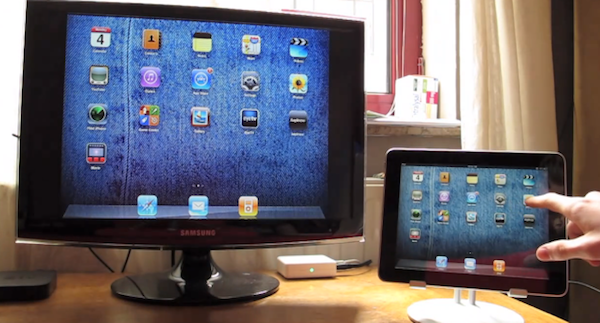


Enable Display Mirroring On The iPad 1

One of the most interesting features of the iPad 2 (cameras and thinner design aside) is the possibility to activate video mirroring: thanks to Apple’s Digital AV Adapter or VGA Adapter, any app on your iPad 2 can be mirrored on the television’s bigger screen with just an additional cable and no setup required. It works out of the box – meaning all your apps, presentations and websites can be sent off to a monitor that supports HDMI or VGA. This has been touted as one great functionality of the iPad 2 especially among teachers and people who always wished to mirror the iPad’s display to an external monitor during business meetings.

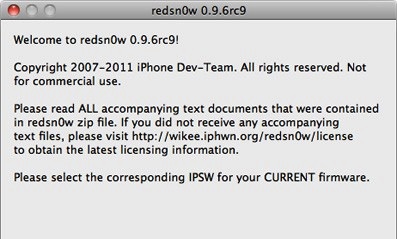
Unfortunately, the feature is “officially” iPad 2-only – but thanks to a jailbreak hack it is now possible to enable system-wide display mirroring on the original iPad with a few easy steps. As detailed by Nature’s Eye Studios, you’ll need a jailbroken iPad 1 running iOS 4.3 to modify some system files and activate video mirroring. This can be easily achieved with the latest redsn0w that brought untethered 4.3.1 jailbreak last night. Read more


redsn0w Untethered Jailbreak Now Available For iOS 4.3.1

The Dev-Team today released version 0.9.6rc9 of their jailbreaking tool redsn0w, which jailbreaks all iOS devices running 4.3.1 - except for the iPad 2. So effectively that includes the iPhone 4 (GSM), iPhone 3GS, iPod Touch 4G, iPod Touch 3G, iPad 1 and the Apple TV 2G (PwnageTool only). However if you depend on ultrasn0w you must wait until there’s a compatibility fix, which is currently in the works.

The key (untethered) exploit is all thanks to Stefan Esser (@i0n1c) who is a security researcher in Germany that is experienced in vulnerability research. He was previously known in the iPhone jailbreak community for his “antid0te” framework which actually improved security by adding ASLR support for jailbroken iPhones, and before Apple had even implemented it. Needless to say the Dev-Team is pleased to see Stefan help them with jailbreak exploits.

As for the iPad 2, Apple unfortunately patched the two bootrom exploits that the Dev-Team had ready (SHAtter and limera1n) and so until a new one is found, no untethered jailbreak can be developed.

You can download this latest edition of redsn0w for either Windows or Mac. You can also get the latest PwnageTool (Mac only) here, and the latest edition of sn0wbreeze (Windows only) here.


Companies Considering Cydia As Advertising Platform

Cydia, the alternative App Store that can be installed on iOS by “jailbreaking” a device, has evolved from being an interesting experimentation to distribute software and hacks Apple wouldn’t approve in its official App Store into a full-featured, massive on-device store that hosts thousands of packages created by users or developers and released through custom sources known as “repositories”. According to the latest numbers shared by Cydia’s creator and main developer, Jay Freeman aka saurik, Cydia has been installed on 10-15 million iOS devices accounting for roughly 9% of the total iOS userbase worldwide. Kyle Matthews, founder of ModMyi (a popular Cydia repository and forum for jailbreakers) says 1.5 million users log in Cydia on a daily basis. Cydia isn’t a cool experiment anymore: it’s a growing community and, with the latest 1.1 update, a great piece of software to discover, try and buy tweaks and apps for the iPhone or iPad.

As reported by iPhoneDownloadBlog, large companies like Toyota have seen the potentialities of Cydia and are now keeping an eye on it as a way to promote their brand and products without having to wait for Apple’s approval, or invest thousands of dollars into an iAd campaign. Put simply, they’re coming up with new ways to massively promote products in pure Cydia style: Toyota affiliate Scion created an exclusive theme for jailbroken devices showcasing their 2011 tC vehicle. Read more


The Spotify Box

Spotify Box: Package Contents

Spotify Box: Package Contents

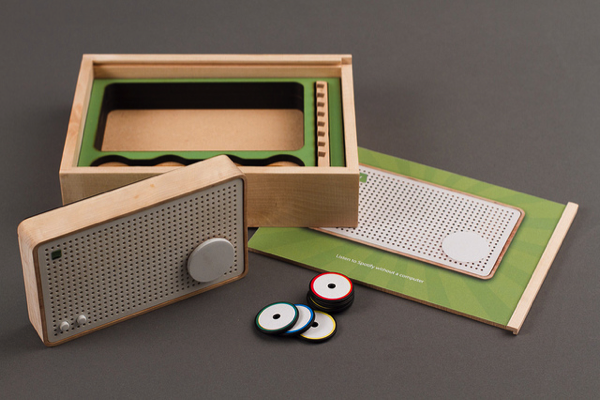
Occasionally minds more creative than mine combine technologies physical and virtual to create delightful products that make radio nerds like me ooze with excitement. If the fat grin on my face isn’t enough to show you just how much I enjoy this particular concept, then you must clearly be an American (at least we still have Rdio) or perhaps you can’t appreciate the simpler times when wood vinyl FM/AM radios played fuzzy music from our bedroom dressers. The concept – evolved through research and development from Jordi Parra – bonds RFID tags (which look kind of like poker chips) with a Spotify URL that when attached to the radio playback a playlist or radio station over WiFi. While the radio itself stores the information you assign from Spotify over USB, the RFID tags are nothing more than the “on switches” that relate to the stored playlists. These playlists are associated with colors, thus to play a particular sample of songs you’d simply attach a red RFID tag to the radio for example. The beauty of a concept like this is that it maintains the simplicity of a manual radio, while introducing and integrating with modern and intuitive technologies. The world may be going digital, but there’s still something about being able to touch music with your fingers that emotionally makes the analog experience so much more palatable and personal. Parra’s prototype doesn’t have a name, but the Spotify Box as it’s dubbed on Vimeo is a great reminder that good design doesn’t always have to have a touchscreen, or even an LCD display. It’s a return to the basics, and while I understand a student project such as this would take a considerable amount of effort to produce, I do wish Jordi and his team all the best if something like this gets off the ground. If you do start a Kickstarter, you’ve got my support.

Past the break we’ve embedded the concept video, and you can also check out the project in it’s entirety on Zenona. There’s a Flickr group if you want to see the project from draft to inception, but I have to say: having this much access to the workings of the prototype Spotify Box can drive an author to be a little too giddy, don’t you think?

[Zenona via TNW]

Read more


Happy Birthday, iPad!

One year ago today, the original iPad went on sale in the United States. It was 365 days ago, and we really didn’t know what to expect from the “magical device” Steve Jobs unveiled on stage roughly two months before, at a special event on January 27th. We just knew that Apple was up to something, and we needed to check out this “new thing”. Then many of us realized an Apple tablet was exactly what they had been looking for: smaller than a laptop but bigger than a smartphone, the iPad was meant to create a new market for all those who didn’t need a physical keyboard anymore, for all those who wanted the simplicity of iOS on a large multitouch screen, for all those who believed technology wasn’t just about the RAM and Gigahertz. That was April 3, 2010.

One year later, the iPad has been a terrific commercial success for Apple. More than 15 million copies sold, over 75,000 native apps available in the App Store, long lines around the globe to get the chance of buying an iPad 2. The iPad has become an iconic device in 12 months; and for those who believe, it’s become more than a simple piece of glass and aluminum. One year of iPad has changed everything for Apple, and the millions of consumers who get things done with it every day. The doctors, the journalists, the school teachers, the students, the writers and the sports fans. A single device with simple hardware features (touch, large screen, thin design) has proved that apps and a well-designed operating system can make a huge difference. And one year later, I still have the feeling we’re just getting started.

So happy birthday, iPad. It’s been a year already, but we know the best has yet to come.
Read more


iFiles 1.9 Can Paste Images and Text Files In The Cloud, Adds SugarSync Support

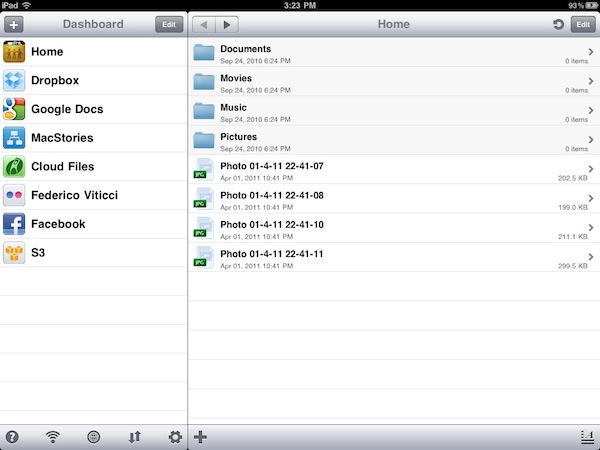
Long-time MacStories readers know that iFiles is one of my favorite apps for iOS: both on the iPhone and iPad, iFiles lets you access all your accounts in the cloud and transfer files between servers and iOS devices, or a local computer. iFiles is a file manager with a cloud workflow that supports Dropbox, MobileMe, Flickr, Facebook, Amazon S3, WebDAV, Google Docs, Rackspace Cloud Files, Picasa and Box.net. Thanks to the excellent integration with all these services, iFiles offers a powerful feature set to manage your files and backups on the go, move files around and even upload them directly to the cloud. The 1.8 update, released in December, added support for the popular Amazon S3 service, AirPrint and text editing in the cloud that made the app more powerful than ever before.

Version 1.9, however, takes another leap forward by adding three new important functionalities: SugarSync integration, FTP support and the possibility of pasting items directly in the cloud from your clipboard. Managing your SugarSync account in iFiles works as expected: once authenticated, you get a list of files and folders on the right and you can do whatever you want with them through the contextual menu that appears once you swipe on an item. FTP support is simply great: web developers and website owners are going to love this, as iFiles can be configured to work with standard FTP, FTPS and SFTP servers. With the lightweight text editor and image previewer, iFiles can now be used as a quick way to manage and edit websites from an iPhone or iPad. And if you need to quickly upload something to the cloud, but you don’t want to create a new document every time, iFiles 1.9 can paste images and text documents in the cloud. This is very convenient if you’re copying a file from a specific service, and you want to send it to another one.

iFiles keeps getting better and better on each release. I can’t recommend this app enough if your life and workflow are in the cloud and you depend on files stored on remote servers on a daily basis. Just go get it in the App Store.


New iPad 2 Ad: We Believe

But when technology gets out of the way, everything becomes more delightful.

What separates Apple from other companies can be summed up in a single quote. Apple isn’t a company that’s competing on specs, nor do they wish to win the gigahertz war. Quite simply, the answer to the tablet computer isn’t the ability to play Flash media or score the highest on a GPU benchmark. Apple understands that it’s how you use a tablet, and not what it is, that makes the iPad a very real Post-PC device. At the iPad 2 announcement, Steve Jobs said:

Technology married with liberal arts, humanities, yields the result that makes our hearts sing.

This video is a representation of just that. You can catch the video after the break.

[via YouTube]

Read more


Saddleback Now Shipping Next Generation iPad 2 Case

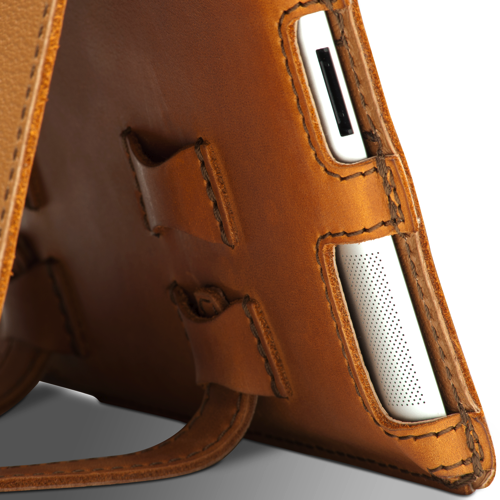
Saddleback Leather Co. makes some of the finest leather products from the Southern United States, rugged enough to haul a day’s load across the Mississippi River twice over and chic enough to protect your MacBook from the hipster-mobs of San Francisco. If you don’t know what the hype is about, we’ve previously taken Saddleback’s Leather iPad Case from the great American educational institutions back to the backpack before leaving the spoils on MacStories for all to see. Built pigskin tough and bound with enough rawhide to turn your aluminum slate into a cowboy’s workstation, the successor to the iPad will need its own set of skin for all of you early adopters. Now shipping is the iPad 2 Leather Case, hand made from the same bull-tough materials and kevlar stitching that’s now tapered to the iPad’s every edge. Available in Carbon Black, Chestnut, Coffee Brown, and Tobacco Brown (pictured) to fit your rugged personality, Saddleback’s iPad 2 Case is available for $104.00 online.