This Week's Sponsor:

HomeSnap

A Private, Read-Only Window Into Your HomeKit Home


Posts in news

Apple Releases Safari 5.0.5 and Security Update 2011-002

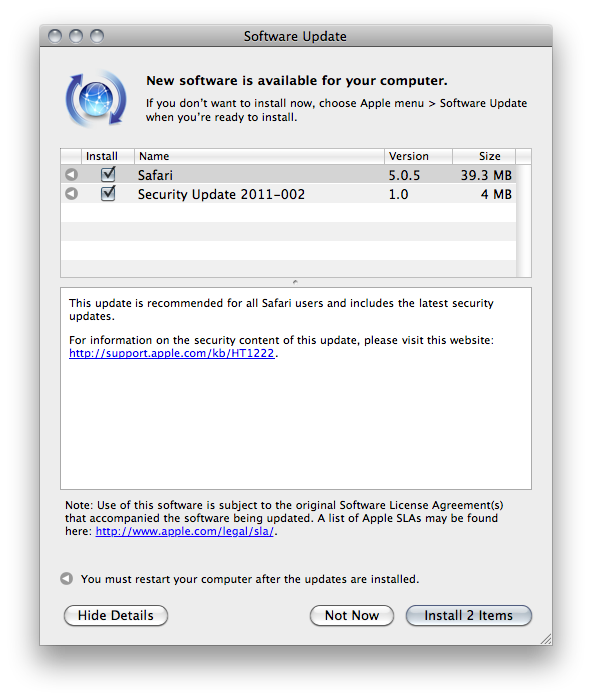
Together with iOS 4.3.2, Apple also released a security update and a new version of Safari. The updates are available now in Software Update and on Apple’s website. Safari 5.0.5 “includes the latest security updates”, and it’s recommended for all users.

Security Update 2011-002 is recommended for all users and improves the security of Mac OS X. Previous security updates have been incorporated into this security update.


Apple Releases iOS 4.3.2 [Direct Links]

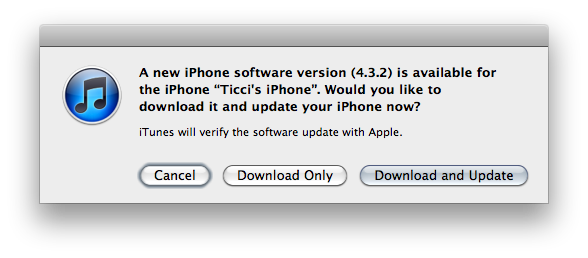
Apple just released iOS 4.3.2. It’s available now in iTunes if you check for updates, and direct links to the downloads will be available shortly.

As previously reported, iOS 4.3.2 fixes issues with FaceTime calls (freezing or displaying random photos from the camera roll), and problems with iPad WiFi + 3G connectivity. Build number is 8H7 for most devices; the CDMA iPad 2 got build number 8H8.

Here are the direct links for iOS 4.3.2:

iPhone 3GS

iPhone 4 (GSM)

iPad

iPad 2 (also iPad 2,2 and iPad 2,3)

iPod touch 3rd gen

iPod touch 4th gen

Update: Apple also released iOS 4.2.7 for the Verizon iPhone. It’s available here, and we’re looking for a changelog.

Update #2: iOS 4.2.7 for the CDMA iPhone 4 contains bug fixes and the latest security updates.

Screenshot of the changelog after the break. Read more


Intel To Support Both USB 3.0 and Thunderbolt with Ivy Bridge

Yesterday, Intel confirmed they will support both USB 3.0 and the recently-introduced Thunderbolt technology in 2012. USB 3.0 – evolution of a widely adopted standard in PCs, mobile devices and tablets – failed to gain support by chipset maker Intel in 2010 and early 2011 as the company only enabled it in desktop motherboards powered by a NEC chip, thus focusing on finalizing the development of Light Peak instead, now known as Thunderbolt. USB 3.0 promises data transfers 10 times faster than USB 2.0, but it can’t reach the 10 Gbps capabilities of Thunderbolt – implemented by Apple and Intel in the latest MacBook Pros, and expected to come to more OS X computers and desktop peripherals in the near future.

Intel is going to support USB 3.0 in the 2012 client platform. We’re going to support Thunderbolt capability. We believe they’re complementary,” said Kirk Skaugen, a vice president at the Intel Architecture Group, speaking at Intel’s developer conference in Beijing today. The event was streamed over the Web.

With the 2011 MacBook Pro refresh, Apple used Intel’s Sandy Bridge processors to increase the performances of the new line and implement Thunderbolt, which allows for multiple connections (daisy-chaining) and high-speed data transfers with a variety of external devices. A report published a day before Apple launched the new MacBook Pros with Thunderbolt and Sandy Bridge processors suggested the 2012 refresh would be a big milestone release for Apple, with a completely new design and breakthrough features. If Intel will manage to get Ivy Bridge chipsets available in the market by the first quarter of 2012, some speculate Apple might consider supporting both Thunderbolt and USB 3.0 as well – it’s worth noting that Intel is indeed telling developers and manufacturers to support both standards. [via Cnet, Engadget]


Instacast 1.2 Adds Dropbox and Instapaper Integration, Lots More

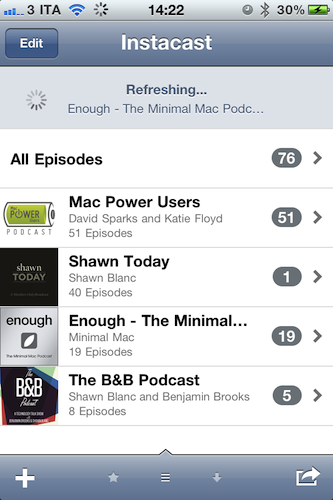
You should have realized by now Instacast has become our favorite way of consuming audio and video podcasts here at MacStories. Whether it’s the latest episode of Shawn Today or tips from Merlin Mann on “Back to Work”, Instacast is the best way to keep podcasts organized and up-to-date without using iTunes (and thus USB sync) on your iPhone. Instacast packs a lot of features into a simple and elegant interface that’s backed by a powerful engine to refresh all your subscriptions, download episodes, stream them over WiFi and 3G and even send audio to an external speaker over AirPlay. Instacast is the Twitter of podcast apps, and it got a lot better in version 1.2 – approved a few hours ago.

Instacast 1.2 adds Dropbox integration to import / export an OPML file for all subscriptions. OPML support has also been introduced in this update, alongside the possibility to share the file via email with your friends. If you’re familiar with RSS readers, you know what to expect from OPML importing. If you’re really serious about your podcasts and you don’t want to miss anything from the authors, Instacast now allows you send show notes to Instapaper and Read It Later. The podcasts I’m subscribed to usually have brief descriptions and a few notes, but I can see why some people would like to Instapaper longer ones.

Instacast 1.2 also brings dozens of stability improvements and bug fixes, as well as minor features like “copy podcast URL to clipboard”, sharing options and auto-refresh for subscriptions. It’s a very good update (now we can’t wait for the iPad version, already in the works) and you can find it here at $1.99.


“ix.Mac.MarketingName” String Appears In The App Store - What Could It Be?

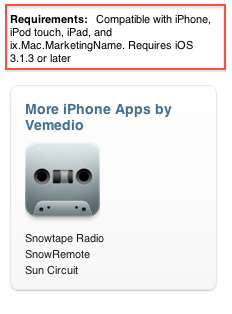
As noticed by several developers and bloggers last night soon after Tweetbot went live in the United States, a strange and curious string started appearing in the App Store’s description pages, under the “Requirements” info tab: ix.Mac.MarketingName. Initially tweeted by Panic’s developer Cabel Sasser, the “bug” has extended to hundreds of other apps in the Store.

This string has lead many to speculate it could be an indication of a new device capable of running iOS apps in the works that’s somehow showing up on the App Store due to a technical error, an old placeholder, or a simple bug on Apple’s end that doesn’t mean anything. Some theories point to “ix.Mac” as an emulator for iOS apps on the desktop – similar to what Apple is already doing with the iPhone Simulator, but for consumers. Others speculate it could be a new device, a sign of universal OS X / iOS apps, or apps finally coming to the Apple TV. The Apple TV second-gen, however, runs a modified version of iOS – whilst the string clearly mentions the Mac.

The most interesting theory we’ve read so far is perhaps looking a bit too much into the placeholder’s name, yet here it is: what if it’s not “ix.Mac.MarketingName” but iX – as in iOS meets OS X?

You can see an example of the string here.

Update: Apple removed the string from every app in the Store. See here.


Tweetbot for iPhone Review


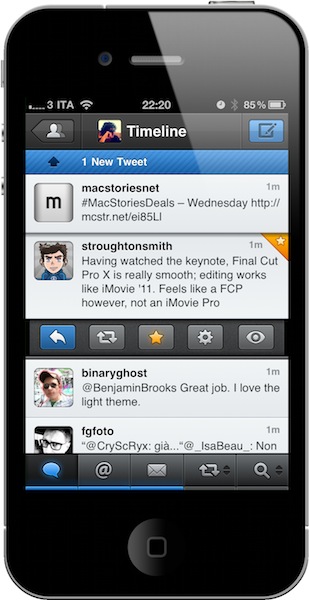
I remember when I bought my first iPhone, Twittelator was the first Twitter client I downloaded from the App Store. Back then I wasn’t writing for MacStories, and I didn’t know about Loren Brichter’s Tweetie. I used Twittelator for months: it was a great app that had everything I needed. I saw no point in switching to another application, let alone start browsing the App Store looking for alternatives. Twitter was a young platform in the middle of expansion with lots of downtime issues, there were no lists or location features and the concept of “retweets” was just taking off thanks to the initiative of some users not affiliated with Twitter at all. For what I had to do, Twittelator was fine. Then I started MacStories, and the hunt for more compelling, alternative, different Twitter apps began.

Twitterrific came after Twittelator for me. I used it for a couple of months and then finally purchased Tweetie – which had seen a terrific rise in popularity thanks to an elegant UI design, a fast engine and a simple, yet powerful set of features. I fell in love with Tweetie: it was stable, fast, intuitive, continually updated. It received the support of the entire Apple community, and it quickly became a standard among iPhone geeks to have Tweetie on a device’s homescreen. The rest is history: Tweetie 2 shipped and revolutionized the ecosystem with pull to refresh, gestures, a refreshed interface and, overall, the richest feature set available on the market. In the meantime, Twitter as a platform was growing to accommodate more users, more servers and – as a side effect to media starting to use the service to deliver news – more responsibilities. Without going back through all the changes that happened at Twitter HQ between 2009 and 2010, you might remember when the company announced they were buying Loren Brichter’s Tweetie and putting him in the position of lead mobile developer. Twitter rebranded the app as “Twitter for iPhone”, Tweetie 2 for Mac disappeared from our radars to eventually come back as Twitter for Mac. Twitter as a company has changed (so much that they don’t even want too many unofficial clients anymore), but the core concept of the service stays the same: it’s all about sharing content in real time. That hasn’t changed at all. If anything, it got better. Read more


White iPhone 4 Coming In Two Weeks?

Bloomberg Businessweek reports Apple is readying the sale of the long-awaited white iPhone 4, which should become available by the end of April. The publication mentions “three people familiar with the plans”, and claims the device will be available both on AT&T and Verizon in the United States.

Apple Inc. will begin selling a white model of the iPhone 4 in the next few weeks after a 10- month delay, according to three people familiar with the plans.

The new version will be available from AT&T Inc. and Verizon Wireless by the end of April, said one of the people, who asked not to be identified because the plans aren’t public.

Last month, Apple’s Phil Schiller confirmed with a tweet to a customer that the white iPhone 4 would be available in Spring and that it’s a “beauty.” The release of the device was delayed multiple times in the past due to alleged production issues with the white panel. The exact reason why Apple delayed the initial June 2010 release date hasn’t been revealed by the company, but previous speculation suggested problems with the white paint caused the device to take bad photos due to light leaks. A rumor also pointed to Apple relying on a new Japanese paint for its white iPhone 4; it’s not clear at this point whether the unit will launch by the end of April only in United States, or internationally as well. Apple was also rumored to be considering a white version of the iPhone 5 for a summer 2011 launch – although recent rumors about a “delayed” iPhone 5 in September with a WWDC focused on software doesn’t leave much credence to the original report. The white iPhone 4 recently showed up on various international carrier websites and Best Buy internal inventory systems.


Safari 5.1 Gets “Do Not Track” On OS X Lion

As noted by The Wall Street Journal, Apple has enabled an option in the latest developer build of OS X Lion (Developer Preview 2 was released two weeks ago) to activate “Do Not Track”, an open project by Mozilla to prevent advertisers and other web companies from tracking you online.

Apple Inc. has added a do-not-track privacy tool to a test version of its latest Web browser for keeping peoples’ online activities from being monitored by marketers.

The tool is included within the latest test release of Lion, a new version of Apple’s Mac OS X operating system that’s currently available only to developers. The final version of the operating system is scheduled to be released to the public this summer. Mentions of the do-not-track feature in Apple’s Safari browser began to appear recently in online discussion forums and on Twitter.

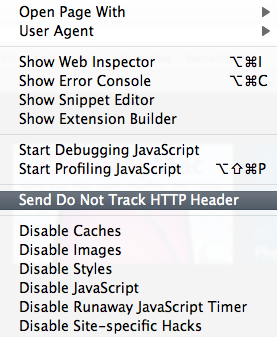
Already offered by Internet Explorer 9 and Firefox 4, ”Do Not Track” can be enabled or disabled by a user at any time; the service will then tell advertisers, web app or companies to stop tracking your movements online and, in a typical scenario, won’t serve “targeted ads” anymore to the browser. The new option hasn’t been given a standalone preference panel in Safari 5.1 yet, but it’s very likely that there will be one come the final release of Lion this summer. Right now, developers can activate the option from the Develop -> Send Do Not Track HTTP Header.


Sketch The Next Killer iPad App on a Dry Erase Board

UI Stencils: iPad Dry Erase Board

UI Stencils: iPad Dry Erase Board

Quickly prototyping iPad designs doesn’t have to be done on a chalkboard, in Keynote wireframes, or via an iPad app. To get things down quickly without leaving a mess, whiteboards are perfect with your favorite dry erase markers for easy swiping and wiping across Design Commission’s iPad Dry Erase Board. Give your design a project title and screen name, and quickly mark down your favorite interface with your choice of black and red dry erase markers, topped with foam erasers to quickly undo mistakes. Not only is the board gridded and marked so you can quickly get the right perspective on your navigation headers and tab bars, but the back of the dry erase bar features a legend (an interaction key) chock full of iPad symbols, terminology, and descriptors for common iPad symbols and icons. You’ll find lots of subtle additions such as guides for positioning the sidebar in the right the place, and other additional alignment tools in conjunction with the dotted grid that helps you sketch pixel (erm, marker) perfect designs. Being able to collaborate on a whiteboard (or five) and pass around designs in the office can be a huge benefit for those not attracted to the iPad screen, and it’s made from the same folks who’ve delivered various other iPhone, iPad, and browser stencils. Available on UI Stencils for $24.95, you can pick yourself up a whiteboard for designing the next great iPad app.

[UI Stencils via TUAW, Swissmiss]