Posts in news

Apple to Open Siri Up to Third-Party Messaging and Phone Apps

Bloomberg reports that Apple will open up Siri to third-party messaging apps with a software update later this year. Third-party phone apps will be added later. According to Bloomberg’s Mark Gurman:

When the software refresh kicks in, Siri will default to the apps that people use frequently to communicate with their contacts. For example, if an iPhone user always messages another person via WhatsApp, Siri will automatically launch WhatsApp, rather than iMessage. It will decide which service to use based on interactions with specific contacts. Developers will need to enable the new Siri functionality in their apps. This will be expanded later to phone apps for calls as well.

As Gurman notes, the company’s change in approach comes as Apple is facing scrutiny over the competitive implications of its dual role as app maker and App Store gatekeeper in the US and elsewhere.

It’s interesting that the update is a Siri-only change. Users will still not be able to replace Messages with WhatsApp or Phone with Skype as their default messaging and phone apps for instance, but it strikes me as a step in the right direction and a change that I hope leads to broader customization options on iOS and iPadOS.

Permalink

AppStories, Episode 132 – Apple Arcade: The Launch and Favorite Games

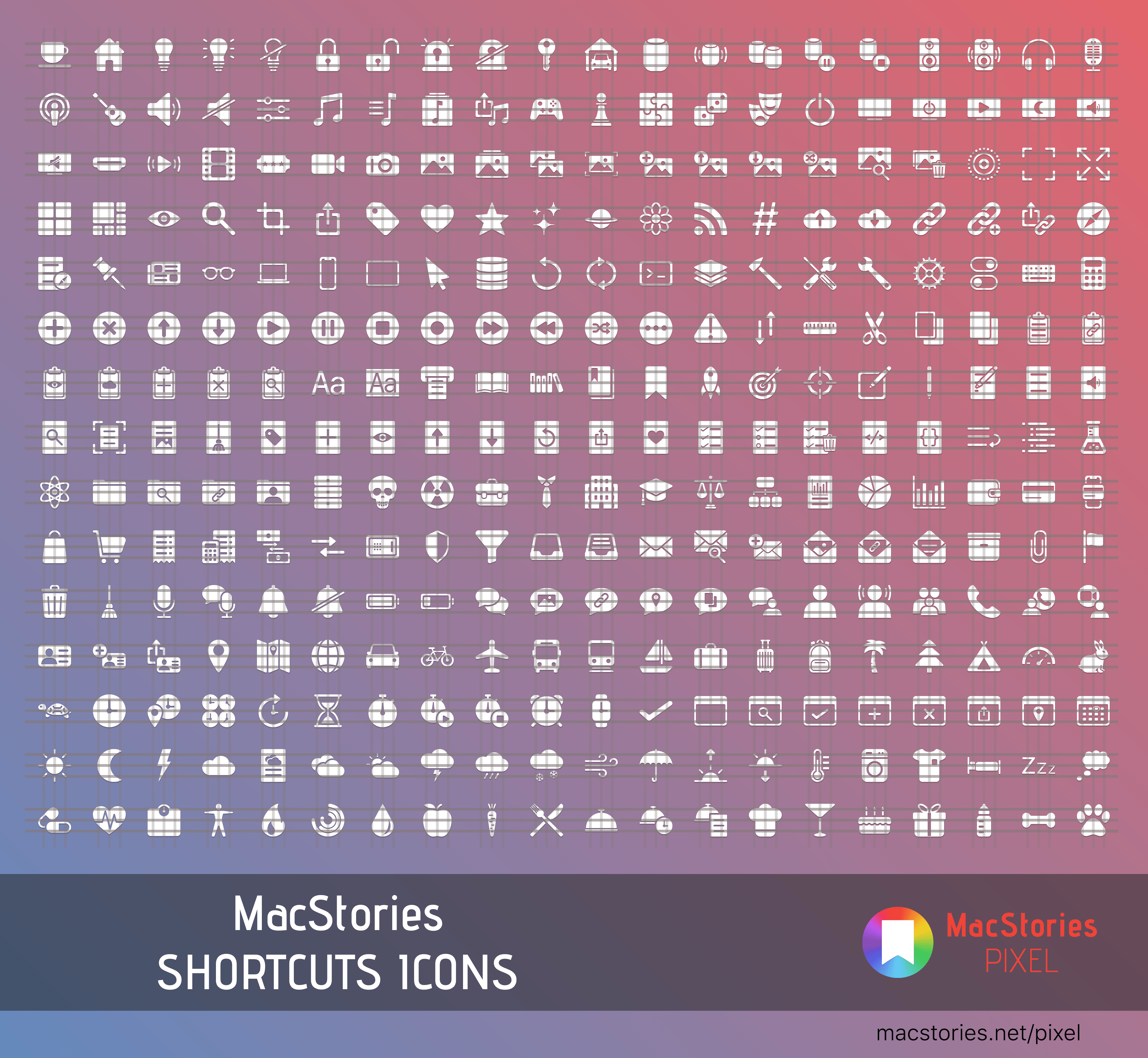
On this week’s episode of AppStories, we cover the all-new MacStories Shortcuts Icons, a set of 300 custom icons for shortcuts that you can add to your Home screen and then revisit Apple Arcade in the wake of its public launch discussing some of our favorite games so far.

Sponsored by:

  • Pingdom – Start monitoring your website performance and availability today, and get instant alerts when an outage occurs or a site transaction fails. Use offer code APPSTORIES to get 30% off.
  • Zapier – The easiest way to automate your work. Start your 14-day free trial today.
  • Direct Mail – Create and send great looking email newsletters with Direct Mail, an easy-to-use email marketing app designed exclusively for the Mac.

Permalink

Halide 1.14 Adds New Lens Switching Interface and Guides

Halide 1.14 is out with a new lens switching UI to accommodate the three-camera system of the iPhone 11 Pro and Pro Max. As soon as the update was out, I went for a walk to give it a try.

Halide has introduced a new lens switching button featuring haptic feedback and a dial-like system for moving among the iPhone’s lenses. When you press down on the lens button, you get a tap of haptic feedback to let you know without looking that the lens picker has been engaged.

From there, you can slide your finger among the ultra wide, wide, and telephoto options that radiate out from the button. As you swipe your finger across each option, it enlarges, and you’re met with another little bit of haptic feedback as you swipe over the lenses other than the one already selected. Once you have the lens you want, you simply let go and your iPhone switches to it.

You can also cycle through the lenses in order by tapping the button repeatedly or swipe left for the ultra wide lens or up for the telephoto one. In my brief tests, swiping left or up is the best option if you already know the lens you want, but using the dial-like lens switcher is perfect for considering your options first because Halide has also added lens preview guides.

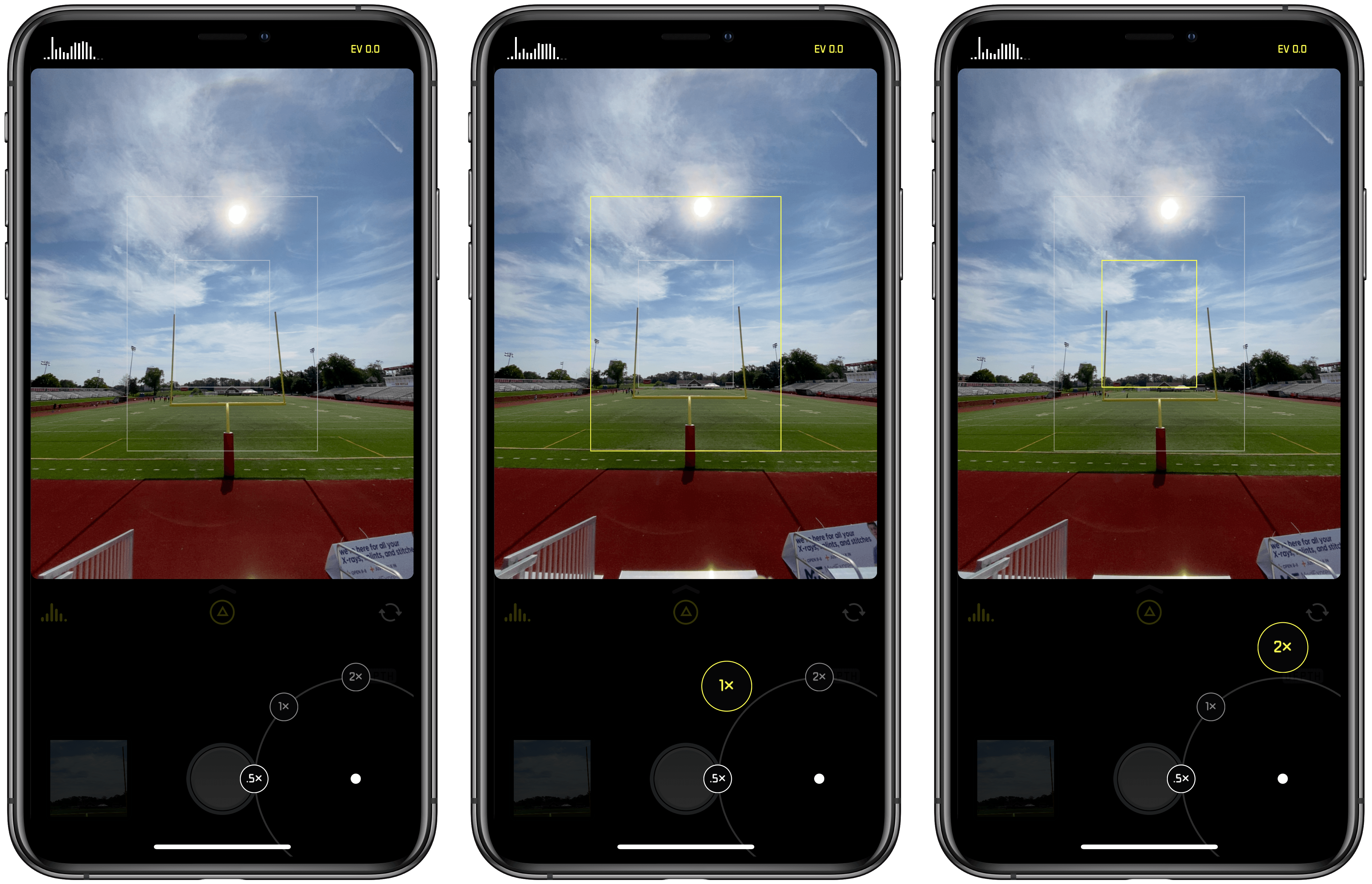
With the lens button engaged, Halide shows guides for each of your zoom options. That means if you’re using the ultra-wide lens, you’ll see the light gray guidelines for the wide and telephoto lenses. As you swipe over those lenses, the guides change to yellow to highlight the composition you’ll get if you switch to that lens.

If you’re already using the telephoto lens though, Halide will highlight the outer frame of the image to suggest you’ll get a wider shot, though it does not zoom the viewfinder out to show that composition until you lift your finger. You can see how the lens guides work from the screenshots I took at a local high school football field above and in this video:

Switching lenses in Halide.Replay

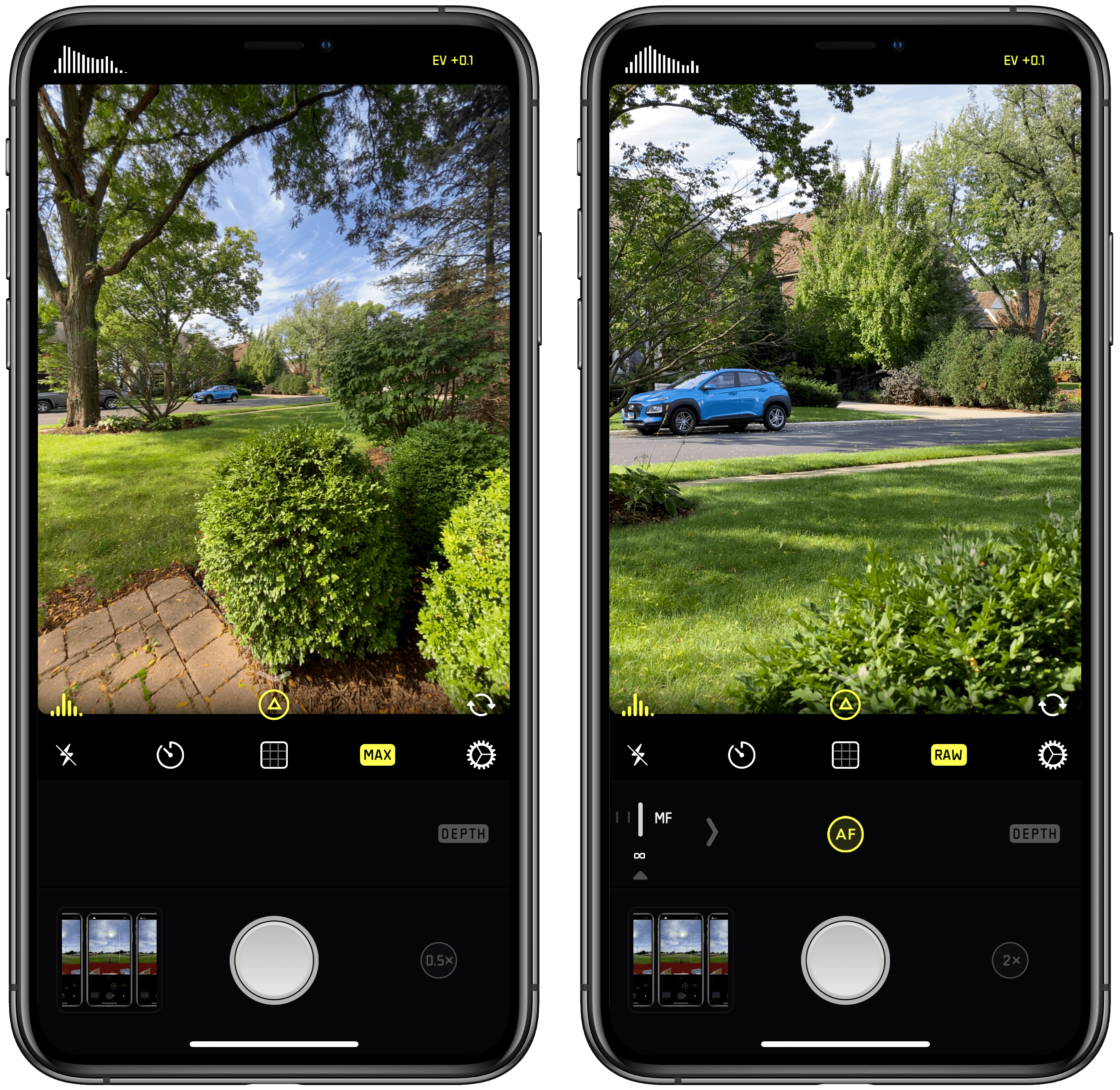
When you switch to the ultra wide lens, you’ll notice that not all the usual Halide features are available. Manual focus is missing and so is shooting in RAW. That’s because the new iPhone hardware and iOS and iPadOS 13 don’t support those features. Although the ultra wide shots don’t support RAW, Halide has included a ‘MAX’ option in place of the ‘RAW’ option, so you can get the most image data possible from your wide shots, which you can see in the screenshots below.

Ultra wide images are limited to MAX quality (left) instead of RAW, which is supported by the wide and telephoto lenses (right).

Ultra wide images are limited to MAX quality (left) instead of RAW, which is supported by the wide and telephoto lenses (right).

The Halide team says that the latest update also includes noise-reduction adjustments to the RAW images produced by the iPhone 11, but that they are continuing to fine-tune how that app handles RAW photos from the new phones as part of a more significant update that is coming next.

The latest update is relatively small, but I especially like the use of haptic feedback and lens guides, which make it easy to switch lenses when you’re focused on the viewfinder of the camera instead of Halide’s buttons.

Halide is available on the App Store for $5.99.


Introducing MacStories Shortcuts Icons: 300 Custom Home Screen Icons for Your Shortcuts

Update: October 18, 2019: MacStories Shortcuts Icons has received its first free update, which adds 50 new icons to the set. You can read more here.

I’m thrilled to announce MacStories Shortcuts Icons, a set of 300 custom icons for shortcuts added to your Home screen, designed by the MacStories team.

Here’s the short version of this story: the set contains 300 Home screen icons, it has been specifically designed with Shortcuts users in mind, and it works on both iPhone and iPad. It’s available today at $14.99 and you can buy it here.

If you’re a Club MacStories member, check your member area for a discount code first: for you, the set is 33% off, so you can purchase it at $9.99.

All sales are final. You can read our license and terms of use here.

You can find a complete preview of MacStories Shortcuts Icons’ 300 glyphs here..

With these icons, you’ll have more options than what is provided by default in the Shortcuts app for Home screen icons. There are no workarounds, no hacks: our icons can be installed using a native feature of Shortcuts supported in the just-released iOS and iPadOS 13.1.

And here’s the best part: MacStories Shortcuts Icons will keep the original colors of your shortcuts, so you’ll be able to create Home screen shortcuts that are consistent with the app, yet unique and personal. MacStories Shortcuts Icons is the first Shortcuts-specific icon set to support this.

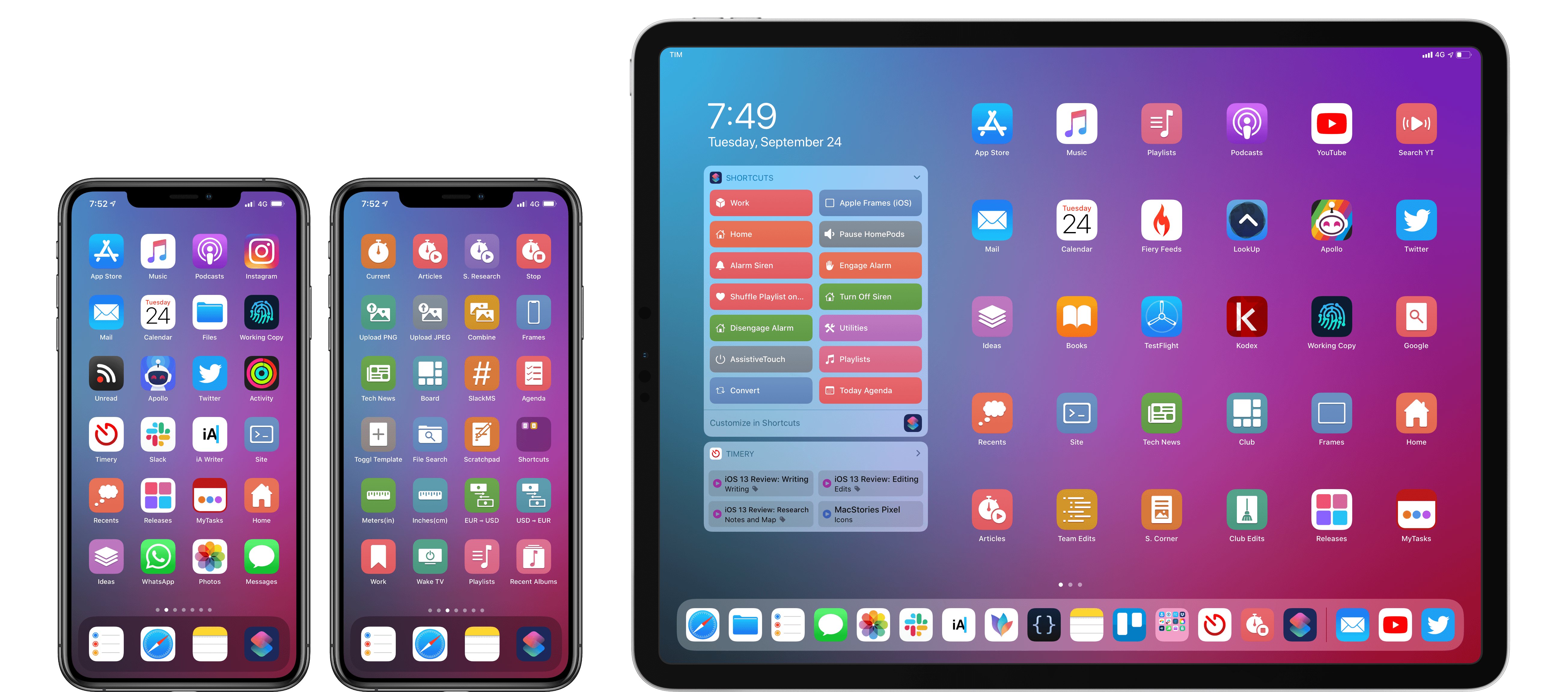
Here are actual examples of my iPhone and iPad Home screens, which I updated using MacStories Shortcuts Icons:

Mixing and matching apps with MacStories Shortcuts Icons on my Home screens.

Mixing and matching apps with MacStories Shortcuts Icons on my Home screens.

We’ve teamed up with our designer Silvia Gatta for this set, which is the first product we’re launching under the new MacStories Pixel brand.

We spent months crafting MacStories Shortcuts Icons with attention and care for the Shortcuts community, and I’d love for you to check it out.

Now, let me share a few more details on how MacStories Shortcuts Icons came to be.

Read more


iOS and iPadOS 13 Review Extras: eBooks, Wallpapers, Shortcuts, Podcasts, and Making Of

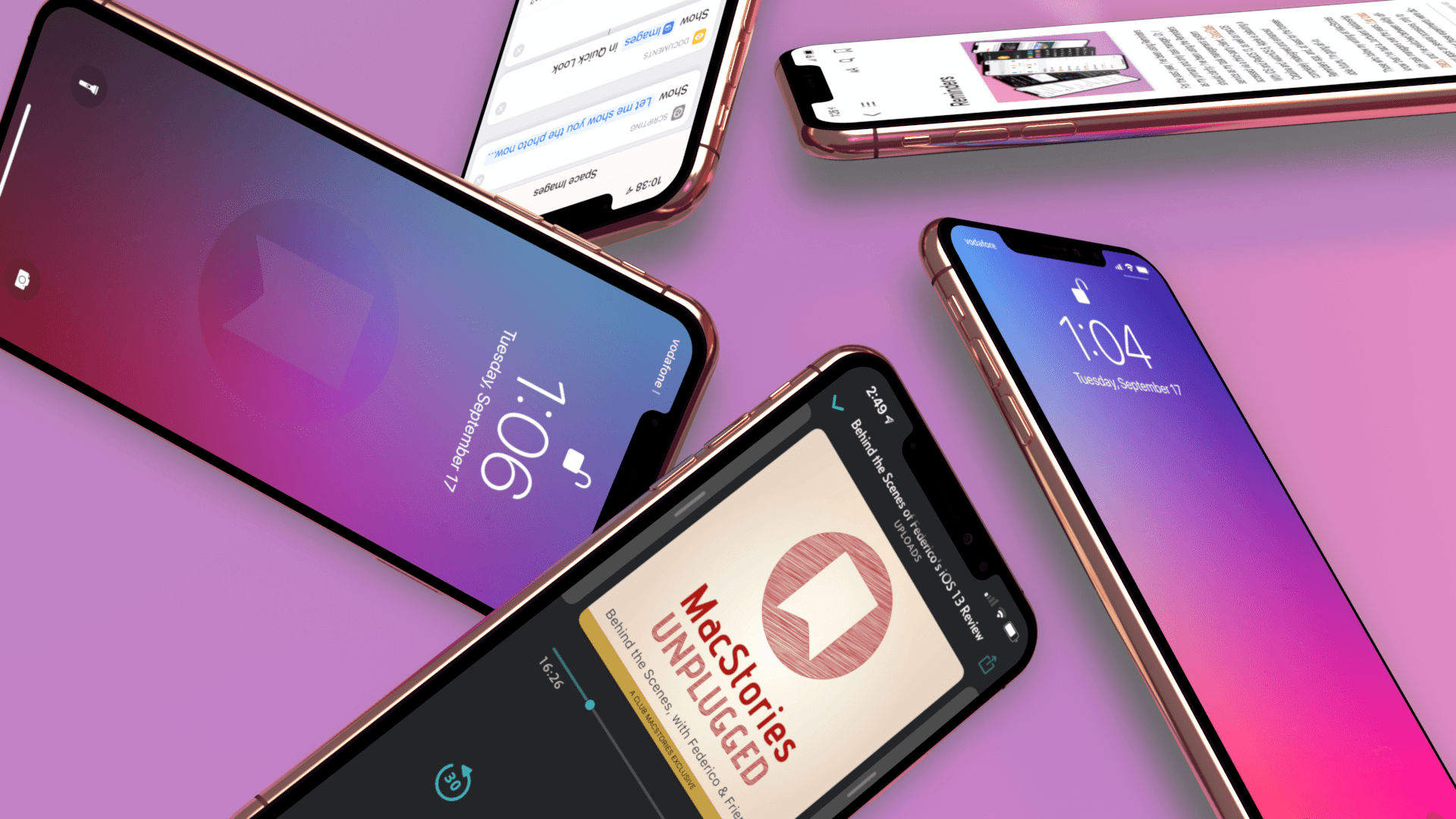
Today, Apple released iOS 13, watchOS 6, and Apple Arcade, and tomorrow, the iPhone 11, 11 Pro, 11 Pro Max, and Apple Watch Series 5 will begin arriving on doorsteps worldwide. The publication of Federico’s iOS and iPadOS 13 review makes it a big day for MacStories too, which has evolved in recent years into a multi-week affair when combined with the Club MacStories anniversary, our iOS 13 app coverage, and related podcasts.

As in the past, the centerpiece of our coverage is Federico’s iOS and iPadOS 13 review. We’re also excited to share Alex Guyot’s comprehensive watchOS 6 review with you tomorrow, as well as a long list of app updates and debuts that spotlight the new features of iOS 13 that we will be publishing in the coming days.

We’ve got a lot more in store though, including a bunch of Club MacStories exclusives.

Among the Club-only extras this year are two eBooks, a set of stunning desktop and mobile wallpapers, advanced shortcuts, and bonus podcast episodes. Check out all of the details after the break. If you’d like to learn more about the Club or sign up to take advantage of all these extras, plus perks from previous years, please visit club.macstories.net.

Read more


AppStories, Episode 129 – The Apps of Apple’s Fall Event

On this week’s episode of AppStories, we dive into the new and updated apps announced at Apple’s fall keynote including Compass, Camera, and the upcoming Apple Arcade game subscription service.

Sponsored by:

  • Linode – High performance SSD Linux servers for all of your infrastructure needs. Get a $20 credit.
  • Setapp, from Macpaw – More than 100 powerful apps for your Mac.
  • Direct Mail – Create and send great looking email newsletters with Direct Mail, an easy-to-use email marketing app designed exclusively for the Mac.

Permalink

Arcade Launches for Some iOS Beta Testers

Earlier today, a series of reviews of Apple Arcade were published across the web and on YouTube. Shortly thereafter, Apple took the wraps off the service itself for at least a subset of people running the iOS 13 or 13.1 betas. Arcade doesn’t officially launch until September 19th, but it appears that Apple is using a slow roll-out to some beta testers to test the service and create buzz around the launch.

The design of the Arcade tab is reminiscent of the App Store’s other tabs, although more space is reserved for spotlighting individual titles, and so far, there is little editorial content. It will be interesting to see how this mix evolves as more games become available and more editorial content is created. In addition to themed collections like ‘Start Your Adventure’ and ‘No Time to Blink,’ Arcade has a section dedicated to ‘New Arrivals,’ includes hint guides for three of the games and a button at the bottom of the view for accessing every game in the service.

The activation of Arcade for some users coincided with a press release from Apple highlighting four games by smaller game studios: The Enchanted World, Patterned, Overland, and Card of Darkness. I haven’t had a chance to comb through the entire catalog yet, but there are a lot of great-looking games featured at launch that jumped out at me including:

I’m looking forward to trying all of these as well as discovering new titles.

As I said on AppStories this week, I’ve been cautiously optimistic and excited about Arcade. What I’ve seen of the new service in my brief time with it so far today is perfectly in line with what I hoped for. Apple seems to have struck a nice balance among many different categories of games, and with only about half of the 100+ titles that should be coming soon, that is an excellent start.


The Potential of the iPhone 11’s Ultra Wideband U1 Chip

A feature of the iPhone 11 and 11 Pro that didn’t get stage time this week was Apple’s new U1 chip, which adopts the relatively new Ultra Wideband wireless technology. The UWB Alliance, an industry trade group, describes the technology as follows:

UWB is a unique radio technology that can use extremely low energy levels for short-range, high-bandwidth communications over a large portion of the radio spectrum. Devices powered by a coin cell can operate for a period of years without recharge or replacement. UWB technology enables a broad range of applications, from real-time locating and tracking, to sensing and radar, to secure wireless access, and short message communication. The flexibility, precision and low-power characteristics of UWB give it a unique set of capabilities unlike any other wireless technology.

For now, all Apple has said is that the U1 chip will permit users to point an iPhone 11 at another iPhone 11 and “and AirDrop will prioritize that device so you can share files faster.” However, the same iPhone 11 Pro preview page also notes that the U1 is “going to lead to amazing new capabilities.” In light of recent rumors that Apple is developing a hardware tag for tracking your belongings, it’s not hard to imagine at least one application that the company probably has in mind. However, Tile-like item tracking is just the tip of the iceberg.

Over on Six Colors, Jason Snell has dug deeper into UWB technology. Snell spoke to Mickael Viot, the VP of marketing at UWB chipmaker Decawave, to better understand other use cases for UWB:

But the possible applications of UWB go way beyond AirDrop and tracking tags. Decawave’s Viot says potential applications include smart home tech, augmented reality, mobile payments, the aforementioned keyless car entry, and even indoor navigation. (And it’s not a power hog, either—Viot says that Decawave’s latest UWB chip uses one-third of the power of a Bluetooth LE chip when in beacon mode, as a tracking tile would be.)

It’s interesting to consider what UWB could enable, especially inside the home. Apple will expand the automation capabilities of NFC tags, which are useful for home automation setups, in iOS and iPadOS 13.1. However, NFC tags still need to be scanned to trigger actions. UWB has the potential to go well beyond NFC by using spatial awareness and presence to expand how we interact and automate all sorts of smart devices.

Permalink

Apple Highlights Arcade Titles in New Video

Today on its YouTube channel, Apple published a new video highlighting some of the titles coming to Apple Arcade once it launches next Thursday alongside iOS 13.

The video spends nearly two minutes providing quick glimpses at a lot of Arcade titles, while lingering for extended periods over a handful of titles that haven’t been seen much before, such as Earth Night, Hot Lava, Skate City, and more.

The demos Apple shared on-stage at its September event received mixed responses, but I would expect a much more enthusiastic response to greet this video. Everything showcased looks fantastic, offering interesting stories, gameplay mechanics, and visuals. If Apple really does have 100+ games like this at or near launch, Arcade is going to quickly become a very compelling service.