Posts in Featured

Steve Jobs on iPhone Location Tracking: “We Don’t Track Anyone”

When security researchers Alasdair Allan and Pete Warden revealed a file in the iPhone’s backup history that contained time and location data, the media broke into a frenzy as Apple, Android, and smartphones became a target of scrutiny for privacy. It’s believed that Apple’s location data exists to reduce the time it has to look for cellular towers and GPS data by caching your known location. The data is accurate but not pinpoint accurate, and Apple has taken significant strides to increase battery life by regulating wireless services on the device. Quite simply, this file is simply for reference and is stored locally, used by the phone to preserve battery life and connect to known wireless “hubs” faster depending on your location. The issue, however, is that the file is likely “leftovers,” meaning cache was accidentally saved as a persistent file. This morning, MacRumors reports that one of their readers reached out to Steve Jobs on the issue, and got a response.

Q: Steve,

Could you please explain the necessity of the passive location-tracking tool embedded in my iPhone? It’s kind of unnerving knowing that my exact location is being recorded at all times. Maybe you could shed some light on this for me before I switch to a Droid. They don’t track me.

A: Oh yes they do. We don’t track anyone. The info circulating around is false.

Sent from my iPhone

Steve Jobs slams Android (claiming Google tracks users while Apple doesn’t), and it’s possible a future update from Apple could fix the issue in question (permanent storage of temporary cache). While Jobs has likely started a firestorm  this week over Android’s integrity (think antennagate all over again), there’s nothing to be worried about here and this issue has been overblown. You can always turn off your iPhone’s GPS services if you feel compelled, but the evidence suggests that Apple has nothing to hide.

[via MacRumors]
Access Extra Content and Perks

Founded in 2015, Club MacStories has delivered exclusive content every week for nearly a decade.

What started with weekly and monthly email newsletters has blossomed into a family of memberships designed for every MacStories fan.

Learn more here and from our Club FAQs.

Club MacStories: Weekly and monthly newsletters via email and the web that are brimming with apps, tips, automation workflows, longform writing, early access to the MacStories Unwind podcast, periodic giveaways, and more;

Club MacStories+: Everything that Club MacStories offers, plus an active Discord community, advanced search and custom RSS features for exploring the Club’s entire back catalog, bonus columns, and dozens of app discounts;

Club Premier: All of the above and AppStories+, an extended version of our flagship podcast that’s delivered early, ad-free, and in high-bitrate audio.

Learn more here and from our Club FAQs.


Apple Testing iPhone On T-Mobile USA With A5 Processor?

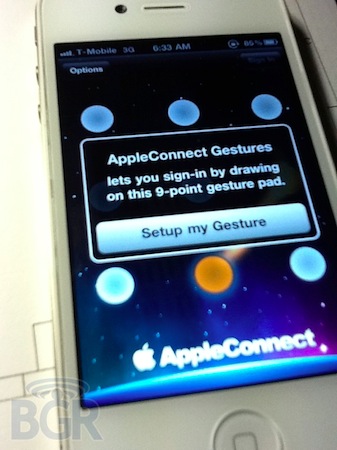
A series of photos posted earlier today by Boy Genius Report show an unreleased white iPhone 4 unit running on T-Mobile USA network. The device looks like an iPhone 4, although, as BGR notes, the proximity sensor looks different than the one shown in the (allegedly) final white iPhone 4 that’s been already sold in the UK. BGR claims the device, just like the Vietnamese videos from last week, is running an old and internal test version of iOS 4, confirmed by the several Apple internal and field-testing applications like Radar and Apple Connect or the preference panels to measure the performances of the device.

That’s right, you’re looking at photos of an iPhone prototype with T-Mobile USA 3G bands. The actual internal model is N94, and if you remember, the Verizon model is N92 while the standard GSM variant is N90. We have verified that the phone itself is running a test version of Apple’s iOS, much like the one we saw in those videos from Vietnam, and it includes internal Apple test apps like Radar and Apple’s employee directory app. Additionally, the front of the white iPhone pictured looks a little different from the photos of the retail white iPhone 4 that surfaced recently — specifically, the proximity sensor has changed on the retail version.

The model number of this white iPhone 4 is N94, the same one that months ago was mentioned in some iOS 4.3 code strings related to the A5 chip – also implemented on the iPad 2. Whilst rumors point to the white iPhone 4 finally being released on April 27th, the N94 model number and A5 processor indicate this might be an updated version of the iPhone 4 coming out later this year – perhaps the “iPhone 4S” select game developers are already testing ahead of the WWDC and the iOS 5 announcement. It’s also worth remembering that AT&T has filed documents in the US to acquire T-Mobile – if the two networks merge, the iPhone will eventually work on the old T-Mobile network (which currently has different radios and frequencies than AT&T). However, the acquisition is rumored to take several months before completion, and Apple could release an iPhone 5 / iPhone 4S this Fall that also runs on the existing T-Mobile network.

Check out the full gallery of leaked shots here.

Access Extra Content and Perks

Founded in 2015, Club MacStories has delivered exclusive content every week for nearly a decade.

What started with weekly and monthly email newsletters has blossomed into a family of memberships designed for every MacStories fan.

Learn more here and from our Club FAQs.

Club MacStories: Weekly and monthly newsletters via email and the web that are brimming with apps, tips, automation workflows, longform writing, early access to the MacStories Unwind podcast, periodic giveaways, and more;

Club MacStories+: Everything that Club MacStories offers, plus an active Discord community, advanced search and custom RSS features for exploring the Club’s entire back catalog, bonus columns, and dozens of app discounts;

Club Premier: All of the above and AppStories+, an extended version of our flagship podcast that’s delivered early, ad-free, and in high-bitrate audio.

Learn more here and from our Club FAQs.


AppSumo: Circus Ponies NoteBook Giveaway

One of the greatest things about owning a Mac is having access to some really splendid, nay, spectacular software that can really do wonders for your workflow. Students in particular have it incredibly easy, especially if they are utilizing the application I’m going to gawk about today. You may have heard about Circus Ponies NoteBook through one of my favorite podcasts, the Mac Geek Gab, and today AppSumo is giving anyone who signs up with their email one hell of a discount at 50%. This isn’t cheap software: NoteBook 3.0 is some of the most powerful note taking software you can download for your Mac, and what’s regularly $49.95 for a regular license is half off for $25 for the next couple of days.

Now, you could get by with a combination of free applications, burying word documents in Dropbox, or maybe you’re just stuck in plain text. But until you’ve tried NoteBook, let’s wash away these perceptions of what a great notes application really is. Imagine having a table of contents that’s focused on search, organizes your topics, indexes everything you write, dates it, stamps it, you can sticky note it, you can add documents, create to do lists, and organize just about anything on styled paper, and that isn’t even half of it. I’d say it’s kind of like the Mac’s own version of Microsoft OneNote, but organized in such a way that it works more like an outlining tool, and we can combine that with files, graphs, and all of kinds of starting templates to really create the perfect set of notes. This is one information silo you shouldn’t be afraid of, and past the break we’re going hands on to see everything that you can do with NoteBook, and how you could want one of ten copies.

Read more

Access Extra Content and Perks

Founded in 2015, Club MacStories has delivered exclusive content every week for nearly a decade.

What started with weekly and monthly email newsletters has blossomed into a family of memberships designed for every MacStories fan.

Learn more here and from our Club FAQs.

Club MacStories: Weekly and monthly newsletters via email and the web that are brimming with apps, tips, automation workflows, longform writing, early access to the MacStories Unwind podcast, periodic giveaways, and more;

Club MacStories+: Everything that Club MacStories offers, plus an active Discord community, advanced search and custom RSS features for exploring the Club’s entire back catalog, bonus columns, and dozens of app discounts;

Club Premier: All of the above and AppStories+, an extended version of our flagship podcast that’s delivered early, ad-free, and in high-bitrate audio.

Learn more here and from our Club FAQs.


iPhone 5 To Feature 3.7-inch Screen, Larger Home Button, Thinner Design?

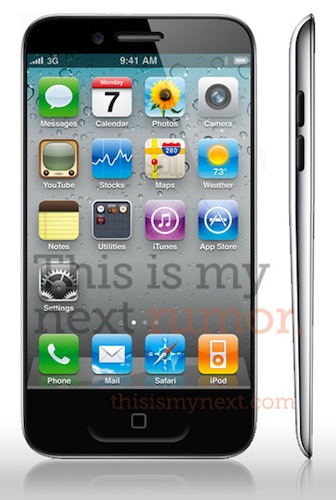
A new report posted by Joshua Topolsky at This Is My Next seems to contradict the rumors we’ve been hearing in the past weeks in describing the next-generation iPhone – so far dubbed iPhone 5 – as a complete redesign of the existing iPhone 4 hardware. The report comes with a mockup based on sketches and descriptions the website received by multiple sources over the past weeks, and shows a dramatically thinner device with a “thick to thin” design from top to bottom similar to MacBook Air’s main body, and a larger multitouch display set at approximately 3.7 inches. The change in size would allow Apple to keep the existing Retina Display branding with a drop to 312ppi (iPhone 4 features 326ppi, and Apple claims a “Retina Display” can be called so starting at 300ppi on an iPhone), and it’s something that’s been rumored before and even spotted in allegedly leaked Apple design documents.

Our sources say the new model (or at least one of the new designs in testing) looks “more like the iPod touch than the iPhone 4.” The phone will be thinner than the iPhone 4, and may have a “teardrop” shape which goes from thick to thin (something along the lines of the MacBook Air profile).

This Is My Next also claims the Home button will become larger, doubling as a “gesture area” for a series of multitouch commands likely inspired by the ones introduced in the iOS 4.3 developer betas. Apple was rumored to be considering an early departure for the Home button, but the website claims the company has been playing around with various prototypes and design iterations, and one of them indeed sports a larger, redesigned version of the Home button. With a larger, almost edge-to-edge screen, Apple is apparently also experimenting with the idea of earpieces and sensors hidden directly behind the display’s glass:

Furthermore, we’re hearing that the screen on the device will occupy the entire (or near to it) front of the phone, meaning almost no bezel. Our source says the company is doing very “interesting things” with bonded glass technology, and has been exploring designs where the earpiece and sensors are somehow behind the screen itself, making for a device where the display is actually edge-to-edge.

Other details reported by This Is My Next include a “swipe area” for NFC capabilities, inductive charging and world-phone functionality with a global CDMA-GSM chipset. Again, these features have been in the rumor mill before, but This Is My Next’s report is mostly interesting because of the design speculation included in the article that contradicts several rumors we’ve recently heard. And even if the design may never make it to the final version of the iPhone 5, TIMN says it’s being tested by Apple:

The versions of devices our sources are seeing could be design prototypes and not production-ready phones. Still, there are strong indications that Apple will surprise a public that’s expecting a bump more along the lines of the 3G to 3GS — and this is some insight into where those designs might be headed.

Access Extra Content and Perks

Founded in 2015, Club MacStories has delivered exclusive content every week for nearly a decade.

What started with weekly and monthly email newsletters has blossomed into a family of memberships designed for every MacStories fan.

Learn more here and from our Club FAQs.

Club MacStories: Weekly and monthly newsletters via email and the web that are brimming with apps, tips, automation workflows, longform writing, early access to the MacStories Unwind podcast, periodic giveaways, and more;

Club MacStories+: Everything that Club MacStories offers, plus an active Discord community, advanced search and custom RSS features for exploring the Club’s entire back catalog, bonus columns, and dozens of app discounts;

Club Premier: All of the above and AppStories+, an extended version of our flagship podcast that’s delivered early, ad-free, and in high-bitrate audio.

Learn more here and from our Club FAQs.


Twitterrific 4.1 for iPhone & iPad Unifies Mac, iOS Experience

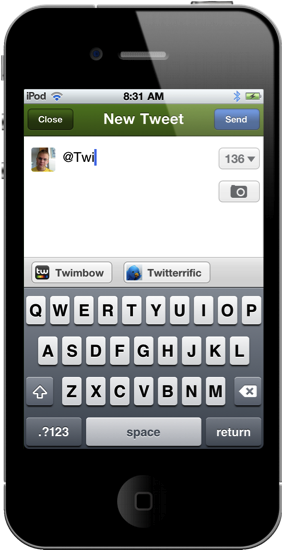
Launching late last night, Twitterrific 4.1 is now available in the App Store for immediate consumption! I’d consider this a milestone update for the iOS version of Twitterrific, as it greatly improves usability on the iPhone and continues the march towards feature parity with the desktop app. I’d say now, Twitterrific has unified their ecosystem such as that replies for example are now handled similarly. This change is most noticeable on the iPhone, where users are no longer taken to the single tweet view to perform actions. Quite frankly, that change alone should address the main complaint many had when wanting to perform simple actions: what used to take three taps now only takes two. 4.1 is a significant update and brings much requested features into the spotlight.

Read more

Access Extra Content and Perks

Founded in 2015, Club MacStories has delivered exclusive content every week for nearly a decade.

What started with weekly and monthly email newsletters has blossomed into a family of memberships designed for every MacStories fan.

Learn more here and from our Club FAQs.

Club MacStories: Weekly and monthly newsletters via email and the web that are brimming with apps, tips, automation workflows, longform writing, early access to the MacStories Unwind podcast, periodic giveaways, and more;

Club MacStories+: Everything that Club MacStories offers, plus an active Discord community, advanced search and custom RSS features for exploring the Club’s entire back catalog, bonus columns, and dozens of app discounts;

Club Premier: All of the above and AppStories+, an extended version of our flagship podcast that’s delivered early, ad-free, and in high-bitrate audio.

Learn more here and from our Club FAQs.


Apple’s Cloud Music Service Almost Ready to Launch?

According to Reuters, Apple “has completed work” on its rumored cloud-based music service that will allow users to store their music online, and access it anywhere using a computer or an iOS device connected to the Internet.

Apple Inc has completed work on an online music storage service and is set to launch it ahead of Google Inc, whose own music efforts have stalled, according to several people familiar with both companies’ plans. Apple’s plans will allow iTunes customers to store their songs on a remote server, and then access them from wherever they have an Internet connection, said two of these people who asked not to be named as the talks are still confidential.

Reuters also claims Apple hasn’t secured any deal with music labels yet, and industry sources said several labels are hoping to close these deals before the service’s launch. Similarly to Amazon’s recently launched Cloud Drive and Cloud Player, Apple could introduce a service that works on the web and mobile devices, and offers a way for users to “digitally lock” their own media in the cloud – quite possibly without even needing the blessing of music labels to do so. Amazon, for instance, was initially rumored to be in a lot of trouble with licensing deals after the Cloud Player launch, but as of today no major music label has sued the online retailer – which basically gives its users an online space to store their DRM-free songs. Amazon, however, is reportedly in talks with labels anyway to come up with a more “advanced” plan that meets the music industry’s expectations and requirements.

Apple, on the other hand, might launch a service that acts as a remote backup location for a user’s iTunes library, and it could be part of the rumored new MobileMe – a complete revamp of the suite of online sync tools that’s also expected to be free, and deeply integrated into future versions of iOS. A number of reports in the past months indicated Apple was building an online iTunes backup solution with built-in streaming capabilities, although others claimed the company was also focusing on a subscription-based model for streaming the entire iTunes Store catalogue – similarly to how music service Spotify requires a premium subscription to stream music you don’t own.

Last, Reuters reports:

Apple and Google are keen to offer services that give music fans more flexibility to access their media wherever they are rather than tying them to a particular computer or mobile device.

In late 2009, Apple bought Lala, a cloud-based music company, but closed it down in April 2010, leading to speculation that it would launch an Apple-branded cloud service.

Interestingly enough, a series of downtimes and errors in iTunes and the App Store during the past 2 days lead many to believe Apple moved its iTunes servers to the new data center in North Carolina, which was set to become fully operative in Spring 2011. Read more

Access Extra Content and Perks

Founded in 2015, Club MacStories has delivered exclusive content every week for nearly a decade.

What started with weekly and monthly email newsletters has blossomed into a family of memberships designed for every MacStories fan.

Learn more here and from our Club FAQs.

Club MacStories: Weekly and monthly newsletters via email and the web that are brimming with apps, tips, automation workflows, longform writing, early access to the MacStories Unwind podcast, periodic giveaways, and more;

Club MacStories+: Everything that Club MacStories offers, plus an active Discord community, advanced search and custom RSS features for exploring the Club’s entire back catalog, bonus columns, and dozens of app discounts;

Club Premier: All of the above and AppStories+, an extended version of our flagship podcast that’s delivered early, ad-free, and in high-bitrate audio.

Learn more here and from our Club FAQs.


“Select Developers” Testing iPhone 4 Prototypes Running A5 Chip?

According to a report by 9to5mac, Apple has begun testing a prototype version of the iPhone running the A5 chip with “select developers.” The units, carrying the usual Apple model numbers for prototypes, are apparently based on the iPhone 4 hardware, with the only exception of the Apple A5 processor – clearly aimed at enhancing speed and graphics performances on the next-generation device. The report goes on to say these modified iPhones featuring the A5 CPU have been given to “high-level gaming outfits” in order to start writing gaming applications for the iPhone 5 that will, allegedly, be announced in September. As with the first-generation iPad, Apple is forcing these developers to keep the prototypes in a safe in the company’s offices at night – likely under strict surveillance from Apple employees or security staff.

Apple isn’t taking the next iPhone’s A5-power lightly. They already have select developers working on versions of their iPhone applications that take full advantage of the next-generation iPhone’s speedier and much more powerful hardware. These developers, seemingly from high-level gaming outfits, have been given what is essentially an iPhone 4 but with an A5 processor instead of an A4. The device itself is virtually identical to the iPhone 4, and there is no way anyone can tell it’s not an iPhone 4 based on the phone’s exterior.

According to the report, these early units are nothing but modified iPhone 4s with an A5 chip inside – even the OS is the same iOS 4 that’s currently shipping to customers, only slightly tweaked to work with the new processor. As far as the design goes, these developers haven’t seen anything about the next-generation iPhone that’s not already available to the public with the iPhone 4. From a software perspective, it makes sense to start giving prototypes of a device that’s going to be very similar to the final version away to developers now: the A5 processor will surely find its way in the iPhone 5, and game developers will have plenty of time to test their improved graphics. And as soon as iOS will be previewed at the WWDC ‘11 and released in beta form, these same developers will have a chance to test an A5-enabled iPhone running the new OS.

If the iPhone 5 is really going to be a minor refresh of the existing iPhone hardware, being able to test the A5 – which will likely be the most important addition – five months ahead of the rumored release date must sound like a great plan to these developers.

Access Extra Content and Perks

Founded in 2015, Club MacStories has delivered exclusive content every week for nearly a decade.

What started with weekly and monthly email newsletters has blossomed into a family of memberships designed for every MacStories fan.

Learn more here and from our Club FAQs.

Club MacStories: Weekly and monthly newsletters via email and the web that are brimming with apps, tips, automation workflows, longform writing, early access to the MacStories Unwind podcast, periodic giveaways, and more;

Club MacStories+: Everything that Club MacStories offers, plus an active Discord community, advanced search and custom RSS features for exploring the Club’s entire back catalog, bonus columns, and dozens of app discounts;

Club Premier: All of the above and AppStories+, an extended version of our flagship podcast that’s delivered early, ad-free, and in high-bitrate audio.

Learn more here and from our Club FAQs.


ListBook: A Simple List App for iPhone

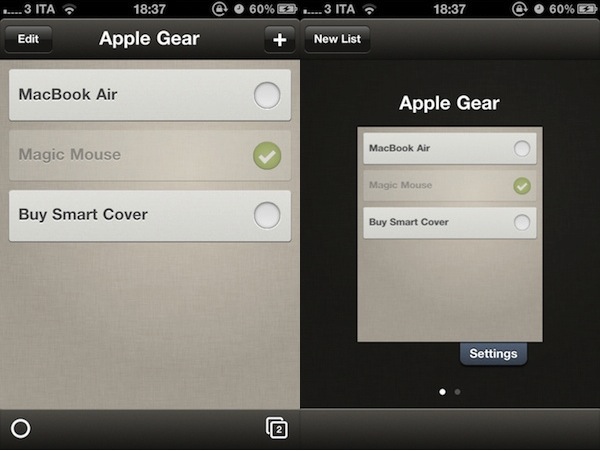
ListBook, a new iPhone app from the developers of MoneyBook, wants to be the simplest solution to create lists on an iPhone, and check off completed items with ease. The App Store is full of apps that enable you to create lists: just think about Simplenote, the popular note-taking application for iPhone and iPad (and the web) that, among other things, also allows you to convert notes to lists. Not to mention the hundreds – if not thousands – of Dropbox-enabled apps that you can use to set up quick shopping lists, todos and reminders and have them always available anywhere you go. The ListBook’s developers, though, recognize that setting up a Dropbox account and having to mess with plain text files, folders and, why not, Markdown support might be a pattern average iPhone users aren’t ready to learn. We, as geeks, love to fiddle with OTA sync, filenames and tags: the majority of iPhone users, however, might not want to do that. And that’s why ListBook doesn’t come with any of these features, but still enables you to create lists, with a beautiful interface and a clever use of gestures.

In ListBook, you create lists and assign new items to them. There are no due dates or tags – you just check off an item once it’s been taken care of. Every list can have a name, as well as a badge on the homescreen to tell you how many tasks you still have to complete. There is no sync or iPad version, no web app or Dropbox integration. You can navigate between lists in a Safari-like UI that displays lists as “pages” in the browser; you can also pinch & zoom to reveal a list and close it.

ListBook won’t satisfy the geeks, but it should be a good alternative to Apple’s Notes app for most iPhone users. Get it in the App Store at $0.99.

Access Extra Content and Perks

Founded in 2015, Club MacStories has delivered exclusive content every week for nearly a decade.

What started with weekly and monthly email newsletters has blossomed into a family of memberships designed for every MacStories fan.

Learn more here and from our Club FAQs.

Club MacStories: Weekly and monthly newsletters via email and the web that are brimming with apps, tips, automation workflows, longform writing, early access to the MacStories Unwind podcast, periodic giveaways, and more;

Club MacStories+: Everything that Club MacStories offers, plus an active Discord community, advanced search and custom RSS features for exploring the Club’s entire back catalog, bonus columns, and dozens of app discounts;

Club Premier: All of the above and AppStories+, an extended version of our flagship podcast that’s delivered early, ad-free, and in high-bitrate audio.

Learn more here and from our Club FAQs.


News.me iPad App Launches To Take On Social Magazines

News.me, a new social reading experience for the iPad developed by technology incubator Betaworks and The New York Times, launched on the App Store a few minutes ago after much anticipation and speculation on whether or not the service could take on well-established “social magazines” like Flipboard and Zite. There’s no doubt the iPad has created a new market for this kind of applications: rather than presenting a series of links pulled from the top Google News or Techmeme, apps like Flipboard aim at showcasing content being shared by your friends on Twitter and Facebook. But while Flipboard simply collects all content shared in your timelines without applying any sort of filter for relevance and popularity, News.me wants to change the rules of tablet-based social reading experiences by offering a “smart” system that, thanks to data provided by popular URL shortener bit.ly, can filter out the most relevant items appearing in your Twitter timeline – and in someone else’s as well.

That’s the key point of News.me, the feature that will need to be tested in the long term to see if the experiment has a chance to survive in this crowded digital and social newsstand. Not only does News.me enable you to see what your friends are sharing (through tweets), it also lets you see what they are reading. And from this standpoint, logging into Twitter within News.me gives the app a whole new meaning when it comes to “Twitter integration.” It’s a huge bet for Betaworks and The New York Times: can the bit.ly-backed algorithm provide an efficient way to distribute personalized news to iPad users? More importantly, is it enough to convince people to pay $0.99 a week, or $34.99 a year? Read more

Access Extra Content and Perks

Founded in 2015, Club MacStories has delivered exclusive content every week for nearly a decade.

What started with weekly and monthly email newsletters has blossomed into a family of memberships designed for every MacStories fan.

Learn more here and from our Club FAQs.

Club MacStories: Weekly and monthly newsletters via email and the web that are brimming with apps, tips, automation workflows, longform writing, early access to the MacStories Unwind podcast, periodic giveaways, and more;

Club MacStories+: Everything that Club MacStories offers, plus an active Discord community, advanced search and custom RSS features for exploring the Club’s entire back catalog, bonus columns, and dozens of app discounts;

Club Premier: All of the above and AppStories+, an extended version of our flagship podcast that’s delivered early, ad-free, and in high-bitrate audio.

Learn more here and from our Club FAQs.