Posts in Featured

Shine Is A Beautiful Weather App for iPhone

If you’ve found yourself struggling to find the perfect weather app that looks great and it’s packed with functionalities at the same time, you might want to take a look at Shine, the latest entry in the weather software panorama that, at $0.99 in the App Store, provides a neat way to check on your current location’s weather, forecasts, temperature and wind speed. Shine wants to keep things simple, and for someone like me who’s no weather expert at all, the promise of offering readable weather data in a beautiful and intuitive design sounds like a major selling point, especially considering the price of one buck.

The app’s main screen lets you see your location’s weather conditions at a glance. Current weather is displayed above in a large calendar-like view with temperature, icon and wind speed, whilst a today / tonight / tomorrow forecast is embedded below with the same stats. You can assign multiple locations in the settings, and re-fetch your location by tapping on the crosshair icon in the top right. Switching between locations is as easy as sliding your finger on the location bar on top. Another feature of Shine is the extended forecast view you get by pulling up the screen with a verticals swipe; the only problem is, the app seems to be US-centric in the way it gets weather information – it relies on SimpleGeo and the National Weather service, and I wasn’t able to get forecasts or correct wind speeds in Italy. Perhaps the developers should implement Yahoo Weather data or something else to make sure Shine works across countries outside the United States.

As it stands now, Shine is a simple, beautiful weather experiment that I’m sure works perfectly in the US, but lacks the necessary data to be a hit internationally. Perhaps the developers will fix this in a future update (I sure hope so), so if you live in the US and have $0.99 to spend, give it a try. Otherwise, wait for an update.

Access Extra Content and Perks

Founded in 2015, Club MacStories has delivered exclusive content every week for nearly a decade.

What started with weekly and monthly email newsletters has blossomed into a family of memberships designed for every MacStories fan.

Learn more here and from our Club FAQs.

Club MacStories: Weekly and monthly newsletters via email and the web that are brimming with apps, tips, automation workflows, longform writing, early access to the MacStories Unwind podcast, periodic giveaways, and more;

Club MacStories+: Everything that Club MacStories offers, plus an active Discord community, advanced search and custom RSS features for exploring the Club’s entire back catalog, bonus columns, and dozens of app discounts;

Club Premier: All of the above and AppStories+, an extended version of our flagship podcast that’s delivered early, ad-free, and in high-bitrate audio.

Learn more here and from our Club FAQs.


Seagate Announces Portable Wireless Hard Drive for iOS Devices

With all the recent talks about MobileMe and the cloud, it’s easy to forget most users still don’t have access to fast and reliable Internet connections that would allow them to stream their entire music library, movies and photos off the web. Whilst streaming is undoubtedly the future of media consumption (just look at the Apple TV, Google Music Beta, Netflix, or Spotify), managing media locally still plays an important role, especially for iPhone and iPad owners who are forced to keep everything organized into iTunes, and sync. Seagate wants to become the new middle man in this scenario, and with the official announcement of the GoFlex Satellite this morning, it looks like they have a chance to provide a better solution for many users.

The GoFlex Satellite is an external portable 500 GB drive that’s got a wireless connection and can stream content up to 3 connected devices at once. It’s got a built-in battery with 25 hours of promised life, and can stream 5 hours of continuous movie content. It works with iPhones and iPads through the GoFlex Media app, but Seagate says it’ll also be compatible with other WiFi-enabled devices and it will be accessible on a local network from a web browser. The portable drive, offering way more storage than an high-end iPhone or iPad, is clearly meant to carry all your music and HD movies around, bridging the gap between local storage and streaming. So while you’ll have to carry yet another gadget in your bag, at least no cable will be required to beam content to iOS. Most of all, music and movies won’t need to br synced locally to an iPhone or iPad; on the other hand, media can be transferred from your Mac or PC to the GoFlex Satellite with a USB 3.0 (USB 2.0 compatible) cable and the Media Sync desktop software.

With the growth of the tablet and iPad markets and the larger volumes of high-quality media now being consumed, there is a clear need for access to content that is not plagued with the challenges of streamed video over the Internet,” said Patrick Connolly, vice president and general manager of Seagate’s retail group. “The unfortunate fact is that these popular new mobile devices are hampered by their limited storage capacity while one of their primary functions is that of media consumption.

“With the GoFlex Satellite mobile wireless storage, we wished to create an elegant solution that provides real value to the multitude of iPad users out there by delivering a seamless connection to local storage. No longer will a consumer feel as though it is a compromise to purchase a lower capacity tablet or iPad. With GoFlex Satellite, people will be able to carry their entire media library with them without the need for wires or the web at a fraction of the cost of adding 3G or purchasing or a higher capacity tablet.

In spite of non-exceptional battery life (5 hours of video doesn’t sound exactly great, considering I like to watch my Lost episodes one after the other), I think this is a great idea, and I’m definitely looking forward to the product. The GoFlex Satellite ships this summer, and it’s available for pre-order now at $199.99 from Seagate.com, Amazon and BestBuy.com.

Access Extra Content and Perks

Founded in 2015, Club MacStories has delivered exclusive content every week for nearly a decade.

What started with weekly and monthly email newsletters has blossomed into a family of memberships designed for every MacStories fan.

Learn more here and from our Club FAQs.

Club MacStories: Weekly and monthly newsletters via email and the web that are brimming with apps, tips, automation workflows, longform writing, early access to the MacStories Unwind podcast, periodic giveaways, and more;

Club MacStories+: Everything that Club MacStories offers, plus an active Discord community, advanced search and custom RSS features for exploring the Club’s entire back catalog, bonus columns, and dozens of app discounts;

Club Premier: All of the above and AppStories+, an extended version of our flagship podcast that’s delivered early, ad-free, and in high-bitrate audio.

Learn more here and from our Club FAQs.


iOS 5 Voice Recognition Interface Conceptualized

With far improved voice recognition expected to make its way into iOS 5, the next questions is how Apple will implement it. Well one person, Jan-Michael Cart, has thought of how it might be possible to implement and put together a well-thought out video demonstrating the concept (after the break).

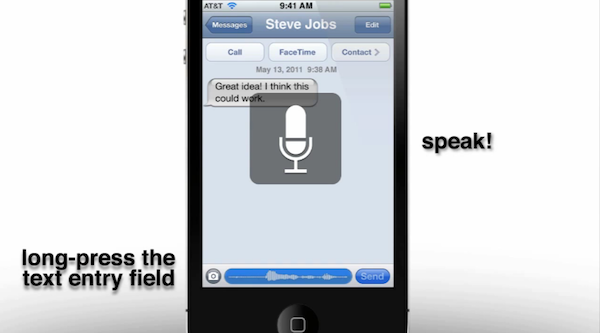
There are number of aspects to the voice recognition he conceptualizes, starting with the notion that it can be used to navigate the entire user interface and is triggered by holding down the home button – much like how Voice Control currently works. Yet instead of bumping you to a whole new screen like Voice Control does, the status-bar will turn blue and serve as a visual guide as to when to speak and telling you how it interpreted what you said.

That’s a fairly straightforward extension of what iOS currently does, what is more intriguing is Jan-Michaels concept of how any text-field can have voice input. All you would have to do is press and hold the text-field and again the status bar turns blue and you speak. For somewhere like notes or mail (which don’t have a text-field but rather an area for a block of text) you would double tab to open the copy and past bar but which would also now have a microphone icon – pressing it would start voice dictation.

As would be reasonably expected, Jan-Michael also believes that APIs would be offered to developers to use voice-recognition and shows how the Facebook app would be an easy candidate for voice recognition support. Make sure to jump the break to watch the video by Jan-Michael, and if you like it, I would highly recommend checking out his YouTube page which has some other iOS 5 concepts including faster app switching using gestures and how widgets could be implemented.

Read more

Access Extra Content and Perks

Founded in 2015, Club MacStories has delivered exclusive content every week for nearly a decade.

What started with weekly and monthly email newsletters has blossomed into a family of memberships designed for every MacStories fan.

Learn more here and from our Club FAQs.

Club MacStories: Weekly and monthly newsletters via email and the web that are brimming with apps, tips, automation workflows, longform writing, early access to the MacStories Unwind podcast, periodic giveaways, and more;

Club MacStories+: Everything that Club MacStories offers, plus an active Discord community, advanced search and custom RSS features for exploring the Club’s entire back catalog, bonus columns, and dozens of app discounts;

Club Premier: All of the above and AppStories+, an extended version of our flagship podcast that’s delivered early, ad-free, and in high-bitrate audio.

Learn more here and from our Club FAQs.


Guinness World Records Awarded To The iPhone 4, App Store and iOS Games

The iPhone 4, the iOS App Store and a number of iOS games have been honoured with Guiness World Record awards. The iPhone 4 was named the fastest-selling portable gaming system following a first day sales figure of 1.5 million units when it was released on June 24 last year – far exceeding the previous holder of the title, the Nintendo DS which sold 500,000 units over a week in 2004.

“The release of the iPhone has not just changed the mobile industry, but the video game world too,”Gaz Deaves, Guinness World Records’ gaming editor, said in a statement. “With the never-ending App Store selection and an intuitive device, Apple has created a gigantic new space for itself in the casual games genre that literally brings entertainment to users wherever they may be.”

Apple’s App Store has also been awarded the Guinness World Record for being the most popular application marketplace following more than 6.5 billion downloads since its launch in July 2008. The App Store is also the largest downloadable video game store, which had as of September last year, roughly 37,000 games. This figure far exceeds other downloadable game services such as Steam, which offers around 1,110 games, the Xbox Live Indie Arcade, which has 1,300, and the Wii Virtual Console, which offers around 580 games. The final award gong given to the App Store was for having the largest launch line-up of any gaming system – with 145 games that were available on July 10th, 2008.

Several iOS games also received awards including the infamous Angry Birds which received an award for being at the top of the paid apps list in the most countries after selling more than 6.5 million copies since being released in December 2009. Plants vs. Zombies was awarded for being the fastest-selling iPhone/iPod strategy game with more than 300,000 paid downloads in just nine days. It also received an award for being the highest-grossing strategy game in the App Store – generating about $1 million for its developer, PopCap, in just over a week. Lastly, the Tap Tap Revenge game series was awarded the most popular game series in the App Store after more than 15 million downloads since launching July 2008.

[Via LA Times]

Access Extra Content and Perks

Founded in 2015, Club MacStories has delivered exclusive content every week for nearly a decade.

What started with weekly and monthly email newsletters has blossomed into a family of memberships designed for every MacStories fan.

Learn more here and from our Club FAQs.

Club MacStories: Weekly and monthly newsletters via email and the web that are brimming with apps, tips, automation workflows, longform writing, early access to the MacStories Unwind podcast, periodic giveaways, and more;

Club MacStories+: Everything that Club MacStories offers, plus an active Discord community, advanced search and custom RSS features for exploring the Club’s entire back catalog, bonus columns, and dozens of app discounts;

Club Premier: All of the above and AppStories+, an extended version of our flagship podcast that’s delivered early, ad-free, and in high-bitrate audio.

Learn more here and from our Club FAQs.


Apple Releases Lion Developer Preview 3

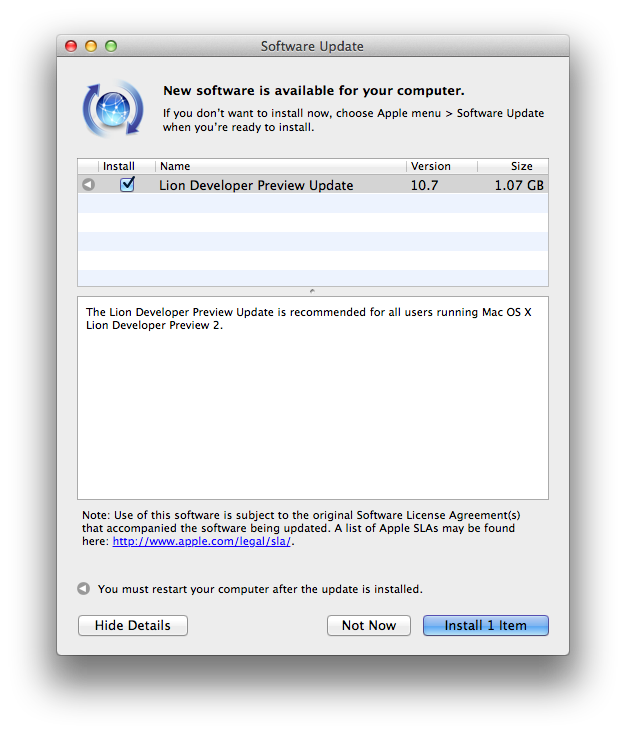
Apple just released a new OS X Lion Developer Preview. The update weighs at around 1.07 GB and it’s available now in the Software Update control panel. It is recommended for all users running Lion DP 2, and Apple’s Mac Dev Center seems to confirm the new build is indeed Lion Developer Preview 3, although the direct link on the Dev Center still goes back to Lion Developer Preview 2. It appears Apple is now seeding Lion DP update only via Software Update.

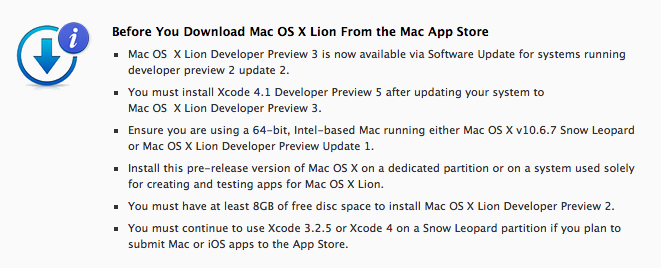
Mac OS  X Lion Developer Preview 3 is now available via Software Update for systems running developer preview 2 update 2.


In the past weeks, Apple released via Software Update two updates for Lion Developer Preview 2; these latest updates to Lion DP 2 are needed in order to install Developer Preview 3 through Software Update. Read more

Access Extra Content and Perks

Founded in 2015, Club MacStories has delivered exclusive content every week for nearly a decade.

What started with weekly and monthly email newsletters has blossomed into a family of memberships designed for every MacStories fan.

Learn more here and from our Club FAQs.

Club MacStories: Weekly and monthly newsletters via email and the web that are brimming with apps, tips, automation workflows, longform writing, early access to the MacStories Unwind podcast, periodic giveaways, and more;

Club MacStories+: Everything that Club MacStories offers, plus an active Discord community, advanced search and custom RSS features for exploring the Club’s entire back catalog, bonus columns, and dozens of app discounts;

Club Premier: All of the above and AppStories+, an extended version of our flagship podcast that’s delivered early, ad-free, and in high-bitrate audio.

Learn more here and from our Club FAQs.


OmniOutliner for iPad Launch Overview

If I was limited to the number of applications I could install on my Mac, I would probably limit the bulk of that to those made by The Omni Group. From OmniFocus to OmniOutliner, I consistently am able to achieve a workflow standard that enables me to be agile when it comes to getting ideas off of my brain and onto virtual paper. In the case of OmniOutliner, a dated yet incredibly powerful application whose outline architecture is currently being introduced in apps such as OmniPlan, the amount of practicality it has brought to my idea well has been astounding. From typing on a blank slate to producing quick lists of app ideas, article drafts, and review checklists, the key tool in my workflow next to a good text editor has been OmniOutliner.

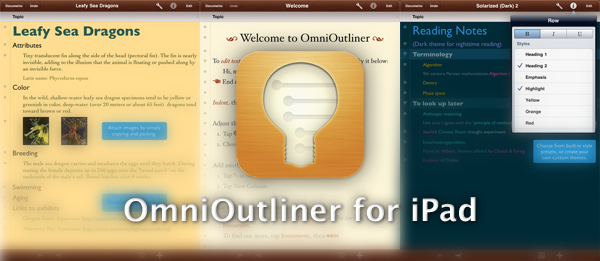
With a quick approval from Apple (Ken Case first announced the app last week), OmniOutliner for the iPad is now available on the App Store, bringing the quick and powerful features from the desktop app into a carefully handcrafted interface designed to be approachable and efficient. Repurposed to fit the finish and feel of iOS, OmniOutliner for iPad is imaginative in design, incredibly touch friendly, and extremely powerful for styling outlines and creating an experience that I’ve fallen in love with. I’d like to briefly cover just how The Omni Group made it all fit, and what you can expect diving into the app for the first time.

Read more

Access Extra Content and Perks

Founded in 2015, Club MacStories has delivered exclusive content every week for nearly a decade.

What started with weekly and monthly email newsletters has blossomed into a family of memberships designed for every MacStories fan.

Learn more here and from our Club FAQs.

Club MacStories: Weekly and monthly newsletters via email and the web that are brimming with apps, tips, automation workflows, longform writing, early access to the MacStories Unwind podcast, periodic giveaways, and more;

Club MacStories+: Everything that Club MacStories offers, plus an active Discord community, advanced search and custom RSS features for exploring the Club’s entire back catalog, bonus columns, and dozens of app discounts;

Club Premier: All of the above and AppStories+, an extended version of our flagship podcast that’s delivered early, ad-free, and in high-bitrate audio.

Learn more here and from our Club FAQs.


Twitter for Mac 2.1 Released: Updated UI, Lots Of Fixes

Ever since I reviewed Twitter for Mac back in January, the long anticipated sequel to popular Twitter client Tweetie by Loren Brichter, I couldn’t switch to any other app. I tried other Twitter clients for the desktop and I even thought that the web app would be the best fit for me (to keep everything in the browser), but in the end I always kept coming back to Twitter for Mac. For me, the app is just so good, for a number of reasons: live stream allows me to stay on top with the latest tweets and news; direct messages have their own section and they don’t appear in my main timeline; gestures let me quickly switch between sections without lifting my fingers off the trackpad, and most of all they’re fast. Twitter for Mac already had a great feature set, but some people criticized the app when it came out for some design choices implemented by Twitter and Brichter that didn’t make the app behave as “normally” as other apps on the Mac. With Twitter for Mac 2.1, released a few hours ago, the application gets a facelift to finally feature a more native Mac look (just when we were getting used to the old one, but I guess it’s better this way), as well as several interface changes, bug fixes and performance improvements.

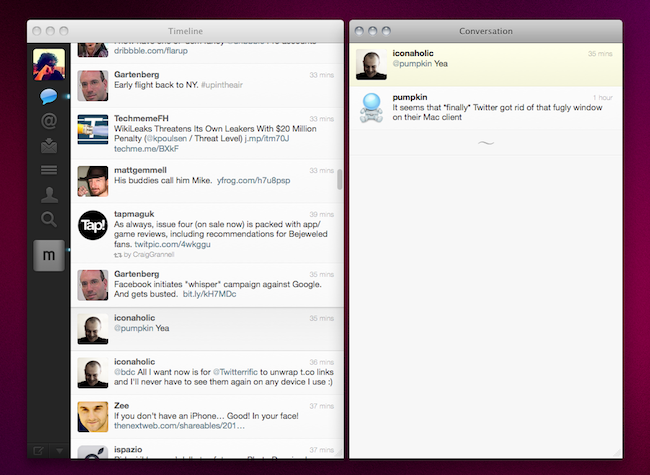
In Twitter for Mac, the main window has been redesigned to sport a native top toolbar with breadcrumb navigation for every time you dig into a conversation view, a profile, or a search. Just like in Tweetie 1 for Mac, you can click on the native toolbar to go back to where you were previously. Embracing a more native look apparently brought some welcome fixes as well, such as the fact that Twitter for Mac doesn’t follow you from space to space anymore. In the 2.1 changelog, the developers mention “bug fixes, enhancements and performance improvements” together with the addition of a console in the preferences for registered Twitter devs.

The biggest change in 2.1 is the possibility to “clone” any view in a separate window. By hitting the triangle icon in the bottom left or the Shift + Cmd + T keyboard shortcut, you’ll be able to open a conversation in a separate view, or your direct messages, a profile view, a search - anything can be cloned in multiple windows that will sit alongside your main timeline. This allows you to have multiple timelines on screen at the same time, multiple searches - I’m pretty sure Twitter power users who need to keep an eye on lots of things at the same time will appreciate this. Speaking of updated views, Twitter 2.1 also gets an updated profile window (with new tabs on top) and a refreshed DM view featuring the popular “chat bubbles” also seen on many iPhone apps.

Other changes have found their way in Twitter for Mac 2.1, too. AppleScript support has been implemented, as well as font size preferences; username and hashtag autocomplete enables you to tweet or mention someone faster from the compose window; t.co links now work much like the iPhone and iPad apps, being displayed as the domain they belong to (example: mcstr.net) without http:// before them. These links are still clickable, but when you copy them you’ll notice they won’t automatically append http:// to the link. I hope Twitter will change this, as it’s something that’s always bothered me on the iPhone and iPad too. For those who know how to unlock secret features in Twitter for Mac (it was possible in the first version with a MacHeist trick), we’re hearing the app features some neat things like pull to refresh and Classic mode.

From what I’ve seen so far, Twitter for Mac 2.1 is definitely an improvement over the last version, and the interface changes will be much easier to get used to this time. Bugs have been fixed, the app feels more responsive overall, the clone functionality to open multiple windows is just great. You can download Twitter for Mac for free in the App Store. Check out more screenshots below. Read more

Access Extra Content and Perks

Founded in 2015, Club MacStories has delivered exclusive content every week for nearly a decade.

What started with weekly and monthly email newsletters has blossomed into a family of memberships designed for every MacStories fan.

Learn more here and from our Club FAQs.

Club MacStories: Weekly and monthly newsletters via email and the web that are brimming with apps, tips, automation workflows, longform writing, early access to the MacStories Unwind podcast, periodic giveaways, and more;

Club MacStories+: Everything that Club MacStories offers, plus an active Discord community, advanced search and custom RSS features for exploring the Club’s entire back catalog, bonus columns, and dozens of app discounts;

Club Premier: All of the above and AppStories+, an extended version of our flagship podcast that’s delivered early, ad-free, and in high-bitrate audio.

Learn more here and from our Club FAQs.


Twitter Rolls Out Redesigned & Improved Mobile Web App

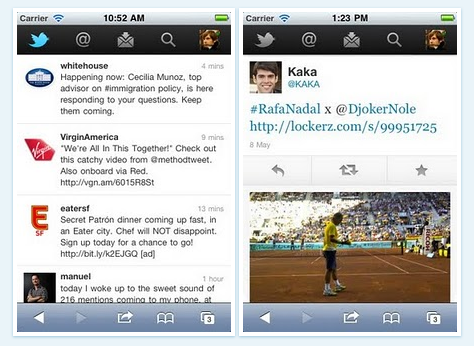
With an official blog post that went live a few minutes ago, Twitter has announced they’re slowly rolling out an updated version of their web app for mobile devices – this time redesigned to resemble the Twitter app for iPhone, but with a tab bar on top, and to feature more HTML5 integration. The web app allows you to quickly scroll the timeline, switch between tabs, check out your profile and even direct messages without leaving Mobile Safari.

We want you to be able to access Twitter no matter where you are; regardless of what device you use; or, whether you prefer to access Twitter through a mobile application or the browser. Today, we’re starting to roll out a new version of twitter.com for mobile devices. This web app allows us to provide a high-quality and consistent Twitter experience on high-end touchscreen devices – whether or not an official Twitter application is available. It was built from the ground up for smartphones and tablets, which have more advanced browsers that support the latest web technologies, including HTML5.

The new web app works on the iPhone, iPod touch and Android handsets, but it’s being rolled out to a small percentage of users today, with more following in the next weeks. Whilst the redesign looks good from the screenshots, there are still some obvious perks in using the native iPhone app, such as inline browsing for media and links or image and video uploading functionalities. Still, this looks like a major improvement over the old version, and we hope Twitter will be faster in rolling it out to all users than they did with #NewTwitter.

Access Extra Content and Perks

Founded in 2015, Club MacStories has delivered exclusive content every week for nearly a decade.

What started with weekly and monthly email newsletters has blossomed into a family of memberships designed for every MacStories fan.

Learn more here and from our Club FAQs.

Club MacStories: Weekly and monthly newsletters via email and the web that are brimming with apps, tips, automation workflows, longform writing, early access to the MacStories Unwind podcast, periodic giveaways, and more;

Club MacStories+: Everything that Club MacStories offers, plus an active Discord community, advanced search and custom RSS features for exploring the Club’s entire back catalog, bonus columns, and dozens of app discounts;

Club Premier: All of the above and AppStories+, an extended version of our flagship podcast that’s delivered early, ad-free, and in high-bitrate audio.

Learn more here and from our Club FAQs.


Labels Hoping Apple’s Music Service Will Launch at WWDC

According to a new report by Cnet, multiple “music industry sources” have told the publication the four major music labels in the US (Warner Music Group, EMI, Sony, Universal) are hoping Apple’s rumored cloud music service will launch next month during the WWDC. The labels, Cnet reports, are counting on Apple to provide a full-featured music service with iTunes Store integration that would force competitors like Amazon and Google to start paying licensing fees for their “music locker” services, which allow users to upload songs to the cloud, but have in no way official support or backing from the labels. The labels are seemingly unhappy with Amazon and Google services as users might be able to upload songs they illegally downloaded from the Internet, and it also appears that Google transcodes some uploads to a new format (making a copy), thus raising some questions on copyright issues as well.

Apple is in a strong position to deliver a cloud service that allows for both uploading and streaming of songs thanks to deals negotiated with the labels. Last month, it was indeed reported that Apple had inked a deal with the Warner Music Group, with more labels to follow soon or already signed according to other rumors.

But the services offered by Amazon and Google are not all that they can be because those companies had to tippy-toe around copyright issues. Since neither company was either able or willing to obtain licenses from the four major labels, neither of them could deliver the same range of options that Apple will be able to offer with its upcoming cloud service, according to multiple music industry sources.

Lots of people at the four major labels, however, now hope the service launch at Apple’s Worldwide Developer Conference on June 7. The risk for the record labels is that the services from Amazon and Google could prove good enough for most music consumers and that the companies don’t feel compelled to upgrade.

The WWDC ‘11 kicks off on June 6 in San Francisco, and previous speculation suggested it would be a software-focused event with on-stage demoes of iOS 5 and OS X Lion. iOS 5 has been in the middle of a debate recently, mainly as to whether Apple will really showcase its new cloud offerings revolving around a revamped MobileMe or other functionalities such as voice recognition, postponing the launch of all cloud services to this Fall. Reuters reported a few weeks ago that work on Apple’s new music service had been finalized on the technical side, and Apple was simply completing the process of signing deals with music labels to offer both upload features and streaming of songs you don’t own, likely through a subscription system. Google launched its new “Music Beta” service yesterday and, similarly to Amazon’s Cloud Player, it allows users to upload songs and albums to an online locker, but doesn’t provide any sort of subscription à la Spotify to enable users to listen to music without uploading it first.

Access Extra Content and Perks

Founded in 2015, Club MacStories has delivered exclusive content every week for nearly a decade.

What started with weekly and monthly email newsletters has blossomed into a family of memberships designed for every MacStories fan.

Learn more here and from our Club FAQs.

Club MacStories: Weekly and monthly newsletters via email and the web that are brimming with apps, tips, automation workflows, longform writing, early access to the MacStories Unwind podcast, periodic giveaways, and more;

Club MacStories+: Everything that Club MacStories offers, plus an active Discord community, advanced search and custom RSS features for exploring the Club’s entire back catalog, bonus columns, and dozens of app discounts;

Club Premier: All of the above and AppStories+, an extended version of our flagship podcast that’s delivered early, ad-free, and in high-bitrate audio.

Learn more here and from our Club FAQs.