Posts in Featured

Apple Releases New Time Capsule with 3 TB Storage, $499

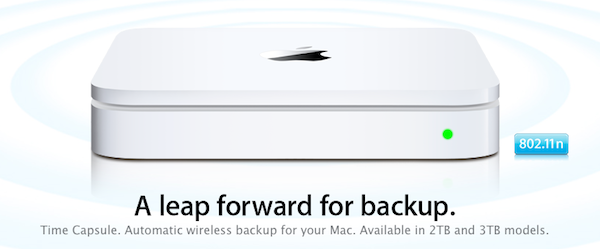
As the rumors correctly suggested, Apple has just launched a new Time Capsule model with 3 TB of storage. At the moment of writing this a press release isn’t out yet and the Apple website seems to be going under an update, and from what we can see right now there’s no mention of additional caching capabilities for software updates or iCloud integration.

The Time Capsule retains the same 802.11n wireless features of the previous models with simultaneous dual-band operation and Mac / PC compatibility. The device now comes in 2 TB and 3 TB configurations and Apple’s product page states it “starts at $299”, though the retail website hasn’t been updated yet with the new models’ pricing.

The AirPort Extreme, also rumored for an update, doesn’t look like will be getting a refresh today.

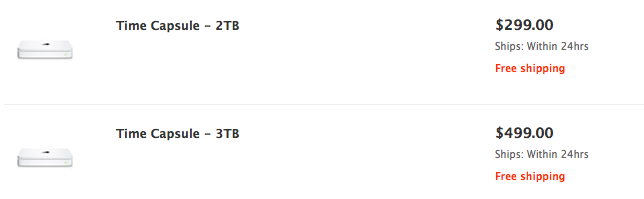
Update: The new Time Capsule models are now available on the Apple online Store. The 2 TB version is priced at $299, whilst the new 3 TB one is available at $499. From the search results:

Access Extra Content and Perks

Founded in 2015, Club MacStories has delivered exclusive content every week for nearly a decade.

What started with weekly and monthly email newsletters has blossomed into a family of memberships designed for every MacStories fan.

Learn more here and from our Club FAQs.

Club MacStories: Weekly and monthly newsletters via email and the web that are brimming with apps, tips, automation workflows, longform writing, early access to the MacStories Unwind podcast, periodic giveaways, and more;

Club MacStories+: Everything that Club MacStories offers, plus an active Discord community, advanced search and custom RSS features for exploring the Club’s entire back catalog, bonus columns, and dozens of app discounts;

Club Premier: All of the above and AppStories+, an extended version of our flagship podcast that’s delivered early, ad-free, and in high-bitrate audio.

Learn more here and from our Club FAQs.


Apple Releases Final Cut Pro X On The Mac App Store For $299

UPDATE: Final Cut Pro X is now available in the Mac App Store, as well as Motion 5 and Compressor 4.

Apple has just issued a press release noting that Final Cut Pro X will launch sometime today on the Mac App Store for a price of $299.99 with Motion 5 and Compressor 4 also out today for $49.99 each.

Apple® today announced Final Cut Pro® X, a revolutionary new version of the world’s most popular Pro video editing software which completely reinvents video editing with a Magnetic Timeline that lets you edit on a flexible, trackless canvas; Content Auto-Analysis that categorizes your content upon import by shot type, media and people; and background rendering that allows you to work without interruption. Built on a modern 64-bit architecture, Final Cut Pro X is available from the Mac® App Store™ for $299.99.

Some of the new features of Final Cut Pro X include a vastly improved video editing experience, completely rebuilt to feature a “dynamic editing interface” including what Apple dubs a ‘Magnetic Timeline’ which lets editors assemble shots simply and quickly with no unwanted black gaps in the timeline. In a similar vein clips can now be connected so that as you move one clip to a new place on the timeline, all the other connected clips (such as music or audio effects) stay synchronized with the clip. Compound Clips is another new feature that lets editors combine a group of elements (clips, audio etc) into just one clip that can easily be moved around on the timeline.

Another cornerstone feature of FCP X is vastly improved media organization, starting with support for many more formats of video. Content is now automatically analyzed with FCP X organising your footage into preset kinds of footage including whether or not there are people in the shot (and whether it is just one person or a group), whether it is a wide or closeup shot, whether the footage is stable or shaky and so on. There is also support for keywords which can be applied quickly to any piece of footage, combine this feature with the content auto-analysis and you can find the shot you need nearly instantly. Other key points of interest include ‘Smart Collections’ allowing users to organize clips without having to physically move the file and direct access to content libraries such as Aperture and iPhoto.

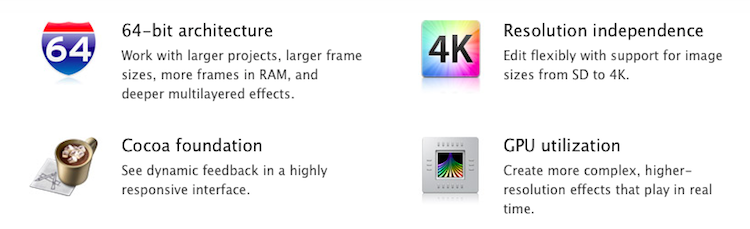
As had been expected, performance is also a huge area of improvement for FCP X, off the bat there is support for the 64-bit architecture and then there is resolution independence (4K footage is now supported), improved GPU utilization, background processing and a shared render engine between Final Cut Pro, Motion and Compressor. Some final points of note are that FCP X comes with a large variety of video effects, including the standard ‘Film Grain’ and ‘Cartoon’ to many others. There are also title sequences and bundled audio effects that are royalty free.

Motion 5 which is also available from today from the Mac App Store for $49.99 which is Apple’s motion graphics tool that has been redesigned, adds new templates, simplified chroma-keying and similarly takes advantage of 64-bit architectures. Compressor 4 is also available for $49.99 in the Mac App Store and has seen some modest improvements and feature additions, most notably is again support for 64-bit architectures and GPU utilization. Curiously both Motion 5 and Compressor 4 mention Blu-Ray recording - perhaps a Mac accessory could soon allow direct Blu-Ray recording, or perhaps new Mac Pros.

You can purchase Final Cut Pro X in the Mac App Store for $299.99, also available in the Mac App Store is Motion 5 for $49.99 and Compressor 4 for $49.99. FCP X requires at least 2GB of RAM (4GB is recommended), an OpenCL-capable graphics card or an Intel HD Graphics 3000 or later, 256MB of VRAM and at least 2.4GB of disk space. For a full run down of new features be sure to check out the Final Cut Pro X page on the Apple Website.

Jump the break for Apple’s full press release.

Read more

Access Extra Content and Perks

Founded in 2015, Club MacStories has delivered exclusive content every week for nearly a decade.

What started with weekly and monthly email newsletters has blossomed into a family of memberships designed for every MacStories fan.

Learn more here and from our Club FAQs.

Club MacStories: Weekly and monthly newsletters via email and the web that are brimming with apps, tips, automation workflows, longform writing, early access to the MacStories Unwind podcast, periodic giveaways, and more;

Club MacStories+: Everything that Club MacStories offers, plus an active Discord community, advanced search and custom RSS features for exploring the Club’s entire back catalog, bonus columns, and dozens of app discounts;

Club Premier: All of the above and AppStories+, an extended version of our flagship podcast that’s delivered early, ad-free, and in high-bitrate audio.

Learn more here and from our Club FAQs.


Intel Confirms Sandy Bridge ULV Processors, Likely For New MacBook Airs

As noted by Cnet, Intel has updated its official processor price list to include new Sandy Bridge-based Corei5 and Corei7 processors with ultra-low voltage power specifications that will make them suitable for future ultra-thin laptops like the upcoming MacBook Air refresh, set for a June or July release. The new processors, as included in the list:

  • i5-2557M (3M cache, 2 Cores, 4 Threads, 1.70 GHz 32nm) - $250
  • i7-2677M (4M cache, 2 Cores, 4 Threads, 1.80 Ghz, 32nm) - $317
  • i7-2637M (4M cache, 2 Cores, 4 Threads, 1.70 Ghz, 32nm) - $289

As reported back in May, these new power-frugal processors make for a great option when it comes to powering thin machines like Apple’s MacBook Airs or other devices called “ultrabooks” by Intel. By increasing clock speed from 1.4 GHz and 1.6 GHz to 1.7 GHz and 1.8 GHz from the previous-gen Arrandale CPUs, and with turbo boost frequencies set at 2.8 GHz and 2.9 GHz, Intel’s new ULV chips seem to fall in line with Apple’s requirements for low power consumption and speed. More importantly, the new Sandy Bridge processors dissipate only 17 watts, unlike standard laptop-oriented processors from Intel that with 35-watt dissipation would be too much for the MacBook Air’s thin and slim design.

The new MacBook Airs were initially rumored to be receiving an update in June, though recent speculation claims Apple will refresh the line in July – also holding out for new Mac releases until Lion comes out, so the new OS will come pre-installed on new Mac models. Many have indicated the MacBook Air as Apple’s new “crown jewel”, the most popular new MacBook model that will be perfectly capable of running OS X Lion thanks to its fast SSD, instant-on feature, high portability and multitouch trackpad.

Access Extra Content and Perks

Founded in 2015, Club MacStories has delivered exclusive content every week for nearly a decade.

What started with weekly and monthly email newsletters has blossomed into a family of memberships designed for every MacStories fan.

Learn more here and from our Club FAQs.

Club MacStories: Weekly and monthly newsletters via email and the web that are brimming with apps, tips, automation workflows, longform writing, early access to the MacStories Unwind podcast, periodic giveaways, and more;

Club MacStories+: Everything that Club MacStories offers, plus an active Discord community, advanced search and custom RSS features for exploring the Club’s entire back catalog, bonus columns, and dozens of app discounts;

Club Premier: All of the above and AppStories+, an extended version of our flagship podcast that’s delivered early, ad-free, and in high-bitrate audio.

Learn more here and from our Club FAQs.


The Freelance Mac App Bundle Giveaway

Mac owning freelance web developers might be able to push pixels in Photoshop and write code in BBEdit, but just how are you going about your invoices, backup, and how do you even begin to collect all the little bits of inspiration you find around the web? Clients need secure passwords to protect their websites, and responding to gobs of email can keep you from being focused on what really matters. Entertainment and keeping your daily routine in check are just as important. Freelancers also need to be on top of their game, and thus, we have the Freelance Mac App Bundle which packages $300 worth of goodies together for only $49.

Billings ($39.99)
TextExpander ($34.95)
WriteRoom ($24.99)
Radium ($9.99)
Arq ($29)
LittleSnapper ($29)
1Password ($39.99)
Alarms ($16.80)

Envato is also throwing in a wordpress theme, client manager, a professional business card, and an eBook from RockablePress to round out the bundle.

Freelancers looking for a bargain on really great apps can grab their copy today. Being a MacStories reader, however, also gives you a chance to win one of two bundles which you’ll find past the break. Read more

Access Extra Content and Perks

Founded in 2015, Club MacStories has delivered exclusive content every week for nearly a decade.

What started with weekly and monthly email newsletters has blossomed into a family of memberships designed for every MacStories fan.

Learn more here and from our Club FAQs.

Club MacStories: Weekly and monthly newsletters via email and the web that are brimming with apps, tips, automation workflows, longform writing, early access to the MacStories Unwind podcast, periodic giveaways, and more;

Club MacStories+: Everything that Club MacStories offers, plus an active Discord community, advanced search and custom RSS features for exploring the Club’s entire back catalog, bonus columns, and dozens of app discounts;

Club Premier: All of the above and AppStories+, an extended version of our flagship podcast that’s delivered early, ad-free, and in high-bitrate audio.

Learn more here and from our Club FAQs.


1Password for Mac Adds OS X Lion Support

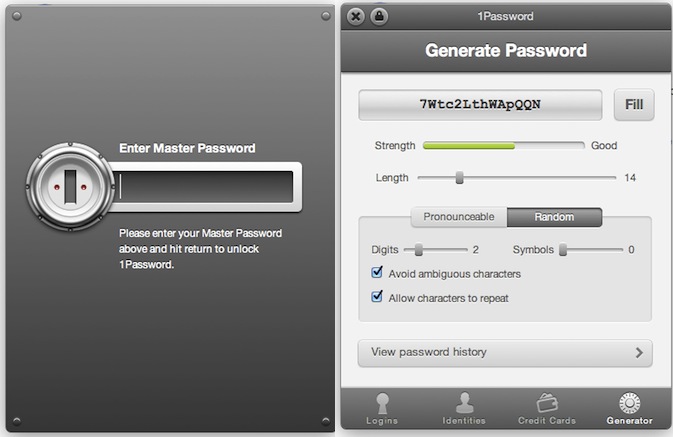
1Password for Mac, the must-have utility we at MacStories use on a daily basis to manage and organize our web logins, credit card data and anything else that can go into AgileBits’ secure and encrypted database, was updated a few minutes ago to include support for OS X Lion and Mozilla’s latest desktop browser, Firefox 5. For those who have been keeping an eye on 1Password’s releases, you might have noticed the developers put great effort into building an amazing Google Chrome extension that allows you to easily access your web logins, identities, or generate passwords for new accounts. The Google Chrome extension was far superior to the Safari 4 counterpart, which was stuck on old interface schemes with less features and a clunky menu to fill web fields and account credentials. 1Password 3.6 finally brings the same extension seen on Chrome to Safari 5.1 on Lion and, after a quick test, I can say the extension looks even better than Chrome’s version as it’s powered by a neat animation for opening / closing. Overall, the new 1Password extension on Lion looks great, it’s fast and, from what I’ve seen so far, very stable when browsing around, filling logins and generating new passwords.

1Password 3.6 also adds support for apps created with Fluid 1.0, as well as Firefox 5. As AgileBits have added support for OS X 10.7 and Mozilla’s new browsers, the developers recommend people willing to use Leopard or older versions of Firefox to stay on 1Password 3.5.9. Support for new OSes and browsers aside, 1Password 3.6 is filled with welcome minor changes and bug fixes: whilst you can see the full list when upgrading from 3.5.9 to 3.6 in the built-in changelog screen, let me highlight that the new 1Password supports the latest Dropbox file configuration for sync, and it brings improved backups to detect problems with the app’s backup folder. On top of that, Lion-specific improvements will make the app a joy to use for those who have already made the jump on Apple’s new big cat.

1Password is a priceless utility that at $39.99 (Mac version) will change the way you manage, save, organize and keep data safe on your computers. The Mac app can be downloaded here, and you can find iOS counterparts for iPhone and iPad (with sync) here, here, and here.

Access Extra Content and Perks

Founded in 2015, Club MacStories has delivered exclusive content every week for nearly a decade.

What started with weekly and monthly email newsletters has blossomed into a family of memberships designed for every MacStories fan.

Learn more here and from our Club FAQs.

Club MacStories: Weekly and monthly newsletters via email and the web that are brimming with apps, tips, automation workflows, longform writing, early access to the MacStories Unwind podcast, periodic giveaways, and more;

Club MacStories+: Everything that Club MacStories offers, plus an active Discord community, advanced search and custom RSS features for exploring the Club’s entire back catalog, bonus columns, and dozens of app discounts;

Club Premier: All of the above and AppStories+, an extended version of our flagship podcast that’s delivered early, ad-free, and in high-bitrate audio.

Learn more here and from our Club FAQs.


SwitcherSettings Gives Jailbreak Users An Alternative To SBSettings

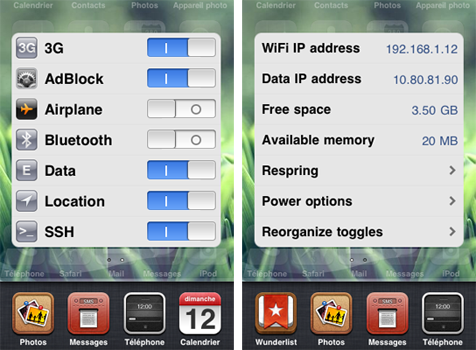
A new jailbreak tweak to hit Cydia this week, from Florian Denis (developer of another tweak, iReply), aims to offer an alternative to the popular SBSettings. The tweak, named SwitcherSettings, works by presenting your SBSettings toggles in the application switcher screen, offering easy access to various settings such as AirPlane Mode, Bluetooth and SSH.

SwitcherSettings is said to be completely compatible with any and all of your existing SBSettings toggles, and unlike SBSettings, it doesn’t require a respring when removing or adding toggles. You don’t even need SBSettings – you can remove it and SwitcherSettings can still run your toggles.

SwitcherSettings is fully compatible with all your SBSettings toggles, and presents them directly into iOS, offering a native user experience: a quick access to your settings, exactly like Apple would have coded it.

Finally, just like SBSettings you can see some vital information about your device including IP address and available memory, just swipe across to the second SwitcherSettings screen as seen above. SwitcherSettings is available from the BigBoss repo for $2.49 - running on devices capable of iOS 4.

Access Extra Content and Perks

Founded in 2015, Club MacStories has delivered exclusive content every week for nearly a decade.

What started with weekly and monthly email newsletters has blossomed into a family of memberships designed for every MacStories fan.

Learn more here and from our Club FAQs.

Club MacStories: Weekly and monthly newsletters via email and the web that are brimming with apps, tips, automation workflows, longform writing, early access to the MacStories Unwind podcast, periodic giveaways, and more;

Club MacStories+: Everything that Club MacStories offers, plus an active Discord community, advanced search and custom RSS features for exploring the Club’s entire back catalog, bonus columns, and dozens of app discounts;

Club Premier: All of the above and AppStories+, an extended version of our flagship podcast that’s delivered early, ad-free, and in high-bitrate audio.

Learn more here and from our Club FAQs.


Link Your Computer And iOS Device With myPhoneDesktop: Double Pass Giveaway!

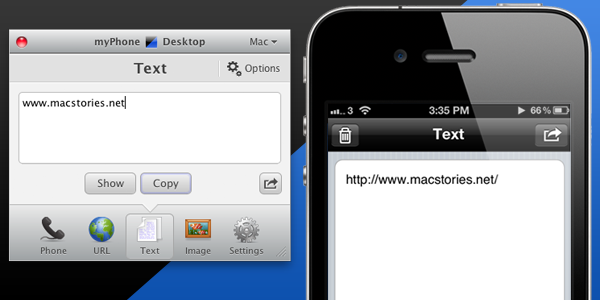
We’ve talked about myPhoneDesktop before on MacStories but we thought it deserved a short ‘re-review’ to accompany today’s giveaway. Keeping it simple, the premise of myPhoneDesktop is that it provides a portal through which you can easily transfer data and information from your desktop computer to your iPhone or iPad.

Broadly speaking the app transfers four types of data including phone data (both numbers and text messages), website URLs, text and images. When you send any of that data from your computer, and there is both a desktop and web client, it will be pushed straight to your device with a notification.

But where I think the app becomes most powerful is when you have the data on your iPhone or iPad. In the corner of the app it has the “Open in” icon where it literally has a wealth of options for your data. There is everything from the obligatory search with Google, to send by email, add to contact, send SMS or launching another app with that data. Importantly, the developers aren’t resting on their laurels, since we last talked about myPhoneDesktop there have been a few updates that continue to add more app integrations including Navigon and InstaTodo.

In reality I have only just scraped the surface of what this app can do, for example it also integrates with Google Voice and Skype, so make sure to check out the myPhoneDesktop website to learn more and get your own copy. Today we’re giving away 5 ‘double passes’ of myPhone desktop – in other words the five winners will receive two promo codes, perfect to give one copy to a iPhone-toting friend or family member, or (god forbid) use it as a belated Father’s Day gift. Details of the give away are past the break.

Read more

Access Extra Content and Perks

Founded in 2015, Club MacStories has delivered exclusive content every week for nearly a decade.

What started with weekly and monthly email newsletters has blossomed into a family of memberships designed for every MacStories fan.

Learn more here and from our Club FAQs.

Club MacStories: Weekly and monthly newsletters via email and the web that are brimming with apps, tips, automation workflows, longform writing, early access to the MacStories Unwind podcast, periodic giveaways, and more;

Club MacStories+: Everything that Club MacStories offers, plus an active Discord community, advanced search and custom RSS features for exploring the Club’s entire back catalog, bonus columns, and dozens of app discounts;

Club Premier: All of the above and AppStories+, an extended version of our flagship podcast that’s delivered early, ad-free, and in high-bitrate audio.

Learn more here and from our Club FAQs.


Why the $100 gift card is better than an iPod

This year, Apple isn’t offering an iPod touch with the purchase of a new Mac. Instead, Apple is handing out a $100 gift card, advertising that the extra money is best spent on apps from the Mac App Store. You could argue that a $229 iPod touch is more valuable since you can resell it, but that ends up being a hassle as you have to buy the device upfront, mail in a rebate, and receive a check from Apple at a later date. Some might want the free iPod touch, but you could argue that a majority of senior high and college students already have one (or an iPhone), and wouldn’t benefit from an additional model. Apple no longer needs to make the iPod touch popular. By giving students a $100 gift card instead of offering a physical device, Apple is getting students to invest in the future. While the past decade was primarily about the iPod, this decade’s focus is shifting towards apps and Apple’s iCloud.

Apple is leveraging this year’s Back to School promotion to make the Mac App Store popular. While the credit can be spent in the App Store, iTunes Store, or the iBookstore, Apple wants you to load up your Mac with new software. In a matter of minutes, students can open their Macs, create an Apple ID, and download the entire iWork suite with little effort. Developers should be incredibly happy about this: Apple is giving potential customers money to spend on their applications. I would be coming out of my socks right now if I was the developer of Smartr or iStudiez Pro. This is a huge win-win for everyone involved. By handing out a $100 gift card, Apple accomplishes three things:

  1. Students have the opportunity to load up their Macs with paid software at no cost from the Mac App Store.
  2. Apple is aiding developers in the sales of their apps.
  3. Apple takes a 30% cut of each app downloaded.

By teaching students to purchase apps from the Mac App Store, Apple can lock new customers into their ecosystem, and get people used to the idea that software doesn’t come on a disc. Developers will be getting a lot of exposure during the duration of this program, although I think Apple will benefit again when the iWork suite will likely be the first thing students download. The beauty of handing students $100 worth of credit for apps, music, and books is that Apple will eventually make thirty percent of that credit back if students spend the entirety their cards in the Mac App Store or otherwise. Apple is investing in students to use their products, in developers to develop new apps on the Mac, and in their own ecosystem in one fell swoop. This is a great marketing strategy by Apple.

Access Extra Content and Perks

Founded in 2015, Club MacStories has delivered exclusive content every week for nearly a decade.

What started with weekly and monthly email newsletters has blossomed into a family of memberships designed for every MacStories fan.

Learn more here and from our Club FAQs.

Club MacStories: Weekly and monthly newsletters via email and the web that are brimming with apps, tips, automation workflows, longform writing, early access to the MacStories Unwind podcast, periodic giveaways, and more;

Club MacStories+: Everything that Club MacStories offers, plus an active Discord community, advanced search and custom RSS features for exploring the Club’s entire back catalog, bonus columns, and dozens of app discounts;

Club Premier: All of the above and AppStories+, an extended version of our flagship podcast that’s delivered early, ad-free, and in high-bitrate audio.

Learn more here and from our Club FAQs.


Alternative Ways To Add Actions Into OmniFocus

It is no secret I’m a big fan of The Omni Group’s OmniFocus for Mac and iOS, as over time it has become my “trusted system” (as people like to call great applications you can rely on nowadays) to organize actions (tasks), contexts and, in general, stuff I have to do and don’t want to forget about. If you’ve been reading MacStories in the past few months, you know we care about the latest OmniFocus updates and new features implemented by the developers, but more importantly we, like many others, have fallen in love with the iPad version of OmniFocus, which contrary to expectations has turned out to be a great portable counterpart that retains most of the functionalities of the desktop OF without sacrificing usability – actually adding new intuitive schemes, navigation options, and more. With an update to the iPhone app around the corner and a major 2.0 update for the Mac coming out sometime in the next months, there’s plenty of features to look forward to.

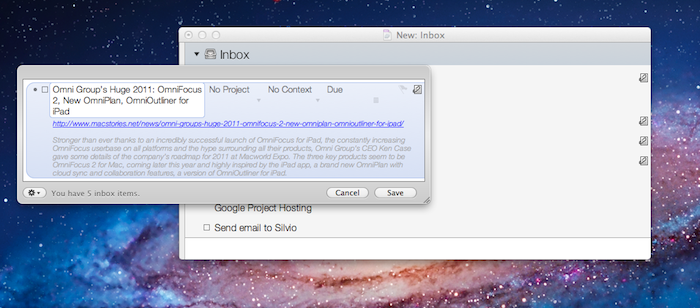
Over the past weeks, however, rather than reading tutorials on how to get the most out of OmniFocus or learning about other users’ setups (something that I usually love to do, by the way, as my Instapaper queue can prove), I decided to play around with tools and utilities provided by The Omni Group to customize the way you can get actions into OmniFocus without actually using OmniFocus. That’s an interesting concept: as OmniFocus can be integrated with OS X, accessed to from a web browser or even linked to by other apps, there are ways to quickly get items into it without following the usual pattern of opening the app + writing down a new action, or launching the desktop Quick Entry window manually. And as much as I love the iOS versions of OmniFocus, there’s always something that bothers me when I’m in a hurry but I need to get some actions saved quickly: as others have outlined before, I think I’d really enjoy a “mini OmniFocus” that’s exclusively aimed at entering tasks in seconds without loading the entire database. Or, there could be a way to send an action quickly to OmniFocus’ cloud server, without having to open OmniFocus at all. While this is not possible today – but I have a pretty good feeling The Omni Group is considering it for future updates – there are ways to quickly create tasks outside of the main OmniFocus environment and save them in seconds.

After the break, I take a look at some of the tools I’ve been using to add actions in my OmniFocus using an iPhone, iPad, or Mac. Read more

Access Extra Content and Perks

Founded in 2015, Club MacStories has delivered exclusive content every week for nearly a decade.

What started with weekly and monthly email newsletters has blossomed into a family of memberships designed for every MacStories fan.

Learn more here and from our Club FAQs.

Club MacStories: Weekly and monthly newsletters via email and the web that are brimming with apps, tips, automation workflows, longform writing, early access to the MacStories Unwind podcast, periodic giveaways, and more;

Club MacStories+: Everything that Club MacStories offers, plus an active Discord community, advanced search and custom RSS features for exploring the Club’s entire back catalog, bonus columns, and dozens of app discounts;

Club Premier: All of the above and AppStories+, an extended version of our flagship podcast that’s delivered early, ad-free, and in high-bitrate audio.

Learn more here and from our Club FAQs.